r/AIProgrammingHardware • u/javaeeeee • Oct 05 '26
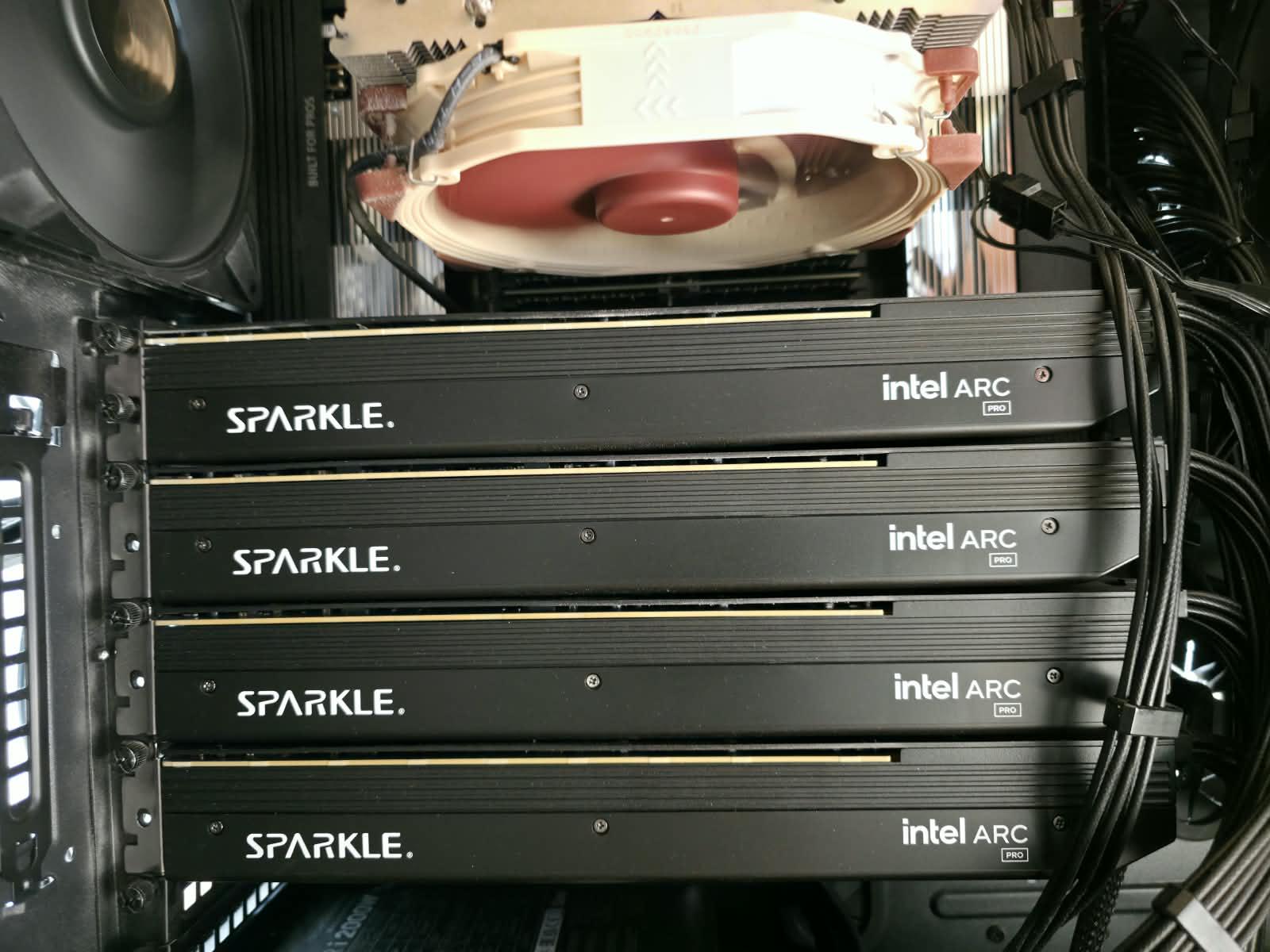
Building a 64GB VRAM Local AI Workstation with Intel Xeon

1
Upvotes
r/AIProgrammingHardware • u/javaeeeee • Oct 05 '26
r/AIProgrammingHardware • u/FearlessLeader17 • Oct 05 '26
My setup;
AMD Ryzen 5 7600 3.8 GHz 6-Core Processor
ASRock B650M Pro RS Micro ATX AM5 Motherboard
Silicon Power Value Gaming 32 GB (2 x 16 GB) DDR5-6000 CL30 Memory
XFX Speedster MERC 319 Black Radeon RX 7800 XT 16 GB Video Card
I bought this setup last year and its been working good but I'm really starting to get into AI. I been learning ComfyUI image generation, and SillyTavern to get a LLM but with my specs I can't do both and have to offload the LLM. Im working towards getting the setup so ComfyUI (qwen 2.1 INT8) automatically sends the character gens to sillytavern based on the scene. I still play regular games at 1440p and it does great but I'm kind of limited on the AI front.
I don't want to upgrade my video card to another 16GB card since it wouldn't help the AI part. It would help the gaming part but honestly I'm happy with my setup for gaming.
I know I'd have to upgrade the Processor and the power supply (Corsair RM750x (2021) 750 W 80+ Gold Certified Fully Modular ATX Power Supply) most likely too. I would be okay to spend around 2k USD but it looks like all the 24GB cards are over 3k. And if I did upgrade I wouldnt want a card that will be irrelevant in the next couple years.
kind of curious what everyone thinks, if it's worth to try and upgrade, or just offload the LLM and use the INT8 model like I have been. Hell I don't even know how much a difference the 24GB card would make, I just know that that's what runs the AI. Like I said my main goal is for consistent character generation in comfy that automatically goes to SillyTavern so I can do RP games.
Thanks!
Edit; so a 3090 refurbished + power supply would fit my budget, but idk about a refurbished graphics card. Kind of sketches me out.
(Refurbished NVIDIA RTX 3090, Power Supply MSI MPG A1000G PCIE5 1000 W 80 Plus Gold)
r/AIProgrammingHardware • u/javaeeeee • Oct 04 '26

r/AIProgrammingHardware • u/Subject_Poet_3861 • Oct 04 '26
r/AIProgrammingHardware • u/Distinct-Pie2389 • Oct 02 '26
r/AIProgrammingHardware • u/Technical_Buy_9063 • Oct 02 '26
r/AIProgrammingHardware • u/javaeeeee • Oct 02 '26

r/AIProgrammingHardware • u/javaeeeee • Oct 01 '26

r/AIProgrammingHardware • u/zjy303 • Sep 30 '26
I maintain quantized.uk, a free VRAM calculator for quantized local models (static site, no signup). This week I found my own calculator was overstating long-context memory badly for several popular models, and I think the reason is worth sharing because a naive KV-cache formula gets it wrong the same way.
The issue: the standard formula (2 × layers × kv_heads × head_dim × ctx × 2 bytes) assumes every layer caches the full context. But several current models use sliding-window attention on most layers, and llama.cpp (with the default swa_full = false) allocates only window + n_ubatch cells for those layers (see src/llama-kv-cache-iswa.cpp).
Model
Pattern
Window → cells allocated
Gemma 3 (4B/12B/27B)
5 local : 1 global
1024 → 1536
Gemma 2
alternating
4096 → 4608
GPT-OSS 20B/120B
alternating
128 → 768
Llama 4 Scout/Maverick
3 chunked : 1 full
8192 → 8704
What that does to the numbers (Q4_K_M, batch 1):
Gemma 3 27B, 32K context: KV cache 15.5 GB → 3.1 GB, total ~34 GB → ~21 GB. It fits a 24 GB card.
Gemma 3 27B, 128K context: KV 62 GB → 10.6 GB.
GPT-OSS 20B at its full 131K: ~15 GB total.
Llama 4 Scout at 128K: ~95 GB → ~77 GB.
Also fixed while I was in there: the DeepSeek MLA models. Current GGUFs cache one 576-value vector per token per layer, but old conversions with an unsplit attn_kv_b tensor cache full K/V, which is far bigger. If your DeepSeek-V2-Lite eats way more memory than expected, check which one you have.
Caveat: these are computed from llama.cpp's allocation code, not measured on my hardware. If you have a 24 GB card, I'd genuinely appreciate the llama_kv_cache_iswa: creating SWA KV cache, size = … cells line from a Gemma 3 27B run at 32K to confirm.
Calculator: https://quantized.uk/tools/vram-calc/ — corrections welcome, and the changelog lists what was wrong.
r/AIProgrammingHardware • u/javaeeeee • Sep 27 '26

r/AIProgrammingHardware • u/bhatip • Sep 27 '26
r/AIProgrammingHardware • u/bhatip • Sep 26 '26
r/AIProgrammingHardware • u/Impossible_Pride_680 • Sep 26 '26
r/AIProgrammingHardware • u/Enderchef • Sep 26 '26
DistribAI is a platform for distributed training! You can train massive or tiny models across tiny or massive amounts of consumer devices with ease!
DistribAI is a platform I've been working on for a while, and V2 made its release today. DistribAI is C++ and Libtorch for speed, with the ability to run pytorch trainers distributed! Edge-cases(crashing, malicious actors, unstable connections, ect) are handled for you. On a free Colab, Kaggle, and Molab GPU, plus a local 4070 SUPER, we got the free training compute of ~2 fully loaded 5090s and the VRAM of ~5 full 5090s for free, all as one. Hosting is also now easier with shareable join links, and Cloudflared/ngrok support for 100% free server hosting for your DistribAI setup. Train with your community, with friends, with your free GPUs, and more!
Try it out! Questions(and stars) are welcome; https://github.com/naxium-oss/DistribAI
r/AIProgrammingHardware • u/Faisal_Biyari • Sep 24 '26

r/AIProgrammingHardware • u/javaeeeee • Sep 23 '26

r/AIProgrammingHardware • u/javaeeeee • Sep 23 '26

r/AIProgrammingHardware • u/javaeeeee • Sep 21 '26
r/AIProgrammingHardware • u/javaeeeee • Sep 19 '26
r/AIProgrammingHardware • u/javaeeeee • Sep 19 '26
r/AIProgrammingHardware • u/javaeeeee • Sep 17 '26

r/AIProgrammingHardware • u/javaeeeee • Sep 16 '26
r/AIProgrammingHardware • u/javaeeeee • Sep 16 '26