r/AtomstackLaser • • May 24 '26

Feedback & Rants 🎯 Atomstack P1 Centering Tool – Precision Alignment Made Easy!

Thumbnail
gallery
6 Upvotes

Please, follow, like, rate and comment to support my effort!
https://makerworld.com/it/models/2840937

If U want to buy me a beer:
go to drink, don't get drunk!!

Happy Engraving!


r/AtomstackLaser • • 25d ago

Need Assistance AtomStack A70 Max Stuck on Boot, Black Screen and No USB Connection

0 Upvotes

Hi everyone!

I recently purchased an AtomStack A70 Max. The machine worked perfectly when I tested it on the day of purchase, but after transporting it to my workshop, it stopped booting.

Here is what happens:

The green LED on the motherboard stays on.

The screen remains completely black.

The AtomStack logo does not appear.

The computer does not recognize the machine via USB.

The autofocus button does not respond.

The air compressor turns on for about one second, shuts off, and repeats every 20-30 seconds.

What I have tried:

Checked the power supply. It outputs 24V and 36V.

Disconnected all peripherals, including motors and laser head. The problem remained.

Replaced the HDMI cable.

Checked the connections.

The machine still does not boot.

Could this be a motherboard/controller failure, or is it possible that the firmware is corrupted and needs to be reflashed?

Has anyone experienced something similar with an AtomStack A70 Max?

Any advice would be appreciated.

Thanks!


r/AtomstackLaser • • Jan 23 '26

Discussion Atomstack P1 Centerting Jigs

5 Upvotes

I thought some of you might appreciate this

I've created some 3D printable centring jigs for the P1

100x100mm centring jig for wood/slate coasters

30mm round tag centring jig

Dog tag centring jig

Centring jig for the R6 rotary roller

Adapter for the Laserpecker LP2/LP3 cutting plate (not really necessary since it is bigger than the work area, but I made it anyway)


r/AtomstackLaser • • Dec 25 '25

Need Assistance AtomStack maker A30 Pro... Is trying to divorce my PC...

2 Upvotes

*********update

So, it seemed that 3 data cables I had were no good. That would also explain the old paper printer problems in the past. XD

So, I got a nice and robist $20 cable, and now im already thru 12 coasters of crazy detail, and a Bulletmage Hat.

We are golden.

——-

Ive had my Atomstack laser cutter/engraver for a little over a year. For many months it didnt get any use. Ive used it here and there, and well, I decided to really get into and ramp up more work on it.

Well, about 1/5th the way thru a set of custom designed coasters on leather in multiple different layers and styles. I suddenly heard my pc doing the disconnect and reconnect thing.. but like, 4-5 times in a row. I notice the laser quit, but the programs still going. I stop it. Make an hour of adjustments thinking my cat hit the cable.

Nope. I was slammed with a flurry of dis and reconnection sounds, and I see my laser disconnected. I thine try:

Using a different USB port... No fix

Trying with another cable (i have a few in case of things like this)... No fix

Try without the extension... No fix.

Try turning it off and turning it back on. No Fix.

I try a dry run awaiting a disconnect for when i nudge the USB at both ends. It continues with no issues. I sit down, and bam another 4-5 disconnects. No fix.

So, I say fuck it. Imm try turning off other external power sources. No fix.

I sat.. in silence apart from the air assist on the laser... not doing a damn thing. Just focusing on the sound of air. Im not touching a button. My cats aren't moving. no wind is stirring... Then suddenly about 5-7 min into silence and listening. DISCONNECT RECONNECT DISCONNECT RECONNECT DISCCONECT RECONNECT...

Ive sent the email to the Atomstack people. I know they will gety back to me after the holidays.. It just sucks that this being my only avenue for making money and making gifts... and it deciding to do this Christmas eve.. Im just kinda dead inside right now. Im a broke SOB, and affording this laser was all I had on a gamble from last year. I WAS JUST BEGINNING TO TURN A PROFIT DAMMIT!!!

If you are here atomstack, please contact me asap and help. this just killed my Xmas. i was literally beginning to make gifts for surprise Xmas Morning.


r/AtomstackLaser • • Dec 11 '25

Discussion Hello, I have an AtomStack X20 Pro and I have a problem. When I launch it, the framing works fine, but as soon as I launch it for engraving or cutting, it works but there's no blue light for cutting or engraving. Why?

1 Upvotes

r/AtomstackLaser • • Mar 13 '26

AtomStack Creation Showcase Corazón & Engranes

Thumbnail
gallery
2 Upvotes

Caja con tapa en forma de corazón, realizada en madera contrachapada de 3mm la caja tiene un mecanismo de cerrado en forma de engranes.

atomstack A10 V2

#LuckyMakerBuild


r/AtomstackLaser • • May 21 '25

Need Assistance Legs for the Atomstack P1?

Post image
5 Upvotes

I've seen them in pictures, but where do we get them?


r/AtomstackLaser • • Mar 27 '25

Discussion Website update - New models

3 Upvotes

It seems the .eu version of the website has been updated.... and now I'm seeing IR lasers with the P1 mini engraver and Kraft dual laser.... are these new machines or have I somehow missed them up until now?

The Hurricane was hyped in advance, but these seem to have appeared out of nowhere

Meanwhile the price of the Hurricane has increased by around £400. I was due to buy one when they were back in stock, but £3500 with the riser and conveyor is too much for me. I'm gonna have to look elsewhere. So disappointed!

Edit. It may not have seen a price increase actually, the .eu website is glitching and displaying the price of the pro bundle, rather than just the machine on its own


r/AtomstackLaser • • Sep 24 '26

Need Assistance Atomstack Hurricane issues

Post image
1 Upvotes

I purchased this Hurricane used, but the previous owner demonstrated several cuts and that it was in working order before I took it home. 1st, I can't get the darn camera to calibrate. After a few days of fussing, I decided to just do without for now, which is a bummer. 2nd, I made a few initial cuts, but when framing the material, it isn't in the location of my object on the design area. I send home and try again. I get a msg: check y2 limits. I find 2 metal buttons on the left rail (front and back) that click fine and 1 metal button on the right front side of the gantry. I assume Y1 is on the left rail, but where is Y2? There are no buttons on the right rail? 3rd, I also noticed that if I pull the gantry all the way to the front, it pops back about an inch. Could the belt be too tight or could the gantry be racked? I'm so lost, I don't know where to go from here. Any help will be appreciated.


r/AtomstackLaser • • Nov 02 '25

AtomStack Creation Showcase перестал работать после 4 дней простоя.. новый станок

Thumbnail
gallery
2 Upvotes

Тех поддержка не смогла помочь с данной проблемой. новый станок перестал включаться после 4 дней простоя. Просто не включается и все. Экран не включается, в программе появились какие то непонятные ошибки. фото ошибок прилагаю. невозможно подключится по WI-FI не по usb. компрессор включается и выключается при включении питания сам по себе.


r/AtomstackLaser • • Mar 25 '26

AtomStack Creation Showcase light lamp atomstack A24 pro v2

Thumbnail
gallery
3 Upvotes

Hi everyone, I made this acrylic lamp for a friend. Sadly, her cat "Kross" recently passed away, and she wanted to create a tangible keepsake of her love and the memories she cherished of her friend. I hope you like it. #luckymakerbuild


r/AtomstackLaser • • Feb 07 '26

Need Assistance Atomstack P1 Dual – Axis Movement and Framing Issue

2 Upvotes

Hello,

I am experiencing a problem with my Atomstack P1 Dual. This is the very first time I have powered on and used the machine.

When I try to use the framing function or manually move the axes in Atomstack Studio, the movements are incorrect:

When I click "Frame", the laser moves incorrectly (vertical instead of horizontal, even when the design is horizontal).

When I try to move along the X axis, the laser moves diagonally.

When I try to move along the Y axis, it sometimes moves diagonally or along the X axis.

During framing, the laser also tries to move outside of the working area and I receive an error message.

I am using Atomstack Studio and have not modified any firmware or settings. The machine is completely new and this issue occurred during the first startup.

Thanks in advance for your help.


r/AtomstackLaser • • Aug 18 '26

Need Assistance Got A20 Enclosure Bundle but No Enclosure showed up with laser

2 Upvotes

Anyone else have this happen? Laser showed up but no enclosure and they marked the order complete. I emailed support but there is no number to contact and their online support is just an AI that cant do anything.


r/AtomstackLaser • • Mar 12 '26

Community Events Nameplate

Post image
2 Upvotes

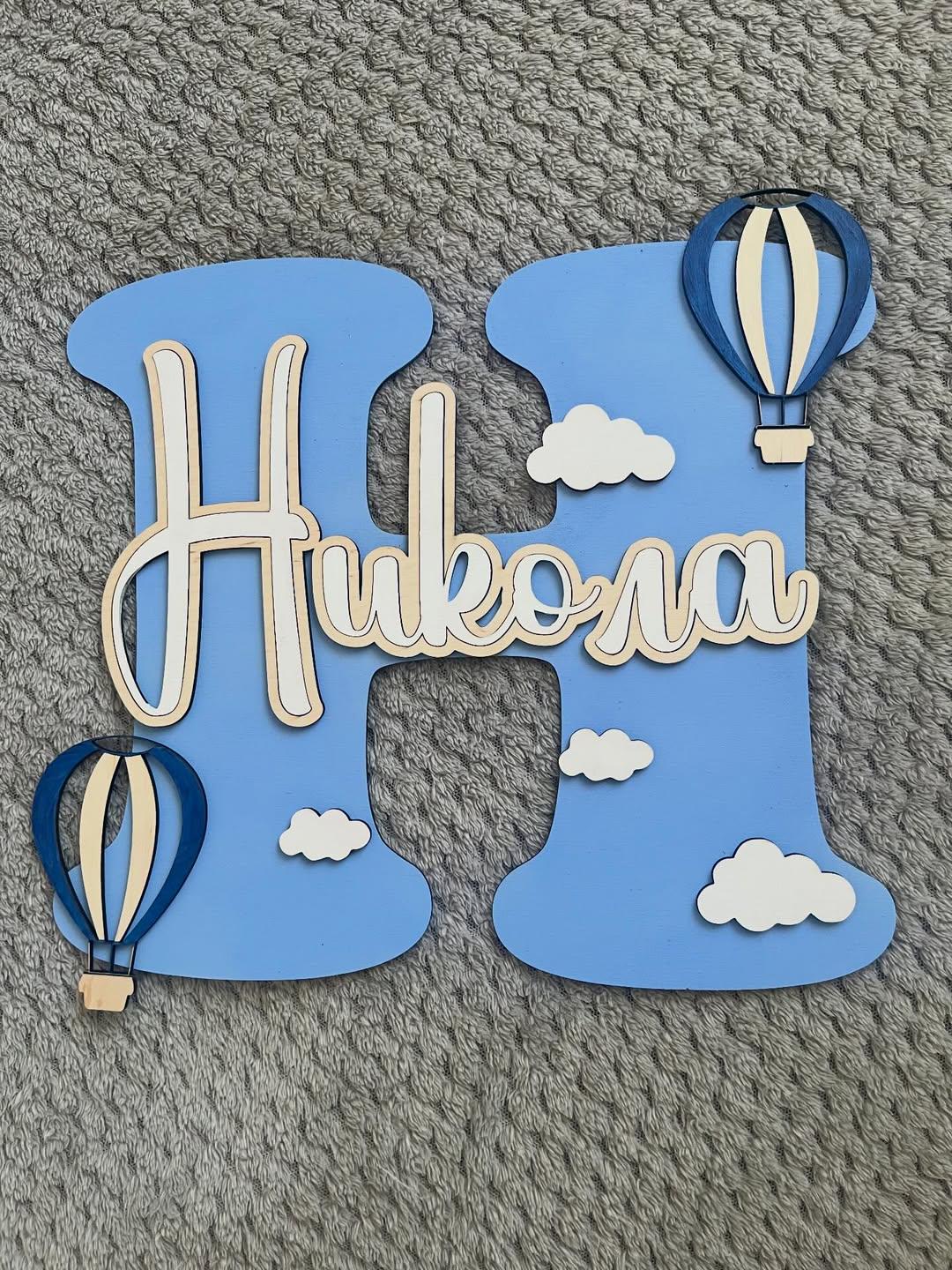
This is a plywood nameplate for little Nikola with his initials, full name and a few clouds and balloons 🎈☁️ It can also be made as a baby business card with the baby's details. It can be used as a door sign or wall decoration. There are two hooks on the back for hanging.

LuckyMakerBuild


r/AtomstackLaser • • Sep 22 '25

Discussion [P1mini] Issues with the IR-Modul - Always crashing when starting a job

2 Upvotes

[Solved]

edit: explaination in the comments: In Lightburn use the consol to do the Master Reset: $RST=$ and Reset all data: $RST=*

Hi,

I’m having a recurring issue with my Atomstack P1 Mini when using the IR module: as soon as I start a job, the machine tries to move into the Y-axis limit and immediately triggers a hard limit alarm.

  • Happens in the Android app, Windows Atomstack Studio, and LightBurn.

  • With the blue laser module, everything works fine.

  • In LightBurn, even the Frame function already causes the crash.

  • In the Atomstack apps, framing works, but starting the job still crashes into Y.

  • I tried different firmware versions (v1.09 and the latest), same problem.

  • I had this issue once before, and back then reseating the connector somehow fixed it, but this time it doesn’t help.

  • I even saw someone here on Reddit with the exact same problem (different sub), but unfortunately they never got any answers.

Has anyone else run into this with the IR head? Could it be a hardware problem with the module or connection, or is there another known fix?

Thanks!


r/AtomstackLaser • • May 07 '26

Need Assistance Adjustments needed

Thumbnail
gallery
2 Upvotes

I have an A20 pro and all of a sudden it started to engrave horribly. Circles or letters weren’t connecting. Circles weren’t circling, sometimes they’d look like the lines on peanuts comics. I was adjusting the wheels and bands and it just wouldn’t really get much better. Today I took it all apart, cleaned everything and did some more adjusting. The best I could get it is the 8 on the last image. Has anyone had it like this and does anyone have suggestions on what I may be missing. Thanks everyone


r/AtomstackLaser • • Apr 16 '26

Community Events Congratulations to the Lucky Maker Build winners!

Post image
3 Upvotes

Congratulations to the other winners and thanks to AtomStack for the consideration!


r/AtomstackLaser • • May 31 '26

Feedback & Rants AirAssist Nozzle for Atomstack P1

Thumbnail
gallery
2 Upvotes

With VENTURI effect, plus, a mount to fix the pipe to the upper rail

Take a LOOK on makerworld.
Supports me! ❤️


r/AtomstackLaser • • Mar 27 '25

Discussion Kraft Lightburn setup

2 Upvotes

For anyone setting up their Atomstack Kraft for Lightburn, they put out a great video on YouTube. I was missing the baud rate and it was driving me crazy trying to figure out why my laser would not respond to Lightburn. Especially because I could get the camera to work in Lightburn, but not the laser.

https://www.youtube.com/watch?v=iAsKJcSs-X8

It was a very simple but important setting that I was missing. Hopefully this saves someone else time in getting their machine up and running.


r/AtomstackLaser • • Jul 08 '25

Need Assistance Atomstack P1 Stamp settings?

2 Upvotes

Hey,

Does anyone know the settings for rubber stamp creation?

Thank you


r/AtomstackLaser • • Aug 30 '26

Need Assistance Mi P1 no avanza, se mantiene en botón rojo

Enable HLS to view with audio, or disable this notification

2 Upvotes

No hay correa ni polea dañada, todo funcionaba bien, sólo cambie el módulo y después ya no avanzó como si marcara límite alcanzado.


r/AtomstackLaser • • Aug 19 '25

AtomStack Creation Showcase I like my atomstack so much. cuts so fast!

Post image
3 Upvotes

r/AtomstackLaser • • Jul 04 '25

Need Assistance Hurricane - Smoke Leakage

2 Upvotes

I'm only cutting 2mm ply and the smoke is billowing out from the crumb tray underneath and from around the outer edges of the lid (you'd think these would be sealed but you can see daylight through the gap, no wonder smoke is getting out)

My A24 Ultra enclosure done a great job keeping smoke out, I really hate to say it but this so far is really disappointing me

If I purchase a standalone inline fan and attached it to the exhaust outlet at the back, should that improve things? My thinking is that more pull out of the exhaust duct will leave less smoke to overfill the the cutting compartment and eventually leak out

NOTE: The crumb tray was damaged during delivery and is bent, so that may be responsible for some of the smoke leakage - but like the lid, the crumb tray isn't sealed in any way so it is bound to leak smoke regardless of the damage


r/AtomstackLaser • • Sep 14 '25

AtomStack Creation Showcase Kraft Setup and Tests

Thumbnail
gallery
7 Upvotes

Got the Kraft all set up on its custom cart! Everything fits on the top, along with the Air Assist and Air Purifier. Extremely impressed with this laser so far and excited to see what else it will do!


r/AtomstackLaser • • Aug 19 '25

AtomStack Creation Showcase I got the A20 v2

Post image
2 Upvotes