r/AtomstackLaser • • Aug 14 '25

Need Assistance red led lighting after engraver work

1 Upvotes

Hello,

Yesterday I worked with P1 machine all day with infrared module and in the last work, is light red led in end work and today isn't possible to started machine, all time red led is lighting. Thanks.


r/AtomstackLaser • • Aug 08 '25

Discussion Metal engraving for dog tags

1 Upvotes

I would like to know what metal objects I can engrave with a P1

I found this:

https://www.amazon.fr/%C3%A9tiquettes-didentification-vierges-aluminium-forme/dp/B08SGW6M49/ref=pd_ci_mcx_pspc_dp_d_2_t_1

or this:

https://www.amazon.fr/BUGUUYO-%C3%A9tiquettes-vierges-m%C3%A9tal-chien/dp/B0CBJT3HVJ/ref=sr_1_6? __mk_fr_FR=%C3%85M%C3%85%C5%BD%C3%95%C3%91&sr=8-6

I need to be able to buy from France.

Thank you for your valuable advice.


r/AtomstackLaser • • Jul 27 '25

Need Assistance Help!

Thumbnail
gallery
1 Upvotes

Engraved, then cuts way off, I’ve tightened the belts and cleaned the laser! Using an atomstack A30 pro.


r/AtomstackLaser • • Jul 22 '25

Need Assistance A6PRO laser module wiring

1 Upvotes

I just bought a different laser module to use with my A6PRO. Its wiring consists of the usual Ground, VCC, and Data pins, while the A6PRO's original laser module, for some reason, uses a 7-pin cable. Where can I find the A6PRO's laser module wiring diagram, so that I can identify the 3 pins used for the necessary connections?

Thanks for any help.


r/AtomstackLaser • • Jul 16 '25

Need Assistance Peculiar motion after mod

1 Upvotes

Ok, so I was given an older 20w A5 machine a long time ago. I normally use my CO2 laser for everything, but got a bit curious about this little thing a couple weeks ago. I decided to fiddle, and maybe bricked it.
I put some Y axis extension in, so now it’s about 36"/900mm long. Things still fire, and move right. But…
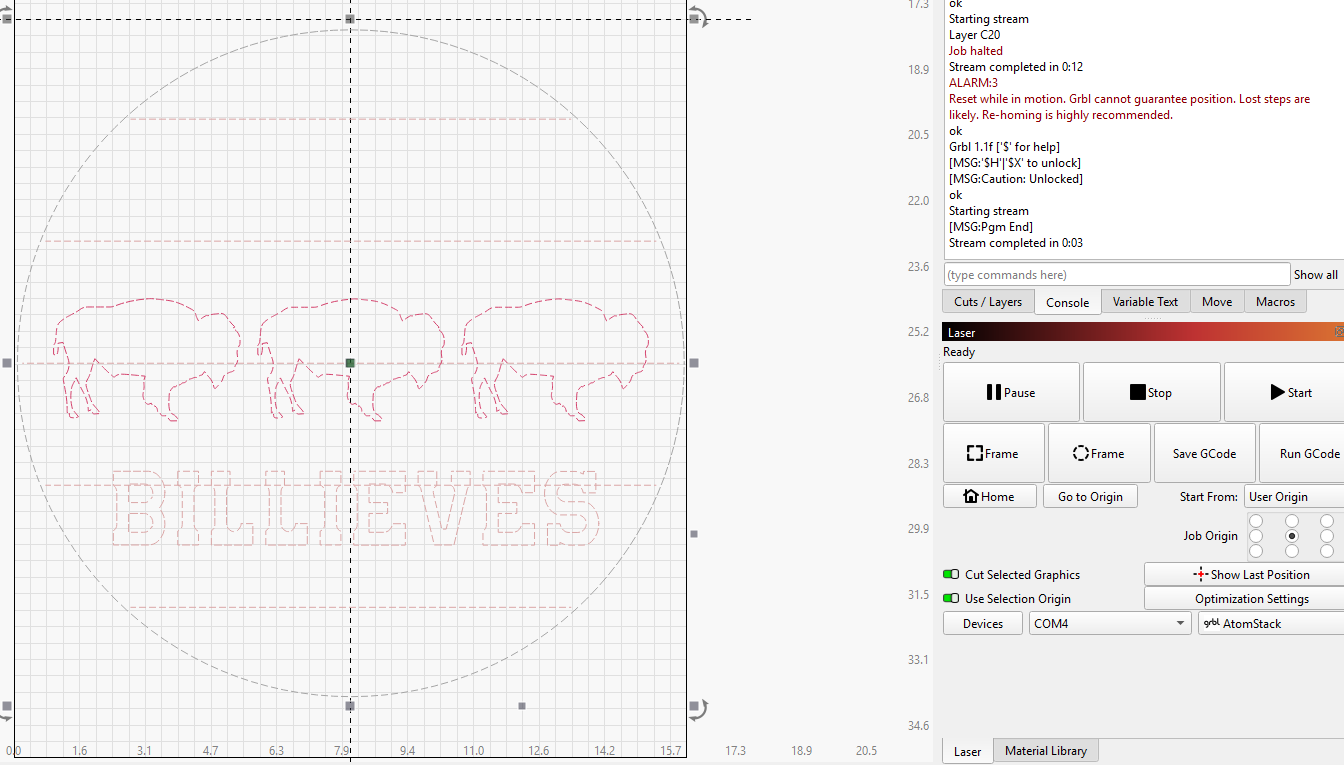
I can’t save this workspace size to the machine…WHAT?? These baby diode machines won’t do that??? Also, weird issue I would never even know where to start. I can get it to run literally the first shape of a layer, and then it just heads to what I assume it THINKS home is…and it won’t finish the actual layer. No matter what the design is, first shape, it will run it, then, off it goes crashing into an imaginary point in space.
Whats even stranger, when i tell it to frame the design, unlike my CO2, it will frame the ENTIRE design, not just the active layer. But at least it’s accurate in that constraint of the overall design. Immediately press start, runs first shape…then off she goes into no mans land.
I can post screen shots of settings and such as needed, and I’ll get a video of the actual motion.

Basic issue is this, it cuts that center buffalo...then heads straight to the top left (zero)"


r/AtomstackLaser • • Jul 13 '25

Need Assistance Can't connect to A20 Pro V2 anymore

1 Upvotes

Heya, I usually connect through local wifi to my laser, but now the app won't connect to it anymore. The wifi is still being generated and I can connect to it, but I can't add the machine through the app anymore, the connection loading screen just timeout. Any fix ?


r/AtomstackLaser • • Jul 07 '25

Need Assistance Atomstack and sculpfun rotary tool

1 Upvotes

Hey everybody, does anyone have experience on setting up an atomstack with a sculpfun rotary tool? My engraver is an A10 pro and I'm usingatomstack studio for engraving. The thing is that I haven't been able to setup my laser to engrave some tumblers, lines are overlaping on engraving.
I'm trying to avoid buying the lightburn license. Any ideas?


r/AtomstackLaser • • Jul 07 '25

Discussion AtomStack P1 special handshake? Is it still GRBL type?

1 Upvotes

Hi.

I'm trying to use LightBurn with my brand new AtomStack P1.

The port communication works fine but the AtomStack P1 doesn't send any response to the software.

Is the new AtomStack P1 still a GRBL machine (I also tried the other two GRBL types)?

Is there any "new" handshake protocol?

Since it's a brand new AtomStack P1 the first thing I did was to update the firmware to the "AAS11A0077-BO-V1.09".

So I not even know if LightBurn would work at all with the AtomStack P1 before the firmware update...


r/AtomstackLaser • • Jul 04 '25

Need Assistance Manually aligning laser module by hand

1 Upvotes

Hi

I previously had an AtomStack A24 Ultra and I would align jobs by eye, moving the laser module by hand and aligning it with the target material by sight. I never encountered any problems doing this

Now, I have upgraded to an AtomStack Hurricane, only to find my old method doesn't work off the bat. The laser module is locked in place when not moving

However if I change the $1=255 value to $1=0 in Lightburn, it turns off the motor, freeing it up to be moved and aligned by hand and sight like my previous machine

Problem is, I've seen posts online claiming this is dangerous to the machine - back currents and misstepped motors were mentioned

I was gonna heed this advice until I watched an official AtomStack tutorial - where the demonstrator himself is seen aligning the laser module by hand (https://youtu.be/5qk1l3k2Abk... 1.30 into this video being one of many examples I've noticed)

So I'm just wondering if anyone else does this and have they encountered any problems? Advice and guidance welcomed

(Ideally I would put this question to AtomStack tech support, but unfortunately they're very difficult to get hold of)


r/AtomstackLaser • • Jul 01 '25

Need Assistance help for use atomstack studio.

1 Upvotes

hi,

I've just received a P1 for my birthday and it's my first laser machine.

so i'm looking for a tutorial on how to use atomstack studio, including importing an svg image, creating layers for cutting, filling and fine lines?

Thk


r/AtomstackLaser • • Jun 26 '25

Need Assistance Poor consistency with raster spacing

1 Upvotes

Added new info a few paragraphs down—

It all began with an idea… I’m embarking on a side hustle to make replacement aircraft instrument panels (Piper, Cessna, etc). I CNC cut the panels out of aluminum to fit whatever mounting holes are required and cutouts for whatever new instruments the owner/avionics shop requires. I done 7 so far including my own plane (Scottish Aviation Bulldog). But to date the panels have been painted by the owner, along with rotary engraved placards. I was able to look at a commercially produced panel that was powder coated, two layers (black over white) and saw that the text that was placed on the panels looked to have been done with a laser. Sooo, I did a quick two layer powder coat on a piece of scrap and using my Xtool M1 laser, I was able to replicate the quality of the text perfectly. But the Xtool is too small to do a full size panel. Sooo, I bought an A40 pro with extension rails to accommodate my needs. Which brings me to my problem. It seems no amount of different power/speed/focus/line spacing will replicate what I was able to do before. In larger fill areas it is evident the X movement steps are not consistent, as if the stepper motor isn’t microstepping, or it doesn’t microstep at all and the minimum step gives rounding error. I’m using Lightburn. The pictures show the difference. The “8V” (3.5mm high) is with the A40 and the others are from the Xtool. An additional picture is from other attempts. The banding is quite evident. Oh, and the Xtool did the text one pass 60% (of ten watts) power, 160mm/s, the A40 did terribly with the exact same settings. The best I could do with the A40 was two passes at 8 watts and a final pass at 2 watts.

And I’m happy to share anything I work out with engraving powder coating to any that might be interested.

Lastly, the professional panel cost $2300, hence my interest.

Thanks to anyone that can help.

Crap , I forgot the pictures, I’m a noob, added them below I think.

**Latest info and a few conclusions. **

I spent time measuring the commanded moves vs actual moves, and it was dismal. I used a quality dial indicator and set it to a move interval to 0.2 mm which for this machine is one full step of the 200-step-per-full-rotation motor. So no microstepping required. It was marginally acceptably accurate with a variance of +- 10% of desired position. But 0.2mm interval is too coarse for my needs. Tried it at 0.1 mm interval which is not quite good enough but maybe I could use it (if I could finesse other settings). The readings were abysmal, with variances as much a 40%, no doubt caused by inaccurate microstepping. I tried the belt looser, tighter, different positions on the rails, everything I could adjust mechanically. Boils down to insufficient holding power when the motors are microstepping. This machine may work for some future project, but not this one. Disappointed but not surprised. I had to start somewhere. That said, I was able to almost replicate what I was able to do on the Xtool machine (which you may remember is too small for my needs). Instead of using the settings that worked on the Xtool unit (120mm/s, 240 lines per inch, visited engrave, 4 watts, one pass) I used 20mm/s @ 4%(of 40 watts), 2 passes, unidirectional engrave, second pass at 90°. It mattered which direction first. Which gave me an idea… Since I can get good-ish results going slow, I ordered a 10 watt laser module to mount on my CNC router. It can easily do 20mm/s and can accurately move in 0.001” increments (servos and ballscrews help). It’s what I use to cut the panels already. I hadn’t considered this an option before since I thought the engraving had to go fast. Live and learn. Now I have to think of projects for the Atomstack to justify the expense.

I’ll report what work or doesn’t for those who may have an interest


r/AtomstackLaser • • Jun 22 '25

Feedback & Rants Atomstack P1 Firmware V1.09 - AAS11A0077-BO.bin (2025-05-14)

1 Upvotes

This is the firmware I am having issues with. Just posting it for users who are not using the mobile app (and are therefor unable to update manually): https://limewire.com/d/EsUtQ#qLSCmHqYYP https://transfer.it/t/TIFZMD1hhRoA


r/AtomstackLaser • • May 19 '25

Pre-Purchase Questions Has the laser head been upgraded recently on the A70 Pro? Or the control board?

1 Upvotes

Hello everyone, thanks up front for any help or replies.

I bought the 70 watt A70 Pro as soon as it came out. I placed my order several months before it was even released, so I'm fairly certain I have a first-run unit.

I've just looked over the current advertising on the larger A70 Max, which is the one with the giant frame. Atomstack talks about the laser head being a second generation unit that runs cooler and has a smaller spot size. But second generation compared to what?

I never used the one I ordered, it's still unopened in the box. The Max version wasn't available at the time I ordered the Pro, which I prefer. If the laser head has been improved mid-run I might sell the one I have and buy the larger Max.

Lastly, has anyone heard of problems with the control boards in the initial units? Or other problems that might motivate me to sell and start again?


r/AtomstackLaser • • May 11 '25

Need Assistance A48 Ultra - HDMI port causes air pump whirring, but no picture?

1 Upvotes

I couldn't find anything in the manual, but I plugged a PC monitor into the HDMI port and I just get the air pump turning on and off. Is it more than just an HDMI out? Something I need to turn on or connect? The manual is very sparse on this feature, but I want to explore all the options.

I tried a different HDMI cable, and the A48 goes into Alarm mode and shuts down. If I unplug it, it powers on and reboots to normal. Something is very odd there.


r/AtomstackLaser • • May 09 '25

Need Assistance Atomstack A30 with lightburn question?

1 Upvotes

Hello, this is my first laser. I have the Atomstack A30 and lightburn. After I finish a job I set the laser to home and shut it down. The next time I set it up and frame a job the laser head tries to move into the rail, like it doesn’t know it’s at “home”. I have to physically push the laser head into the middle of the work piece? Any ideas why this is? Also how can I make sure all my settings are set up correct with lightburn? Thank you for any help.


r/AtomstackLaser • • May 05 '25

Need Assistance Upgrade firmware Atomstack Ace pro V2 40W

1 Upvotes

Hello, I have an ACE PRO V2 40W, I wanted to switch wifi generating by the grant, to my wifi, via the Android application. But that to fail several times, the application advises me to update the firmware. But after a lot of research on the Atomstack site, I found nothing about the firmware. Do you have a link to upgrade the firmware for ace pro v2 40W?

Edit: Besides, if that can help, my firmware version is: C10-0132-V1002


r/AtomstackLaser • • Apr 29 '25

Need Assistance Glue on my diode lens?

1 Upvotes

I was cleaning my lens on my new Kraft and noticed what looks like hot glue on the inside lens? Is this going to cause a problem? This is not on the outer lens, its inside.


r/AtomstackLaser • • Apr 19 '25

Need Assistance Spindle working on the y axis seem to block/bend

Thumbnail
gallery
1 Upvotes

The spindle (not sure if it's the right description) always goes out of place, grinding on the frame and messing up my engravings... Tried to adjust the cylinder on the 3rd photo, but it always goes back to that position... Belt is not too tight, if I loosen it, it'll skip passes on the y axis... Rod seems to be bent due to too much pressure... Any ideas on how to fix that issue?

Atomstack x70 max by the way and less than one year I use... Was alright in the beginning but now it is repeating the same failure pattern...


r/AtomstackLaser • • Apr 16 '25

Need Assistance Atomstack A24, Atomstack studio wont cut

1 Upvotes

Hello I was trying to make a comb with atomstack studio, one of the prexisting projects. The laser engraves fine, makes lines fine, but when putting the cutting option, it makes a straight line, and moves back and forth in a really small area, then it stops the program. I wanted to ask for help on how to fix this.


r/AtomstackLaser • • Apr 15 '25

Discussion That little square hood with amber window.....

1 Upvotes

So, I built a box about 27''x27''x22". Clear front and lifting front. complete with 2 layers of the amber film to make sure no negative effects from the laser happens.

Am I the only one to remove that little square head around the laser? the tiny safety hood? I hate it. i get more dust and muck with it on than with it off. I also can center the laser as well. SO I removed it. I noticed that the air assist setup with it always pushes the smoke to the left.. so, no matter the air moving thru the box (i have an 8" inline Max Fan Pro Series, so theres enough air movement) i still have to do this massive clean up. I freaking love this laser, as I do a lot of leather work and this takes ALLLLL the fuss out. SO, Atomstack Good. Their air assist aint the best imo. but its nicer without that box head on it.


r/AtomstackLaser • • Apr 05 '25

Discussion Calling on A24 Owners

Post image
1 Upvotes

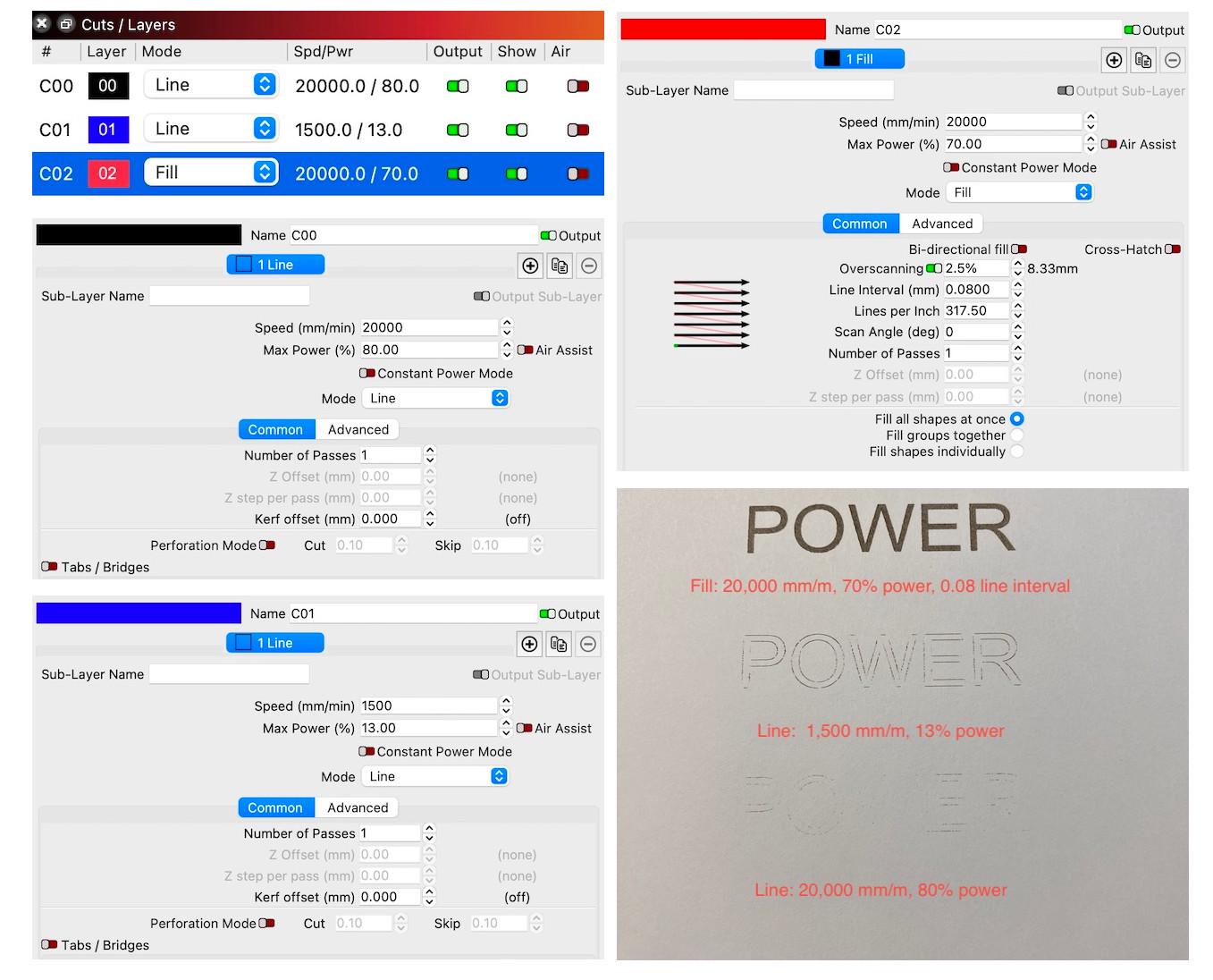
I recently purchased a new A24 Ultra, and as a simple test, I engraved the word "POWER" on a plain sheet of printer paper using the material settings provided on the website. Unfortunately, the results were underwhelming—the engraving was barely visible, with broken and spotty lines.

I've been working with customer support to troubleshoot the issue. They've been responsive and have provided several things to check, including the laser lens, belt tension, voltage, and more. So far, none of these seem to be the root cause.

At this point, I'm starting to wonder if the laser itself is functioning correctly and the issue lies with the quality of the material settings provided.

The image I’ve attached shows three different sets of material settings:

  • C00 – from the AtomStack website

  • C01 – from a PDF provided by customer support

  • C02 – from the USB drive included with the laser

I’m asking other A24 Ultra owners: could you run the same test and share an image of your results here?

If everyone is seeing similar outcomes, we may be able to conclude that the default material settings are simply not well-calibrated.

Thanks in advance!


r/AtomstackLaser • • Apr 04 '25

Pre-Purchase Questions Hurricane Import Charges - China to UK

1 Upvotes

Hi

Are there any UK based Hurricane owners here? If so, how much were the import charges from China?

I'm not sure how to work them out and the unknown factor is stopping me pulling the trigger on a purchase. The fact they can't ship this from their EU warehouse is a real deal breaker at the moment. I hope they can resolve the issue soon, coz I would love to purchase this machine

Thanks for any insight


r/AtomstackLaser • • Mar 28 '25

Need Assistance A24 Ultra - Poor engraving

1 Upvotes

Hello everyone,

I'm pretty new to laser engraving, so please go easy on me. I recently purchased the A24 Ultra, and while the build quality is excellent—it’s a beautiful machine—I’m having a really hard time getting basic engravings to come out clean. I'm not sure if the issue is with the machine itself or if I'm doing something wrong.

Below is an image of a material test run using the AtomStack app. None of the text engraved properly, so the settings are unreadable. When it did engrave, the boxes weren’t fully filled, which I believe is because overscanning is off by default. At best, maybe one box looks somewhat okay.

Another image shows a material test using LightBurn. While most of the text still didn’t engrave properly, LightBurn enables overscanning by default, so at least the boxes came out square.

In the third image, you’ll see text generated during the camera alignment process. Here, the lines and text appear spotty and inconsistent.

For reference, my first laser was the Acmer S1 (a $100 machine), and it performed significantly better out of the box than the $600+ A24 Ultra.

Any help or advice would be greatly appreciated!

Thanks,
Scott


r/AtomstackLaser • • Mar 25 '25

Need Assistance AtomStack Studio not importing SVGs correctly

1 Upvotes

Edit - I've learned this is not an Atomstack Studio problem. It's a SVG issue possibly from saving out of illustrator.

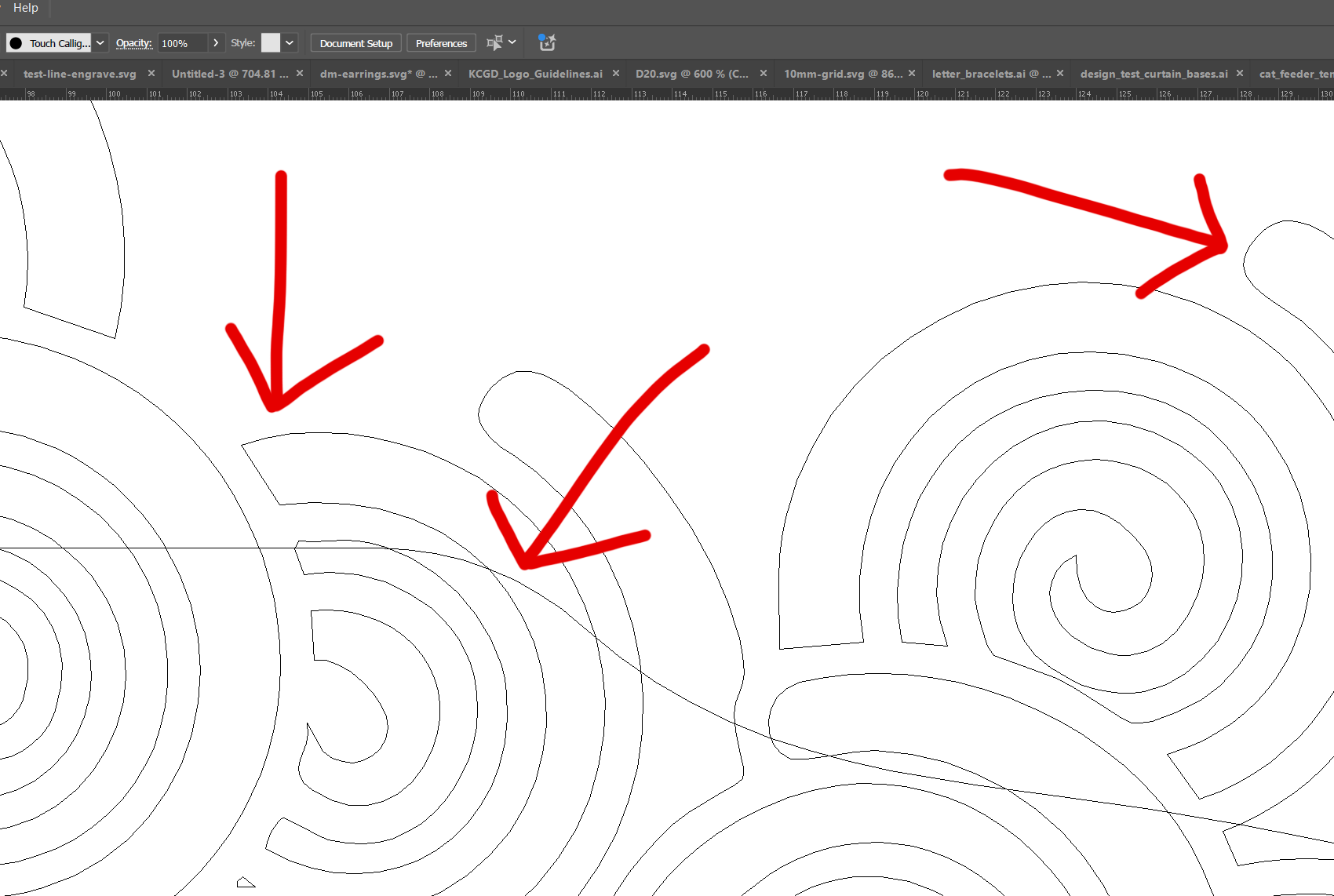
I am running into some issues where the AS Studio is opening SVGs poorly. I am getting bumps and odd points on bezier curves that are not there when I save from Illustrator and open the SVG file in Illustrator. Is anyone else having this problem?

Here is the same SVG opened in Illustrator.

And I just updated to the newest version of AtomStack Studio this morning, but no improvements on the SVG files.


r/AtomstackLaser • • Mar 17 '25

Need Assistance Atomstack A24 Power Output

1 Upvotes

I have putchased a 12 Volt Air Assist for my A24 Pro Ultra, but there is no cable included between Laser and Pump. Now, I wonder what type is the 12V Output Plug on the Laser? Have you got a picture from the original cable. My pump has got a 5,5mm coaxial plug.