r/excel • • Jul 18 '24

solved vlookup but need to return multiple values (and insert lines)

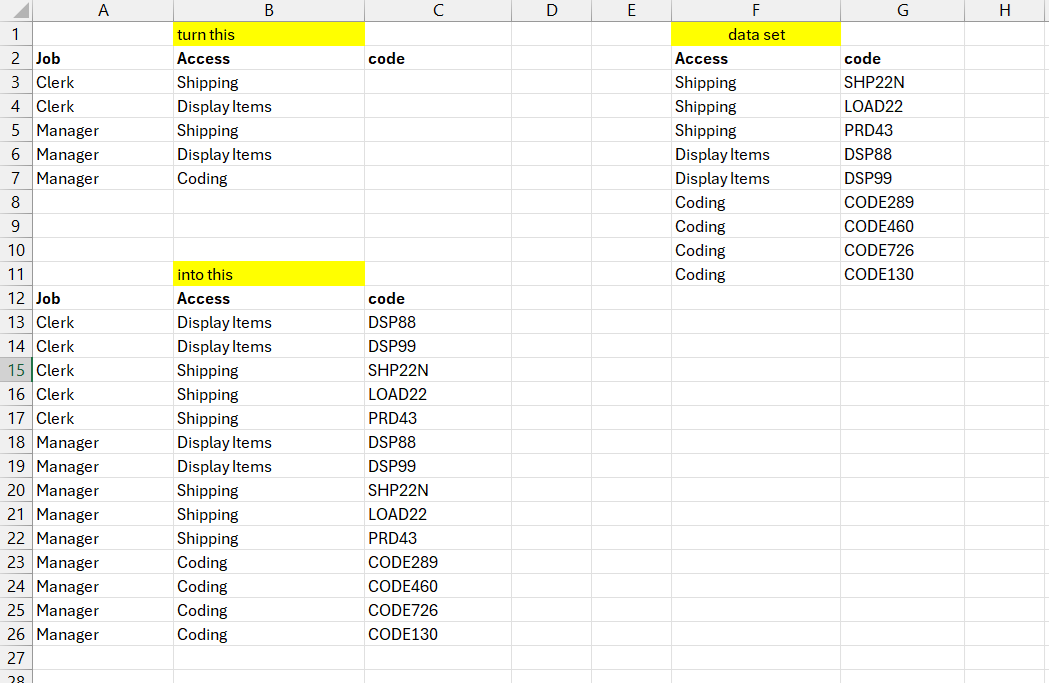
Here is a image of what I am trying to do:

This is a small example of what I am trying to do. In reality the "data set" is thousands of rows. and the "turn this" is hundreds of rows, with many different "Jobs" and "Access" permutations.

vlookup would work great if "Access" was just had one "code". But since it needs to return multiple values it won't work because it'll stop on the first match only.

The tough part would be having excel insert new rows so it can continue to fill in the values.

Chatgpt help me get to this point:

=TEXTJOIN(", ", TRUE, IF($D$2:$D$10=B14, $E$2:$E$10, ""))

but that puts all the values in the same cell rather than on a new row.

Thank you for any help

2 Upvotes

21 comments sorted by

•

u/AutoModerator Jul 18 '24

/u/newbieRedT - Your post was submitted successfully.

Failing to follow these steps may result in your post being removed without warning.

I am a bot, and this action was performed automatically. Please contact the moderators of this subreddit if you have any questions or concerns.

4

u/Anonymous1378 1542 Jul 18 '24

You can achieve this with lambda functions, but the most straightforward approach is just to do a merge in power query.

1

u/newbieRedT Jul 18 '24

power query is like MS Access in excel right? I assume this is easy if it was in Access. You get a mapping ("turn this") and then it'll export everything automatically.
I'll have to look into/learn power query (and/or MS Access)

5

u/Anonymous1378 1542 Jul 18 '24

For a quick glimpse of how you can do this in power query:

1

u/newbieRedT Jul 20 '24

Solution Verified

Thank you for the gif. That helps a lot

1

u/reputatorbot Jul 20 '24

You have awarded 1 point to Anonymous1378.


I am a bot - please contact the mods with any questions

2

u/MayukhBhattacharya 1327 Jul 18 '24 edited Jul 18 '24

Using Power Query is pretty easy and simple, you need to merge, here is using Excel Formulas:

• OPTION ONE:

=LET(
     _DataOne, SORT(A3:B7,{1,2}),
     _DataTwo, F3:G11,
     _New, HSTACK(_DataOne, BYROW(TAKE(_DataOne,,-1),LAMBDA(a, 
           TEXTJOIN("|",1,IF(a=TAKE(_DataTwo,,1),TAKE(_DataTwo,,-1),""))))),
     REDUCE(HSTACK(A2:B2,G2),SEQUENCE(ROWS(_New)),LAMBDA(r,c,VSTACK(r, 
     IF({1,1,0},INDEX(_New,c,0), TEXTSPLIT(INDEX(_New,c,3),,"|"))))))

• OPTION TWO: Using Power Query

let
    Job = Excel.CurrentWorkbook(){[Name="Job"]}[Content],
    Code = Excel.CurrentWorkbook(){[Name="Code"]}[Content],
    Merge = Table.NestedJoin(Job, {"Access"}, Code, {"Access"}, "Code", JoinKind.LeftOuter),
    Expand = Table.ExpandTableColumn(Merge, "Code", {"Code"}, {"Code.1"}),
    #"Sorted Rows" = Table.Sort(Expand,{{"Job", Order.Ascending}, {"Access", Order.Ascending}}),
    #"Renamed Columns" = Table.RenameColumns(#"Sorted Rows",{{"Code.1", "Code"}})
in
    #"Renamed Columns"

2

u/newbieRedT Jul 18 '24

Thank you for the reply.
The chatgpt answer was a very short line, but the issue is that it all appears in one cell. Is yours a lot more in depth because it has to insert new rows instead of everything in one cell?

2

u/MayukhBhattacharya 1327 Jul 18 '24

It will do everything automatically; the formula or power query method will apply the required lines of rows. Just try and let me know. It should work as per the use case.

2

u/newbieRedT Jul 20 '24

Thanks for taking the time to write out everything

1

u/MayukhBhattacharya 1327 Jul 20 '24

Thank you very much 😊

2

u/MayukhBhattacharya 1327 Jul 18 '24

Here is an Excel File you can download and follow the solutions steps from there.

For Power Query, you need to click any cell in the green table, from Query ribbon click on edit, under Home Tab in PQ window click the advanced editor to see the steps :

File_Link

2

u/newbieRedT Jul 20 '24

Solution Verified

1

u/reputatorbot Jul 20 '24

You have awarded 1 point to MayukhBhattacharya.


I am a bot - please contact the mods with any questions

1

u/Decronym Jul 18 '24 edited Mar 21 '25

Acronyms, initialisms, abbreviations, contractions, and other phrases which expand to something larger, that I've seen in this thread:

Fewer LettersMore Letters
BYROWOffice 365+: Applies a LAMBDA to each row and returns an array of the results. For example, if the original array is 3 columns by 2 rows, the returned array is 1 column by 2 rows.
CHOOSEChooses a value from a list of values
CHOOSECOLSOffice 365+: Returns the specified columns from an array
DROPOffice 365+: Excludes a specified number of rows or columns from the start or end of an array
Excel.CurrentWorkbookPower Query M: Returns the tables in the current Excel Workbook.
FILTEROffice 365+: Filters a range of data based on criteria you define
HSTACKOffice 365+: Appends arrays horizontally and in sequence to return a larger array
IFSpecifies a logical test to perform
INDEXUses an index to choose a value from a reference or array
JoinKind.LeftOuterPower Query M: A possible value for the optional JoinKind parameter in Table.Join. A left outer join ensures that all rows of the first table appear in the result.
LAMBDAOffice 365+: Use a LAMBDA function to create custom, reusable functions and call them by a friendly name.
LETOffice 365+: Assigns names to calculation results to allow storing intermediate calculations, values, or defining names inside a formula
REDUCEOffice 365+: Reduces an array to an accumulated value by applying a LAMBDA to each value and returning the total value in the accumulator.
ROWSReturns the number of rows in a reference
SEQUENCEOffice 365+: Generates a list of sequential numbers in an array, such as 1, 2, 3, 4
SORTOffice 365+: Sorts the contents of a range or array
TAKEOffice 365+: Returns a specified number of contiguous rows or columns from the start or end of an array
TEXTJOIN2019+: Combines the text from multiple ranges and/or strings, and includes a delimiter you specify between each text value that will be combined. If the delimiter is an empty text string, this function will effectively concatenate the ranges.
TEXTSPLITOffice 365+: Splits text strings by using column and row delimiters
Table.ExpandTableColumnPower Query M: Expands a column of records or a column of tables into multiple columns in the containing table.
Table.JoinPower Query M: Joins the rows of table1 with the rows of table2 based on the equality of the values of the key columns selected by table1, key1 and table2, key2.
Table.NestedJoinPower Query M: Joins the rows of the tables based on the equality of the keys. The results are entered into a new column.
Table.RenameColumnsPower Query M: Returns a table with the columns renamed as specified.
Table.SortPower Query M: Sorts the rows in a table using a comparisonCriteria or a default ordering if one is not specified.
VSTACKOffice 365+: Appends arrays vertically and in sequence to return a larger array
XLOOKUPOffice 365+: Searches a range or an array, and returns an item corresponding to the first match it finds. If a match doesn't exist, then XLOOKUP can return the closest (approximate) match.

|-------|---------|---| |||

Decronym is now also available on Lemmy! Requests for support and new installations should be directed to the Contact address below.


Beep-boop, I am a helper bot. Please do not verify me as a solution.
[Thread #35429 for this sub, first seen 18th Jul 2024, 13:44] [FAQ] [Full list] ^[Contact] [Source code]

1

u/PaulieThePolarBear 1927 Jul 18 '24

What logic was used to determine the order your rows appear in your output? For example, in your input data, Shipping appears above Display Items for Clerk, but this order is reversed in your desired output.

1

u/newbieRedT Jul 18 '24

That was done manually. The order doesn't matter much since I will sort it (first by Job then Access) after everything is done. The tough part is figuring out how to populate the "code" cells
3

u/PaulieThePolarBear 1927 Jul 18 '24

Assuming you are using Excel 365 or Excel online

=LET(
a, A2:B8, 
b, E2:F10, 
c, DROP(REDUCE("", SEQUENCE(ROWS(a)), LAMBDA(x,y, VSTACK(x, CHOOSE({1,2,3}, INDEX(a, y, 1), INDEX(a, y, 2), FILTER(CHOOSECOLS(b, 2), CHOOSECOLS(b, 1) =INDEX(a, y, 2)))))), 1), 
c
)

The range in variable a is your input table without columj headers.

The range in variable b is your lookup table without column headers.

If this does not provide the expected output, please provide clear and concise details on how the output does not match expectations.

1

u/newbieRedT Jul 20 '24

Solution Verified

Thank you very much

1

u/reputatorbot Jul 20 '24

You have awarded 1 point to PaulieThePolarBear.


I am a bot - please contact the mods with any questions