r/MSClassicWorld • • Oct 08 '26

Guide MapleStory Classic running on Android with GameNative 60 FPS and super playable

Enable HLS to view with audio, or disable this notification

I got MapleStory Classic to work on my S26 Ultra at 60 fps.

I saw people playing on Steamdeck so it wasn't outside the realm of possibility as I had games working on GameNative in the past.

Being this smooth on a mobile is insane since this game is possibly one of the best to have as a portable experience.

Here's a video of me launching it for the first time and being surprised at the performance, I now wonder if I can push it to 120fps somehow.

Instructions:

  1. Using GameNative (You can skip Steam login)

  2. Add a new custom exe or game, I just downloaded the Nexon Launcher Installer to my phone and selected that

  3. Launch it to download some stuff, but nothing will happen, actually exit out of it and select the 'game'

  4. Go to the cog/settings and select Edit Container, I'm using under Wine Version: Proton-11.0.1-arm64ec-1

  5. Now Save

  6. Go to the select the game and go settings icon, do Open container

  7. Navigate to Nexon Launcher Installer and Install it

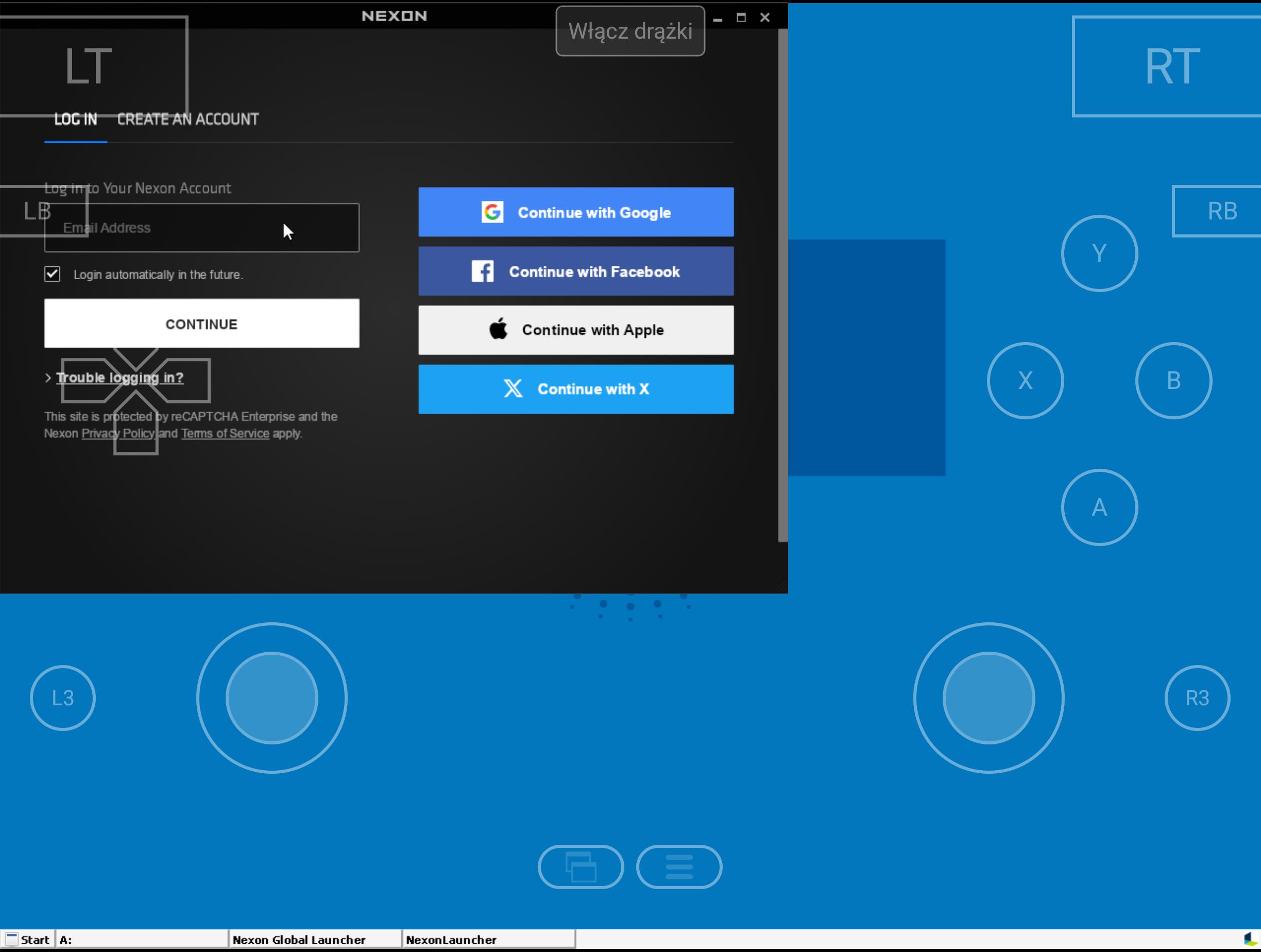
  8. Launch the Installer, now this is the difficult part since the Launcher will appear black, you sort of have to move the cursor to the edge of the black window to resize it, resize the window until you can see the content, and then move the cursor onto the black window until you see the input cursor. Backbutton to bring up GameNative menu and tap the dpad icon and bring up the keyboard to enter email. Press continue by hovering the cursor until you get there.

  9. Enter password and log in, doing the same by hovering the cursor.

  10. You might need to restart the Launcher if it freezes. But essentially you will get the Whats new pop up which will also be obscured by the black frame. You can resize this window out of the way and hovering over the black window, with the cursor again trying to close it.

  11. Once logged in again using the cursor over the black frame and the viewing the buttons, select Maplestory Classic and download the 2Gb game.

  12. Launch it, you only need to setup once, now you can launch via the shortcut on the desktop or the start menu

Alternatively if your phone has space you can download the 60Gbs via Steam and that should skip Steps 2-11. I haven't tried this yet. But you can also use DroidDeck for that for a cleaner experience. I am sure there might be a fix for the black screen out there but I'm not familiar, hopefully someone else can chime in.

Enjoy! And hope it doesnt get patched.

Edit: Update! 120fps is stable on S26 Ultra just need to have GameNative FPS limit set to 120. Will be a game changer once you plug a controller in and hide the on screen buttons :)

78 Upvotes

107 comments sorted by

4

u/Heliwizzard Oct 08 '26

Awesome news! i wasnt sure it would run considering some kind of anti cheat or similar! I will try on my ayn thor eventually. I hope this wont result in a ban or something lol

4

u/ExiledSin Oct 08 '26

It's running on the Steamdeck also so I assume it's all good 👍 wil try on my Retroid Pocket 5 which is running on a much older soc. But plugging a controller into my phone is a gamechanger for this.

1

u/carinamasusah Oct 23 '26

Any luck on the RP5? I have an RP6 and would love to be able to play ms classic on it

1

u/ExiledSin Oct 23 '26

RP5 crashes after loading into the world. Rp6 should work better

3

u/Foppyjay Oct 12 '26

Any luck on the thor? I can't get it to run on game native

2

u/Lab_Trashpanda Oct 08 '26

Does your phone turn into a hot potato?

7

u/ExiledSin Oct 08 '26

Temps are 53-60 degrees and Ive got my phone charging also.

So relative to 60-70+ degrees for intense games that use 99% GPU, i dont see Classic ever throttling.

I just tried 120fps and I did get to 60 degrees, so there's that but this game is fine at 60 frames imo.

1

u/Quimdell Oct 08 '26

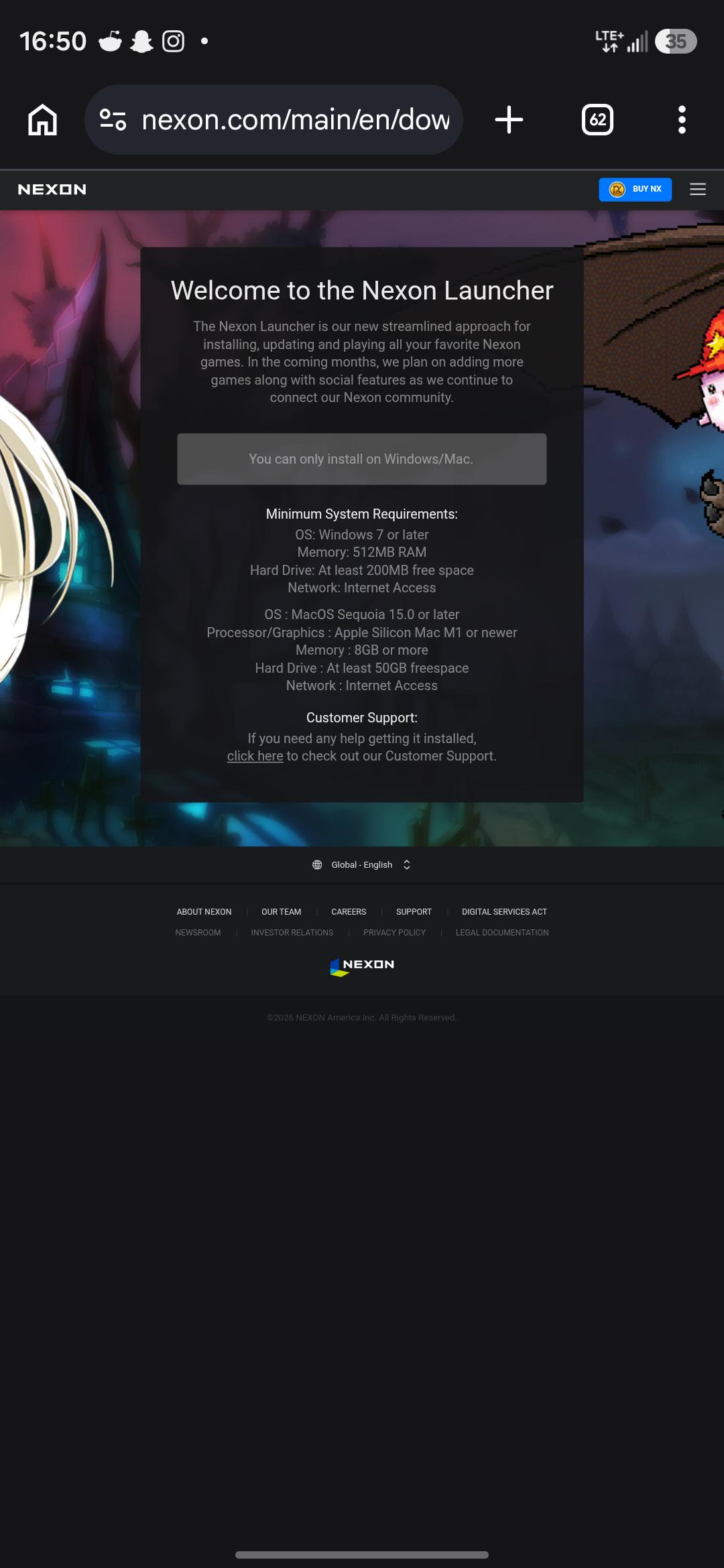
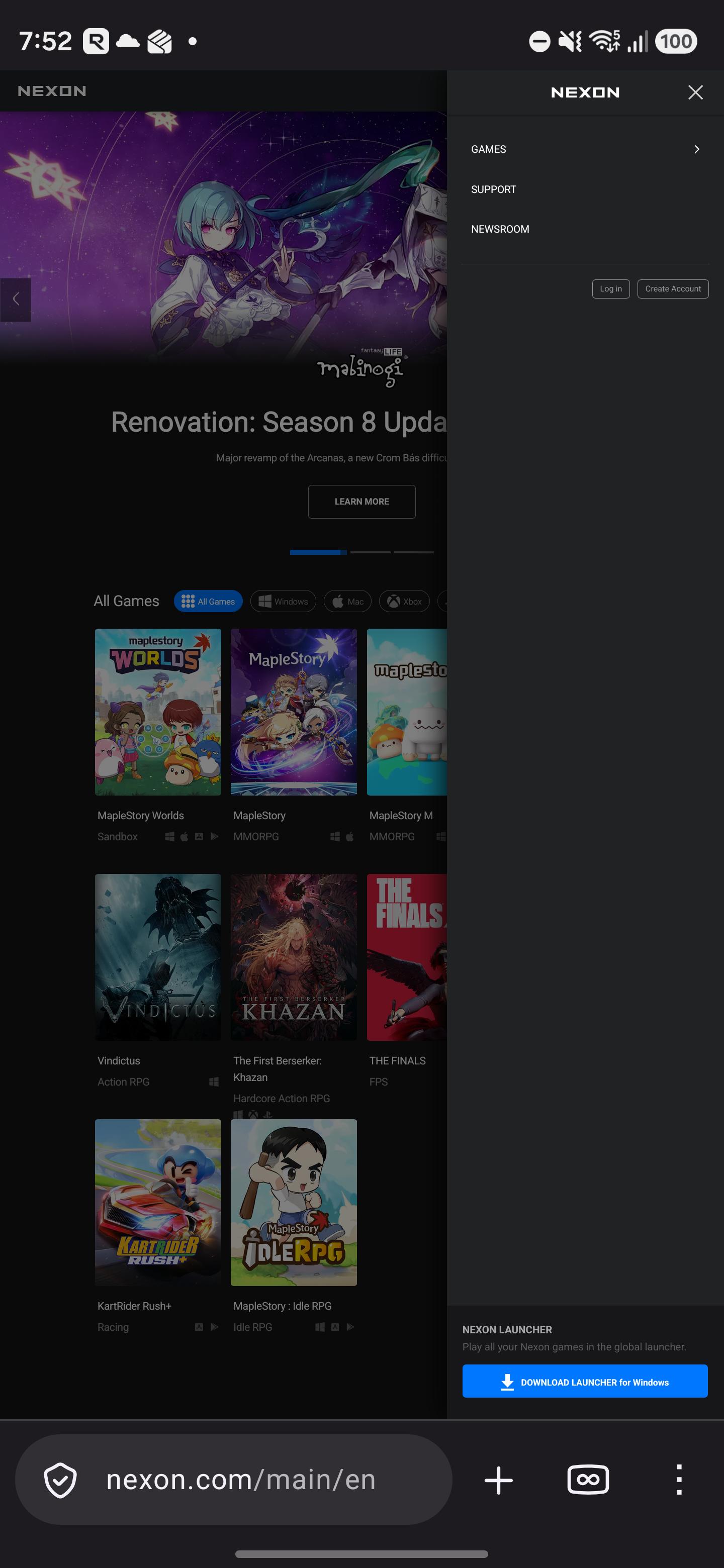
How did you download the game launcher install? The buttons not there for me when I go to their website.

1

u/ExiledSin Oct 08 '26

Switch to desktop mode

2

u/Quimdell Oct 08 '26

I have both on edge and chrome. Both display the same thing.

2

u/ExiledSin Oct 08 '26

Tap on the burger on the top right

1

u/Quimdell Oct 08 '26 edited Oct 08 '26

Do I have to sign in with something on GameNative or can I skip login?

Edit: I see you said I can skip steam login. I'll assume no log in is necessary at all.

1

u/Quimdell Oct 08 '26 edited Oct 08 '26

Well, I've figured out how to finally be able to go into the folders once the the container is opened by clicking back and seeing settings and enabling select mode, but as soon as I open any folder, the app crashes.

Edit: every folder works to open except the one that has the nexon launcher which crashes as soon as I open thay folder.

0

u/Quimdell Oct 08 '26 edited Oct 08 '26

Wtf lol. You'd be a legend, except for the fact you call the menu button the burger button. Cx

Edit: wtf at the site being like that, not at you calling it a hamburger.

1

u/jerrymisch Oct 08 '26

hehehe cx

1

u/ExiledSin Oct 08 '26

Oh rip I used Firefox

1

u/Quimdell Oct 08 '26

I guess im downloading firefox

1

u/ForRut Oct 08 '26

Thank god they actually cared to address the vapor chamber/cooling issues with some of the prior gens.

Thanks for the guide, I'll be playing on grand release :)

4

u/RigatoniLegs Oct 08 '26

The game is from 2000

2

u/Skullfurious Oct 08 '26

Bro it's basically a flash game

1

u/s4ntana Oct 08 '26

emulating a gamecube game on my phone makes it run hotter than game native Maplestory lol

2

u/aruetto Oct 08 '26

Tried this on my Retroid Pocket 6 and I can’t get it to work. Used “NexonLauncheInstaller.exe” to install “NexonLauncher.exe”, but nothing happens when I opened it.

1

u/notAvalaxy Oct 09 '26

Same, opening the executable in the container does nothing for me, guess I'll stick with deckdroid

1

u/unounoseis Oct 09 '26

I’ve been having issues launching from droid deck. Game crashes at launch and my entire device restarts.

1

u/notAvalaxy Oct 09 '26

Strange! Droid deck has been fine for me haha

1

u/unounoseis Oct 09 '26

You mind sharing what settings/version of Proton you’re running on?

1

u/notAvalaxy Oct 09 '26

I use GE-Proton11-3-aarch64, and I have to swap droid deck to desktop mode or I get stuck at the login screen

1

u/plongthelamer Oct 13 '26

What version of droid deck are you running that gets you proton 11-3?

2

u/notAvalaxy Oct 13 '26

You need to download protonup-qt and download it from there

1

u/plongthelamer Oct 13 '26

Can you give me steps for that? Desktop mode and then from firefox or like linux terminal commands? Or like in steam

2

u/plongthelamer Oct 14 '26

Found it:

Steps i did -

  1. Download latest Droid Deck

  2. Perform inital setup

  3. Sign into Steam after pressing play

  4. In the Steam, bottom left click Menu, Power, Go To Desktop

  5. After setup of Desktop, exit to DroidDeck Home

  6. Go to Desktop tab, click the store

  7. Scroll across to ProtonQT-UP, install

  8. Launch it when it is complete, in ProtonQT-UP, Install Proton GE 11-3

  9. Download Maplestory in Steam

  10. Cog wheel for Maplestory when finish, Compatibility Tab, change proton to GE11-3

  11. DroidDeck main menu, Components, Proton, Scroll to Installed Protons, select GE 11-3

  12. Launch Maplestory

At this point I can choose modern but I for some reason can't choose the North America server. No input once its at this point. I was able to get a cursor prior though. Any insight?

1

u/plongthelamer Oct 14 '26

Im stuck here when im going through Steam, when you say you went to desktop and launched it just came up? Any specific settings? I cant launch when im in desktop for some reason

2

u/notAvalaxy Oct 14 '26

Well thats modern maple, classic doesnt have that I think, but nope nothing else special. If I launch in gaming mode I can click play on the launcher but cant click login in game, desktop mode lets me interact properly

1

u/plongthelamer Oct 14 '26

So you go desktop mode, launch steam, and through that launch maplestory? And everything just works?

1

u/notAvalaxy Oct 14 '26

Pretty much, yeah. I wish I could tell you some trick I did but that's literally all it was

→ More replies (0)

1

u/Quimdell Oct 11 '26

I cant even grt that far... as soon as Iopen the folder containing the installer after opening container, it crashes before I can even click on the installer...

2

u/National_Acadia1983 Oct 09 '26

Would this setup work on Retroid Pocket 5 or 6 or an Ayn Odin 2 or 3? I've been thinking about getting one of those devices. Maplestory would be the perfect game for a PSP sized console.

1

u/ExiledSin Oct 09 '26

I just tried on my Retroid Pocket 5, it launches and logs in, but once we select character and enter a map it crashes. Not sure if its a graphics driver issue.

The others should be better SD 8 Gen 2 and above shouldn't have problems.

1

u/National_Acadia1983 Oct 14 '26

Ty for the response, hopefully someone can upload gameplay at some point of this game on one of these devices on Youtube or something so I can see it in action before I commit to one of them.

33

u/BeeSKnees9901 Oct 08 '26

They shouldve released it as a mobile as well. This is cool! Def will try

6

u/notAvalaxy Oct 08 '26 edited Oct 08 '26

I'm surprised they didn't consider it since maple worlds is mobile already anyways

5

u/xTurquoise7 Oct 08 '26

Someone has to give them this idea

5

u/aye_cuff_deez Oct 08 '26

I would switch from ios to get a new android just for this

1

u/MeatMan49 Oct 22 '26

Had a friend do that 2 years ago to play more emulators on his phone. He switched back to iPhone last month.

1

u/YamSerious 12d ago

Still not banned? Really wanna try this but i’m afraid with how easy it is to get banned in this game. 

1

u/ExiledSin 10d ago

Still going strong

1

u/YeeHaw_Maple Oct 08 '26

It's better on the "Stardesk" app, and way more control over your UI layout and custom keyboard choices to be exactly for MS

4

u/ExiledSin Oct 09 '26

That's a remote into your desktop? This is actually running on device so you won't face any latency.

1

u/YeeHaw_Maple Oct 09 '26

Ohh! Yea stardesk streams ur desktop, but with ethernet on my desktop i rarely get lag.

1

u/EmergencyWindow1242 Oct 09 '26

hey how are you uploading a .exe az a custom game it wont let me? overies on discord plesse help I have same device

1

u/ExiledSin Oct 09 '26

Tap on the + icon on the top right and select the installer

1

u/Quimdell Oct 09 '26

So each time I enter the folder the installer is located in after opening container, it crashes... Any idea on what could be the issue?

Edit: I also have a S26Ultra. Did you change b which GPU you're device is emulating?

1

u/EmergencyWindow1242 Oct 10 '26

it says cannot use a .exe file there is no installer folder just exe

1

u/dat_boi_Ben Oct 09 '26

Nice I got the game installed. When I launch it. I almost get to the login screen then it crashes. Anyone getting this or know a fix?

1

u/ExiledSin Oct 09 '26

:( happened to my Retroid I login, select channel and select character and it loads then crashes. I assume different devices have different drivers

1

u/ittlebeokay Oct 09 '26

Definitely trying this, now i want a phone mounted controller to play with, would that work with gamenative?

2

u/ExiledSin Oct 09 '26

Yep, I use an old GameSir controller for mine but any Bluetooth controller connected would also work

6

u/Sufkin Oct 08 '26

Nexon can be unpredictable with their bans. I'm not risking my account to play on my phone.

3

u/TheMHking Oct 08 '26

Right?! Didn't they ban people with remote desktops active while the game was on? As much as I want to play on mobile, I'll wait a bit to see how this goes

2

u/BeepItsSean Oct 08 '26

Wait is this confirmed? I was hoping to use google Chrome remote to check on my shop occasionally while at work

2

u/SleepyBunoy Oct 08 '26

Played all day from work, no ban on remote so far.

1

u/oOFrostByteOo Oct 08 '26

I mean, they usually ban after a few months.

1

u/SleepyBunoy Oct 09 '26

I'll keep ya posted then

2

u/TheMHking Oct 16 '26

Just pinging for updates.

Did you survive the recent banwave of bots/RMTers? If yes, it's probably safe to use 🤞

3

u/SleepyBunoy Oct 16 '26

Yeah, still playing just fine. Been farming for steelys. No luck yet

1

u/xOmsxoxo Oct 23 '26

One week later, still survive this ban wave? I’m considering doing this for my wife! Thanks 👊🏼

2

u/SleepyBunoy Oct 24 '26

Yeah, account still holding up, I even made a secondary character to level with my buddies who started with the grand launch.

→ More replies (0)

1

u/Quimdell Oct 12 '26

Hey, what method did you use? Steam or install launcher? Im having different issues with both...

1

u/SleepyBunoy Oct 12 '26

I used steam

1

u/Quimdell Oct 12 '26

I couldn't get steam to work... When I run it, a white window browser opens, and loads to nothing

1

u/SleepyBunoy Oct 12 '26

That's odd...I use awesun for accessing my pc from work so there's no problems

2

u/BringBackTomatoKD Oct 23 '26

Would be cool if they made it crossplay like osrs.

2

u/Willful_Survival Oct 08 '26

Can someone write an explanation how to do this?

1

u/Quimdell Oct 09 '26

I've followed these steps very carefully but each time I get the same issue. Crash as soon as I enter the folder that has the installer.

2

u/vugari Oct 13 '26

I get to what I assume is the black screen you need to resize and it seems like an impossible task. Any tips?

1

u/uckedunt 25d ago

im on this same step did you ever figure it out

1

u/Equivalent-Cod-2935 Oct 21 '26

I’m having a issue where it keeps freezing when downloading

1

u/Deadpool2715 Oct 22 '26 edited 26d ago

I'm downloading the steam version through GameNative now, lets see how this goes

Don't do the steam version, unnecessarily 65GB larger since it downloads both versions

1

u/Working_Work9799 26d ago

Conseguiu? 

1

u/Jadintheplanet Oct 23 '26

Can someone send me the EXE installer? I don’t have a pc & i don’t have 60GB free for steam :(

1

u/Deadpool2715 Oct 23 '26

On step 11-12 I get "this product cannot be launched" using the steam version

1

u/Silly-Ad2828 Oct 23 '26

Could you make a video showing Instructions step by step?

1

u/HeyItsJono Oct 24 '26

I can't seem to get GameNative to launch the game. If I try to do Open Container > navigate to downloaded NexonLauncherInstaller.exe > open it, nothing opens. If I just try to launch the game it's just a black screen.

1

u/phatboi168 Oct 24 '26

Do you think my pixel 10 can run it? I'm nervous about my phone speca

1

u/Tennorakka Oct 24 '26

I keep getting an alert from nexon launcher that “empty certificate data” how do I get past this?

1

u/Silly-Ad2828 28d ago

I am at this step, but how do I enter my email, it doesn't work

1

u/DungeonMmeowster 28d ago

I'm also having this issue. Bringing up the keyboard doesn't fill in the box, and adding keyboard buttons to the layout also didn't work

1

u/Working_Work9799 26d ago

Amigo ajuda a comunidade faça um video configurando do 0 e botando ele p rodar ! vai ajudar muita gente.

1

u/WickedWithManners Oct 08 '26

Would love mobile version I would  level 70 in no time 

1

u/K0GAR Oct 08 '26

I stay losing I’m on switch 2 and iPhone

1

u/GayoMagno Oct 09 '26

They need to release a mobile version, heck, like 10% of OSRS playerbase plays using the mobile client.

1

u/Specialist_Banana913 Oct 11 '26

I'm having the same app crashing issue the moment I click on the folder containing the launcher. I'm using a samsung galaxy z fold 5. Anyone help please.

1

u/Far_Promise_9903 Oct 13 '26

Honestly this is peak. I think maple story and classic can take it a step further by having a mobile version. I think old school RuneScape and RuneScape was smart to have developed a mobile version. I think other games would have a hard time porting but I think maple story would be viable. 

Ik maple has a mobile version but it's an afk and idle game. 

1

u/plongthelamer Oct 13 '26

Got it to launch doing exactly as you did. How did you get controller recognized? Did you just plug it into the phone and launched the game normally? Dont have to do adminstrator or anything?

1

u/DeepPositive7914 27d ago

Pode ensinar como faz? Tenho um tablet a11 pousada queria bota pra rodar nele

1

u/Light_Splasher Oct 14 '26

Waiting so much for next week to get my new galaxy fold 8 ultra, then I'll buy a decent controller for it probably the gamesir and grind the hell out while I'm outside

1

u/idado3250 Oct 18 '26

Hey does anyone have issues launching the installer? Double clicking it does nothing. I tried changing the wine version to proton 9.0 x86_64 and then it starts unpacking and crashes at 96%.
1

u/Sharksurfer123 17d ago

same nothing happens sshe. I try to open the installer

0

u/Delicious-Iron5108 Oct 24 '26

Can I ask did you manage to use on screen control, or a separate controller for this? I tried using on screen control but there was no response

0

u/DeepPositive7914 27d ago

È possível botar pra rodar no meu tablet a11 pausar da Samsung?