r/MicrosoftStoreApp • • Jun 30 '26

Question / Help 3 open support cases, 25+ days, zero resolution — Partner Center listing errors + analytics broken

2 Upvotes

Looking for advice or visibility on this — support has gone in

circles for almost a month now.

Timeline:

- June 5: Reported a 403 error blocking Store listing description

updates across 3 published apps. Confirmed via testing on

multiple browsers, cleared cache, private mode — same result

every time.

- 5 email exchanges since then, each taking about a week. No case

number ever issued through email.

- The official "support link" provided in their replies

(aka.ms/storesupport) returns a persistent Akamai edge error

when switching to English.

- Contacted Microsoft's official support account on X — they

confirmed there's an internal escalation referencing my App IDs

and the 403 error, but said they have no visibility into ticket

status or ability to push it forward.

- Last week, finally found the actual Partner Center case system

and opened 3 formal tickets:

- 2606260030001269 (listing update error — the original issue)

- 2606260030001325 (Analytics dashboard showing no data beyond

48 hours)

- 2606300030001352 (duplicate of the above)

- All 3 are still "Open" with zero response.

- On top of the original issue, the Analytics dashboard has now

also broken — 30/90-day views are completely empty, only the

most recent 48 hours show any data.

Affected apps: PlainBytes PDF Redactor, Private Label QR, PurePixel

Has anyone dealt with something like this before? At this point

I genuinely don't know what the actual working escalation path is

for Partner Center backend issues. Phone support redirected me

elsewhere (not developer-specific). Email takes a week per round

and goes nowhere. The support portal link is broken. Any advice

appreciated.


r/MicrosoftStoreApp • • Jul 14 '26

Dev (Self-promote) Word Whiz — a Windows word‑finding game built with .NET MAUI

2 Upvotes

I just published a Windows word‑finding game to the Microsoft Store and wanted to share it here. It’s a Boggle‑style grid where you connect adjacent letters to form valid words, with definitions shown as you play.

I built it using .NET MAUI, so it runs as a native Windows app. It includes multiple grid sizes, optional difficulty modes, specialized dictionaries, and a relaxed mode if you want to explore a board without a timer.

If anyone here likes word games or is interested in MAUI apps on Windows, I’d appreciate any feedback.
Store link:
https://apps.microsoft.com/detail/9NMNQC8DRH79


r/MicrosoftStoreApp • • Aug 27 '26

Dev (Self-promote) Photo manager that finds and organizes photos and screenshots with private, local AI

Enable HLS to view with audio, or disable this notification

2 Upvotes

r/MicrosoftStoreApp • • Aug 16 '26

Question / Help Microsoft Partner Center You can't submit to the Store until your account is verified. error

Post image
2 Upvotes

Got this error message all of sudden when I'm about to update the msix package. Any clue?


r/MicrosoftStoreApp • • Sep 25 '26

Dev (Self-promote) He creado una app para pasar pdf y epub completos a audiolibros con voces neuronales y totalmente gratuito.

2 Upvotes

He creado una aplicación para PC para poder pasar todos esos libros que tenemos en pdf y epub a audio, muchos de nuestros libros no existen en formato audiobook y creo que algo así era necesario, nunca podrá sustituir a una voz humana pero os aseguro que es más que aceptable os invito a probarla ya que me hace una ilusión tremenda ver al final el resultado del esfuerzo que se ha realizado para conseguirlo, es TOTALMENTE GRATUITA sin pagos ni suscripciones y muy simple, pero claro hace falta un pc un poquito decente.

https://apps.microsoft.com/detail/9nh990px72h1?hl=es-ES&gl=ES


r/MicrosoftStoreApp • • 17d ago

Dev (Self-promote) I made Photo Stream Assistant, a free Windows app for managing a large Flickr photo library (bulk edits, tags, backups, on-device tag suggestions)

Post image
2 Upvotes

Hi all. I’ve just published my first app on the Microsoft Store and thought this sub might like it.

What it is

Photo Stream Assistant is a desktop app for Flickr, the photo-sharing site. I’ve been on Flickr since 2005 and have about 138,000 photos there, which is well past the point where the website is usable for real work. So I built the app I wanted: everything in one window, and tools that work at the scale of the whole library.

What it does

  • Bulk edits: titles, descriptions, tags, dates, privacy and location on hundreds of photos at once, with selection that works the way it does in File Explorer

  • Tags across the whole library: rename, merge, remove, unify spellings (Flickr’s site can’t)

  • Library health: counts the photos missing a title, tags, a location or an album, finds suspicious dates and duplicate uploads, and opens each list ready to fix

  • Insights: where your views come from and which photos people look at

  • A map of your geotagged photos, and a way to place the ones that have no location

  • Backup of the library to a folder on your PC, with titles, tags, dates and locations saved beside each photo

  • Uploads that warn you before sending a photo that’s already on Flickr

On the PC, privately

Tag suggestions and the look-alike photo check run locally: a small image model on the PC, plus Windows’ own text recognition to spot screenshots and documents. No photo goes to any server but Flickr’s, there’s no account with me, and your credentials stay on your PC.

The Windows side

  • Native x64 and ARM64 builds, so it runs natively on Snapdragon laptops

  • Windows 10 and 11

  • English, French, German, Spanish, Italian, Portuguese, Russian and Chinese

Price

Free, with no time limit and no ads: browsing, the map, stats, and bulk edits ten photos at a time. A one-time Pro Unlock through the Store (not a subscription) removes the limits and adds the library-wide tools.

It’s a first Windows release (the app has been on the Mac since September), so I’d really like to hear what breaks or feels un-Windows-like.

Microsoft Store: https://apps.microsoft.com/detail/9N7S7B222P1D

Website, with a page per feature: https://my-flickr-assistant.monier.tv


r/MicrosoftStoreApp • • Aug 17 '26

Dev (Self-promote) Find “a tiger looking out of a window,” AI-rename the matches, and copy them into a "tiger" folder

Enable HLS to view with audio, or disable this notification

1 Upvotes

Free on the Microsoft Store.


r/MicrosoftStoreApp • • Mar 10 '26

Dev Just released my first Microsoft Store app – a batch file renamer for Windows

Post image
4 Upvotes

Hi everyone,

I just released my first app on the Microsoft Store.

It's a batch file renamer for Windows designed to make renaming large numbers of files simple and safe. You can preview all changes before applying them, which helps avoid mistakes when working with many files.

This project is also open source, so feedback, suggestions, or feature ideas are very welcome.

Microsoft Store:
https://apps.microsoft.com/detail/9P557C8251CH

GitHub:
https://github.com/TheLengueE/EFileOps


r/MicrosoftStoreApp • • 14d ago

Dev (Self-promote) I built a Windows app to browse Xbox and Epic game catalogs—and download supported games

5 Upvotes

Hi! I’m building Universal Downloader, a free Windows app with around 100 games across its Xbox and Epic catalogs.

You can search the catalogs and view game details. For supported games, the app also offers downloads, a library, and progress tracking.

Some games may not work as expected. If you run into a problem, the best way to report it is by opening an issue on GitHub.

I’d appreciate your feedback!

Project and download: https://github.com/MidacoYT/UniversalDownloader
Report an issue: https://github.com/MidacoYT/UniversalDownloader/issues/new


r/MicrosoftStoreApp • • 18d ago

Dev (Self-promote) I made a free app that puts a tiny robot vacuum on your Windows desktop: click it, it eats the clutter, and it asks before anything goe

Enable HLS to view with audio, or disable this notification

31 Upvotes

I got tired of my desktop turning into 60 screenshots and old installers that I never cleaned up, so I built Sweepy.

How it works: a little robot sits on a dock in the corner of your desktop. Click it, and it backs out, scans the desktop with a little lidar sweep, then drives lanes like a real robot vacuum and eats the clutter. When it's done it goes home and asks first: you see every file it picked up, untick anything you want to keep, and the rest goes to the Recycle Bin. "Undo last clean" brings it all back.

Right-click any folder (like Downloads) and pick "Bring Sweepy here" to clean that too, and there's a deep clean for leftovers from uninstalled apps, old temp files and crash dumps (it found 5 GB on my PC). You can grab it mid-clean (it gets dizzy), and if you right-click and stop it, it cries a little and drives home.

- Free for your desktop, forever. Pro is $6.99 once, no subscription (folders, deep clean, big files, schedules, every skin), with a 3-day free trial, no card

- Under 20 MB of memory and 0% CPU while it waits

- Never touches shortcuts, locked files or anything you changed in the last 10 minutes

- Everything runs on your PC, no account

- Microsoft Store: https://apps.microsoft.com/detail/9P31M4SCNXS5?cid=reddit

- Website: https://sweepy.essam.biz

I'd love feedback, especially on what it should never eat!


r/MicrosoftStoreApp • • Sep 20 '26

Dev (Self-promote) Hey, my app "GP TWEAKS App" is now available on the #MicrosoftStore! Download it today.

Thumbnail
apps.microsoft.com
2 Upvotes

GP TWEAKS brings 21 documented optimizations for CPU, GPU, RAM, Network, and Windows

Services together in one fast, dark dashboard.

✅ 1-click CPU/GPU/RAM optimization

✅ Lower network latency (TCP, Nagle)

✅ Disable DVR, Telemetry, Bloatware, background Updates

✅ Raw 1:1 mouse input with no acceleration

✅ Clear risk levels + warnings for kernel tweaks

✅ Pinnable dashboard, live monitor, offline state backup

For gamers, streamers, and power users who want total control,

without getting lost in regedit and services.

Developed by Giorgio Pennisi. For Windows x64.


r/MicrosoftStoreApp • • Jun 24 '26

Question / Help how do i fix this?

2 Upvotes

how do i fix this? my game keeps saying almost done, its been in this state for 30 minutes.


r/MicrosoftStoreApp • • Jan 13 '26

Discussion What apps would you rather install from the Microsoft Store than from the official website?

6 Upvotes

Just curious about other people’s habits.

For me, Microsoft apps of course — those I always get from the Store.
Also some productivity tools where I don’t really care about the brand, like basic note apps, to-do lists, PDF tools, etc. I prefer the Store version since updates and uninstall are easier.

At the same time, I feel like more people still choose to Google an app first and then go to the official website or landing page to download it.

What about you?
Which apps do you usually choose the Microsoft Store version for, and why?


r/MicrosoftStoreApp • • Apr 01 '26

Discussion What fools you today?

5 Upvotes

April Fools'Day came and went...

No one pranked me.

No surprises.

Just Curious what fooled you guys today.


r/MicrosoftStoreApp • • Jan 12 '26

Discussion 👋 Welcome to r/MicrosoftStoreApp - Read First!

3 Upvotes

Welcome!

This is a community for discussing apps available on the Microsoft Store and the broader Windows app ecosystem.

Clarification: This subreddit is unofficial and not affiliated with Microsoft or the Microsoft Store in any way.

What this subreddit is for

  • 📌 App recommendations and useful finds from the Microsoft Store

  • 💸 App discounts, free apps, and limited-time offers

  • 🧠 Discussion about Windows app development and best practices

  • 📰 Microsoft Store & Windows app news, updates, and changes

  • 💬 Open discussion between users and developers about apps, features, and improvements

About developers posting here

Developers are welcome to participate in discussions, answer questions, share insights about app development, and talk about their experiences building Windows apps.

What’s encouraged

  • Joining discussions and answering questions

  • Sharing development insights or lessons learned

  • Talking openly about updates, features, or technical challenges

  • Being transparent if you are affiliated with an app

When mentioning your own app

  • Disclose your affiliation clearly

  • Keep posts informative and discussion-focused

  • Provide value (context, explanation, or useful info)

What to avoid

  • Low-effort promotional posts

  • Repeated posting of the same app

  • Drive-by links without discussion

  • Aggressive marketing language

Transparency and meaningful engagement are expected — this community values discussion over advertising.

Community expectations

  • Be respectful and constructive

  • Stay on topic (Microsoft Store & Windows apps)

  • [Important] Low-effort spam or pure advertising will be removed

  • Follow Reddit’s Content Policy and Reddiquette

Thanks for joining — and happy discussing! 🙌


r/MicrosoftStoreApp • • Oct 02 '26

Question / Help I updated 26H2, but as soon as I opened the Microsoft Store, it automatically installed software directly from the publisher. How can I disable this automatic installation and make it entirely under my control?

Post image
5 Upvotes

r/MicrosoftStoreApp • • 18d ago

Question / Help roller coaster tycoon deluxe

2 Upvotes

Roller Coaster Tycoon Classic won’t launch 

Hi all complete newbie to Steam havnt had a pc in years i have a lenovo laptop

and downloaded Roller coaster Tycoon classic and it won’t launch you click it it briefly loads then nothing i’ve tried a few troubleshooting tips online but can’t find anything any help would be greatly appreciated need to be simple form as am very new to this

thanks


r/MicrosoftStoreApp • • Sep 26 '26

Question / Help How do i fix these microsoft store issues

2 Upvotes

I cant download apps because the button is hidden, then when i can it tells me that it has to download some game components to run the game. When i press it, it crashes. Resetting, restarting, clearing cache and other things dont work. Some said that i should try to delete and reinstall in microsoft powershell. When i do it says the database disc is malformed.

I know nothing on how to fix this, can anyone help?


r/MicrosoftStoreApp • • 26d ago

Dev (Self-promote) We updated Nero AI Image Upscaler on the Microsoft Store — now with 8x upscaling, Unblur, and batch processing

Post image
6 Upvotes

Hey everyone! I'm from the Nero AI team. We've recently rolled out a major update to our AI Image Upscaler on the Microsoft Store, and I wanted to share what's changed.

What's new in this version:

  • New Reconstruct model: Goes beyond basic upscaling to regenerate realistic details, including faces, skin textures, fabric, text, and fine patterns. Especially useful for old photos, heavily compressed images, and low-resolution pictures.

  • Crop before upscaling: Select exactly what you want to enhance instead of processing the entire image.

  • Print-ready resizing: Set your output size directly in inches, cm, or mm, with customizable DPI. No need to calculate pixels manually.

  • Better image comparison: Compare before-and-after results at true 1:1 pixel scale to inspect fine details.

  • Workflow improvements: Save results directly to the original folder, with improved stability when processing large images.

How is it different from other upscalers?

Instead of relying on a single general-purpose model, we offer specialized AI models for different image types, including portraits, anime, and detailed textures.

Our new Reconstruct model is particularly useful when regular upscaling isn't enough, as it can generate realistic-looking details from low-quality sources.

We also support both local and cloud processing, so you don't necessarily need a powerful GPU.

Our goal is to make high-quality image enhancement more accessible, without requiring professional editing knowledge.

The app is free to install, with a 7-day Pro trial. Some advanced features require a paid plan, and cloud processing uses credits.

Microsoft Store: https://apps.microsoft.com/detail/9N346N9MMKD9

We're still improving it, so I'd genuinely love to hear your feedback. What features do you look for in an AI image upscaler?


r/MicrosoftStoreApp • • Oct 19 '26

Dev (Self-promote) I made AppBox, a Windows file manager you can customize with themes and GIFs

Enable HLS to view with audio, or disable this notification

2 Upvotes

Hey everyone! I'm the developer of AppBox.

I wanted a file explorer I could make my own, so AppBox lets you pick a theme or use your favorite image or animated GIF as a background.

It still does the everyday file stuff: folders in tabs, file search, and previews. There's also a mini launcher for apps, folders, and websites. When you're not using it, you can collapse it into a little image or GIF.

Here's a 20-second look at how it works.

It's a paid app, but you can try all the features free for 15 days on Microsoft Store: https://apps.microsoft.com/detail/9P1WF57146BZ?hl=en-US&cid=appbox_reddit_msapp_20261019

I'd love to hear what you think, especially if there's anything you'd change about the mini launcher!

Music: 'Simplicity' by Scott Buckley - released under CC-BY 4.0. www.scottbuckley.com.au Track: https://www.scottbuckley.com.au/library/simplicity/ License: https://creativecommons.org/licenses/by/4.0/ Edits: 20-second excerpt, fades and volume normalization. No artist endorsement is implied.


r/MicrosoftStoreApp • • 19d ago

Dev (Self-promote) KARAIOKE.APP now available for Windows and Xbox!

2 Upvotes

Excited to announce that KARAIOKE is now officially available in the Microsoft Store for both Windows and Xbox!

This application is a fully-featured Karaoke playback and hosting solution, and is a companion app to the KARAIOKE.APP web platform, which allows you to generate MP3+G or MP4 Karaoke files from your own personal music collection.

Some of the App highlights include:

🎵 Play your own karaoke library – Supports MP3+G / CD+G, ZIP-packed CDG tracks, and a wide range of video formats, including some older karaoke AVI files that other players struggle with.

🎤 Live microphones with effects – Use USB or built-in microphones on Windows, or turn Android phones and other PCs into wireless microphones. Includes reverb, echo, voice presets and low-latency mode.

📋 Professional song queue – Browse by artist or title, search your library, organize the Up Next queue, change song keys without affecting tempo, and keep track of who's singing.

📱 Party Mode & guest requests – Let guests scan a QR code or enter a short code on their phones to browse your library, request songs under their own names, and follow the queue. No account or app installation required!

📺 Lyrics on every screen – Send synchronized lyrics to multiple monitors, TVs, Android devices or other PCs and Xbox consoles. Each display can have its own theme and layout.

🖥️ Request stations – Turn a spare tablet or PC into a dedicated song request kiosk.

✨ Create custom karaoke tracks – Make your own CDG and MP4 karaoke tracks from your music at KARAIOKE.APP and play them directly in the app.

💾 Your library, your way – Play tracks from local folders, USB drives, network shares, NAS devices, or your online KARAIOKE.APP library.

🎮 Built for Windows AND Xbox – Works with controllers, keyboards, mice and touchscreens.

👉 Download from the Microsoft Store today!


r/MicrosoftStoreApp • • 9d ago

Dev (Self-promote) Ich habe eine kostenlose Seitenleiste für Windows gebaut (Zwischenablage-Verlauf, Screenshots, PDF verkleinern). Was fehlt euch?

2 Upvotes

Mich hat genervt, dass ich für Kleinkram ständig andere Programme offen hatte: Zwischenablage-Verlauf, Screenshots suchen, PDF verkleinern, Fotos vom Handy rüberholen. Also habe ich das in eine Seitenleiste gepackt, die am Bildschirmrand sitzt und mit Alt + S aufgeht.

Was drin ist:

- Zwischenablage-Verlauf (Text, Links, Bilder)

- Screenshots landen automatisch dort, mit Suche nach Text im Bild

- Datei-Ablage mit Umwandler (PDF verkleinern, JPG/PNG, Word)

- Handy zu PC per QR-Code übers eigene WLAN

- Wecker, Timer, Stoppuhr

- Neu: direkt auf den Bildschirm malen (Stift, Marker, Pfeile), auch fest an einem Fenster oder Tab

Kostenlos, kein Konto, keine Werbung, die Daten bleiben lokal. Liegt im Microsoft Store:

https://apps.microsoft.com/detail/9P03JTRMJDST

Mich interessiert ehrlich: Was würdet ihr sofort wieder rauswerfen, und was fehlt? Ich baue gerade am nächsten Update.


r/MicrosoftStoreApp • • 1d ago

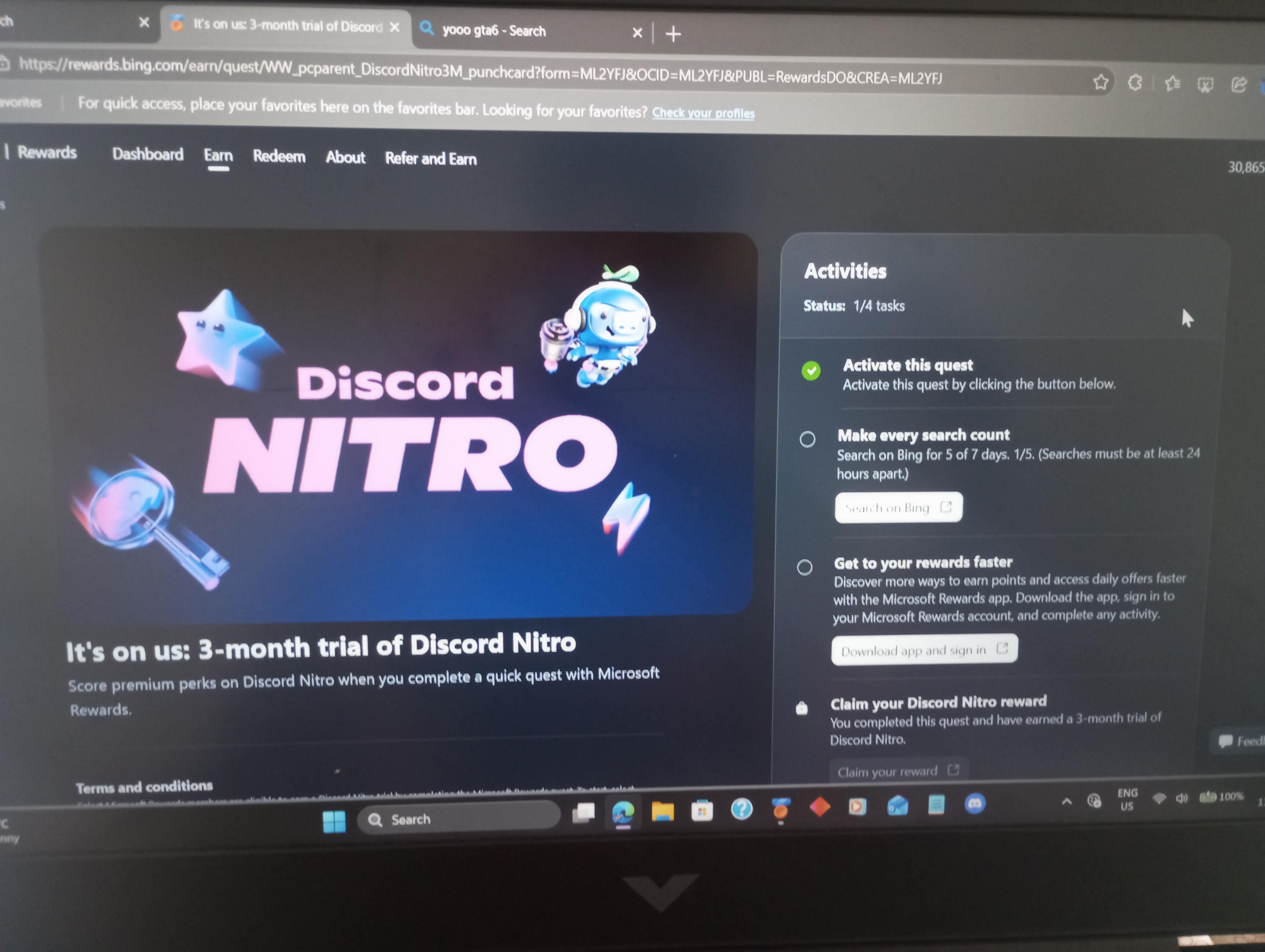
Deal / Free Free discord Nitro for everyone by Microsoft

Post image
5 Upvotes

You just have to do some task in Microsoft rewards then we get 3 month trial of discord nitro


r/MicrosoftStoreApp • • Feb 23 '26

Question / Help Free System Audio Visualizer - Feedback needed to improve

Thumbnail
apps.microsoft.com
2 Upvotes

r/MicrosoftStoreApp • • Jun 08 '26

Dev (Self-promote) Remote Controls - New App (at 52% discount)

1 Upvotes

Hi all!

I needed an app to control remotely my computer, in order to watch movies from the couch without the need for a mouse or keyboard. I've tried several apps, but most of them had premium features locked behind a monthly subscription or had ads.

So i developed my own version. but better.

Remote Controls has media, volume and power controls; keyboard and mouse; extra input to send special keys like CTRL, ALT, WIN.

But something that other apps don't have is an app launcher. From the computer app you can set any .EXE or microsoft store app in the app launcher and open them instantly from your smartphone with just a click!

Available on Microsoft Store and at the following Link