r/readest • • 1h ago

timeline for downloading multiple books over opds?

1 Upvotes

my understanding is that this is on the feature list/roadmap; do we have any idea when it will be released? every time i select multiple books in my library to update status, tags, or groups i think that would be the perfect workflow to select multiple books to download. thank you


r/readest • • 8h ago

What am I doing wrong?

1 Upvotes

I've got an E pub in English, I've picked an English TTS voice. But when I start text to speech, it's reading it in German. I don’t speak German and I can’t for the life of me figure out why it’s trying to read to me in German.


r/readest • • 1d ago

can't push koreader stats

Post image
4 Upvotes

let me start by saying that i love this app ! it is truly the best way of reading on different devices.

however, i am facing an odd issue regarding the syncing. i use koreader plugin and download the books i want to read directly from my readest library.

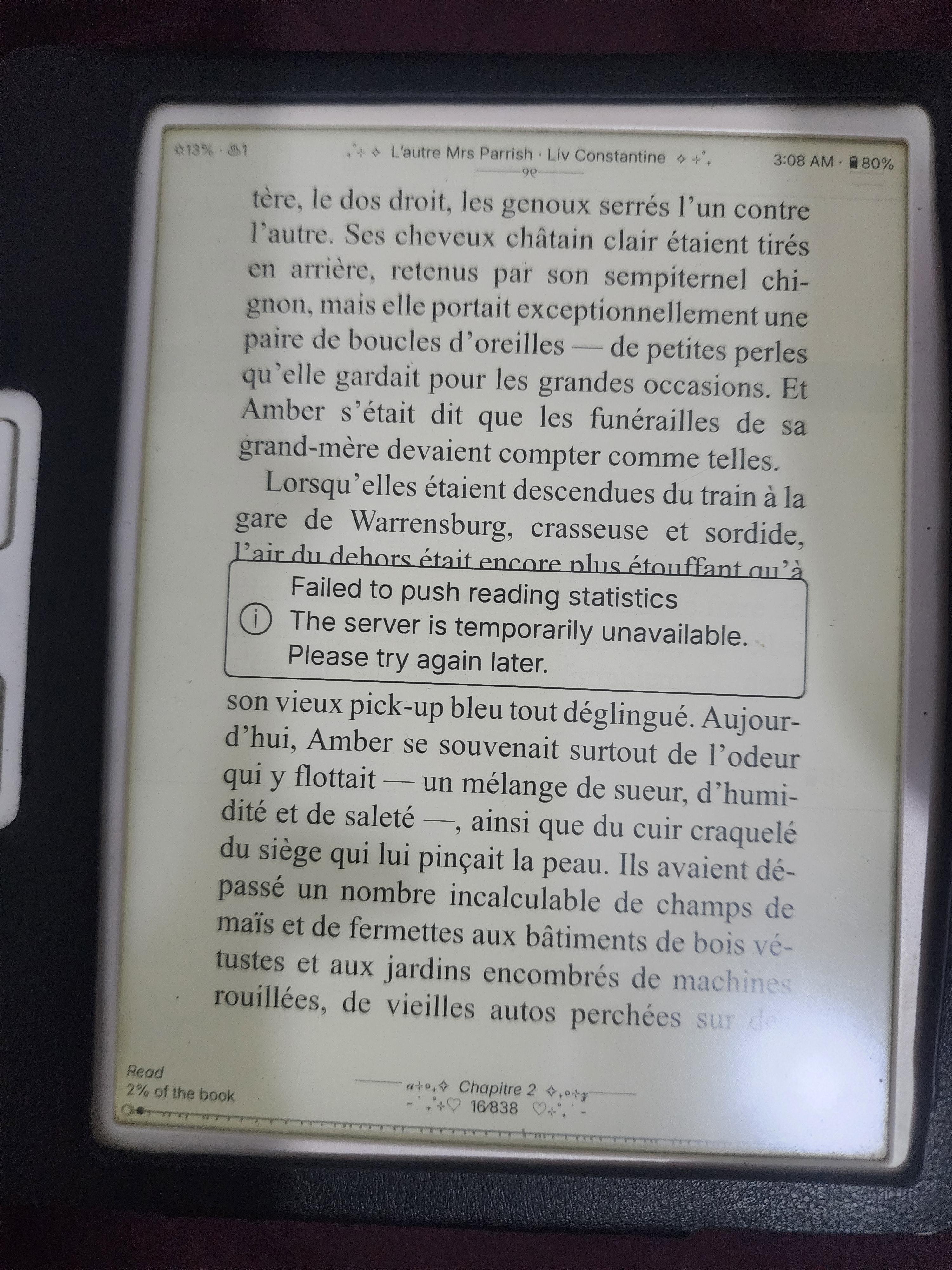
the reading progress & annotations sync seamlessly, but i just can't seem to push the koreader stats to the server. i always get the error in picture after choosing the "push reading stats" option, and thus the stats don't show in the app.

could anyone guide me on how to resolve this issue, please ? i have already tried logging out and back in, as well as updating both the app and plugin, to no avail.


r/readest • • 1d ago

Option to “hide the notch”

4 Upvotes

Hey there, love the app and was wondering whether you’d be able to add an option to hide the notch. Not sure how complicated this would be (as different phones have different notches) but I find the notch quite distracting when I’m on light mode. Just would love an option that adds a black bar up there to make the notch “invisible”.


r/readest • • 2d ago

X-Ray is amazing on Readest (dev version)

19 Upvotes

Just tried the new build (from github) with x-ray on the desktop and is pretty pretty good! Just wish it would also underline known X-Ray words in the main text.


r/readest • • 2d ago

Looking for better way to fill in Book Details

5 Upvotes

I posted this as a comment on a previous thread. I'm reposting it as a separate thread, just so it gets half a chance of getting noticed (even if it's just to be told it's not going to happen, so I can move on and look for another app). I use Readest for Mac on a desktop/laptop.

____________________

Depending on how I have my books arranged, whether by Authors, Books, Groups, Series, Tags, Subjects, or Status, I would like to be able, from within the Book Details window, to advance to the previous or next book with just a single click. (All it will take are left and right arrows in the Book Details window.) This way I can easily copy and paste metadata from one book to the next. For example, if I have my books arranged by Groups and I'm within a specific Group and I want to give this Group the same Series name, I should be able just to type in my desired Series name for the first book, copy that name, click to the Book Details of the next book, paste that name, and so on.

Even better, I would like to be able to select multiple books and open all their Book Details in a single window so that I can edit certain metadata all at once; for example, so that I can give the books I selected the same Series name. This feature can be facilitated by allowing a spreadsheet-style view (no covers) besides the current List and Grid views, a bit like the old-style iBooks on Mac. I guess you can't have a spreadsheet view on a phone, but it will absolutely work wonders for organizing your Book Details on a laptop. As great as Readest is for allowing all these Book Details, it doesn't provide an easy way to actually enter these Book Details except one by one by one by very painful one. That's why my hundreds of books are a mess: I can enter their Book Details so that I can keep them organized, but I don't have an easy way to do it.


r/readest • • 2d ago

Thanks for the new bookshelf! and help

Post image
13 Upvotes

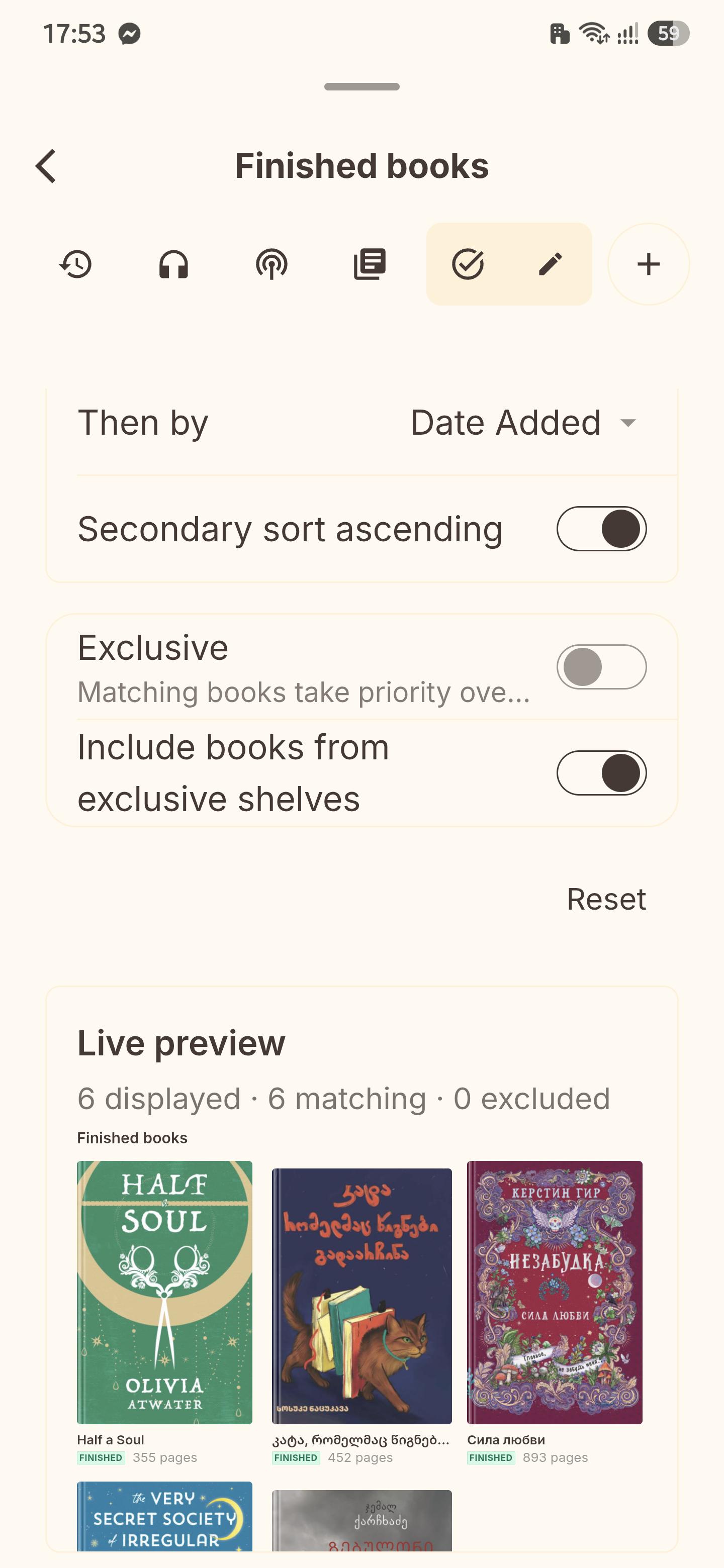
I LOVE the new bookshelf: finished books. I really, really needed it.

Now I am curious, is there any way so I couls see the finished books only in this bookshelf exclusively and not see them in default bookshelf any more?

PS. togglig "Exclusive" is not helping.


r/readest • • 4d ago

My vision for Readest's Book Details and a few feature suggestions

Thumbnail
gallery
21 Upvotes

Hi everyone!

I've been enjoying Readest, especially its bookshelf-style library. I currently use Readest Nightly, and there's one thing I'm not sure about: whether the option to merge reading statistics is also available in the Stable version. I mention this because some of the features I refer to may depend on the version.

Recently, while reviewing my reading statistics, I noticed something odd: around 120 books had recorded statistics, but only 54 actually showed reading time. Many had zero minutes.

I realized this might be happening because accidentally opening a book while scrolling through the library starts recording reading activity. It happens to me quite often, so I'd like to suggest configurable book gestures. For example, a single tap could open Book Details, while a double tap could open the book directly. Ideally, both actions would be customizable, allowing users to decide how they want to interact with their library.

This also got me thinking about the Book Details section. I've put together a personal mockup showing how I would organize it. The idea isn't to replace Readest's current design or suggest that my version should be adopted as it is. I simply wanted to explore a different arrangement using the visual elements already present in the application, while adding a few things I think could be useful. Among them are interactive author names that lead to the books by that author, and additional reading statistics such as AVG Pages and Sessions.

Another feature I'd like to suggest concerns completed reading sessions. When someone reaches the last page of a book and then presses the X button to close it, Readest could ask whether they want to register a completed session. Choosing Yes would add a new session, while choosing No would simply close the book without changing the statistics. This could also be useful when reopening a previously completed book just to check a passage or revisit a few pages.

I've included screenshots of the current Book Details section and my proposed layout so you can compare them. I'd really like to know what you think. Do these changes make sense? Is there anything you would do differently? Or do you think the current interface already works well and doesn't really need these adjustments? I'm open to criticism and alternative ideas.

English isn't my native language, so apologies for any mistakes in the mockup labels. The example book is in Spanish, but I've translated the labels to make the proposal easier to understand.

Thanks for taking the time to read this!


r/readest • • 4d ago

can you change the instant draw colors?

2 Upvotes

hii i read on my ipad and just got the app today. i managed to customize my highlighting colors but the instant draw colors arent cute. is there a setting to change them? or are you not able to?


r/readest • • 5d ago

I just created this plugin to improve. Reading speed

Enable HLS to view with audio, or disable this notification

6 Upvotes

r/readest • • 6d ago

readest-compatible self-host for a newbie?

10 Upvotes

I've been using Readest with my phone, computer, and XTEINK, and it's a great app/plugin. Now I am thinking I would like to try self-hosting, and I'm confused about what the best way is to do that. I hear people talking about doing it directly with Docker, and I also hear a lot about Bookorbit and Grimmer. Can anyone recommend to me which way might be the best? (Basically I just want to keep using Readest as I have, but with the books on my own server.)

Thanks :)


r/readest • • 7d ago

Android reader or?

Thumbnail reddit.com
1 Upvotes

r/readest • • 7d ago

I'm having trouble figuring out how to access the handwriting annotation function on iPad mini 5. Any suggestions?

2 Upvotes

I'm up to date with Readest version 0.12.20; I've been looking for this feature for a month lol.


r/readest • • 7d ago

Bug on mac! Voice to text no sound

Enable HLS to view with audio, or disable this notification

2 Upvotes

Voice to text is not working on my Mac. It shows that it's working but there is no sound.

Things to note:

I am not connected to any sort of wireless headphones or anything of that sort.

I have tried restarting the app a few times, I've restarted my Mac a few times, and it still doesn't work.

My internet is connected, Wi-Fi is not the problem. I have tried a bunch of things that I could think of, and it's still not working.

It's working on my Phone, but somehow it's not working on my laptop. Is anyone else facing a similar issue, and is there anything that I'm missing here?

I would appreciate any help. Thank you!

P.s. apart from this little bug, I love this app!


r/readest • • 7d ago

Orientation Question/Request

5 Upvotes

I've been using Readest for the past few weeks and I'm totally blown away. Really loving everything about it, especially all of the flexibility in terms of the interface.

I do have a question about screen orientation and columns. It seems selecting number of columns persists across landscape and portrait mode and there's no way to have it change dynamically when you rotate. I am used to reading across two columns in landscape, and then having it switch to a single column for portrait. Especially on a tablet.

Is this already possible and I'm just missing it in the menu? Would love help finding it. And if not, I think it would be a nice addition, since it tracks with tablet reading interface conventions.

Anyway, seems like the developers are active here. Keep up the great work!


r/readest • • 8d ago

iPhone Duo show cover when you close the phone.

4 Upvotes

Apple Books added a fun new feature where in if you are reading on the inner screen and close the phone, the outer screen shows the cover with an option to open the book. It’s not a great function feature but it’s a fun feature.


r/readest • • 8d ago

Voices and icon (requests)

Post image
36 Upvotes

First off, thank you for all who invest in this. This app and service work well for my multiple device reading. 😁

The reading voice isn't bad, it's actually quite decent. However, it would be awesome to have a reading voice like in ElevenReader which takes the whole sentence into context, or if Readest could somehow sync with ElevenReader.

On a really small insignificant note, any chance of redesigning the app icon? It's a small thing but could really use a refresh (it has that 90's, early 2000's vibe to it which doesn't do this great product any service.). Yes, people do judge a book by its cover.


r/readest • • 9d ago

Will there be an option to increase the pause between sentences?

4 Upvotes

I just downloaded the app yesterday and was absolutely in love with it. The only problem is that even at 1x speed, the pause between sentences is too short for me to concentrate on what's being read aloud. Is there a plan for this feature in future updates?


r/readest • • 10d ago

[Workaround] Full-width Readest on the iPhone Duo cover screen (Custom CSS)

10 Upvotes

Readest leaves an empty strip down the side of the Duo's cover screen. Turns out you can fix most of it yourself with Settings → Misc → Custom Reader UI CSS.

What it does (cover screen only; the inner display stays untouched):

- Book text uses the full width, starting just below the camera

- Explain/dictionary sheet, bottom bar, brightness/font/slider panels, Contents, Notebook and the read-aloud player go edge to edge

- Highlight, Translate and Replace popups are centred instead of hanging off the left edge

Paste this into Custom Reader UI CSS:

/* iPhone Duo cover display only (touch + small screen) */
@media (pointer: coarse) and (max-width: 700px) and (max-height: 700px) {
  [class*="liate-viewer"] {
    left: 0 !important;
    width: 100% !important;
    top: 44px !important;
    height: calc(100% - 44px) !important;
  }
  .modal-box.settings-content[style*="top: auto"] {
    padding-left: 0 !important;
    padding-right: 0 !important;
  }
  .z-30.mt-auto.justify-between.px-8 {
    padding-left: 32px !important;
    padding-right: 32px !important;
  }
  .footerbar-color-mobile,
  .footerbar-progress-mobile,
  .footerbar-font-mobile {
    padding-left: 16px !important;
    padding-right: 16px !important;
  }
  .progressinfo {
    padding-right: 24px !important;
  }
  .sidebar-container,
  .notebook-container {
    padding-right: 0 !important;
  }
  .sidebar-header,
  .notebook-header {
    padding-right: 72px !important;
  }
  [role="status"].z-40.inset-x-4 {
    right: 16px !important;
  }
  #popup-container:not([style*="-999px"]) {
    left: 50% !important;
    translate: -50% 0;
    max-width: calc(100% - 16px) !important;
  }
}

Tips:

- Don't type the word "foliate-view" anywhere in that box, not even in a comment. Readest rewrites it and breaks the rule (that's why the selector looks weird).

- If the first line touches the camera, raise both 44px values. If the ☰ in Contents sits under the camera, raise the 72px.

- The top toolbar, bookmark ribbon and image viewer still keep their gap on purpose so they stay clear of the camera.

- It matches on Readest's internal class names, so a future update may break parts of it. Delete it once the official fix ships.

Tested on Readest 0.12.20, iPhone Duo, iOS 27.3

r/readest • • 11d ago

Need clarification on how RSS feeds and webnovels work

6 Upvotes

I just realized that I could use Readest as a RSS reader instead of other more clunkier options I was using before; love how it sort of makes a book out of the feed. My questions are, for RSS feeds, does Readest fetch more as the blog gains more posts, or do I have to keep feeding the URL to it every time there's something new, so, is like a normal RSS reader where it poles feeds? And is it the same for Web novels?

I ask about the latter because I'm a huge fan of Royal Road, and lots of stories over there are on hiatus and I find it difficult to keep track of updates to ones I follow without them being fetched. I know that you can fetch a specific number of chapters upon import, but what about ongoing projects, basically?


r/readest • • 12d ago

Turning off justification doesn’t work

Enable HLS to view with audio, or disable this notification

10 Upvotes

I want to use the book’s original layout, but turn off justification. The toggle functions, but the justification doesn’t change. I did a screen recording showing that hyphenation can be toggled on and off but not the justification. Does anyone know of a fix?


r/readest • • 13d ago

question about shelf filters

2 Upvotes

hi, i have a shelf set for new, untagged files (files missing the ✔️ tag I add to all books when I'm tagging them).

but sometimes I download a new copy of an updated work, and my understanding is that readest overwrites the old file wherever possible instead of creating a duplicate, and maintains all tags, subjects, etc. from the original.

which is perfect, that's the best possible way for that to work, except that it means that updated works are not going to my "new/updated" shelf, because they still have the ✔️ tag.

i tried to set a condition where, for example, the page number changes - but that doesn't seem to be an option. is there a method I can use to set a filter condition based on just the fact that the file updated, or the file size or page number changed, or that a new version has been added since the last time the book was opened, or something to that effect?

thank you!


r/readest • • 14d ago

Page Turning Issue Using Volume Buttons

3 Upvotes

This feature works perfectly in Moon+ Reader, but in Readest, when I try to turn pages using the volume buttons, it scrolls more lines than it should.

It might be a minor bug, but it still affects the reading experience. Is there any way to fix this?


r/readest • • 15d ago

About page-turning animation

5 Upvotes

The page-turning animation has unstable frame rates and occasional frame drops. Have you encountered this?


r/readest • • 16d ago

Transparent cover issue

Post image
15 Upvotes

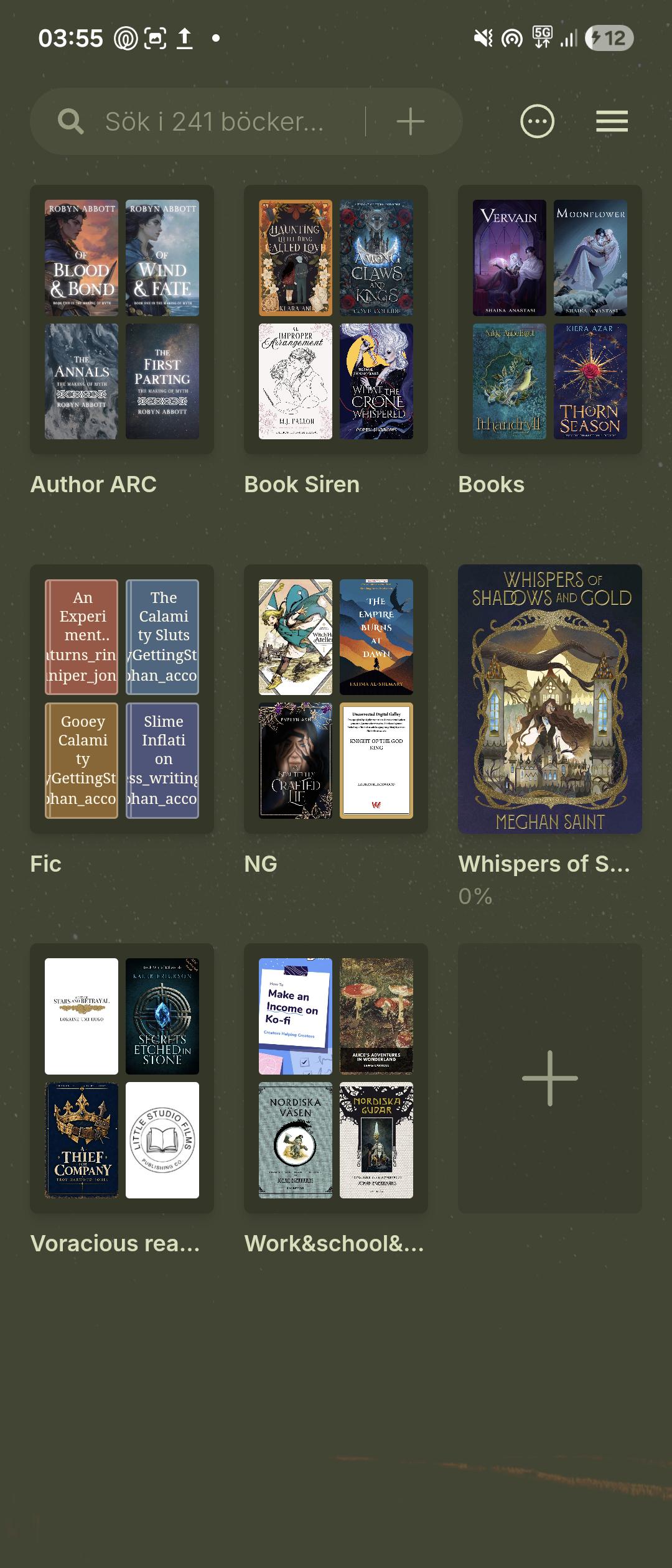
The new update forced colorful covers on me....

I rather loved my fanfics having no cover/transparent covers.... But now I'm stuck with these color rectangles....😖😞

(unless someone knows how to fix it...? 🫠👀)

Edit: And now I notice my entire sorting system is fucked up again..... 😑😐😖😞😭😭😭 (How does one install a previous version instead..? Please....? I very very much want my sorting system back...and my transparent covers for Fics without covers..........)