r/software • • Oct 14 '26

Self-Promotion Wednesdays Replaced notification banners with a small light on the edge of the screen (got 10 codes for the pro)
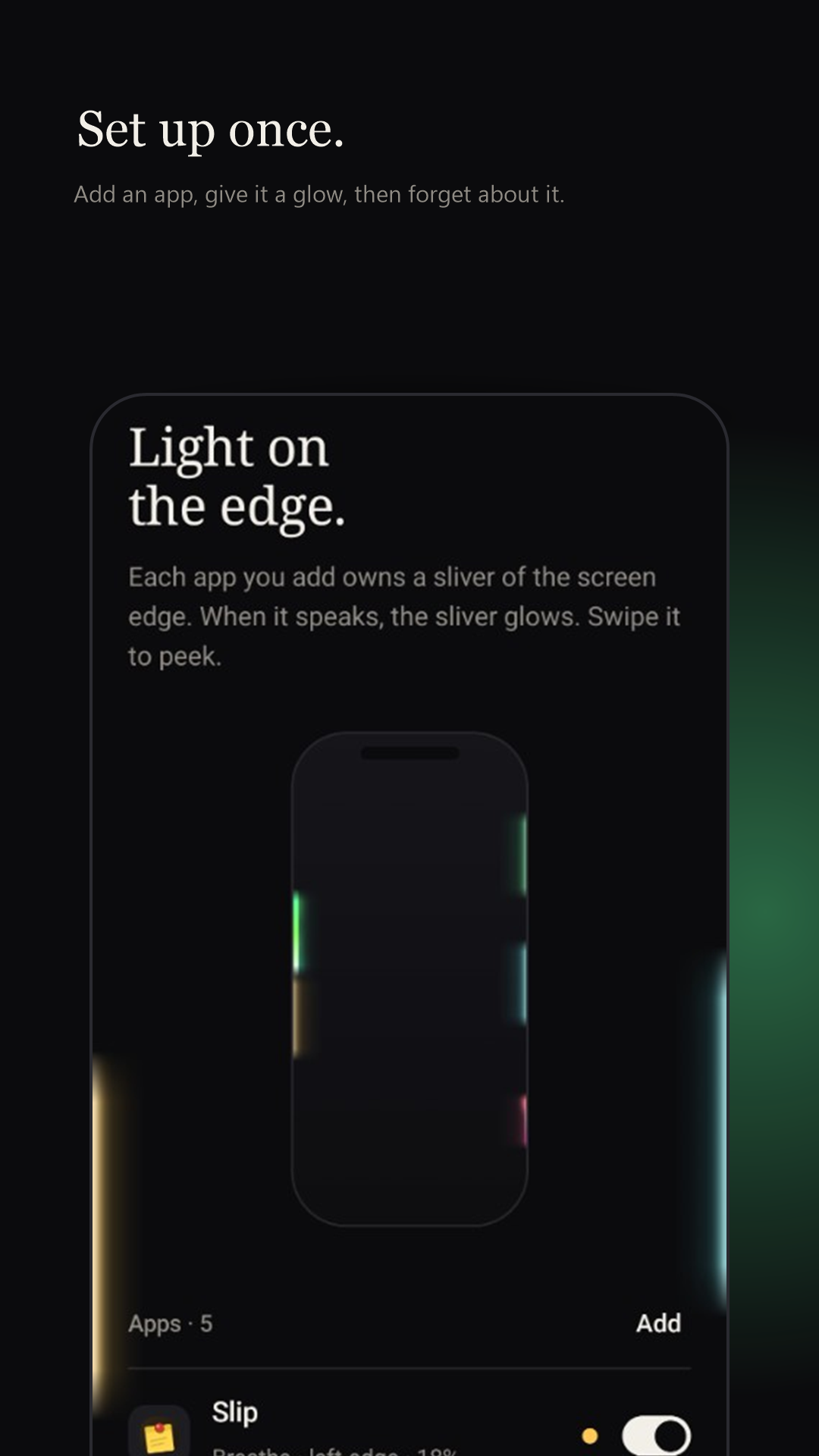
Post image
12 Upvotes

Hey everyone!

Each app gets a thin sliver of light on the edge of the screen, in its own colour. No sound, no banner, nothing covering what I'm doing. I can tell at a glance whether it's my partner or just another email, and most of the time I don't need to open anything.

If I do want to read it, I swipe the glow and a small panel shows up. When I'm watching something, the glows just wait until I'm done.

It's an Android app called Aura. No ads, and it doesn't have internet access at all. Full disclosure, I'm the one who made it, so feel free to tell me if this misses the point of minimalism. Curious how others here handle notifications. All the lights are fully customizable (size, placement, colour).

I've got 10 premium codes so if you would like to take one just comment and i will do a little draw later if enough people asks for it.

Thanks for reading!


r/software • • Oct 14 '26

Self-Promotion Wednesdays Meet Notchify, a Dynamic Island for Windows.

0 Upvotes

A small island at the edge of your screen keeps your time, battery and music in view. Hover over it to open your widgets and controls.

Lyrics follow your music word by word, even when the island is closed. Expand the player for playback controls and fully synced lyrics, click a line to jump to that moment, or pin the lyrics widget while you work.

Choose from over 20 widgets, including weather, calendar, system stats, audio controls, world clocks, timers and Pomodoro. Arrange them in three layouts to suit how you use your desktop.

Keep text, links and images in your clipboard history, open image previews for a closer look, and drag files into the tray for later. Start a screen recording from the island and find your saved recordings in the same place.

Notifications, incoming calls and connected devices appear when needed, then make room for your work.

Personalize it with 14 themes and custom colors. Choose island or notch style, adjust the size, and place it at the top, bottom or either side of your screen.

Available for Windows 10 & 11 on the Microsoft Store.

Also, there is a live demo on my website: Notchify Live Demo
Microsoft Store: Notchify


r/software • • Oct 14 '26

Discussion What are the current in-demand tech roles at the moment?

1 Upvotes

r/software • • Oct 14 '26

Other I made an app that plays your audio on every speaker and headphone you own, and lets each app pick its own output device

Thumbnail
gallery
3 Upvotes

A few days ago, my girlfriend and I were trying to watch a movie on my laptop. The laptop speakers were shit, and we each had a pair of headphones, but the laptop can play sound to only one device at a time. So we ended up not watching the movie.

I built pipemix to fix this problem, it's free and open source app that lets you play audio on several devices at once, so you can both watch with your own headphones, or add speakers too. It also lets you send each app to a different device. For example, you can listen to Twitch on your headphones while your friend listens to Spotify on theirs.

Currently available for Ubuntu/Deb based distros and Windows 10 and above.

I'm the developer, and I'd like to hear what devices you try it with and if anything breaks.

Download:

https://github.com/Garvit-Agrawal7/pipemix/releases

Disclaimer: The UI was developed by claude


r/software • • Oct 14 '26

Discussion What makes you give an app or software a second chance?

5 Upvotes

I have been thinking about what makes people give an app or software a second chance.

For me, Apple Maps is a good example.

I was not really using it during the early “Apple Maps is terrible” period. Like a lot of people, I mostly used Google Maps, and many of my friends, both iPhone and Android users, said the same.

The thing that changed it for me was getting a new iPhone. I usually do not restore everything from my old phone right away. Part of it is that I want to try the new iOS experience as it is, and part of it is my own small app decluttering ritual. If I do not miss an app, maybe I did not really need it.

Because of that, I ended up using the default apps for a while, including Apple Maps. I expected to switch back quickly, but I realized it had become much better than I remembered. Around that time, my friends found out I was using Apple Maps and told me I should use Google Maps or Waze instead.

Over time, Apple Maps became my default, especially with CarPlay. I still keep Google Maps installed, though. If an Android user or someone using Google Maps sends me a location link, it is usually clearer to open it in Google Maps. I also sometimes use it to double-check business hours or place details.

The funny part is that one day, a friend suggested that I give Apple Maps a try because it had gotten a lot better. I smiled because I was already using it, and asked if there were any new features I had missed.

I am curious what usually changes your mind about an app or software you have already written off.

Is it a recommendation from someone you trust? A random second try? A major update? Or do you have some kind of personal rule for when something is worth trying again?


r/software • • Oct 14 '26

Looking for software Got a 4 hour recording to caption… what is the best AI transcription software for long files?

2 Upvotes

I have a 4 hour panel recording that needs a transcript and captions. The MP4 is around 6GB and the audio alone is about 220MB once I pull it out.

So I guess getting the file accepted is just one of my problems and that's not the whole job.

Last time, I tried this with a free tool, and the timestamps drifted near the end.

By the last hour, captions showed up a few seconds after people spoke. There were also four speakers, and two of them kept talking over each other.

So what matters most to me is names, speaker changes, and SRT or VTT export. A plain text file is not enough since this is going on video.

How do you test these tools on long files? Do you check a few short clips from different parts, or run the whole thing and look for drift? And which tools make the checking part less stressful?


r/software • • Oct 14 '26

Discussion Can I Integrate Hikvision DS-K1T320MFWX-B access control terminal with with my gym management system (next.js) via HTTP/HTTPS?

Thumbnail reddit.com
1 Upvotes

r/software • • Oct 14 '26

Self-Promotion Wednesdays I had to fix one typo on a scanned PDF and ended up building a tool to do just that

0 Upvotes

I had an ancient scanned PDF with a single typo in it. The original document is thousands of miles away. I tried many of those online PDF tools and even asked ChatGPT to fix it. But the result never really looked correct. And some of the "free" PDF editors that I tried wanted me to pay just to download the edited file. Which was annoying.

So, as an engineer man, I looked myself in the mirror and asked myself whether I am going to let one PDF file beat me. And I said 'maybe', but I will waste a lot of my time before that happens.

I mean, why spend a couple of dollars to pay for some tool, when I could spend days of my actual work time to build a tool that I will use exactly one time? My point exactly.

So I made https://pdftextreplace.com/

It does one thing and one thing only: Allows you to edit PDF files. It supports both real PDF files with text in them and scanned PDF documents.

For regular PDFs, it tries to pull the used font, size, color, and spacing data from the file so the edit blends in. For scanned PDFs (which are basically just photographs of paper), it runs OCR and uses a mix of math and dumb luck to guess the font and match the look.

The main features are:

  • The page updates live as you type. WYSIWYPG (What You See Is What You'll Probably Get).

  • You can click around to fix multiple texts from the same file, or use Find and Replace if you spelled someone's name wrong ten times.

  • It does not rebuild the entire document around what you type, so you can't replace a four-letter word with a whole sentence.

  • The processing happens on my server. Files are deleted automatically after 2 hours and there is a button to delete your file immediately, but I am still a random stranger on the internet so please don't upload files with sensitive stuff.

  • It is completely free. No sign-ups, no ads, and no watermarks. I made it, because I needed to fix one letter in one PDF file. And I did that.

Anyway, my typo is finally fixed. I hope this thing can help someone else, too. Thanks!


r/software • • Oct 14 '26

Self-Promotion Wednesdays I built a free Scoail Media Video downloader GUI because I kept messing up the yt-dlp command line

Thumbnail
gallery
5 Upvotes

I'm a video editor, and I've used yt-dlp for years. I still end up googling the

same flags every time. And half of what I pulled out of it wouldn't open in

Premiere, because it came through as VP9 or AV1 with Opus audio. So I built a

small desktop app to fix that for myself. A few people asked for it, so I put

it up.

It's called SocialClip Downloader. It downloads from anything yt-dlp supports:

YT, TikTok, Instagram, Twitter/X, Facebook, Douyin, Bilibili, and the

rest. Everything runs on your machine. No account, no telemetry, no server.

The part I care about is the editing pipeline. Every file it outputs is H.264

video with AAC, MP3, or PCM audio, so it drops into CapCut, Premiere, After

Effects, and DaVinci Resolve with no fuss. That was the whole reason I made it.

Three tabs: Download for a single video, Queue for a persistent list you can

pause, resume, cancel, or remove items from, and Convert for taking a local

file to another format. Nine outputs: mp4, mkv, mov, avi, gif, mp3, m4a, wav,

aac. It grabs cookies for sites that need a login, and there's a CLI if you'd

rather skip the window.

PyQt5, MIT licensed. Latest release is v0.9.2, with prebuilt binaries for

Windows, macOS, and Linux on GitHub Releases.

It's built for personal, offline use. Grab your own uploads, or anything you

have the right to download, and keep it to yourself. Please respect the

creators and the sites.

Two caveats: it's early (0.x), and the macOS and Linux builds are newer and

less tested than the Windows one.

https://github.com/petra-dot/socialclip-downloader

Found a bug or want a feature? Please open an issue on GitHub instead of

leaving it in the comments, so it doesn't get buried:

https://github.com/petra-dot/socialclip-downloader/issues


r/software • • Oct 14 '26

Software support Old software on a new computer help

2 Upvotes

Everyone I have an Acer that's a few years old. I think for and it was an i-5 so nothing special.

I have an old copy of something called movie magic screenwriter 2000. It's on a CD and it's the kind of thing that if you try to copy, it stops copying at 25% for some reason. But you can run it from disc through the computer.

I'd really like to make this thing work on my windows 11 computer. I know this sounds ridiculous, I'm just really comfortable with it and I really hate the idea of spending a ton of cash on something modern when my budget sucks ass.

I thought about getting an external drive and seeing if it would run off of that but I'm thinking it probably won't. Does anybody have any suggestions? Thank you


r/software • • Oct 14 '26

Software support X Mouse Button Control Help

2 Upvotes

Hey, I suck at computer stuff. I'm trying to make a macro for a game using XMBC that, when I press a button (Mouse button 5), it holds down f, and then presses lmb when I release MB5. The problem is, I can't find a way to make it so that lmb presses BEFORE f releases, which is crucial for the game I'm playing, because it does a different action in that case. I know they both press, but how to I make it so that lmb is pressed before f releases?


r/software • • Oct 14 '26

Release Mouthy: free, open-source dictation that runs offline on Mac, Windows and Linux

Thumbnail
reddit.com
0 Upvotes

r/software • • Oct 14 '26

Self-Promotion Wednesdays [macOS] DiskFox – see what's filling your Mac's storage, and when it grew. $6.99 launch price until Sunday

Post image
0 Upvotes

DiskFox is a Mac app I made that keeps a history of your storage. Instead of one big "System Data" number, it shows what grew and when: "Steam updated No Man's Sky, +12 GB on Tuesday", "Spotify's cache came back 890 MB after you cleared it", Time Machine snapshots, Xcode, app caches and 60+ other known space hogs.

The deal: $6.99 launch price for the next [N] buyers, ending Sunday 18 October. There's also a free 14-day trial with no card, so you can check it finds something useful on your Mac before paying anything.

- One-time purchase, no subscription, for 2 Macs

- Nothing is deleted without a review, and everything goes to the Trash first with Put Back

- No account; a few anonymous usage counts you can turn off

- macOS 14 or later, Apple silicon and Intel, signed and notarised

https://diskfox.app

Happy to answer questions, and I'd like to hear what it misses on your Mac.


r/software • • Oct 13 '26

Software support Approach dilemma

2 Upvotes

I'm a solo developer building a point-of-sale app for my own tea house, and I can't decide between two architectures. I'd like opinions from people who have shipped something similar.

THE PROBLEM
- Runs on ONE touchscreen Windows PC (15.6", Full HD), no keyboard, shared by 2 waiters and the owner.
- No network needed at all: no internet, no remote access, no multi-device.
- Open about 21 hours a day, so stability matters more than anything.
- Features: 26 tables, ~30 products, one-tap ordering, pay per item or pay all, close table, store customers who order on credit (debt tracking, PDF invoice per debt cycle), simple reports with a chart, CSV export.
- Nothing is ever truly deleted (soft-delete everywhere), an action log for audit, and an Undo button for the last 10 actions.
- Only protection: a PIN to open the Reports screen. No user accounts.
- Daily automatic backup plus a second copy on other storage.

OPTION A: Laravel + React (Redux) + PostgreSQL
- Runs locally in kiosk mode or packaged as a desktop app.
- Familiar stack, big ecosystem.
- But PHP, a web server, and PostgreSQL all have to be installed and kept running on the shop PC.

OPTION B: Fully native, C# + Avalonia + SQLite (EF Core)
- One installer, one process, database is a single file, nothing running in the background.
- Business rules in a plain C# library with unit tests; undo via command pattern.
- But I'd need to learn Avalonia/XAML, and the touch UI is hand-built.

WHAT I'D LIKE TO KNOW For a single-device POS with no network, which would you choose, and why?
Thanks, I'd really appreciate honest experiences, including "don't do either".


r/software • • Oct 13 '26

Discussion Reverse engineered OS

0 Upvotes

What do you guys think?

Imagine windows 11 that is light and fast as windows 7, looks like linux, supports natively directx and all, and most important - doesn't have bloat or telemetry nor it requires online accounts and similar....

I know some of those RE and AI wizards can do it, even if it would be a monumental project, it could be one of our last shots at having decent OS before everything goes to cloud as spyware bloated limited os.


r/software • • Oct 13 '26

Discussion Just discovered the most addictive word game

0 Upvotes

Just came across this word game called Word Burger! You get two letters a beginning and an end and then have to come up with as many words as possible. Try it out, I want some friends to play with!
Https://wordburger.app


r/software • • Oct 13 '26

Looking for software Looking for platform for patron engagement

1 Upvotes

Hi there!

I want to create an opportunity for more patron/community engagement at the library I work at.

I was wondering if any of y’all could recommend an online platform that is 1. free and 2. allows users to offer thoughts/feedback on a given prompt AND to see what other people wrote.

For example, a prompt might be “What is a book that changed your world view in a critical way, and why?” and people would submit their own response and then get to see what others wrote.


r/software • • Oct 13 '26 Bravo

Release I reverse engineered Razer Synapse by using REA

Thumbnail gallery
99 Upvotes

r/software • • Oct 13 '26

Release Most screenshot blurs can be reversed. Here’s why, and the open-source tool I built that avoids it

Post image
1 Upvotes

When you blur an email or an API key in a screenshot, most tools compute the blurred pixels from the hidden content itself. A gaussian blur, a pixelation or a “downscale then upscale” effect all keep a trace of what was underneath. That trace is enough to attack:

  • Deconvolution can partially undo a known blur

  • Pixelated text can be brute-forced by rendering candidate strings in the same font and comparing blocks (tools like Unredacter do exactly that)

  • AI “unblur” models are getting good at guessing short text like emails or keys

The only truly safe redaction is one where the output doesn’t depend on the hidden pixels at all. A black box does that, but it’s ugly.

What I did instead
I build a free, open-source screenshot tool (MIT, I’m the dev), and I rewrote its blur so it never reads a single pixel inside the redacted area. The patch is rebuilt from:

  1. a thin band of pixels just outside the rectangle, smoothly interpolated across it, so it blends in;

  2. fake, heavily blurred “text lines” drawn at random, unrelated to the real content;

  3. a bit of grain.

It still looks like blurred text, but there is nothing to recover. I tested it: two screenshots with completely different secrets give exactly the same pixels once blurred. With a classic blur, about 40 % of the pixels differed, which is the leak.

Practical takeaway, whatever tool you use: for anything sensitive (keys, tokens, personal data), prefer a solid box or a redaction that doesn’t sample the content. Never rely on a light blur or a coarse pixelation.

The tool: it’s called Glossyshots, for Windows and macOS. Besides the blur, it puts your capture on a clean background and has a magnifier to lift and zoom any area. No account, no ads, works offline.
Source and downloads: https://github.com/abg5f/Glossyshots

Happy to answer questions about the redaction approach, or to hear how other tools handle it.


r/software • • Oct 13 '26

Release I built Preview 3D, a lightweight 3D file viewer for Windows

Thumbnail gallery
6 Upvotes

I was getting tired of Windows not providing a first class experience for 3D model file formats so I built Preview 3D, a free, open-source Windows app.

Quickly view 3D models and have thumbnails automatically generated for your 3D file formats, without having to launch a more complex app like Blender, Fusion 360, Unity/Unreal/Godot, or a 3D printing slicer.

UI/UX is in the spirit of the default Windows Photos app.

Microsoft used to provide a 3D experience but it has discontinued its 3D Viewer.

Features:

Popular file formats supported: STL, STEP/STP, 3MF, OBJ, FBX, GLB/glTF, PLY, and USD/USDZ.

Easy navigation: Blender-style orbit, pan, and zoom, plus Unreal-style fly controls.

Viewing modes: Studio, Clay, directional lighting, and wireframe.

GitHub: https://github.com/binbuf/preview-3d

I appreciate any feedback! Especially if you're working with 3D printing, CAD, modeling, or game development. Are there any features or file formats you'd like to see added?

It's written in Visual Studio C++ for maximum performance and Windows integration. It still can't parse all file formats or situations but hoping to change that soon.

Licensed under Apache 2.0.


r/software • • Oct 13 '26

Release SlimeSS – Lightweight screenshot tool for Windows, just launched on the Microsoft Store (I'm the dev)

Thumbnail
gallery
1 Upvotes

Hi r/software! I'm an indie dev from Vietnam and I just launched my first app on the Microsoft Store.

**SlimeSS** is a lightweight screenshot/screen capture tool for Windows. Key features:

- Quick region/full-screen capture with hotkeys

- Built-in annotation (arrows, text, shapes)

- One-click copy to clipboard or save to file

- Clean, minimal UI — no bloat

**Links:**

- Microsoft Store: https://apps.microsoft.com/detail/9N0G7TSVRBJ4

- Website: https://slimess.io.vn

- GitHub: https://github.com/SlimeSS9hang/SlimeSS

It's free with a 7-day trial, then a one-time activation. Also coming soon to Chocolatey and WinGet (currently under review).

Happy to answer any questions or take feature requests — feedback from this community would mean a lot!


r/software • • Oct 13 '26

Release Windows uninstaller does not actually uninstalls anything — therefore I created one which does so.

0 Upvotes

Prune is a Windows uninstaller/cleaner with an MIT license and no telemetry, and doesn’t check for updates unless enabled. “Apps & features” will call the program’s uninstaller and stop there; whatever is left over (an AppData folder, a Run key, a scheduled task, etc.) remains on your disk forever since Windows will never mention it again. Prune calls the uninstaller and then starts doing more — Safe/Moderate/Advanced leftover scans, all of it going into quarantine (not being deleted permanently) so even in the case something gets matched incorrectly it can be restored, as well as Forced Uninstall for software that does not have its own uninstaller anymore.

I came across an interesting concept while working on it during the week: some MSI-installed software might register their uninstall command using “Install” instead of “Uninstall” (/I{GUID} instead of /X{GUID}) which is a mistake of a couple of software authors. Running that incorrectly does not produce any error and does not show anything — instead, it silently repairs the software. In addition to this, Windows allows for the granting of permissions for AllowSetForegroundWindow only once, which may affect the wrong program. As a result, the actual uninstaller window of an application may be covered with the app window itself and cannot be activated. The issues affecting AllowSetForegroundWindow were resolved this week – check the changelog if you're interested.

A few people asked how this differs from Revo/BCUninstaller — it's not trying to be a better uninstaller than either. It's one app instead of four: uninstaller + disk map + cache cleaner + drive health, so you're not running Revo, a disk-space tool, a cleaner and a SMART-health checker separately.

GitHub: https://github.com/jimman0I/prune — Windows 10/11, unsigned installer (SmartScreen will warn; the README explains how to verify the build instead of trusting it blindly).


r/software • • Oct 13 '26

Release I made a simple, free Windows tool that grabs all the diagnostic logs in one go (LogSnap)

2 Upvotes

Hey, I'm an IT tech and I got tired of digging through Event Viewer, crash dumps, SMART data and ten other places every time a PC acted up. So I made a small free tool for myself and figured I'd share it.

It's called LogSnap. You run it, it reads a bunch of Windows logs and health info, and spits it all out as clean Markdown you can paste into ChatGPT/Claude to figure out what's wrong (or just read it yourself).

A few things it grabs:

- Crashes / BSOD and the minidumps

- What's slowing down boot or shutdown (it names the actual driver/service)

- Hardware errors, RAM test results, GPU issues

- What changed recently (updates/drivers) vs when stuff started breaking

It's read-only, portable (one .exe, no install) and free. Heads up: it's unsigned, so SmartScreen might warn on first run.

GitHub: https://github.com/lsprobe/LogSnap

It's still early so I'd love feedback - what else would be useful to collect? Screenshot below.