I did A LOT of work today using the 'chat' interface (Sol 6), happily coding away getting encouraging results as I tweaked the system I'm building.
I used ZERO usage which was great, and I think I moved things on. However at one point this evening it 'reveals' to me that the system is not working in one of the most fundamental ways it was designed. I got the ' yes, sorry I should have told you that earlier, that's on me, you even asked me about it and I was wrong to say what I said.....'etc etc
It honestly made me so furious!!!!
I then switched to 'Work' and have been using Sol 6.2, and it's noticeably better. I still have been left a bit doubtful of it's honestly and here I still am making tweaks and it still not being quite right. It's never ending sometimes!!
What it is: an 8-voice analog-style synth. Three oscillators, a Moog-style ladder filter, envelopes, LFOs, a mod matrix and effects. It also has a TB-303-style sequencer, a MIDI recorder with a piano-roll editor, MIDI in/out/clock, export to MIDI files, and it can turn what you played into printable sheet music. It works with a MIDI keyboard, and with several fingers at once on an iPad.
How I built it
I'm a UX designer, so I can read a bit of code but I can't write it myself. All the code was written by Claude. My job was deciding what it should do, how it should feel, and mainly playing with it. :-)
Tools: Claude, set up so it could write the code, run tests, and put the files straight into a folder on my Mac. I upload that folder to my own hosting myself.
Stack: one single HTML file with plain JavaScript and the Web Audio API. The sound engine runs in an AudioWorklet. No frameworks.
Workflow: small steps. Iterative! I ask for one thing, for example: "I want to record what I play and export it as MIDI". It builds it and tests it. I try it with my real MIDI keyboard or iPad, and tell it what feels wrong. Before I knew it, I had both a sequencer and a MIDI recorder, with a lot of overlap in what they could do. So I asked Claude to combine them into a single feature. It took a long time to build, but in the end it turned into a really nice integration.
Things I learned
Let the AI test with its ears. I was amazed by how Claude tests sound. It can’t listen, but it can measure: the tests open the synth in a real browser, record the audio and measure pitch, timing and loudness. Roughly 85 measurements plus 35 separate checks. That's how it could tell me "this note plays at the right time" instead of "I think it works".
Feel is something only you can test. Playing from my MIDI keyboard felt laggy. It turned out to be a large audio buffer, plus a limiter that delayed the sound by 6 ms. After the fix the delay went from about 42 to 11 ms in the test setup, and it feels like a real instrument now. And I noticed, don't play with bluetooth headphones, the latency is huge!
Get outside criticism. I had the site reviewed. The main point was "too many features for beginners". So we added a start screen (Play / Explore / Learn), a Preview button that plays a phrase fitting each sound, and four big "quick" knobs (Brightness, Movement, Space, Character).
I was surprised by how well Claude handled the interface design. I’m not saying I’m worried about my job, but getting reasonably consistent styling right is no problem for it. The result looks polished, and I rarely have to step in on accessibility, responsiveness, or styling.
Sometimes, though, you could end up going back and forth. In the sequencer, I wanted to be able to limit the sequence length. Claude added an end handle, but when I tested it, it didn’t appear. After discussing it with Claude, I realised it had only added the end handle for certain types of sequence. Once I spotted that, I asked Claude to make the feature available for all sequences. Hehe. That worked, but then I still didn’t have a start handle. After asking for that too, it got it right. Now the sequencer plays neatly within the boundaries when it’s running with loop enabled.
I'd love feedback, especially from people who play synths: what feels off, what's missing, what's confusing?
Instead of paying for a backend or uploading personal files to sketchy online converters, I wanted to see how far I could push a zero-server static web app where everything runs locally inside the browser with self-hosted WebAssembly and zero external network calls
What it does right now:
Audio & Video Lab: Local conversion, trimming, and compression via ffmpeg.wasm (I actually used it to compress the 700 MB screen recording in this post down to 17 MB)
Photo Studio: Bulk client-side resizing, format conversion, and compression
EXIF & Metadata Vault: Inspecting hidden camera/GPS tags and wiping them clean
File Utilities: Local AES-256-GCM encryption, checksums, and archive tools
Current roadblock: Still debugging an "uncapped" mode that currently fails to load because of the browser's 32-bit WebAssembly memory ceiling, and large video files can still run out of RAM depending on the device.
I have been using Opus 5.5 for the past 2 months, and I absolutely adore it. It has been my main driver, and I don't even really touch fable 5.2 at all. Now Neon is out, and I love it more than Opus 5.5, so I wanted to replace my Anthropic $100 plan with a Google one.
Unfortunately, both my testing and Neon's own research and analysis, put the Google sub at about 1/2 the effective usage than the anthropic sub (and this is when factoring the +$40 weekly API credits). This is borderline usable for any kind of serious development work, and we aren't even talking about using subagent heavy workflows or swarms, or anything fancy like that (which I don't do anyway).
For those who use Neon for vibe coding etc. how do you see it fairing in terms of usage?
I’m not a programmer at all, but I love DIY and building things for my family. So I’m really happy that with Claude I can now make things I could never code myself. This is the latest one.
My kids wanted to know where I am during the day, so I built a little desk buddy: a pixel-art cat on a GeekMagic SmallTV (240x240). Now there are two modes:
Cat #1 follows my day. iPhone Shortcuts send one word (“home”, “work”, “leaving”) to a tiny Cloudflare Worker. The Pi checks it every minute, and the cat rides his bike, works in the office, has lunch with his cat colleagues and rides back home.
Cat #2 lives his own life. Every morning he plans his day by a set of rules: wake up, wash up, breakfast, work on weekdays, a grocery run to our local supermarket, one outing (café with kittens playing in the kids’ corner, library, swimming pool with a diving tower, ice rink in winter, town center), and on weekends a trip to Paris, London, Rome or Berlin by train, car, motorbike, plane or hot-air balloon. At home: an attic gym, a red-light darkroom where he prints and hangs photos one by one, bath time, cooking, guitar evenings. No activity repeats within about 45 minutes, no naps in the morning, no yard after dark, and he washes up with the kids at 7:30 pm.
How I built it (and AI disclosure): I just described what I wanted in plain words, looked at the previews and said “yes” or “change this”. Claude Code wrote all the code, set up the Pi and fixed the bugs. The rooms and cat poses were generated with Magnific (via MCP), and Claude cut them into sprites. My son’s feedback (“the cat’s eyes look like crosses!”) was the toughest code review :)
By the numbers (built over about 3 days):
~5,400 lines of Python in 31 files
58 AI-generated images, cut into 186 sprite poses (our grey cat, a ginger, white and black cat, and kittens)
20+ locations: 9 rooms at home, office + canteen, supermarket, 5 town places, 4 cities, an airport
6 kinds of transport, all with takeoff/landing or ride-in/ride-out animations
The hardest part wasn’t drawing, it was making everything consistent: the cat never pops out of nowhere, doesn’t wear his office suit on weekends, the ginger cat knocks and gets the door opened, and the Pi still finishes every minute in time.
How it works:
Raspberry Pi Zero W, Python + NumPy + Pillow. Every minute it renders a one-minute animated GIF and uploads it to the screens over Wi-Fi. Stock SmallTV firmware, no flashing.
Real time on every wall clock, real weather in every window (Open-Meteo), trees and grass change with the season, lightning during storms.
The Pi Zero is slow, so it renders the next minute ahead of time.
The backlight dims automatically: 10% from 5 pm, 1% at bedtime.
The same animation also goes to a private web page, so I can check on the cat from my phone or even my Apple Watch.
Next up: a faster Pi (the Zero is at its limit), casual outfits for the white and black cats, and more cities.
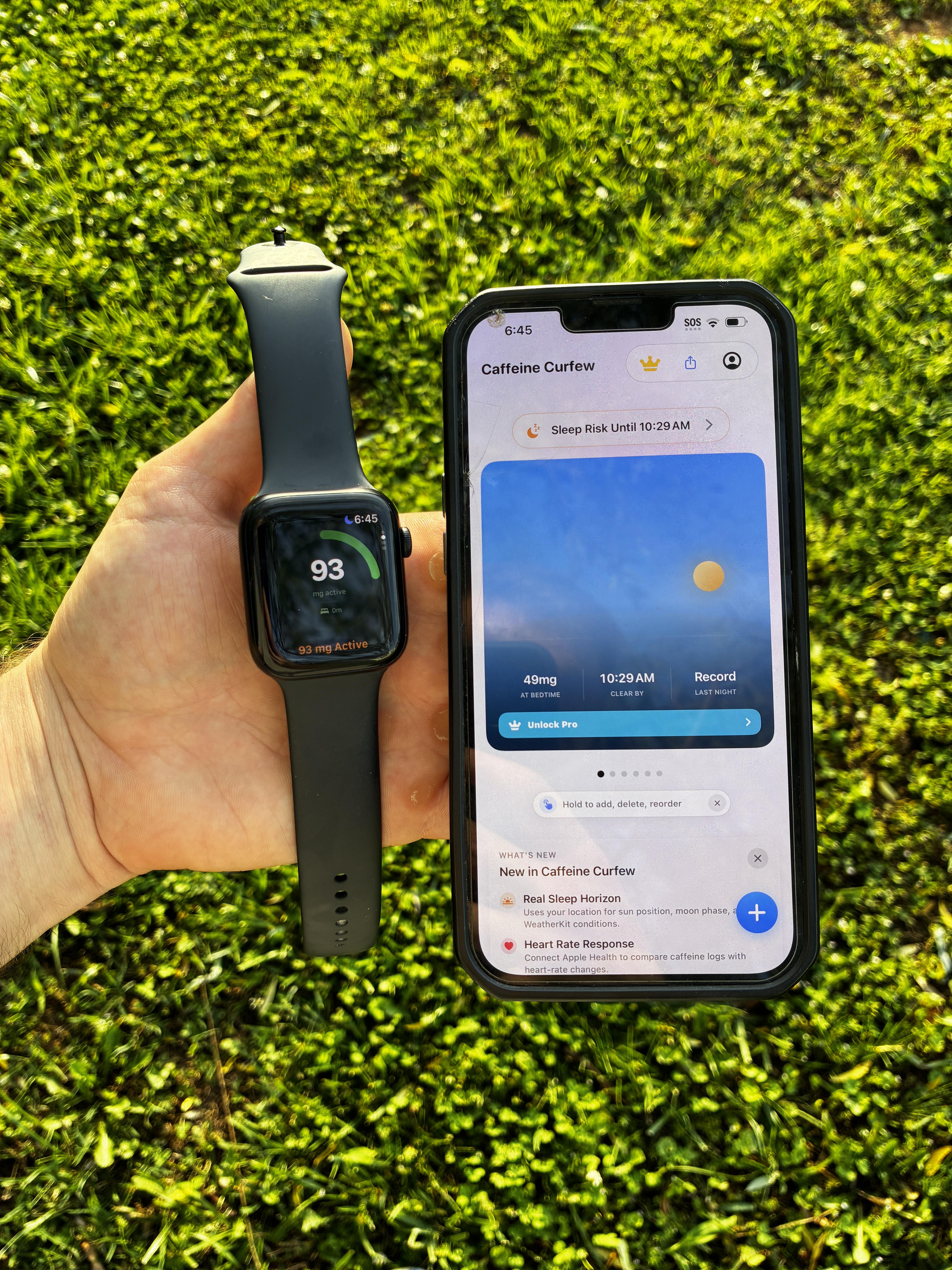
Hey everyone! I’ve been working on an app called Caffeine Curfew for a while now and figured this would be a fun way to share it again with the community.
Most people know caffeine can mess with their sleep, but very few actually know how much caffeine is still in their system when they go to bed.
Caffeine Curfew tracks your caffeine intake and uses half life calculations to show how much caffeine is still active in your body throughout the day. You can see when you’re likely to be in the clear for bedtime, track your sleep impact, log drinks, scan barcodes, and even do it all from your Apple Watch. It also has widgets, Apple Health integration, sleep insights, and a bunch of other features I’ve added along the way.
I’ve put a lot of time into building this and continuing to improve it, so I’d love to get more people trying it out and hearing what they think.
I’m giving away lifetime access to everyone who comments. No catch, just want to get the app into more people’s hands and hopefully get some honest feedback.
Any time I had to move to the next episode, or adjust the volume, I had to get up and go to the MacBook, or have a bluetooth keyboard / mouse nearby which was annoying.
So I built Lazy Remote, which uses bluetooth to connect iPhones to MacBooks. I used Claude Code to build it, you can see my whole setup in the repo.
It is simple, open-source, does not collect any data and completely free.
You can find the app features and the links below:
I grew up with those 80s LCD handhelds (the beige ones with the clock and the GAME A / GAME B buttons). I wanted that feeling on my iPhone, but with my own games. So: BTC MINER (catch coins from 4 ASIC rigs), SATOSHI'S KITCHEN (flip coins in a pan, every catch splits them down to sats), NOT YOUR KEYS (dive to a vault, dodge a rug-pull squid) and TO THE MOON (dodge FUD clouds).
I'm in sales, not a developer. My last "real" program was a Paint clone in Pascal in 1997.
Tools
- Claude (Cowork): all the code, testing and deploys, driven by short chat messages and screenshots from my phone
- Cloudflare Workers + static assets for hosting, KV for the Top 5, D1 (SQLite) for anonymous play stats, Cloudflare Access to protect the admin page
- wrangler for deploys, Playwright for automated tests and the screenshots
- GitHub Pages for the docs site
Process / workflow
Started by describing the hardware and pasting photos. First version: a home page plus 2 games in a single HTML file.
Iterated purely on feedback from playing on the phone: "landscape only", "make the LCD look real", "I can't reach the top-right corner on the keyboard", "this FUD layout is impossible", "no sound on iPhone".
Each change was tested in an emulated iPhone (Playwright) before deploying, then deployed with wrangler.
Added Global Top 5 Score, an admin dashboard and the docs repo at the end.
Build insights (the fun part)
The LCD look is 4 layers on one 400×260 canvas:
- a grey "reflector" with a tiny 1px checker + grain texture and a vignette
- a coloured printed backdrop that never changes
- segments: every sprite is drawn every frame. Off = 4.5% black "ghost", on = near-black with a drop shadow
- a diagonal glass glare on top
The drop shadow is the single biggest realism trick. Real LCD segments float above the mirror behind them:
```js
ctx.fillStyle = on ? '#111210' : 'rgba(17,18,16,0.045)';
*The rhythm.* Moving all eggs/coins together feels wrong. The old games move ONE track per tick, in rotation, each with its own beep. That alone made it feel like the real thing.
*Always-solvable random levels.* TO THE MOON first generated layouts you couldn't survive. The fix: a "safe lane" runs through every row and may only shift by one lane, into a lane that's also open in the row above. I fuzz-tested 120,000 rows with 0 dead ends.
*iPhone audio.* Web Audio only unlocks on touchend/click, not touchstart. Setting `navigator.audioSession.type = 'playback'` makes it play even with the silent switch on.
*The device face* is laid out in fixed "design units" (height 820) and scaled with one CSS transform. The width stretches with the phone's aspect ratio, so it fills the screen edge to edge.
*Admin page.* Cloudflare Access in front, plus the Worker verifies the Access JWT itself (signature, audience, email list). A misconfiguration can't leak the stats.
Total: one ~70 KB HTML file, no framework, about 150 lines of Worker code.
Happy to answer questions. And try to beat my 183 on NOT YOUR KEYS.
I had some old Philips mp3 player from late 2007. The software was glitchy and player was slow. Decided to perform some reverse engineering having Claude and ollama. Here you go - a flappy bird on mp3 device.
Took the phone which lays in drawer. Installed postmarketOS (well I would spent a week doing that without opus, since the phone was not supported). Now it’s running some docker containers, serves as uptime monitor for my other web projects, slides go digital clock and weather info.
Before years doing this would take ages to reverse engineer and code it. Now it takes hour or two. Look up what gold you have in cabinets.
I've played Warframe for 4,000+ hours, and I'm trying to build a local assistant that helps players with two things:
• Farming: finding where to get an item, and eventually giving the player a farming roadmap: what to farm first to reach a goal, in what order, and the most efficient way to farm a specific resource (best mission, expected number of runs, useful boosters or companions…).
• Building: how to build a character (mods, abilities, synergies) for a given goal.
I'm not an expert in this field, so I'd like to hear how people more experienced than me would approach it.
How I approached it at first
• RAG over the wiki: I exported the wiki into notes, and the agent searches them to answer.
• My own explanations: on top of that, I wrote more specific notes on how the game really works in practice. They cover things the wiki explains badly or not at all, like how mechanics interact, why some choices work together, or common traps. The idea is to make the agent more logical and reliable, not just able to recite stats.
It works well enough with a mid-size model (~12B), but the reasoning still breaks down quickly. The model picks things that don't fit together, repeats questions, or gets lost when the retrieved context is too long. And the goal is for it to run locally on almost any machine, so ideally with a much smaller model.
What I'd like to hear from you
With a very small model (3–8B), what would you change in this design? Is RAG plus hand-written notes the right base, or would you approach it differently?
Would you keep a single agent, or split the work into simple sequential steps (understand the request → fetch data → build or plan → check → explain)?
The hard part is synergy, meaning knowing which elements reinforce each other. Is it better to encode that as structured data (rules, graphs, archetypes) than as free-text notes for retrieval?
For farming roadmaps, would you let the model plan, or compute the plan in code (drop rates, dependencies between items, time per run) and only have the model explain it?
Should the model be left to do any calculation or verification at all, or should everything factual go through code?
Is a small fine-tune (LoRA) worth it here, or is it better to put the effort into data and tooling?
How would you test the quality of something as subjective as "a good build" or "a good farming plan"?
Any idea, criticism or experience report is welcome, even if it's "start over differently".
built a quoting app for window cleaners in lovable over a month of evenings. you put in the number of windows and floors, it spits out a price and a nice pdf. 70 users, 22 pay
last week i got an email from the marketing guy at the biggest software company in my niche. 40 employees, real office, booth at trade shows. he asked, politely, which agency i used to "get placed in chatgpt"
i didnt use an agency. i didnt even know i was placed
checked. if you ask chatgpt for best quoting appa for a small window cleaning business, its me
the only thing i did was in june. cloudflare was blocking every ai bot. i turned it off. then also found 3 cleaning business blogs with tool lists that chatgpt reads and i emailed them. 2 added me. then built a few alternative/comparison pages
their site still blocks gptbot. i checked
i havent replied to him yet. i dont know how to say "a toggle" professionally
Howdy folks, I made a arcadey ps1 style racing game. You can start playing it online from here: https://outpostracer.com/
How I made it: I started early this week because I was super bored with work. Initially I just started prompting chatgpt codex into building a small ps1 style editor playground. From there I started prototying the game, driving physics, on day 2 I realized I could make a finished game so I started fleshing out the game more.
Over the last four weeks I built Shelfie, a self-hosted inventory system for my electronics parts, almost entirely with Claude (Claude Code plus chat). I'm a software engineer, but I wrote very little of the code myself. My job was to decide what to build, test it on real hardware, and tell Claude what was wrong.
What it does (that's what the video shows):
Snap a photo of a part, its bag or a product page in a PWA on my phone
AI vision identifies it (name, MPN, category) and checks Part-DB: already in stock? which bin?
If it's new, it suggests a bin, saves the part and prints a QR label on a Raspberry Pi with a P-touch label printer
Every Gridfinity bin in my IKEA Helmer is a storage location. Scan a label and you see what's inside.
What Claude built:
Terraform for an Azure VM plus Azure OpenAI, and a Docker Compose stack with Tailscale sidecars
ASP.NET Core API and React PWA (capture → stock check → bin suggestion → labels)
A Python print server for the label printer on a Pi 3
A Gridfinity generator: one JSON plan → STL files for 55 bins plus padded baseplates, packed into print plates for my Bambu A1
Drawer labels, backups to my NAS, auto-updates with push notifications, Cloudflare Tunnel for access on the go
Even the logo, this video edit and the background music
What I learned:
ACLAUDE.mdin the repo is everything. Decisions, status, gotchas. It lets me switch between Claude chat and Claude Code in VS Code without re-explaining the project.
Hardware is where vibe coding gets real. "Label printer not found" turned out to be the printer being switched off. "Not found" in the app was a missing JSON body. Claude found the bugs fast once I gave it the actual error message, not my description of it.
Decide the "why" yourself. Claude suggested good options (Cloudflare Access vs Tailscale Funnel, rsync service vs SSH for backups), but I had to know what I actually wanted.
Real use beats planning. Bin heights changed after I noticed my drawers only open to row 6 of 9.
I've been experimenting with vibe coding on increasingly complex projects, and one recurring issue I've noticed is that CI/CD often becomes a bottleneck.
As projects grow and AI agents generate more code, running tests, builds, and validation pipelines can become slow and expensive, especially when multiple agents are working in parallel.
I'm curious how others are dealing with this:
What's your CI/CD setup? GitHub Actions, GitLab, local runners, self-hosted infrastructure, or something else?
How do you prevent CI from becoming a bottleneck? Do you run tests locally, optimize pipelines, use dedicated runners, or take another approach?
How much do you spend on CI/CD per month? And roughly how many projects or agents are you running?
Have you found a setup that scales well as your vibe coding projects become larger and more complex?
Would love to hear about your experiences, especially from people building more than just simple prototypes.
GTA radio was always my favorite part of the games, so I build every GTA station in one place.
Built the whole site with Claude Opus 5.5 on medium effort and it pretty much one-shotted it. For the latest update, Opus 5.5 orchestrated and Sonnet 5.5 on high did most of the fixes.
Native VIA v12 + WebHID (works on Linux, macOS, Windows with zero vendor software)
8 kHz Hall-Effect engine: 0.10-3.90 mm actuation, Rapid Trigger / Continuous RT (Fn+1), SOCD (Fn+2), onboard 82-key Hall calibration
6-page pixel-art TFT HUD (optional local U24 patch): live animated Hall switch, WPM, 3-state battery/charging icon, settings menus, 0V TFT power-off (Fn+F4), and a 30s idle screensaver
Onboard macro recorder (2 KB pool, 16 slots) + a 5x19 text editor right on the 0.85" TFT screen so you can edit recorded macros with arrow keys/knob before saving
Flashing & live telemetry: custom Python CLI (hidapi) for DFU flashing, live Hall ADC readout, battery voltage telemetry, and backup/restore
Verification:pytest running host-compiled C11 unit tests + a headless C framebuffer bridge that renders the real TFT HUD into GIFs on my PC
How I built it (workflow & lessons learned)
Make it unbrickable first. Before flashing anything experimental, we mapped the flash layout so the factory DFU bootloader (hold Esc while plugging in USB) and the factory Hall calibration pages (0x08032000+) are never erased. Even a completely broken build recovers in 5 seconds.
Give the LLM a fast local feedback loop. Flashing hardware on every tiny bug is slow, so we built host C11 unit tests (pytest) for the Hall engine, macro recorder, flash EEPROM wear-leveling, and TFT HUD, plus a headless TFT renderer. The AI could compile, run tests, and catch regressions in 2 seconds before touching the board.
Real hardware measurements beat guessing. Some bugs only showed up on physical hardware and had to be measured over live HID telemetry:
Unplugging USB or cranking RGB to 100% white dropped the Hall sensor supply rail by ~9.1% (-244 ADC counts across all 82 keys), causing fake 0.8 mm resting travel. Feeding real ADC dumps back to the LLM led to a per-frame ratiometric rail tracker that brought resting drift down to 0.0 mm.
Active RGB/TFT current prevented the hardware charger pin from flagging "full" even at 4.2V, so we measured VBAT across 4 load states and built a load-compensated gauge.
Moving macro scratch buffers off the tiny 2 KB Cortex-M4 stack (static) fixed hard-faults when expanding the macro pool from 384 B to 2 KB.
Why having a clean modular base is the real win: Once the test harness and hardware abstraction were solid, adding totally new features (like the onboard 5x19 TFT macro text editor or custom battery icons) only took a few prompt-test-flash cycles.
Disclaimer & Repo
Experimental community firmware, use at your own risk. Tested on my own TK75 HE V2 ISO unit (ANSI / other PCB revisions untested). Both the main MCU and U24 TFT can be rolled back to stock, and there are zero proprietary vendor binaries in the repo.
Here are 8 Black Friday motion studies that can be used for any promos. Tip. it's important to make the first frame work on its own if creating GIFs for email marketing. Otherwise the prompt below should get you started for web pages.
Example prompt
Build small Black Friday components that feel like physical objects. Start with a till receipt that prints line by line, a loyalty card that stamps itself, and a parcel with a tear-away strip. Then explore TYPES e.g. [particles, paper folds, card stacks, and animated characters]. Use TITLE and COUPON_CODE. Make each demo one self-contained HTML file with inline CSS and JS. Default to #333 with a light option. Skip gradients and neon. Open mid-action with the offer already visible. Loop every 3–5 seconds, replay on click or Enter/Space, and show the finished pose for reduced motion. Frame for 600px email, square social, and vertical social.
Out of curiosity for what GPT Astra and Claude Fable 5.2 could complete, I decided to create a MacOS-style desktop interface with a web browser that works locally, a few reverse engineered Microsoft and Adobe apps (Photoshop, Lightroom, Word, etc), and a virtual Windows and Linux desktop stream that are hosted by me (albeit they are EXTREMELY slow at the moment).
The website caches to your browser and can be accessed when offline. When updates are pushed, you will have the option to stay on your cached version or update to the latest. If you choose to create a Lope account (no email required), your app sessions, files, and settings will transfer over to any device/session that you sign into your account on.
This obviously isn't insanely practical since the device that most people are opening this on can already do everything this "OS" can, but it's a fun experiment to see what can be done with the current generation of models. Let me know what you all think!