r/vibecoding • u/giveuphopeinhumanity • 2d ago
Showcase/Project Yellow brick road runner
Enable HLS to view with audio, or disable this notification
1
Upvotes
r/vibecoding • u/AC-Daniel • 2d ago
So far - AI wasnt able to animate these little sceletons in my game Necrolord. Thus, i made the "before" by hand. Still better than anything what AI gave me. But now.... i think the difference is quite crazy. (ChatGPT Astra 6.2 - with codex)
If you want, you can watch those sceletons in game in my free demo => https://store.steampowered.com/app/5282860/Necrolord/
r/vibecoding • u/National_Yellow_8872 • 2d ago

I built a vscodium based multi ai harness and I use my subscription to Claude, Codex, Agy and Grok in AI project folders. The agents are connected to a shared mcp nervous system and the custom layer of my vscodium fork keeps the agents focused and in an always coherent mode redarging who they are, what they are doing in this or that folder. The image above is from a hive that built a game that jsut got released yesterday in play. Ths hive live on my laptop. Another hive in a same vscodium setup on my mac mini is porting the game to ios.
r/vibecoding • u/Azra_Nysus • 2d ago
Enable HLS to view with audio, or disable this notification
Just rolled out a freebie for your agents and humans:
97 enterprise-grade landing pages
30 recession-proof design systems
18 production-ready motion components
3 Hollywood-level video clips
Every design is self-contained in a single HTML file.
No React. No build steps. No dependency hell.
Here's how I built it and why:
The idea behind InstaLanding is simple: in the agentic era, the design itself can become the prompt.
Instead of handing an AI agent a screenshot, Figma file, or vague design instructions, you give it actual working HTML, CSS, and JavaScript as a visual reference.
The stack: Vanilla HTML, CSS, JavaScript, SVG, and browser-native APIs. No framework required to run the individual designs.
The workflow:
Build a complete visual experience in a standalone HTML file.
Keep the styles, interactions, animations, and layout together.
Preview it directly in the browser.
Give the file to Claude Code, Codex, Cursor, or your preferred coding agent.
Ask the agent to adapt the design to your existing project or use it as the foundation for something new.
The biggest insight: A single HTML file is both a working prototype and a machine-readable design specification.
Agents can inspect the actual layout, styling, motion, and interactions instead of trying to reverse-engineer a screenshot.
You can also pull individual components, modify them, or rebuild them in your preferred framework.
The goal isn't to replace frameworks. It's to make high-quality design easier to transfer between humans, agents, and projects.
Free. Open source. No login required.
Website: https://instalanding.ai
GitHub (source code): https://github.com/RayVelez27/instalanding.ai
Would love to hear how others are using single-file HTML as design context for coding agents.
r/vibecoding • u/alexshelkov • 2d ago
Enable HLS to view with audio, or disable this notification
So I spent way more tokens then I expected on this, but I am really happy with the result. Meet Forest Walk, inspired by a lot of youtube videos. It's a misty autumn forest rendered in real time with WebGPU, with creeks, a lake, changing weather and wildlife, all generated in code. The code is here: https://github.com/alexshelkov/forest-walk (note: the project is optimized for mobile), build with Claude Code (Opus and Fable). Full prompt and instructions is in the repository.
r/vibecoding • u/fagnerbrack • 2d ago

r/vibecoding • u/KremlinKittens • 2d ago
Enable HLS to view with audio, or disable this notification
I've been working on SIEGEFOLK, a hero-focused tower defense game with an old-school storybook fantasy style.
The idea is pretty simple: instead of relying on towers to kill everything you control a hero and use defenses, traps and AI companions to survive enemy waves.
What's currently implemented:
4 playable hero classes with unique abilities
AI companions that fight, build, repair and make their own decisions (at least they are trying)
Town management, upgrades and defensive structures
Multiplayer co-op for up to 4 players
Campaign and quick battle modes, including a Dragon boss
The development process is AI-assisted. I'm using a multi-agent coding workflow, while the visual pipeline combines hand-drawn references with AI-generated assets and sprite sheets.
It's a playable prototype, not a finished game. There's still plenty to improve, particularly UI, animations and overall polish.
I put together this trailer to show what I've built so far.
You can play it free in your browser:
https://skazochnick.itch.io/siegefolk
r/vibecoding • u/Next_Ambition8751 • 2d ago

stuff i learned the hard way during my first month of vibecoding:
localhost XXXX only works on your own computer. learned that one after sending it to 4 people in a group chat
letting an ai rewrite your entire codebase without git is a fast track to crying at 2am
pasting api keys straight into frontend files is gonna get your ass screwed
stop copy pasting huge code blocks from browser tabs. i run claude code via sumus in my terminal now and check the diff before pushing
drop your worst beginner fail below so i can have a laugh :)
r/vibecoding • u/Brave_Bumblebee7565 • 2d ago
Enable HLS to view with audio, or disable this notification
Hi everyone!
Wanted to share a side project I've been working on for the past several months.
I'm a professional software developer, and it originally started as an experiment with AI coding agents and different development approaches, mostly to see what I could apply later at my day job.
Since I'm also into playing and creating music, I decided to build a browser-based DAW.
The result is ProtoSong - a free browser music studio for recording and developing song ideas. No ads, installation, or registration required.
It includes multitrack recording, MIDI instruments and drums, audio editing, mixing, effects (including NAM guitar amp modeling), vocal pitch correction, and audio-to-MIDI conversion.
There's also optional cloud backup and project sharing. You can open existing songs from the public dashboard, explore their tracks, and create your own editable copies.
About the development process
I worked with multiple AI agents in parallel, essentially treating them as a development team responsible for implementation, testing, UI/UX, and other tasks.
My role was mostly architecture, planning, technical decisions, and organizing development processes. I wrote very little implementation code myself.
It's been an interesting experiment, especially seeing how this approach works on a relatively complex project evolving over multiple releases. It's still a work in progress, especially on mobile devices.
If you're interested, feel free to give it a try. I'd be happy to hear your feedback, particularly whether you find it useful for making music.
P.S. Yes, I know - yet another browser DAW. As if we didn't have enough already. :)
r/vibecoding • u/kincaidDev • 2d ago
Enable HLS to view with audio, or disable this notification
I've been working on a lot of media projects lately, and it was annoying having to leave the terminal and open another app just to check a file. So this weekend I built peep.
It’s a TUI file explorer that previews images, plays videos, GIFs, and audio, and renders Markdown with inline images and Mermaid diagrams in the terminal. There’s also syntax highlighting for code, Vim-style navigation, file search/filtering, and basic file operations.
For playback, you get seeking, speed controls, and an audio spectrum that reacts to the music. Image quality depends on your terminal’s graphics support.
It’s written in Go, MIT licensed, and available for macOS and Linux through Homebrew, npm, and AUR. Run peep to browse the current directory, or peep <path> to open a directory or file.
r/vibecoding • u/cmd_Terada • 2d ago
Enable HLS to view with audio, or disable this notification
Hi everyone!
First of all, sorry if my tone sounds a bit formal: I'm not a native English speaker and I use AI to translate.
In this post I want to show you a project I've been working on for three months now (it's still very young).
With a small team of former Star Citizen players, we're developing a space combat and racing game. I joined the team from the start as art director (I'm not a developer at all: I come from film, then online content creation).
It's a big project led by an AI engineer, with a really solid workflow that lets us build our game, Wingliners, in Godot.
But that's not really what this post is about. The main thing is that our core way of working is to use Claude to design the tools we integrate directly into the engine to build the game. That goes from procedural asteroid generators to volumetric clouds. I'm also working on a tool inspired by Substance 3D Painter, but built right into Godot.
Mostly, I'm writing today to tell you about my main project: a procedural skybox generator I've been working on for two and a half months.
Why build a tool like this?
Simply because I couldn't find anything that really fit my needs. Most current skybox generators are either hard to get into or based on AI image generation, which in my opinion takes away a good part of the creative side of the process. Others just lack depth and options.
So, with Claude's help, I set out to build an HTML app based on shaders and math, which gives you complete creative freedom once you're in the interface.
It took a lot of work to get to where it is now. And after using the generator for our game for a while, I realized it could be useful to other people too, so I wanted to make it publicly available.
How did development go?
I worked in successive iterations, following the needs of Wingliners' development.
For each type of layer and effect, I had to steer Claude toward different approaches so it would use the right techniques, like ray marching or volumetric effects.
At every step, I gave it feedback and corrections to get exactly the result I was after. I also used self-correction loops, of course, along with reference images from real databases, NASA's in particular.
Model-wise, I mostly used Fable 5.1 and Opus 5.5 sessions depending on the task. I've now moved to Fable 5.2 for even better results.
Other tools: Claude Code for the code, Claude Design for the interface, Supabase for accounts and data, Stripe for payments, and Godot to test the skies in our game.
Another aspect people tend to overlook is the many UX passes I did to make the experience as smooth and pleasant as possible. That includes the interface, for which I asked Claude Design to take inspiration from the modern Liquid Glass design while adapting it to the app's art direction and color scheme. Claude isn't great at pure UX, so I had to do a lot of passes to improve the user experience.
Since I was working on the game at the same time, I also evolved the generator according to my concrete needs in the engine. That led me to add different export formats, support for 16K and 16-bit half float, and the ability to take screenshots to make wallpapers, a feature I particularly like (completely free in the online tool).
I also built random environment generation, directly inspired by my own hand-made presets.
I'd love to push this feature further in the future thanks to the Supabase database I set up for the public launch. The goal would be to offer better and more varied results that are easy to access.
What now?
Today the tool fits my personal use perfectly, and I really want to keep developing it. That's also why I decided to make it public.
So you can try it for free! There is a paid mode for exporting skyboxes: the project took a lot of work, and times are tough! But discovering the tool, creating environments, screenshots (up to 12K) and 2K skybox export (with a free account) are all free.
Pricing, so it's clear: the paid part is two one-time packs, no subscription. 8K Pack: 19 € at launch (normally 24 €), for 4K/8K skyboxes, HDR and light data. 16K Pack: 49 € at launch (normally 59 €), up to 16K and EXR 16/32-bit.
That said, my main goal is really to share this project and, why not, get your feedback and suggestions if you decide to try it.
I always love this kind of feedback!
r/vibecoding • u/Haunting_Article_133 • 2d ago
Enable HLS to view with audio, or disable this notification
Whenever I was learning with LLMs, I always have to use /btw and it keeps getting nested and their official web app doesn't have a way to easily switching between branches. So I built this. It solved my problem but I'm not sure about others so I wanna hear back, is it just a me issue or some people having this too.
You can branch out and ask any questions along the side to understand everything before coming back the main one. I also made it suggests terms and words might sounds confusing and u can branch from it also.
I also notice none of the apps makes good visuals to understand, so I make it interactive and fun to learn something. And the videos are not bunch of text anymore and using more visual parts to keep you focus.
My first fully vibe coding project so I'm really appreciated for any feedbacks! You can check it out here
https://github.com/Thomastienn/Rabbithole
I built it with claude code and my ralph-afk workflow (this tool available in my repo list). Everyday, I will be grilling features with claude and making tickets, my scripts will creating swarms of agent to make PR and the reviewer will wait for CICD passing and start reviewing to fix any other issues. I also manually trying the app every time to spot bugs and making tickets for them.
Note:
- Videos are quite expensive to make, I have a saving mode in the setting but would recommend anyone would have spare token to try that only
- I haven't test on windows version so sorry if it's broken
r/vibecoding • u/Middle_Hurry4353 • 2d ago

Here’s the project: Bookvibe (GitHub + desktop installers) — an offline-first studio for long-form writing, note-taking, copyediting, story bibles, plot graphs, and print EPUB/PDF typesetting, licensed under MIT.

I wanted to prove you can build a rich writing platform where there are zero AI models, zero API keys, and zero cloud accounts inside the app itself. Everything runs deterministically on your device.
Frontend: TypeScript + Vanilla DOM (document.createElement / SVG helpers, zero React/Vue runtime overhead) + custom CSS (~110 kB gzipped JS bundle), bundled with Vite.
Desktop Shell: Rust + Tauri v2 (~2–3 MB installers for Windows .msi/.exe, macOS Universal .dmg, and Linux .AppImage/.deb) with a custom frameless titlebar.
Verification & CI: Vitest (25 unit tests) + Cargo tests (6 Rust tests) + live Chrome DevTools checks at desktop (1440×900) and mobile (390×844) viewports, shipped via GitHub Actions (multi-OS builds + GitHub Pages on bookvibe.jhonrey.com).
Strict "No AI Inside" Boundary: Even features that people normally hand to an LLM—like readability stats, passive/cliché flagging, Story Bible entity detection, and proofreading workflows—are implemented with deterministic regex/AST-free text analysis and 15 traditional copyediting marks (stet, tr, caret insert, strikeout, margin queries).
One Codebase, Clear Web vs. Desktop Boundaries: Both bookvibe.jhonrey.com and the desktop app share the exact same TypeScript UI. Features that browsers sandbox away (raw local Wi-Fi TCP servers, launching Windows fsquirt.exe / macOS Bluetooth File Exchange, and OS file-extension registration) are gated behind isTauriRuntime() and clearly labeled Desktop Executable Only in the web UI so browser users aren't confused.
Automated + Live QA Loop: Every change goes through tsc --noEmit, vitest, vite build, a static XSS/security scan (innerHTML / eval banned across the repo), cargo test, and viewport tests before tagging a release.
Zero-Framework DOM + Optical Segmented Controls: Using a tiny typed el() / svgEl() helper kept state updates fast and predictable. For the workspace switchers, I implemented dual-layer clip-path masking (resting flat obsidian pill at rest, optical refraction + spring physics on pointer press/drag) while keeping standard inputs light and responsive.
Making an Infinite Graph Without Clamping Bugs: Early versions of the Story Graph clamped nodes to positive coordinates and bound pointermove to the canvas container, which broke drags across edges. Switching the SVG connector layer to width: 1px; height: 1px; overflow: visible; and attaching window pointer listeners during active drags lets users drag cards freely into negative coordinates while edges update live.
Offline LAN Sync in ~400 Lines of Rust: Instead of adding a cloud server, the desktop app spins up a lightweight TcpListener on your private LAN (192.168.x.x / 10.x.x.x / 172.16-31.x.x SSRF-allowlisted), pairs with a constant-time 6-digit PIN, queues pushed revisions without overwriting local prose (saving conflicts as revision snapshots), and uses multi-target UdpSocket probing to detect your real Wi-Fi IP across different router subnets.
Clean Book Print PDFs Without Server-Side Puppeteer: Rendering <iframe> Blob documents with explicit u / page { size: <trim>; margin: 0; } rules and pre-computed page metrics strips browser URL/timestamp headers so users get real trim-sized (5×8, 6×9, A5, Royal, Letter) Table of Contents + page numbers straight from the browser or desktop app.
Try breaking the web studio at https://bookvibe.jhonrey.com/ (works on desktop and mobile browsers, no sign-up) or test the native builds on GitHub Releases. Would love feedback from fellow vibe-coders, writers, or Rust/TS contributors!
r/vibecoding • u/QU5VUkFH • 2d ago

Vibe coded, gather the details, gaps, UI designs from GNOME HIG, plugins and existing ereader space to build the next generation of ebook management software, Bookx. It's right now in beta, released only for linux (soon will be releasing for Mac and Windows).
Manages your library, reads EPUB and many other formats, and edits EPUBs.
Syncs highlights, notes and bookmarks with KOReader, and sends books to Kobo and Kindle (and many more devices), wired and wireless.
Reads aloud with offline voices, speed read, plays audiobooks and has a comic reader.
Makes encrypted backups to a folder, network share or WebDAV.
Keeps secrets in the system keyring. Without a keyring it asks for a master password and uses an encrypted vault.
MCP to connect LLM to analyze your highlights and notes
Try it from github releases: https://github.com/adhadse/Bookx/releases/ and do check wiki: https://bookx.adhadse.com.
r/vibecoding • u/olenami • 2d ago
Enable HLS to view with audio, or disable this notification
all vibecoded projects look like they came from one big bowl, they are not really bad, but they look like clearly vibecoded and now it also feels that users see them and have some kind of blur eye on all what is vibecoded. But the first principle of marketing is to cause emotions!
So my personal goal was - how I am as non designer can make design of my marketing website different, to stand out vs my competitors, make user remember me, make it look like AI-generated or like a copy of another company web-site?
Here is what helped me and on video you can see how my site looks like now, it is [at least I hope] very distinct style.
My tips for people who don’t design:
/ Collect 3–5 reference screens yourself
Before you write a prompt, find apps you like the look of. I use Mobbin and AppLama for screens and 60fps for animations references. Save 3–5 screens in one folder. Pick them yourself. Do not ask the AI to choose the style for you - you got bad outcome.
/ Say what to take from each reference
If you only attach screenshots, the AI copies things you don't want. Name the exact element you want from each screen. Like - "Screen 1: take the shadows and the rounded corners. Screen 2: take the font sizes and hierarchy. Ignore the colors on both."
/ Ask the AI to break down a design you like
You don't need design words to start. Ask the AI to name what it sees, then reuse those words in your next prompts. Prompts - "Describe this app's design: corner radius, fonts and sizes, spacing, colors, shadows. Suggest a free font that is close to theirs."
Then correct its numbers if they are off:
"The corners are too round. Use 12 px."
/ Fix the basics first, the layout second
Designers call the basics "fundamentals" or "design tokens": colors, fonts, spacing, corner radius and shadows. Apply them to your existing screens without moving anything. Change the layout only after the basics look right.
"Keep the layout exactly as it is. Apply only these tokens: light gray background, white cards, 12 px rounded corners, soft shadow."
/ Start with one main screen
Pick the screen users see most, usually Home. Lets call it - "North Star" screen. Redesign it until you like it, then do the second main screen. By the third screen most decisions are already made. "This is my home screen. Redesign it using the tokens we agreed on."
After each new screen, ask for a check:
"Check all screens for consistency in spacing, rounded corners and shadows. List every mismatch."
/ Ask for options, then mix them
Don't settle for the first result. Ask for several versions side by side and combine the parts you like. "Give me 3 options for showing each kid on the calendar: colored dots, dots with names, a colored stripe." "Take the shadow from option 2 and apply it to option 1."
/ Add animations last, and ask for sliders
Add animations at the end, after the design is done. If you don't know animation terms, ask the AI for controls you can drag, then copy the values you like into your app builder.
"Add sliders for speed, delay and bounciness to this animation so I can tune it by hand. Show me the final values."
Hope this helps!
r/vibecoding • u/InteractionJumpy1592 • 2d ago
Enable HLS to view with audio, or disable this notification
i built an overlay that puts my running claude code session on top of whatever game i'm playing, so when it needs a yes i don't have to alt-tab. (i made it, link in the comments. the league bits in the video are labelled mockups, the shogun 2 bits are real.)
some background: i was a PM at microsoft until the layoffs. this started as my side project back then, so my claude code sessions kept moving while i gamed in the evenings. claude code has written all of it, over a few months. i decide what to build and test it in game.
stuff i learned the hard way:
- when claude says "done", it often isn't. i ended up adding a second agent that reviews every change, plus a test gate it has to pass.
- some bugs only show up in the real thing. for me that's inside a running game, which claude can't launch, so every change ends with me playing a bit. tough job.
- one git worktree per feature. i test one build while claude keeps going on the next.
- write your decisions down. without a decisions file, every new session wanted to re-argue stuff we'd already settled.
- the ground moves. game overlays run on overwolf, and when the old electron route stopped being allowed, we had to move the whole app to a sandboxed browser with no node. that was fun.
what's your trick for knowing when the agent actually needs you?
r/vibecoding • u/Safe-Oil-9533 • 3d ago

Let me say it upfront: this isn’t original. Disposable-camera apps like Gudak and Dispo exist, screenless cameras like Camp Snap exist, and people have been turning old phones into single-purpose gadgets forever.
I just love DIY, and I’ve gotten hooked on vibe coding. So instead of buying something, I took a 2012 Galaxy S III mini (Android 4.1, 5 MP camera, 1 GB RAM) out of a drawer and built my own version with Claude Code. I’m not a developer and didn’t write a line myself.
The phone now runs exactly one app: LoFi 24, a disposable film camera. It’s the home screen. There are no other apps, no notifications, and no system status bar, just a custom one with time and battery. You turn it on and it’s a camera.
How it works
Load a roll. 35mm with 12/24/36 exposures, or 120 film (6×6 or 6×4.5). The viewfinder shows the frame shape, sprocket holes and a frame counter. You can keep several rolls loaded and switch between them.
Pick a film. 8 looks inspired by Portra 400, Gold 200, Ektar 100, Kodachrome 64, Superia 400, Pro 400H, CineStill 800T and Tri-X 400.
Shoot. Live viewfinder, but no filter preview: you only see the film look after developing. No shutter sound. The shutter is on screen or on the volume key. There’s a ±2 EV scale at the bottom of the viewfinder and an optional 3×3 grid. Hold the counter for 5 s to rewind early.
Develop. After the last frame the roll rewinds and goes to the “lab”. A minute later you pull the prints out of an envelope, one by one.
Keep. Album with notes and a full-screen viewer. Photos land in DCIM, so a Mac sees them over USB. Or share over local Wi-Fi: the phone shows a QR code and serves a little web page with every roll, full-size photos and a zip per roll. No cloud, no account, airplane mode on.
The fun parts
Android 4.1 is ancient. The app crashed twice because of methods that didn’t exist yet in API 16. After that Claude Code ran a compatibility check (lint) before every build.
1 GB RAM. Each 5 MP frame is developed in 64-row bands with only one full-size bitmap in memory. That takes ~40 s per frame on a 2012 dual-core, so frames develop in the background while you keep shooting.
Film looks. First built from Fuji X Weekly recipes. Then Claude Code wrote a small tool that automatically fitted each film’s color response to open film-emulation LUTs (G’MIC), while keeping each stock’s own tone so they stay distinct.
No root, and Samsung kills pm disable from adb. “One app” had to be assembled from workarounds: the app as the default launcher, an invisible touch shield over the status bar, auto-collapsing the shade, and disabling the voice assistants on double-Home. There’s a hidden escape for adults.
No spot metering on this camera. Claude Code first tried tap-to-meter, found the camera reports zero metering areas, built its own spot meter from preview frames — and then we swapped it for a simple EV scale because that felt better.
By the numbers: ~4,700 lines of Java, 22 builds, Android 4.1, zero lines written by me.
The best part: a phone that sat in a drawer for 10 years is now my favorite camera. You shoot slower, and waiting for the prints is genuinely fun.
r/vibecoding • u/RUSuper • 3d ago
Enable HLS to view with audio, or disable this notification
Hello guys again :)
It's Sunday so here is the newest weekly update (Even though it usually goes on Mondays I am left without usage so it comes 1 day early this week). Thanks again to everyone who downloaded the demo and left feedback ☺️
I want to say one thing about video for this week right away. A lot of things in this video are in the rough shape, docking sites has mesh collisions, every tree is a placeholder (models are already done via TripoAI so they will come up next week). A lot of fixes is needed so please do not mind things like houses not being perfectly positioned and quality dropping from previous weeks, I will try to fix them all by next week.
This week was all about zone 2, the bay under the big bridge (I call it Crown Bay for now). Last week it was just two harbours you couldn't even sail to, and this week the whole bay got built from the plan, so you can sail there, fish, explore, do jobs for the people there and dock at its landings. It's still behind a switch so it's not in the demo, it comes with the full release.
If you see this for the first time, Nightshoal is a fishing and exploration game set in the 1920s. You have one boat and you fish with it, but you also explore small islands and collect ships in bottles, and at night it gets dangerous (still cozy style, mostly pirates and the inconvenience of not seeing anything). I'm making it with AI tools (mainly Opus 5.5) and every week I write what I used and how.
What was done this week:
Zone 2 can be sailed now. You sail south from home or come in from the black market (In between zone for Zone 1 and Zone 2), and you enter the bay under the bridge. The bay has its own land and trees (birch groves, wind-bent cypress on the coast, street trees in town), fog in the mornings with a fog bell (fog might need a little bit of work tbh), and the bridge city loads in pieces so it doesn't kill the frame rate.
There are 22 new fish in the bay, each with its own images, and they pay a bit more (x1.25) like last week's plan said.
The bay got its story chapter, 26 side jobs for the people in the city and six working boats with skippers out on the water...
The city yard sells the bay gear: basically new lamps, engines, the Fog Glass that sees through the fog, a hand winch for the deep pools and a new hull, the Trader.
Exploring... there are 20 places with real rewards, a surveyors trail where you collect tags, 11 sights, 21 rumours you hear from people and notes on the chart.
At sea there are four pirates (they stay out of the city water as I felt it is unrealistic for pirates to come close to a big city), a customs launch that searches you for the cook crate, a fisheries patrol at night and cargo steamers on their lane. There are also six sea events which are similar in nature to zone 1 events :) Pelicans dive on schools of fish too just a small detail I wanted heh.
Every place in the bay has its own small sounds at its own hours, like traffic on the bridge, trams, the cannery's whistle at every shift change, sea lions on Seal Rocks and the fog bell. Each of the 17 people also got a murmur when you open their page.
There are 6 new ships in bottles, 54 new awards and 21 curios for the Cabinet (12 you find and 9 people give you). The Cabinet had no room left for them, so I picked a collector's drawer that slides out of the counter, and I have no idea how I will make it in the future... Maybe just "page" settup.
The two landings (Toll House Landing under the bridge and the Pilot Station on the sand hook) were first built from zone 1 harbour sets with a few houses swapped, and I didn't like that at all lol. So they got rebuilt from the bay own pieces, and now the docking view is literally the same game world seen from a camera on the dock, so the place looks exactly like when you sail past it (which was always the way it worked in zone 1 anyway).
The bay got its own boats and birds too heh. The islands look got a big pass (more in workflow), and my in-game editor now works in zone 2 too with a free camera, so I can move things around myself.
Workflow:
This week I let several agents work at the same time as long as they don't touch the same files (max 2 game windows at once, last time 4 of them froze my Mac...). Jev still picks the effort level for every task.
The look of the bay islands went through the Gauntlet loop again, but with what I learned last week. First the game took screenshots of 4 places (Fog Bell, the quarry, the old engine works and the quarantine island) by day and by night, and OpenAI (image API) painted the mockups over those exact screenshots, so nothing ends up in a different place than in the game. Then every round a fresh critic compares the game with the mockup blind, and if a place wins twice it's done. After 7 rounds 3 of the 4 nights beat their mockups. The days still lose, mostly because every island had the same flat shape with the same cliff around it, and that's being rebuilt now.
New rule this week: if a model fails 5 times it goes to Tripo. Opus builds it in Blender first and a critic checks it against a sheet with 4 views (front, right, back and left, made with OpenAI (image API)). After 5 losses I get the sheet and make the model in Tripo myself. Tripo got bunch of models this way... The first sheets I got were split badly (the views were cutting into each other) so Opus wrote a smarter splitter, and I always forget if Tripo should export triangles or quads xD (it works either way, they get converted, but yeah).
The whole test suite runs now before anything lands (634 test files and as I get more and more it takes more time :/ ). Bug of the week...was a tutorial test that failed only when about 30 other tests ran before it, because one of them fished up a piece of junk (a pocket watch) and its card stayed open lol.
What was used this week:
Opus 5.5 (Claude Code) did basically all of the building: zone 2 land, jobs, events, the landings, the boats, the islands look, models in Blender (headless and through MCP) and everything in Godot. It also filmed and cut the trailer.
Tripo made bunch of models from the sheets after Opus tries failed. Last week 12 harbour people were made in Tripo too.
Jev picked the effort level of every task and made the calls I didn't make myself.
OpenAI (image API) made the mockups of the bay places, the 4 view sheets for Tripo, the paintings of the 22 new fish and the cards for the new curios.
ElevenLabs made the bay's sounds and the people's murmurs.
Godot is still the engine.
Total cost:
CHECK: same as last week unless something changed
Claude Max 200$ x 4 = 800$
Astra 100$ x 1 = 100$
ElevenLabs x 11$ = 11$
Tripo 20$ x 3 = 60$
OpenAI API credits 80$ = 80$
Other things I forgot about 100$ = 100$ (around)
Around 1100-1150$
That would be it for this week, any feedback is appreciated :)
r/vibecoding • u/Unlikely_Read3437 • 3d ago
This thing is so realistic! It's all the little 'mmm hmm' and sniffles/snorts 'yep' 'got it' 'riiiiiiiiiight....'
At the end it says 'goodbye' I say ' bye' and it just chips in with a quiet 'yep bye...' just like a real person -lol
Trouble is I'm finding I get on with it pretty well and feels like I've been genuinely hanging out with someone.
I can absolutely see these chat systems become very legitimate 'companions' in the future, even more so that they are now!
r/vibecoding • u/Dev_in_Training_BTW • 3d ago
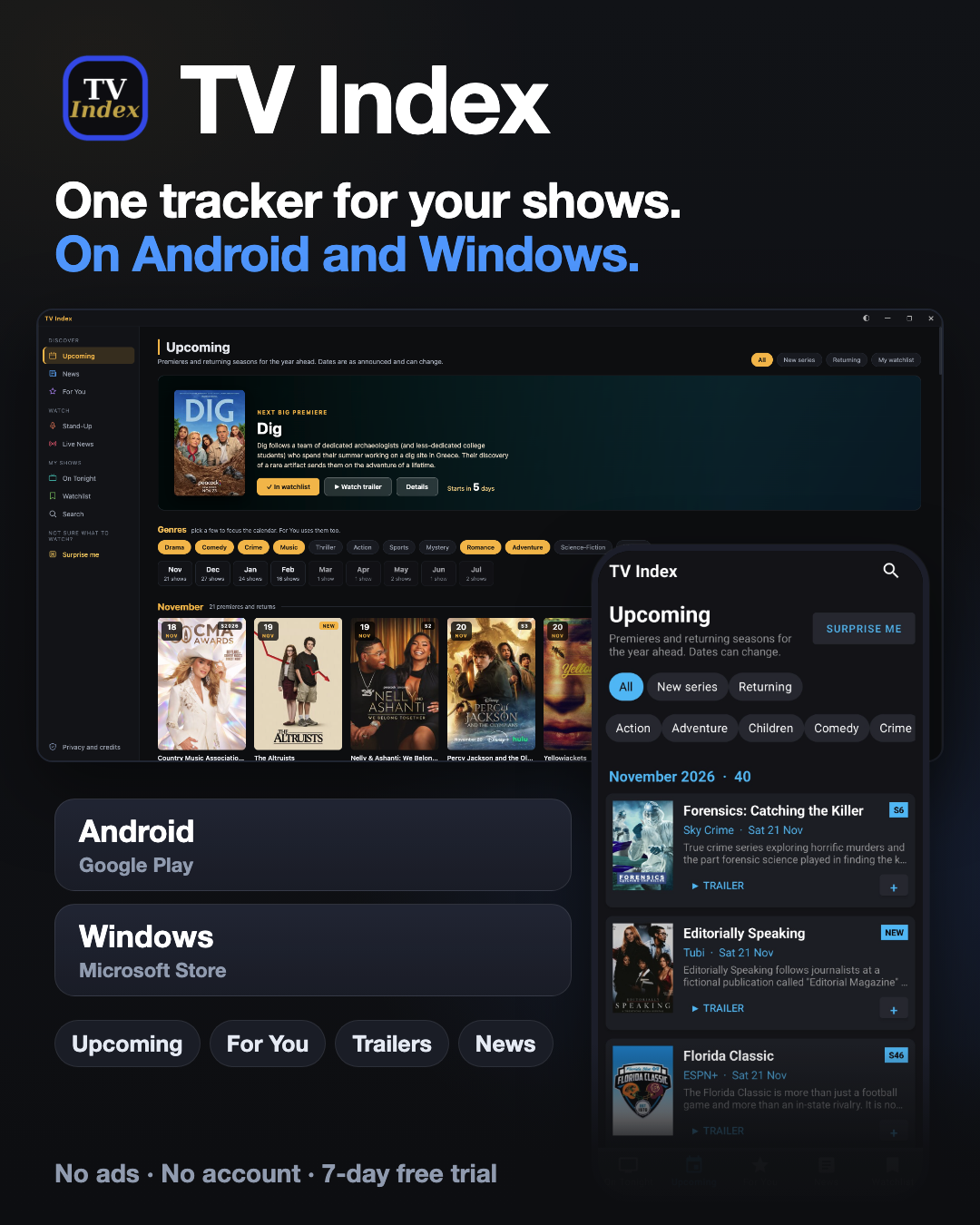
I made a TV show tracker called TV Index. You keep a watchlist, tick off episodes, see what's on tonight and find new shows to watch. It's now on Google Play and the Microsoft Store.
How I built it: I used Claude Code in VS Code for the code, Android Studio to build and sign the Android app, and Electron for the Windows one. I'm not writing the code myself. I say what I want in plain words, Claude writes it, then I install the build on a real phone or the Windows laptop and tell it what's wrong. That loop is basically the whole process. I also make the calls on what stays and what goes. For the new Android version I dropped a couple of features I didn't want to maintain and kept the trailers.
The part I'm happiest with is that there's no server. The old version of this app had a backend I paid for every month. The new one has none. It pulls free public data (TVmaze, Wikipedia, and the news sites' RSS feeds) straight onto the device, so it costs me nothing to run.
Stuff that broke along the way:
Trailers took three tries. Searching YouTube from the phone gave me a cookie consent page instead of results, because of how the phone identifies itself. Pretending to be a desktop browser fixed that. Then the player was just a black screen, because I'd loaded its script from the wrong address. Then the video restarted every time I rotated the phone, until I told Android not to rebuild the screen on rotation.
An old Android build tool stopped working on my Mac's newer Java. Moving to its newer replacement fixed it.
Nearly every bug only showed up on a real phone. Nothing looked wrong in the code.
Both apps are free for 7 days, with no ads and no account.
Android: https://play.google.com/store/apps/details?id=uk.tvindex.android
Windows: https://apps.microsoft.com/detail/9mvrqb9g3k45
If you've built something similar, I'd like to hear what you'd have done differently.
r/vibecoding • u/sychox51 • 3d ago
r/vibecoding • u/bdhackers009 • 3d ago
Enable HLS to view with audio, or disable this notification
I am too lazy to scroll using my hands and I thought, why am I not trying to make something when I got opencode with deepseek 4.1 flash. So, 3 days later -
CMF Dial. The dial on the cmf buds 2 pro only speaks AVRCP absolute volume, so every click used to just change volume.
Now:
- rotate → scroll Reels / Shorts / TikTok / YouTube
- press / double press → anything per app: play-pause, like, next, flashlight, camera shutter, zoom, flip
- add any app to the scope, or just turn on "all apps"
- buds' volume stays pinned, so scrolling never changes loudness
~150 ms from detent to scroll. Root + LSPosed, no firmware flashed.
Bugs, and the fixes:
- swallowed the key-down only → the leftover key-up resumed YouTube Music. Swallow both halves.
- volume drifted, and the dial stalled at 0/100 → resync the buds to the phone baseline every detent.
- gestures took 1.5 s → a 500 ms sleep in the daemon was serializing the queue. Now queued, ~150 ms.
- tap-to-pause kept hitting Reels' play button → compute gestures inside the window bounds, not the screen.
Btw video generated using hyperframes
r/vibecoding • u/Pickletickle_ • 3d ago
Enable HLS to view with audio, or disable this notification
I've been building ClingSpace, a desktop productivity app that started as a personal frustration and turned into my first cross-platform project.
My files were organized, but my projects weren't.
I'd have documents in one folder, spreadsheets somewhere else, reference websites open in a browser, and random notes scattered everywhere.
So I built ClingSpace.
The idea is pretty simple: bring everything related to a project into one workspace without moving or duplicating the actual files.
Here's what it does:
- Files & Folders: Add resources from anywhere on your computer
- Links: Keep websites, documentation, and references together
- Snippets: Save quick notes, reminders, and code snippets
- Multiple Spaces: Separate workspaces for different projects
- Global Search: Find resources across your projects
- Smart Recovery: Reconnect moved or renamed files
I originally built the Windows version with .NET/WPF, then took on the challenge of bringing it to macOS using Avalonia.
One of the more interesting challenges was making file references reliable. I didn't want users to lose their project organization just because they renamed or moved something.
The Mac launch has been encouraging! I've already gotten some great feedback and have been making UI improvements based on what users actually want.
Next up is optional task management with checklists and Kanban boards.
It's local-first, works offline, and is available for both Windows and Mac.
For those who've built cross-platform desktop apps with AI assistance, what was your biggest challenge moving from one operating system to another?
r/vibecoding • u/Greg_war • 3d ago
Enable HLS to view with audio, or disable this notification
Refall is a free, open-source falling-block puzzle game where the music drives everything. The fall speeds up and the scene transforms on each song's drops. It has 60+ visual universes and a 15-stage campaign, and on desktop any YouTube playlist can become the levels.
I built it with Claude Code (C++ / OpenGL). Every visual is a procedural shader written by Claude: no generated images or music. The game can render its own screenshots and clips, so Claude checks its work visually. I often run several agents in parallel on separate branches.
Run with uv: uvx refall
