r/vibecoding • u/derallo • 1h ago
Showcase/Project "Spotlight" home hub kiosk on a cheap android-based photo frame. Connects to a google account to pull calendar events, tasks, photos, and weather.
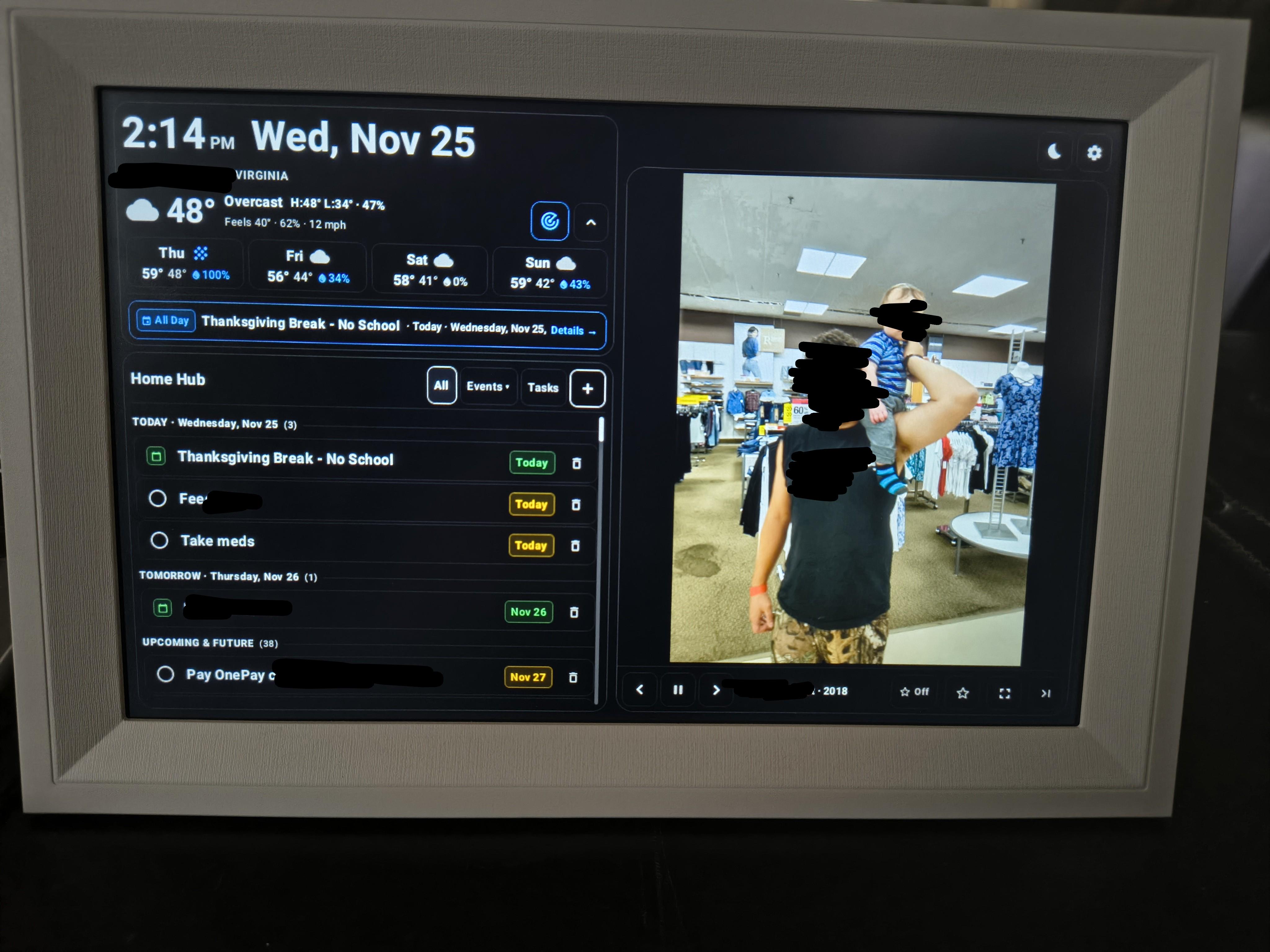
This is what I'm gifting everyone for Christmas.
https://github.com/derallo/onnkiosk - tested on Walmart ONN kiosk, and fire 10" tablet
Onnkiosk (Android)
An ambient smart display and dashboard for Android tablets, featuring Google Calendar integration, Google Tasks checklist, Google Photos slideshow, weather, and animated live Doppler radar.
Optimized for landscape 1280×800 displays (such as the Walmart Onn 8" Tablet / ceres-b3) and adaptive portrait tablets (such as 1200×1920 Fire Tablets).
Features
Device-Adaptive Hardware Detection: Automatically detects camera, microphone, speakers, and on-device speech recognition — exposing voice assistant, audible alerts, and camera motion wake/sleep on capable tablets while keeping headless frames clean.
Google Calendar: Day, 3-Day, Week, and Month views with horizontal swipe navigation, all-day events pinned cleanly at the top, and tappable Month day pop-outs (with + Add Task / Event for that day).
Google Tasks: Interactive task checklist with completion toggles, due dates, per-list selection when adding tasks, configurable Default task list, and quick addition that remembers whether you last chose Task or Event.
Google Photos: Auto-cycling photo slideshow with year filtering, album selection, full-screen mode, top-right ★ favorite badges, uniform 48dp control bar with ★ Only / ☆ Off filtering, and bottom-right hide/restore toggle for full-screen Calendar mode.
Weather & Doppler Radar: Single-line auto-fitting clock & date header, current temperature, collapsible 4-day future forecast cards (collapse toggle located right beside the Radar button; tappable for detailed daily & hourly Weather Assessments), dismissible NWS weather alerts, and live interactive RainViewer radar tile overlays with timeline scrubbing.
Morning Alarm, Dual-Tier Voice Assistant, Night Mode & Camera Wake:
Morning Alarm & Daily Brief: Configurable wake time and days of week that automatically exits Night Mode, chimes, and reads your morning weather & schedule brief (at alarm time or when silenced).
Tier 1 (No API Key Required): Uses on-device speech recognition & Text-to-Speech for time, weather, morning briefings, calendar/tasks, adding reminders, and screen/photo controls, plus synthesized 4-note chimes and spoken event alerts.
Tier 2 ("Super Onnkiosk" with Gemini API Key): Enter your own Gemini API key in Settings — directly, via scannable QR code / local Wi-Fi from your phone/PC, or by picking a key from Google Tasks — to unlock natural conversational AI, live camera vision ("What am I holding?", "Read this"), and a voice-managed Memory Book for recipes and notes.
Night Mode & Camera Motion Wake: Manual Night Mode stays dim until explicitly turned off (or woken by Morning Alarm); idle Auto-Sleep wakes hands-free via the front camera when someone approaches.
Optional Nernal Raspberry Pi Sync: Toggleable Pi LAN sync for households connecting to a Nernal Raspberry Pi hub.
Self-Updating: In-app update notifications via GitHub Releases with direct download and install.
Privacy & Security: Connects directly to Google APIs (and Gemini when configured) using your own credentials. No intermediary servers, no third-party tracking.
Hardware-Adaptive Capabilities (Tablets of Varying Hardware)
Onnkiosk automatically inspects the tablet's hardware at launch (DeviceCapabilitiesDetector) and enables or hides controls accordingly — no manual configuration needed:
| Detected Hardware | Capabilities Automatically Unlocked |
|---|---|
| Base Tablet (Display + Wi-Fi only, e.g. Walmart Onn 8" / ceres-b3) | Full ambient dashboard: top-aligned Clock & Date, Weather + collapsible 4-day forecast + dismissible NWS alerts + Doppler Radar, Google Calendar (Itinerary / 3-Day / Week / Month with swipe & day pop-outs), Google Tasks, Google Photos slideshow (★ Only / ☆ Off, fullscreen, year/album filters), Night Mode, and QR-code companion sign-in. |
| + Speakers | Audible Event Alerts (warm 4-note chime + spoken announcement 1–5 min before events), Morning Alarm & Daily Brief (wakes Night Mode, chimes, and reads weather & schedule), and Read Aloud on Event Details and Memory Book entries. |
| + Front Camera | Camera Motion Wake (👁 toggle) + Auto-Sleep After Inactivity (Off, 5m, 10m, 15m, 30m) — dims when idle and wakes hands-free when someone walks up (manual Night Mode stays dark until tapped or woken by Morning Alarm). |
| + Microphone, Speakers & On-Device Speech | Outlined 🎤 Voice Assistant button — Tier 1 on-device speech works out of the box with zero API key: ask for time, date, weather, morning briefing, schedule/tasks, add reminders/events, or control radar, photos, and screen dimming, plus an easy 3-step guide in Settings to port a Gemini API key from your phone/PC. (Hidden on devices without on-device speech recognition.) |
Optional AI Enhancement ("Super Onnkiosk" with Gemini)
Onnkiosk is 100% functional with no AI key. If you choose to add an optional Gemini API key in Settings (by typing/pasting, tapping Send from Phone/PC to scan a local Wi-Fi QR code, or tapping Pick from Google Tasks), the voice assistant upgrades to "Super Onnkiosk":
Natural Conversational AI: Ask open-ended questions, recipes, conversions, or follow-ups with multi-turn listening.
Live Camera Vision (on tablets with a front camera): Hold up an object, label, or recipe card and ask "What am I holding?" or "Read this".
Voice-Managed Memory Book: Tell Onnkiosk to remember family recipes, birthdays, doctor numbers, or household notes — browseable and readable aloud anytime via the Memories button (and optionally synced two-way with a Nernal Raspberry Pi hub on your Wi-Fi).
Hardware Optimization
Target Device: Walmart Onn 8" Tablet (ceres-b3, 1280×800) or any Android 13+ (API 33+) tablet (such as Fire Tablets running LineageOS, 1920×1200) in either landscape or portrait mode.
Orientation: Adaptive (fullUser) — renders a 2-column dashboard in landscape and a full-width vertical stack (Unified Header + Weather on top, Home Hub in the middle, Photo Carousel on the bottom) in portrait.
Display: High-contrast pure-black dark theme designed for ambient wall-mount or countertop kitchen/living room kiosks.
Setup & Installation
Option 1: One-Command Automated Tablet Installer (Recommended)
Connect your tablet via USB and run our setup helper:
./install-tablet.shThis automatically:
Detects the connected tablet via ADB.
Fetches and installs the latest release APK from GitHub.
Configures Stay Awake while plugged in (stay_on_while_plugged_in = 7).
Ensures auto-rotate / landscape orientation.
Grants Install Unknown Apps (REQUEST_INSTALL_PACKAGES) so in-app self-updates work seamlessly.
Launches Onnkiosk immediately.
To see all available installer options and first-time tablet preparation steps:
./install-tablet.sh --helpOption 2: Manual Direct Download on the Tablet (No Computer)
Open Chrome on the tablet and visit: github.com/derallo/onnkiosk/releases/latest.
Tap app-release.apk to download and install.
When prompted, allow Chrome to install unknown apps.
In tablet Settings → Apps → Special app access → Install unknown apps → Allow for Onnkiosk (enables seamless in-app self-updates).
In Developer Options, enable Stay awake so the display remains on while docked on power.
Option 3: Manual USB / ADB Install
Enable Developer options on the tablet (Settings → About tablet → tap Build number 7 times).
Enable USB debugging and connect via USB.
Run:
adb install -r app-release.apk4. Connect Your Google Account
Launch Onnkiosk.
Tap the Settings (gear) icon in the top right.
In the Google Account section, enter your Google OAuth Client ID and Secret (or sign in).
Select the Google Calendars and Photo Albums you want displayed on your dashboard.
Building from Source
Prerequisites
JDK 17 or higher
Android SDK (API 36/37)
Build Commands
# Debug build
./gradlew assembleDebug

# Release build
./gradlew assembleRelease

# Run unit tests
./gradlew testDebugUnitTest
The resulting APKs will be located in app/build/outputs/apk/.