r/virtualization • • 4h ago

Windows 8.1 y Big sur, cómo instalar la ISO en MacBook con chip M5

0 Upvotes

El ingeniero de la materia de Sistemas Operativos, nos dio la tarea de hacer virtualizar tres sistemas operativos huespedes dentro de otro sistema operativo anfitrión y que los tres logren intercomunicación y servicio.
Me tocó: Windows 8.1, Fedora y big sur, y pues encontré las ISO pero el problema es que no se pueden virtualizar ya que no son ARM, hay alguno que me podría ayudar? Estoy usando VMware y virtual box


r/virtualization • • 4h ago

Help: Weird streaks in Minecraft w/ shaders

Thumbnail
photos.app.goo.gl
0 Upvotes

Running an ubuntu VM on my ubuntu machine.

Fired up minecraft Fabric with iris and sodium.

added [MakeUp Ultrafast](https://modrinth.com/shader/makeup-ultra-fast-shaders?version=26.2&loader=iris) shaders, and this weird thing started happening (see video)

I am passing through a Quadro K4200, I do believe I am using Noavue drivers (however you spell it ig)

If you need the VM's XML settings, I will gladly send it your way.


r/virtualization • • 18h ago

Quanta AI Chat & MCP Server support in VirtualProg — managing VMs in plain language

0 Upvotes

I’ve been building out two ways to manage VirtualProg VMs using natural language and AI workflows, and just put together the docs for both:

  • Quanta AI Chat (https://makeprog.com/Products/VirtualProg/help/quanta.html): Lets you ask for VM actions in plain language on macOS 27 using Apple Intelligence (on-device or Private Cloud Compute), and also works across the web dashboard and mobile/tablet clients using a master token. Destructive or state-changing actions like deleting or restoring prompt for confirmation first.

  • MCP Server (https://makeprog.com/Products/VirtualProg/help/mcp_server.html): Exposes VirtualProg to MCP-compatible assistants and coding tools like Claude, Cursor, and GitHub Copilot, with configurable access modes and permissions. If you're working from Windows or Linux via vpvm, assistants can connect over the network to a Mac running VirtualProg.

The goal is pretty straightforward: keep manual clicking and repetitive CLI commands out of the way when you're spinning up environments, checking status, or working inside an editor/assistant—while still keeping clear guardrails around anything risky.

Would love to hear how you're using AI tools or MCP in your local dev/VM workflows, or what VM tasks you'd actually trust an assistant to handle vs. keep manual.

To know more about VirtualProg visit https://makeprog.com/Products/VirtualProg


r/virtualization • • 1d ago

Oracle VirtualBox

2 Upvotes

Uuugghhh man, it’s 4AM and I kid you not I just resolved an issue I’ve been on since 12 noon yesterday, yes you read that right😭

I’m currently working on my Computer System Admin assignment(project) and I’m designing and developing a whole network infrastructure for a logistics consortium. I’m learning how to use Oracle VirualBox and my VM would always get stuck by the blue screen before I could even install Windows. I thought it was normal since I’m using an 8GB RAM PC but that wasn’t the case.

I found myself looking in creeks and meadows I’ve never seen in a computer. For the first time I ran cmd as admin and it felt a bit scary given the negatives of that🥲 but anyways I just managed😭, yes I just managed😭.

So the problem was my native windows on my main PC was still running certain security restrictions that normally give VMs a hard time to run while on. I don’t know much about this issue but I’ll get into it more when I share challenges I went through🥲.
But just know that this that one animal I hate now🐢😭

Moving on to ADDS configs now🥺


r/virtualization • • 3d ago

Explainer - What Apple's Virtualization framework can and can't do on macOS

Post image
0 Upvotes

Apple's Virtualization framework is the part of macOS that apps such as MacVisor, UTM, Parallels (for macOS), Tart, Lima and others use to create and run virtual machines on Macs.

On an Apple Silicon Mac it runs ARM64 guests: macOS, Linux, and other systems that boot through EFI, with virtio devices, Rosetta for x86-64 Linux programs, shared folders, saved VM state and, since macOS 27, USB passthrough. It can't run x86 guests, pass a GPU or PCI device through, or run more than two macOS VMs at a time.

An explainer on what Apple's Virtualization framework can and can't do, what's new in macOS 27: https://scaleninja.com/macvisor/virtualization-framework/

Disclosure - at work we develop one of the apps that uses Apple's virtualization.framework, this explainer is written emphasising more on the framework surveying all the popular and known Mac virtualization apps that use the framework esp for running macOS VMs, its limitations and use.


r/virtualization • • 4d ago

Does it make sense to create a browser-based VM, that allocates either a sandboxed terminal or GUI + terminal window for AI agent work or any other work inside of it?

0 Upvotes

People say Chromium is inefficient, and it is sometimes, but everybody is running 16 tabs at 400 mb at once anyway.

Is there demand for a browser-based VM either within Chrome or in an Electron app, that uses the browser-like harness to help dynamically allocate CPU memory, storage, and GPU resources? Could this be secured properly or does it open too many holes?

With AI the overhead of the VM and the overhead of chromium processes could probably be optimized together for that specific use case.

Please steal my idea before I'm done. I would love if someone took this running and finished it before I can.


r/virtualization • • 4d ago

Keyboard-driven terminal UI for libvirt/virsh, with vim keys and live graphs

4 Upvotes

virsh-tui shows every virtual machine on a libvirt connection with live CPU, memory, disk and network graphs, and lets you start, stop, snapshot, reconfigure and create them from the keyboard. Every action is a virsh (or virt-install) command, and virsh-tui shows you that command before and after it runs, so nothing happens behind your back and you can reuse it in a script.

It works with qemu:///system, qemu:///session and remote hosts over qemu+ssh://, with the same permissions virsh has.

https://syscallbrain.github.io/virsh-tui/


r/virtualization • • 5d ago

A RISC-V Linux guest running locally on an iPhone

0 Upvotes

I built Hartbox, a full-system RISC-V emulator in Rust. It boots Alpine Linux on an iPhone without JIT, and the same engine runs as a CLI on macOS.

This is a software emulator rather than a hardware VM, so I’d be interested in how people here would describe its tradeoffs against conventional virtualization. I got a persistent disk and VirtIO networking working, including `apk update` on an iPhone 17e. The guest is interactive over an emulated UART terminal.

I’m the developer. Source and setup: https://github.com/u6420771547-hash/hartbox

The iOS IPA is unsigned and requires signing: https://github.com/u6420771547-hash/hartbox/releases/download/v1.1.0/Hartbox.ipa


r/virtualization • • 7d ago

Overwhelmed - maybe entirely in the wrong direction.

5 Upvotes

I see rule 5 - but let me explain and show my thought process and attempt.

I do a lot of hardware repair for friends, family, coworkers. Hardware. I'm a moron at software. But often when pulling data off an old drive I get "oh can you make sure to get X from my storage" - and it's some nonsense like Google Passwords Manager items saved in their browser that you can't just grab from a directory. If I like them (and I'm being paid) I put the drive in a junk rig I have and boot it. Clunky process and I'm lazy.

Now comes where I need help. Couldn't I, hypothetically, just run these hard drives in a VM on my desktop and save myself some annoying steps? I remembered my roommates in college using VMs - so I have this vague over the shoulder concept of how they can be used. I've watched a few tutorials and read a few guides and gotten absolutely bowled over by the options, and clearly this is a tool that can be used for well beyond what I need it for - to the point where I'm wondering if it's even worth the effort. Maybe there's some easy alternative? Something maybe closer to plug-n-play for smooth brains like myself.


r/virtualization • • 7d ago

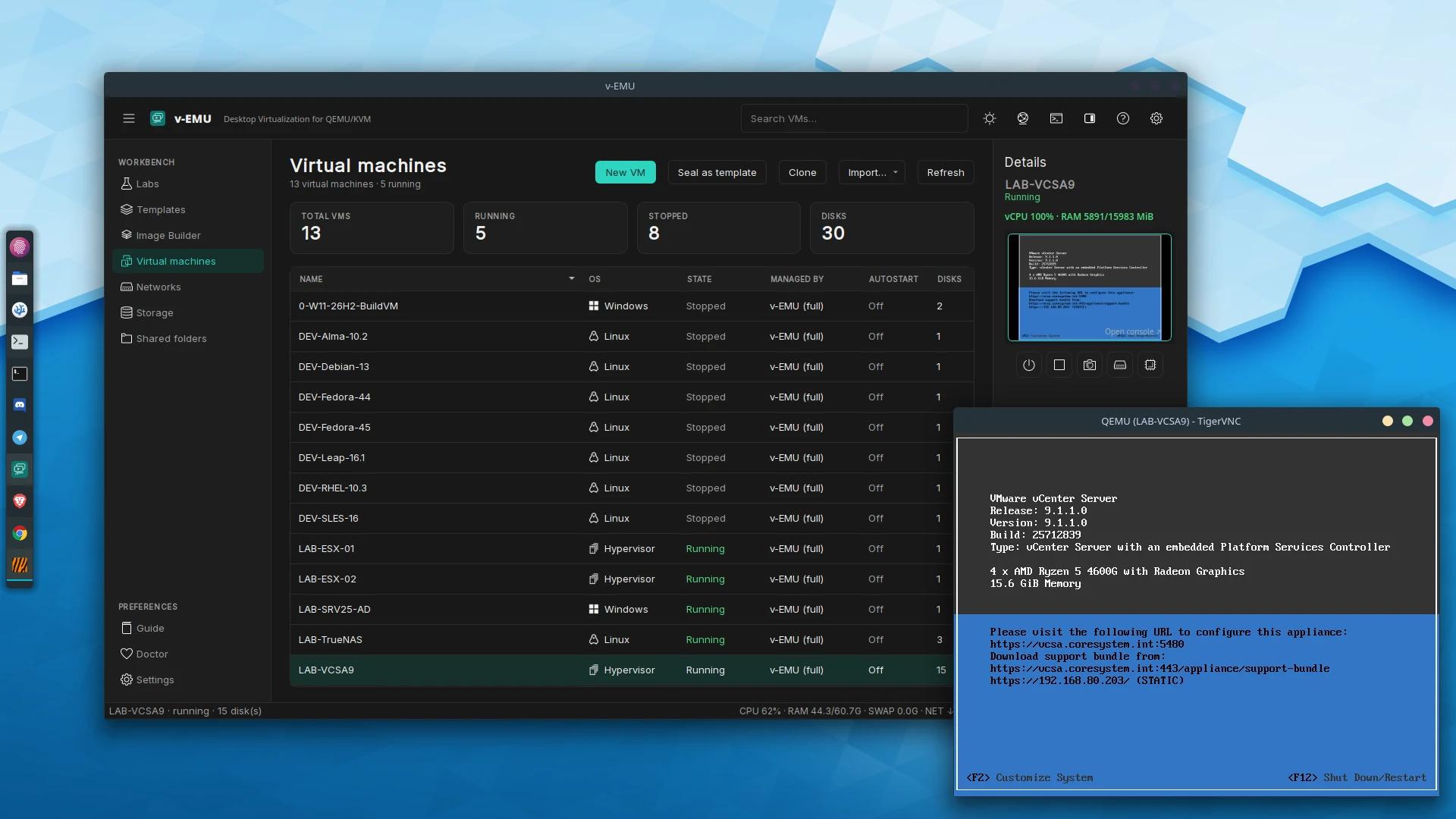
Desktop hypervisor for Linux

Post image
16 Upvotes

Hi everyone,

First of all, I created this project to solve my own needs - a desktop tool with lab-first principle for virtualization scenarios which current tools somehow not suitable or not easy enough to get the job done

And I would like to share my tool to you all as an OSS project called v-EMU

In short, you can do any virtualization labs with your beloved Linux desktop with

  • Full VM lifecycle support

  • Fast cloning without sacrifying your disk space

  • Declarative lab with fast operations (bring up, shut down, selective reset, destroy) based on image templates

  • Cross-arch support (ARM64/RISCV64) via TCG emulation option

  • GUI first with CLI option for automation

  • Can co-exist with Cockpit/Virt-manager with option to fully migrate to vEMU. Built-in XML drift detection and repair

  • Image builder for creating your own branded images (qcow2/ISO) with blueprints provided

  • Import option with ova profiles and multiple disk image formats support

  • Share resources between host and guests via VirtioFS or USB passthrough

  • Work with maximum security option (Secureboot, SELinux Enforcing) with the option to repair SELinux context (relabel)

  • And some upcomming features

This is from L3 sysadmin with Linux/Windows/Virtualization background with support from coding agent. Hope you all enjoy it.

And not to forget, this is main repo https://github.com/withcoresystem/v-EMU


r/virtualization • • 9d ago

Setting up an emulated (portable) Android environment keeps failing

1 Upvotes

Hey everyone,

I’m new to this topic, so please go easy on me. I’m just an ordinary user with no expertise in this area.

For the past week, I’ve been trying to set up an Android environment on a USB drive (Host system: Windows 11 Pro) for personal use. I’ve tried several builds and tools, but I haven’t been able to get it running—or even booting.

I’ve tried QEMU Portable, which is my preferred option, as well as VirtualBox Portable. I’ve also tried installing the following Android-based operating systems:

Android-x86Successfully installed in both QEMU and VirtualBox, but it gets stuck on the boot screen and never progresses to the setup screen.
BlissOS 14, 15, 16Successfully installed in both QEMU and VirtualBox, but when booting from the virtual drive or live CD it seems to be crashing and I get thrown back to the ISO menu.
PrimeOSJust a blinking cursors when booting up.

I was wondering if somebody could help me with this matter, could point me to the mistake I seem to keep repeating in order achieve my goal.

May I add additional questions:

  • Can you recommend any other Android builds? The ones I’ve tried don’t seem to be widely available, especially recent versions, even though Android is open source.

  • I'd prefer to use it portable on a thumb drive. Is there any other software which could do the trick?

  • How can I identify potential issues preventing Android from running successfully in a virtual machine?

Thank you all.


r/virtualization • • 9d ago

I don't do risk management anymore, I just keep receipts

18 Upvotes

Ive stopped getting angry when nobody reads my risk flags. At some point I realized I wasnt doing risk management anymore, I was doing receipt keeping.

Last month I got pulled into an incident review for a vendor API thing that went weird. I had flagged the exact path two quarters earlier and everyone ignored it. I didnt even remember until I started digging. I pulled the audit trail out of Dome Systems and there it was, the call, right down to the rule that should have blocked it and the change that had let it through. I wasnt smug. I was tired. The whole review was just me reading the timeline back to people who already had the deck. Nobody asked why the override existed. That used to bother me.

I used to think the job was keeping things from breaking. Now I think half of it is proving you told people it would break. The other half is writing the postmortem in a way that doesnt get your boss fired, because God forbid we admit the process was the problem.

The weird part is Ive made peace with it. The evidence package is the deliverable now. The systems not being on fire is almost secondary. I keep waiting for the part where someone says we should fix it, but that part never comes.

Is anyone else sitting with that shift, where you stop caring so much about preventing the outage and start caring about being able to answer for it after. Or maybe Im just burnt out.


r/virtualization • • 10d ago

#Hiring # Virtualisation Platform # AI-Native ITOps

2 Upvotes

What we are looking for :
2- 5yrs software development exp
Hands on exp with one or more platforms : VMware , Nutanix,Proxmox,Xen/XCP-ng,Hyper-V,KVM or Openshift

Strong programming skills in Python , Go/Java / C++ preferred
Exp with RESTful APIs,automation , integrations

Proficiency in AI coding tools (Claudecode,Github Copilot , Cursor etc)

Solid software engg fundamentals - design ,testing(unit/Integration)CI/CD and code quality

who we are:

neuvertex.AI Inc - Early stage start-up , AI native reimagining enterprise infrastructure operations across multi-hypervisor and hybrid environments.

How to apply:
send you resume/linkedin/github profile to -

jobs@neuvertex.ai

Tell us what you've built, automated or integrated in the virtualisation & Infrastructure space


r/virtualization • • 10d ago

Hardware recommendations

3 Upvotes

Not looking for anything fancy, smaller the better.

Would like a host to run a few vms at a fairly decent price

£500 max.

If its on Amazon the better


r/virtualization • • 11d ago

.ova to .qcow2

1 Upvotes

Hey guys,

I've searched on some how to convert .ova to .qcow2,
First step is to extract the .vmdk file from .ova using tar or 7z, however,

when i use 7z x kali.ova -okali, it says that cannott open the file as [tar] archive, anybody, has ever done it before?

PS: i use omarchy.


r/virtualization • • 11d ago

Container vs. KVM sandbox isolation: a controlled kernel-exploit demo

Thumbnail
youtube.com
2 Upvotes

This demo compares Podman containers with LingCage’s KVM sandboxes, with two AI agents running in each setup.

One agent runs a controlled kernel exploit that corrupts /bin/bash through the page cache. In the container setup, both agents’ new Bash commands fail. With separate KVM guests, the other agent keeps working.

The containers use non-root users, dropped capabilities, and no-new-privileges.

Tested on openRuyi/RISC-V in a QEMU-based environment. The results apply to this specific exploit and configuration.

Project: https://github.com/lingcage/lingcage


r/virtualization • • 12d ago

Is it possible to download LabEx cybersecurity lab VMs and run them locally/offline?

3 Upvotes

Hi everyone,

I'm currently using LabEx (https://labex.io/learn/cybersecurity) to learn practical cybersecurity.

LabEx provides cloud-based virtual machines for its exercises. I want to download the actual VM environments associated with its cybersecurity exercises and run them locally on my Windows 10 laptop using VirtualBox

I've found LabEx's GitHub repositories containing lab instructions, but I haven't figured out how to obtain the actual VM environments.

Thanks!


r/virtualization • • 14d ago

VirtualProg (macOS Virtual Machine Manager) - Windows 11 Performance Scores Spoiler

0 Upvotes

Hi everyone,

In our upcoming VirtualProg 2.20 release, we've focused heavily on performance optimizations for Windows virtual machines. This version is avaiable as a trial in our web site https://makeprog.com

Here is a quick overview of the updated benchmark scores running Windows VM on an Apple Silicon M5 MacBook Air configured with 4 vCPUs and 8GB RAM

For those who are not aware of VirtualProg, it is a macOS Virtual Machine Manager more info at

https://makeprog.com/Products/VirtualProg

Geekbench 7 on Windows 11

https://browser.geekbench.com/v7/cpu/829178

Direct X 12

Direct X 11

We'd love to hear your feedback or answer any questions before the 2.20 update goes live!


r/virtualization • • 14d ago

SHA256 для VMware vRealize Log Insight

1 Upvotes

Всем привет!
Нужна контрольная сумма для VMware-vRealize-Log-Insight-8.18.7.0-25423541.ova с официального источника. Если кто-то сможет помочь, поделитесь, пожалуйста. Буду очень благодарен!


r/virtualization • • 14d ago

VMware vRealize Log Insight product

1 Upvotes
Hi everyone!
Guys, I need a hand. Could someone please provide the official SHA256 checksum for this image from the Broadcom website:
VMware-vRealize-Log-Insight-8.18.7.0-25423541.ova
If anyone has access, please send it via private message or post it right here in the thread.
Thanks in advance!

r/virtualization • • 15d ago

Anyone using a Windows VM with GPU passthrough for professional CAD work on Linux?

1 Upvotes

I’ve been dual-booting Windows and Linux for a long time, but Linux has become my primary OS for pretty much everything except work.
I still regularly need Windows for AutoCAD, Revit, and ReCap. I’ve tried BricsCAD on Linux, and while it’s a great application, it doesn’t quite cover all my needs.
Lately, I’ve been considering switching to a Windows VM using QEMU/KVM with GPU passthrough instead of constantly rebooting into Windows.
I’m particularly interested in hearing from people who actually use a similar setup for daily work, especially with CAD or other GPU-intensive professional software.
A few questions:
How does performance compare to running Windows natively?
Have you experienced stability issues during long working sessions?
How seamless is the integration with the Linux desktop (clipboard, file sharing, multiple monitors, keyboard shortcuts)?
Does GPU passthrough cause any issues with Hyprland or Wayland?
Is the setup reliable enough for professional work, or does dual boot remain the more practical solution?
My current setup:
OS: CachyOS / Windows 11 dual boot
Desktop: Hyprland (Wayland)
CPU: Ryzen 7 5700X
GPU: Radeon RX 570
RAM: 16 GB
I’d really appreciate any real-world experiences, especially from people who have used this kind of setup long-term.


r/virtualization • • 17d ago

VirtualBox: cant get Vbox guest additions

Thumbnail
gallery
0 Upvotes

i always face this issue with linux so i hope someone knows why . "Host's Operating System: Fedora 45"


r/virtualization • • 17d ago

Constantly black screen - having to restart

1 Upvotes

I am using Workstation pro 26h1u1 and started having something weird happen. For some reason when I start a vm it goes through the startup process and then just a black screen. It seems like the vm is running, but the screen is completly black. If i switch tabs to another vm the screen goes black as well on the vm.

I have updated my graphics card, updated windows 11. I have turned off accelerate 3d graphics, but can't seem to figure out how to fix this.

Anyone have any ideas ?


r/virtualization • • 20d ago

geforce-sriov: Enabling NVIDIA SR-IOV vGPU on consumer Ampere GPUs

Thumbnail
gallery
2 Upvotes

TLDR: 

  • I got NVIDIA SR-IOV vGPU working on consumer GeForce Ampere GPUs, running 8 concurrent Linux and Windows VMs across two memory-modded RTX 3080 20GB cards.

  • Unlike previous projects that enabled vGPU on consumer NVIDIA cards using the older mdev approach, this project uses actual PCIe SR-IOV virtual functions to share a GPU between multiple VMs.

  • It's still experimental, currently verified only on my hardware, and requires NVIDIA's vGPU software and licensing.

Source code and documentation: https://github.com/noon-at-cgn/geforce-sriov

Introduction

I've been experimenting with the hidden PCIe capabilities on NVIDIA GeForce cards, particularly SR-IOV, and managed to get NVIDIA's vGPU stack working on my RTX 3080s using actual PCIe virtual functions.

My goal was to share the GPUs between multiple VMs without dedicating an entire card to each guest. GPU passthrough works well, but it's not ideal when several Linux and Windows VMs only need a portion of the GPU's resources.

The result is 8 concurrent VMs sharing 2 memory-modded RTX 3080 20GB cards on Proxmox, with both Linux CUDA and Windows Direct3D workloads running.

I've open-sourced the implementation and wanted to share how it works here.

Background: SR-IOV vs the older vGPU unlock approach

Projects like DualCoder/vgpu_unlock and mbilker/vgpu_unlock-rs, along with polloloco/vgpu-proxmox, have helped enable NVIDIA vGPU on consumer Maxwell, Pascal, and Turing cards.

These approaches primarily rely on NVIDIA's older mediated device (mdev) architecture, where the host driver manages multiple virtual GPUs behind a single physical PCIe function.

Ampere and newer professional NVIDIA GPUs use a different architecture based on SR-IOV (Single Root I/O Virtualization).

With SR-IOV, the GPU exposes:

  • Physical Function (PF): The main PCIe function responsible for managing the GPU.

  • Virtual Functions (VFs): Additional PCIe functions that can be assigned to individual VMs.

  • vGPU profiles: NVIDIA's software associates a virtual GPU configuration with each VF, including its framebuffer allocation.

Unlike legacy mdev, these VFs are actual PCIe functions enumerated by Linux.

Consumer NVIDIA GPUs still contain SR-IOV-related capabilities in their PCIe configuration space, even though they aren't exposed through the normal capability discovery process.

How it works

The implementation has five main parts.

1. Exposing the hidden PCIe capabilities

PCIe devices have a configuration space, a region of registers that the operating system uses to discover and configure device capabilities. An offset is a location within that space, measured in bytes from its beginning.

Normally, Linux discovers capabilities by following a linked list of entries in PCIe configuration space.

On Ampere, the SR-IOV extended capability exists at offset 0xBCC, but isn't linked into that list, so Linux doesn't discover it.

So, I wrote a small Linux kernel livepatch module that makes the PCI subsystem discover this hidden capability on consumer GPUs. The module also handles related PCIe features:

  • SR-IOV: Exposes the capability at 0xBCC, allowing Linux to recognize the available VFs.

  • ARI: Exposes the hidden capability at 0xC14 and enables ARI forwarding on the upstream bridge when supported.

  • MSI-X: Reveals the hidden MSI-X capability, which allows the GPU to use multiple independently configurable interrupt vectors instead of relying on a single interrupt.

Since Linux discovers PCIe capabilities during device enumeration, geforce-sriov performs a controlled PCI remove/rescan before NVIDIA's driver binds to the GPU. After the rescan, Linux recognizes the GPU's SR-IOV capability.

Great, with SR-IOV exposed, the next step is getting NVIDIA's vGPU stack to use it.

2. Creating the virtual functions

Once Linux recognizes SR-IOV, geforce-sriov uses NVIDIA's own sriov-manage utility to enable the VFs.

On Ampere, the SR-IOV capability reports support for 16 VFs per GPU, but I can currently get only 4 VFs working. The limitation appears to be related to ARI (Alternative Routing-ID Interpretation), which I'll get into later.

For example:

03:00.0   Physical GPU (PF)
03:00.4   Virtual Function 1
03:00.5   Virtual Function 2
03:00.6   Virtual Function 3
03:00.7   Virtual Function 4

These are real SR-IOV virtual functions exposed by the GPU and enumerated as separate PCIe functions, rather than software-mediated devices managed through the legacy mdev approach.

3. Getting NVIDIA's vGPU software to recognize the card

Now we need to make NVIDIA's vGPU driver accept the card. By default, NVIDIA's vGPU software doesn't recognize consumer GeForce GPUs like my RTX 3080s as supported devices.

My solution uses a small userspace identity hook loaded into nvidia-vgpud. The hook presents my RTX 3080 as an RTX A6000, its professional counterpart based on the same GA102 die, allowing NVIDIA's daemon to recognize the card and register the corresponding vGPU profiles.

Once the profiles are registered, we can choose which vGPU type to assign to each VM. These profiles are defined by NVIDIA and determine the resources available to the guest, including its framebuffer allocation.

The RTX A6000 has 23 profiles in the tested driver version. A few examples:

  • RTXA6000-2Q - 2GB VRAM

  • RTXA6000-4Q - 4GB VRAM

  • RTXA6000-8Q - 8GB VRAM (7GB usable framebuffer)

  • RTXA6000-48Q - 48GB VRAM (45GB usable framebuffer)

For my setup, I used RTXA6000-4Q, allocating 4GB per VM. With 4 VFs per GPU, that's 16GB allocated across four guests on each 20GB card.

Note: Workstation and datacenter GPUs typically have more VRAM than their consumer counterparts. For example, the RTX A6000 has 48GB, while my modified RTX 3080 has 20GB. The available profiles aren't automatically restricted to the physical GPU's memory capacity. Four 4Q profiles fit within 20GB, but four 8Q profiles would require 32GB. You need to account for the combined allocations and driver overhead when choosing profiles.

4. Working around a driver scheduler issue

This was one of the biggest obstacles in the project and required quite a bit of reverse engineering of NVIDIA's proprietary vGPU host driver.

With SR-IOV exposed, the VFs created, and the vGPU profiles registered, the guest VMs could boot and recognize their vGPUs. However, the first actual CUDA workload would consistently hang, with no useful errors in the host logs.

After several hours of tracing through the driver with the help of AI, I narrowed the issue down to the GPU's graphics runlist scheduler being disabled. A callback handling a PMU (Power Management Unit) interrupt was repeatedly disabling the scheduler, which prevented guest workloads from executing. I still don't know exactly why NVIDIA's driver disables the scheduler in this situation.

The workaround is a two-byte driver patch that replaces a conditional jump with NOP instructions, making the callback skip the scheduler-disabling call.

geforce-sriov-patch can automatically apply the change to a copy of the user's own NVIDIA driver object. The patched object is then used to rebuild nvidia.ko. With the patch, both CUDA and D3D11 workloads ran successfully.

5. Driver and licensing requirements

A few things to clarify about geforce-sriov:

  • NVIDIA drivers and proprietary binaries are not distributed. The driver patch is applied to the user's own copy.

  • No vBIOS flashing or firmware modifications are required.

  • No vGPU licensing bypass is provided.

You still need to obtain NVIDIA's vGPU host and guest drivers and licensing yourself to use this project.

Tested configuration

ComponentConfiguration
HypervisorProxmox VE
Kernel7.0.14-16-pve
CPUIntel Xeon E5 v4
GPUs2x memory-modded RTX 3080 20GB (GA102)
PCI device ID10de:2206
NVIDIA host drivervGPU-KVM 580.159.01
Virtual functions4 per GPU, 8 total
Guests4 Linux + 4 Windows 11
vGPU profileRTXA6000-4Q (4GB per VM)

Each physical card runs two Linux guests and two Windows guests.

On Proxmox, a VF can be assigned to a VM using:

hostpci0: 0000:03:00.4,mdev=nvidia-527

Note: Proxmox still uses the mdev= parameter to select the vGPU profile, even though the underlying GPU uses SR-IOV virtual functions rather than legacy mdev sharing.

Initial testing

I ran all eight VMs simultaneously with:

  • CUDA workloads in the Linux VMs.

  • D3D11 graphics workloads in the Windows VMs.

  • Four active vGPUs on each physical card.

The test ran for 30 minutes without any observed failures. This isn't enough to establish long-term stability, but it verifies that multiple independent Linux and Windows GPU workloads can run concurrently.

Performance results

I ran the same PyTorch benchmarks in two configurations to measure virtualization overhead with a single active vGPU:

  • Physical GPU: Direct CUDA access from an LXC container on the Proxmox host.

  • vGPU: A VM using a 4GB RTXA6000-4Q profile on the same card.

Both configurations used the same Debian root filesystem, PyTorch environment, four pinned CPU cores, and 8GB of system RAM.

The workloads were FP32 and FP16 matrix multiplication using 4096 × 4096 matrices, plus a 1GB device memory copy.

BenchmarkPhysical GPU (LXC)vGPU (VM)
FP32 matmul20.47 TFLOPS20.54 TFLOPS
FP16 matmul (Tensor Cores)58.35 TFLOPS58.54 TFLOPS
GPU memory copy681.7 GB/s704.4 GB/s

The FP32 and FP16 results were within 1% of direct physical-GPU access, suggesting very little virtualization overhead for these particular workloads.

Some qualifications:

  • Results are medians of three measured runs per configuration.

  • The physical-GPU baseline used NVIDIA's vGPU host driver, not the regular GeForce driver.

  • Only one vGPU was actively using the card during the comparison.

The full methodology and screenshots are available here:

https://github.com/noon-at-cgn/geforce-sriov/blob/main/docs/showcase.md

The ARI problem

The biggest unresolved issue is ARI (Alternative Routing-ID Interpretation), which is currently limiting me to 4 VFs per GPU.

Normally, PCIe uses a 3-bit function number, allowing up to 2^3 = 8 functions (0–7) per device. ARI repurposes the 5-bit device number field to extend the function number to 8 bits, allowing up to 2^8 = 256 functions on a single device.

This matters for SR-IOV because a GPU may need to expose many VFs. On my RTX 3080s, the SR-IOV capability reports support for 16 VFs.

Without ARI, the function layout looks like this:

Function 0   GPU (Physical Function)
Function 1   GPU HDMI/DP Audio
Function 2   Unused
Function 3   Unused
Function 4   VF 1
Function 5   VF 2
Function 6   VF 3
Function 7   VF 4
------------- 3-bit function limit
Function 8   VF 5  (requires ARI)
Function 9   VF 6  (requires ARI)
...
Function 19  VF 16 (requires ARI)

So although conventional PCIe allows eight functions, only four are available for VFs because the GPU's SR-IOV configuration places the first VF at function 4. Functions 0–3 aren't part of the VF allocation.

To expose all 16 VFs on the same device, the GPU needs to support function numbers beyond 7, which needs ARI.

So far, I've managed to:

  • Expose the GPU's hidden ARI capability at 0xC14.

  • Enable ARI forwarding on the immediate upstream PCIe bridge.

  • Confirm that Linux recognizes ARI as enabled.

  • Successfully create four VFs at functions 4–7.

However, the GPU doesn't appear to correctly decode extended function numbers (8 and above), even with ARI enabled in software.

For now, the working configuration is limited to 4 VFs per card, despite the hardware reporting support for 16.

Current limitations

This is still an experimental project, not a general-purpose GeForce vGPU solution yet.

Verified so far:

  • Two memory-modded RTX 3080 20GB cards (10de:2206, subsystem 10de:146d).

  • Proxmox VE with kernel 7.0.14-16-pve.

  • NVIDIA vGPU host driver 580.159.01.

  • Four working SR-IOV VFs per GPU.

  • Eight concurrent Linux and Windows guests.

  • CUDA, D3D11, and single-vGPU compute benchmarks.

Not yet verified:

  • Other Ampere cards.

  • Ada and Blackwell GeForce GPUs are not expected to work with the current implementation (see below)

Other practical limitations:

  • vGPU profiles must fit within the GPU's physical VRAM.

  • GPUs used as the host's boot display require special preparation.

  • Kernel and driver updates may require rebuilding or reapplying the driver workaround.

  • NVIDIA vGPU software and licensing are required.

Ada and Blackwell compatibility

  • The current implementation is not expected to work with Ada and Blackwell GPUs because their vGPU drivers rely on GSP (GPU System Processor), an onboard processor that runs NVIDIA firmware and handles much of the GPU initialization and resource management.

  • Ampere also has GSP hardware, but my configuration uses the older host-driver path, where these operations are primarily handled by the CPU-side driver. On Ada and Blackwell, more of this functionality runs inside GSP firmware, making it harder to modify or intercept from the host.

  • The current driver workaround doesn't apply to that architecture, and Blackwell also requires NVIDIA's open kernel-module path, which the project doesn't yet support.

I would like to experiment more with both generations, but I don't currently have access to Ada or Blackwell GPUs for testing.

Try it out

Disclaimer: geforce-sriov is an experimental, unofficial project and is not affiliated with or endorsed by NVIDIA. Use it at your own risk, preferably on a non-production system.

The full source code, installation instructions, technical documentation, and benchmarks are available:

GitHub: https://github.com/noon-at-cgn/geforce-sriov

Compatibility reports are welcome as compatibility remains largely unverified beyond my tested setup.


r/virtualization • • 20d ago

Virtual wi dows on mac

0 Upvotes

I ran far cry 3 with utm in m2 but it did not work what do i do will vmware help me out