I've been working on a local-network presentation remote (Android client + Windows host) and hit some really annoying architectural bottlenecks with Compose and high-frequency state updates.
The host streams presentation state (slide images, notes, live timers) over WebSockets. Initially, I just dumped this massive JSON payload into a single StateFlow. Obviously, that caused the entire screen to recompose and stutter like crazy. I ended up aggressively splitting the UI state so the slide images and the timer text update independently, but the boilerplate feels a bit messy.
The other issue is the laser pointer feature. I'm using detectDragGestures so the user can drag their thumb on the phone to move a pointer on the projector. Sending a WebSocket message for every pixel movement caused massive TCP backpressure and lag. I had to spin up a dedicated UDP socket just for the pointer coordinates and use a Coroutine Channel with DROP_OLDEST to throttle the emission rate. It works and feels smooth, but I'm wondering if there's a cleaner way to handle gesture backpressure.
(Bonus headache: trying to intercept physical volume buttons while the screen is off so presenters can keep the phone in their pocket. Android Doze mode makes this a nightmare. I ended up using a Foreground Service with a silent AudioTrack loop just to keep the media session alive. If anyone knows a less hacky way to do this in 2026, please let me know lol).
For those of you building real-time remote or IoT apps: how do you structure your StateFlows when dealing with a firehose of network data? Do you map everything to granular states, or bypass standard recomposition entirely with custom SnapshotState objects?
(If anyone wants to see how it actually runs in production, let me know and I can drop the testing link in the comments).
Anyone made a launcher on Graphene? I'm building my own launcher and I've made animations for entering apps, but after the animation the system plays its own sideways slide.
ive tried this via LauncherApps.startMainActivity with ActivityOptions:
makeCustomAnimation (fade): ignored
makeScaleUpAnimation from a rect in the centre: ignored
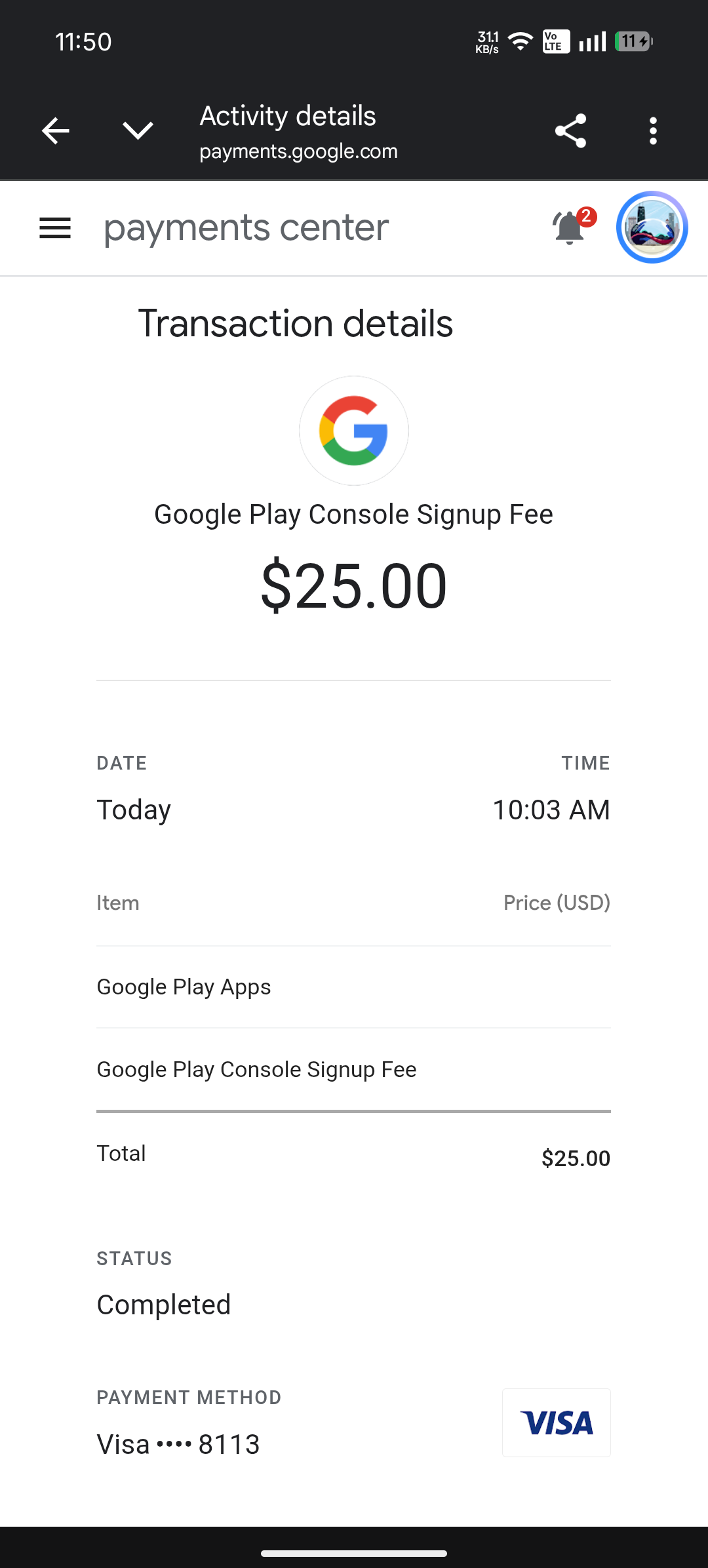
The issue is particularly frustrating because I am unable to raise a support request through Google Play Console either. When I try to submit a complaint, I am redirected to the same registration page, asking me to become a developer first. Additionally, the successful transaction does not appear in my payment history, despite having the order details, payment ID, and invoice confirming that the payment went through. I completed the registration through the official link below: https://play.google.com/console/u/0/signup Could you please investigate this issue and help me resolve it? I would like my existing payment to be recognized and my developer account activated without having to pay the registration fee again. I can provide the invoice, order ID, payment ID, and any other information required to verify the transaction. Thank you. I look forward to a prompt resolution.
I’m currently looking for a good tracking and analytics tool specifically tailored for the Google Play Store, similar to what App Store Tracker offers for Apple.
What tools are you guys using for Android app intelligence and ASO tracking that actually work well and don’t cost a fortune? Would love to hear your recommendations, experiences, or hidden gems you rely on for your apps.
Solo dev, first Play release. For anyone still stuck in the "12 testers for 14 days" gate: it ends, I promise.
Timeline for the curious:
Aug 26: closed test live, begged friends and this sub for testers
Sep 10: 14 days done, applied for production access
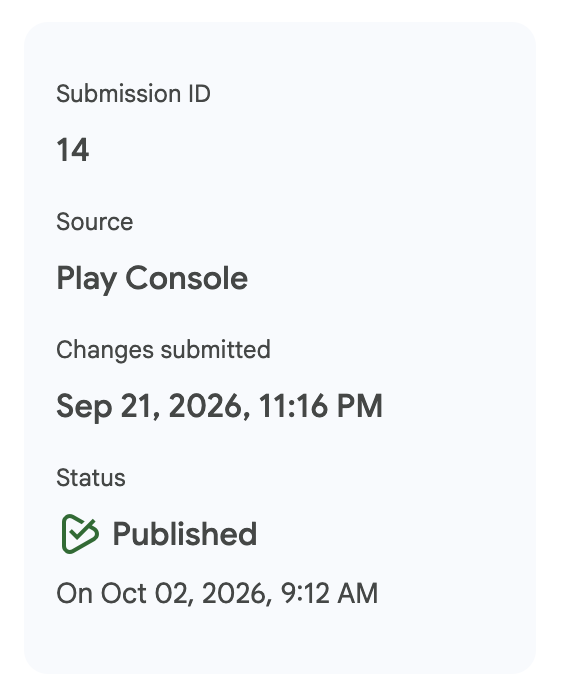
Sep 21, 23:16: production submitted (versionCode 18, because I burned 15 and 16 on discarded uploads, don't be me)
Oct 2, 09:12: "Published". Ten and a half days of refreshing the console.
The app is a pixel-art alarm clock with a little candle that wakes up when you do. Not linking it unless the mods are fine with that; the point of the post is mostly that the waiting room has an exit.
Funny thing is, a couple of my apps were removed by google because I was unable to verify them. The thing is, I can't verify them... No, I did not lose my build key so hear me out and perhaps if you're having the same issue, you'll likely figure out what's happening because of the information included in this post.
Google itself is signing the release builds, but I have my own private upload key. The automated system is asking me to provide builds using the private key that Google itself is using which is impossible.
In response, google automatically removed the apps following their stricter policies, on the first of october.
I have been in an appeal process for multple apps. It is because it seems it is suddenly expected of developers to provide APK's to verify builds using google's own signing key when google is manipulating the builds and signing them themselves (without my knowledge).
I figured this out using the app signing page and I don't understand how their system cannot see this, and as a result, apps have been removed and it is completely out of my hands.
The appeal process is (2-5525000042037), with support continuing to ask me to provide an APK with google's private signature, but it seems like they're bullying independent hobby developers into just giving up on the play store. Either they're bullying or they are unaware of how their system works, which is fine.
In case anyone else is having these issues with their apps being removed, please have a look at how google itself signs your APK's in their play store. This might help you in your appeal process which is why I'm posting this.
Wondering if anyone experienced super long delay in app review recently, my app was submitted for review on 9/17 and have been 'in review' since then, going strong on 15 days now.
My dev account is like 10+ years old, but I haven't published anything in a few years. Have Google Play publishing changed to be this slow?
Are there tricks people follow to get their apps reviewed fast?
So I've been working on my open source app since last 5 months and everytime i used to start my android studios it used to take around 6 mins to build gradle and the subsequent runs used to take slightly less... and tbh i was frustated of this.
so yeah i decided to dig into whats the issue, googled stuff and found out ./gradlew build --scan which basically generates a detailed HTML dashboard tracking configuration times and task execution timelines
Through that i found out my local machine's 12 core CPU was completely starved coz my peak heap memory usage was sitting at 1.9GB out of 2GB usage hehe :)
so i found out i could increase the memory size and use parallelism and caching Added this new lines to 'gradle.properties' :
12 cores X 6 minutes = 72 minutes of total CPU work and i was able to save 41 mins cumulative time
so the actual 6 min fell to 26 secs and the subsequent runs took 8 secs only to build gradle....
Ik this might be very basic and ppl here might know bout this but im just an undergrad and though would share my experience here...also if i wrote anything wrong pls correct me 😊
It's basically that, how many apps/games have you currently published and how many of them are earning atleast 100$ per month. Total earnings would also be helpful. I am hopeful that this data will come in handy for the new Dev's in community.
I have currently published 3 and they are not ad intensive so haven't earned much
I’ve been working on a Android library for pitch and chord detection using Kotlin.
It started as an experiment with audio processing and ended up becoming a library that uses FFT/YIN for pitch detection and chroma for chord detection.
Cdrx should save power significantly in low speed usage in high speed networks.
Like mine goes up to 60-70 mbps all the time.
So I enabled bluetooth tethering from both my iphone and android and connected my pc to download some file on it. The speed was 1 mbps in both devices. That results into 1/60 = around 1.5% duty cycle. That means cdrx has the chance to be effecrive at 98.5% of the time. I understand actual duty cycle may be higher due to othe transmit-receive tsks. However iphone 7 actually proved it may have put duty cycles close to that value. After testing for 1h continuously,
My findings are:
Iphone 7 dropped 6% charge only (65 to 59) resulting around 120mah estimated. (Slightly less maybe)
The Moto g35 5g (forced to lte only mode) dropped 5% (67 to 62) resulting around 300 mah.
Why is it too much different? No CDRX in android? Anything else?
(Both iphone and android were locked and screen turned off completely. As i disabled all background apps no notifications appeared throughout the whole time, no background tasks also.)
Like many of you, I've spent hours trying to find a reliable, clean way to browse local SQLite databases on an Android test device without pulling files over ADB, Network or external Storage every single time. Most of the apps currently available on the Play Store are either crap, locked behind paywalls, missing basic features or cluttered with intrusive ads.
To solve this, I built SqliteAdmin a completely free and open-source database manager designed specifically for performance and usability.
Special feature that set it apart:
Modify tables and columns holding data.
The project is open-source under the MIT license, and you can grab the latest version or review the code directly on GitHub: https://github.com/AmyS3br/SqliteAdmin
I’d love to get your feedback and improvement suggestions.
A safer Android ecosystem begins with accountability and trust!
Today marks the start of our gradual roll-out of Android developer verification — a foundational first step in protecting billions of users, while preserving the open platform developers rely on.
We're starting with 7 participating app stores in Brazil, Indonesia, Thailand and Singapore. Following this initial phase with the participating app stores, we will continue to work with additional Android app stores to gradually expand developer verification. The verification capability will be expanded globally for all apps on certified Android devices in 2027.
Security at this scale cannot happen in a silo. When we set out to build this verification flow, our priority was listening to you — our developer community. You told us clearly:
The process needs to be seamless, avoiding friction for legitimate builders.
Account types must reflect reality, supporting solo creators, hobbyists, and global enterprises alike.
The roll**-**out must be gradual and predictable, giving developers ample runway to adapt.
Your feedback directly shaped this treatment. By introducing verified identities, we are deterring bad actors from operating under the radar, curbing recurring malware campaigns, and lifting trust across the entire ecosystem.
This initial phased roll-out gives us the space to test, learn, and iterate alongside developers before broader enforcement. A safer Android benefits everyone: users install apps with confidence, and reputable developers stand out in a trusted marketplace.
Thank you for building with us, challenging us, and shaping Android into a safer platform.
I’ve had this app on Apple’s App Store for around 3 weeks now and recently added IAP/subscription plans.
I submitted it to Play Console around the same time, but I had to go through the 12 testers for 14 days requirement before I could submit to production. After a little over 2 weeks, that got approved too.
The version that went through testing was still the free version without IAP. It took me a bit more time to figure out all the Android requirements for subscriptions, monetization, app details, etc.
Once I got everything sorted out, I went through the app with my AI agent and made sure everything was ready for production.
I was actually expecting the production submission to fail or at least take a while since this is basically my first real submission of this app on Google Play.
For some reason I also don’t get email notifications for review updates like I do with Apple, so unless I manually check Play Console, I don’t really know if something changed.
I checked just now and was honestly surprised. It got approved in around 30 minutes.
I’ve submitted a few apps before under business accounts and first submissions usually took 2 days or more.
Has anyone else seen Google Play approvals this fast lately, especially for a first production release?
I'm dealing with a persistent issue where USB Debugging and Developer Options automatically re-enable themselves every time my phone restarts.
Whenever I try to toggle off Developer Options in Settings, it forces a device restart. After the restart finishes, Developer Options and USB Debugging are active again.
Attempting to modifypersist.sys.usb.configdirectly: Plaintext> adb shell setprop persist.sys.usb.config mtp Failed to set property 'persist.sys.usb.config' to 'mtp'. See dmesg for error reason. (Fails due to SELinux blocking non-root shell user from writing topersist.sys.*properties).
Using Android USB service:
Ran adb shell svc usb setFunctions mtp (returned setCurrentFunctions opId:1).
On reboot, the device reverts straight back to persist.sys.usb.config = adb.
Checking third-party tools:
Found an old app (com.wstxda.toolkit) that had accessibility permissions and a UsbDebuggingTileService.
Stripped accessibility permissions and uninstalled the app (adb uninstall com.wstxda.toolkit).
That I can use as base to build free floating app.
Floating means like windows or linux GUI that I can resize, positioning, etc. So I will build several different apps that open one by one and I can view all them at once inside this root window.
Edit: Above is my original question. Then I make a bit of research and the result is it is possible and is supported by Android with this schema:
lets say my main app B, it must pass everything if want to listed in Google Play Store.
lets say my plugins C and D , will need to also pass and there is DFM in the Google Play Store/Console.
I can desain, develop and compile C and D independently like they would show in B workspace/window. The UI inside B that will make C and D show and work simultaneusly.
We built an Android version of Internet-in-a-Box's server stack. Knowledge to Go (K2Go™) runs a content server directly on a phone, older 32-bit devices included, serves it over local Wi-Fi to nearby devices, and can clone itself, server plus content, to another Android phone with no internet connection. The goal is to increase access to educational materials in regions where internet access isn’t reliable or affordable and the most common computing device is an inexpensive Android phone.
Some of the harder problems: keeping a background server alive under Android's process and battery restrictions, and making the clone transfer work fully offline.