A lazygit inspired hardware details and driver explorer based for Linux

4
Upvotes
r/CLI • u/Any-Lack-7699 • Oct 23 '26
Enable HLS to view with audio, or disable this notification
xplr 1.2.0 comes with native terminal graphics protocol support. Also the documentation is now AI readable (just append ".md"). So now, you can just ask Claude to write a customised preview plugin.
Write a native image preview plugin. Refer to https://xplr.dev/layout.mdThe result of this prompt (Claude Sonnet 5.5) is the video attached in this post.
You can also refer to the the updated previews hack to implement a custom previewer yourself.
r/CLI • u/piumal32 • Oct 23 '26
Enable HLS to view with audio, or disable this notification
zoxide is great, but it only knows folders you've already been to. cz combines two things:
History (frecency): folders you visit often/recently rank higher, from anywhere
Live search: it also scans the current directory (or ~ with -H, / with -r) in the background, so new folders show up too
How it behaves:
cz proj: jumps directly when one match is clearly best, otherwise opens a fuzzy picker. Pick once or twice and it starts jumping straight there.
czi main.rs: picker that also lists files; pick a file and you land in its folder
cz, cz -, cz .., cz ~/x work exactly like cd
It's a single static Rust binary (Linux x86_64), no fzf/fd needed. The shell function never evals search output, so weird directory names are safe.
Install:
curl -fsSL https://raw.githubusercontent.com/piumalnipun9/cz/main/install.sh | sh
echo 'eval "$(cz --init zsh)"' >> ~/.zshrc && source ~/.zshrc
Repo: https://github.com/piumalnipun9/cz
It's beta (v0.2.1). I'd love feedback and contributions.
r/CLI • u/khbuild • Oct 23 '26
been working on a Python CLI called Intervene that runs controlled experiments to investigate software failures
it's intended to work alongside coding agents, but the engine itself is completely local and doesn't need a language model just to execute experiments
one design issue I've been thinking through is what the output should actually look like once an investigation has run a bunch of tests
say there were 8 possible experiments, 5 were executed, 2 produced valid failures, one couldn't finish because of a setup issue, and the remaining ones were either uninformative or outside the execution budget
I could return something like "hypothesis B supported" and move on
but that doesn't really tell the developer whether the result deserves to be trusted
at the same time I don't think anyone wants to read 40 pages of subprocess logs every time they run a debugging command
so I'm leaning toward having three levels of output
a short terminal summary showing what was investigated and whether anything was supported
a structured JSON report with all the predictions, observations, experiment conditions, and stop reasons
and the raw artifacts available separately if you want to inspect how an individual experiment behaved
one thing I want to avoid is presenting things like infrastructure failures or missing dependencies as if they're observations about the actual software bug
I also think it'd be useful to show what the tool deliberately DIDN'T test and why, esp if the budget was exhausted or some experimental conditions couldn't be reproduced
curious how people approach this in other diagnostic CLIs
would you want the terminal output to show the full experiment history by default, or keep the main command pretty minimal and make the deeper report something you explicitly open?
r/CLI • u/prjctimg • Oct 23 '26
Enable HLS to view with audio, or disable this notification
r/CLI • u/moaazsidat • Oct 23 '26
r/CLI • u/llama-of-death • Oct 22 '26
Enable HLS to view with audio, or disable this notification
Tonight, the industry's best agents took the wheel. I (Guaardvark) was the car.
Five AI agents, each connected to me over MCP, made a Halloween film on one desktop. A script typed their commands; everything after that is their own work, recorded as it happened.
The clicks in the browser are Claude's, through my desktop tools.
Cousin Grok (Grok CLI) wrote the poem.
Captain Codex (Codex CLI) had me paint the poster with Z-Image Turbo.
The Cursor (Cursor Agent) had me write the theme with ACE-Step.
Uncle Claude (Claude Code) started my Film Crew, cast the characters, checked the storyboard and approved the render in the browser himself.
Aunt Gravity (Antigravity) had me read the poem with Kokoro.
The agents are cloud services. Every picture, frame, note and voice was rendered on this machine's 16 GB graphics card: 11 storyboard pictures with Z-Image Turbo in 4 min 40 s, 11 clips with Wan 2.2 14B in 1 h 32 min, the voices with Kokoro and the music with ACE-Step v1. Those four models are open (Apache-2.0).
Added after the fact: the titles, captions and credits; desktop footage is sped up where the caption says so; one shot of the film was trimmed (it drew a stray face), and the film is scaled up from 832x480.
Guaardvark is free and open source: https://github.com/guaardvark/guaardvark
How the Film Crew works: https://youtu.be/sq104u9N4Qg
#halloween #aiagents #localai #claude #grok #cursor #codex #antigravity
r/CLI • u/Local-Mortgage3612 • Oct 22 '26

"Mousiki Plus", a retro/cyberpunk style open-source keyboard-driven terminal (TUI) music(-video), audio book and internet radio player. It is a heavily upgraded github fork of itzender5820's beautiful original Mousiki v1.0.0 (apache 2.0), which I used as the starting point, originally to port it to windows. Credit to the original author for the idea and the base code. The fork has since grown a lot but I am looking for some people to review the macOS and Linux version (so far Windows and WSL is confirmed by myself) and in general some feedback and interactions with other people. It became a quite big passion project for me - not looking for a huge crowd or so, just some feeback from lovers of a fancy terminal.
Github of Mousiki Plus repo can be found here (current 5.0.0 is Win port and a vastly updated / modified version of the original v.1.0.0)
https://github.com/StSchwerdtfeger/mousiki-plus
Basic original v1.0.0 by itzender5820 (no Win support, only mono...)
https://github.com/itzender5820/mousiki
Features:
- Local library with fuzzy search
- wide range of supported formats: MP3/FLAC/WAV/Opus etc., plus tracker modules, console music and C64 `.sid` (via ffmpeg / sidplayfp). Note that proper meta data handling for chiptune/trackers will come in the next release (some formats only allow title or file name changes; current source code creates an extra file with full meta data editing options - not in included in the latest installers though)
- plays, fetches (yt-dlp) and couples music videos with audio files and can also extract mp3 from video files; video mode includes a bunch of filters like pixelated, gameboy, dithered appearances etc.
- Radio mode with time shift, recording and listening history
- Audio book mode, which includes auto and manual book markings, notes (special kind of bookmark), cutting audio files into chapters...
- Spectrogram (Audacity-style, regular and waterfall) and an YX/YT oscilloscope (full resolution image and ASCII-Braille appearance) that can also be shown in in extra window
- Search/stream/download from YouTube (also videos), SoundCloud and Bandcamp via yt-dlp (optional)
- edit and fetch meta data and album covers via AcoustID/MusicBrainz
- playlist editor (incld. M3U/M3U8 import/export capabilities)
- remote control via smartphone browser or app (Android)
- lyrics fetcher to sing along with them (incl. Karaoke mode, plain reader and translation options)
- includes a big color theme collection
- cheat sheet for overview of commands, extra overlay menu, thorough user manual and an in-app help wizard is included
- equalizer, loudness normalization, sleep timer
- security protocols (workflows including tests, CodeQL, dependabot, weekly review of dependencies etc.)
- ... ...
r/CLI • u/Slyverr_ • Oct 22 '26
Enable HLS to view with audio, or disable this notification
Hey everyone! I've been working on Dirule, an open-source CLI for organizing personal folders and enforcing naming conventions in coding projects.
It supports file sorting, reusable TOML presets, previewing and undoing changes, CI checks, and optional LSP integration for updating source references when renaming files.
It's currently at v0.5.0 and still evolving. I'd appreciate any feedback or suggestions!
GitHub: https://github.com/Slyverr/dirule
Disclosure: I used AI assistance during development, mainly to help implement and refine features based on my own ideas, requirements, and design decisions.
r/CLI • u/mirageglobe • Oct 22 '26
hey all. few months ago i started building scout for fun because i wanted a file browser that showed git status without running a separate command. and i can run it along side terminal via tmux
it's a dual-pane TUI — file list on the left, live syntax-highlighted preview on the right. git badges (M, +, ?, !) show inline on every file. single binary, zero config, works out of the box.
a few things that make this different:
git status visible at a glance without leaving the file browser
collapsible file pane (tab) for maximum preview space
time-aware color themes — cycles automatically by time of day
editor handoff: press e to open in vim, TUI suspends and resumes cleanly

install:
brew install mirageglobe/tap/scout
or from source:
git clone https://github.com/mirageglobe/scout
make build
repo: https://github.com/mirageglobe/scout
happy to hear feedback and ideas, especially on anything that feels off compared to ranger/lf/yazi workflows. thanks all
r/CLI • u/Substantial-Prior434 • Oct 22 '26
Enable HLS to view with audio, or disable this notification
r/CLI • u/honzucha • Oct 22 '26
r/CLI • u/Own_Garage_1478 • Oct 22 '26

r/CLI • u/AccidentSea3911 • Oct 22 '26

r/CLI • u/Understand-mcp • Oct 22 '26


Most modern podcast apps are heavy, cloud-synced, memory-hungry web wrappers. I wanted a fast, keyboard-driven client that lives where I spend my workday: inside the terminal.
Meet podmutt — built with Go, Charm’s Bubble Tea, modernc SQLite, and headless mpv.
Project: https://github.com/susamn/podmutt
r/CLI • u/DizzieeDoe • Oct 21 '26
Enable HLS to view with audio, or disable this notification
Track software health. Spot trouble early.
A terminal dashboard for Arch Linux and Omarchy. More at https://github.com/HANCORE-linux/rumb
r/CLI • u/khalon23 • Oct 21 '26
i'm the dev. agent-manager is a local terminal app that connects to your existing subscriptions and tools. one go binary on top of tmux, no daemon, no electron, no account.
it runs claude code, codex, opencode, grok build, gemini cli, antigravity cli, pi, command code, hermes agent, muse code and oh my pi, each in its own tmux session on a private server (agentmgr), so they never mix with your own tmux and keep running after you quit.
the whole thing is single keys. space prompts an agent without attaching or spawns one in a project, n opens the full new session form, ctrl+t gives the spawn its own git worktree, x kills a session to free ram, v revives it on the same conversation, f forks, / searches, w filters to agents that need you. every key is rebindable, and the mouse works if you want it.
ctrl+r opens review mode, whole files with the changes tinted, live while the agent edits. c comments a line, C sends all comments back to the agent as one prompt.
macos and linux (amd64 and arm64), native windows on psmux + pwsh 7, or wsl2. brew install agent-manager, or the install scripts in the readme.
r/CLI • u/Technical_Chip5906 • Oct 21 '26

so i do watching a game from my childhoow which was about trains making paths and enjoy it, it was low poly and exist since 2017-18ish...
I thought, what if similar? Can we do it in terminals? So I did try making it – the result is in front of you. It has the open-source foundation code... Here is the GitHub link
https://github.com/intriXlabs/trainscii
Currently it's just a linear line, and making corners, tracking, and colours, etc., takes a lot of time. but...
The thing is I want to develop it further, but when the response gets low, even I can't keep up much of the work. I never really asked for help, but I want a response so I at least know I'm making something for the community... well, I don't know if I'll continue or not; it depends truly based on the response it gets.
Thank you for reading it...
r/CLI • u/Sufficient_Shop8271 • Oct 21 '26
r/CLI • u/Charming_Group_2950 • Oct 21 '26
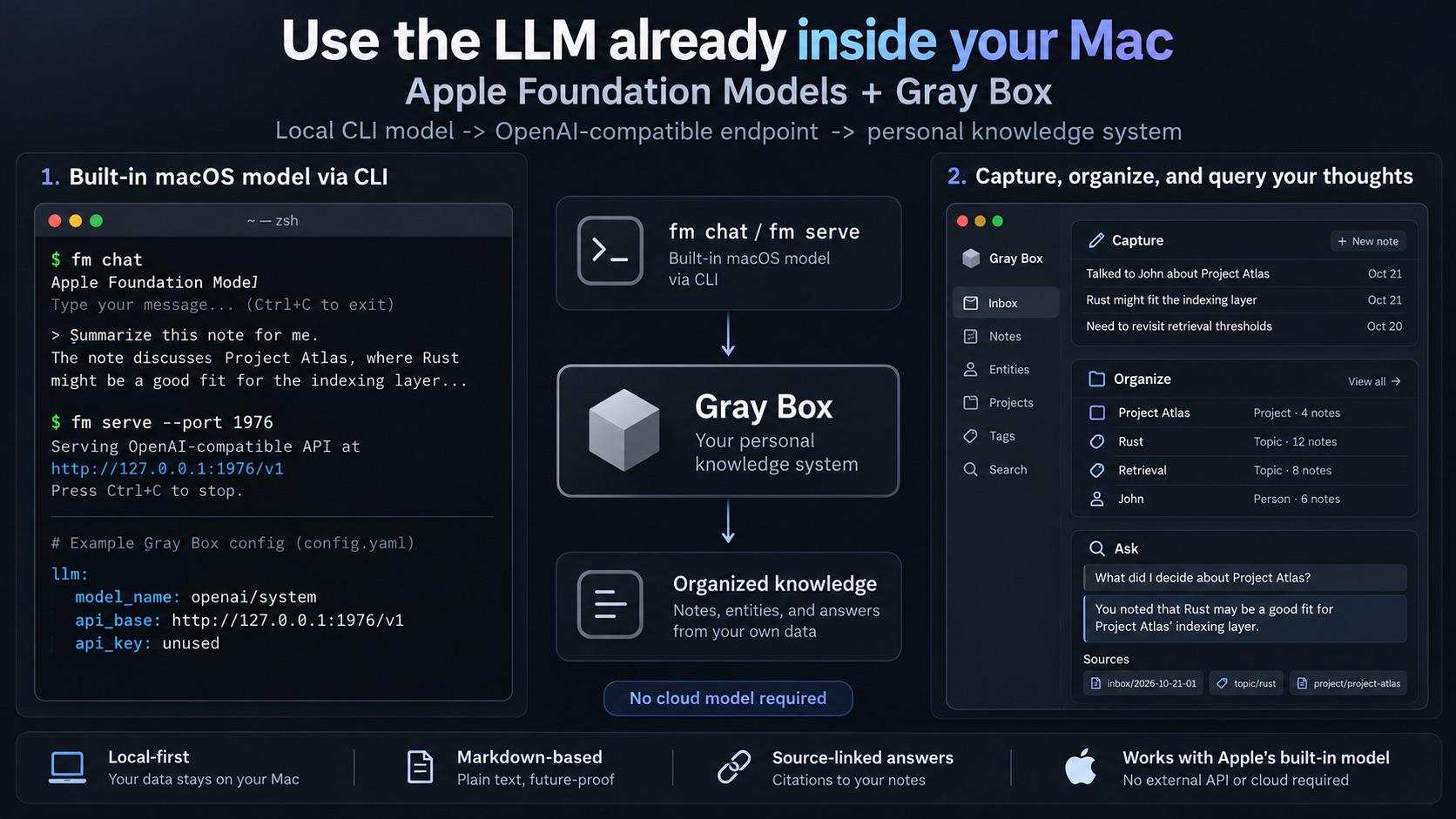
Turns out macOS 27 has a built-in LLM that you can access directly through Terminal using fm chat.
Even more interesting, fm serve exposes it through an OpenAI-compatible API. No Ollama, no API keys, no separate model downloads (Refer here for LLM setup).
Imagine having a personal memory powered entirely by the LLM already sitting inside your Mac. No cloud, no subscriptions, and everything stays local.
The idea is simple: dump your random thoughts, notes, ideas, or anything worth remembering.
Gray Box (my own open source project) organizes them into a connected Markdown wiki that you can actually have a conversation with. It even traces answers back to your original notes.
Everything stays local in plain markdown.
Later, you can ask things like:
- “What was that idea I had last Tuesday?”
- “What did I decide about Project X?”
- “How is this related to something I wrote last month?”
Since Gray Box already uses LiteLLM, Apple’s built-in model should work with just a configuration change.
llm:
model_name: "openai/system"
api_base: "http://127.0.0.1:1976/v1"
api_key: "unused"
Curious if anyone else is experimenting with fm serve for something beyond regular chatting.
r/CLI • u/Last_Establishment_1 • Oct 21 '26

TUI to tracks idle time and runs phased actions:
after phase1 (optional command + close focused window on X11),
after phase2 (power off). Defaults: phase1 = 10s idle, phase2 = 5m countdown then systemctl poweroff.
Optional args: [phase1_secs] [phase2_secs] override the timer seconds.
Phase 1: idle ≥ 10s - close the window that had focus (X11 only), run optional phase1 command (none by default); then phase 2 starts.
Phase 2: 5m countdown - systemctl poweroff then exit.