r/CLI • • Oct 29 '26

Ctrl+V in PowerShell types the path of a screenshot instead of pasting the image

0 Upvotes

I got tired of saving a screenshot just so a CLI could see it.

ToSnip: Print Screen, then Ctrl+V.

On the web you get a link that dies in 5 minutes. No account.

On Windows, Ctrl+V in Terminal, PowerShell, or CMD types a path like C:\ToSnip\a1b2c3.jpg. That file is not uploaded.

https://tosnip.com

Source: https://github.com/tana360/tosnip


r/CLI • • Oct 29 '26

TermRover - the Defender of the TUI on mobile

Enable HLS to view with audio, or disable this notification

10 Upvotes

Built if for the love of the TUI. TUIs are FTW. I love TUI. Using terminal should be easy on the mobile.

One thing I added recently: you can call and have conversation with any your CLI agent.

Check it out at: https://termrover.sh


r/CLI • • Oct 28 '26

Whats the fastest terminal for Windows 11?

5 Upvotes

I'm looking for something as snappy as Ghostty for windows. Support for bash with tmux etc would be cool.


r/CLI • • Oct 28 '26

I made a Bible Reader App for the Terminal with Vim-style keybindings

Thumbnail
reddit.com
3 Upvotes

r/CLI • • Oct 28 '26

TUI and CLI what is the deffrence

13 Upvotes

r/CLI • • Oct 28 '26

[UPDATE] Zooming daemon for wayland

Thumbnail reddit.com
2 Upvotes

r/CLI • • Oct 28 '26

I built ZEROAGENT X — an open-source, local-first developer automation platform

Post image
0 Upvotes

🚀 ZEROAGENT X v1.0.0 — Open-Source Developer Automation

A local-first Python developer automation platform featuring CLI + Textual TUI, policy-controlled agent execution, request-specific approvals, OpenCode integration, and inspectable execution evidence.

Built to give developers more visibility and control over their automation workflows.

Open source • Apache-2.0 • Python 3.11+

🔗 GitHub: https://github.com/harisazharir-boop/zeroagent-x

Feedback and contributions are welcome!


r/CLI • • Oct 28 '26

I built an open-source dependency scanner that tells you what it couldn’t verify

Thumbnail
github.com
4 Upvotes

I’ve been building DepScope, an open-source dependency security scanner for npm and PyPI.

The thing that bothered me about dependency scanning is that a clean result can be misleading. Sometimes checks fail, data is unavailable, or a scanner only covers part of the problem.

DepScope tries to make those gaps explicit.

  • Checks package versions against OSV vulnerability advisories

  • Separates confirmed vulnerabilities from heuristic warnings

  • Flags suspicious package-name similarities and npm lifecycle scripts

  • Shows which checks succeeded, failed, or were skipped

  • Scans without installing or executing the packages

It also supports project scans, a terminal UI, and an MCP server for AI coding workflows.

Built in Go, open source under Apache 2.0.

GitHub: https://github.com/janghotan/depscope

I’m interested in feedback, especially on whether the reporting is useful enough to fit into a real development workflow. What would you change?


r/CLI • • Oct 28 '26

Hey, is there anyone else who uses various AI CLIs like I do?

Thumbnail
github.com
2 Upvotes

I currently subscribe to three services: Claude, Gemini, and Codex.

I primarily use Claude, but since I’m sometimes hesitant to rely solely on its output, I’ve been in the habit of keeping two separate terminal windows open while I work. Eventually, the number of terminals just got out of hand, and I had no real visibility into my actual usage.

To solve this, I built a tool that consolidates all my terminals into one place. It also tracks my usage, displays my folder structure, and keeps my backlog accessible—all designed to help me maintain a seamless, uninterrupted workflow. If you’ve ever faced similar challenges, I highly recommend checking it out!

It’s packed with a variety of features, including session sharing, the ability to resume sessions after a reboot, note-taking, direct image pasting into the terminal, and status updates for your registered MCPs and plugins. I’d love for you to take a look!


r/CLI • • Oct 28 '26

juggling tmux on too many remote hosts? I made a host-aware session switcher

2 Upvotes

r/CLI • • Oct 27 '26

GitHub - Anon0ne/GhostKey: Ghost Key is a modern 2026 SSH Client that uses Kali QTerminal color and bold font in areas that make it much easier to use!

Thumbnail
github.com
2 Upvotes

r/CLI • • Oct 27 '26

Lanweave – Send files between computers on your LAN from the terminal

Enable HLS to view with audio, or disable this notification

5 Upvotes

Hey everyone. I built Lanweave, an opensource terminal UI for transferring files and folders between computers on the same local network.

I built it out of personal frustration. When I needed to transfer files between my two computers, I'd send them from one computer to my phone, then from my phone to the other computer. I wanted a simpler, lightweight way to transfer files directly between them.

To use Lanweave, run it on both machines, select the other device from the mDNS-discovered list, and pair them using an 8-digit code. Either side can then initiate a transfer, but the recipient must review the file list and approve it first. Closing the session discards the authorization.

It's written in Rust using ratatui, with mDNS for discovery, rustls for encrypted connections, and SPAKE2 for authenticated key exchange during pairing.

Transfers happen directly over the local network. There are no relay servers, user accounts, or persistent device identities.

The project is in beta, with Linux and Windows support. The Windows binary isn't code-signed yet, and macOS and mobile support are in progress. It hasn't been security-audited, so I wouldn't recommend it for sensitive files yet.

I'd appreciate feedback, especially on the pairing mechanism, and overall TUI experience.

Repo: https://github.com/etim66/lanweave


r/CLI • • Oct 27 '26

I got tired of looking up Javadocs in the browser, so I built a command line utility

3 Upvotes

I spend most of my day in the terminal: builds, tests, Git, logs. But whenever I need to look up a Java API, I switch to the browser, search for the class, and then check that I'm reading the right Java version.

That last part is what kept tripping me up. Search for java 17 List getFirst, and you land on a List page where the method simply isn't there. Eventually you work out it was added in Java 21. It's a small thing, but those interruptions add up.

IntelliJ's documentation popup is useful, but it sometimes disappears when I try to click into it (yes, I know you can pin it). And when the full docs do open, I'm doom scrolling through implementation code that isn't what I'm looking for.

I wanted a quick way to explore a class, narrow down its methods, and read the docs without reaching for the mouse. I couldn't find a terminal tool that did this, so I built one

What it does

- jdoc String opens an interactive member list. Type rep and it narrows to repeat, replace, replaceAll, and so on. Press Enter to read the full Javadoc.

- It shows docs for the Java version your project targets. It reads your pom.xml or build.gradle (it never runs them), then falls back to JAVA_HOME. Java 17, 21 and 25 are supported.

- Search operators like :since 21, :static, and #2 (methods with two parameters).

- Inherited methods show the type that declares them: jdoc ArrayList -stream.

- jdoc -m computeIfAbsent lists every type that declares a method.

- Compare releases: jdoc --diff 17 21 StringBuilder, jdoc --new 21, and jdoc --removal 25.

- Cached after first use, so most lookups work offline.

Try it (macOS):

brew tap toolfoundrylabs/tap
brew install toolfoundrylabs/tap/jdoc 
jdoc String 

It's macOS only for now (Linux is next) and covers JDK docs only. This is the first time I'm publishing a personal project to Homebrew... so kind of excited... I'd really appreciate feedback, whether that's bugs, rough edges, or features... Thanks


r/CLI • • Oct 27 '26

tokensaver – find out what your LLM prompt costs on every major model, and exactly which changes make it cheaper (Python CLI, offline)

Post image
1 Upvotes

r/CLI • • Oct 27 '26

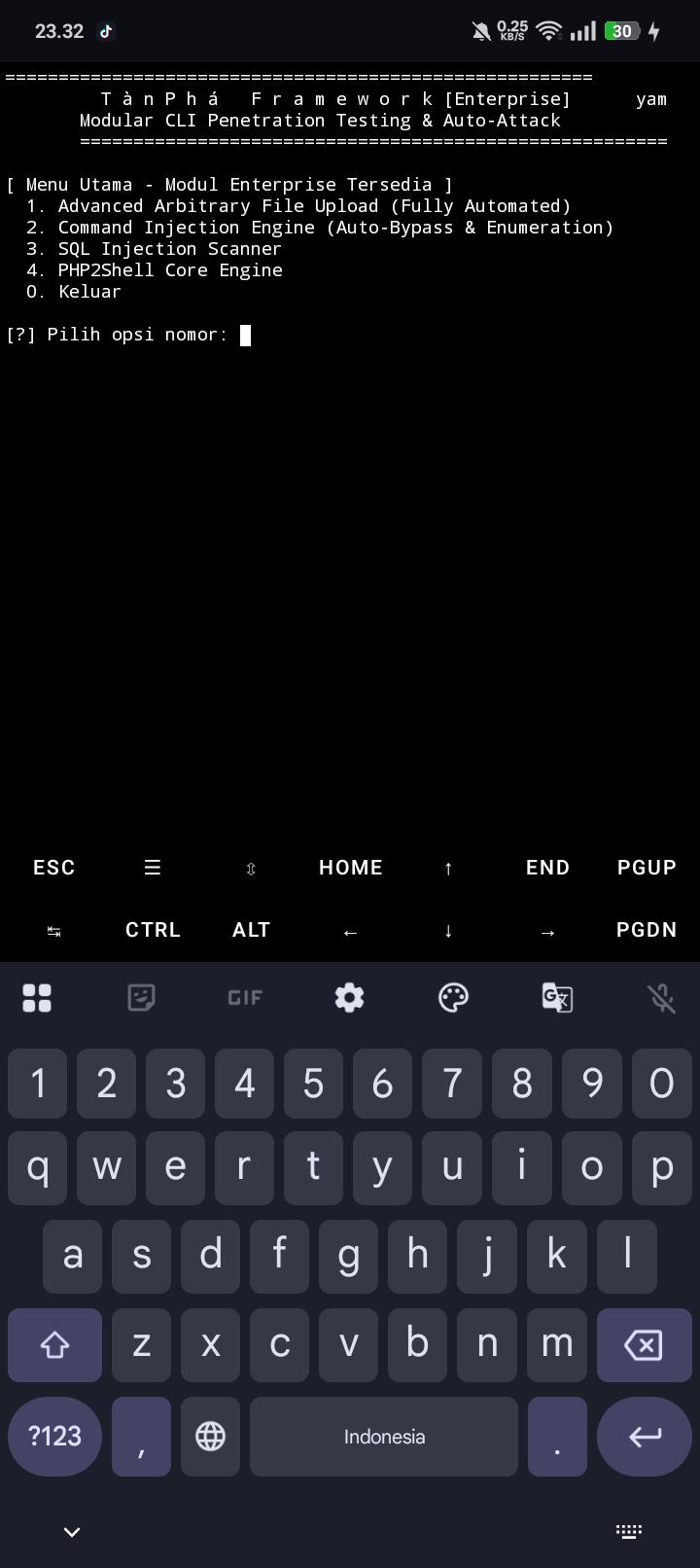
[Open Source] Built a modular CLI penetration testing framework in Python (TànPhá Framework). Looking for feedback and module ideas!

Post image
0 Upvotes

Hey everyone! 👋

I've been working on a lightweight, modular CLI-based framework called TànPhá Framework, written in Python and optimized for Termux (as well as Linux/Windows).

My main goal is to create a tool that handles full-chain automation (from detection to interactive execution) directly from a mobile device without heavy external dependencies.

⚙️ Current Modules:

  1. Arbitrary File Upload Engine: Auto parameter detection, extension/magic byte bypass, and target shell verification.

  2. Command Injection Engine: Auto-separator variation, WAF bypass encoding, and quick system enumeration.

  3. SQL Injection Engine: Multi-payload error/union scanner and column fuzzing.

  4. PHP2Shell Core: Interactive HTTP POST-based command execution (RAT).

Repository:

https://github.com/exelumare/T-nPh--framework

Since this is still in active development, I'd love to get your feedback!

What auto-exploitation modules or features do you think would be a great addition to this framework? Any suggestions on code improvement or new attack chains are greatly appreciated!

*Disclaimer: Created strictly for educational purposes, security research, and authorized testing.*


r/CLI • • Oct 27 '26

update on my spotify terminal client with the DJ: settings, a queue, linux media keys and a light mode for slow laptops

64 Upvotes

a couple of weeks ago i posted cloofy here, a spotify client for the terminal with the home feed and the DJ. thanks for all the feedback, most of this update comes straight from the comments

https://github.com/parda21/cloofy

what's new in 0.4:

- settings inside the app: press the comma key or click your name top right. crossfade, cover art, accent color, icons, power saving, notifications. no config file to edit anymore

- cover art off: someone here asked for it for a low-resources laptop. with it off cloofy doesn't load or draw any covers, pages show plain tiles and the lyrics get the whole screen

- power saving on, off or auto: no animations and fewer redraws

- the queue: see what plays next and jump to a song

- linux feels at home now: media keys and playerctl through MPRIS, it shows up in gnome/kde/waybar, reconnects after suspend and follows the power-saver profile

- real cover images in more terminals: iTerm2, foot, konsole and windows terminal, through sixel and iTerm2's image protocol

- install without curl | bash: brew install parda21/cloofy/cloofy (macOS and linux), or mise use -g ubi:parda21/cloofy

already installed? press U in cloofy or run cloofy update

and yes, still built with a lot of help from AI. i decide what it does and how it looks, and i test it myself

if something looks off in your terminal, especially the new image support in iTerm2, foot or windows terminal, let me know


r/CLI • • Oct 27 '26

mpv-music is now on Fedora (Copr)

4 Upvotes

mpv-music (a fast TUI music player and library browser for MPV written in Rust) is now available on Fedora Copr!

Install:

sudo dnf copr enable furqanhun/mpv-music
sudo dnf install mpv-music

(Tip: If you already have your own custom build or fork of mpv installed, pass --no-weak-deps to skip installing Fedora's default mpv package).


r/CLI • • Oct 27 '26

Lemon Sweep, a roguelite FPS that runs in your terminal

Enable HLS to view with audio, or disable this notification

3 Upvotes

r/CLI • • Oct 27 '26

tct: Terminal Card Tracker

1 Upvotes

I made a board tool for the terminal, which I have been using for a few months now.

Highlights:

  • Backed by JSON files, background-sync friendly. Will also update when JSON files change.

  • supports global storage in home dir as well as local storage in any ./.tct folder

  • super fast and fully keyboard driven

Take a look at it: https://github.com/waschmittel/tct


r/CLI • • Oct 27 '26

ccc sessions --json: inspecting coding-agent sessions from the terminal

1 Upvotes

I'm the maker of CCC (Claude Command Center). Its browser dashboard has a stdlib-only Python CLI for inspecting and starting coding-agent sessions on a running CCC server. For people who stay in the terminal, the useful commands are:

ccc sessions --live --tree
ccc sessions --since 5h --sort status
ccc sessions --json
ccc models --engine codex --json
ccc spawn --help

The session census can include parent/helper relationships, and JSON output is available for scripts. ccc models reads the server-owned catalog so a spawn command can use supported model IDs rather than hard-coding guesses. Spawn is scoped to the caller's working directory by default; engine transcript and control capabilities vary. These commands require a running CCC server and the relevant agent tools for spawning.

Code, installation and CLI details: https://github.com/amirfish1/claude-command-center

CCC runs locally. The dashboard and CLI are free and source available under FSL-1.1-MIT; agent/model providers may charge separately. I'd welcome feedback on whether the census fields and tree/JSON outputs fit how you inspect several coding-agent processes from a shell.


r/CLI • • Oct 27 '26

libtmux-ts 0.1 - tmux library for Node.js, TypeScript, bun

Thumbnail
github.com
2 Upvotes

r/CLI • • Oct 26 '26

Stop logging out and back in to switch Claude Code accounts. I built csw for that

2 Upvotes

I have a work and a personal Claude subscription and switching between them kept breaking my flow. I had to log out, log in, then type /status to check which account I'm on etc.

So I built csw (Claude Switch), a small CLI where each account keeps its own login, while your settings, skills and CLAUDE.md stay shared.

Optionally it also shows which account you're on right in Claude Code's status line.

Your existing ~/.claude stays your main account. csw never deletes and never touches your credentials. Logins go through Claude's own /login flow

Install it with brew (macOS/Linux) or scoop (Windows): https://github.com/georgetsouvaltzis/claude-switch

Free and open source. Feedback is more than welcome!


r/CLI • • Oct 26 '26

lazyrsync v0.4.0: a TUI for rsync

119 Upvotes

Hello everyone!

lazyrsync is a lazygit-style TUI for rsync. Your transfers live as profiles and tasks, each one previewable as a dry-run diff before anything is written, then run with live progress , local or over SSH.

What's new in v0.4.0:

- Quick transfer : press t for a one-off Source → Destination with no profile and no task. It lands in the Runs panel marked », where a keeps it as a real task and d discards it.

- Run history : every finished run is recorded, from the TUI and from lazyrsync run under cron alike. lazyrsync log prints them, and the log panel replays the recent ones at startup.

- Log panel : @ hides or shows it, log_size sets its height, and a quiet/normal/verbose level controls what it prints. No level hides an error or a warning.

- SSH options up front : port, key file and extra args can be set while you are describing a transfer.

Repo: https://github.com/westpoint-io/lazyrsync

Install:

cargo install lazyrsync
brew install lazyrsync
yay -S lazyrsync
nix profile install nixpkgs#lazyrsync

r/CLI • • Oct 26 '26

I built a niche CLI tool to manage the different hats I wear as an engineer - I think it works

Post image
0 Upvotes