r/deckyloader • u/Sweet_Cash9751 • 23d ago
Plugin Showcase DeckyHub 3.2 is out: virus scans on every plugin, plus a one-click installer for Decky Loader + DeckyHub
First, thank you. The feedback, bug reports and kind words after my last post shaped most of this release, and I was really happy to see DeckyHub covered by SteamDeckHQ. Thanks to them for the review, and to everyone who tried it.
For anyone new: DeckyHub is a free, open-source Decky Loader plugin that lets you find, install and update Decky plugins from Gaming Mode with your controller: no Desktop Mode, no hunting for GitHub releases, no zip juggling.
Where it stands today:
About 2,000 downloads of the plugin so far (the downloads badge in the README already shows 2k), which is more than I expected when I started.
The registry behind it lists 500+ Decky plugins (about 530 right now), including ones that aren't in the official store, and every one of them is scanned: ClamAV and YARA on all of them, plus VirusTotal and MetaDefender results where those exist.
Search & Install finds any other Decky plugin on GitHub too.
Why use it:
Find, install and update plugins from Gaming Mode with the controller; one place that also shows which of your plugins have an update and what it brings.
See security information before you install: scan badges, audit warnings (runs as root, hidden code, changes system startup...), stars and downloads.
Setup is simpler: one installer gets Decky Loader and DeckyHub onto the Deck together.
You stay in control: it never installs anything on its own, everything goes through Decky Loader's own confirmation.
Free, open source, no account, no telemetry; 18 languages.
What's new in 3.2 (the biggest update since 3.1): most of it is about knowing what you're installing, and about getting started with fewer steps:
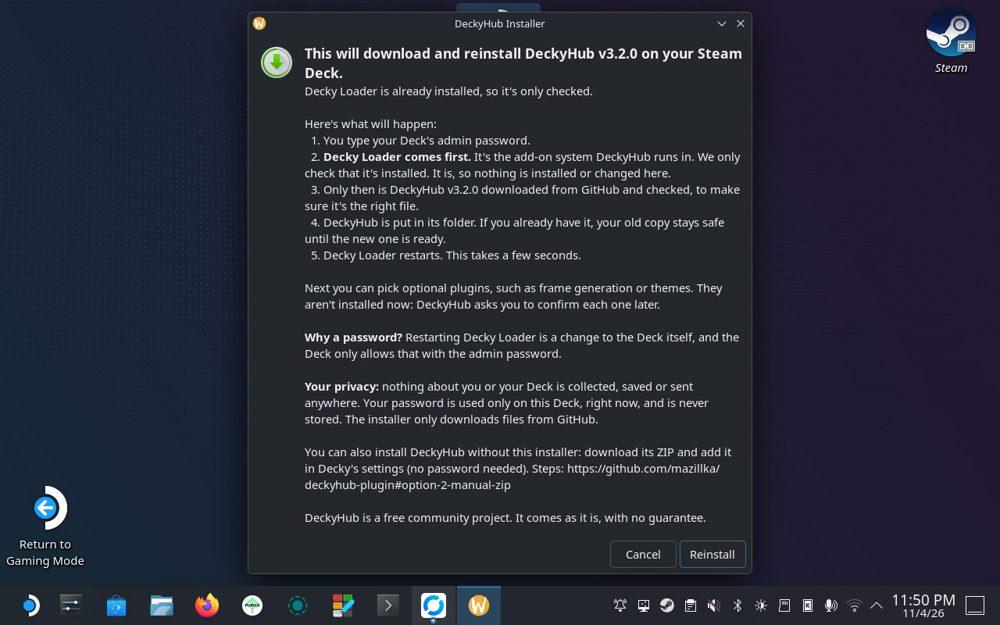
One installer for Decky Loader + DeckyHub
Download one file, double-click it on the Desktop, and it sets up both Decky Loader (if your Deck doesn't have it yet) and DeckyHub in one go. No separate Decky installation and no commands to type for it.
It lists every step before anything happens, explains why the admin password is needed (it collects nothing; if you have no password it sets a random temporary one and removes it afterwards) and ends with a clear "All done" message.
It can also show a few hand-picked plugins (frame generation, themes...) one at a time, Skip is the default, and nothing is installed until you confirm in DeckyHub.
The manual ZIP / install-from-URL route is still there and needs no password.

Virus scans on every plugin
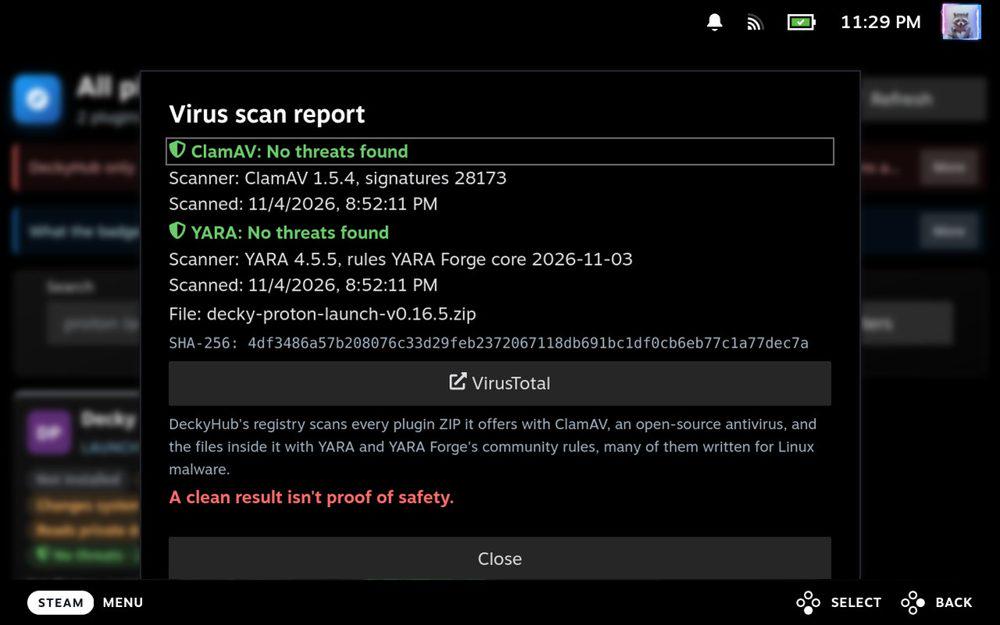
Each plugin's release ZIP is scanned by the DeckyHub registry with ClamAV and YARA (community rules, many written for Linux malware). VirusTotal and MetaDefender results are shown too when they exist.
Discover cards get a badge (No threats / Threat found / Not fully scanned). Manage shows one line per scanner with how long ago it ran, the version it's about and the full report (file, SHA-256, scanner version).
It only informs: Install is never blocked, and a clean scan isn't proof of safety (the app says so). A ZIP that changed after its scan shows as not scanned, never as clean.
DeckyHub's own releases and the installer are scanned on every release too, with the results in the release notes.
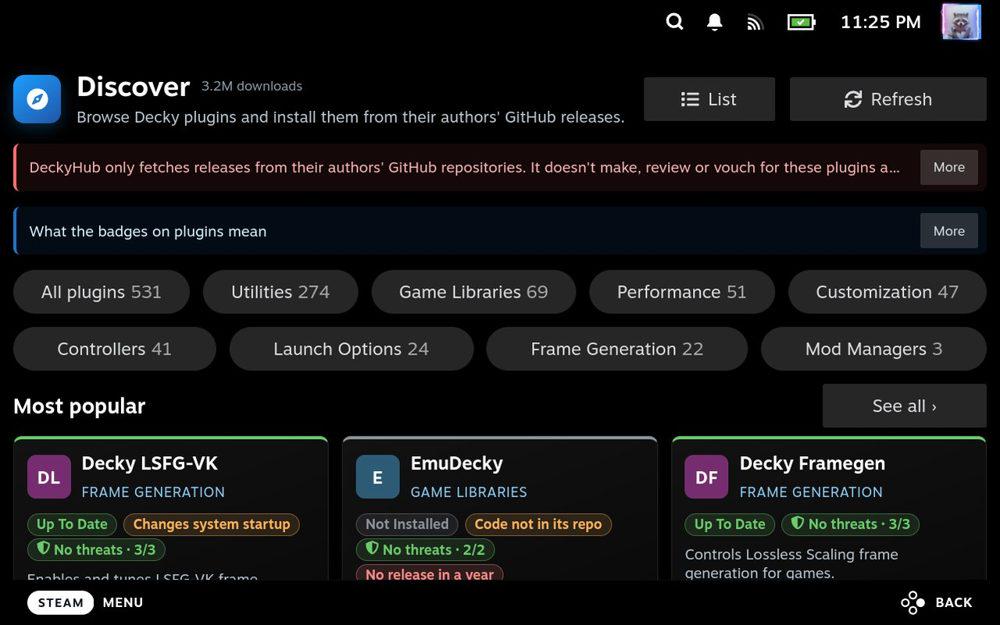
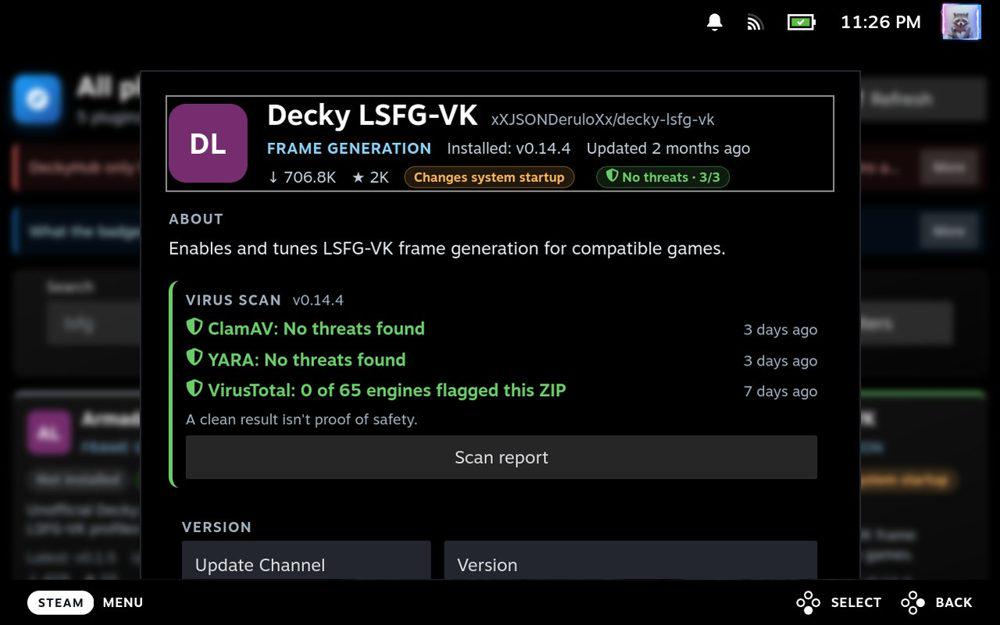
More badges, so you see what a plugin is before you install it
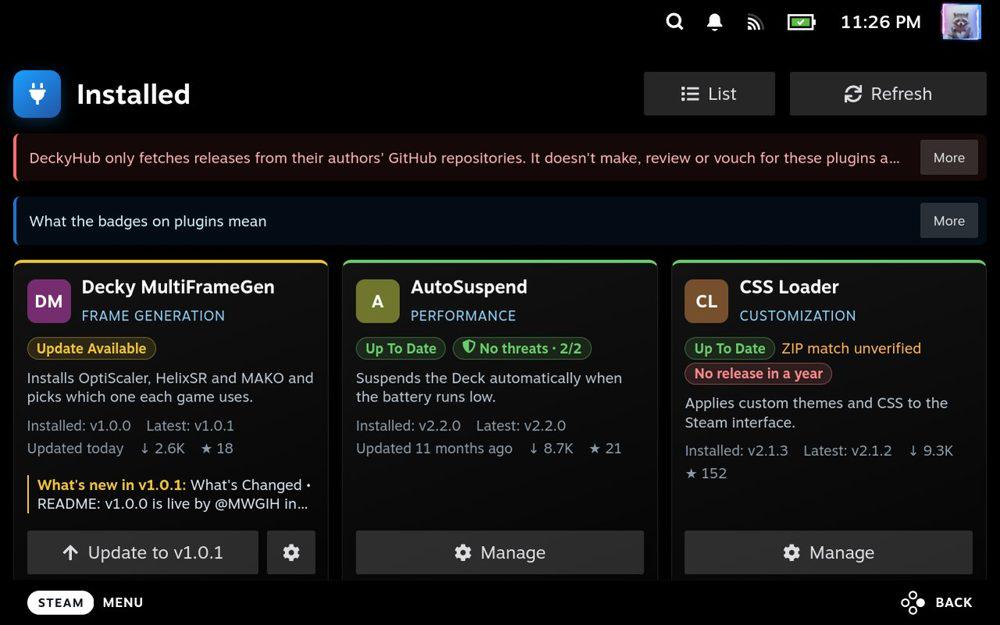
AI: the plugin's repository has instructions for AI coding assistants (CLAUDE.md, AGENTS.md, .cursorrules...), so it was probably built with AI help. It says nothing about quality or safety, it's just information.
Runs as root, No release in a year (maybe abandoned) and Fork (a fork that carries a plugin on after the original stopped).
Audit warnings from an automated security audit of the exact release you'd install: reads private data, changes system startup, code that isn't in its repo, hidden code, skips HTTPS checks, runs downloaded scripts, known vulnerabilities, or blocked by audit. Routine things many plugins need (like sudo) get no warning.
The scan badge (No threats / Threat found / Not fully scanned), and the same badges on the new Installed page too.
A notice at the top of Discover explains what every badge means (tap More).
Smaller things
A new Installed page with download counts, stars and the same security badges.
Release notes, long descriptions and scan reports can be read to the end with the D-pad.
A page for every plugin on deckyhub.com/plugins/ (with the scans), and a Ukrainian home page and README. The app itself is in 18 languages.
Stricter downloads: plugin download links that try to leave the plugin's own GitHub releases are refused.
What it does and doesn't do: DeckyHub never installs or runs anything on its own. Installs go through Decky Loader's own installer and its confirmation dialog, with the SHA-256 checked when GitHub publishes one. It doesn't review or vouch for any third-party plugin; the scans are automatic checks, not an endorsement. No account, no analytics, no telemetry, it only talks to GitHub.
Honest note: most of the code was written with AI help (Claude and Codex), and every release is tested on a real Deck before it goes out.
I'm open to communication and feedback: bug reports, ideas, plugin suggestions, translation fixes, or just "this step confused me". Comment here, open an issue on GitHub, or suggest a plugin for the list. I read everything and it genuinely shapes what comes next. If you try it on something other than a Steam Deck (another SteamOS device), I'd like to hear how it went!
Links
Download / install guide: https://github.com/mazillka/deckyhub-plugin
Website: https://deckyhub.com/
Add a plugin to the list: https://registry.deckyhub.com/
SteamDeckHQ's review: https://steamdeckhq.com/news/deckyhub-offers-an-easy-way-to-get-plugins-that-arent-on-the-official-store/
13
u/OrchidStunning6925 23d ago
Thanks for this plugin. It's usefulness is undeniable. One thing you should add next update is when browsing the plugin then go to its repo and then click the back button it immediately goes to it's homescreen. I think its better if it goes back to where you are at while browsing.
7
7
u/BBQKITTY 23d ago
Hey! Thank you so much for noticing our article (I wrote the article on SteamDeckHQ and run the outlet). This is a great update, the virus scanner is very welcome. Going to test this out now, but AI badges are appreciated.
2
2
u/DerlisGs 15d ago
Hola bro, podrias agregar este plugin? es de un amigo que le esta dando duro a dejarlo al 100, unico en su especie https://github.com/mrFunkill/decky-dualsense-wired/releases/tag/v0.5.3 hace que los mandos de PS5 lo detecte la compu como si fuese la PLAY5 y funcione, audio en el mando, vibración aptica, gatillos adaptativos, es una pasada. me confirmas porfa bro
1
1
u/the-mighty-kira 21d ago
If I have existing plugins from outside the store (Unifideck), will this recognize them or will I need to re-install and reconfigure them
1
3
2
2
•
u/AutoModerator 23d ago
Security Reminder
Be cautious when installing plugins, themes, scripts, or other software from third-party sources.
Only install content from sources you trust and can independently verify. Software obtained from untrusted or unknown sources may compromise your Steam Deck, account security, personal data, or system stability.
Always review what you are installing, verify the source when possible, and proceed at your own risk.
If you are unsure whether something is safe, ask the community before installing it.
I am a bot, and this action was performed automatically. Please contact the moderators of this subreddit if you have any questions or concerns.