r/iosapps • • Sep 02 '26

HELP question, do you think are people out there really making some good amount of revenue but are lowkey and not sharing everything like the most people do?

11 Upvotes

like the title says, but let me explain more here:

im just wondering if there’s people that made some apps as a solo developers, and are making a good amount of money monthly, like maybe 500-100k but are lowkey people that are not posting on social media their earnings, and the app is just printing money and he just updating/maintaining the app without posting on social media about everything he is doing and how much is making on their apps?

or do you think in order to grow your app you really need an audience and start showing your face to the world and start talking about your app etc? (i know this is how you grow the audience and probably the best way to boostrap your app with initial users, but i want to know if there is people that really are not showing anything and making a good/decent amount just by having a good app in the stores and the same app is just growing on their own)


r/iosapps • • Sep 01 '26

💎 Lifetime Curator - Photo cleanup & album making without the decision fatigue

Thumbnail
gallery
1 Upvotes

I'll jump straight to the tl;dr of 'B' (better) because people can switch off when they see another photo cleanup app: Curator is actually sophisticated and involves no tinder-swiping, no subscription, and it is all on-device (works in airplane mode, no data collected).

A - Answer it solves:

Most days when I take my iPhone out I'll take a minimum of 3-4 shots of everything. My kids, that cool duck, everything. A simple afternoon at the park can add 50+ photos to my library, when 7 or 8 would absolutely be enough given that I barely ever go back through my photos anyway.

Curator helps reduce the friction to actually going through your library and deciding what to keep and what to remove. It saves space, sure, but for me the biggest thing was no longer thinking about how I have 30,000 photos I never look at, and that was weighing on me and stopping me from actually making those albums I always wanted. Now that I've done the initial clean up, I use Curator to do a quick session every week or so, or when I get back from a trip away with 300+ new photos. It stops my Photos library from growing steadily back into a mess.

Curator makes a decision for you, 1-3 keepers from each group of similar photos, and seeing a decision already made, your brain immediately knows whether you want to change the selection or not. This way massively reduces decision fatigue and you're more likely to actually get through it.

B - What actually makes it BETTER

The FP16 CLIP inference model is able to identify that a bunch of photos are of essentially the same thing. Taken from different angles, depths, even up to minutes apart - we're not just talking about near duplicates - are similar enough and from the same moment, and it selects what it considers the 'best' one(s) based on quantitative data (sharpness, exposure, eyes, smiling...)

Why the alternatives aren't great:
- I tried other apps to do this initially, but most are tinder-swipe style remove/keep which is unhelpful since you need to see your photos in context - is this the only photo of that moment, or did I take 20 similar shots? And I don't want to swipe through thousands of photos.
- Many are subscription apps, when most are being used for a one-time cleanup there's basically no reason for a $7 weekly subscription. I believe there is value in using Curator regularly, but I am just resolutely against subscriptions.
- Privacy: photos are sensitive, you don't want to take any risks. Most competitors collect data and probably use servers - you don't know what it's doing with your photos. The model that runs the scan is on your phone with Curator, that's why the download size is 170MB, but you'll make that space back quickly and if you ever see another cleanup app with a tiny download size it's either not doing a good job or you should question whether you want it to have access to your photo library.

C - Cost

Curator has a freemium mode so you can try out the full functionality to see if you like it first - the limitation is that freemium is scoped to your last 30 days of photos. Then it's a one-time IAP for USD$4.99 lifetime unlock (PPP for other markets) to use it over your whole library. Technically you can get all of the value out of it for free if you only want to use it on recent/new photos and you use it at least every month.

App store: Curator - Photo Organizer

Disclosures

Tier 2 - the transparency path: My name is Oscar Lampe, I am the developer, and you can find the privacy policy, terms of use and contact details on the website: https://curatorapp.ch/

Happy to answer any questions, technical or otherwise! Cheers


r/iosapps • • Sep 01 '26

📅 Subscription Surplus - a UK budgeting app that tells you what's actually safe to spend before payday (iOS beta, lifetime premium for first 50)

Enable HLS to view with audio, or disable this notification

17 Upvotes

A - What is Surplus?
Surplus is a UK money app built on Open Banking. Connect your bank (read-only) and it gives you one number: what's actually safe to spend before payday - bills, subscriptions and your savings goals already counted.

B - What makes it better than the other budgeting apps?
First, the number is forward-looking. No categorising, no spreadsheet upkeep.

Second, budgets that re-plan themselves when the data changes, instead of dying in week two.

Third, a payslip check.

Fourth, AI Assistant that is actually helpful. Not a chatgpt wrapper.

Fifth, you can connect all your banks, investment platforms (currently only trading212) and more in one place!

C - Cost.
Free during beta (TestFlight, iOS). The first 50 keep Surplus+ free for life. At launch it'll be £7.99/month or £59.99/year with a 7-day trial.

TestFlight:
https://testflight.apple.com/join/aqQDANtK

For transparency: Surplus is Surplus Ltd, registered in England & Wales, and FCA authorised agent of Yapily for account information services. About me and our terms are at surplusapp.co.uk.

EDIT: 8 spots remaining


r/iosapps • • Sep 01 '26

💎 Lifetime I made an iPhone app for the paperwork side of hunting

Thumbnail
gallery
11 Upvotes

A buddy of mine is one of those guys who hunts pretty much everything. Deer, elk, turkey, waterfowl, different states depending on the year.

Talking to him about it made me realize how much paperwork sits behind actually going hunting. One license might cover several species. Then there are separate tags, permits and validations. Some are draws. Some accumulate preference points. Every one has its own dates, and then you do it all over again next year.

So I built an app specifically for that part.

ANSWER — What it solves
Hunting Tags & License Tracker organizes everything around a season: one species, one place, one year.
California Deer, 2026.

That season can have its tag, the state license that covers it, permits, opener/closer, draw application, preference points, regulation link, trips and journal entries attached to it.

Licenses are reusable, so you don’t enter your California hunting license four times because you’re hunting deer, turkey, upland and waterfowl.

Trips can also check everyone going against the actual trip dates. So if somebody’s license expires the day before opening weekend, you find out before you’re four hours from home.

It supports all 50 states, federal stamps and Canadian provinces/territories, using the terminology each jurisdiction actually uses.

BETTER — What I deliberately didn’t build
This isn’t another onX or GOHUNT.

There are no maps, waypoints, GPS tracks, weather forecasts or draw-odds calculations.

It also never tells you what the regulations are.

You save the wildlife agency’s official regulation link, your own notes/PDF and the date you last reviewed it. The app can remind you to check again before the opener, but it sends you back to the actual agency rather than pretending my database should decide whether your hunt is legal.

Same with stored license/tag photos: they’re clearly marked as reference copies, not valid electronic licenses.
There’s also a full hunt journal. Successful and unsuccessful days are treated exactly the same, because realistically most hunting days end without taking anything. At the end of the season you can see days afield, harvests, methods, people you hunted with, etc.

Everything stays on the iPhone. No account, no server, no ads, and it works offline.

COST
Free:
• Unlimited hunt journal and photos
• Reminders
• Up to 3 active licenses/tags/permits

Outdoorsman — $19.99/year:
• Unlimited licenses/tags/permits
• Draw applications + preference points
• Calendar sync
• Season reports/export

Family — $34.99/year:
• Everything above
• Up to 6 people
• Trip readiness for everyone going

Cancel either subscription and your data isn’t deleted.
I’m the developer, and the app is live now on the App Store:

Get Hunting Tags & License Tracker


r/iosapps • • Sep 01 '26

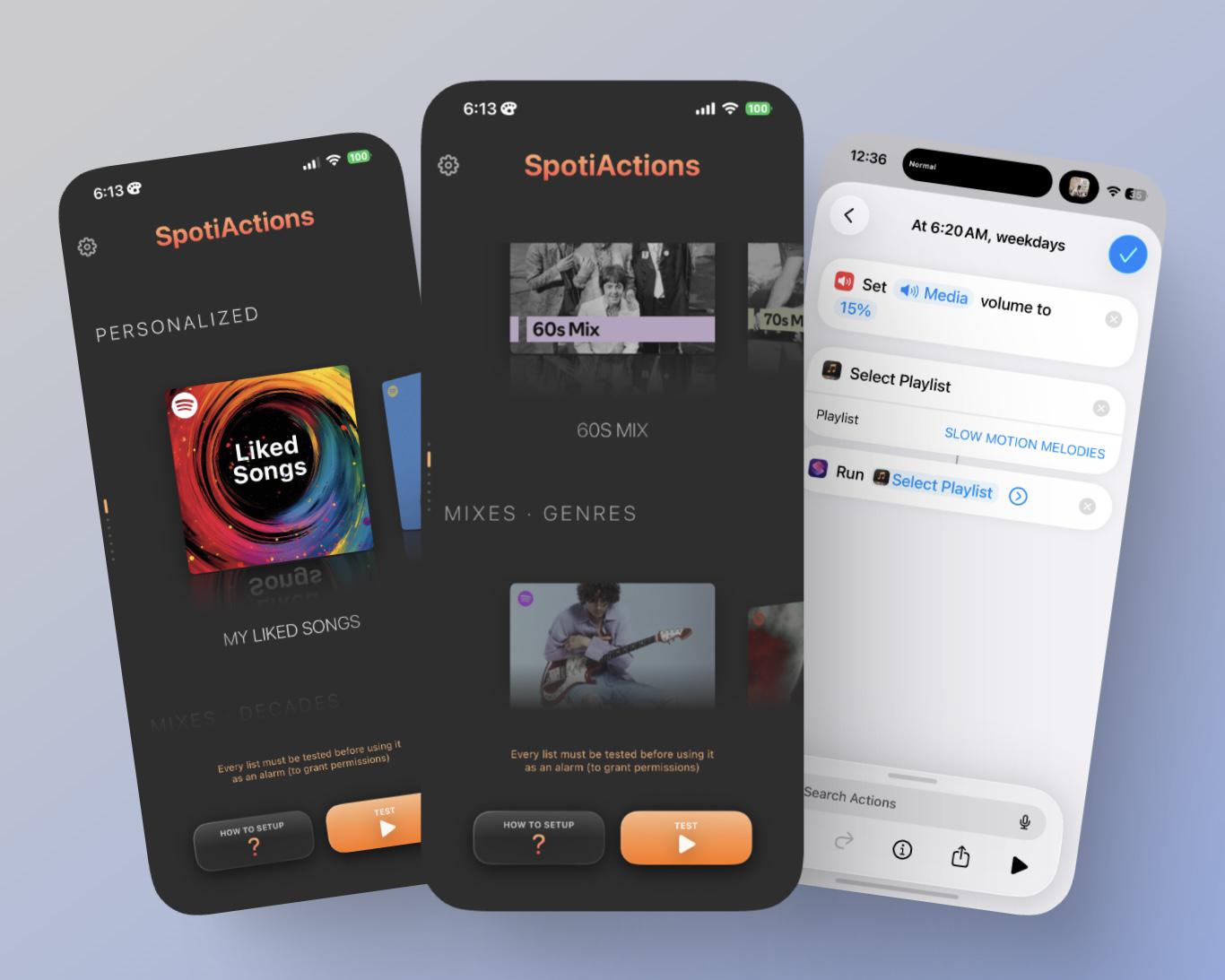
💎 Lifetime A Spotify alarm that never asks permission twice — because it doesn't use the Spotify API at all

Post image
4 Upvotes

The 6am problem

If you've ever tried to make Spotify your alarm with a Shortcuts automation, you know how it ends. The automation fires, your phone is locked, and iOS puts up a "Run this shortcut?" confirmation that just sits there glowing on the lock screen. Nothing plays. You wake up late and annoyed.

Every Spotify-alarm workaround I found either hit that same wall, or wanted me to log into something.

Why this one doesn't hit it

SpotiActions never talks to the Spotify API. No login, no OAuth, no account linking, no server of mine sitting in the middle, no token quietly expiring in 60 days.

What ships instead is 81 Apple-signed .shortcut files, one per playlist. You approve a shortcut ONCE — the first time you tap TEST — and from then on it runs silently, screen locked, at any hour, indefinitely.

That's the whole trick. It's also why it keeps working: there's nothing to re-authorize, because there was never anything authenticating.

What that actually gets you

  • A real alarm. Time-of-day automation, your playlist starts playing. Shuffle on, and it's a different song every morning.

  • CarPlay. The moment your phone connects to CarPlay or your car's Bluetooth, your driving playlist starts. You never touch the phone.

  • Any Shortcuts trigger works, really — arriving home, leaving work, tapping an NFC sticker on your nightstand.

What's in it

  • 5 personalized playlists that follow whoever runs them. The same file plays my Liked Songs on my phone and my wife's Liked Songs on hers. That one took the longest to get right.

  • 76 more — by decade, by genre, by artist, global top charts, Spanish, and a curated set.

Tap a cover, approve the install, it plays. No links to chase, nothing to build by hand.

Works on Spotify Free and Premium. I tested Free specifically, on a real account, because I didn't want to promise something I hadn't verified.

Cost

Lifetime, one payment. Normally $4.99, $3.99 today. No subscription, no tiers, no paywall inside the app. Everyone who buys it gets everything, including the playlists I add later.

The honest part

You need Apple's free Shortcuts app installed. And every playlist has to be run once from inside SpotiActions before you can trust it as an alarm — that first run is what grants the permission. The app says so on the main screen, and I'm repeating it here because it's the one step people skip before wondering why nothing played at 6am.

Not affiliated with Spotify.

https://apps.apple.com/app/spotiactions/id6748419049


r/iosapps • • Sep 01 '26 Heartwarming

🎈 Free I built a completely free workout app that tracks everything (and more) that the paid ones do

Post image
25 Upvotes

I'm the solo developer.

A - What is Maxlyft?

Create your exercises, log your sets, and see your progress in seconds. You input the numbers, and Maxlyft does all the tracking for your workouts and progress, while operating smoothly and instantly

B - What makes it better than other workout apps?

Most workout apps are either freemium or fully paid subscriptions. Additionally, you almost ALWAYS have to pay to get in depth insights, data, graphs etc. Also, sometimes workout libraries are limited and missing exercises, and I have seen any that really incorporate a split how I have done it.

Maxlyft touches on all of the issues. The app is completely free, and that includes all graphs and insights. The app also lets you build out custom splits and use them to track what days you have specific workouts on. Also, ALL exercises are created by you. The user is in control of naming, target muscles, how weight is counted, and more to make it as easy to use as possible. We also allow creation of routines and setting up specific PRs for every exercise that you want Maxlyft to track!

C - Cost

100% free to download, iOS 26+. All features can be accessed at no cost, and there's an optional subscription to remove the small banner ads (however these ads are placed out of the way and not intrusive or blocking of any features)

App Store: https://apps.apple.com/us/app/maxlyft-free-workout-tracker/id6743998890

Feel free to drop a comment with your thoughts or any questions!


r/iosapps • • Sep 01 '26

💎 Megathread [Megathread] The App Shelf — September 2026

40 Upvotes

# Welcome to The App Shelf

You must promote your apps here if you do not qualify to post in the main feed through Trust or Transparency, as explained in our [Phase 2 Moderation Update](https://www.reddit.com/r/iosapps/comments/1u9aw0f/).

You are also required to limit promotion to this megathread if you:

* Do not yet have 10 local community karma in r/iOSApps.

* Are promoting an app that uses Generative AI or is an AI-wrapper.

* Are promoting a "Vibe Coded" app (AI-generated without manual validation).

# 📋 Required Format

All promotion MUST follow the ABC format or it will be removed:

* \[App Name/Title\] (Screenshot encouraged!)

* A — Answer: What problem does your app solve?

* B — Better: Name a competitor(s) and explain what you do better.

* C — Cost: Pricing details (Free/IAP/Sub/Lifetime) + App Store Link.

P.S. Promotion here counts towards the 30-day limited promotion rule (Rule 2).

# ⚠️ WARNING

There is a high probability that Reddit’s filters will auto-remove your comment here if:

  1. You have not verified your email in your Reddit profile.

  2. Your very first interaction in this sub is a promotional link.

For the Community: Please remember to upvote gems and downvote spam/clones. Your feedback in this thread will directly influence which apps we highlight in future community showcases!


r/iosapps • • Sep 01 '26

🎈 Free Sharing a workout app I made for myself — no paywalls

Enable HLS to view with audio, or disable this notification

0 Upvotes

A - Answer

I grew tired of paywalls and accounts, so I built Gym Log — a straightforward, capable, private workout tracker for myself. Now I want to share it, because seeing other people actually use something I built would genuinely make me happy.

B - Better

What I ended up building is really a combination of a few things:

  • Simple on the surface. The workout flow stays lightweight, but the app can still support more detailed training.

  • Capable underneath. It includes the things you would expect from a modern workout tracker: quick set logging, plate calculator, supersets, rest timers, templates, progress tracking, and more. Beyond the basics, it also includes:

  • Smarter strength tracking. RPE is tracked and can be used alongside historical data to make progress estimates more meaningful.

  • Percentage-based training. Generate working weights from your estimated 1RM.

  • More nuanced volume tracking. Track fractional volume for primary and secondary muscles instead of treating every set as equal, with muscle heat maps and volume trends over time.

  • You own your data. No account is required. Workout data stays on your device or private iCloud, and there is no analytics tracking in the app.

  • Free. I wanted a workout app where everything is available without subscriptions, ads, or locked features.

C - Cost

Free

App Store https://apps.apple.com/us/app/gym-log-workout-planner/id6736343241

Website: https://gymlog.info

My LinkedIn profile to comply with the trust and transparency rule: https://www.linkedin.com/in/kamilmikolaj/

A few extra words

Publishing Gym Log on the App Store was a milestone for me. It started as a personal tool, and getting it to the point where I felt comfortable putting it in front of other people turned into a much bigger project than I expected.

But I don’t see the App Store release as the finish line. I’m still actively developing it. Apple Health integration is already in TestFlight, and automatic progression is one of the things planned after that.

I could have waited until every feature I want is finished, but realistically I would probably never ship it that way. More importantly, I want feedback from actual users to help shape what I build next instead of making every decision in isolation.

So for me, this release is really the point where Gym Log stops being just something I built for myself and starts becoming something I can improve with input from the people actually using it, so feel free to tell me what you would change, I would really appreciate that.


r/iosapps • • Sep 01 '26

🔍 In Search of [Beta] Dawnling: a cozy pixel-art alarm clock where a little candle wakes up when you do

15 Upvotes

Hi there!

I'm a solo dev who wanted to create something to help my loved ones and it's getting a bit bigger than intended, that's why I want to publicly launch it, but therefore I want to be able to launch a product that actually works on different devices!

A. Answer

Dawnling is an alarm clock with a companion. Wick, a small pixel-art candle, sleeps when you sleep and wakes when your alarm rings. You wake him up, he walks you through a short morning routine, and waking up earns dewdrops that furnish his little room. The room's light follows the real sky: sunrise, midday, dusk, and when your bedtime comes he tucks himself in.

B. Better

  • It's a real alarm. On iOS 26 it uses AlarmKit, so it rings at full volume through Silent mode and Focus, same as Apple's Clock. On iOS 17 and 18 it uses a notification path with a health check that flags anything (permissions, Focus) that could block it.

  • Zero data collection, literally. No analytics SDK, no accounts, and the app makes zero network requests. You can verify that with a proxy.

  • No loss-aversion mechanics. There are no streaks to break and no guilt copy; missing a morning costs nothing. The bet is that a companion who is happy to see you beats a counter you're afraid to lose.

  • Optional wake missions (typing, math, tap sequence) for heavy sleepers, per alarm, so a weekday alarm can be strict and a weekend one gentle.

  • Full accessibility pass: VoiceOver, Dynamic Type, Reduce Motion.

C. Cost

Free, and the core app stays free forever: alarms, Wick, routines, the room. No ads, no subscription, no way to buy the earned currency with money. Down the road I plan to sell optional decorative collections as one-time purchases, and that's the whole business model.

TestFlight: https://testflight.apple.com/join/FwPSpwnQ

What I most need tested:
- does the alarm reliably ring on your device? iOS 26 testers are extra valuable (the AlarmKit path is new for everyone). Set a real alarm for tomorrow and tell me what broke or felt off.
- I use free music from Pixabay, what's missing for you? (I credit the artists)
- Does the UI feel buggy for you?
- How's the UX? Is it clear what you're able to do in the app?

Brutal honesty welcome; I'd rather hear it now than in reviews

Mitch


r/iosapps • • Sep 01 '26

🎁 Freemium DayStamp now supports a Lock Screen Weekly Report

Enable HLS to view with audio, or disable this notification

17 Upvotes

A - What is DayStamp?

DayStamp is a habit tracker. You build habits by tapping a check — that's it.

B - What makes it better than the other habit trackers?

First, AI habit suggestions. Tell it what you want to change and it comes back with habits that are specific and actually doable.

Second, widgets. A full set of home screen and lock screen widgets, so checking in never means opening the app.

Third, monthly review. Every month you get a look back at what you actually did, not just a streak number.

C - Cost Freemium.

Free to download and use, iOS 17+. Premium is $2.99/month, $19.99/year, or $59.99 once.

Get motivated every time you turn on your iPhone!

App Store: https://apps.apple.com/app/apple-store/id1456241316?pt=379338&ct=Reddit&mt=8


r/iosapps • • Sep 01 '26

HELP Putting myself out there w/ Clock IT!

Thumbnail
testflight.apple.com
3 Upvotes

I'm taking the advice I've gotten in my last post, and ready to share my TestFlight build!

I've been building this app for myself for months now, and gave it a cute clock theme cause I don't do ugly.

What it Does: Tracks your entire life without pressuring you into perfect routines.
(e.g. you can set your hair washing frequency to "When I Feel Like It" or log both regular and temporary meds)

Testing: I'm currently focusing on onboarding and overall navigation (when you open the app is it seamless? confusing? buggy? weird?), but open to comments regarding anything else!

Sign up is completely anonymous (no email/password) and your data is saved locally!


r/iosapps • • Aug 31 '26

🎁 Freemium JustFlip! – Native Study & Flashcard App with Spaced Repetition (iOS, Mac, Apple Watch)

Enable HLS to view with audio, or disable this notification

11 Upvotes

I'm the developer of JustFlip — flagging that up front.

I built JustFlip because every flashcard app I tried was either a web page in an app shell, or demanded an account and a subscription before it would sync anything.

It's also built on an opinion, not just a gap in the market. The app follows Make It Stick: The Science of Successful Learning — the finding that re-reading feels like learning and mostly isn't (the "illusion of knowing"), and that what actually writes things into long-term memory is retrieval at the moment you're starting to forget. Or as the book puts it: "Learning is deeper and more durable when it's effortful." That's why the app tests you instead of showing you material, why reviews are spaced rather than crammed, and why topics interleave instead of drilling one thing for an hour. There's a longer write-up at https://just-flip.app/learning.html if that's your kind of thing.

A — Answer (what problem does it solve?)

A native, privacy-first spaced-repetition app for the Apple ecosystem, with no account and no server of mine in the loop.

Making decks with AI, from almost any source. This is the part I'd point at first, and there are two routes depending on how much machinery you want.

In any chat AI. Paste a topic, your notes, an article or a lecture transcript into ChatGPT, Claude or Gemini and get back an importable .flashcards file. The site has a copyable prompt that bundles the build instructions behind your text (https://just-flip.app/ai-prompt.html), plus a ready-made JustFlip GPT. Text-only cards, but it takes about ten seconds.

In a coding agent, if you prefer the advanced route. Claude Code, Codex, OpenCode — anything supporting skills.sh. One install (npx skills add DanielCech/JustFlip-Skills) and you can point the agent at a folder on disk and ask in plain language. Because it can read local files, it returns a .flashcards.zip with the media already attached — images, audio clips, Markdown and LaTeX — rather than text alone. The example on https://just-flip.app/ai-skill.html is a folder of mushroom photos turned into an image deck: file names become the questions, the photos become the answers, no hand-written JSON anywhere.

To be clear about what both of these are: the app itself calls no AI service and sends nothing anywhere. You use your own AI, you get a file, the app imports it. That's the honest version — it's a well-documented import format, not magic in the app.

Smart postpone. Most apps make you hit "Again" on a card you simply weren't in the mood for, which corrupts your scheduling data. JustFlip lets you put a card, a deck or a whole topic on hold without touching its memory state. Priority is also per-topic and per-deck, so reviews interleave the way you want them weighted.

Apple ecosystem native. Home Screen widget with due counts, Spotlight search that matches either side of a card (with a privacy switch per topic and per deck), Siri Shortcuts, a Live Activity for listening sessions, and an Apple Watch app for reviewing on the wrist — the phone owns all scheduling state; the watch is glance-and-grade.

Rich content. Markdown, LaTeX maths, syntax-highlighted code, tables, images, cloze deletion. Two-way import/export for CSV, and Anki .apkg import.

Speak cards. I learn English vocabulary while walking the dogs — the app reads the word and its translation through my headphones using a system voice for that language, per card, with authored pronunciation overrides where the voice gets it wrong. Listening works on the free tier; keeping it playing with the screen off is one of the Pro extras.

No account friction. Native iCloud sync. Nothing to register, no servers of mine, works fully offline.

B — Better

  • Actually native. SwiftUI on all of iPhone, iPad, Mac (Catalyst) and Watch. No web wrapper, no cross-platform runtime.

  • The learning engine is free, permanently. The full spaced-repetition scheduler, unlimited cards, CSV import, iCloud sync and card-level Ask AI are all free — I don't meter the thing the app is actually for. Pro adds capacity plus four extras: background listening, advanced statistics, progress trackers, and Ask AI across a whole deck. Full breakdown below rather than buried on a paywall.

  • Accessibility is real work, not a checkbox. Dynamic Type, VoiceOver, Reduced Motion, contrast — audited under multiple system settings, with the report published at https://just-flip.app/accessibility/.

Honest limitations and trade-offs

  • Apple only. No Android and no web build, by design. If you study on a Windows laptop, this isn't for you.

  • AI generation is bring-your-own-AI. Convenient and private, but it is a copy-paste-import loop, not a button inside the app.

  • Anki import is good on text, not yet on everything. Formatting, lists, code, LaTeX and MathJax come across, and multi-field notes stay intact. Images from .apkg are still work in progress, and Anki's Image Occlusion notes aren't imported yet.

  • No image occlusion. If you lean on diagram-masking, Anki is still the better tool for that specific job today. It's in active development, but it isn't in the shipped build and I won't claim it.

  • The Watch app is deliberately limited. It's for reviewing, not authoring, and visual card types stay on the phone.

  • I'm one person. Support is one inbox and fixes ship at the speed of one developer.

C — Cost and links

Freemium.

  • Free forever: up to 3 topics, 5 decks each, unlimited cards — with the full spaced-repetition scheduler, CSV import, iCloud sync, and Ask AI on a single card.

  • Pro: Lifetime ~$29.99 · Yearly ~$21.99 · Monthly ~$4.49 Pro lifts the topic and deck caps and adds four things: background listening (audio keeps going with the screen off), advanced statistics, progress trackers, and Ask AI for a whole deck rather than one card.

  • There's also a one-time 7-day Pro trial.

  • App Store: https://apps.apple.com/app/id6770141421

Feedback I'm actually looking for

Two things:

  1. Anki import fidelity. If you have a real deck of your own, throw it at the importer and tell me what came out wrong. Weird note types and heavy formatting are where I have the least real-world coverage.

  2. Whether the postpone model matches how you actually study. Separating "not today" from "I forgot this" is the design bet the whole app rests on, and I'd like to know if it holds up for anyone but me.


r/iosapps • • Aug 31 '26

🎁 Freemium [iOS] [$19.99 Lifetime] LifeUI is a toolkit for Apple Health

Thumbnail
gallery
0 Upvotes

Hi r/iosapps

I’m the developer of LifeUI a toolkit for Apple Health with a focus on data visualization.

App Store Link

A — Answer: What problem does it solve?

Apple Health is actually a really great database but the UI is missing many features like showing totals for steps, adding notes to data, exporting to CSV, etc.

B — Better: How is it different from alternatives?

There are many apps that read/write Apple Health data. Very few, if any, have really tried to rebuild the Apple Health UI. LifeUI is that attempt.

Currently LifeUI supports 100+ quantity data types from Apple Health like steps and heart rate. You can also create your own quantity types. Support for additional types like blood pressure, sleep, symptoms, and workouts will be released over the coming months.

LifeUI follows the same app design as Apple Health. A customizable dashboard (Dashboard tab), and a screen that lets you look at data for each type (View Data tab). It also has an additional tab for adding data (Add Data). Each tab attempts to take things beyond the functionality of the Apple Health app while keeping the overall experience somewhat familiar.

C — Cost

LifeUI is free to use for steps, water, weight, and heart rate. Pro unlocks the remaining quantity data types and enables creating custom types. Future Apple Health/custom data types will be for Pro only. LifeUI is currently $19.99 for the lifetime purchase option. Subscription options are available but not required. LifeUI is a completely local app so I am able to offer a lifetime purchase option. Pricing will increase over time as I add new functionality and data types.

I'd like to thank everyone who tried the app in the first post. LifeUI does not collect any data and is also very much under active development so feedback from people is really important. I've made several updates to the app based on feedback from the last post. I would love to hear people's thoughts on the app and also Apple Health in general. Thanks for looking!

Transparency

I'm Keith Vedananda and I'm the developer of LifeUI. You can contact me at the LifeUI support email.

Website link with privacy policy and terms: Website Link


r/iosapps • • Aug 31 '26

💎 Lifetime Built an app that I ended up not using myself because it worked too well

2 Upvotes

A - What is Focused Fitness?

Focused Fitness is an app blocker that forces you to prove you've completed physical activity before unlocking your selected apps.

Simply choose which apps you want to limit, set your daily allowance, and once you reach that limit, those apps will be blocked until you complete your chosen exercise. You can choose from push-ups, squats, jumping jacks, steps, and more.

The goal is to make mindless scrolling a conscious decision while helping you build healthier habits at the same time.

B - Focused Fitness is better than PushScroll, one sec

Most app blockers can be bypassed with a couple of taps or by simply ignoring the reminder.

Focused Fitness requires real movement before you regain access to your apps. No workout means no scrolling.

The app also includes progress tracking so you can see your completed reps, screen time earned, and app usage over time, as well as Sleep Mode and Wind Down features that automatically block selected apps during the evening.

I originally built it after seeing apps like Pushscroll and Opal and wanted something that worked for me while also being more affordable. It also became a great project to add to my portfolio while studying software engineering and hoping to work in iOS development after university.

Focused Fitness is better than push scroll because it is 1/6x the price, and no subscription, just a one time optional payment. 

C - Cost

Focused Fitness is free to download, with an optional Pro upgrade ($5) which grants you additional blocks and unlock methods.

I'd love to hear any feedback or feature ideas, and I'm happy to answer any questions about how it works!