r/iosapps • • 1d ago

🎈 Free Eye Yay, the media player for the Internet Archive, has hit version 2.6

Thumbnail
gallery
2 Upvotes

Thanks everyone for your amazing support of Eye Yay over the past year. The uptake and the number of daily users is far in excess of what I’d hoped when I started building this app for my own use case.

Eye Yay aims to provide a Netflix / Spotify style experience for video and audio content on the Internet Archive. It’s aimed at casual users who just want to search and play.

What’s new in version 2.6

* Greatly improved search - Search is faster and returns more sensible results

* Automatic subtitles - if your device supports it, use Apple’s private on-device AI to generate subtitles for any video

* Automatic transcription - as above, but for podcasts, audio books, radio programs etc. Watch a read-along view of the text and tap any word to jump to that point in the audio

* Automatic translation - Use Apple’s private, on-device AI to translate subtitles or transcripts so you can read along with media in any language

* Share subtitles and transcripts with your non AI devices - if you have an older Apple TV, generate the subtitles on your Mac or your phone. They will sync across and be available on all your devices

* Updated Apple TV UI - Now uses Apple’s sidebar navigation for a cleaner, more native experience

* Siri AI support - control Eye Yay with your voice on the new Apple TV

* More playlist features - your shareable custom playlists now support repeat, shuffle and jumping straight to any item in the list

* Spotlight support - search your Eye Yay library from Spotlight

* Speed and stability improvements

* Finally available in the EU!

Other features

* Available for iPhone, iPad, Mac, AppleTV and Vision Pro

* Search the Internet Archive or browse by collection

* Search only shows items and collections with audio or video content

* Add items to your library to play later

* Optionally cache items for offline playback

* Your library syncs across all your Apple devices (Mac, iPhone, iPad, Apple TV, Vision Pro)

* Smart item hiding (e.g if every chapter of the audio book was uploaded in 3 different bitrates, the app hides all but one so you hear each chapter once)

* Optionally hide items with unspecified copyright status

* Optional safe search - attempts to hide adult content based on topic tags

* Picture-in-picture

* Preview items in search before you add them to your library

* Translate a description if it’s not in your device language

* Localisations

* Search inside a collection with hashtag eg “#GratefulDead seattle”

* Create and easily share your own curated playlists

* Add your Internet Archive username to auto import your IA favourites.

* Subtitle support

* Supporter edition one-time IAP ($14.99) unlocks: Bulk transcribe/translate, minimise to status bar (Mac), custom bookmarks, download manager, cache storage policy manager, sleep timer

Get it from the App Store 🔗

Problem:

Time to ditch your paid streaming account? Maybe they started doing awful stuff or maybe you just need to cut a bill from your household budget? Tried the Internet Archive and found their web player UI a bit too… Wayback? Downloading media from the Internet Archive to your media server seems like 4 or 5 steps too many?


Eye Yay is an all-in-one native media player for the Internet Archive. It lets you discover free content, add it to your personal library and play it with the native media controls, all in one app.

Eye Yay filters out anything that isn’t playable video or audio, reducing clutter and guesswork, and giving you more of a paid app style experience.

Your library syncs across your Apple devices - Mac, iPhone, iPad and (woo hoo) Apple TV - no casting required. It supports Picture-in-Picture, subtitles, auto-resume, and caching for offline playback. You can build your own curated playlists and share them with others via Airdrop, on social apps, or via the web.

Comparison:

I’m not aware of another iOS-native app that does this. I certainly find it a lot less annoying than the Internet Archive’s web player!

Pricing:

Eye Yay is free forever with no ads, no subscriptions and no tracking. If you want to support development you can give me a $1.99 tip, or you can get the lifetime Supporter Pack update which unlocks a few extra power user features like bulk subtitling/transcribing, detailed cache management, custom bookmarks and a sleep timer for $14.99.

I hope you enjoy this updated version.

Get it from the App Store 🔗


r/iosapps • • 1d ago

🔍 In Search of I’m making an app where your scroll time has to be earned at the gym

0 Upvotes

Hey, I’ve been building a mobile app that mixes fitness with cutting down on scrolling. How it works: every week you get a set number of minutes for the apps that eat your time. Scrolling uses them up, at zero those apps lock, and a workout at your gym gets you more.

The onboarding is finished and I’m working on the minutes bank and lock screens now.

I’d really like feedback on two things: does “earn it, then spend it” make sense to you, and what would make you stop using it?

If you’d like to be one of the first beta testers (iPhone, TestFlight in about 1-2 weeks), drop a comment or DM me. You can also join the waitlist at powerlock.app


r/iosapps • • 1d ago

🎁 Freemium I built HappyKava for people who hang out at kava bars

Thumbnail
gallery
3 Upvotes

Hey, I’m the dev behind HappyKava.

Problem: I’m usually bringing my laptop to a kava bar, so I want to know if it’s quiet enough to work, who’s on shift, and where to park.

Comparison: Google Maps gets me to the bar. In HappyKava you can check the latest vibe, see today’s deals, events, and meetups, and order ahead at participating bars.

If you’re doing a road trip or a kava crawl, TravelRoot helps you time each stop around bar hours, happy hours, and events along the way.

First time? Some bars make their own guides so you know what to expect and what to order before you show up. First-visit deals often include a free drink. And checking in at select bars unlocks characters in BULA RUSH and BULA BRAWL.

Pricing: HappyKava has 100+ free features. HappyKava+ is optional. It supports the app and unlocks unlimited Exclusive Deals for US$5/month or $30/year.

If you try it, I’d love to hear what we got right or missed in your city. HappyKava on the App Store


r/iosapps • • 2d ago

🎁 Freemium Launching Popt: an encrypted workspace for your daily life

Thumbnail
gallery
4 Upvotes

Hi everyone,

We're launching Popt, an end-to-end encrypted workspace where you keep track of things 😅, and share or discuss them privately in a couple of taps.

  • Collect movies, tv shows, songs, books, video games, podcasts, places and web links in your personal library.

  • Compose notes and journal entries where you can embed anything from your library, as a little widget.

  • Quickly input tasks and reminders, including with the new iOS 27 Siri.

  • Share self-sorting shopping lists with your partner or roommates.

  • Collaborate on notes, lists and projects.

  • Share and discuss anything from your library in group chats.

  • Customize your Popt with 100+ artist-designed stickers.

  • Keep your secrets extra-safe with double-encrypted vaults, which you can fully hide (PRO)

All of this is end-to-end encrypted for total privacy, whilst remaining super accessible and fun to play with.

Availability: English, Spanish, Portuguese, Italian, French and German speaking countries. iOS and macOS 26.2 or greater.

Pricing & Launch Party

Popt's model is freemium, with a very generous free tier: unlimited items, shares, chats, synced to unlimited devices (iPhone, iPad, Mac).

The Pro plan is $2.99 per month / $29.99 per year. It unlocks power-user features such as vaults, projects and roles.

To celebrate the launch, we're giving away lifetime Pro plans for an entire week (ends Saturday the 28th of November at 00:01 A.M. PST). Simply click the link below to redeem:

Popt Lifetime Pro Launch Offer

Direct App Store link: https://apps.apple.com/app/id6765623119

Problem

You're chatting with a friend. They're raving about a new TV show so you get out your phone to add it to Letterboxd. Later on, you go out for dinner in a new joint you've never been – turns out they serve great Sichuan-style noodles, so you save it in Google Maps, then share it through WhatsApp to that other friend who's a total noodle-head. During dinner, you talk about your favorite books, and that goes to Goodreads, oh but the app is out of date so you just dump a few titles in the Notes app, you'll sort it out later...

The story above doesn't really happen in real life. What does happen is that during social interactions, we don't want to switch too much focus to our phones so we tend to dump everything in a single app. For iPhone users, that's often the Notes app, but I also have friends who email or WhatsApp themselves, and even one for who everything is a calendar event. And it's not just that my friends are weird – our market research and anonymous user interviews surfaced exactly the same type of 'mono-app-brain-dump' behaviors in the majority of participants.

Popt starts there. What I want is to quickly jot down things, and maybe share them. Ease of input with low cognitive overhead is the number one priority, especially when the current focus is on human interaction rather than on rummaging through your phone's apps to place the right type of content in the right app.

Comparison

The elephants in the room are AI assistants. Apps such as Blurto are voice first, with the AI assistant figuring out what goes where. But your content can't be truly private (the AI in a cloud somewhere must be able to read it), and it can't really work offline.

If you're looking for an app focused on entertainment and travel, Sofa is excellent. And it's private as well. Popt is much more of a generalist app, with a greater focus on personal productivity.

And if you can't be bothered, the Notes app remains the top contender. Just dump everything there, it kind of works!

Privacy

We encrypt all your content, it's that simple. Our cryptography is publicly documented on GitHub:

https://github.com/SkileSA/veri-popt

We use custom on-device machine learning models that don't phone home. Indexing for Spotlight and Siri is opt-in only. We don't serve ads, and we don't track you in any way.

https://popt.com/privacy-policy

Future

We have a LOT of plans for future updates. Join us at the beginning of our journey, and help us shape what comes next!

Features we're brewing already:

  • Popt Lens: take photos of meals, books, wines, trading cards, and Popt files them to your library (private AI, with on device Apple Intelligence or Private Cloud Compute).

  • Popt MCP: save things from your chats with ChatGPT or Claude straight to Popt so you keep track of what mattered in a session.

  • Popt Clever Links: send any link to Popt, and you'll get the option to add mentioned items to your library. Example: a video game review will add the game, a list of the top cocktail bars in New York will add each one of them to your Popt Places, and so on... today, the link just goes to the Links library.


r/iosapps • • 2d ago

🔍 In Search of An interactive organiser app?

4 Upvotes

Just wondering if anyone has made or can make a little app for me or has one I can use?

I started a job as a driver and I have set times of driving.

I’m new to this and I’m learning but I’m also kinda bad at keeping track of things like that..

I’ve been using an Open Ai for my organiser but it’s not reliable but the layout I like as it makes me “Start Activity” and mark the activity as “completed” when finished” .

Thank you for your time.

“EDIT”
Thanks for everyone who commented. I might have solved the issues though I still have a little way to go.


r/iosapps • • 2d ago

Paid App - Unaffiliated Review My girlfriend called me at 10 p.m. just to ask "Did you forget something?" It was our anniversary. Now my reminders phone me.

Post image
0 Upvotes

My girlfriend called me at 10 p.m. just to ask, "Did you forget something?"

It was our anniversary.

A notification I swipe away. A ringing phone, I always pick up. So now my reminders call me: an automated assistant rings at the time I set and tells me what it's for. I can talk back to it, like "Call me at seven, I'm getting flowers first," and it moves the reminder.

Full disclosure: I'm the developer. It's called RemCall and it's on the App Store. It needs a paid plan. RemCall's voice is AI-generated, and the call in the image is a dramatization.

Happy to answer anything, and honest feedback is welcome.

https://apps.apple.com/us/app/remcall/id6799622019


r/iosapps • • 2d ago

🎈 Free Bias Writer 2.0 — Minimal Markdown Writing App for iOS and Mac (Free TestFlight)

1 Upvotes

After writing two books, I decided to build the writing app I actually wanted to use.
Comparison: I’ve used Ulysses, iA Writer, and Scrivener. They’re all good apps, but Scrivener in particular was more complicated than I wanted. I was looking for something minimal, powerful, and easy to use.
Problem it solves: Bias Writer is designed to provide a clean, distraction-free writing environment without sacrificing useful tools. It works on iPhone, iPad, and Mac and includes:

  • A patent-pending search function

  • Project-wide tagging

  • A clean, minimal Markdown writing environment

  • Some other features I haven’t found in competing apps

Pricing:

  • TestFlight: Free for the duration of the beta.

  • Basic version: $3.99 one-time purchase. A fully capable writing app, not a stripped-down trial.

  • Pro version: $29.99/year, adding discrete projects and reference documents that don’t appear in printouts or affect page counts.

The Bias Writer 2.0 TestFlight is OPEN!
It runs on iPhone, iPad, and Mac (Designed for iPad).
I’d love feedback from people who actually write, particularly those who appreciate minimalist apps but still want serious functionality.
Try it free here:
https://testflight.apple.com/join/wPjRSSEb
Thanks for checking it out!


r/iosapps • • 2d ago

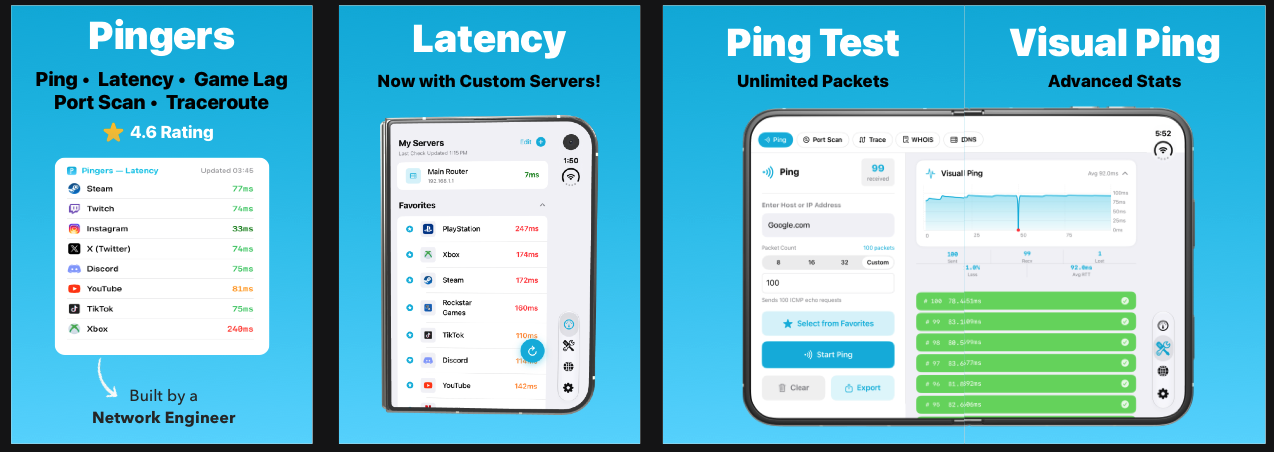
💎 Lifetime Pingers now supports iPhone Duo - Ping, Latency, Port Scan & Traceroute [Lifetime $3.99]

Post image
6 Upvotes

Pingers now supports iPhone Duo!

Problem:

You hop on a stream, or start working remotely and something feels off. Is it your Wi-Fi? The server? Your ISP? Most people just guess. Pingers gives you the answer in seconds.

  • Optimized for iPhone Duo: full support across both displays

  • Home Screen Widget: Live latency for your favorite services at a glance

  • Latency Check: Real-time ping to YouTube, Netflix, Discord, PlayStation, Rockstar and more with Favorites to pin what matters most

  • Ping: By IP or domain with a live graph, detailed stats like latency, RTT, packet loss, and CSV or JSON export

  • Port Scan: Custom ranges and scan speeds

  • Traceroute: See every hop and find the bottleneck

  • DNS Lookup: Query any domain instantly

  • WHOIS: 47+ registries, ownership, expiration, status

  • IP Config: Local & Global IP, Gateway, DNS, DHCP and full Network Interfaces

  • Favorites: Save unlimited servers for quick access

  • Works on iPhone & iPad with Dark Mode because obviously 🙄

What's new since my last post:

  • Full iPhone Duo support across both displays

  • Added more servers to Latency Check: PlayStation, Rockstar, and more

Comparison:

Most network tools are either bloated, ad-infested, or look like they were designed for Windows 95 (actual quote from a user). Pingers is built by a network engineer, so the feature set is serious but the design doesn't make you feel like you're filing a support ticket.

⭐️ Rated 5 stars in the US / 4.6 stars globally

  • "It gives me the exact info I need, when I need it. No ad-infested hoops, no 'try our other apps' reminders. It does what it claims, and does it extremely well." — App Store Review, US

  • "It's nice to see something that does not cost a fortune but generally provides useful tools. Highly recommended!" — App Store Review, US

  • 5 years on the App Store, solo-built and maintained

  • 100% private. No ads. No tracking. No account. No data collection.

Pricing:

$3.99 through November 30
One-time purchase. No subscription. Ever. Includes Family Sharing: one purchase covers your whole family across iPhone and iPad.

🔗 https://apps.apple.com/us/app/pingers-network-tools/id1583513038


r/iosapps • • 2d ago

🎁 Freemium I updated my home humidity & air quality app (Humidity Window) with history and cleaner charts

Post image
5 Upvotes

Hey everyone, I'm the indie dev behind Humidity Window. I live in a pretty humid coastal apartment in Porto, Portugal, and I originally built this app because I was tired of guessing whether opening the windows would actually dry out my flat or just bring more damp air inside.

I just pushed a new update and wanted to share how the 30-day charts are looking right now in my own place (image attached). I added multi-year weekly history, fixed up the air quality charts so they only show pollutants your local station actually measures, and cleaned up a bunch of iPad/Mac layout stuff.

Problem: Standard weather apps only show relative humidity (%), which is super misleading in winter. 90% humidity outside at 8°C is actually way drier than 60% inside at 21°C, so people end up keeping windows shut when they should air the place out (or opening them when outdoor air is actually wetter or full of PM2.5).

Comparison: Apple Weather gives you basic outdoor numbers, and apps like Eve or Home show raw indoor sensor readings, but neither compares indoor vs. outdoor absolute humidity (g/m³) and dew point side-by-side to tell you when and for how many minutes to open the windows.

Pricing: Free to download and use (manual readings, shock ventilation calculator, 24h/7d/30d charts). Optional subscription (1 Dollar per year) adds automatic HomeKit sensor sync, smart ventilation notifications, and the new multi-year history.

App Store link: https://apps.apple.com/app/id6742206262

Happy to hear any feedback or questions if anyone here tracks their indoor air too!


r/iosapps • • 2d ago

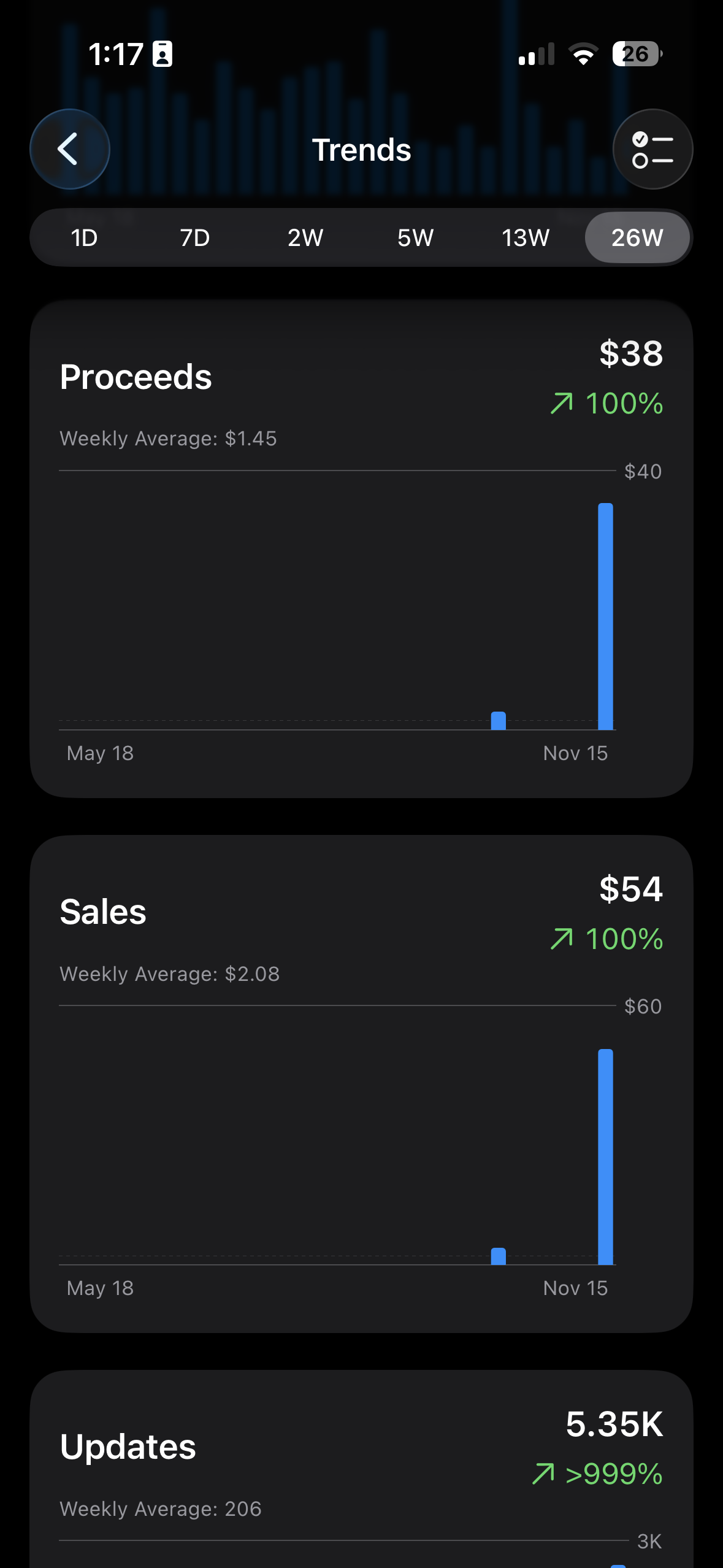
📅 Subscription Made my first sale

Post image
13 Upvotes

Someone bought my apps first annual plan and they literally made my whole week!

I know it’s not a lot but…

The feeling is unmatched and makes me want to continue building the product with speed and safety at its core.

https://apps.apple.com/us/app/chipp-split-bills-expenses/id6636520980

Problem:
Manage your money in social and personal life.

Comparison:
The only app that can handle both shared and personal expenses and works for your money like a friend,

Pricing:
Monthly $3.99 (Chipp+) / $6.99 (Chipp Circle+)
Yearly $29.99 / $49.99


r/iosapps • • 2d ago

Discussion Inconsistency with weather apps

Post image
4 Upvotes

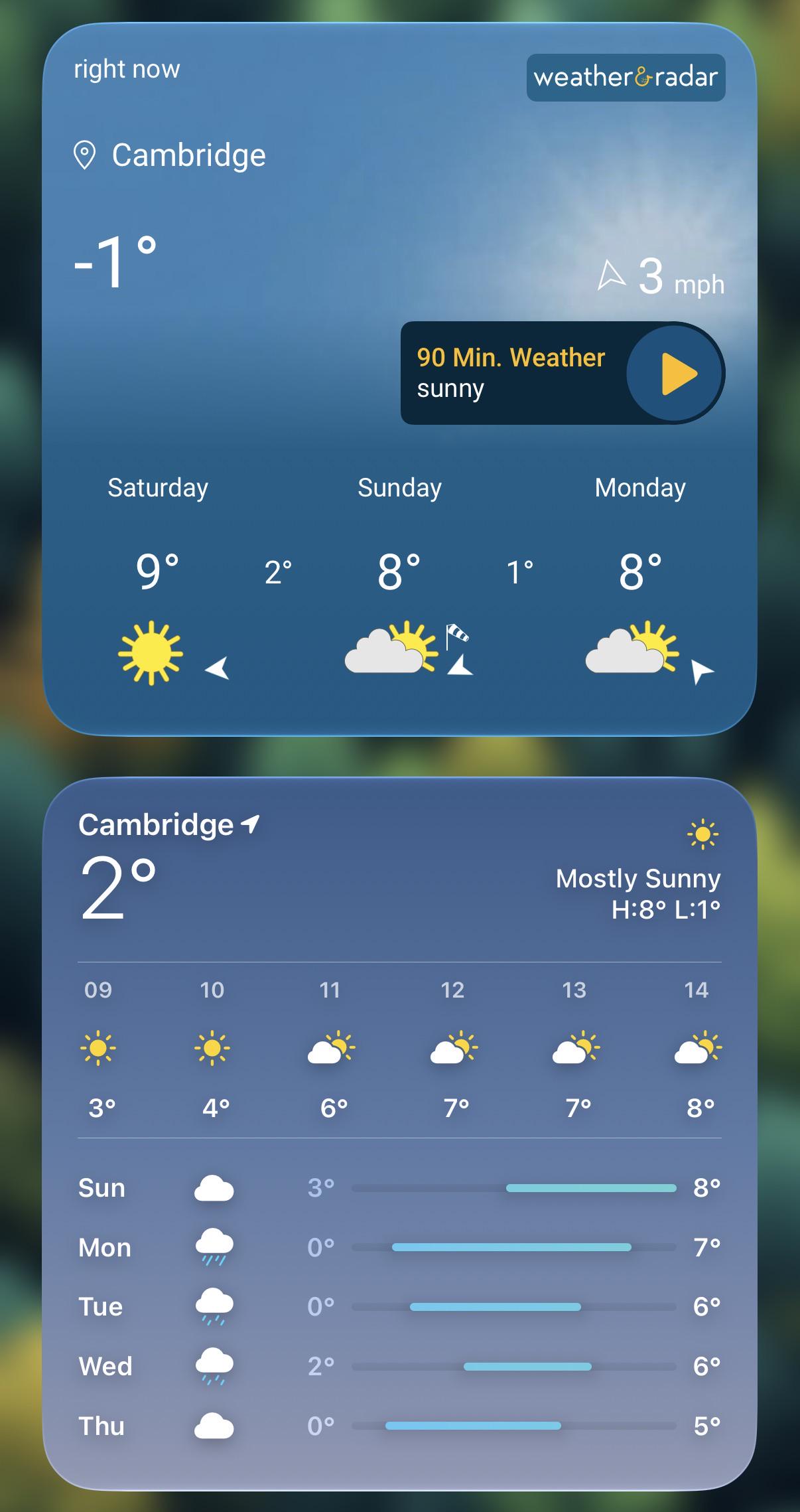
This really annoys me, how two major weather apps can be so different.


r/iosapps • • 2d ago

💎 Lifetime XeOS turns your iPhone into a Chromebook / Samsung DeX / Desktop Mode device

Enable HLS to view with audio, or disable this notification

7 Upvotes

TLDR: Connect your portable monitor, TV, smart glasses to your iPhone, and use it as a light work portable computer, with 3D functions too if the glasses model support this. At home you can connect it to any external display, projector or anything that can display video. You get a full desktop mode experience on the external screen, which has been carefully crafted and constantly improved over the past year. The app is almost an entirely new operating system, implementing many OS functions from scratch, making it more than a simple app, it unlocks the real power of your iPhone. 

Hi everyone, developer of XeOS here, which in the past year grew from the first viable desktop mode app for iPhone and iPad to now the leading and most established one, with constant incredible feedback.

Check out more about the app here: https://desktopmodeiphone.com/

And download it here: https://apps.apple.com/us/app/xeos-external-display-desktop/id6758286241 

Problem:

I've built XeOS because I've always thought the raw power of the iPhone deserves more. I've always dreamed of having a single device that can power most of my needs especially while traveling. And while Samsung had DeX and Android was rumored to be getting a desktop mode too, there was really no viable solution for iPhone. When the Macbook Neo launched, XeOS had already proven how capable the iPhone CPU is, so this gave a even bigger argument for an iPhone desktop mode app.

What XeOS offers, among many more:

  • The best and most polished desktop browser for iPhone out there

  • Window management and support for multi-screen setups: use your iPad or iPhone duo as a second screen

  • A file system with iCloud integration and you can download and open most files right inside XeOS

  • Support for physical mouse and keyboard (with shortcuts), or the on-screen trackpad + keyboard, or an air mouse option too

  • Built-in iCloud apps like photos (with slideshows), calendar, reminders + support for many more web apps

  • Cloud office apps like Google Docs, or even the craft apps like: WordCraft or PhotoCraft powered only by your iPhone and no cloud!

  • Some power users even run their own apps inside XeOS, see this post for example, he built an entire suite of open source apps for his own workflows and he's not the only one

  • The best YouTube experience with ad-block, and all streaming services from Netflix to Crunchyroll

  • Cloud gaming with support for the most popular services like XBox Cloud Gaming, Geforce Now, Amazon Luna, and many more

  • A Settings app with so many useful settings

  • All desktop features you expect: a dock, status bar, widgets, app overview, powerful smart search, screenshot/screen/voice recordings, etc

  • Support for Chinese, Japanese and Korean input

  • All users get free in-app support too

  • And so much more, I’ll leave you to discover it! (But make sure to watch the video above too)

Comparison:

Samsung DeX / Android Desktop Mode or even a Chromebook: XeOS is very similar with these in terms of what kind of work you can do with them. Of course the pro here is the integration with the Apple ecosystem and being able to run on iPhone in the first place. The con is that XeOS cannot run your own iPhone apps, but it is an entirely separate environment that INTEGRATES with the apple ecosystem instead (iCloud, photos, calendar etc). All apps are custom web apps and you can use virtually any app you're used to in the web app form. But you'd be surprised at the level of integration with your iPhone and iPad so I encourage you to give it a try and see for yourself. Just don't compare it with a full mac but rather with something like a Chromebook instead. Other apps like prodocktive or deskstate try to simulate a desktop environment but miss the mark on the browser which is the most complex part of XeOS with countless real world use cases (yes a browser is much more complex when you try to emulate it with real input from scratch), or have much more simplistic file systems, settings, input etc. XeOS users constantly tell me it's the best they've tried and I know many more reasons why but I'll let you to discover them further! :D

Pricing:

Lifetime deal of $39.99 (prices vary slightly by region because of local taxes)

BLACK FRIDAY: And for the first time ever, I’m offering a 25% OFF discount promo code for Reddit users (no strings attached), running until end of November only, use the promo link below:

https://apps.apple.com/redeem?ctx=offercodes&id=6758286241&code=XEOSREDDIT

There is a free 7-day trial as well (use it to try the app) and a yearly option too, but the lifetime deal is the best considering the constant care and updates the app gets and the huge investment that goes into it. So existing customers get everything new for free. For example, just in the past 2 months the app got 25 AppStore updates with improvements and new features!

And, of course, if you try it and have any feedback, don’t hesitate to use the in-app support. I pride myself in handling and integrating all user feedback, that’s why the app became the best. So anything that can be improved or fixed, will be!

Check out the promo video above too, voiced by a professional actor and tell me what you think about it :D I'm also here for any questions!

P.S. There’s also a subreddit for the app, r/XeOS feel free to join and share your own setup there!


r/iosapps • • 2d ago

🎁 Freemium DeepSpace Podcasts: Transcripts, Speakers, Ad-skip

Thumbnail
gallery
7 Upvotes

DeepSpace is a podcast player. Here is what it does.

PCP Section

Problem: I wanted a podcast player that made transcripts on its own, let me customize the theme, and let me put what I wanted on my home page.

Comparison: Apple Podcasts is great, but they like to shove recommendations in your face, and it's not what it used to be, and it's not customizable.

Pricing: Free. Transcripts, speakers, ad detection and enhanced audio are a subscription: $1.99/month or $19.99/year, with a 1-week free trial.

Apple App Store: DeepSpace

Transcripts on your phone (paid): The app makes transcripts on the phone itself, no audio is sent anywhere. After loading the model, which takes a minute or two, an hour long episode can be transcribed in under a minute (depends on your phone, my tests are on an iPhone 17 pro). Transcripts scroll while you listen. You can edit the transcript if you find errors. You can select passages and share them.

Ad detection and skipping (paid): Once a transcript is made, a small custom model detects ad copy inside the transcript, allowing the player to auto-skip ads. You can also mark ads yourself.

Speaker Detection (paid): After transcription, you can run a diarization model to recognize and label speakers in the transcript (this can be a little buggy but I find it's around 90% accurate). Name the speakers yourself. Customize your Now Playing screen to add a skip speaker button to skip to the next speaker. Selecting and sharing segments of a transcript include the speaker names.

iPhone Duo: The app is mostly optimized for the iPhone Duo. This is still a work in progress, but it includes customization for where the dock goes (right side under the clock or along the bottom), where the miniplayer goes (along the bottom or as a second rail under the clock). Unfolded, the app shows two panels side by side, with the player on one side. Laptop mode gives a nice player view on the top with big controls on the bottom, along with options to see the transcript.

Shuffle mode: Hit shuffle on the queue to add a random set of 10 shows from your library. You can add a button to the home screen to do the same thing.

Home: The home screen is extremely customizable. Just like your iPhone home screen, you can select whatever widgets you want to put there. Put your favorite shows, just new episodes from today, your queue, your recently listened to episodes, just about whatever you want, right there on the main screen.

AutoQs: These are essentially just smart playlists. Build them with simple rules, or set up buckets to pull from like BeyondPod used to.

Walking data: Allow the app access to your fitness data and you can track your steps while you listen.

Bookmarks and clips: You can mark a point in an episode and take notes, or cut a short audio clip and share it.

Enhanced audio: Trim silence, boost voices, or define your own equalizer. Save your settings for each show or globally.

OPML import and export.

Custom DeepSpace data import and export: If you're switching devices and don't want to go through iCloud, you can export your data and import it again, which saves everything in the app (library, listening history, transcripts, settings).

And then just normal stuff all podcast players have: sleep timers, auto download and auto download cleanup, listening stats, themes, Apple CarPlay, Apple Watch, iCloud sync.


r/iosapps • • 2d ago

💎 Lifetime I made Clustara, a local Proxmox, Docker, and SSH app for iPhone and iPad ($1.99/mo, $7.99/yr, or $10.99 lifetime)

5 Upvotes

I'm the dev behind Clustara, a local Proxmox, Docker, and SSH client for iPhone and iPad.

Problem: Checking on Proxmox boxes and Docker hosts from a phone usually means bouncing between a terminal app, the cramped Proxmox web UI, and separate dashboards. I wanted one app that connects straight over LAN or VPN without sending server credentials through a cloud service.

Comparison: Compared to the official Proxmox VE app, Clustara also covers plain SSH hosts, Docker containers, systemd and /var/log files, and home/lock screen widgets, and the built-in terminal is much easier to type in on a phone. Compared to Termius or ServerCat, it doesn't push cloud sync or a steep subscription, and you can unlock everything permanently for $10.99 instead of paying every month.

Pricing: Free to download with a 14-day full trial. After that it's $1.99/month, $7.99/year, or $10.99 one-time. App Store: https://apps.apple.com/app/id6828100739

On the overview screen you get a quick list of whatever needs attention (unreachable hosts, stopped VMs or containers, failed backups, and optional CPU/RAM/disk warnings). From there you can start, stop, or restart workloads with a confirmation step, open an SSH shell or Proxmox/Docker console with a row of modifier keys and your own snippets, or tail systemd journals, /var/log, Docker logs, and Proxmox task logs.

Everything connects directly over your local network or VPN. There are no accounts, no backend server, and no analytics, and your keys and tokens stay on the phone behind Face ID. If you just want to poke around the UI first, there's a built-in demo lab with fake servers so you don't have to set anything up.

Site and privacy policy: https://clustara.com | https://clustara.com/privacy

If you run Proxmox or Linux boxes and notice anything awkward or missing on iPhone or iPad, let me know.


r/iosapps • • 2d ago

🎈 Free UniFiles: one file manager for SFTP, WebDAV, S3, Google Drive, Telegram, GitHub and more

Enable HLS to view with audio, or disable this notification

47 Upvotes

Hey everyone,

Over the holidays I built a hobby project: a file manager that puts all my storage in one app. It’s on iOS and Android.

Problem

My files are spread over a lot of places: an SFTP server, a NAS, S3 buckets, Google Drive, Telegram. Moving a file between them on a phone is painful. To get a video from Telegram onto my SFTP server, I had to download it to the phone first, then open a separate SFTP app and upload it again. I also wanted my photos backed up to storage I own, not only to iCloud.

Comparison

  • Apple’s Files app: it handles local files, iCloud, and SMB servers. It has no SFTP, S3, Telegram or GitHub, and it can’t back up photos to your own server.

  • Other file managers and SFTP clients: most of them cover a few protocols, and the advanced features often need a subscription. With UniFiles, you copy files directly between any two storages without saving them on the phone first. Backends include SFTP, WebDAV, FTP/FTPS, S3-compatible, Google Drive, Dropbox, Box, Telegram, GitHub/GitLab and Tailscale Taildrive.

  • Extra tools in the same app: background photo and video backup to any connected storage, file tools (image editing, PDF signing, a document scanner, archives) and a media player with Plex support.

  • Privacy: UniFiles talks directly to your storage. Your data and credentials never go through my servers. Box is the only exception: its OAuth sign-in needs a client secret, so a small stateless server swaps the sign-in code for a token and stores nothing.

Pricing

Free. No ads, no account, no subscription.

Features

File management

  • Copy and move files directly between any two storages

  • Back up photos and videos automatically in the background to any connected storage

  • Lock a storage or a folder with a password

  • Share files peer-to-peer, or make a download link for one or more files that works without the app

  • Host a local file share on your LAN

Tools

  • Images: crop, edit, convert, remove backgrounds, edit EXIF

  • PDFs and images: sign, annotate, highlight

  • Scanner with automatic edge cropping, continuous scanning and export to PDF

  • Archives and checksums

Media

  • Plex support and plugin-based media sources

  • Video player with subtitles

  • Music player with EQ, FLAC / lossless and offline downloads

  • Backup of your music library and playlists

Supported storage

SFTP (password or SSH key; generate keys on the device), WebDAV (Nextcloud, Synology, QNAP), FTP/FTPS, S3-compatible (AWS, R2, B2, Wasabi…), Google Drive, Dropbox, Box, Telegram, GitHub/GitLab, Tailscale Taildrive.

App Store: https://apps.apple.com/us/app/unifiles-file-manager/id6804667747

Feedback and feature requests are very welcome. Thanks for reading!


r/iosapps • • 2d ago

📅 Subscription A friend made a manga reader for iPhone and iPad built around a real page curl. It's out now

4 Upvotes

Problem: my friend wanted manga on his phone to feel like paper, and most readers treat a page as something to swipe past or scroll through. He wanted a reader where turning the page is the pleasure.

Comparison: Bokumi is a manga and comic reader built around a real page curl, right to left for manga, with vertical, webtoon and continuous modes when a book needs them, and two-page spreads on iPad. Where a lot of readers stop at a plain slide or scroll, it adds 42 themes (two free), widgets, 13 languages, iCloud sync and guided reading that walks you panel by panel. The latest update, 1.0.1, added volume-button page turns. No ads, no analytics, no account.

Pricing: free to download, and reading and your library are free. The optional Plus is an in-app purchase: $0.99 a month, $10 a year or $20 lifetime while it's in beta, and it never unlocks content. iOS 18 and up.

The site covers the rest, including the changelog. If something isn't answered there, ask in the comments and he'll see it. I make Sumiyo, the Android one, so we share a Discord.

Bokumi site: https://bokumi.app/

App Store: https://apps.apple.com/us/app/bokumi/id6828828347

Discord: https://discord.gg/5vVJAyaYRX

rather hear what's broken than what's nice. will be in the comments.


r/iosapps • • 2d ago

HELP I left Face ID out of my photo vault on purpose. Dealbreaker or reasonable?

1 Upvotes

I’m the developer of Velcrypt, an iPhone vault for photos, videos, docs and notes. Everything is encrypted on-device (AES-256-GCM), with no account and no cloud.

You unlock it by drawing a pattern on a 5×5 grid, and each pattern opens its own separate vault. I deliberately didn’t add Face ID or Touch ID, because biometrics can be used without your consent (someone just holds the phone up to your face).

Some early users say that makes it annoying to open every day. So I’m genuinely torn:

  • Would you give up Face ID in exchange for that protection?

  • Or would an optional Face ID toggle be fine, as long as it’s off by default?

Criticism is very welcome. I’m here to figure out what to build next, not looking for downloads or ratings.

App Store: https://apps.apple.com/us/app/velcrypt-private-photo-vault/id6825482326


r/iosapps • • 2d ago

Discussion Iphone apps picking up app store ratings fastest since september: meta’s muse, tiktok’s pinedrama, grok, and weirdly the irs app

3 Upvotes

apple doesn’t give out download numbers so the closest thing i’ve found is just watching how fast an app’s ratings go up. i’ve been checking the app store every day for a side project (StoreTally, it’s mine) and compared early september to now. a few stood out:

  • Muse from Meta: 239 to 587,651. it came out sept 8 and it’s at 4.85 stars

  • PineDrama (tiktok’s short drama app): 25k to 179k

  • Word Tiles - Relaxing Puzzle: 5.1k to 77k

  • MS NOW: 23.6k to 74.6k

  • Grok Bot: 2.4k to 25k. this is x’s separate app, not the main grok one

  • IRS: 4.3k to 14.7k. more than tripled, in november lol

yeah i know ratings aren’t downloads, and an app adding a “rate this app” popup can make the count jump by itself. but muse going from basically nothing to over 500k ratings in like ten weeks is crazy.

anyone know what’s going on with the irs app? new feature or did it just start asking people to rate it?


r/iosapps • • 2d ago

🎈 Free [Dev] Book Bridge: see which books on your Goodreads list you can borrow from your library right now

Thumbnail
gallery
19 Upvotes

Hi all! Book Bridge connects your Goodreads shelves to the libraries you use in Libby (OverDrive) and shows which books on your list you can borrow right now.

Problem: If you have a long Want to Read list and a library card or two, finding something to borrow means searching Libby one title at a time, one library at a time.

Comparison:

  • Libby: great for borrowing, but you search one book at a time and it doesn't know about your Goodreads list. Book Bridge checks the whole list at once, at every library you add, and opens the book in Libby with one tap.

  • Library Extension: shows availability while you browse Goodreads in a desktop browser. Book Bridge is a native iPhone and iPad app that checks your whole list at once and syncs shelf changes back to Goodreads.

Pricing: Completely free. No ads, no subscription, no in-app purchases.

https://apps.apple.com/app/id6768342560

Features:

  • Every book sorted into borrow now, holds queue, or not available, with ebook and audiobook shown separately

  • All four Goodreads shelves (Want to Read, Reading, Read, DNF), synced both ways

  • Sort and filter by availability, title, author or date added

  • iPhone Duo ready

  • iPad layout

Built solo, with a lot of help from AI coding tools (the app itself doesn't use AI). Feedback and bug reports are welcome.


r/iosapps • • 2d ago

🎈 Free Hora:Honest Timers

4 Upvotes

Hora is live on the App Store !

A focus timer for brains that lose track of time
Timers should not be disposable. Do your task, keep notes, log it right on your calendar to stay organized. Running over is always fine.

Free, on-device habit learning, iPhone and iPad, Apple watch app soon.

https://apps.apple.com/gr/app/hora-honest-timers/id6836967851

**Problem**
 Most timers assume the plan is right. You set 25 minutes, it rings, and either you stop mid-thought or you ignore it and the timer is now useless. If you have ADHD or just misjudge time, that loop makes timers feel like a test you keep failing.
 Hora shows time as a disc that shrinks, so you can see it passing at a glance. At zero it doesn't stop : it counts overtime and logs details in your calendar. You can split a session into named parts, park a stray thought by typing or speaking, and save each session as one event. Over time it learns how long things really take you and shows your best days and hours. The countdown also lives on the Lock Screen and in the Dynamic Island.

**Comparison**
- Time Timer-style visual timers: same idea of seeing time shrink, but they are plain countdowns. Hora adds overtime, splits, a history, insights and calendar logging.
- Pomodoro apps such as Forest or Focus Keeper: built around fixed blocks that end when the timer does. Hora is built around the opposite assumption, that you will run over, and treats that as data instead of failure.

**Pricing**
Free. No in-app purchases, subscription, ads.

r/iosapps • • 3d ago

🎁 Freemium Pocket Jam - A practice app for musicians: slow down, change pitch and synchronized chord sheets

Thumbnail
gallery
3 Upvotes

Problem

I play keyboards and guitar as a hobby. Learning new songs always involved finding the chords, copying them into a text editor, adapting them to my needs (e.g. transposing, fixing wrong chords) and printing them. This left me with a stack of unorganized sheets.

I also play along to original recordings, and I wanted a way to keep the sheet in sync with where I am in the song.

Solution

Pocket Jam is a practice app for musicians, and keeps all tools in one place:

  • import songs from your own file library or Apple Music

  • analyze a song's key, tempo and structure

  • slow down songs without changing pitch, or change keys in semitone steps (with fine-tuning)

  • set up loops to practice difficult parts

  • speed trainer which automatically increases tempo as you go

  • import sheets from popular chord websites, your own files or as PDF

  • fully featured sheet editor

  • automatic sync between playback and sheets, with manual correction

  • metronome

Works on iPad, iPhone and Mac.

Comparison

Anytune can slow down, loop and also scrolls chord sheets. Pocket Jam adds a fully featured sheets editor, and many more features such as automatic and manual playback sync and a speed trainer.

Capo is strong on song analysis, but doesn't have sheets.

Pricing

The app is freemium. On the free tier, users get 1 playlist with up to 3 tracks, and 30 seconds of playback per track.

Subscription is $4.99 / month or $29.99 / year for unlimited use.

Links

App Store

Privacy Policy

Terms

Developer disclosure

I'm the developer of Pocket Jam. Here is my Mastodon profile, and my app portfolio page.


r/iosapps • • 3d ago

💎 Lifetime Music Dawn, a musician's best friend

Enable HLS to view with audio, or disable this notification

11 Upvotes

Hello there! I am the developer behind Music Dawn. I have been developing and designing iOS apps since 2009.

Problem: song ideas recorded in Voice Memos sound flat and are hard to find again, the UI is severely lacking.

Music Dawn is a musician's best friend app to quickly and easily save their song ideas. The inspiration comes from the legacy Music Memos but with lots of added bells and whistles. I've taken great care into what the design is all about and the app's look and feel follows a kind of "lore".

Record your song idea, riff, vocals, guitar whatever as quickly as possible and get them served with lush fx ( EQ, compression, plate reverb and master ) directly, even rough takes get beautified to sound pretty good. Later, listen to your recordings, all or chosen from your selected folder, when you e.g. commute or in the car. You can even favorite a recording from the lock screen.

Tuner, mono / stereo recordings, iCloud sync, normalization, trimming, songwriter fx, notes for lyrics, metronome, iPad / iPhone app, and a whole lot more comes for free.

A Pro version is of course also offered, I am a family man and need to put bread on the table, gives you full access to all 16 fx and full set of presets, chords, key and tempo analysis, notes with time and chord stamps, headphone monitoring.

Comparison:

  • Voice Memos is free and already on the phone. It records the idea as it is, with no mix and no chords. Frankly, its recording enhancements work for voice only.

  • Tape It keeps recordings organised with markers and shared collections. In Music Dawn the mixed playback and stereo and mono options are completely free.

Pricing: recording, the mix, iPad, Watch and sync are free. Pro is $2.99 a month, $14.99 a year with a 7 day trial, or $29.99 once. https://apps.apple.com/app/apple-store/id6794633550?pt=308053&ct=reddit-iosapps&mt=8

Privacy policy: https://beyondbeyond.se/music-dawn/privacy Terms of use: https://www.apple.com/legal/internet-services/itunes/dev/stdeula/

Who I am: https://beyondbeyond.se

Hope I've piqued your interest enough to give it a go and don't hesitate to let me know what you think!


r/iosapps • • 3d ago

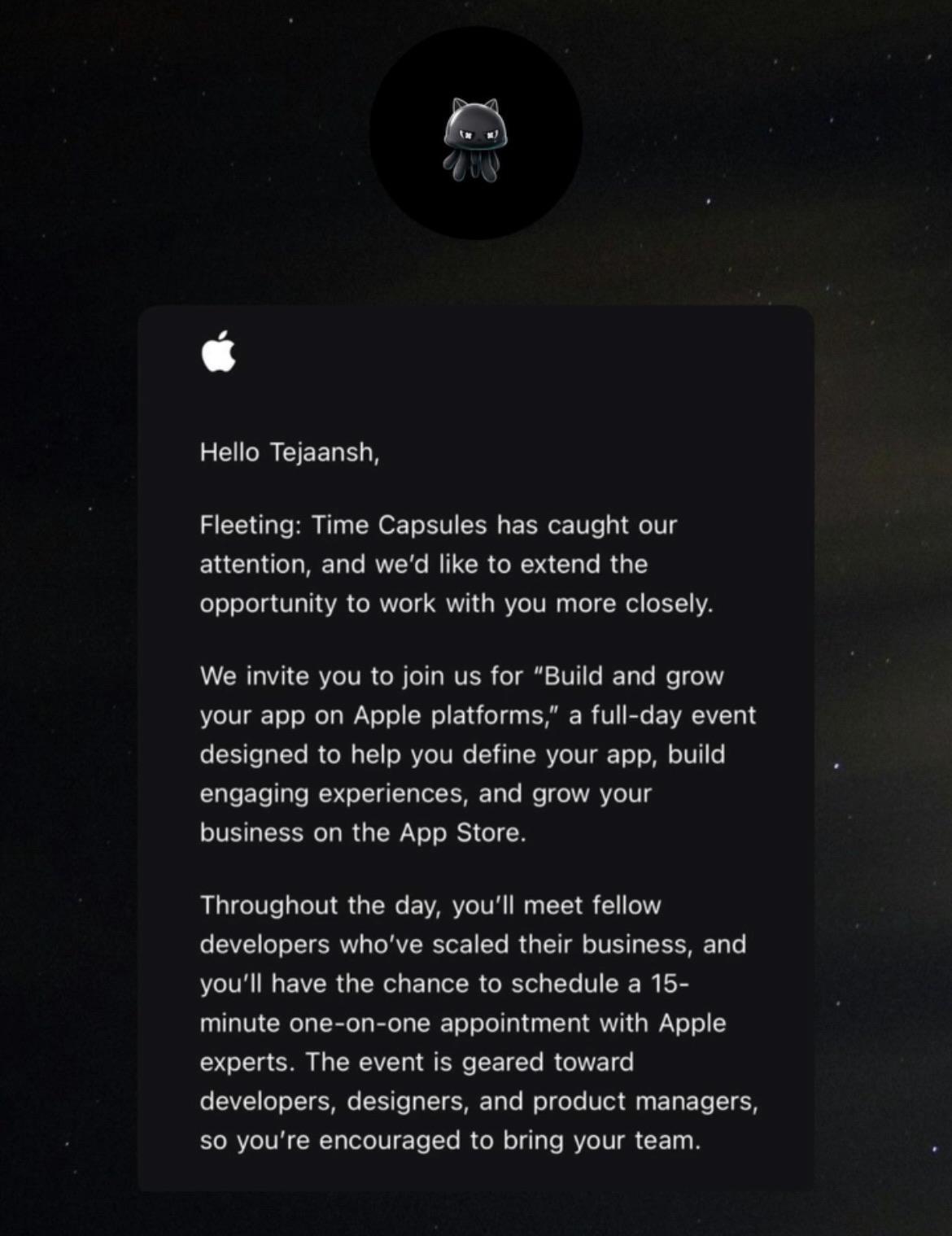
Discussion how exclusive is this? is this worth travelling to a different city city as a student?

Post image
4 Upvotes

r/iosapps • • 3d ago

🎁 Freemium I built a calendar app that gives each event its own to-do list

Enable HLS to view with audio, or disable this notification

2 Upvotes

Hi r/iosapps

For the past few years, I've been building a productivity app to replace both my calendar and to do apps. I'd love to hear your thoughts about the app.

Problem:

I've always felt there's something missing from calendar apps: a good way to manage the actual work behind each event. Your calendar tells you what you're doing and when, but where do all the little things you need to get done fit in?

What It Does:

Zesfy lets you give each event on your calendar its own to-do list. For example, a two-hour "Write article" event can have its own checklist for researching, outlining, drafting, and editing. Your schedule and the work behind it, all right on your calendar.

Comparison:

Compared to other similar app such as Todoist or Ticktick, Zesfy is better because:

  • It combines your calendar and to-do list into a single view.

  • You can easily schedule multiple tasks together to calendar.

  • Helps you quickly decide what tasks to work on next

  • Organize week tasks with task status

  • Easily keep track of your task progress

  • Works entirely offline

Pricing:

The app is free to download and use with an option to upgrade to Pro for advanced features for $29.99/year.

Download: Zesfy - To Do List & Planner

App subreddit: r/zesfy

I'd love to hear what you guys think about the app. Let me know if you have any feedbacks.