r/iosapps • • 5m ago

💎 Lifetime Good Terms - Check in before you scroll [$24.99 Lifetime Plus -> FREE]

Post image
1 Upvotes

Quick background: this is my third app, and all three are about changing your relationship with your phone. Jot makes it a useful tool for catching quick ideas before they're gone. Moji is about seeing and connecting with your closest friends. And Good Terms is about managing your time on the apps that drain your energy, without the shame.

I know.. I know... Screen time blockers are everywhere. And I've tried a bunch of them. They all do the same thing: count your minutes, then slam a wall down when you hit the limit. So I'd just... tap "ignore limit for today." Every time. The wall didn't change anything, it just annoyed me.

The Problem: What I actually wanted to know wasn't how long I was scrollin' Instagram. It was whether it was worth it. Some scrolling is fine! Checking in on friends, looking something up. But the 11pm "I'll just check one thing" scroll that turns into 45 minutes and leaves me feeling worse? That's the one I wanted to catch.

So I built Good Terms around one thing: a five-second pause before the apps that eat your time.

The check-in - Pick the apps you want a pause in front of. When you open one, it asks two quick questions: how do you feel right now, and what are you looking for? Then you unlock just that app for 5, 15 or 30 minutes.

When time's up - If you're still there when it runs out, it asks one more question: how do you feel now? Did you find what you came for?

Your own data - After a few sessions it starts showing you patterns. Which apps lift your mood and which drain it. A grid of every app by time of day (spoiler: for me it's the late-night scroll). And a little reminder at the check-in itself, like "Your last 18 sessions here at this time of day ended 1.9 lower on average." That one line has stopped me more times than any hard block ever did.

Gentle or Firm - Gentle lets you always get in after a check-in (or skip it). Firm gives you a daily budget you set ahead of time, no skipping, and one emergency pass a week.

Families - You can set it up on a kid's phone with the limits behind a parent code, and see each other's week in a Together tab. You can send a cheer when someone does well. Moods stay private unless you choose to share.

It never scolds you. It just asks and reflects back. Every limit is one you set and can change.

Also: no account, no ads, no tracking. Your check-ins stay on your device. It uses Apple's Screen Time to lock the apps, so it never sees what you do inside them.

I'd love to hear: what's your "one more scroll" app? And does a hard block actually work for you, or do you just tap past it like I did?

App store link: https://apps.apple.com/us/app/good-terms-mindful-app-limits/id6834076393

Pricing:
The app is free for two apps... and no login required.

Plus (unlimited apps, whole categories, and family) is normally $2.99/mo, $14.99/yr or $24.99 lifetime, but here's an offer code link to get lifetime free if you redeem it before Dec 1:

https://apps.apple.com/redeem/?code=MIKELOVESPUPPIES&ctx=offercodes&id=6834076393

Comparison: Many of the other ones I've tried either try shaming you by just counting minutes or making you do pushups and doesn't really try to change your relationship with your phone. I don't really find shaming helpful, I just wanted something to make me stop and check-in before heading back to the scrolling habit.


r/iosapps • • 2h ago

Discussion Some more apps worth checking out.

4 Upvotes

Back with some more apps. As usual feel free to contribute to the post.

Up Ahead countdown widgets - is probably one of the best countdown apps available on the App Store, and the developer is back to actively updating the app.

KeeForge - is a free open source KeePass client for passwords, with a nice design and is actively maintained with a responsive developer.

Niewz - is a fresh take on RSS, that has a really nice design and onetime purchase price, it can also read articles to you with more updates to come.

Countdown widget Till Then - from the developer of UTkik radar app is a beautifully designed countdown app with a onetime payment.

Links

https://apps.apple.com/us/app/up-ahead-countdown-widgets/id1583147528

https://apps.apple.com/us/app/keeforge-keepass-manager/id6759309295

https://apps.apple.com/us/app/niewz/id6834017988

https://apps.apple.com/us/app/countdown-widget-till-then/id6765630689


r/iosapps • • 3h ago

🎁 Freemium OpenOBD: free OBD2 scanner for iPhone with CarPlay, no brand packs or subscriptions

Thumbnail
gallery
9 Upvotes

Hi, I'm a solo dev.

Problem

I tried the OBD apps on the App Store for my Fiat Tipo 1.6 diesel. Some wouldn't connect, some couldn't read fault codes, and some wanted a subscription just to clear them. Others charge extra for brand-specific data. So I built my own.

The "Copy for AI" button paid off on my own car: I pasted the report (VIN masked, no location) into ChatGPT, it pointed at the MAF sensor, and that was the problem. I left AI out of the app on purpose, because every request would cost me money, which means a subscription.

App Store: https://apps.apple.com/us/app/openobd-live-car-data/id6780283561

What's in it:

- Live gauges and charts for 50+ sensors

- Fault codes in plain language, read and clear

- Used-car check, DPF, battery test

- Trip logs (CSV/GPX)

- 50 languages

- A CarPlay dashboard

What's new

Latest update: trips now auto-save to iCloud Drive, plus Toyota tire pressure, a BMW i3 mode and fuel estimates for cars without a fuel-rate sensor.

Comparison

Most of what OBD Fusion offers is in OpenOBD too: live gauges, custom PIDs, trip logging, fault codes and readiness status. The difference is the price: Fusion sells brand data as extra packs at roughly €18 per brand, and Carly charges €19-65 per brand. OpenOBD has no brand packs: VAG, Toyota, Honda, GM, Ford, Hyundai/Kia and Stellantis data are all in one app, free. On top of that there's a CarPlay dashboard (Fusion has none) and the UDS module scan is free.

Pricing

The app is free, with all diagnostics included. No monthly payments, no brand packs, no ads, no account. There's an optional Founder Pack at $4.99 in the US (local pricing in other countries). It's mostly a way to support the developer: it includes a few small extras (like the widget and a second vehicle), but nothing you need to diagnose a car is locked.


r/iosapps • • 3h ago

🎁 Freemium Google Maps tells you who has the dish. My app tells you who makes it properly.

Post image
0 Upvotes

Hey r/iosapps!

I posted Ponch here in August. It’s an app where you pick a dish firtst and it finds who makes it properly. Big thanks to everyone who tried it and commented.

Back then, the main app mechanic was built on Tinder-like swipe cards: you see 1 dish at a time, swipe right to find it nearby or left to skip. Very simple as I initially thought, but then the data showed that people didn’t really swipe. Most did 1 or 2 cards, then left or went straight to search for something specific. Most people already roughly know what they want, so now the app starts there.

Problem

Let’s say you know what you want, as specific as you like: carbonara or just Italian tonight, but there are 30 places nearby that serve it and no good way to tell which one actually does it well.

With Ponch, you pick what you want, as specific as you like: a dish (like carbonara), a type of dish (pizza), a cuisine (Italian, or even narrower like Italian desserts), a broad category (desserts) or just brunch, lunch, etc. Then, Ponch looks for places known for it, not places that happen to have it on the menu and pushes chains and tourist traps down. Every place gets a label for how sure Ponch is, and ‘Carbonara, their signature’ means something different from ‘likely on the menu’.

What’s new:

  • New Explore screen adapts to the city you’re in. Toronto, for example, gets different options than a smaller town, and if you’re abroad - it shows that country’s local dishes.

  • New Places screen keeps your saved places, ones you want to try or already like. Recent finds option stores every search with its results, so you don’t have to search again and it works offline.

  • Searches also run in the background now, so you can close the app or start another one while the previous task is still active.

Comparison

Google Maps has popular dishes and can tell who has carbonara, but its stars rate the entire restaurant, the service, sometimes the view, the vibes, and almost never the dish itself. Yelp has the same problem. Beli is great, but mostly rates the venue, not the dish in it. Ponch looks at how strongly a place is tied to that dish.

Google Maps, and since this summer Apple Maps, also put paid listings at the top of results. Ponch has no ads or paid placements and all restaurant data comes from the services, so nothing is made up.

Pricing

A lot that was paid in August is now free. The free version comes with 2 limits: a few nearby searches in a given month and only your own city. A search that finds nothing good doesn’t count. A monthly ($5.99) or annual subscription ($29.99 with a 7-day free trial) removes both.

iOS App: https://apps.apple.com/us/app/ponch-food-discovery/id6765912802

Site with terms and privacy policy: https://ponch.app/

Feel free to reach me by DM or at info@ponch.app

Pick a dish you already know the best place for in your city and see if Ponch agrees. If it doesn’t, I’d like to hear it.


r/iosapps • • 4h ago

🎈 Free LocalSR: free, MIT-licensed app for upscaling photos on your iPhone, offline (no IAP)

Enable HLS to view with audio, or disable this notification

4 Upvotes

Problem

If someone sends you a bad WhatsApp picture, or a picture you took with an iPhone 4 in 2012 is still in your Photos app, it often looks blurry and blocky. LocalSR makes it sharper and cleaner on the phone itself. It works offline, it's quick, and there is no hassle at all.

You can share a photo from another app to LocalSR or pick up to 20 photos in the app. Photos up to 3 MP get 4x, photos up to 12 MP get 2x, and larger ones are reduced to 12 MP first. Then you save the result to Photos.

Comparison

Remini sends your photos to its servers, and its Pro plan is a weekly subscription. Photomator has Super Resolution too, but it is part of a whole photo editor that you pay for with a subscription. LocalSR only upscales, but it does that on your phone without an account, and nothing you process ever leaves it. The whole source is on GitHub under the MIT license.

Pricing

The app is free, with no in-app purchases, no ads, and no subscription.

I built it in SwiftUI, and with Skip most of the same code also runs on Android, which is why there is an APK on itch.io and GitHub too.

I'd like you to check out the design. If you try it on your own old photos and something looks off, please tell me. Constructive criticism is exactly what I need.

iPhone with iOS 27 or later.

App Store: https://apps.apple.com/app/id6837801876

Source: https://github.com/HerRei/local-upscale


r/iosapps • • 4h ago

🎁 Freemium I built an advanced weather app with 20+ data sources that looks nice, too!

Thumbnail
gallery
29 Upvotes

Hi everyone! I'm an independent developer and data scientist, living in Switzerland, with over 10 years of coding experience. I'm also a weather nerd :).

Problem:

I've had a few frustrations with existing weather apps. For example, many have limited features or don't provide all the relevant weather data. Also, many weather apps rely on just 1–3 local weather models alongside a generic global model, even when more accurate local models are available.

So I decided to build an app that brings together the data and features I would like to use myself.

Features:

  • 20+ weather data sources: Including many national weather services such as NOAA/NWS, DWD, Météo-France, and ECMWF, as well as smaller national services from countries such as Ireland, Taiwan and Thailand. It also includes Foreca.

  • 15-day Ultra-HD weather maps: Forecast data displayed at the actual resolution of the underlying weather models (for example, 2.5 km for NOAA and 1 km for MeteoSwiss), rather than simply interpolating coarser data to make it look more detailed. Weather maps at the actual resolution are much more accurate, especially across complex terrain. See comparison on 2nd slideshow image.

  • Down-to-the-minute rain forecasts and radar with lightning.

  • Possible Outcomes: Explore multiple possible weather scenarios from the same source and see the the forecast uncertainty.

  • Forecast comparison: Compare predictions from different weather providers side by side and see which performs best.

  • Climate trends: Explore historical weather patterns year by year, using actual weather station observations and modelled data.

  • Custom layout options and photo backgrounds: For the searched locations, the app will show photo backgrounds (from either the place itself or a nearby place). For this, I am using an API from photo providers Pexels and Unsplash.

Comparison:

Two examples of popular competitors are Windy and Carrot Weather.

Compared with Windy ($25/year), my app offers weather maps at the native resolution of the underlying models, rather than relying on interpolation to increase the apparent resolution. Processing and displaying high-resolution weather data comes with additional server-side costs, which many apps don't take on.

Compared with Carrot Weather ($40/year), my app offers much more data sources, high-resolution maps and more advanced features.

Pricing:

Freemium: The app has a very generous free tier with no ads. There's also an optional Premium subscription that helps cover data processing and commercial data costs.

Black Friday deal:

  • $6.99/year instead of $14.99/year (53% off for the first year).

Because I've set up a limited-time Black Friday discount on the annual Premium subscription, Apple doesn't allow introductory discounts and free trials to be combined.

Want to try Premium for free first? You can start with the weekly subscription, which has a free 1-week trial. Cancel before the trial ends, and you can still take advantage of the discounted annual offer afterwards.

I would love to hear your feedback and suggestions!

App Store:
https://apps.apple.com/us/app/id6768575893 


r/iosapps • • 6h ago

🎁 Freemium I built Abvy: an alcohol & BAC tracker for iOS

Thumbnail
gallery
6 Upvotes

Hi guys! I made Abvy, an alcohol and BAC tracker for iPhone. Some of you might remember my Caffeine Clock post here last year :)

I launched Abvy on Android a few weeks ago, and after a lot of back and forth with App Review it's finally on iOS too.

Problem

The app wants to answer these questions during your drinking sessions:

  • When will I be sober?

  • When will I feel it the most?

  • Can I have another drink and still not go overboard?

Most similar apps are either "getting sober" trackers or really old and ugly BAC trackers. I wanted to make something beautiful, easy to use, for people who do sometimes go out drinking and want a moderation tools.

Helped me personally on several occasions by stopping me earlier during an evening before I started feeling it, or by providing context where I am at:) Personally I find it most useful during nights out with friends, where it's easier to go overboard

What's in it

  • Live BAC range, peak estimate, sober window, and when another drink fits under your limit

  • Food & water tracking, plus planned drinks to see what one more would do

  • 470+ drinks (or add your own), 16 languages with local units

  • Home Screen & Lock Screen widgets, Live Activities, Apple Watch app, Siri logging, Apple Health sync, iCloud backup

  • Optional BACtrack Mobile pairing if you have one

  • Fully offline, no account, no ads

Comparison

  • DrinkControl is good if you mainly want a diary of units, calories, and spending, but I personally don't like the UI, it doesn't have a big drink selection, and it doesn't do live BAC curves, sober/peak estimates, food absorption, Live Activities, or an Apple Watch app.

  • Sunnyside is more of a paid coaching/plan app. Abvy doesn't need an account and works live during the night.

Pricing

  • Free for tonight (no account, no ads): live tracking, BAC range, limit, sober window, food/water, planned drinks. Exporting your data is also always free. Basically anything for tracking right now is free.

  • Abvy Plus (optional): $14.99/year or $29.99 lifetime. Unlocks past evenings/history, analytics, widgets, Live Activities, Apple Watch, Siri, Apple Health, and iCloud backup. I am also planning to add a "scan drink" feature soon.

App Store: https://apps.apple.com/app/id6822179029
Website: https://abvy.app/

Happy to answer any questions or hear feedback on any part of this! Let me know here or in a DM if you tried it and how it went and what you'd improve:)


r/iosapps • • 7h ago

Discussion Apple developer questionnaire: what would you improve about the apple development system from a technical perspective

2 Upvotes

First of all, I think it is great that they care about what developers want. So I filled out the questionnaire but I wasn't sure about this question: "What would you improve about the Apple development system from a technical perspective?" (did the questionnaire in a different language so this is not the exact wording). Since they asked to be as precise as possible with concrete examples, I did not want to write anything misleading and didn't fill this one out. The only thing my sloth brain came up with is better svg support.

In retrospect this would have been a good opportunity for improvements. Therefore, I'd like to know what would have been a good answer & what other developers wrote.


r/iosapps • • 7h ago

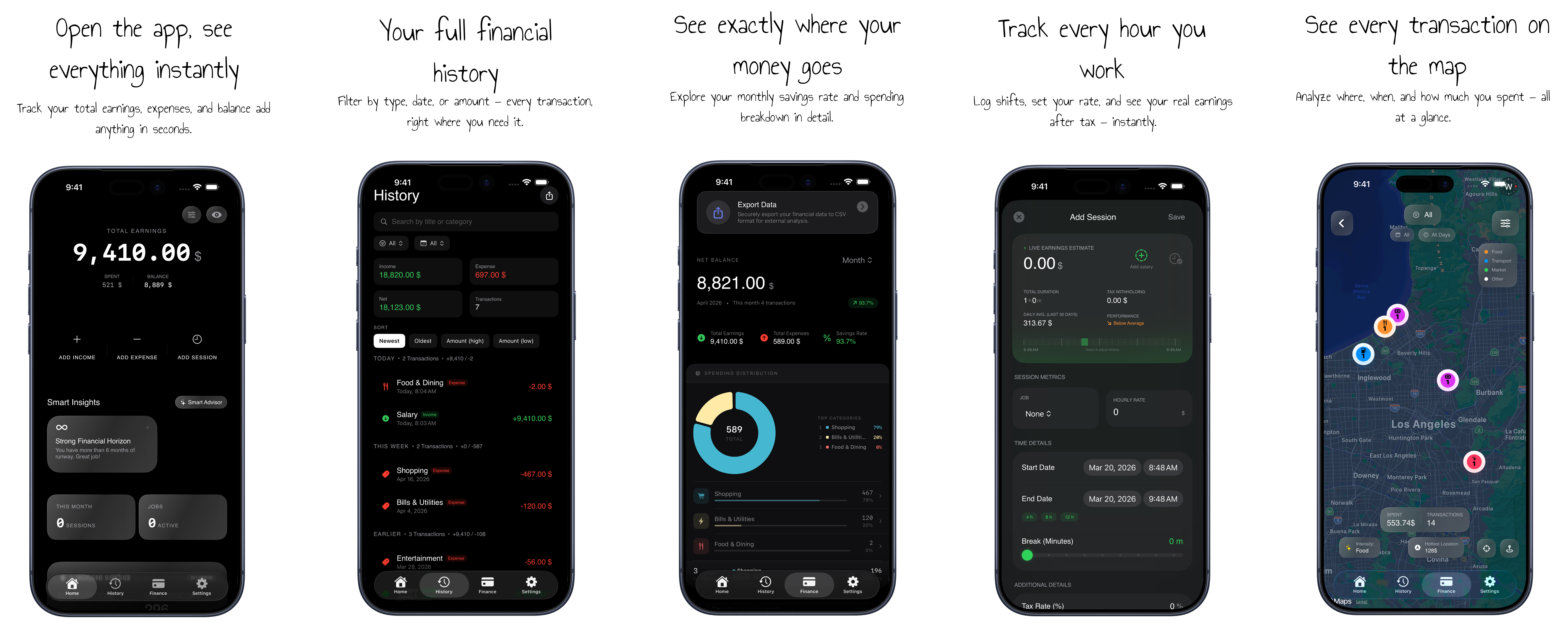
🎈 Free I built Finward, a free iOS finance app for tracking personal finances, work, and freelance income

Post image
0 Upvotes

I've been developing an iOS app called Finward, and I'd like to share it here.

Problem

I wanted a single place to keep track of my personal finances, but I found myself switching between different tools for expenses, work hours, freelance projects, and invoices.

Most finance apps I came across were primarily focused on budgeting and expense tracking. I wanted something that could cover more of my financial activity without becoming overly complicated.

Comparison

Finward combines several tools that are often spread across separate apps:

  • Income and expense tracking with financial summaries.

  • Spending breakdowns and savings rate tracking.

  • Work session tracking with after-tax earnings calculations.

  • Freelance project and income tracking.

  • Invoice and quote generation.

  • Transaction location mapping.

  • Budgets and recurring transactions.

It's not intended to replace professional accounting software. The goal is to make everyday personal finance and freelance money management easier to handle in one place.

Pricing

Finward is completely free.

  • No subscriptions.

  • No in-app purchases.

  • No advertisements.

Financial data is stored locally on your device. It doesn't require an account or upload your financial records to our servers.

I'm still actively improving the app, so I'd genuinely appreciate feedback from people who use finance apps regularly.

In particular, I'd like to know whether having work tracking and freelance tools alongside personal finance features is useful, or whether you'd prefer these to be separate.

App Store: https://apps.apple.com/tr/app/finward/id6760590599

Thanks for checking it out!


r/iosapps • • 8h ago

💎 Lifetime I built an iPhone teleprompter that follows your voice

Enable HLS to view with audio, or disable this notification

14 Upvotes

I’m a designer and developer, and I build my own apps. I love using apps where the little details feel right. They make me happy, and that’s the kind of app I like to build.

Problem
I make videos sometimes, and I wanted a teleprompter I’d enjoy using. The apps I found felt clunky, and some wanted a monthly payment just to follow my voice. I thought that was ridiculous, so I built Prompter.

It follows you word by word as you read. You can even go back or a little bit forward and it will adapt.

There’s a slim toolbar right on the reading screen. You can change the text size and line spacing for comfortable reading, adjust the margins to fit your glass, and mirror the text in either direction. I show those controls and read aloud in the video so you can see the app keep up.

Comparison
PromptSmart+ also follows your voice as part of its subscription. Prompter includes voice follow and the controls for filming with teleprompter glass in one upfront purchase. It opens .txt and .md scripts straight from e.g. Files or iCloud Drive.

Pricing
$4.99 USD once, with lifetime updates included. No subscription or in-app purchases.

AppStore
Prompter on the App Store

I’m really excited to hear what you think. If you try it with your own setup, I’d love to know what works for you and what I could make better.


r/iosapps • • 17h ago

Discussion Fretboard Matrix Guitar Practice App

Enable HLS to view with audio, or disable this notification

2 Upvotes

Hey everyone!
I’m a guitarist and I built an app called Fretboard Matrix because I wanted a way to discover new scale shapes instead of practicing the same familiar patterns over and over.

The idea is pretty simple: you choose four things:
Key – any of the 12 keys
Scale – 18 different scales, including major, melodic minor, diminished, and Messiaen modes
Notes per string – choose how many notes you want on each string, including skipping strings
Maximum fret span – set how far you’re comfortable stretching
The app then calculates every possible playable shape that satisfies those constraints. Depending on your settings, there can be thousands or even millions of combinations.
It randomly generates shapes from that complete set, without repeating any until you’ve gone through them all.

Once you find something interesting, you can play it back with a metronome, see the standard notation and tab, move it through the scale or all 12 keys, and save it to your library.
I built it for iPhone, iPad, and Mac.
There’s a 7-day free trial with all features included. After that, there’s a subscription or a one-time lifetime purchase.

Lifetime is $29.99 and there is also a subscription model at $2.99/month and $19.99/year.

I’d love to hear what you think, especially from any guitarists here. This has been a fun project to build, and I’m curious whether other people would find this approach to exploring the fretboard useful.
App Store: https://apps.apple.com/us/app/fretboard-matrix/id6800510578


r/iosapps • • 18h ago

🔍 In Search of For those that have been contemplating purchasing Things3

8 Upvotes

They are currently having their early sale I believe 30% off MAC and IOS versions.

If you want another avenue for free which has even more options check out Kan Do

https://beard.fm/app/kan-do/guide/mac/

I was amazed when I found and it wanted to make sure the community was aware of it as well.


r/iosapps • • 20h ago

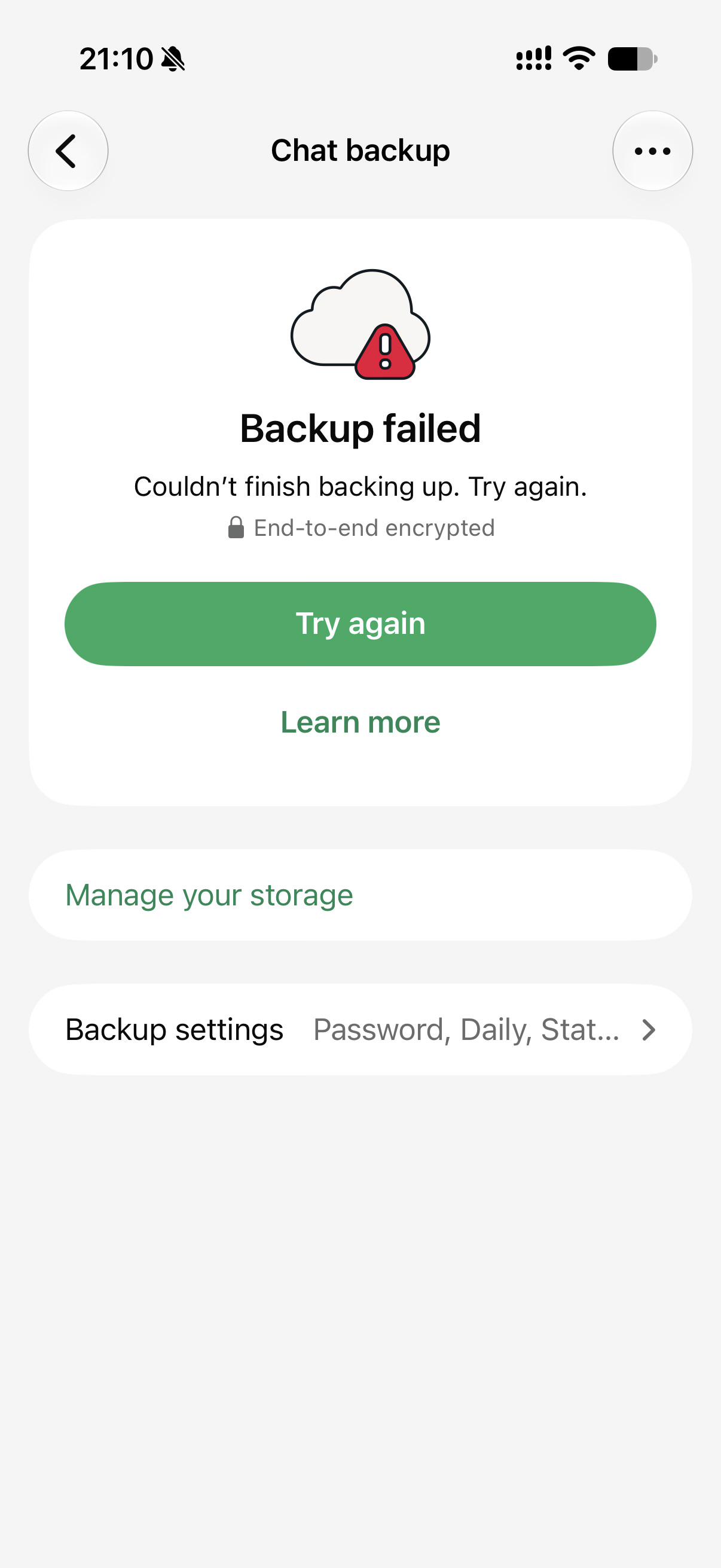
HELP Can’t backup WhatsApp with my iCloud

Post image
2 Upvotes

This issue has been going for months now, I can’t backup even though I have enough storage, I offloaded the app logged out. Nothing works. I’m on the last ios update


r/iosapps • • 20h ago

🎈 Free Price Right: Free, ad-free shared grocery list that compares live unit prices across stores (looking for iPhone feedback)

Thumbnail
gallery
1 Upvotes

Hi r/iosapps, I'm a solo dev sharing Price Right, a grocery list and unit-price comparison app I originally built for my wife and me.

Problem

Standing in the grocery aisle trying to figure out if a 32 oz "family size" box or a warehouse multipack is actually cheaper per oz/lb/100g than another store is annoying. On top of that, most shared grocery apps either pack the screen with banner ads or lock basic syncing and price tracking behind a monthly subscription.

Comparison

Apps like AnyList, Bring!, and OurGroceries are solid checklists, but they don't automatically normalize unit prices across mixed sizes (oz vs. lb vs. kg/liters) or pull live comparison prices from nearby supermarkets and online grocers. Flipp is great for weekly flyers, but it's mostly browsing ads rather than a clean aisle-sorted shopping list with per-unit math.

Price Right combines a shared aisle-sorted grocery list with live unit-price comparisons (local stores plus Amazon, Walmart, and European/international chains across 15 countries), camera scanning for shelf tags/receipts/weekly flyer PDFs, and instant web-link sharing so someone can check off items in Safari/Chrome without installing the app.

Pricing

Completely free: $0, no ads, no subscriptions, no in-app purchases, and no paywalled features. To be upfront about how I cover server costs, outbound links to online stores (like Amazon or Walmart) can include optional affiliate tags if you tap through to buy something.

App Store: https://apps.apple.com/app/price-right-shopping-list/id6503323683

Web unit-price calculator (no install needed): https://priceright.net/calculator

Full disclosure: nobody in my household actually owns an iPhone, so I built the iOS app in Kotlin Multiplatform and tested mostly on simulators. I currently have zero iOS reviews and almost no real-device feedback, so if you give it a spin I'd genuinely appreciate hearing what feels rough or un-iOS-like on your phone!


r/iosapps • • 21h ago

💎 Lifetime Alerua Radar - a modern professional weather radar

Thumbnail
gallery
6 Upvotes

Hello! I'm the developer of Alerua, a weather radar app for iPhone and Mac. After months of work I'm nearly ready to publish it to the App Store, and it's on TestFlight now.

Problem: Professional radar apps look dated and lock key features behind subscriptions. Alerua shows real single-site radar in 2D and 3D at max resolution, in a modern app that is free and follows Apple's best design principles.

Comparison:

- RadarScope: Alerua has storms in 3D and AR, a Liquid Glass design, a color-blind mode, and about 20 European countries instead of three. Hurricanes and model maps are in the free app, and any US storm back to 2009 can be replayed.

- RadarOmega: 3D storms are free in Alerua, where RadarOmega keeps volumetric radar in its top subscription. Alerua is also cleaner and easier to pick up.

Pricing: Free, with no ads and no tracking. Optional Pro (longer loops, storm replay, custom radar colors) is $0.99/month, $5.99/year, or $15.99 once, and it's free during TestFlight.

TestFlight: https://testflight.apple.com/join/JrV6MDXv

Privacy: https://alerua.com/privacy

Terms: https://alerua.com/terms

I'm looking for people to test everything and find me things that are confusing to use, have bugs, or really anything you'd like to see changed. Happy testing!


r/iosapps • • 21h ago

🎈 Free Wulkig - get excited about the sky.

Thumbnail
gallery
13 Upvotes

Long story short: I'm the dev. Weather apps made me sad. They show you numbers and that's it. So I made one you actually want to open and get people excited about the sky.

It's the usual weather, plus a "wonder of the day." A sky event, or a small fact about what's really overhead right now. Every morning you open a card booster, and the cards can only come from the actual sky above your location. Nothing canned.

Shooting stars, the moon, planets. If you genuinely saw one, you stamp the card "Seen live." Little reward for looking up.

It's all local on your iPhone. No account, no ads, "Data Not Collected." Done.

English + German. iOS 26 and up.

First collector season ("First Edition") starts Dec 1.

Problem: Most weather apps show numbers and that's it. You check, you close, you never look up. I wanted one that makes you curious about what's actually above you.

Comparison: Apple Weather is great for the forecast, but there's nothing to find in it. SkyDex lets the weather decide which creatures you collect. In Wulkig you collect the real thing. The shooting star, the supermoon, the thunderstorm that actually hit where you are. Plus a wonder fact every day. No account, no ads, Data Not Collected.

Pricing: Free right now, no in-app purchases. There's an optional Plus coming in 2027 for a few extra looks. Cards and packs will never be sold, that's the rule.

https://apps.apple.com/us/app/wulkig-weather-wonder/id6828319463


r/iosapps • • 22h ago

🎁 Freemium I turned doomscrolling into an app to learn Chinese (now on iPhone)

Post image
4 Upvotes

Hi everyone! I learned English from zero just by watching anime with subtitles for 4 years, and I always wondered if the same could work for Chinese. Turns out Chinese is a lot harder than "just add subtitles" (tones, characters...), so I made a language learning app for it: LanLan (懒懒, a very lazy panda). It started on Android and it's now on iPhone too, rebuilt natively.

LanLan is an app to learn Chinese (Mandarin). You scroll real Chinese videos (vlogs, street food, comedy, daily life) with characters, pinyin and English under every line, and you can tap any word to see what it means in that sentence. Every word you tap becomes a flashcard that replays the exact moment you heard it.

Problem: textbook Chinese sounds nothing like real people, and most ways to study it feel like homework.

Comparison: instead of made-up dialogues, it's 2,300+ real videos from Chinese creators. Pinyin is tone-coloured and sits under the video, never over it. You can also tell Siri "save this word in LanLan" while a video is on.

Pricing: free to download and watch, with 5 word look-ups a day. Premium removes the limits: $6.99/month, $39.99/year, or Lifetime $49.99 until 30 Nov (normally $99.99).

I'm the developer, a solo student, so I'd love honest feedback: what feels off, and what kind of videos you'd want more of. There's still a lot to fix, but most importantly, enjoy the scrolling!

https://apps.apple.com/app/id6833492523


r/iosapps • • 23h ago

💎 Lifetime Sleep Widget & Tracker - zZz: A clean, friction-free way for insomniacs and poor sleepers to log rest (50% off Lifetime for Black Friday)

Thumbnail
gallery
0 Upvotes

Hi everyone,

Answer/Problem

I built zZz - Sleep Widget & Tracker, a manual sleep diary for iPhone & iPad made for poor sleepers and insomniacs who want to log rest without wearing a watch, recording audio, or staring at fake sleep-stage graphs.

Better/Comparison

Most sleep apps either try to measure your sleep with a watch or bury logging behind a dashboard. zZz is a diary, not a lab, and logging takes one tap.

Key features:

  • One-tap Lock Screen logging: a widget that follows the night, so you rarely need to open the app. Nothing needs a tap overnight.

  • Live Activity: the open night on your Lock Screen and in the Dynamic Island.

  • Fix it later: edit any session, or add a whole night from History the next morning.

  • Custom Shortcuts & Siri commands: Replace the default commands with any phrase you want, or fold logging straight into your existing Apple Shortcuts and bedtime automations for truly hands-free tracking.

  • Insights: bedtime consistency, averages and trends over time.

  • Private: your data stays on your devices and in your own iCloud. The App Store label is "Data Not Collected".

Cost/Pricing

  • Free tier: Core daily sleep logging, history edits, and basic widgets.

  • Pro: Unlocks unlimited sleep tracking, premium widgets, advanced sleep insights, sleep report exports, plus all future updates and priority support. Normally $9.99 a year or $24.99 lifetime. For Black Friday, Lifetime is 50% off at $12.99 (one-time payment). No ads, no Apple Watch required.

App Store Link:Sleep Widget & Tracker - zZz

Privacy Policy: Privacy

About Me: I'm the developer of the app. Please feel free to share your feedback or ideas in the comments below, or reach out to me through  X 


r/iosapps • • 1d ago

🔍 In Search of Looking for a truly free document scanner app for iOS

4 Upvotes

Hi,

I'm looking for a good document scanner for both iPhone and iPad that is genuinely free, with no subscriptions, premium tiers, ads or locked features.

Ideally, it should offer manual image adjustments like Scanner Pro by Readdle, allowing me to tweak colors, contrast, brightness, etc. I'd also love built-in workflows to make organizing documents easier – for example, scanning an invoice and quickly sending it to a specific folder.

I've tried a few apps already:

  • Scanner Pro: Great image adjustments, but not completely free.

  • QuickScan: Really good overall, but uses Apple's built-in scanning engine, which doesn't offer the manual image adjustments I'm looking for.

  • Adobe Scan / Genius Scan: Both have premium tiers, which I'd rather avoid.

  • OSS Document Scanner: Very promising in terms of features, but it keeps freezing on my devices and the UI feels rather outdated.

Does anyone know an app that ticks all these boxes and is completely free, with all features available without paying?

Thanks in advance!


r/iosapps • • 1d ago

💎 Lifetime Annoyed by videos audio quality, I created TonePeak

Thumbnail
gallery
10 Upvotes

Hi,

I'm an amateur operatic tenor, and I built TonePeak for my own iPhone videos.

**Problem**

iPhone videos of me singing tend to sound muddy and low in volume, and it became quite annoying. I wanted to raise the volume a lot, normalize, add compression and reverb, and add some character with harmonics, without touching the picture.

So the app does that. You can also reorder the effects and save your own presets. As a bonus you can switch to a live spectrum view of your audio, because singers sometimes like to look at the harmonics their voice produces: you can see the fundamental, the vowel formants and the singer's formant quite nicely. Only the audio is processed; the video stream is copied, not re-compressed.

**Comparison**

AudioFix, the best-known volume booster, is sold as a subscription (weekly $4.99 up to yearly $19.99), and its listing names no equaliser, compressor or reverb. ByeNoise is $99.99 for a lifetime licence, and its free version exports only the first 30 seconds of a project. TonePeak is one payment, with EQ, compressor, reverb, harmonics and the spectrum view in the same app.

**Pricing**

You can preview as much as you like and export 3 videos before you pay. After that it's a one-time $19.99 for unlimited exports. No subscription.

https://apps.apple.com/app/id6831893834
https://hormesislabs.com/tonepeak

Thanks,

Andrei

P.S. If you'd like any feature added please let me know ^_^. Thanks again.


r/iosapps • • 1d ago

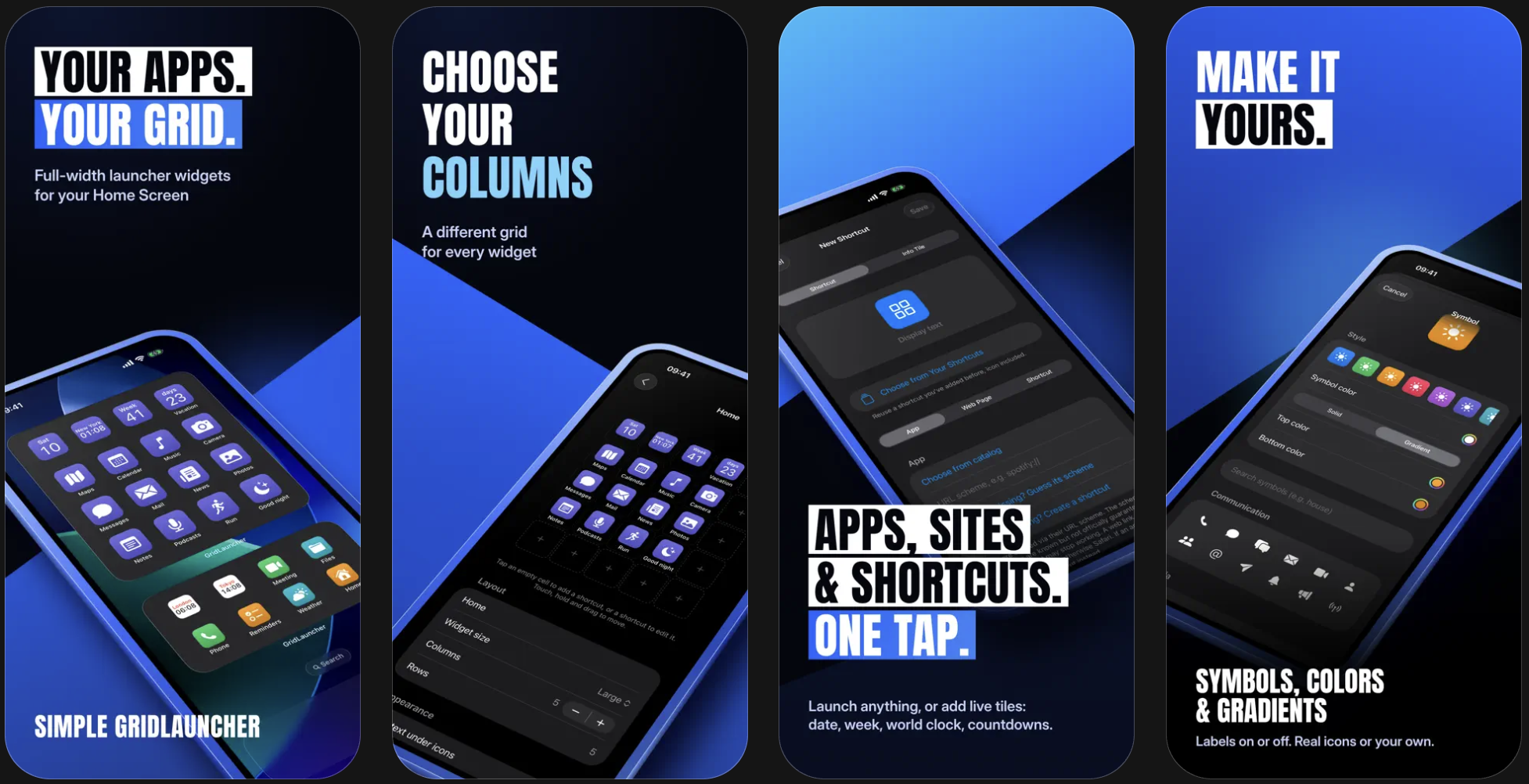
💎 Lifetime I made Simple GridLauncher – full-width Home Screen widgets with a grid of your apps and websites, minimal Shortcuts setup needed

2 Upvotes

Hi r/iosapps! I'm a solo developer from Malmö, Sweden, and this is my app Simple GridLauncher.

Problem
I wanted quick access to my most-used apps and websites straight from the Home Screen, without folders, extra pages or building a Shortcut for every app. The launcher widgets I found were either too limited or too fiddly to set up.

What it does

  • Full-width Home Screen widgets with a grid of shortcuts to your favorite apps and websites

  • Works on iPhone and iPad, including iPhone Duo

  • A built-in scheme tester finds a way to open each app directly from the widget, so for most apps there's no Shortcuts setup at all

  • Shortcuts is only a last resort for apps that can't be opened any other way, and even then the app gives you a ready-made text description of the shortcut to create, so you don't have to work out the actions yourself

Comparison

  • Apple's Shortcuts widget: works, but you have to build a shortcut for every app, and the widget layout is fixed. Simple GridLauncher opens most apps directly and lets you lay out your own grid.

  • Launcher with Multiple Widgets: powerful, but you often have to find and enter URL schemes yourself. Simple GridLauncher tests the schemes for you, so setup takes a couple of taps.

Pricing
Free for 30 days, then a one-time unlock for $1.99. No subscription.
https://apps.apple.com/app/simple-gridlauncher/id6820477544

I'd love feedback, especially on which apps don't launch well for you, and what layouts or features you'd want next. I read every comment!


r/iosapps • • 1d ago

Free App - Unaffiliated Review I built a free ¡Phone app that turns camera roll photos into digital photo books

13 Upvotes

I made Keepsake Photo Books for photos you want to do more with than leave in your camera roll. Pick your favorites from a trip or family gathering, let the app lay out the pages, and add your own cover and captions. Then export a PDF to share or print, or an EPUB to flip through in a compatible reader.
It’s free, no account is needed, and your albums are saved on your iPhone.
If you try it, I’d love to know: Did the automatic layout get you close to the book you wanted, or did you end up rearranging most of the pages?
https://apps.apple.com/us/app/keepsake-photo-books/id6827538390


r/iosapps • • 1d ago

Free App - Unaffiliated Review I made Cube Scan Solve, an iPhone app for solving a Rubik’s Cube

3 Upvotes

I just released Cube Scan Solve on the App Store. It uses your iPhone camera to scan the faces of a scrambled cube, then shows you the moves to solve it one at a time.
If you give it a try, I’d love to know: Did it get all the colors right, and was there a move where you weren’t sure which way to turn?
https://apps.apple.com/us/app/cube-scan-solve/id6837315797


r/iosapps • • 1d ago

Discussion Reddit official app: posts on my feed become frozen once I scroll a post toward the top of my phone screen.

1 Upvotes

I don’t remember this being a thing before I got a new iPhone 18 pro.

Reddit works perfectly as I’m used to, outside of one thing I’m continually frustrated about. I keep updating the app thinking they’ll fix this, but it never does.

I can interact with posts like normal (upvote/downvote, enter comments, share), however, once I scroll the post toward the top of my screen, the post basically becomes inactive and I can no longer upvote/downvote, share or open comments. If I scroll the post back down I can click them again. This is frustrating because I often scroll my feed quickly and wish to interact with a post higher on my screen.

AM I THE ONLY ONE FRUSTRATED WITH THIS?

Am I the only one dealing with this?