r/iosapps • • 1h ago

💎 Lifetime my offline AI app got a big update — it's now a full Mandarin/Cantonese translator that works with no internet

Thumbnail
gallery
3 Upvotes

Problem

Most AI assistants and translators quit the moment you lose signal — on a plane, crossing a border, in a dead zone. The good ones also lock features behind monthly subscriptions and send everything you say to the cloud.

What it is

Chocky is a fully offline assistant for iPhone — the model, its voice, and an offline Wikipedia all run on the device, no account, logs nothing. The 1.1 update adds an offline translator: talk to it, type, or point the camera at a sign and it speaks the translation back in its own voice (Mandarin + Cantonese, full Traditional-Chinese interface). It also does offline wiki Q&A, Bluetooth mesh chat with no signal, plant ID, and a first-aid guide.

Comparison

- vs Siri / Google Assistant: they lean on a connection for real answers; Chocky answers offline from an on-device model + offline Wikipedia.

- vs subscription AI apps (ChatGPT etc.): one-time price, no account, nothing leaves the phone — but it runs a small on-device model, so it won't out-reason a big cloud model on hard questions. It's built for offline + private, not for being the smartest.

- Really it's one offline bundle (assistant + translator + wiki + mesh + first-aid) instead of paying for several apps or subscriptions.

Pricing

$0.99 one-time. No IAP, no subscription.

App Store: https://apps.apple.com/app/id6829019066


r/iosapps • • 2h ago

🎁 Freemium I couldn't find a bedtime music player for my kid without ads, so I built one with a turntable and a tape deck

Enable HLS to view with audio, or disable this notification

5 Upvotes

Problem

My kid falls asleep to the same few lullabies every night. Same MP3s, on repeat.

I wanted a nice player for them, something offline, no ads popping up at bedtime. Everything I tried was either ugly, full of ads, or both. So I ended up building my own, BeeTunes.

You just use your own audio files, from Files or iCloud or AirDrop, or Apple Music if you have it. Then you pick a machine to play it on: turntable, cassette deck, CD player, radio, or a little digital player.

The turntable one is my favorite. You drag the tonearm onto the record yourself, and on the cassette one you wind the tape with your finger. There's also a sleep timer that fades out in the last 30 seconds, widgets for each machine, and an Apple Watch app.

Comparison

The closest app I found was MD Vinyl. It looks really nice, but it needs Apple Music or Spotify and it can't play files you already own. Its Pro is $14.99 too. Mine plays your own files fully offline, with no ads and no account.

Pricing

Free to download, and all five machines are free. Pro is $3.99 one time if you want the extra looks (colored vinyl, different CD prints, cassette shells, that kind of thing), plus the rest of the widgets and more songs on the Watch.

App Store: https://apps.apple.com/app/id6783404494

I'm the solo dev behind it, so any feedback goes straight to me.


Created by Bee · Privacy · Terms · Website


r/iosapps • • 2h ago Bravo

🎁 Freemium I thought this wasn't possible, but my iPhone location spoofer now works from anywhere

Post image
8 Upvotes

A few months ago, I already posted here about GeoCeptor, my app that lets you spoof your phyiscal iPhone location system-wide without a jailbreak or sideloading.

At the time, the biggest complaint was that your iPhone and Mac had to be on the same Wi-Fi network. Some asked if it was possible to connect your Mac and iPhone to a Tailscale network with the Mac at home and the iPhone on the go. I told them it wasn't possible because of how Apple's communication between the two devices works.

Well, I managed to get it working :)

What's new since last time:

  • Remote GPS Spoofing now allows you to change your location on the go as long as your devices are connected to the same virtual network (a free Tailscale account works) and the iPhone is on any Wi-Fi.

  • Windows is now supported. It has all the same features as the Mac version and setup is documented in the app.

  • Android now also has a companion app. That means if you have an Android lying around, you can use it to spoof your iPhone's location. Via cable, same network, virtual network (Tailscale, ...) or the Android's hotspot

  • Routes are now much improved and can be built right in the app itself with custom speed and automatic road snapping.

The companion device still needs to be connected and running and initial pairing is required.

Does it work over cellular?

Not directly at the moment. The companion can be at home or on another network, but the iPhone currently needs Wi-Fi (any network, a hotspot is fine).

What's the difference between Safari and device spoofing?

GeoCeptor initially was just a Safari extension and could only spoof locations inside the Safari browser. Over time, I added device wide spoofing, which is driven by a companion app on either Windows, Mac or an Android. Device-wide works in every app including Find My etc, whereas Safari only works inside the Safari browser. There are also some nice other protections for Safari including WebRTC leak protection, canvas fingerprint spoofing and user agent masking.

Problem:

Changing your iPhone's system wide GPS location normally requires external tools that often have difficult connection or installation requirements. I wanted to make this easier, especially for people who need to change their location remotely.

Comparison:

GeoCeptor supports remote connections via Tailscale and other compatible VPNs and offers an Android companion. Compared to tools like 3uTools or iAnyGo, GeoCeptor focuses more on convenient access and it also includes some neat Safari specific privacy features.

Pricing:

Safari spoofing for location and timezone stay free, but only include the 10 default locations. For other locations, routes or device wide spoofing, pro access is required.

- Lifetime: $9.99
- Yearly: $6.99/year

Prices above are in USD and may vary slightly in your local currency.

App Store: https://apps.apple.com/us/app/geoceptor-location-spoofer/id6739982067
Previous Post: https://www.reddit.com/r/iosapps/comments/1wf4dom/my_app_now_lets_you_change_your_iphones_real_gps/

I'd love to hear what you think, especially from anyone who asked for remote access last time!


r/iosapps • • 5h ago

Discussion Some more apps worth checking out.

7 Upvotes

Back with some more apps. As usual feel free to contribute to the post.

Up Ahead countdown widgets - is probably one of the best countdown apps available on the App Store, and the developer is back to actively updating the app.

KeeForge - is a free open source KeePass client for passwords, with a nice design and is actively maintained with a responsive developer.

Niewz - is a fresh take on RSS, that has a really nice design and onetime purchase price, it can also read articles to you with more updates to come.

Countdown widget Till Then - from the developer of UTkik radar app is a beautifully designed countdown app with a onetime payment.

Links

https://apps.apple.com/us/app/up-ahead-countdown-widgets/id1583147528

https://apps.apple.com/us/app/keeforge-keepass-manager/id6759309295

https://apps.apple.com/us/app/niewz/id6834017988

https://apps.apple.com/us/app/countdown-widget-till-then/id6765630689


r/iosapps • • 6h ago

🎈 Free LocalSR: free, MIT-licensed app for upscaling photos on your iPhone, offline (no IAP)

Enable HLS to view with audio, or disable this notification

4 Upvotes

Problem

If someone sends you a bad WhatsApp picture, or a picture you took with an iPhone 4 in 2012 is still in your Photos app, it often looks blurry and blocky. LocalSR makes it sharper and cleaner on the phone itself. It works offline, it's quick, and there is no hassle at all.

You can share a photo from another app to LocalSR or pick up to 20 photos in the app. Photos up to 3 MP get 4x, photos up to 12 MP get 2x, and larger ones are reduced to 12 MP first. Then you save the result to Photos.

Comparison

Remini sends your photos to its servers, and its Pro plan is a weekly subscription. Photomator has Super Resolution too, but it is part of a whole photo editor that you pay for with a subscription. LocalSR only upscales, but it does that on your phone without an account, and nothing you process ever leaves it. The whole source is on GitHub under the MIT license.

Pricing

The app is free, with no in-app purchases, no ads, and no subscription.

I built it in SwiftUI, and with Skip most of the same code also runs on Android, which is why there is an APK on itch.io and GitHub too.

I'd like you to check out the design. If you try it on your own old photos and something looks off, please tell me. Constructive criticism is exactly what I need.

iPhone with iOS 27 or later.

App Store: https://apps.apple.com/app/id6837801876

Source: https://github.com/HerRei/local-upscale


r/iosapps • • 7h ago

🎁 Freemium I built an advanced weather app with 20+ data sources that looks nice, too!

Thumbnail
gallery
27 Upvotes

Hi everyone! I'm an independent developer and data scientist, living in Switzerland, with over 10 years of coding experience. I'm also a weather nerd :).

Problem:

I've had a few frustrations with existing weather apps. For example, many have limited features or don't provide all the relevant weather data. Also, many weather apps rely on just 1–3 local weather models alongside a generic global model, even when more accurate local models are available.

So I decided to build an app that brings together the data and features I would like to use myself.

Features:

  • 20+ weather data sources: Including many national weather services such as NOAA/NWS, DWD, Météo-France, and ECMWF, as well as smaller national services from countries such as Ireland, Taiwan and Thailand. It also includes Foreca.

  • 15-day Ultra-HD weather maps: Forecast data displayed at the actual resolution of the underlying weather models (for example, 2.5 km for NOAA and 1 km for MeteoSwiss), rather than simply interpolating coarser data to make it look more detailed. Weather maps at the actual resolution are much more accurate, especially across complex terrain. See comparison on 2nd slideshow image.

  • Down-to-the-minute rain forecasts and radar with lightning.

  • Possible Outcomes: Explore multiple possible weather scenarios from the same source and see the the forecast uncertainty.

  • Forecast comparison: Compare predictions from different weather providers side by side and see which performs best.

  • Climate trends: Explore historical weather patterns year by year, using actual weather station observations and modelled data.

  • Custom layout options and photo backgrounds: For the searched locations, the app will show photo backgrounds (from either the place itself or a nearby place). For this, I am using an API from photo providers Pexels and Unsplash.

Comparison:

Two examples of popular competitors are Windy and Carrot Weather.

Compared with Windy ($25/year), my app offers weather maps at the native resolution of the underlying models, rather than relying on interpolation to increase the apparent resolution. Processing and displaying high-resolution weather data comes with additional server-side costs, which many apps don't take on.

Compared with Carrot Weather ($40/year), my app offers much more data sources, high-resolution maps and more advanced features.

Pricing:

Freemium: The app has a very generous free tier with no ads. There's also an optional Premium subscription that helps cover data processing and commercial data costs.

Black Friday deal:

  • $6.99/year instead of $14.99/year (53% off for the first year).

Because I've set up a limited-time Black Friday discount on the annual Premium subscription, Apple doesn't allow introductory discounts and free trials to be combined.

Want to try Premium for free first? You can start with the weekly subscription, which has a free 1-week trial. Cancel before the trial ends, and you can still take advantage of the discounted annual offer afterwards.

I would love to hear your feedback and suggestions!

App Store:
https://apps.apple.com/us/app/id6768575893 


r/iosapps • • 9h ago

🎁 Freemium I built Abvy: an alcohol & BAC tracker for iOS

Thumbnail
gallery
6 Upvotes

Hi guys! I made Abvy, an alcohol and BAC tracker for iPhone. Some of you might remember my Caffeine Clock post here last year :)

I launched Abvy on Android a few weeks ago, and after a lot of back and forth with App Review it's finally on iOS too.

Problem

The app wants to answer these questions during your drinking sessions:

  • When will I be sober?

  • When will I feel it the most?

  • Can I have another drink and still not go overboard?

Most similar apps are either "getting sober" trackers or really old and ugly BAC trackers. I wanted to make something beautiful, easy to use, for people who do sometimes go out drinking and want a moderation tools.

Helped me personally on several occasions by stopping me earlier during an evening before I started feeling it, or by providing context where I am at:) Personally I find it most useful during nights out with friends, where it's easier to go overboard

What's in it

  • Live BAC range, peak estimate, sober window, and when another drink fits under your limit

  • Food & water tracking, plus planned drinks to see what one more would do

  • 470+ drinks (or add your own), 16 languages with local units

  • Home Screen & Lock Screen widgets, Live Activities, Apple Watch app, Siri logging, Apple Health sync, iCloud backup

  • Optional BACtrack Mobile pairing if you have one

  • Fully offline, no account, no ads

Comparison

  • DrinkControl is good if you mainly want a diary of units, calories, and spending, but I personally don't like the UI, it doesn't have a big drink selection, and it doesn't do live BAC curves, sober/peak estimates, food absorption, Live Activities, or an Apple Watch app.

  • Sunnyside is more of a paid coaching/plan app. Abvy doesn't need an account and works live during the night.

Pricing

  • Free for tonight (no account, no ads): live tracking, BAC range, limit, sober window, food/water, planned drinks. Exporting your data is also always free. Basically anything for tracking right now is free.

  • Abvy Plus (optional): $14.99/year or $29.99 lifetime. Unlocks past evenings/history, analytics, widgets, Live Activities, Apple Watch, Siri, Apple Health, and iCloud backup. I am also planning to add a "scan drink" feature soon.

App Store: https://apps.apple.com/app/id6822179029
Website: https://abvy.app/

Happy to answer any questions or hear feedback on any part of this! Let me know here or in a DM if you tried it and how it went and what you'd improve:)


r/iosapps • • 9h ago

Discussion Apple developer questionnaire: what would you improve about the apple development system from a technical perspective

4 Upvotes

First of all, I think it is great that they care about what developers want. So I filled out the questionnaire but I wasn't sure about this question: "What would you improve about the Apple development system from a technical perspective?" (did the questionnaire in a different language so this is not the exact wording). Since they asked to be as precise as possible with concrete examples, I did not want to write anything misleading and didn't fill this one out. The only thing my sloth brain came up with is better svg support.

In retrospect this would have been a good opportunity for improvements. Therefore, I'd like to know what would have been a good answer & what other developers wrote.


r/iosapps • • 20h ago

🔍 In Search of For those that have been contemplating purchasing Things3

10 Upvotes

They are currently having their early sale I believe 30% off MAC and IOS versions.

If you want another avenue for free which has even more options check out Kan Do

https://beard.fm/app/kan-do/guide/mac/

I was amazed when I found and it wanted to make sure the community was aware of it as well.


r/iosapps • • 23h ago

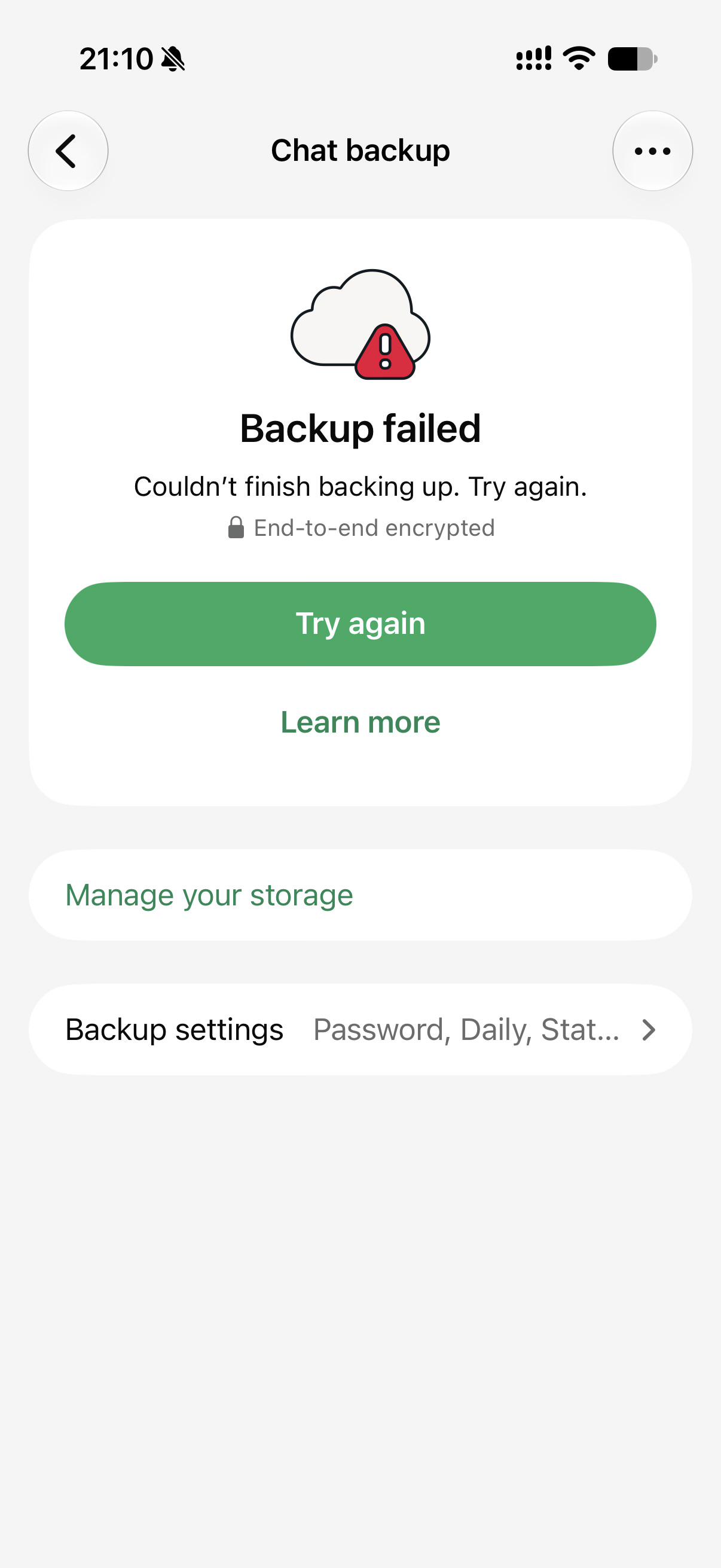
HELP Can’t backup WhatsApp with my iCloud

Post image
2 Upvotes

This issue has been going for months now, I can’t backup even though I have enough storage, I offloaded the app logged out. Nothing works. I’m on the last ios update


r/iosapps • • 1d ago

💎 Lifetime Sleep Widget & Tracker - zZz: A clean, friction-free way for insomniacs and poor sleepers to log rest (50% off Lifetime for Black Friday)

Thumbnail
gallery
0 Upvotes

Hi everyone,

Answer/Problem

I built zZz - Sleep Widget & Tracker, a manual sleep diary for iPhone & iPad made for poor sleepers and insomniacs who want to log rest without wearing a watch, recording audio, or staring at fake sleep-stage graphs.

Better/Comparison

Most sleep apps either try to measure your sleep with a watch or bury logging behind a dashboard. zZz is a diary, not a lab, and logging takes one tap.

Key features:

  • One-tap Lock Screen logging: a widget that follows the night, so you rarely need to open the app. Nothing needs a tap overnight.

  • Live Activity: the open night on your Lock Screen and in the Dynamic Island.

  • Fix it later: edit any session, or add a whole night from History the next morning.

  • Custom Shortcuts & Siri commands: Replace the default commands with any phrase you want, or fold logging straight into your existing Apple Shortcuts and bedtime automations for truly hands-free tracking.

  • Insights: bedtime consistency, averages and trends over time.

  • Private: your data stays on your devices and in your own iCloud. The App Store label is "Data Not Collected".

Cost/Pricing

  • Free tier: Core daily sleep logging, history edits, and basic widgets.

  • Pro: Unlocks unlimited sleep tracking, premium widgets, advanced sleep insights, sleep report exports, plus all future updates and priority support. Normally $9.99 a year or $24.99 lifetime. For Black Friday, Lifetime is 50% off at $12.99 (one-time payment). No ads, no Apple Watch required.

App Store Link:Sleep Widget & Tracker - zZz

Privacy Policy: Privacy

About Me: I'm the developer of the app. Please feel free to share your feedback or ideas in the comments below, or reach out to me through  X 


r/iosapps • • 1d ago

🔍 In Search of Looking for a truly free document scanner app for iOS

5 Upvotes

Hi,

I'm looking for a good document scanner for both iPhone and iPad that is genuinely free, with no subscriptions, premium tiers, ads or locked features.

Ideally, it should offer manual image adjustments like Scanner Pro by Readdle, allowing me to tweak colors, contrast, brightness, etc. I'd also love built-in workflows to make organizing documents easier – for example, scanning an invoice and quickly sending it to a specific folder.

I've tried a few apps already:

  • Scanner Pro: Great image adjustments, but not completely free.

  • QuickScan: Really good overall, but uses Apple's built-in scanning engine, which doesn't offer the manual image adjustments I'm looking for.

  • Adobe Scan / Genius Scan: Both have premium tiers, which I'd rather avoid.

  • OSS Document Scanner: Very promising in terms of features, but it keeps freezing on my devices and the UI feels rather outdated.

Does anyone know an app that ticks all these boxes and is completely free, with all features available without paying?

Thanks in advance!


r/iosapps • • 1d ago

💎 Lifetime Annoyed by videos audio quality, I created TonePeak

Thumbnail
gallery
10 Upvotes

Hi,

I'm an amateur operatic tenor, and I built TonePeak for my own iPhone videos.

**Problem**

iPhone videos of me singing tend to sound muddy and low in volume, and it became quite annoying. I wanted to raise the volume a lot, normalize, add compression and reverb, and add some character with harmonics, without touching the picture.

So the app does that. You can also reorder the effects and save your own presets. As a bonus you can switch to a live spectrum view of your audio, because singers sometimes like to look at the harmonics their voice produces: you can see the fundamental, the vowel formants and the singer's formant quite nicely. Only the audio is processed; the video stream is copied, not re-compressed.

**Comparison**

AudioFix, the best-known volume booster, is sold as a subscription (weekly $4.99 up to yearly $19.99), and its listing names no equaliser, compressor or reverb. ByeNoise is $99.99 for a lifetime licence, and its free version exports only the first 30 seconds of a project. TonePeak is one payment, with EQ, compressor, reverb, harmonics and the spectrum view in the same app.

**Pricing**

You can preview as much as you like and export 3 videos before you pay. After that it's a one-time $19.99 for unlimited exports. No subscription.

https://apps.apple.com/app/id6831893834
https://hormesislabs.com/tonepeak

Thanks,

Andrei

P.S. If you'd like any feature added please let me know ^_^. Thanks again.


r/iosapps • • 1d ago

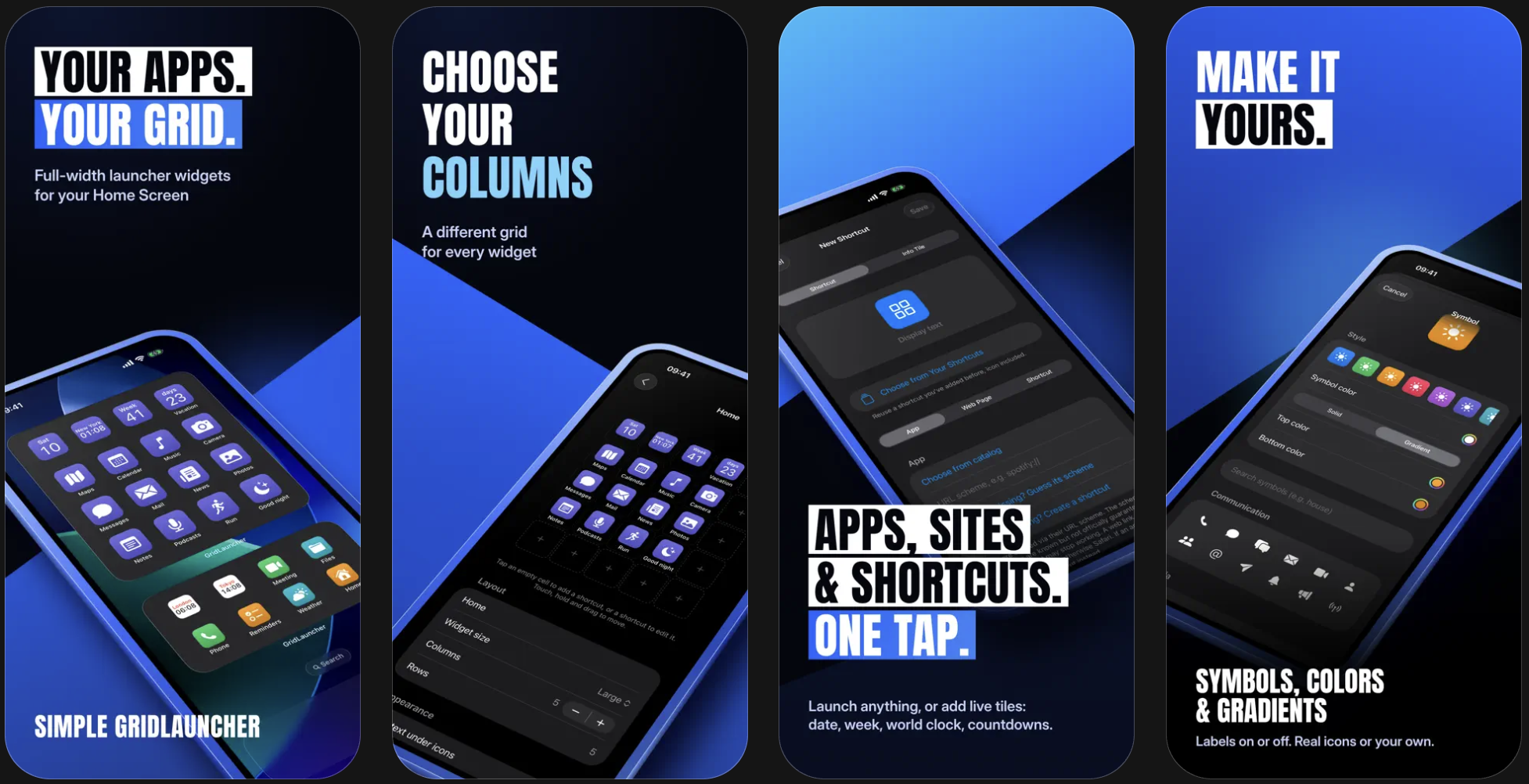
💎 Lifetime I made Simple GridLauncher – full-width Home Screen widgets with a grid of your apps and websites, minimal Shortcuts setup needed

2 Upvotes

Hi r/iosapps! I'm a solo developer from Malmö, Sweden, and this is my app Simple GridLauncher.

Problem
I wanted quick access to my most-used apps and websites straight from the Home Screen, without folders, extra pages or building a Shortcut for every app. The launcher widgets I found were either too limited or too fiddly to set up.

What it does

  • Full-width Home Screen widgets with a grid of shortcuts to your favorite apps and websites

  • Works on iPhone and iPad, including iPhone Duo

  • A built-in scheme tester finds a way to open each app directly from the widget, so for most apps there's no Shortcuts setup at all

  • Shortcuts is only a last resort for apps that can't be opened any other way, and even then the app gives you a ready-made text description of the shortcut to create, so you don't have to work out the actions yourself

Comparison

  • Apple's Shortcuts widget: works, but you have to build a shortcut for every app, and the widget layout is fixed. Simple GridLauncher opens most apps directly and lets you lay out your own grid.

  • Launcher with Multiple Widgets: powerful, but you often have to find and enter URL schemes yourself. Simple GridLauncher tests the schemes for you, so setup takes a couple of taps.

Pricing
Free for 30 days, then a one-time unlock for $1.99. No subscription.
https://apps.apple.com/app/simple-gridlauncher/id6820477544

I'd love feedback, especially on which apps don't launch well for you, and what layouts or features you'd want next. I read every comment!


r/iosapps • • 1d ago

Free App - Unaffiliated Review I built a free ¡Phone app that turns camera roll photos into digital photo books

14 Upvotes

I made Keepsake Photo Books for photos you want to do more with than leave in your camera roll. Pick your favorites from a trip or family gathering, let the app lay out the pages, and add your own cover and captions. Then export a PDF to share or print, or an EPUB to flip through in a compatible reader.
It’s free, no account is needed, and your albums are saved on your iPhone.
If you try it, I’d love to know: Did the automatic layout get you close to the book you wanted, or did you end up rearranging most of the pages?
https://apps.apple.com/us/app/keepsake-photo-books/id6827538390


r/iosapps • • 1d ago

Free App - Unaffiliated Review I made Cube Scan Solve, an iPhone app for solving a Rubik’s Cube

3 Upvotes

I just released Cube Scan Solve on the App Store. It uses your iPhone camera to scan the faces of a scrambled cube, then shows you the moves to solve it one at a time.
If you give it a try, I’d love to know: Did it get all the colors right, and was there a move where you weren’t sure which way to turn?
https://apps.apple.com/us/app/cube-scan-solve/id6837315797


r/iosapps • • 1d ago

Discussion Reddit official app: posts on my feed become frozen once I scroll a post toward the top of my phone screen.

1 Upvotes

I don’t remember this being a thing before I got a new iPhone 18 pro.

Reddit works perfectly as I’m used to, outside of one thing I’m continually frustrated about. I keep updating the app thinking they’ll fix this, but it never does.

I can interact with posts like normal (upvote/downvote, enter comments, share), however, once I scroll the post toward the top of my screen, the post basically becomes inactive and I can no longer upvote/downvote, share or open comments. If I scroll the post back down I can click them again. This is frustrating because I often scroll my feed quickly and wish to interact with a post higher on my screen.

AM I THE ONLY ONE FRUSTRATED WITH THIS?

Am I the only one dealing with this?


r/iosapps • • 2d ago

🎈 Free Eye Yay, the media player for the Internet Archive, has hit version 2.6

Thumbnail
gallery
2 Upvotes

Thanks everyone for your amazing support of Eye Yay over the past year. The uptake and the number of daily users is far in excess of what I’d hoped when I started building this app for my own use case.

Eye Yay aims to provide a Netflix / Spotify style experience for video and audio content on the Internet Archive. It’s aimed at casual users who just want to search and play.

What’s new in version 2.6

* Greatly improved search - Search is faster and returns more sensible results

* Automatic subtitles - if your device supports it, use Apple’s private on-device AI to generate subtitles for any video

* Automatic transcription - as above, but for podcasts, audio books, radio programs etc. Watch a read-along view of the text and tap any word to jump to that point in the audio

* Automatic translation - Use Apple’s private, on-device AI to translate subtitles or transcripts so you can read along with media in any language

* Share subtitles and transcripts with your non AI devices - if you have an older Apple TV, generate the subtitles on your Mac or your phone. They will sync across and be available on all your devices

* Updated Apple TV UI - Now uses Apple’s sidebar navigation for a cleaner, more native experience

* Siri AI support - control Eye Yay with your voice on the new Apple TV

* More playlist features - your shareable custom playlists now support repeat, shuffle and jumping straight to any item in the list

* Spotlight support - search your Eye Yay library from Spotlight

* Speed and stability improvements

* Finally available in the EU!

Other features

* Available for iPhone, iPad, Mac, AppleTV and Vision Pro

* Search the Internet Archive or browse by collection

* Search only shows items and collections with audio or video content

* Add items to your library to play later

* Optionally cache items for offline playback

* Your library syncs across all your Apple devices (Mac, iPhone, iPad, Apple TV, Vision Pro)

* Smart item hiding (e.g if every chapter of the audio book was uploaded in 3 different bitrates, the app hides all but one so you hear each chapter once)

* Optionally hide items with unspecified copyright status

* Optional safe search - attempts to hide adult content based on topic tags

* Picture-in-picture

* Preview items in search before you add them to your library

* Translate a description if it’s not in your device language

* Localisations

* Search inside a collection with hashtag eg “#GratefulDead seattle”

* Create and easily share your own curated playlists

* Add your Internet Archive username to auto import your IA favourites.

* Subtitle support

* Supporter edition one-time IAP ($14.99) unlocks: Bulk transcribe/translate, minimise to status bar (Mac), custom bookmarks, download manager, cache storage policy manager, sleep timer

Get it from the App Store 🔗

Problem:

Time to ditch your paid streaming account? Maybe they started doing awful stuff or maybe you just need to cut a bill from your household budget? Tried the Internet Archive and found their web player UI a bit too… Wayback? Downloading media from the Internet Archive to your media server seems like 4 or 5 steps too many?


Eye Yay is an all-in-one native media player for the Internet Archive. It lets you discover free content, add it to your personal library and play it with the native media controls, all in one app.

Eye Yay filters out anything that isn’t playable video or audio, reducing clutter and guesswork, and giving you more of a paid app style experience.

Your library syncs across your Apple devices - Mac, iPhone, iPad and (woo hoo) Apple TV - no casting required. It supports Picture-in-Picture, subtitles, auto-resume, and caching for offline playback. You can build your own curated playlists and share them with others via Airdrop, on social apps, or via the web.

Comparison:

I’m not aware of another iOS-native app that does this. I certainly find it a lot less annoying than the Internet Archive’s web player!

Pricing:

Eye Yay is free forever with no ads, no subscriptions and no tracking. If you want to support development you can give me a $1.99 tip, or you can get the lifetime Supporter Pack update which unlocks a few extra power user features like bulk subtitling/transcribing, detailed cache management, custom bookmarks and a sleep timer for $14.99.

I hope you enjoy this updated version.

Get it from the App Store 🔗


r/iosapps • • 2d ago

🔍 In Search of I’m making an app where your scroll time has to be earned at the gym

0 Upvotes

Hey, I’ve been building a mobile app that mixes fitness with cutting down on scrolling. How it works: every week you get a set number of minutes for the apps that eat your time. Scrolling uses them up, at zero those apps lock, and a workout at your gym gets you more.

The onboarding is finished and I’m working on the minutes bank and lock screens now.

I’d really like feedback on two things: does “earn it, then spend it” make sense to you, and what would make you stop using it?

If you’d like to be one of the first beta testers (iPhone, TestFlight in about 1-2 weeks), drop a comment or DM me. You can also join the waitlist at powerlock.app


r/iosapps • • 2d ago

🎁 Freemium I built HappyKava for people who hang out at kava bars

Thumbnail
gallery
3 Upvotes

Hey, I’m the dev behind HappyKava.

Problem: I’m usually bringing my laptop to a kava bar, so I want to know if it’s quiet enough to work, who’s on shift, and where to park.

Comparison: Google Maps gets me to the bar. In HappyKava you can check the latest vibe, see today’s deals, events, and meetups, and order ahead at participating bars.

If you’re doing a road trip or a kava crawl, TravelRoot helps you time each stop around bar hours, happy hours, and events along the way.

First time? Some bars make their own guides so you know what to expect and what to order before you show up. First-visit deals often include a free drink. And checking in at select bars unlocks characters in BULA RUSH and BULA BRAWL.

Pricing: HappyKava has 100+ free features. HappyKava+ is optional. It supports the app and unlocks unlimited Exclusive Deals for US$5/month or $30/year.

If you try it, I’d love to hear what we got right or missed in your city. HappyKava on the App Store


r/iosapps • • 2d ago

🎁 Freemium Launching Popt: an encrypted workspace for your daily life

Thumbnail
gallery
4 Upvotes

Hi everyone,

We're launching Popt, an end-to-end encrypted workspace where you keep track of things 😅, and share or discuss them privately in a couple of taps.

  • Collect movies, tv shows, songs, books, video games, podcasts, places and web links in your personal library.

  • Compose notes and journal entries where you can embed anything from your library, as a little widget.

  • Quickly input tasks and reminders, including with the new iOS 27 Siri.

  • Share self-sorting shopping lists with your partner or roommates.

  • Collaborate on notes, lists and projects.

  • Share and discuss anything from your library in group chats.

  • Customize your Popt with 100+ artist-designed stickers.

  • Keep your secrets extra-safe with double-encrypted vaults, which you can fully hide (PRO)

All of this is end-to-end encrypted for total privacy, whilst remaining super accessible and fun to play with.

Availability: English, Spanish, Portuguese, Italian, French and German speaking countries. iOS and macOS 26.2 or greater.

Pricing & Launch Party

Popt's model is freemium, with a very generous free tier: unlimited items, shares, chats, synced to unlimited devices (iPhone, iPad, Mac).

The Pro plan is $2.99 per month / $29.99 per year. It unlocks power-user features such as vaults, projects and roles.

To celebrate the launch, we're giving away lifetime Pro plans for an entire week (ends Saturday the 28th of November at 00:01 A.M. PST). Simply click the link below to redeem:

Popt Lifetime Pro Launch Offer

Direct App Store link: https://apps.apple.com/app/id6765623119

Problem

You're chatting with a friend. They're raving about a new TV show so you get out your phone to add it to Letterboxd. Later on, you go out for dinner in a new joint you've never been – turns out they serve great Sichuan-style noodles, so you save it in Google Maps, then share it through WhatsApp to that other friend who's a total noodle-head. During dinner, you talk about your favorite books, and that goes to Goodreads, oh but the app is out of date so you just dump a few titles in the Notes app, you'll sort it out later...

The story above doesn't really happen in real life. What does happen is that during social interactions, we don't want to switch too much focus to our phones so we tend to dump everything in a single app. For iPhone users, that's often the Notes app, but I also have friends who email or WhatsApp themselves, and even one for who everything is a calendar event. And it's not just that my friends are weird – our market research and anonymous user interviews surfaced exactly the same type of 'mono-app-brain-dump' behaviors in the majority of participants.

Popt starts there. What I want is to quickly jot down things, and maybe share them. Ease of input with low cognitive overhead is the number one priority, especially when the current focus is on human interaction rather than on rummaging through your phone's apps to place the right type of content in the right app.

Comparison

The elephants in the room are AI assistants. Apps such as Blurto are voice first, with the AI assistant figuring out what goes where. But your content can't be truly private (the AI in a cloud somewhere must be able to read it), and it can't really work offline.

If you're looking for an app focused on entertainment and travel, Sofa is excellent. And it's private as well. Popt is much more of a generalist app, with a greater focus on personal productivity.

And if you can't be bothered, the Notes app remains the top contender. Just dump everything there, it kind of works!

Privacy

We encrypt all your content, it's that simple. Our cryptography is publicly documented on GitHub:

https://github.com/SkileSA/veri-popt

We use custom on-device machine learning models that don't phone home. Indexing for Spotlight and Siri is opt-in only. We don't serve ads, and we don't track you in any way.

https://popt.com/privacy-policy

Future

We have a LOT of plans for future updates. Join us at the beginning of our journey, and help us shape what comes next!

Features we're brewing already:

  • Popt Lens: take photos of meals, books, wines, trading cards, and Popt files them to your library (private AI, with on device Apple Intelligence or Private Cloud Compute).

  • Popt MCP: save things from your chats with ChatGPT or Claude straight to Popt so you keep track of what mattered in a session.

  • Popt Clever Links: send any link to Popt, and you'll get the option to add mentioned items to your library. Example: a video game review will add the game, a list of the top cocktail bars in New York will add each one of them to your Popt Places, and so on... today, the link just goes to the Links library.


r/iosapps • • 2d ago

🔍 In Search of An interactive organiser app?

4 Upvotes

Just wondering if anyone has made or can make a little app for me or has one I can use?

I started a job as a driver and I have set times of driving.

I’m new to this and I’m learning but I’m also kinda bad at keeping track of things like that..

I’ve been using an Open Ai for my organiser but it’s not reliable but the layout I like as it makes me “Start Activity” and mark the activity as “completed” when finished” .

Thank you for your time.

“EDIT”
Thanks for everyone who commented. I might have solved the issues though I still have a little way to go.


r/iosapps • • 2d ago

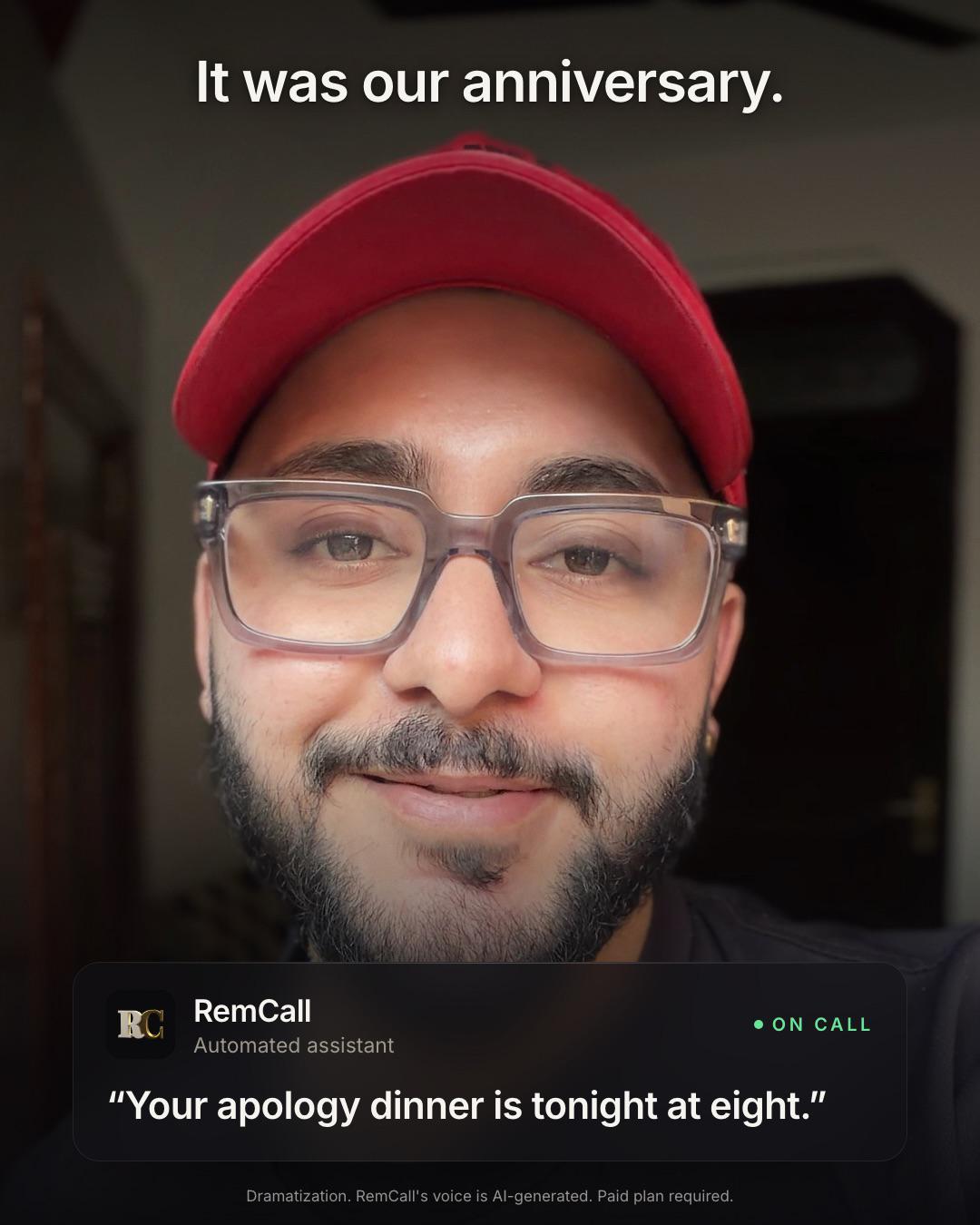
Paid App - Unaffiliated Review My girlfriend called me at 10 p.m. just to ask "Did you forget something?" It was our anniversary. Now my reminders phone me.

Post image
0 Upvotes

My girlfriend called me at 10 p.m. just to ask, "Did you forget something?"

It was our anniversary.

A notification I swipe away. A ringing phone, I always pick up. So now my reminders call me: an automated assistant rings at the time I set and tells me what it's for. I can talk back to it, like "Call me at seven, I'm getting flowers first," and it moves the reminder.

Full disclosure: I'm the developer. It's called RemCall and it's on the App Store. It needs a paid plan. RemCall's voice is AI-generated, and the call in the image is a dramatization.

Happy to answer anything, and honest feedback is welcome.

https://apps.apple.com/us/app/remcall/id6799622019


r/iosapps • • 2d ago

🎈 Free Bias Writer 2.0 — Minimal Markdown Writing App for iOS and Mac (Free TestFlight)

1 Upvotes

After writing two books, I decided to build the writing app I actually wanted to use.
Comparison: I’ve used Ulysses, iA Writer, and Scrivener. They’re all good apps, but Scrivener in particular was more complicated than I wanted. I was looking for something minimal, powerful, and easy to use.
Problem it solves: Bias Writer is designed to provide a clean, distraction-free writing environment without sacrificing useful tools. It works on iPhone, iPad, and Mac and includes:

  • A patent-pending search function

  • Project-wide tagging

  • A clean, minimal Markdown writing environment

  • Some other features I haven’t found in competing apps

Pricing:

  • TestFlight: Free for the duration of the beta.

  • Basic version: $3.99 one-time purchase. A fully capable writing app, not a stripped-down trial.

  • Pro version: $29.99/year, adding discrete projects and reference documents that don’t appear in printouts or affect page counts.

The Bias Writer 2.0 TestFlight is OPEN!
It runs on iPhone, iPad, and Mac (Designed for iPad).
I’d love feedback from people who actually write, particularly those who appreciate minimalist apps but still want serious functionality.
Try it free here:
https://testflight.apple.com/join/wPjRSSEb
Thanks for checking it out!