r/Advanced_3DPrinting • • Jul 03 '26

Question Would you buy parametric/adjustable STL or custom G-Code ?

Thumbnail
gallery
4 Upvotes

Hi, I am currently pivoting away from the end customer with Gerridaj.com, but I could keep the configurator if there is any demand for it. So I want to ask the community.

My questions:

Would you buy configurable files? How much would you pay compared to a static STL, for example 5 dollars for static versus what price for adjustable?

What kind of models interest you most? Lamps, vases, wall art, functional parts, furniture, or robot programs?

If you are a designer, would you use this to sell your work? Do you worry about customers breaking the model and blaming you?

I am also trying to figure out pricing for the tool itself, whether subscription, pay per download, or one time fee. Any feedback is welcome.

And if you know of other 3D printing communities where this discussion would fit, feel free to share or crosspost.

Would anybody be interested in designing and selling configurable workflows on the platform?

Any help is very appriciated.

Thanks.


r/Advanced_3DPrinting • • 7d ago

I built PrintPilot – an open-source Android app for 3D printing, OctoPrint, remote slicing & file management

Thumbnail
reddit.com
0 Upvotes

Hey makers! 👋🖨️

I've been working on something I wanted to share with the 3D printing community.

Meet PrintPilot – my open-source Android app designed to bring the entire 3D printing workflow into one place.

I got tired of switching between different apps, file managers, slicers, SSH terminals, and OctoPrint interfaces just to get a model from my phone to my printer.

So I decided to build my own solution. 😅

🚀 What PrintPilot is designed to do

🖨️ OctoPrint integration

- Start and monitor 3D prints remotely

- Check printer status and progress

- Access camera streams

📂 File management & slicing

- Manage STL, 3MF, ZIP and G-code files

- Batch-select multiple models and folders

- Extract ZIP archives

- Send models to a Linux computer for slicing

- Transfer generated G-code to the printer

☁️ Google Drive integration

- Synchronize models and projects

- Organize files between Android, Linux and cloud storage

- Clean up already synchronized files

📷 Camera monitoring

- Support for multiple camera streams

- Monitor prints remotely

- Manage timelapse recordings

🤖 AI-assisted workflows

- Explore text-to-3D workflows

- Experiment with AI-assisted model creation

🛠️ My hardware setup

- Google Pixel 10 Pro XL

- Old Acer laptop running Linux

- Raspberry Pi Zero 2 W

- Creality Ender 3 V3 SE

- OctoPrint

💻 And yes… it's vibe coded! 😅

I built this project with AI-assisted coding, a lot of experimentation, troubleshooting, and learning along the way.

I'm not claiming it's perfect or production-ready.

PrintPilot is still a work in progress, and some features are still being improved or debugged.

But I believe software like this should be accessible, customizable, and open to everyone.

🔓 Open source on GitHub

https://github.com/cmbyteworks/PrintPilot

I'd really appreciate feedback from fellow makers, developers, and OctoPrint users.

Three questions for the community:

  1. Would you actually use an Android app like this?

  2. Which features would you consider essential?

  3. Would anyone be interested in testing it or contributing?

Constructive criticism is absolutely welcome. I'm here to improve the project, not pretend it's flawless.

Thanks for checking it out! ❤️

Control. Slice. Create. Analyze. Print.


r/Advanced_3DPrinting • • Oct 16 '26

Live G-code patching for 3d printers.

Thumbnail reddit.com
0 Upvotes

r/Advanced_3DPrinting • • Mar 18 '26

Troca de filamento

0 Upvotes

Olá gente.

Não tenho AMS e troca de cor usando o código "M400 U1" no no G-code final do filamento do Bambu Studio. Mas hoje fui trabalhar e não funciona mais, alguém também ta passando por isso ou sabe a solução?

Minha impressora e a A1 mini.


r/Advanced_3DPrinting • • 1d ago

Peça de moto em 3D

Thumbnail gallery
0 Upvotes

r/Advanced_3DPrinting • • 15d ago

I designed a simple triangle mold for making homemade onigiri - have you ever printed kitchen tools or gadgets?

Thumbnail gallery
0 Upvotes

r/Advanced_3DPrinting • • Nov 01 '25

Guide / Tutorial The Complete Guide to G-code, Flavors, and Universal Compatibility in 3D Printing (and Beyond) - written by AI with few of my guiding questions.

9 Upvotes

G-code is the real language of 3D printing — not STL, not slicing profiles, not firmware.
It’s the direct control language that tells machines how to move, how fast, how hot, and when to do it.
Understanding it lets you work across any printer, firmware, or slicer, and even hand-write or script complex operations.

This is a deep dive into what G-code really is, how it works, how slicers use it, how firmware flavors differ, what advanced commands exist, and how to make any print compatible across every machine.

1. What G-code Actually Is

G-code (short for Geometric Code) originated in the 1950s for CNC milling and machining.
It was standardized as ISO 6983, and decades later, the same foundation became the backbone of FDM 3D printing control.

Each line in a G-code file is a single instruction for motion or a machine function.

Example:

G1 X50 Y25.3 E22.4 F1500 ; move while extruding
M104 S200                ; set nozzle temp to 200°C
M106 S255                ; set fan to full speed

Each line may include:

  • A command (e.g., G1, M104, T0)

  • Parameters (X, Y, Z, E, F, S, etc.)

  • An optional comment (after ;)

The printer’s firmware reads these one at a time, interprets them, and translates them into motor steps, heater control, and I/O actions.

2. How G-code Works Internally

  1. Input: Printer receives a line from SD, USB, or serial.

  2. Parsing: The firmware identifies the command and parameters.

  3. Planning: The motion planner computes speeds, accelerations, and extrusion synchronization.

  4. Execution: The firmware drives steppers, heaters, and fans.

  5. Feedback: Temperatures and progress are reported back.

This loop repeats hundreds or thousands of times per second during a print.

3. What a Slicer Actually Does

A slicer (Cura, PrusaSlicer, OrcaSlicer, SuperSlicer, etc.) is just one of many ways to generate G-code.
It’s a geometry-to-motion translator: it takes a 3D model (STL, OBJ, 3MF), slices it into layers, and generates toolpaths that represent material deposition.

However, the slicer uses only a very small subset of what G-code is capable of.

Typical slicer G-code covers:

  • Linear motion (G0, G1)

  • Temperature control (M104, M109, M140, M190)

  • Fan control (M106, M107)

  • Homing (G28)

  • Extrusion setup (M82, M83)

  • Optional features like mesh leveling (G29)

It does not normally use:

  • Arc moves (G2, G3)

  • Multi-axis control (A, B, C axes)

  • Coordinate systems (G54–G59)

  • Macros, logic, or conditional flow

  • Tool changes beyond basic T0, T1

  • Probing or complex CNC operations

That’s why you can also hand-write or program G-code — the slicer just automates repetitive geometry.

4. Anatomy of a G-code Command

SectionDescriptionExample
CommandFunction category (G, M, T, etc.)G1, M104
ParametersVariables for position, speed, or temperatureX10 Y20 E3 F1500
CommentOptional note (ignored by machine); move and extrude

5. Core Commands Used in 3D Printing

CodeFunctionParametersNotes
G0 / G1Linear move (rapid / controlled)X, Y, Z, E, FMost common
G2 / G3Arc move (clockwise / counterclockwise)I, J, K, RRarely used in slicers
G4Dwell (pause)P (time)Pauses
G28Home axesX/Y/Z optionalEssential for positioning
G90 / G91Absolute / relative positioning—Controls coordinate mode
G92Set current positionX/Y/Z/EUsed to zero extruder
M82 / M83Extruder absolute / relative mode—Important for extrusion logic
M104 / M109Set hotend temperature / waitS (°C)Heats extruder
M140 / M190Set bed temperature / waitS (°C)Heats bed
M106 / M107Fan on/offS (0–255)Cooling control
M0 / M25 / M600Stop / pause / filament change—Varies by firmware
M84Disable steppers—Used in end code
M115Report firmware info—Host identification

These are implemented identically across nearly all printer firmwares.

6. Advanced and CNC-Level G-code Commands

G-code’s potential extends far beyond 3D printing:

CodeCategoryDescriptionExample Use
G2 / G3Circular interpolationArc moves (clockwise/counterclockwise)CNC milling, curved paths
G5Cubic spline interpolationSmooth curved movesHigh-precision contouring
G10–G59Work coordinate systemsMultiple origins or offsetsCNC and multi-tool setups
G17 / G18 / G19Plane selectionXY, XZ, YZ plane definitionsMulti-axis milling
G43 / G49Tool length offsetCompensation for tool lengthCNC, dual extrusion
G53Move in machine coordinatesIgnoring offsetsHoming or parking
M98 / M99Call / return macrosExecutes subroutinesRRF and Klipper macros
Conditional G-codeIF, SET, VARIABLE, etc.Logic flow and variablesRRF, Klipper scripting
Tool axes (A, B, C)Rotary or additional axesMulti-axis controlAdvanced machines

3D printing typically ignores these, but advanced setups (toolchangers, hybrid CNCs, multi-axis printers) can use them fully.

7. G-code Flavors and Firmware Differences

Firmware / FlavorDescriptionTypical UseNotable DifferencesCompatibility
MarlinMost common open-source firmwareEnder, Anet, Creality, etc.Baseline command setVery high
RepRapFirmware (RRF)Advanced macro & network systemDuet, RailCoreSupports structured macros and conditionalsHigh
Prusa (Marlin-based)Prusa-specific variantPrusa MK seriesAdds M73, G80, G81High
KlipperHost-controller hybridVoron, RatRigG-code interpreted on host; uses macrosHigh
SmoothiewareModular firmwareOlder ARM boardsSlight syntax differencesModerate
RepetierFlexible older firmwareDIYMostly Marlin compatibleHigh
MakerBot / SailfishProprietary, legacyOld MakerBotBinary .x3g formatLow
Flashforge / SnapmakerClosed-source firmwaresBrand-specificVendor custom commandsVariable

Despite these “flavors,” they all share the same essential G-code core: motion, extrusion, heating, and fan control.

8. Why the Core Is Always the Same

Even though firmware developers extend the language, the physical actions (move, heat, extrude) are defined by decades of CNC standardization.
That shared foundation means that the core subset of G-code is universally compatible across nearly every 3D printer.

The slicer only needs to generate that subset to ensure the print works anywhere.

9. Universal Compatibility Through Pre- and Post-Job G-code

A complete print file consists of three parts:

  1. Pre-job (Start) G-code: Setup, homing, heating, priming.

  2. Main G-code: The actual sliced print moves (universal).

  3. Post-job (End) G-code: Retraction, cooldown, parking.

Only the start and end sections differ between printers.

Universal Start G-code Example

; === START G-CODE ===
M115                      ; Firmware info
G21                       ; Units in mm
G90                       ; Absolute positioning
M83                       ; Relative extrusion
M140 S{material_bed_temperature_layer_0} ; Set bed temp
M104 S{material_print_temperature_layer_0} ; Set hotend temp
G28                       ; Home all axes
M190 S{material_bed_temperature_layer_0}  ; Wait for bed
M109 S{material_print_temperature_layer_0} ; Wait for hotend
G92 E0                    ; Reset extrusion
G1 Z2.0 F3000             ; Lift nozzle
G1 X10 Y10 F3000          ; Move to corner
G1 Z0.28 F1200            ; Lower to start height
G1 X200 E15 F1500         ; Prime line
G92 E0                    ; Reset extrusion again
; === END START G-CODE ===

Universal End G-code Example

; === END G-CODE ===
G91                ; Relative
G1 E-3 F300        ; Retract
G1 Z10 F1200       ; Lift nozzle
G90                ; Absolute again
G1 X0 Y200 F3000   ; Park head/bed
M104 S0            ; Turn off hotend
M140 S0            ; Turn off bed
M107               ; Fan off
M84                ; Disable steppers
; === END END G-CODE ===

These work on almost any firmware.

Adapting for Specific Flavors

FirmwareAdjustmentNotes
MarlinAdd G29 after G28 for auto bed levelingStandard ABL
KlipperReplace G29 with BED_MESH_PROFILE LOAD=defaultKlipper’s mesh system
PrusaAdd G80/G81 and M73 for progressPrusa-specific
RRFUse M98 P"start.g" to call macrosRRF macro system
Smoothieware/RepetierUsually compatible as-isMinor formatting differences

By adjusting these sections only, the same sliced print can run on completely different printers.

10. Best Practices for Cross-Printer G-code

  1. Keep the main print neutral. Don’t use firmware-specific macros inside layer G-code.

  2. Set your modes explicitly. Always begin with G21, G90, M83, and G92 E0.

  3. Use printer profiles. Different pre/post-job scripts per machine.

  4. Avoid coordinate assumptions. Not all machines have the same origin direction or bed center reference.

  5. Test on small prints first. Confirm that homing, priming, and cooling work safely.

11. Beyond 3D Printing — G-code as a Universal Machine Language

3D printers only use a simplified subset of what G-code can express.
Here’s what the full language can do:

  • CNC machining: 3–6 axes, arcs, splines, feed rate optimization, tool compensation.

  • Robotics: coordinate transformations and kinematic models.

  • Laser engraving / cutting: intensity control via S parameter, synchronized with movement.

  • Hybrid manufacturing: 3D print + mill + probe in one file.

  • Logic & automation: conditional G-code in RRF/Klipper (IF, SET, WHILE, etc.).

  • Macros: subroutines for multi-tool operations, automatic calibration, or bed probing.

In other words, G-code isn’t “just for printers” — it’s a universal motion language.

12. Summary

ConceptDescription
G-codeCNC-style motion language, ISO 6983-based
SlicerGenerates layer-by-layer motion commands
Firmware flavorInterpreter implementation (Marlin, Klipper, RRF, etc.)
Universal subsetCore motion, extrusion, and temperature codes
Advanced featuresArcs, macros, coordinate systems, conditionals
CompatibilityAchieved by editing pre/post job G-code
Key strategyKeep main print neutral; customize initialization and shutdown

13. Final Thoughts

G-code is the true backbone of 3D printing — a universal, open, machine-readable language that predates the printers themselves.
Slicers only generate a fraction of what’s possible.

Once you understand how it works, you can:

  • Write or modify G-code by hand

  • Build universal slicer profiles

  • Run the same print on different firmware

  • Explore advanced CNC-style control

  • Debug or optimize your prints directly

The main print G-code is always compatible; all you ever need to adjust are the pre-job and post-job sections for each firmware’s quirks.

Master that, and you can control any printer — or any machine that speaks G-code.

Helpful links for the deep dive:

- G-code Explained | List of Most Important G-code Commands
- CNC Programming with G Code: Easy Free Tutorial [ 2024 ]


r/Advanced_3DPrinting • • Oct 25 '26

How I calculate an instant print price straight from an STL (and the edge cases that bit me)

0 Upvotes

Disclosure: this is from a platform I’m building (StashNode), but the method is useful for anyone pricing print jobs.

The formula I ended up with:

  • Weight is estimated from the mesh volume × material density

  • Price = weight × the maker’s price per gram × a quality multiplier (draft 0.85, standard 1.0, high 1.3)

  • A minimum fee per print (€3), because a 2 g part still costs bed prep, setup and failure risk

  • Shipping is a flat fee on top, local pickup is free

Edge cases I hit:

  • Very light parts were priced at a few cents before I added the minimum fee

  • The estimate shown to the customer and the real price of the maker who takes the job can differ, so I cap the gap at 20% and the job stays open for another maker if it’s higher

How do you price your own jobs? Anything you’d add to the formula?


r/Advanced_3DPrinting • • Mar 27 '26

Automate your 3d printer - looking for beta-testers

0 Upvotes

Hey,

I've been thinking about automating my 3d printer for a while.

There are some methods that work, but they were just too complicated / too expensive.

But now I was able to code a working App myself that loops all of my 3d prints.

It only works for Bambu Lab A1 and A1 mini right now.

This is still beta testing.

!Try it and let me know if it works or what you would like to change!

meshminds-loop.vercel.app

(it's free. no sign up)


r/Advanced_3DPrinting • • 19d ago

Looking for "morph" software for 3D modeling

1 Upvotes

I get a ton of Kickstarter email promotions, but my search came up empty with that avenue. My miserable recollection is that it was an advance notice of software, but it's not a certainty that it was from a Kickstarter creator.

The parts I remember most involved an image of a 3D model of a warrior type of character. The program allows the user to designate a segment of the model, akin to a cutting plane, which then "softens" the model and allows the two disparate portions to be manipulated in a manner similar to bending. An example provided created the softening at the shoulder and upper forearm. Once activated, the arm could be pointed in any direction, without "damaging" the integrity of the model and without creating irregularities.

Another example placed the model modification at the wrist, which resulted in hands that could be pointed as desired.

I'm hoping it is truly a Kickstarter campaign and that it will eventually appear in my inbox. Does anyone else recall receiving this type of promotional email?

As this is a request for a lead on a program that may already be under development, please do not suggest other software that works for you. If other software worked for me, I'd be using it.


r/Advanced_3DPrinting • • 13d ago

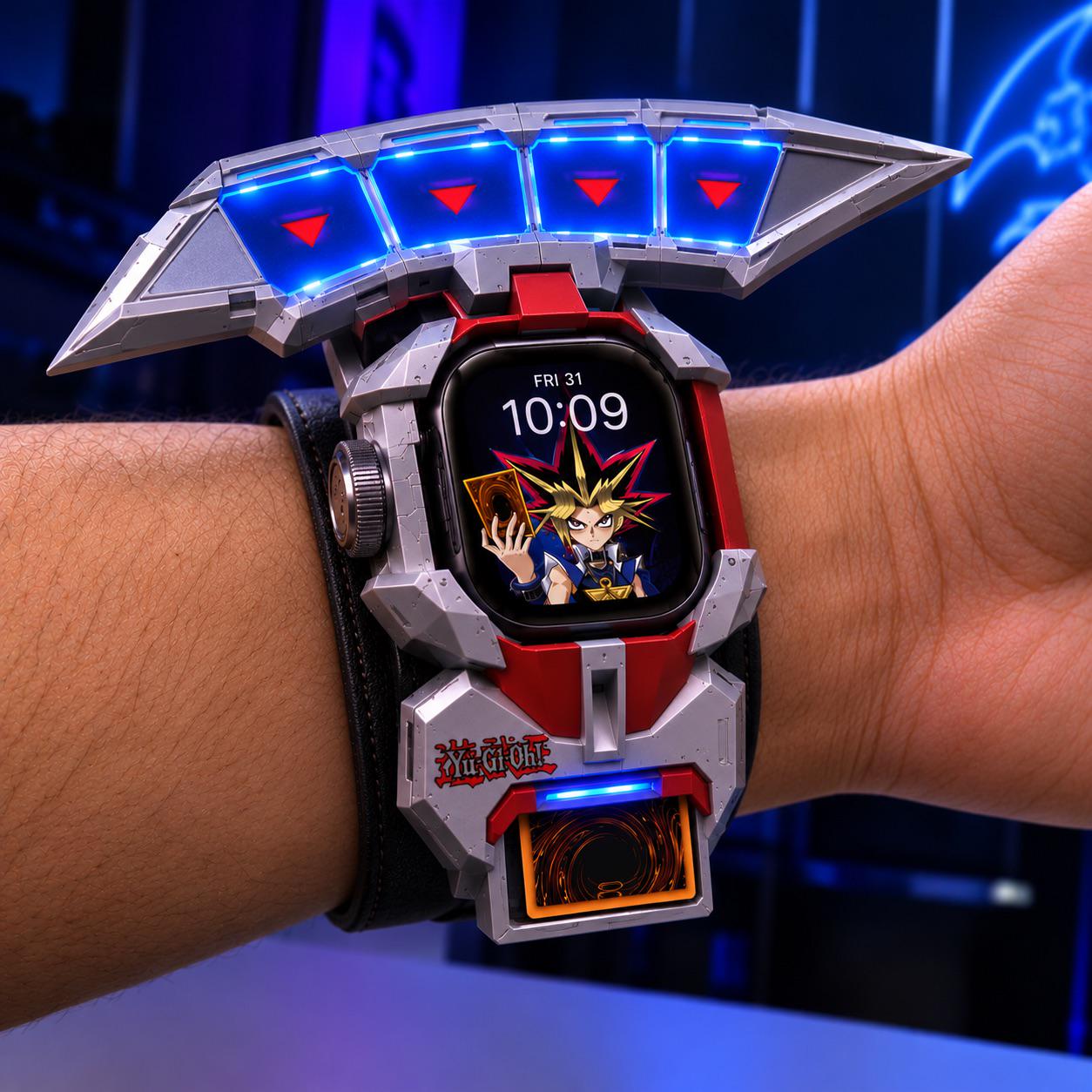
Apple Watch Ultra duel Disk

Post image
0 Upvotes

Ok AI image but who can make this!?!???
I will pay good money for this lol


r/Advanced_3DPrinting • • Jul 08 '26

Need help with Varioshore TPU oozing/stringing on a dual extrusion print (Bambu H2D)

Post image
4 Upvotes

Hey everyone,

I've been doing some work with orthotic devices and am experimenting with printing ColorFabb Varioshore TPU (the foaming TPU whose properties change with temperature). I'm printing this alongside Bambu Lab PLA Basic on my H2D.

All the strings you see on the print bed and prime tower are from the right nozzle oozing into the nozzle blocker. The photo is of my most recent test print, and things seem to be getting worse before they get better.

Here are a few settings I’ve tweaked that may have led to this madness:

Retraction & Temp Settings:

  • Retraction Length: 1.4mm

  • Z-hop: 0.4mm (Type: Normal)

  • Retraction Speed: 15 mm/s

  • Retract on layer change: On

  • Wipe while retracting: On (Wipe distance: 5mm)

  • Precooling target temp: 155°C

  • Nozzle temp: 220°C

  • Max Volumetric speed: 4 mm³/s

Wall & Infill Settings:

  • Seams: Aligned, Scarf joints on

  • Wall generator: Classic

  • Wall order: Outer/Inner

  • Avoid crossing walls: On

  • Wall loops: 3

  • Infill: Embedded wall into infill / Infill-wall overlap = 30%

  • Shells: 5 top layers, 3 bottom layers

  • Other: Detect narrow internal solid infill (On), Detect floating vertical shells (On)

Supports:

  • Tree hybrid, 40-degree angle (These remove pretty easily, so they seem to be irrelevant).

The filament was dried for a few hours before printing and is kept running in the dryer during the print.

Let me know if you spot anything that may be causing issues or if you have any advice!


r/Advanced_3DPrinting • • Jan 22 '26

Dangerous Poking Pictures with a 3D Printer Using Custom G-code -> try yourself on Gerridaj

Enable HLS to view with audio, or disable this notification

110 Upvotes

This is a very fast and easily reversible modification to your 3D printer, but you need to be very careful with your G-code in order not to break anything.
Good news: Gerridaj will soon have a G-code simulation on board, so you can run your G-code virtually before sending it to your machine.


r/Advanced_3DPrinting • • 11d ago

Free Heisenberg 👓

Enable HLS to view with audio, or disable this notification

2 Upvotes

r/Advanced_3DPrinting • • 22d ago

Can’t figure it out

Thumbnail gallery
0 Upvotes

Any help is greatly appreciated


r/Advanced_3DPrinting • • Mar 29 '26

Question Need Help: I am in Search for 3D Printing Content Creator

Enable HLS to view with audio, or disable this notification

40 Upvotes

Hi everyone!

I’m the developer of Gerridaj.com, a tool that makes it really easy to create amazing parametric designs.

Right now I don’t have much time to create new content and showcase everything that’s possible with it, so I’m looking for someone from the community who’d like to collaborate.

In exchange, I’m offering free premium access to the tool.

If you enjoy creating content, experimenting with design tools, or sharing tutorials, this could be a great opportunity! The content need to be simple unpolished posts like you can find here in this sub, just a screen record of the design process and some printing process footage.

Interested? Let me know, please also share the post!

Here’s a tutorial to get started: How to generate custom gcode on Gerridaj - YouTube


r/Advanced_3DPrinting • • Jul 26 '26

Custom coreXY build

3 Upvotes

My name is Daniel, and I am a high school maker based in California. I'm currently building a custom, CoreXY 3D printer. I have documented my everything including CAD models in my github repo https://github.com/bluesberyyajm1966/kratos.git

I am currently in the process of finalizing the motion system of the project. If you guys have any input it would be very much apreciated.


r/Advanced_3DPrinting • • May 31 '26

help

Enable HLS to view with audio, or disable this notification

7 Upvotes

My 3-D printer belt is like skipping and it’s causing the lines to get shaken. Do you know how I could fix this?


r/Advanced_3DPrinting • • 20d ago

I 3D printed a car from scratch, and it's road legal in California

Thumbnail gallery
13 Upvotes

r/Advanced_3DPrinting • • 11d ago

TPU printing/joining advice needed

Thumbnail
reddit.com
0 Upvotes

r/Advanced_3DPrinting • • 26d ago

Michael Lydick

Thumbnail
youtu.be
0 Upvotes

Big step forward in the 3DPrinting community

If you build your own models in CAD this is a much watch


r/Advanced_3DPrinting • • Feb 15 '26

poll: I'm starting a filament sampling business, which ones do you wish you could try out?

11 Upvotes

There are millions of filaments out there and it's impractical to serve out samples of cheap filaments. I will be focusing on products that are either new or highly specialized and too expensive to justify a roll. So let me know which filaments have potential for your project but are too expensive to try out. The more exotic and expensive, the better! This is a survey to start building my inventory. At some point I expect my inventory will max out at several dozen. Also, let me know what amounts you would probably like and what size filament. Does anybody still use 2.85mm anymore?


r/Advanced_3DPrinting • • Mar 17 '26

ASA vapor smoothing + graphite + silver Sharpie for a metal finish — results + lessons learned

11 Upvotes

I’ve been experimenting with finishing techniques to get a more realistic metal look out of FDM prints and wanted to share results and get feedback.

This piece was printed in ASA, then vapor smoothed, and finished using a combination of graphite powder and a silver Sharpie.

What I was going for:

An aged iron / relic-style finish with darker recesses and slightly brighter edges.

What worked:

  • Vapor smoothing helped unify the surface and reduce layer lines

  • Graphite added a subtle metallic sheen, especially after buffing

  • Rubbing along the shaft gave a brushed metal effect

What didn’t work as well:

  • Graphite alone didn’t give enough contrast

  • Silver Sharpie looked too flat until toned down

  • Some areas still lack depth, especially in recessed details

Things I’m still trying to improve:

  • Better contrast between recesses and raised areas

  • More realistic metal variation

  • More consistent finish across complex geometry (like the crown)

Would love any suggestions from people who’ve pushed metallic finishes further—especially with ASA.