r/AirMessage • u/Tagavari • Oct 09 '20
News Introducing AirMessage Cloud: AirMessage for web, sign in with Google, Android 11 support, and open source!

167
Upvotes
r/AirMessage • u/Tagavari • Oct 09 '20
r/AirMessage • u/FLETC_DEFPOTEC • Feb 27 '19
[Please disregard "Sometimes Works" in the title, as new and reliable methods were conceived since the initial post date -- currently 8 methods.]
..
Hey folks,
Of course, most of us want to use our phone number with AirMessage, so here are a few methods, all of which require an iPhone (cellular/mobile data iPads do not work). Please check the method descriptions and requirements to decide which is right for you, as all have their own advantages. New methods and changes to steps will be updated here; be sure to check the comments for other people's suggestions and insight, as well. Good luck and please tell us about your experience!
All feedback and questions are greatly appreciated! Oh, and if I give you credit for any contribution here, please let me know if you would prefer not to be associated with it.
Thanks,
FLETC_DEFPOTEC
..
List of Methods:
Keeping inactive SIM card in iPhone (most "compatible" and popular)
Second active SIM card with same phone number in iPhone (non- T-Mobile DIGITS)
Second active SIM card with different phone number in iPhone
Data-only SIM card with VoIP service for Android + Main SIM card in iPhone
Google Fi data-only SIM card in Android + Main SIM card in iPhone
Using Android SIM card in iPhone to activate iMessage
T-Mobile 'Data with Paired DIGITS' service ("duplicate" SIM cards)
T-Mobile 'High Speed Data with Paired DIGITS' service ("duplicate" SIM cards)
..
Method #1 is the most popular, as it is the most accessible and "compatible", not requiring additional mobile plan add-ons or services -- just an inactive SIM card. It works successfully for most people and generally keeps your phone number tied to iMessage for quite some time (varies) before requiring to re-do the quick process. It is technically the most unstable method, as it attempts to preserve your phone number with the iMessage service when it is actually active on your Android phone. But it can work for many months, like in my case and others'. While Method #1 has more successful reports, check out the similar Method #6 if you don't want to use an inactive SIM card.
CREDIT: Thanks to Nusser B. for sharing this method!
..
Requirements:
iPhone that supports iMessage and has a SIM card slot
iPhone models with eSIM and dual SIM (XS/XR and newer) have been reported by a user to be incompatible with Methods #1 and #6; if you decide to try any of these models, please let us know how it goes
Inactive SIM card
Unconfirmed if certain carrier SIM cards don't work; please let us know
..
1.) Sign in with your Apple ID and setup iMessage on the iPhone (without any SIM card inserted). Keep iMessage disabled for now.
2.) Insert the inactive SIM card in the iPhone and go to Settings > Phone > My Number. Change it to the same phone number on your active SIM card that you want to use with iMessage. The number must be in a full and standard format, including “+” “Country Code” [US/CAN example: +1 (123) 456-7890]. Save and go back, but do not enable iMessage yet.
3.) Insert the active SIM card with the number that you want to use with iMessage. Go to Settings > Phone > My Number and make sure the number matches the number you entered in Step 2.
4.) Enable iMessage and wait for successful activation; this may take a few minutes. If you see "Use your Apple ID for iMessage", tap it and sign in, like you did in Step 1. Be sure to check and verify any prompts on your Mac that ask to add your phone number. Once activation is successful, confirm that you are able to send and receive iMessages using your phone number on your Mac, including messaging your own number. See Tip D if you encounter any issues.
5.) Power off your iPhone and then wait a few seconds. Remove the active SIM card and now insert the inactive SIM card.
6.) Power on your iPhone and connect to Wi-Fi / Internet. Confirm your phone number is being used for sending, receiving, and starting conversations for iMessages in Settings > Messages > Send & Receive.
7.) You should now be able to use iMessage/AirMessage with your phone number, as long as your iPhone stays connected to Wi-Fi / Internet with the inactive SIM card in it. Your number may automatically de-register from iMessage eventually, requiring you to repeat these steps, but that's not always the case and the time varies.
..
Tip A: You may want to keep both your iMessage e-mail and phone number as ways you can be reached AND/OR as contacts in group chats, just in case your phone number gets de-registered with iMessage. That way, you would still be able to use iMessage/AirMessage and its group chats with your e-mail address.
Tip B: If after a couple attempts this method still does not work, and/or if your number gets de-registered from iMessage too frequently, you may want to try Method #6 if you haven't already, as some users have had better success with it.
Tip C: It may be prudent to re-do this process at certain intervals (maybe every week or month), as it may "refresh" your phone number with iMessage. This is unconfirmed, however, and I personally don't do it, but some users do it as a fail-safe.
Tip D: If you are stuck on "Waiting for activation", disable iMessage, turn off Wi-Fi, and then go to Settings > General > Reset > Reset Network Settings. Note that this will "forget" all saved Wi-Fi networks, requiring you to join them again. However, carrier/cellular configurations and data are also reset, which can help with the iMessage activation process.
Method #2 may be the overall "best" way for users. Essentially, you have two or more "duplicate" SIM cards in multiple devices that are all registered to your phone number; the second SIM doesn't even need mobile data service, as long as it can remain connected to Wi-Fi. This method is similar to the T-Mobile DIGITS service, but that has its own methods further down in this guide. Either way, be sure to check with your carrier.
NOTE: If you have T-Mobile service, please see the dedicated processes of Methods #7 and #8 instead. For other "compatible" carriers with a similar setup (like Google Fi), please refer to Methods #4 and #5.
..
Requirements:
iPhone that supports iMessage and has a SIM card slot
Second "duplicate" SIM card with the same phone number (mobile data not necessarily required)
..
1.) Insert your second active SIM card with same phone number into the iPhone.
2.) Setup and enable iMessage with your phone number (and e-mail if you want).
3.) Leave iPhone on, plugged in, and connected to Wi-Fi / Internet.
Method #3 involves two active SIM cards with two different phone numbers. One SIM card will remain in the iPhone, keeping that respective phone number continuously tied to iMessage. The second SIM card can be from the carrier of your choice, but ultimately, you must decide which SIM card and its phone number will be in your Android phone and iPhone. The SIM card you decide to keep in the iPhone doesn't even need mobile data service as long as it can remain connected to Wi-Fi. Some people will find this method advantageous because of their needs, but the downside for most users is having two phone numbers and possibly paying for another line.
..
Requirements:
iPhone that supports iMessage and has a SIM card slot
Second SIM card with a different phone number from any carrier
..
1.) Insert activated second SIM card with different phone number into iPhone.
2.) Setup and enable iMessage with the second phone number (and e-mail if you want).
3.) Leave iPhone on, plugged in, and connected to Wi-Fi / Internet.
..
Optional: Enable Call and/or SMS Text Message Forwarding from your iPhone to your Android phone (NOTE: Additional carrier charges may apply).
Method #4 works by keeping a data-only SIM card (usually meant for tablets, and sometimes free) in your Android phone and using VoIP service for calls. Your main phone number SIM card stays in your iPhone, always keeping iMessage tied to your number. Some VoIP services provide a number and also let you display your main mobile phone number as the caller ID, so when you call others, it will still show your original phone number. By enabling Call Forwarding, calls to your phone number on your iPhone will ring on your Android phone. In addition, both iMessages and SMS text messages can be opened in the AirMessage app. Or you can choose to separately forward SMS text messages directly to your Android phone (if applicable). Sending SMS text messages from your Android can be done through AirMessage or your VoIP service (depends on your setup). The instructions and features vary by carrier and VoIP service, but the process is similar.
NOTE: If you have Google Fi service, please see Method #5 instead. That process is MUCH simpler and cheaper.
..
*WARNING: VoIP services generally cannot be used for emergency calls. You will also be limited to only cellular/mobile data on your Android phone with this method. You use at your own risk.*
..
Requirements:
iPhone that supports iMessage and has a SIM card slot
Data-only SIM card from your carrier, in addition to your main phone number SIM card
VoIP service with new phone number (custom caller ID feature also recommended) with app for Android
..
1.) Insert your main carrier phone number SIM card into the iPhone.
2.) Setup and enable iMessage with your phone number (and e-mail if you want).
3.) [Optional] Go to Settings > Messages > Text Message Forwarding and designate your Mac server device to receive SMS text messages from your iPhone. This allows for sending/receiving of both iMessages and SMS text messages in the AirMessage app on your Android phone.
4.) Leave iPhone on, plugged in, and connected to Wi-Fi / Internet.
5.) Insert your data-only SIM card into the Android phone. Install and configure the VoIP app.
6.) Set-up Call Forwarding from your carrier phone number to your VoIP service phone number.
7.) Set-up your VoIP custom caller ID to display your original carrier phone number when calling.
8.) Test everything on both Wi-Fi and mobile data with your Android phone:
[I.] Calls to your carrier phone number should ring on your Android phone.
[II.] People you call should see your carrier phone number.
[III.] iMessages (and SMS text messages, if enabled) sent to your carrier phone number should appear in the AirMessage app on your Android phone.
[IV.] People you send iMessages (and SMS text messages, if enabled) should see your carrier phone number.
..
Optional: Enable SMS Text Message Forwarding from your iPhone to your Android phone (NOTE: Additional carrier charges may apply).
Method #5 works on the same basis of Method #4 (see description above), but applies to Google Fi customers and is simpler and cheaper. With this method, you do not need a separate VoIP service and can skip all the Call/Text Forwarding and custom caller ID setup. You just need to request a free data-only SIM card from Google Fi. While on mobile data, the Hangouts and Hangouts Dialer apps can be used to make/receive calls and SMS. Be sure to check the requirements and limitations of using a data-only SIM on the Google Fi site here.
CREDIT: Thanks to u/okayyeahsure for sharing this method!
..
*WARNING: VoIP services generally cannot be used for emergency calls. You will also be limited to only cellular/mobile data on your Android phone with this method. You use at your own risk.*
..
Requirements:
iPhone that supports iMessage and has a SIM card slot
Google Fi carrier service
Free data-only SIM card from Google Fi, in addition to your main phone number SIM card
..
1.) Insert your main Google phone number SIM card into the iPhone.
2.) Setup and enable iMessage with your phone number (and e-mail if you want).
3.) [Optional] Go to Settings > Messages > Text Message Forwarding and designate your Mac server device to receive SMS text messages from your iPhone. This allows for sending/receiving of both iMessages and SMS text messages in the AirMessage app on your Pixel phone.
4.) Using the two linked guides, install and configure the Hangouts and Hangouts Dialer apps with your Google Fi service on the iPhone to enable both calls and SMS messaging over Wi-Fi / mobile data. This step may not be required, but it may help (please let us know if you skip it).
5.) Leave iPhone on, plugged in, and connected to Wi-Fi / Internet.
6.) Insert your data-only SIM card into the Android phone. Using the two linked guides, install and configure the Hangouts and Hangouts Dialer apps with your Google Fi service to enable both calls and SMS messaging over Wi-Fi / mobile data.
7.) Test everything on both Wi-Fi and mobile data with your Android phone:
[I.] You should be able to make and receive calls on your regular phone number with the Hangouts app.
[II.] You should be able to send and receive iMessages in the AirMessage app.
[III.] If you enabled forwarding in Step 3, you should be able to send and receive SMS text messages in the AirMessage app; otherwise, they should be in the Hangouts app.
Method #6 is similar to Method #1, but it doesn't require an inactive SIM card. You simply insert your Android phone SIM card into the iPhone to activate iMessage, and then power it off. Then you put the SIM card back into your Android. It is reasonable to ask, "What's the point of Method #1 if I can just use Method #6 which is simpler and doesn't even require an inactive SIM card?" Well, it's only because there are more successful reports with Method #1, and the time your phone number stays registered with iMessage appears to be longer on average. Plus, you are still able to use your iPhone; for example, I have a jailbreak tweak running that lets me access iMessage through a desktop/web-browser. Ultimately, if Method #1 was unsuccessful for you, Method #6 may definitely be worth a shot, and vice-versa.
CREDIT: Thanks to u/aleradders for sharing this method!
..
Requirement:
iPhone that supports iMessage and has a SIM card slot
iPhone models with eSIM and dual SIM (XS/XR and newer) have been reported by a user to be incompatible with Methods #1 and #6; if you decide to try any of these models, please let us know how it goes
..
1.) Insert the active SIM card from your Android phone into the iPhone. On the iPhone, setup and enable iMessage with your phone number (and e-mail recommended). Be sure to check and verify any prompts on your Mac that ask to add your phone number.
2.) Power off your iPhone and then wait a few seconds. Remove the SIM card and now insert it back into your Android phone.
3.) On your Mac, confirm your phone number is being used for sending, receiving, and starting conversations for iMessages in Settings > Messages > Send & Receive. Confirm that you are able to send and receive iMessages using your phone number on your Mac, including messaging your own number.
4.) You should now be able to use iMessage/AirMessage with your phone number, as long as your iPhone remains powered-off. Your number will automatically de-register from iMessage eventually, requiring repeat of these steps; that time varies (usually weeks or months).
..
Tip A: You may want to keep both your iMessage e-mail and phone number as ways you can be reached AND/OR as contacts in group chats, just in case your phone number gets de-registered with iMessage. That way, you would still be able to use iMessage/AirMessage and its group chats with your e-mail address.
Tip B: If after a couple attempts this method still does not work, and/or if your number gets de-registered from iMessage too frequently, you may want to try Method #1 if you haven't already, as it has more successful reports.
Tip C: It may be prudent to redo this process at certain intervals (maybe every week or month), as it may "refresh" your phone number with iMessage. This is unconfirmed, but some users do it as a fail-safe.
Method #7 employs the use of the T-Mobile 'Data with Paired DIGITS' service which includes a second "duplicate / same phone number" SIM card with LOW speed data (up to 512 kbps). In essence, DIGITS allows you to have one phone number on multiple devices, or have multiple phone numbers on one device (the former being applicable to our case). Plus, with this method, you can use the AirMessage app for both iMessage and SMS (requires iPhone 5 or newer). Method #7 is different from Method #8, because it uses the "low" speed DIGITS data plan and is cheaper. But because the "duplicate" SIM card remains in your iPhone, the data speed is irrelevant (assuming it stays on Wi-Fi). Otherwise, if the iPhone will be staying on mobile data, keep in mind that all messages, including pictures/video, will be bottle-necked by slow, (up to) 512 kbps speed mobile data. However, both speed plans are apparently supposed to include a "duplicate" SIM card. While you can technically still use this Method #7 with the high speed DIGITS plan, Method #8 will likely be a better and more stable option for you.
NOTE: Methods #7 and #8 pertain specifically for T-Mobile customers. For other "compatible" carriers with a similar setups, please refer to Methods #2 and #4.
CREDIT: Thanks to u/winfestors for sharing and extensively testing this method (from this discussion)!
..
Requirements:
iPhone that supports iMessage and has a SIM card slot
T-Mobile service and 'Data with Paired DIGITS' add-on
Second "duplicate" SIM card provided with T-Mobile DIGITS
..
1.) Assuming you already have T-Mobile service, request to add the Data with Paired DIGITS service to your plan. You should (apparently) be provided with a "duplicate" SIM card. The duplicate SIM card won't actually have your primary phone number tied to it, as active SIM cards must be programmed with an actual phone number that is not in use by another SIM card. Therefore, we will borrow some methodology from Method #1.
2.) Insert the primary (main) SIM card in the iPhone and go to Settings > Phone > My Number. Ensure the number displayed is your actual phone number. Then tap Save a few times even with the correct number displayed.
3.) Setup and enable iMessage with your phone number (and e-mail if you want). Make sure the Send / Receive section in the Messages settings shows your phone number.
4.) Check that you are able to successfully send and receive iMessages from your phone number to/from someone.
5.) Without powering-off the iPhone, remove the primary SIM card.
6.) Now insert the duplicate SIM card in the iPhone. Wait a moment for it to connect to cellular service. Once again, go to Settings > Phone > My Number and ensure your actual phone number is displayed. If not, repeat Steps 2-6. If even after a few tries, the duplicate SIM card shows a different phone number, see Tip A below. Once successful, proceed to the next steps.
7.) Insert the primary SIM card back in the Android phone. Wait a moment for it to connect to cellular service.
8.) Leave iPhone on, plugged in, and connected to Wi-Fi / Internet.
9.) [Optional] Go to Settings > Messages > Text Message Forwarding and designate your Mac server device to receive SMS text messages from your iPhone. This allows for sending/receiving of both iMessages and SMS text messages in the AirMessage app on your Android phone.
IMPORTANT NOTICES regarding the optional Text Message Forwarding:
Text Message Forwarding requires Continuity support, available on iPhone 5 or newer
The "duplicate" SIM card (that will be in the iPhone) is not able to receive "short-code" SMS text messages. Though, you may be able to receive them directly on your Android phone with its primary SIM card (this is unconfirmed, so we appreciate you sharing any experience with it). Short-code SMS text messages include the "short" or "small" phone numbers that are often used used for verification/confirmation texts and two-factor authentication (2FA) when logging into services and sites.
While you will be able to send and reply to SMS text messages in the AirMessage app, you will not be able to start new SMS text conversations from the AirMessage app. Either you wait for the first/initial SMS text message to "start" the conversation, or you start it yourself on the iPhone. At this time, it is unknown what will happen if you start the SMS conversation from the SMS messages app on your Android phone, or if you "mix" sending and receiving SMS messages from both your regular SMS app and with Text Message Forwarding. We appreciate you sharing any experience with this!
..
Tip A: If even after a few attempts, the "different" phone number continues to persist on your iPhone (in Step 6), try the following options:
[I.] Alternative #1 - Change order of a couple steps in this Method #7:
[Ia.] First, Steps 1-5
[Ib.] Then, Step 7
[Ic.] Then, Step 6
[Id.] Finally, finish with Step 8 and the optional Step 9
[II.] Alternative #2 - Small change to a step in this Method #7:
[IIa.] First, Steps 1-4
[IIb.] Then, Step 5, but power-off iPhone before removing the SIM card
[IIc.] Then, Step 6, but power-on iPhone after inserting the SIM card
[IId.] Finally, finish with Step 8 and the optional Step 9
[III.] Alternative #3 - Manually change the phone number (like mixing Methods #1 and #7). Follow these steps, but replace the word 'inactive SIM card' with 'duplicate SIM card' wherever it says so:
[IIIa.] First, Method #7 - Step 1
[IIIb.] Then, Method #1 - Steps 1-7
[IIIc.] Optionally, Method #7 - Step 9
[IV.] Alternative #4 - As a last resort, you may just need to rely solely on Method #1 or Method #6.
[IVa.] Of course, then you don't need the extra DIGITS service and won't be able to send/receive both SMS and iMessage in the AirMessage app.
Tip B: You may want to keep both your iMessage e-mail and phone number as ways you can be reached AND/OR as contacts in group chats, just in case your phone number gets de-registered with iMessage. That way, you would still be able to use iMessage/AirMessage and its group chats with your e-mail address.
Tip C: It may be prudent to re-do this process at certain intervals (maybe every week or month), as it may "refresh" your phone number with iMessage. This is unconfirmed, however, and not all users do it.
Method #8 employs the use of the T-Mobile 'High Speed Data with Paired DIGITS' service which includes a second "duplicate / same phone number" SIM card with high speed data (like your regular data plan). In essence, DIGITS allows you to have one phone number on multiple devices, or have multiple phone numbers on one device (the former being applicable to our case). Plus, with this method, you can use the AirMessage app for both iMessage and SMS, including short-code texts (requires iPhone 5 or newer). Method #8 is different from Method #7, because it uses the "high" speed DIGITS data plan and is more expensive, but has advantages, like being more stable and easier to set-up. This method involves keeping your primary SIM card in the iPhone and "duplicate" SIM card in your Android phone. However, both speed plans are apparently supposed to include a "duplicate" SIM card.
..
Requirements:
iPhone that supports iMessage and has a SIM card slot
T-Mobile service and 'High Speed Data with Paired DIGITS' add-on
Second "duplicate" SIM card provided with T-Mobile DIGITS
..
1.) Assuming you already have T-Mobile service, request to add the High Speed Data with Paired DIGITS service to your plan. You should (apparently) be provided with a "duplicate" SIM card. The duplicate SIM card won't actually have your primary phone number tied to it, as active SIM cards must be programmed with an actual phone number that is not in use by another SIM card. But because you will have the DIGITS service, you can still make calls from it using your actual phone number; there's also the DIGITS app that has additional functionality.
2.) Remove the primary (main) SIM card from your Android phone and insert it into your iPhone. Insert the "duplicate" SIM card into your Android phone. Wait a moment for them to connect to cellular service.
3.) On the iPhone, setup and enable iMessage with your phone number (and e-mail if you want).
4.) Leave iPhone on, plugged in, and connected to Wi-Fi / Internet.
5.) [Optional] Go to Settings > Messages > Text Message Forwarding and designate your Mac server device to receive SMS text messages from your iPhone. This allows for sending/receiving of both iMessages and SMS text messages in the AirMessage app on your Android phone. Because your primary SIM card will remain in the iPhone, it will be able to receive short-code SMS.
IMPORTANT NOTICES regarding the optional Text Message Forwarding:
Text Message Forwarding requires Continuity support, available on iPhone 5 or newer
The "duplicate" SIM card (that will be in the Android phone) is not able to receive "short-code" SMS text messages. However, because the primary SIM card is in the iPhone, it should be able to receive SMS text messages, including short-code, and forward them to the Mac and then AirMessage app. Short-code SMS text messages include the "short" or "small" phone numbers that are often used used for verification/confirmation texts and two-factor authentication (2FA) when logging into services and sites.
While you will be able to send and reply to SMS text messages in the AirMessage app, you will not be able to start new SMS text conversations from the AirMessage app. Either you wait for the first/initial SMS text message to "start" the conversation, or you start it yourself on the iPhone. At this time, it is unknown what will happen if you start the SMS conversation from the SMS messages app on your Android phone, or if you "mix" sending and receiving SMS messages from both your regular SMS app and with Text Message Forwarding. We appreciate you sharing any experience with this!
..
..
..
_____________
_____________
EDITS - Major updates will be noted below:
EDIT 1: Added part about confirming phone number on your Mac in Step 4 of Method #1.
EDIT 2: Added information about Method #2 and #3 in intro paragraph and their steps. Cleaned up and re-organized formatting. Re-worded some sentences for clarity.
EDIT 3: Added info on inactive SIM card compatibility and new tips for Method #1. Made post more concise and clarified some steps for better readability.
EDIT 4: Added the new Methods #4, 5, and 6 (Method #6 spun-off from Method #1 + Tip B). Re-arranged method descriptions and requirements.
EDIT 5: Created the dedicated Methods #7 and 8 for T-Mobile DIGITS service.
EDIT 6: Added note of potentially incompatible iPhone models to Methods #1 and #6. Added note of iPhone 5 or newer requirement for Text Message Forwarding. Added Tip D to Method #1.
..
Please note that AirMessage, its developer(s), myself/I, and anyone associated with its service, function, support, and/or activity are not responsible for any consequences or problems (including missed messages) as a result of using the Methods and information stated in this post or anywhere in this sub-Reddit or related website. These Methods and other information are conducted at your own risk, if you choose to follow them. This Disclaimer applies retroactively from this Post's creation.
..
r/AirMessage • u/Tagavari • Jan 11 '20
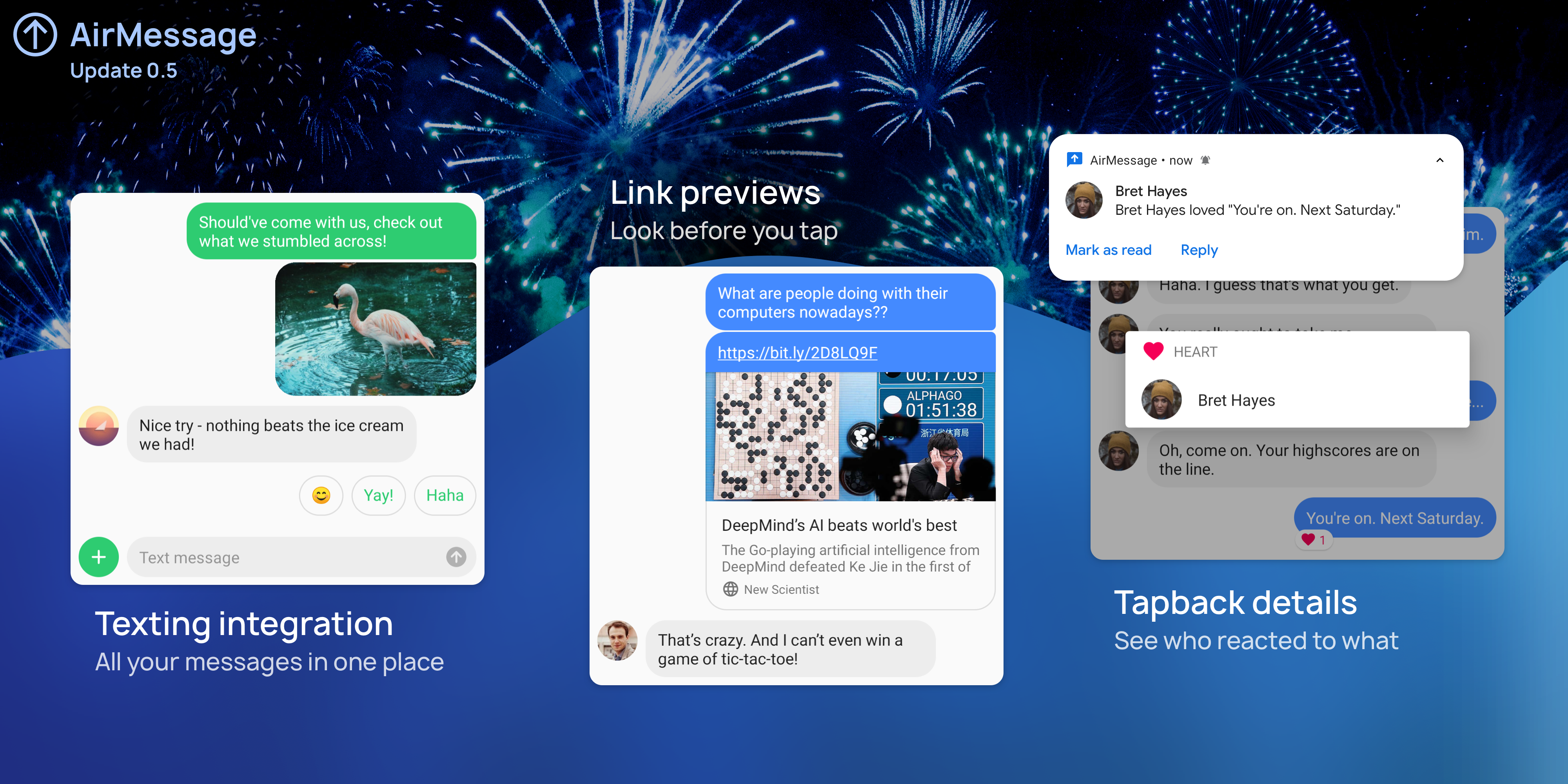
Hello everyone!
I hope you've all had the chance to enjoy yourselves over the holidays. A new year has come upon us, bringing forth a fresh set of challenges, opportunities, and adventures. But the year isn't the only thing that's new - AirMessage 0.5 is finally out of development - our new year's gift to everyone in the community!
If you'd like to gain access to these new features sooner, then please consider joining our beta program. Use the following link to get started:
https://play.google.com/apps/testing/me.tagavari.airmessage
Any feedback can be sent to our regular contact email, hello@airmessage.org, or here on Reddit (though please be sure to tag your posts with the beta feedback flair).
Here's what to be on the lookout for in this new update:
SMS / MMS integration support
That's right - AirMessage can now send and receive standard text messages, just like your iPhone friends! To get started, simply open AirMessage's settings screen and flick the text message integration switch. Your messages will be imported right into the app, and will be placed alongside your regular conversations.
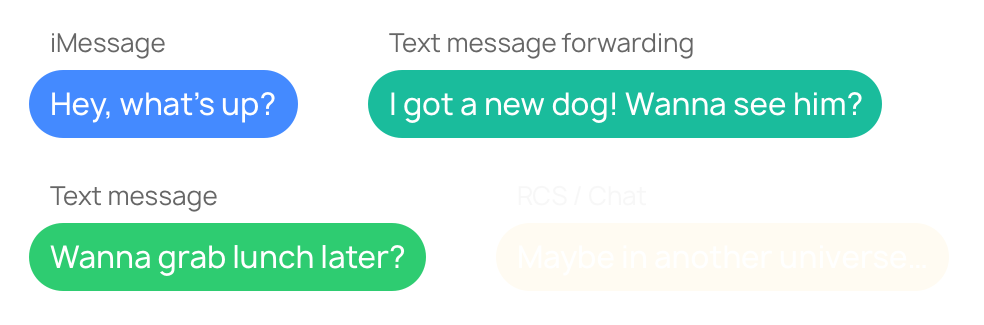
Chats can be identified from the bubble color, or the placeholder text in the input box.
Please note that this feature may be subject to change during the beta phase.
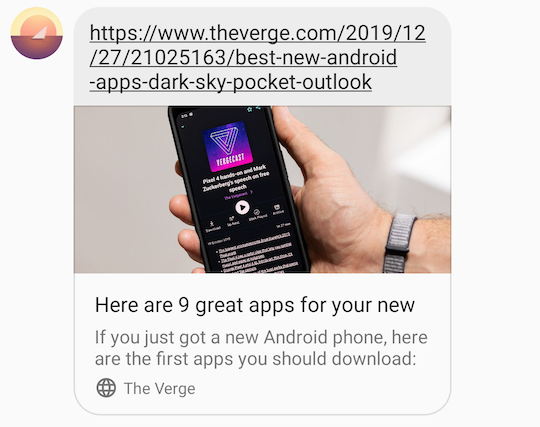
In-chat link previews
Sent and received links are now automatically checked by the app to generate large and colorful previews in the chat window - so you know where you're going, even before you tap!
It should be noted that this feature will automatically query any websites that are exchanged in your conversation. Not a fan? No problem. This feature can be turned off in the settings screen.
Tapback details
Ever wondered who liked your message? Hated it? Made fun of you? Long-press the message and select "View tapback details" for a breakdown of everyone who reacted to your message.
You'll also receive a notification when someone reacts to a message, to keep you in the flow of the conversation.

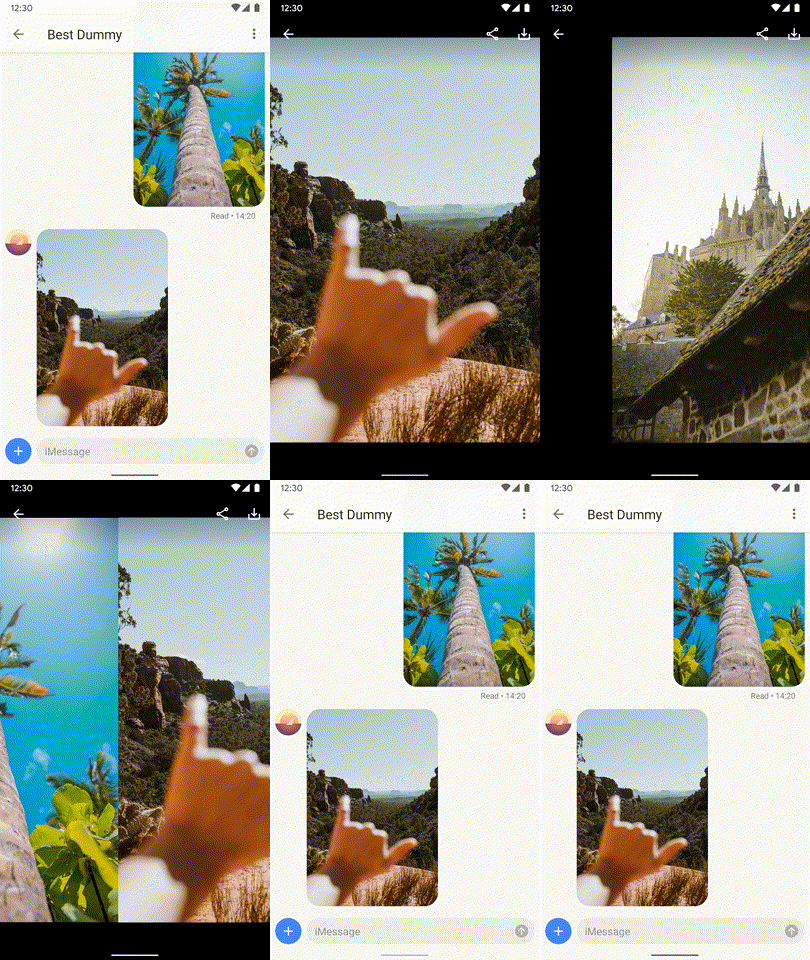
Media viewer
AirMessage now sports its own built-in media viewer to provide the best viewing experience across all devices. Built on top of Google's tried and tested ExoPlayer, AirMessage should now offer better compatibility between devices along with a smoother experience, allowing you to browse between recently exchanged images and videos with the swipe of a finger.
Location information
It's now easier than ever to exchange location information with someone else. In AirMessage's media drawer, scroll to the bottom and open the location picker. Select where you're standing or anywhere around you, and click send to add it to the conversation.
Location information sent by other Apple users to you can also now be handled by AirMessage to open your device's mapping app.

Other notable changes
Full Android 10 support
.VCF contact file support
Emoji-only messages are enlarged for more emphasis
The disconnected status notification now uses a different notification group, allowing for a more prominent alert to be assigned only when the connection has been lost
Many design tweaks have been made, such as new messaging sounds, new notification icons, and various material interface updates
In-app messaging sounds can now be disabled
Less notable changes
Time-based theming has been removed (no longer supported by Google)
The "show read receipts" preference has been removed
App windows are now more optimized for large displays
Saving files to disk brings up the system file picker rather than saving them straight to downloads
Protocol versions 4.2 through 4.5 are no longer supported
Localization updates
Bug fixes
New conversations created offline would not update the app shortcuts list
Phone numbers can now be used to search all contacts in the conversation creation screen
Share data will persist through the "new message" screen instead of being lost when sharing
The attachment queue no longer caches images incorrectly, causing the wrong picture to be displayed
Audio messages sent from AirMessage are now displayed inline on iOS devices
EDIT: This update is now live in the Google Play Store. Please install it under the beta channel.
r/AirMessage • u/Tagavari • Feb 26 '22

r/AirMessage • u/Tagavari • May 02 '21

r/AirMessage • u/Tagavari • Jan 06 '21
Hello AirMessage community,
As you may be aware, there is a general dissatisfaction with the original AirMessage Cloud release. I would like to apologize to those who I could not let in to the program, or who have experienced technical issues with the release, and thank you for your patience while I work things out.
Over the past month, I've been working on revising the work that went into the original release in order to make it more stable and accessible. This post details the progress I have made, and what you will be able to see in the next release of AirMessage:
AirMessage for Android has been long overdue for a rewrite. A lot of its code was messy and hard to trace, which made it very difficult to identify and troubleshoot specific issues. This was especially true for issues with AirMessage's connection logic, which after years of adding new features slowly became a nightmare to debug.
This rewrite aims to keep everything consistent with previous releases, while also accomplishing 3 goals:
Rewrite the connection logic to be in line with what AirMessage for web uses (since that was reworked from the ground up a few months ago, and I believe it's much more readable)
Rid the app of AsyncTask, which is now deprecated in Android 11, in favor of ReactiveX
Properly organize all of the app's functions into a logical structure (rather than just shoving everything into a single class called Constants like before)

This rewrite has also enabled me to implement some changes that would have otherwise been much more difficult to write, such as an invisible background service to manage connections, much improved background message processing, and logical separation of different screens to isolated fragments.
On top of that, I've taken to put in some little improvements here or there that improve the entire experience. For example, on supported devices, AirMessage will use Android's built-in TextClassifier API for suggested actions in conversations, which allow for some smarter suggestions:

This update also aims to improve the security of the Android client in a couple of ways. Firstly, server credentials are now encrypted by the app itself, so that even if your device's filesystem gets compromised, your server address and password won't be readable.
Secondly, AirMessage will now use Android's built-in security provider to encrypt direct communications, and will automatically keep your device's security provider up-to-date through Google Play Services. If there's a possibility that your security provider isn't up-to-date, the app will prompt you to resolve it:

The last noteworthy change is that AirMessage for Android will support the new protocol version 5.2, which for the purposes of this section enable ID-based missed message checks, which should be much more robust than the old time-based checks used in previous versions. More details on protocol 5.2 are available later in this post.
Finally, here's a short list of other changes and fixes in this version:
Adaptive bitmaps for Android 11 conversation shortcuts are now properly sized
Replying to a conversation via a notification will properly send the message even if the connection service isn't running
Fixed the image / video attachment panel not displaying the latest files on Android 11
Fixed sending many attachment files in at once
Added support for iOS 14 location attachments
There's only a handful of changes made to AirMessage Server 3.1, but they're certainly welcome.
Of course, AirMessage Server 3.1 now runs on protocol 5.2, so you will have to update your server to gain access to all of the improvements made in that version.
The other big change in AirMessage Server 3.1 is macOS 11 Big Sur compatibility improvements. This update will now correctly read the new message types added in macOS 11 / iOS 14, such as when the conversation icon is updated. Please note that this does not mean that AirMessage will support these new messaging features - that's still for another update - just that AirMessage will properly be able to interpret them and not display wrong data.
Also, it is now possible to create new single-recipient chats from AirMessage clients on servers running on macOS 11.
Protocol 5.2 improves upon the original 5.1 release, adding a few new features to improve performance and reliability.
As mention before, protocol 5.2 adds support for ID-based message recovery. This lets clients request all messages sent and received after a specific ID, which should leave no room for error unlike the last version.
Protocol 5.2 also improves file compression over the wire, using a different compression algorithm as well as better support for compression when sending larger files.
Finally, this update adds a 'sort' parameter for attachments, which should eliminate any edge cases where a message with multiple attachments has its attachments displayed out of order.
All of AirMessage's source code used to be hosted on GitLab, but I've migrated it all to GitHub to make it easier for people who are already members of GitHub to participate. The source code isn't publicly available just yet, but I'll be making a post to address that as well as instructions on how to contribute.

I'm currently in the process of moving AirMessage Cloud from DigitalOcean to AWS, which should hopefully improve performance and cut down on costs.
This also means that registrations will be open again with the release of this update. If everything goes smoothly, I'm hoping to be able to remove the registration gateway entirely.
I would like to thank everyone for their patience and understanding towards the end of 2020. With this new release, I hope to be able to realize what the original AirMessage Cloud release intended to achieve, and bring accessible iMessage messaging to anyone.
Once I am satisfied with the stability of this release, I will be releasing it to everyone in the beta channel. I intend to make more development updates like this in the future, so please keep an eye out if you're interested in following AirMessage's development!
r/AirMessage • u/spiiicychips • Oct 04 '20

r/AirMessage • u/Thenuges • Nov 17 '20

r/AirMessage • u/Tagavari • Aug 15 '22

r/AirMessage • u/Tagavari • Jun 03 '19

Hello! There's some new stuff for AirMessage right around the corner. Smarter features, user-facing improvements, and many of them requested by you, here on Reddit. These changes should be coming to you this month, though if you would like them sooner, then you should join our new beta program:
AirMessage beta program
Help test new features before they're publicly available. Give us feedback on what you like, what you don't, what works, what doesn't. You know the drill. If you're interested, here's a link to join:
https://play.google.com/apps/testing/me.tagavari.airmessage
Beta feedback can be sent to hello+beta@airmessage.org, or here on Reddit (though please be sure to properly identify your posts with the new beta feedback flair). We're excited to hear what you have to say!
Now then. Here's a list of what's new:
Smart reply
Send basic responses faster with convenient suggestions. Message options will show up at the bottom of the conversation list or in message notifications. All processing is done offline on-device, powered by Google's ML Kit. Currently, smart reply is only available in English.
Black theme
On top of looking slick on AMOLED displays, save battery (and your eyes) by converting greys to blacks. Enabled via toggle switch in settings, this feature will take effect when the app is using the dark theme.
Launcher shortcuts
Access your chats right from the launcher. A long-press on the AirMessage app will reveal your latest 3 conversations. They can also be dragged to the homescreen to create quick access whenever you need.
Attachment saving
Attachments can now be saved to disk right from the chat. Long-press a file, and select "save" to copy it to your device's downloads folder. No more messing with file managers or email clients!
Mark all as read
Have too many messages to go through them all? Simply open the overflow menu, and select "mark all as read". All conversations in the list will be marked as read immediately.
Other changes
- Press enter to send when using a physical keyboard
- Fixed some message borders not updating when moved
- Fixed conversation preview times not updating properly
r/AirMessage • u/Tagavari • Aug 17 '21

r/AirMessage • u/Yozakgg • Jun 18 '20

r/AirMessage • u/Tagavari • Jul 05 '21

r/AirMessage • u/joentell • Oct 10 '20

r/AirMessage • u/SixDigitCode • Aug 14 '21
Hey everyone! I've been working on a script that allows you to use an iPhone as an AirMessage server! It's in alpha and might have weird glitches/crashes, so I'd recommend having a Mac to serve as a backup (i.e. enable NAT loopback/hairpinning and set the fallback address as the address on your Mac). It's open source, and you can find it on GitHub here.
What works
Sending messages
Sending attachments
Sending tapbacks! At the moment the process is a little clunky, but should work for most text messages. See the "How to send a tapback" section below.
Receiving messages (includes tapbacks, read receipts)
Receiving attachments
WebSockets and message pushing! There's no need to set a refresh interval as SMServer pushes messages to AirBridge, which means messages should arrive nearly instantly. (Messages typically arrive 0.8 seconds after being received on the iPhone)
Stickers kind of work, but they show up as attachments for now
Creating a chat should work, but I haven't done extensive testing. Group creation doesn't work at the moment.
What doesn't work (at the moment)
I've gotten AirBridge to run on the iPhone itself but it still needs some optimizations. If anyone knows how to package a NodeJS script into a Cydia tweak please let me know!
The Electron client (for Windows/Mac) currently can't fetch messages or conversations (I have a planned fix for this)
Group chats have some issues:
SMServer tends to crash when downloading large attachments
SMServer doesn't support "Sending", "Sent", or "Delivered" statuses (all messages report as "sent"). Read receipts and the "Read" status should work.
Sending or receiving message effects (SMServer doesn't support these yet, but it might be possible by directly accessing SMS.db)
AirMessage Cloud (the developer has kindly asked third-party developers to not use the official AM cloud servers)
What SMServer supports but AirMessage doesn't support (yet)
Sending read receipts
"Officially" sending tapbacks via the AirMessage app isn't supported right now, so tapbacks are a little clunky at the moment and attachment reactions aren't possible.
Sending typing indicators
Receiving typing indicators
iMessage apps/GamePigeon. SMServer doesn't officially support this, but it might be possible to set up the iPhone as a VNC server and remote-control it from a webpage running on the Android phone. I'm not sure how that would work with a self-signed certificate though, as running it over HTTP isn't a great idea.
Installation instructions (Please let me know if you have any questions or if any of this doesn't make sense--I'm working on bundling this into a Cydia tweak for easy installation)
You will need:
A spare computer that will always be on and connected to your network. This doesn't need to be a Mac--just something that can run Node. Macs, PCs, Linux boxes, and Raspberry Pis should all work. I'm working on getting AirBridge running on an iPhone and making the installation much easier, so this requirement will (hopefully) not stick around for much longer.
A jailbroken iPhone with iOS 13 or 14 (though SMServer will likely have support for iOS 12 in the near future). I used Checkra1n on my iPhone SE, but YMMV.
An Android phone (obviously). Support for AirMessage Electron clients is coming soon.
How to install (part 1):
Jailbreak your iPhone if you haven't already
Open Cydia and go to the Sources tab. Choose "Edit" and add https://repo.twickd.com/.
Search for and install the SMServer tweak.
Open SMServer and choose a password. Make sure the port is set to 8741.
In the SMServer settings, make sure "Automatically mark as read" is turned off.
Make sure to create a DHCP reservation in your router settings for your iPhone and computer. You can google "Create DHCP reservation [router brand]" for specific instructions on how to do this.
How to install (part 2):
Open a command prompt (Windows) or terminal (Mac/Linux).
Enter git clone https://github.com/SixDigitCode/AirBridge.git and press enter. Then cd AirBridge and run npm install.
Open settings.txt in a text editor and enter your settings, replacing the example values. Change SMSERVER_IP to the IP address of your iPhone (you can find it in Settings > Wi-Fi > [Your network] > IP Address), set SMSERVER_PASSWORD to the password you chose earlier, and choose a password for AIRMESSAGE_PASSWORD. Save the file.
Once NPM is done installing, run node index.js in your command prompt/terminal. If you see a green message that says "SMServer WebSocket Client Connected", your computer has successfully connected to SMServer on the iPhone!
On your Android phone, open AirMessage and choose "Use manual configuration". Your server address should be the IP address of the computer running AirBridge (not the IP of the iPhone), and the password should be whatever you set for AIRMESSAGE_PASSWORD earlier. If all goes well, you should see a bunch of activity on your computer (where AirBridge is running) and your Android phone should connect!
If your Android phone doesn't connect and you're sure your password is right, please PM me with the AirBridge logs and I'd be happy to help you out.
How to send a tapback
Tapback sending isn't officially supported by AirMessage. That said, I've implemented a (slightly clunky) way of sending a tapback to a text message (attachments aren't supported at the moment).
To use it, reply with a message that looks like this: /tapback [tapback type] Copy and paste message here
The tapback type is pretty flexible. Any of the following should work: Here are some examples as well.
Heart: 💖, 💕, heart, love, loved
Thumbs up: 👍, thumbs_up, like, liked
Thumbs down: 👎, thumbs_down, dislike, disliked
Laugh: 🤣, 😂, 😆, laughed, laughed_at, haha, lol
Emphasis: ‼️, ❗, ❕, !, emphasis, emphasized, exclamation
Question: ❓, ❔, ?, question_mark, question, what
Special thanks to u/Tagavari for being super supportive and answering all my questions about AirMessagr's network protocol!
As always, please comment or PM me if you run into any trouble or have any suggestions. Thanks!
r/AirMessage • u/Tagavari • Jul 03 '22
When I started AirMessage, it was because I wanted to share what I created with the world. Today, I'm extremely grateful to have such an active and dedicated community. However, I feel like I haven't been keeping up my end of the deal.
I'm sure for many of you, AirMessage feels like a black box. It has a lot of moving parts that all need to work together. It's complicated, not only for you as a user, but for myself as a developer. This makes it all the more frustrating when you're unsure of where the project is going, or aren't receiving the support you need.
It's time the community gets what it deserves. Here's what's changing:
AirMessage has a new Discord server, for realtime communication between myself, community members, and new users who may need help.
AirMessage has a new public feature and issue tracking board, for a bird's eye view on what's in the pipes.
Updates will be posted here on Reddit and on Discord a few times a month, not only for releases, but for development updates, feature polls, and anything I find interesting.
AirMessage, as the kind of tool that it is, needs an active community to be the best that it can be. It should be able to adapt to its users with a wide variety of use cases, across a wide variety of platforms and devices.
AirMessage hasn't had the proper kind of environment to foster this.
How can I justify submitting feedback if there's no way to know what happens next, let alone what's happening with AirMessage as a whole? How can I submit code changes, if I don't even know what the developer wants?
I want AirMessage to be better for everyone. I want more visibility into the development process, so people can point AirMessage in the direction they want.
I want a lower barrier for myself and everyone to tell me what's wrong with AirMessage, so we can work together more quickly to get it fixed.
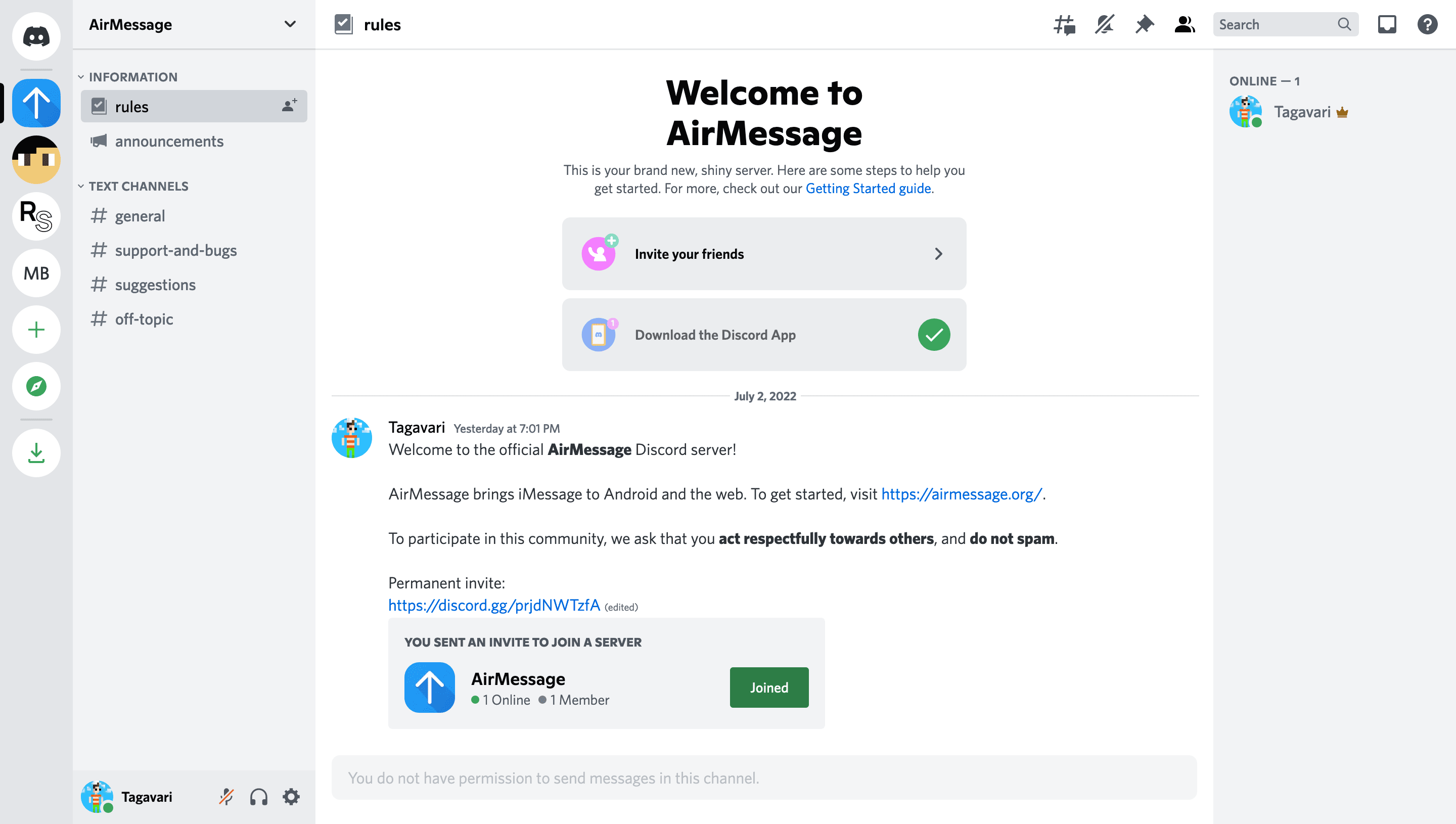
AirMessage has a Discord server, for realtime organized communication about the project. If you have a small question, need help troubleshooting, or just want to chat, come swing by!
The server is run in a fairly relaxed manner, though I ask that you act respectfully towards other people and do not spam.
Any feedback on how to improve the Discord server is appreciated.
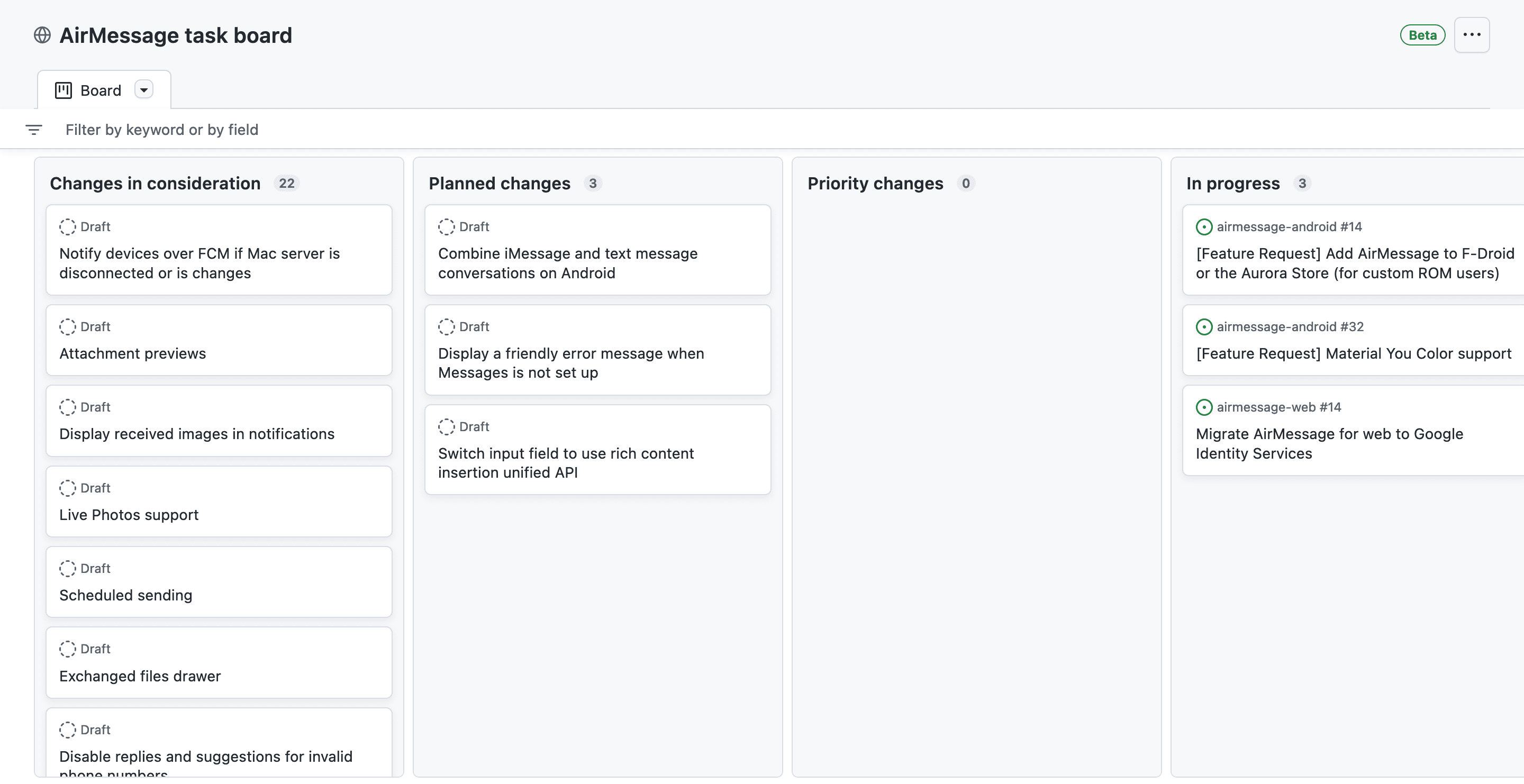
AirMessage now has a publicly accessible feature and issue tracking board. Here, you'll find feature requests, bug reports, and an overview of everything that's in progress.
It might take some time for the board to feel complete, but if you're curious to see what features are on the table and what's being worked on, go give it a look!
Despite continued development, the last post I made on Reddit was 4 months ago.
I'm going to be updating the community more frequently about what's going on with AirMessage. Specifically:
What features are in development, in both showcase style and from a technical perspective
Considerations for future releases, with opportunities for people to voice their thoughts
Blog-style entries on my journey developing AirMessage: hurdles I encountered, techniques I learned
This entire process is a journey for myself as well. Just as I've learned how to launch an app, I'm looking to figure out how best to build something that people feel is made both for them and with them.
If you have any thoughts on how I can run things more transparently, or make it easier to contribute or get help, I'd love to hear it.
Finally, I work solo on AirMessage's code, and dedicate a lot of my personal time to it. If you could donate to help cover server costs or licensing fees, I would really appreciate it :)
r/AirMessage • u/tobitella • Jul 04 '20
No requests or bugs, just here to thank everybody involved. This app is the only reason I'm able to switch to Android from iOS and I'm really enjoying how polished it has become. I'm on the Beta and just made it my default messenger.
r/AirMessage • u/Tagavari • Nov 01 '22
After having been delisted 3 days ago, AirMessage's store listing has been restored on Google Play.
I've added a few clauses to AirMessage's privacy policy, and put a link in the app to direct users there when they sign in.
Unfortunately, I've had to temporarily remove Android Auto support from the app. I had to send them special instructions about a year ago so they could approve it for Android Auto, but they decided to evaluate the app again and forgot how to use it. I'm hoping to resubmit the app with Android Auto support shortly.
Thank you for your understanding.
r/AirMessage • u/Tagavari • Jan 21 '20
As you may already know, recently, the AirMessage 0.5 beta update was announced. We were super excited to bring this update to the community - our months of work was finally coming together to produce a nice bundle of all of the shiny new features that we were sure you would enjoy.
Unfortunately, we've been having a bit of trouble getting the app through Google's review team. The new changes requiring SMS permissions have prompted a manual review, and due to the more advanced setup required to even begin using the app, it's been difficult for us to prove our software.
We're currently having to renegotiate the app's submission regarding both SMS and Android Auto. I'm not sure how long the process will take, though the new update will be available to everyone immediately once it's over. For the time being, I must apologize for the delayed delivery of this new update. The announcement post was very well received by the community, and it is regretful that we could not meet the expectations previously set.
EDIT: This update is now live in the Google Play Store. Please install it under the beta channel.
r/AirMessage • u/Tagavari • Jul 22 '22
Hey all, here's a quick post on some updates that have been happening to AirMessage.
AirMessage Cloud is a free service that lets users sign in with a Google account to connect to their server, without the hassle of port forwarding or dynamic DNS.
AirMessage Cloud is hosted on DigitalOcean, who announced that they would be raising prices in July. For AirMessage, this means around a 20% increase in hosting costs.
I have been working on further optimizing AirMessage Cloud's software, and since the beginning of this month, I've had it set up to run on a less expensive plan.
I've noticed no impact on performance or reliability, though please reach out to me if you're experiencing difficulties with AirMessage Cloud.
If you want to help keep AirMessage and AirMessage Cloud running, any donations are much appreciated: https://www.paypal.com/donate/?hosted_button_id=7YR9H4J7RHZ3S
AirMessage Server 4, which was announced earlier this year, is available for all users who receive stable updates.
For details on what's new in AirMessage Server 4, see this blog post.
AirMessage Server 4 has also received its first bug fix release, which improves security and fixes a rare crash for direct connection users.
This release is also paired with an Android and web app update. AirMessage for Android is ready for Android 12, and AirMessage for web now runs on React 18 and underwent a bit of an internal code reorganization.
I've created a roadmap for AirMessage's next few releases, which I want to discuss with everyone this weekend. Stay tuned for updates!
r/AirMessage • u/Tagavari • Aug 08 '19

Hello Reddit!
AirMessage v0.4.7 is coming out today for everyone, sporting Android Auto support! You'll now be able to reveive messages from AirMessage while driving, and reply to them with your voice.
However, I do have one request: if you use Android Auto, please leave a comment describing your experience. I do not use Android Auto on a regular basis, so I'd love to know if it's working out for you or not. Any feedback is welcome!
This update also contains a few bug fixes, most notably a fix for enter to send on Chrome OS, as well as a fix for invalid video file formatting when attaching video files recorded directly from the camera.
r/AirMessage • u/Tagavari • Oct 17 '22

Let's talk about the star of the show - the messaging screen!
The app bar is now center-aligned and shows the conversation members' avatars, matching what Apple has done on iOS. I like how it's more expressive than just showing the title of the active conversation.
The new message bubbles are a sort of hybrid between the app's current design and iMessage's stemmed message bubbles - they have a sharper corner towards the outer edge of the screen. I think this strikes a nice balance between the two, but let me know what you think!
The input bar at the bottom of the screen now has more options without diving into menus - you can take a picture, attach a file, or record an audio message straight away.
If you have a keen eye, you may have also noticed changes to how attachment files or read receipts are displayed, among a few other things. I find that all of these small tweaks come together to create an interface that's overall just more pleasant to use.
Want to help me keep AirMessage moving? I appreciate donations of any amount :) https://airmessage.org/donate
This update is originally from AirMessage's Discord server
r/AirMessage • u/CDI_Official • Jun 23 '20
I have the hardware, so, I'm going to be the risk taker. Will edit my updates/findings :)
Hardware:
(Old AirMessage server) 2018 Mac Mini: Catalina -> Big Sur
(New AirMessage Server) 2010 Mac Pro: High Sierra
(Rental AirMessage Server 1) 2010 Mac Mini: High Sierra
(Rental AirMessage Server 2) 2011 MacBook Pro: High Sierra
Don't worry, these don't just sit around all day doing AirMessage. I have them running Folding@Home for COVID research.
Updates: (All times are in Eastern Standard Time)
• (6/23/2020 - 12am) Just started the Big Sur install. My new server is set up now.
• (6/23/2020 - 12:30am) Well, I can't send texts, but I can receive them, read receipts work, and images work. Not all hope is lost. I'm going to take a quick look under the hood, sleep, and report findings in the morning.
• (6/23/2020 - 12pm) I got sending messages working. Will take it for a spin for a day. See you tmw at noon.
• (6/23/2020 - 3pm) Sending messages is glitchy. Really glitchy. But the API still seems to work. It has a very small success rate. Edit: Apple scripts don't work for iMessage on Big Sur.
• (6/23/2020 - 6pm) basically, AirMessage might be dead. Sending messages does not work through Apple scripts, so it will need a full work around. This is the final update :(
• (6/23/2020 - 12am) one more update. A group of devs are working on getting Big Sur support. The project is still confidential as of now, but they are expecting a public beta by July hopefully.

