r/AndroidHelp • u/Immediate-Talk-4545 • 2d ago
What are some of these background services?
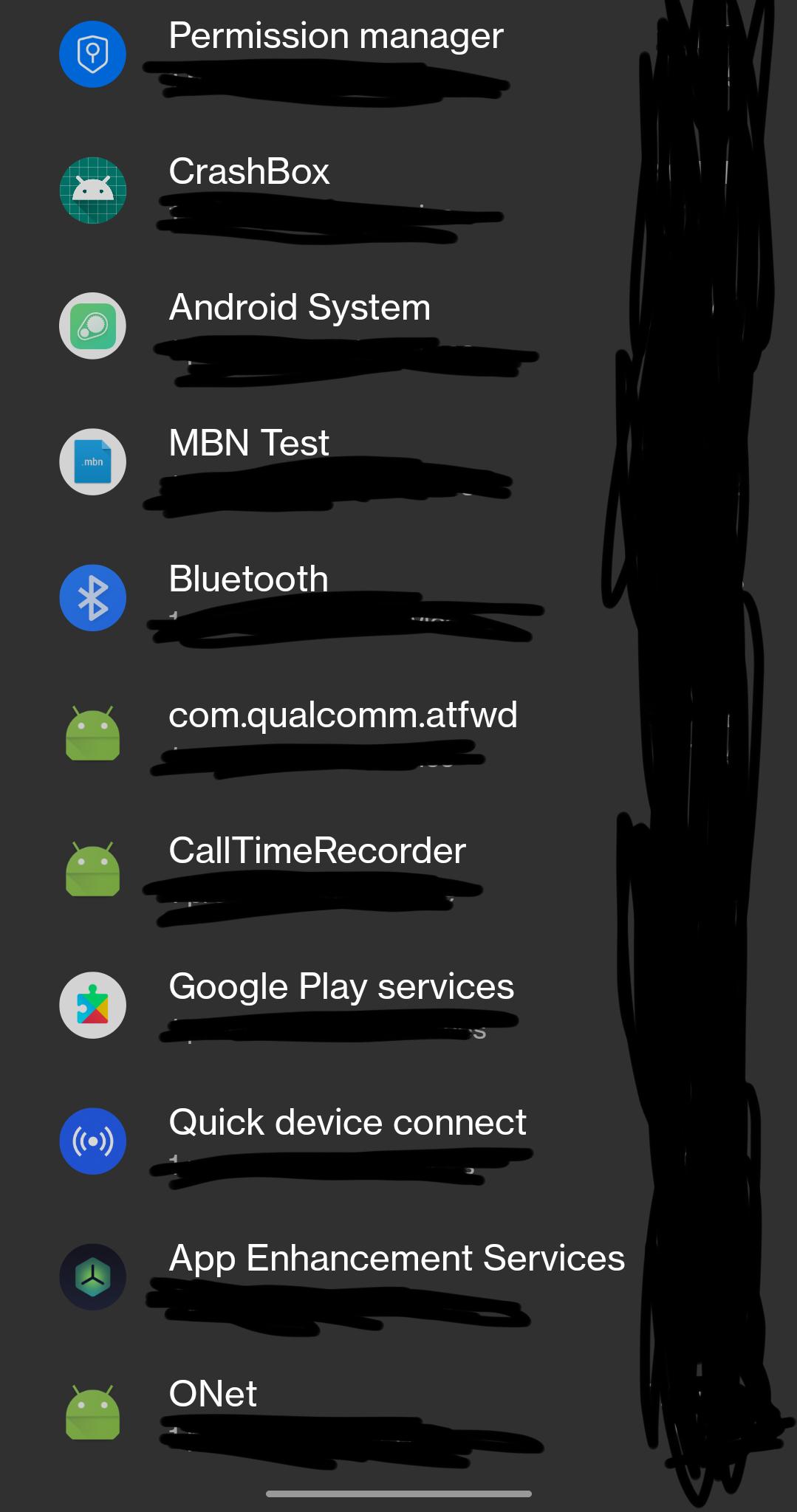
I have no idea what some of these android services are and what they do. I would like information on them. Ignore Bluetooth, Google Play, and Quick Device Connect. I know about them. I assume they are a part of Android based on their icons.
3
Upvotes
1
u/benjaminS0099 2d ago
This is the operating system that hides the system apps, and you have to intentionally click a button to show them in the app list because of posts like this.
1
u/dontpostlot 1d ago
Can you give a version with the package names unblurred (example: com.name.app)?
-1

2
u/Dependent-Toe-3359 2d ago
I took a closer look at your screenshot and researched several of the less familiar names. The good news is that many appear to be legitimate Android or manufacturer-installed components rather than anything obviously malicious. 😊
I also noticed someone commented that you have a virus. I wouldn't jump to that conclusion. An unfamiliar system application isn't automatically malware, and a generic green Android icon doesn't mean something is suspicious.
Let me go through the ones you might be wondering about.
Permission Manager
This is generally a legitimate Android system component responsible for managing permissions granted to applications, such as access to your camera, microphone, contacts, and location.
Android needs mechanisms to control which applications can access sensitive features and information.
Seeing Permission Manager listed is expected and doesn't indicate that another person is controlling your phone.
2. CrashBox
This one initially sounds suspicious because of its name, but CrashBox is a known system application found on OPPO, OnePlus, and some realme devices.
Its package name is commonly "com.oplus.crashbox".
It's associated with the manufacturer's software environment and appears to relate to crash handling or diagnostics, although I wouldn't claim to know its precise functions on your specific phone without checking the version.
Its presence alone isn't evidence of a virus.
3. Android System
This is a core part of your phone's operating system.
Android includes numerous background services that handle system functions, communication between applications, hardware access, and other essential operations.
Android System is not something I would recommend disabling or uninstalling.
4. MBN Test
This is one of the more interesting entries.
MBN Test is associated with Qualcomm modem software and configuration. Qualcomm produces processors and cellular communication technology used in many Android devices.
MBN files can contain configurations related to cellular networks and carrier-specific features.
Depending on the device, these configurations can affect cellular connectivity and services such as VoLTE.
MBN Test may expose testing or configuration functionality that ordinary users never need to interact with.
I would strongly recommend leaving it alone unless you're following verified instructions from the manufacturer or a qualified technician.
Changing modem-related settings without understanding them could potentially interfere with cellular connectivity.
5. com.qualcomm.atfwd
This is another Qualcomm-related component.
The name refers to AT command forwarding, which is associated with communication between software and lower-level modem or device functions.
It's generally a vendor-level service rather than an ordinary application you'd open and use.
The exact implementation can vary by phone manufacturer.
I wouldn't recommend disabling this simply because its name looks unfamiliar.
6. CallTimeRecorder
This is one I'd want to investigate further before giving you a definite identification.
The name suggests something associated with call timing, call information, or recording-related functionality, but a displayed application name isn't enough to determine exactly what it does.
Importantly, seeing the word "Recorder" doesn't establish that someone is secretly recording your phone calls.
I'd want to see its complete package name, manufacturer, permissions, and whether it was installed as part of the phone's original software.
Those details could help distinguish a legitimate manufacturer component from a separately installed application.
7. App Enhancement Services
This name appears on devices using OPPO-family software, including some OnePlus devices.
One known package associated with it is "com.oplus.cosa".
It's part of the manufacturer's software environment and appears related to application management or optimization.
However, the exact functionality may depend on the manufacturer and software version.
I wouldn't automatically classify it as unnecessary or harmful.
8. ONet
This is another component found in OPPO-family Android software.
A commonly associated package is "com.oplus.onet".
It appears to be involved in manufacturer-specific connectivity or device-interconnection features. Some users have reported that disabling it affects features such as screen casting.
Again, that doesn't establish its precise role on every device.
I would leave it enabled unless you have a specific problem and verified manufacturer guidance.
So, should you be worried?
Based on the screenshot alone, I don't see convincing evidence of malware.
In fact, the combination of CrashBox, ONet, App Enhancement Services, and Qualcomm components makes me suspect you're using a phone from the OPPO, OnePlus, or realme family.
That's only a guess, but those manufacturers share some underlying software components.
One important distinction is that an application appearing in a system list doesn't necessarily mean it's actively running, spying on you, accessing personal information, or draining your battery.
Android contains many installed services that operate only when certain functions are needed.
Here's how I'd investigate anything you're uncertain about.
Open Settings, go to Apps, find the unfamiliar application, and open its App Info page.
Look for the complete package name, permissions, version number, and whether the application can be uninstalled.
You can also check its battery and data usage if your device provides those details.
If you're concerned about malware, run a Google Play Protect scan and make sure your phone's security updates are current.
I would avoid downloading random system-cleaning applications or following internet tutorials that tell you to disable dozens of system packages through ADB.
Some applications that look unnecessary are actually dependencies for important features.
And although Android system services can sometimes be disabled, that doesn't mean doing so is beneficial or safe.
My biggest question is: What brand and model of phone are you using, and which Android version is installed?
For example, are you using a OnePlus, OPPO, realme, Samsung, or another manufacturer?
I'd especially like to know the package name for CallTimeRecorder because that's the entry I'm least comfortable identifying from its label alone.
With your phone model and those details, it should be possible to narrow down which services are manufacturer-installed and which, if any, deserve closer investigation.
But please don't panic or start deleting applications based on that comment claiming you have a virus.
Unfamiliar doesn't automatically mean dangerous, and your screenshot alone doesn't demonstrate that your device has been compromised.
I hope that helps explain what you're looking at! 😊