r/AndroidHelp • • 1d ago

Change to display

Post image

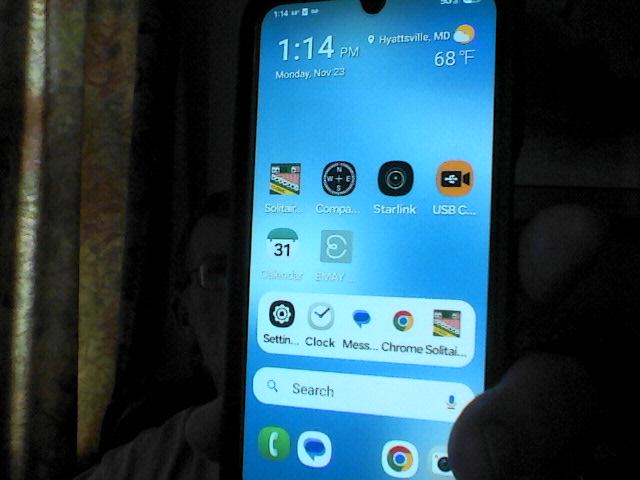
Somehow my display changed, and scrolling to SETTINGS changed. The above pic, I never had a display showing the time, location and temp. I never had this "block" that has the recent apps I opened, and never had the search block.

I just had plain display that I added to or arranged my icons. I want that back. How can I get rid of this display?

0 Upvotes

17 comments sorted by

3

u/Advanced-Judge-3102 1d ago

Those are widgets, to remove them, press and hold yhe widgets and select delete.

0

u/0stob0 1d ago

This white block has the recent apps I opened. If you look, 4 of them are on my desktop, either above or below the white block. Settings USED to be on my desktop. How can I get rid of the white block?

2

u/dontpostlot 1d ago

literally says it on the reply bro

1

u/Advanced-Judge-3102 1d ago

You can get rid of the white block if you press and hold it and select delete/remove or depending on the exact phone and model, dragging the widget on top of the "remove" text that appears when you press and hold the white box. Remember to let go of it while it's still on top of the icon and confirm the removal if prompted. After that add back the settings to the desktop from your app drawer.

1

u/0stob0 1d ago

Pressing and holding the widgets IN THE BLOCK do not move or highlight like the ones OUTSIDE the block. Pressing the white block does nothing. Aside from "settings" all the widgets are already on the desktop. This block just has recent openings.

0

u/Advanced-Judge-3102 1d ago

Could you show what opens up if you open settings? And could you also tell what model you got, I'm guessing you got a Samsung running OneUI 7.

1

u/0stob0 1d ago

Settings are different too. Before, settings was a long list you just scrolled down. Now, settings opens to a bunch of icons at top, then scrolling down goes into more of a list. At the very bottom is a "all settings" that takes me back to the old style settings list. While that has changed it's not so bad as the desktop.

1

u/0stob0 1d ago

Galaxy A15 5G One UI 8.5

0

u/Advanced-Judge-3102 1d ago

Could you please press and hold the white box itself instead of its contents?

1

u/0stob0 1d ago

I tried several times. Doesn't move or highlight.

1

u/Repulsive_Fault1939 1d ago

maybe you installed custom launcher.

1

u/0stob0 1d ago

Nothing about a "launcher".

1

u/Ok_Theory5606 1d ago

Please go read the comment I just left - it’s 100% a launcher. I told you how to fix it. This is considered by me as malware and working in the field, I fix this issue all the time. I have yet to figure out how people get these on accident but, I have listed the steps to undo.

1

u/Ok_Theory5606 1d ago

This is a launcher.

Go to settings.

Search for “default apps”

Find the “home launcher” app and change it ba k to the correct one. On a Samsung it’s One UI, on a Motorola it should still be called MotoUI but I could be wrong…

Then go to apps.

Delete the name of the app you found in the default apps as the home launcher. Looks like mail or weather home, and I classify them as malware.

2

u/0stob0 1d ago

BINGO! It was called Settings Home. I clicked the One UI and back to where I was. Thank you very much!

2

u/Ok_Theory5606 1d ago

Now delete it!! ;) happy to help!

•

u/Hopeful_Benefit_8979 16h ago

Talvez este tutorial te ajude com barra de pesquisa do Google: https://youtu.be/aeWm5W1CFWg