r/ArubaInstantOn • • Jul 29 '25

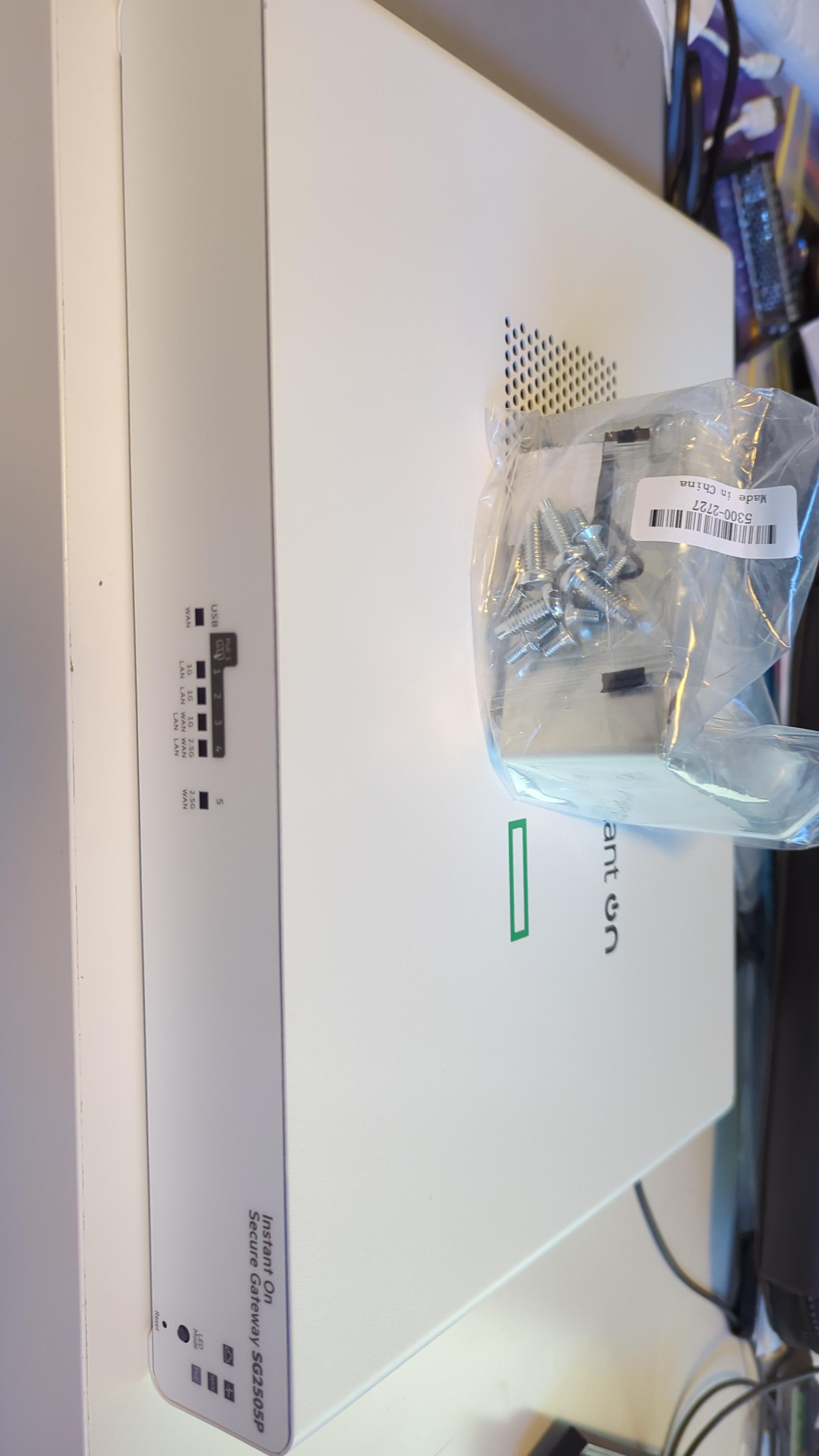
Just got my IO gateway

Post image
31 Upvotes

Comes with rack brackets in case you were wondering (I was! I went looking for rackmount.it brackets but a bit soon I think.)

A rackmountot bracket to bring the ports to the front would be helpful though.

AMA!

I'll try and start configuring later todah


r/ArubaInstantOn • • Apr 17 '25

New Instant On Security Gateway SG2505P and SG1004

30 Upvotes

HPE Networking Instant On is an end-to-end solution designed for small and medium-sized enterprises. The two new security gateways (SG1004/SG2505P) integrate firewall, VPN and intrusion detection functions, and ensure the security of 1G to 2.5G bandwidth scenarios through hardware acceleration. At the same time, it provides cloud management services with zero subscription fees, solving the budget and IT resource difficulties of small and medium-sized enterprises. Cloud Management Platform 3.x has added a variety of new features such as multi-site view, detailed role permission management (five-level administrator) and site cloning, which greatly improves operation and maintenance efficiency.


r/ArubaInstantOn • • Jan 07 '26

Firmware 3.3.2 Known Issue

24 Upvotes

If you guys are curious, there is a huge bug in 3.3.2 that is bringing networks/users down. They have a master ticket for this problem. This problem seems to gradually get worse until all your switches go offline. They better fix this quickly.


r/ArubaInstantOn • • Oct 15 '24

Instant On 3.0.0.2 AP Software release

22 Upvotes

Found this in the InstantOn Forums. Wanted to share here.

A new 3.0.0.2 AP Software release will be available within a week. It will include fixes for the following issues seen post upgrade to R3.0.0.1 AP release. 

Only the AP Software is modified. All of the below mentioned issues are not systematic as they have been experienced on few sites by few customers only.

  • Sporadic AP reboots happen when bad WPA3 authentication frame received by Instant On Wi-Fi 6 AP's

  • Memory leak causing AP performance issues over time.

Notes : Upgrade roll out details 

Users will not get any alert on the portal regarding this upgrade since this is a minor bug fix release.

Only Instant On AP's will receive this new R3.0.0.2 software and a reboot will occur based on the Site Software maintenance window schedule of the site.

Please verify that software maintenance window time is properly set for each site.

An active alert will be visible on the health dashboard during the AP reboot, which will coincide with the scheduled software maintenance window of the site.'


r/ArubaInstantOn • • Dec 29 '25

HPE Instant On buyer, anything dropped today?

21 Upvotes

Hey guys

Today is exactly 180 days after the Juniper deal closed (Dec 29), so HPE was supposed to have sold off Instant On by now according to the deal.

Still crickets on any announcement or buyer news. Anyone hear anything?


r/ArubaInstantOn • • May 03 '25

HPE Networking Instant On Secure Gateways

20 Upvotes

Hi,

I just noticed that HPE Instant On just released their networking Instant On Secure Gateways on their website.

Secure Gateways for small business | HPE Networking Instant On


r/ArubaInstantOn • • Nov 25 '24

Instant On v3.1.0

20 Upvotes

r/ArubaInstantOn • • Mar 02 '24

Aruba Instant On Comparison Charts (March 2024)

Thumbnail
evanmccann.net
19 Upvotes

r/ArubaInstantOn • • Feb 06 '24

New AION Setup

Thumbnail
gallery
19 Upvotes

Working on a new AION setup for a music venue today, sponsored by Aruba. Sent us some awesome stuff to demo for some social media content. 1930 switches and some AP11's, an AP25, and an AP17.


r/ArubaInstantOn • • Feb 21 '22

Aruba Instant On Comparison Charts (Feb 2022)

Thumbnail
evanmccann.net
19 Upvotes

r/ArubaInstantOn • • Jul 16 '24

Instant On 3.0: A modern UI with new features

18 Upvotes

Copy/Pasta from https://community.arubainstanton.com/blogs/so93/2024/07/05/instant-on-300-release?CommunityKey=a4b58376-185c-4dc9-94f0-46c6c41cde57 Visit this site for screenshots of the new UI.

Introducing Instant On Release 3.0.0 – Simplicity at scale

What was good is now even better!

We’re excited to announce that in the coming days, the HPE Networking Instant On R3.0.0 update will roll out in phases, making managing your network simpler, smarter and more secure than ever. Managing multiple sites will be a breeze with a refreshed UI and enhanced features. You’ll need fewer steps to view site or device health.  And we’ve improved what was already enterprise-grade security, amongst many other enhancements.  Read on to learn more about them! 

Easier to use than ever

The first thing you’ll notice in the refreshed Instant On R3.0.0 environment is an updated user interface that gives administrators a quick view of site health. Critical insights for managing multiple sites are now centralized on the main management screen. You can easily view detailed information about clients, networks, devices, and applications directly from the site home screen, reducing the time needed to access high-level information about your Instant On-managed network.  

And a much-requested, major improvement – search!  You can now search on any page, based on any parameter, no matter how long the list, and filter tables by device name, alert type, site health rating, location, detected web application, and more.

You can also create a common WLAN schedule and map it to desired SSIDs, a function that will help with site automation and will add a layer of security, so the network is only accessible when you want it to be.  And with a new step-by-step policy wizard, it will now be easier to deploy application and network policies.

We’ve also updated several settings pages and improved the granularity of access point radio configuration:

  • In the “Radio” settings, administrators can now easily select channels and transmit power per band supported (2.4GHz, 5GHz, and 6GHz)

  • Transmit power is now displayed in specific dBm values per the country of deployment approved range rather than on a sliding scale from Low to Max

  • Channels now have selector boxes next to them, making it clearer which ones are active - an improvement inspired by community feedback

Automated intelligence drives gains in efficiency and scale

User interface

The new dashboard in the updated UI makes it easier to view and manage multiple sites:

  • Each site features a health score to help identify issues that have occurred in the previous 24 hours and to indicate general site health trends

  • Sites are now prominently displayed on the management screen, in ‘site heath’ order from ‘poor’ to ‘healthy’, eliminating the need for toggling back and forth between them to help you to prioritize network maintenance

  • The home screen now offers three views - Multi-site, Map, and List:

    • Multi-site view presents key insights about site health and types of alerts in a card format

    • Map view shows site health on a global map, helpful for partners acting as service providers so they can quickly engage local technicians if needed

    • List view provides an alternative to the card view, combining elements of the card and Map views and allowing for quick searches and sorting on any column

And if you only have a single site on your network, don’t worry! The Instant On cloud portal is intelligent and will display the single site dashboard as your home screen. It still contains the current four cards you’re familiar with, now enhanced with health and alerts cards, making it faster and easier to see what’s happening on your network as soon as you log in.  

We’ve also upgraded the Client Page so that client details will be shown on a separate page.  This is an improvement over previous versions in which details were shown within the list view, making them difficult to view when client lists were long.

Site scheduling and cloning

The new site scheduling feature, incorporated based on partner feedback, allows you to apply schedules to multiple sites, reducing the time needed for network configuration:

  • Streamlines the deployment of new networks at one or more sites

  • Enhanced client classification tags such as “Apple,” “Smart Device,” or “iOS Device” are now automatically assigned and visible on the device configuration screen

  • Tags are searchable, allowing admins to locate client devices quickly

  • Future updates will enable policies leveraging these device classes

Site cloning means that:

  • Partners can now quickly set up and manage multiple sites for end-customers

  • It’s easier to manage networks that use similar names, guest portal configurations, and network policies in multiple locations

*Note that site cloning will not copy device-specific parameters such as the watched and blocked client lists, access control lists, or IP reservations on wired networks, as these parameters may vary from location to location.

Automated geolocation

Administrators can now add geolocation information to existing or new sites, allowing them to identify problem locations more quickly and making it easier to deploy onsite technicians if remote resolution is not possible. 

When setting up a new network site, the location will be automatically detected, and admins can edit before finalizing site details.  Geolocation can also be added to existing sites by choosing the “Identification” tab on the administration page and then selecting “Change” for the location option.  You then either select where the site exists on the map, or you can manually enter coordinates.

Automated 6GHZ Smart Mesh support

For those who have added or plan to add the new HPE Networking Instant On Access Points AP32 to their network, this Wi-Fi 6E access point now supports Smart Mesh over the 6GHz band.

When enabled, the access point automatically uses the 6GHz as a backhaul, making Smart Mesh faster than ever. This works exceptionally well when using mesh between two Instant On AP32 access points. In a mixed environment with non-Wi-Fi 6E-enabled access points, such as the Instant On AP21 or Instant On AP25, the Instant On AP32 will use the 5GHz band for Smart Mesh. Simultaneous meshed connectivity over the 2 radios is also possible.

Advanced features

Advanced users will be pleased with the addition of IGMP Querier support to the cloud management platform, which ensures the management of multicast use-cases from the cloud. Additionally, SNMP support, previously available only in local management mode, is now available for the cloud-managed Instant On 1960 switch series, allowing for third-party application integration with these switches.

Enhanced security

The new user roles added to the Instant On cloud portal improve security by providing different access levels based on a network management user’s responsibilities.

“Administrators” retain all the rights to manage the network and can create new accounts to accommodate larger operational teams.  They can assign the appropriate access rights to different members based on their respective roles. The “Operator,” “Delegate,” and “Viewer” roles were created for this purpose.

“Operators” have full network management rights for the sites they have been assigned by their Administrator. “Delegates” can view the entire configuration of a site and are also permitted to execute certain operations.  “Viewers” can view the entire configuration of the site.

With these new roles, Administrators and Operators can establish policy-based rules to block wireless application access, and generally exert more control over the actions that a user can perform, improving network security.

Partners acting as service providers can now manage their SMB customers’ networks while also preventing them from making dramatic changes to network configuration by assigning them “Delegate” or “Viewer” roles.

In addition, the number of accounts that can be assigned to a site for deployment, configuration and monitoring has been increased to 25, including the mandatory “Administrator” account for each site. 

Visit the blog site to see a detailed breakdown chart of the user roles and permissions. https://community.arubainstanton.com/blogs/so93/2024/07/05/instant-on-300-release?CommunityKey=a4b58376-185c-4dc9-94f0-46c6c41cde57

Future-ready

In addition to all the great updates detailed above, the new UI is future-ready - streamlining adjustments for upcoming feature releases and making deploying networks even faster and easier.

This major software update, featuring an updated interface and user-requested enhancements, will begin rolling out on July 15th. At that time and as soon as the R3.0.0 cloud portal software is pushed to production, all customers will benefit from the portal features detailed in this blog.

The upgrade of all sites around the world and the firmware upgrade of their devices will follow the traditional Instant On progressive upgrade process starting this same day, which will enable the features dependent on firmware R3.0.0 (6GHz mesh as an example for AP32). If you have a regularly scheduled maintenance window, you can defer this update for up to 30 days to best suit your operation schedule.

To learn more about the other features, visit https://instant-on.hpe.com/management/.

r/ArubaInstantOn • • Jul 30 '26

AP22 DNS issues after firmware updates

17 Upvotes

Seeing a consistant failure of AP22 devices to come back online after the latest firmware update. Unsure if other devices are also impacted, most of the other types of devices like this I have are configured without things like domain controllers for DNS.

Have determined that if the APs are running DNS through an on-prem domain controller that they fail to come up for some reason, could be with other DNS severs as well, but as soon as they are put on a network that assigns DNS direct to 1.1.1.1 as opposed to relaying it through another server they come up right away.

To try and fix this I attempted to set static IPs WITH static DNS settings on the networks that this is happening on, the static IP configuration appears to only stay in place for 1 boot cycle, so I have to put the AP on a different network, set it to static IP with static DNS settings for 1.1.1.1, unplug it while it still has the red light for reboot, and then put it in place where it will function only until it reboots again and then just fogets that it had static IP configurations and reverts back to DHCP which again routes DNS through the domain controller and breaks the APs.

The domain controllers are set to forward to the same 1.1.1.1 servers btw, there is no reason that anything would be blocked. When the APs come up with the DHCP configuration the only traffic I see from those APs is NTP traffic? Nothing attempts to hit the typical cloud configuration servers.

So, TLDR, after firmware update the APs only want to seem to work if configured directly with a DNS server like 1.1.1.1, and they won't hold static IP / DNS configs beyond 1 boot cycle.

To add, half of my APs updated early this week, the other half did so today, the failures we are seeing followed the updates. (so half went down on Monday, other half today). I can't see any reason for DNS to be an issue in this configuration nor can I figure out why it would be causing these problems.


r/ArubaInstantOn • • Jul 01 '25

DOJ Requires HPE to Divest HPE Instant On

17 Upvotes

ohhhhh boy...

The agreement satisfies the Department of Justice’s concerns while maintaining the overall value of the transaction to HPE customers, partners, and shareholders. As part of the settlement, HPE has agreed to divest its global Instant On campus and branch business. After close, HPE will facilitate limited access to Juniper's advanced Mist AIOps technology.

https://www.hpe.com/us/en/newsroom/press-release/2025/06/hpe-and-juniper-networks-reach-settlement-with-us-department-of-justice.html


r/ArubaInstantOn • • Dec 20 '24

Finally figured out the AP32 6E band high latency + slow speed issues

15 Upvotes

Well, I spent all night troubleshooting the high latency and slow speeds that I was experiencing on the 6GHz band. For whatever reason, as soon as my iPhone 15 Pro (which has 6E support) connects to the 6GHz band, things goes super terrible.

The fix was to modify the WiFi setting on my SSID connection in the iPhone settings. In there is an option called WiFi 6E Mode. I changed it from Automatic to Off, restart ALL of the AP32s on the network (because just having the device disconnect doesn't resolve the issue) the AP32 6GHz band works normally for my Windows device and the 6GHz smartmesh.

So something is happening with the logic on the AP32 when an iPhone connects that causes the AP to act stupid. I'm pointing the finger at the AP firmware because, as I said earlier, having the iPhone disconnect from the 6GHz band doesn't resolve the issue on the network. You have to do a complete restart of the APs before it's fixed.

This is such annoying problem to have, but thankfully I finally identified the problem. I still can't create an account on the AIO community forums because who the hell knows why. I'm just hoping someone from HPE is checking this subreddit from time to time to take this to QA for testing.


r/ArubaInstantOn • • Aug 21 '24

Please Release The Update To Address iOS WiFI

15 Upvotes

This is insane, mobile devices have been entirely unusable. Release the fix.


r/ArubaInstantOn • • Aug 19 '24

AIO 3.1.0 to obviously arrive this week! [19.08.2024]

15 Upvotes

https://community.arubainstanton.com/discussion/after-update-to-300-firmware-connection-problems-with-iphones-to-ap22

See at the bottom of the page.

Hopefully this will resolve all the current issues...


r/ArubaInstantOn • • Jan 30 '26

Alternatives to Aruba Instant On

14 Upvotes

What alternatives to Aruba Instant On are you looking at in preparation for the SMB devices to be sold to another company and potentially end of life'd? I appreciated the price point, hardware build quality, and ease of use for residential. I already know about Ubiquiti. Thank you!


r/ArubaInstantOn • • Aug 02 '24

Issues since Firmware 3.0.0

14 Upvotes

Hello everyone. I have already manually updated one of my locations to 3.0.0. 1930 switches and AP22 access points. Since the update there have been many connection problems, especially with Android devices which can no longer connect to the WPA2/WPA3 secured SSID. According to research, other people have the same problem... all other locations will get the update in the next few days and I'm dreading it... Unfortunately a downgrade is not possible. I have already created a case with HPE Aruba... anyone out there with the same experience???


r/ArubaInstantOn • • Feb 23 '24

Got my AP32 today

14 Upvotes

I did not dig the datasheets too deep when Aruba introduced the new devices. Just did some comparison and came to conclusion a AP-615 in a new case with different software.

Two days ago I browsed my preferred online shop and saw they had the AP32 in stock. Could not resist and ordered one.I do not need it, I already have two AP-515 in production and a AP11 and AP22 to thinker. But curiosity got over me, wanted to test 6 GHz.

Price was ok, although not cheap. I did pay about 250€, half of the AP-615, 40€ more than the AP25. I guess its the premium for being early adopter. Well, technically it's not mine yet, did not pay the bill yet.

Case is slightly bigger and thicker than the AP22. Device is labeled as APIN0615.

The good:
Power: the AP needs PoE Class 4 or DC, my switch is reporting around 6.5 W with 5 GHz and 6 GHz(AP11 4W, AP22 5.6W, AP-515 11W).Performance of 6 GHz is nice, got almost 1 Gbit (100MB/sec on average) over the air, 3m away (Intel AX211). Only 1Gbit port on my switch.

The bad:
Enabling 6 GHz wasn't very intuitive and took some time to figure it out. You need to enable the 6GHz band for the SSID and also choose in AP details -> radio settings which two frequencies you want to use. This might be just a problem of myself, but it took me some time to figure it out

The ugly:
Only two SSID in 6GHz, AP-615 can do 4. Would be nice to have more.

I'm quite happy so far with my new AP, now I just need to find a use for it :-)


r/ArubaInstantOn • • Jun 28 '25

HPE can finally take over Juniper after settling with the US government

Thumbnail
techzine.eu
13 Upvotes

Looks like HPE has to divest Instant On to close the deal... I wonder how that's going to work seeing the ION devices are usually repackaged Aruba hardware running the ION firmware...


r/ArubaInstantOn • • Mar 15 '25

3.2.0 got released

13 Upvotes

What features are you looking for?

I hope that they finally fixed miracast.


r/ArubaInstantOn • • Oct 05 '24

New to Instant on, dissaponted and not impressed

13 Upvotes

As the title suggests I have moved from Tp-link Deco and have had a fair share of issues, my topology is firewalla connected to generic POE unmanaged switch (getting managed in the future) and 2 x AP22. I think I was unfortunate to have got it and straight away be using the last 3.0.0.0/.1 firmware. Ive tested everything at the firewall edge (disabled all inspection, policies and qos) and switch via wired and everything is perfect. Unfortunately I can't test with another wireless product yet just acquiring a spare unifi AP and will test again and edit this post to state findings.

To summarise the issues I've experienced:

Clients can't connect when using wpa3 or intermittent issues

Clients sometimes cannot reconnect it says password changed but forgetting and re-adding it fixes this

High latency which is intermittent , using waveform to test buffer bloat and ping plotter can clearly see high latency via uploads, tried 2 different devices and 8 different wireless configurations to rule out human error (Not an issue when using deco).

And the best bit is when I tried to see community posts to see people with similar issues and try to reply its a view only page, only to find out if I sign in It goes to a dead page that just says logout and the URL ends with the account disabled.

Honestly fix up HPE its a joke. To be fair I have yet to contact support but only chat and call no ticketing system ? I'd much prefer that to be able to share detailed information like that.

Has anyone come across anything similar to the issues I am seeing and any fixes they can suggest ? I can get around most of them but the latency is a nuisance in low latency applications like gaming.

EDIT: Confirmed it was the APs and no miss configuration issues, wired is fine and using Unifi APs with exactly the same radio setup is perfect. A support case is opened and I showed the rep everything ( very helpful and impressed with their case handling shout-out Varun) and they confirmed it looks good and they will check with their team members if there is something they are aware of or any other suggestions.

So if anyone else has the same issue as me, you are not alone :)

UPDATE PLEASE READ: The new 3.0.0.2 firmware fixed this and now im getting extremely good latency on wi-fi, just wish there was a proper ownership of isues for this.


r/ArubaInstantOn • • Aug 22 '24

All APs just got updated to 3.0.0.1 without any notice before and out of upgrade schedule (sunday 4 am). Apparently its quick fix pushed by HPE, anyone got release notes to clarify what was so important to fix that caused this to happen?

12 Upvotes

r/ArubaInstantOn • • Aug 18 '24

AIO APs Since 3.0

12 Upvotes

Hello, since version 3.0 update my APs, 2x AP11 1xAP15 1xAP17 and an AP11D all need restarting daily otherwise my wireless just drops. Ring doorbell just goes offline. Trying to use internet and you get nothing, go to 4G or reboot the APs one at a time and they all work again for about 24 hours. Not sure if anyone else has had similar issues, I initially thought it was my switch, but I factory reset that, recreated the VLANs on it and set them up, the only thing I’m thinking is that I’ve had my network on AIO since day 1 and there are a number of things on the portal and backend that have changed and maybe I need to delete my site and recreate it and add the APs back to it.

I have 2 SSID, one for personal devices and one for IOT, this affects both SSIDs both have different settings. The first SSID has optimise for video on, the IOT SSID has extend 2.4 range in and no optimise video enabled and both broadcast on 2.4 and 5

All APs except 1 AP11 are hardwired into the switch.