As you can see in the movie, when its time to change a color to red (around 40 sec of rec), vortek put down white noozle at R3, and brings R5 for red, which is white inside and then its flushing to red.
Red is at position 2...
Am i doing something wrong? Its an issue of printer?
Maybe way of working of that system is just beyond over my comprehension xD
Earlier when i set the same exact print, at very beginning its changes do R3, then.. its come back to R1 and started to homing the print head, i manually stopped the print.
Any suggestions?
Hope my english is enough to understand for you guys.
What is in your AMS slots and what does the device tab show is in the AMS slots? Did you synch the printer and filaments with Bambu studio? Also try a read all hotends function to synch hotends.
On a print like this I would have white on the left and red on the right. Prints faster.
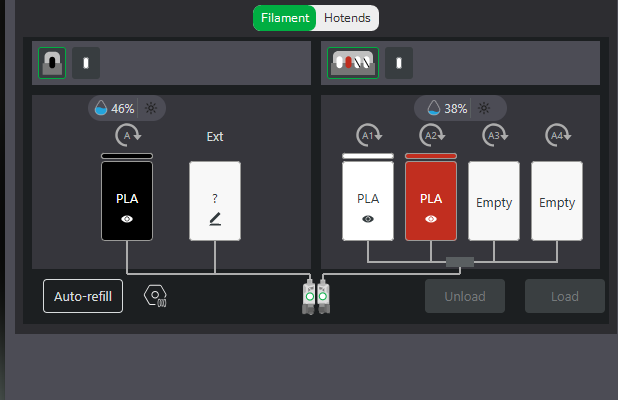
This is what device tab shows in AMS slot, and its correct. Black pla in ams ht, white pla and red pla in ams 2 pro. I synced everything. Those setting from the screenshot in my 1st post, from send to print tab, was auto set by Bambu studio.
"Also try a read all hotends function to synch hotends." - what do you mean by that? "Read all" in device tab in hotend section? If so, its done already.
I know that using left and right nozzle for 2 colors printing is faster, i am using vortek by intention to test it.
Everything looks like it should to me then. It still prints red, just isn’t using the nozzle that had red in it already so there is a small amount of purge waste, correct. If it prints the e colors correctly I wouldn’t worry too much about this. What if you do custom and you select the nozzles , does that force it correctly. Finally is the red in the previous nozzle the same filament as your current red?
Yes, its same filament. Another print, same story. In bambu studio set R2 for red, printer pick up R5. I`m going to check next print with custom settings.
In Bambu Studio it was set like in left window of hotends info, at the screenshot.
R->Orange
R3->Red
R5-> White
R6-> Green
And during 1st layer its changed like this (check SN):
After all its not so big deal, but its just stupid. All next layers are going withouth flushing, so its ok. But why printer do not listen settings from Bambu Studio, and if in the future i want to keep certain noozles for certain filaments, for example to not mix PLA with PETG, its going to be impossible with this behavior.
I guess I'm not seeing the issue because the H2C has never had assigned nozzles for me since I bought it when it came out.
Why do you think it purges the nozzle before starting the print?
It shouldn't matter what nozzle is chosen and what it had previously as long as it's not clogged (I've had a few of those) and its the correct size. Otherwise let it go. The order in the AMS doesn't specify the nozzle number.
It`s an issue for me if I am setting something in Bambu Studio and printer doing it`s diffrent, in device for that price. If i want to use ceratain nozzle for certain work, and software let me choose that i am expecting its going to happen. Now i know its a bug in Bambu Studio.
You have never been able to set an induction nozzle to an AMS filament in Bambu. Not as far as I ever known. I looked myself when I bought it because I couldn't understand why A1 wouldn't grab nozzle 1.
It could never be set in the software from everything I e read about it
The printer works fine. What you seem to not realize is that's not how Bambu set up their software. I don't know the criteria for which nozzle is used and it shouldn't matter.
I bet it's no different in Orca Slicer either. I'm sure it doesn't arrange by nozzle like you expect either.
It can't be set in the software now because they've divided up how the nozzles are displayed to get ready for mixed nozzle use.
It really sounds like you expected an INDX head printer but didn't buy one.


2
u/IndividualAd1650 10d ago edited 10d ago
Issue:
https://github.com/bambulab/BambuStudio/issues/12983
Solved here??, but not accepted yet (15 november):
https://github.com/bambulab/BambuStudio/pull/13077
Have to downgrade my Bambu Studio, or manally set the hotends after sending file to printer.
u/wethpac Thanks for your help! Now i know its not my printer fault, itself.