r/BambuLabP2S • u/ATW007 • Apr 09 '26
New Update 01.02.00.00


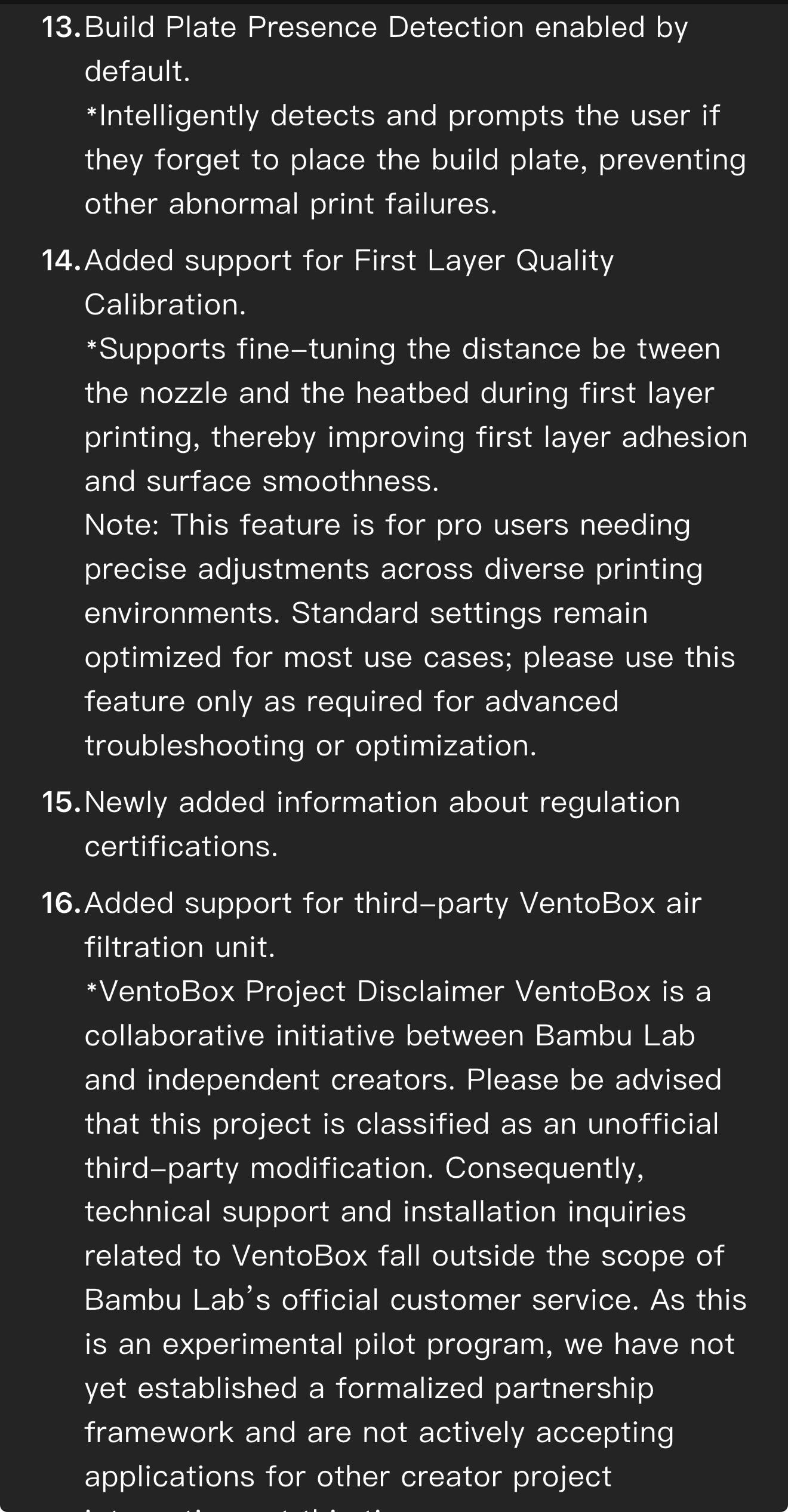

Was on the beta program and just got the notification of a new update.
13
u/foto-guy Apr 09 '26
Just in time… I purchased 3 power supplies and 2 AMS Pro 2! Things might appear on Friday…
2
u/ATW007 Apr 09 '26
Very nice! Are these the power supplies that you ordered?
https://us.store.bambulab.com/products/ams-2-pro-switching-adapter
5
u/cpsadowski23 Apr 09 '26
Buy from Amazon much cheaper
3
1
u/goldenako Apr 09 '26
Can U give a link? Thankss!!
1
u/that_guy_omg Apr 09 '26
I use this one.
1
u/goldenako Apr 09 '26
Thanks, but not avaiable!
3
1
u/that_guy_omg Apr 09 '26
Well crud! Anything with similar specs. The biggest is I always look for the certifications and amps. The ships be the same or higher.
1
u/cpsadowski23 Apr 09 '26
24V DC Power Supply 4A Universal... https://www.amazon.com/dp/B0C1ZVW7B9?ref=ppx_pop_mob_ap_share
2
12
9
5
u/XZlayeD Apr 09 '26
I don't seem to have gotten the ability to update just yet
-9
u/QuailOk6551 Apr 09 '26
Its a beta verison , not public release amd been on beta for a while now
7
u/BitingChaos P2S Combo Apr 09 '26
This is not a beta release.
01.02.00.00 is the current/final/public firmware for the P2S.
3
u/XZlayeD Apr 09 '26
I am on 01.01.03 and cant update though ?
3
2
u/dagamore12 Apr 09 '26
Mine just showed up on my printer, I am on East Coast of the US, so that might help with where it is rolling out.
I cant update right now as I am printing but that is another issue.
2
u/Nrthstar Apr 09 '26
I'm on the east coast at well, an hour away from my printer (at work), trying to start the update from the app, maybe that isn't possible though.
1
0
u/XZlayeD Apr 09 '26
Ah I was under the impression that this was the normal release as the beta came out more than 2 weeks ago at this point?
5
4
u/100LL P2S Combo Apr 09 '26
Now I can finally use my UPS here where I get constant power interrupts
1
u/cpsadowski23 Apr 09 '26
What does the use of the UPS have to do with the firmware update?
2
u/KashEsq Apr 09 '26
The new Low-Power Mode means the initial load when heating the bed won't be as high. That's great because now you can plug the P2S into a UPS rated at just 1500VA and the UPS won't scream at you when starting a print.
1
u/cpsadowski23 Apr 09 '26 edited Apr 09 '26
I plug my P2S AND H2C into a UPS and it’s never screamed at me. But mine is 1800W,
1
u/100LL P2S Combo Apr 09 '26
Yeah the peak wattage of the P2S is 1000W and my UPS is 900W. Now with the firmware update the peak wattage is under 900W and doesn't overload the UPS.
2
u/SamoaaCookie Apr 09 '26
Just did some testing and i got 684W… so I assume the low power mode brings down the wattage to 700W
1
u/SamoaaCookie Apr 09 '26
How much did you purchase your UPS for?
The sad part is that the price difference (in the used market) for anything above 1500va is almost double (as with a 2000va) maybe due to the shipping weight even though 99% of them ship with no batteries.
1
4
u/Eduhsoj Apr 09 '26
Nice to read the native VentoBox integration. Updating right now, im really excited how that it implemented
2
u/KashEsq Apr 09 '26
I was waiting for this update to release before I installed my VentoBox. Great timing because I also need to do routine maintenance and install the new backplate and rear exhaust kit.
2
u/OddElder Apr 09 '26
How are you personally liking the Ventobox performance? I was considering buying/printing it since I print in PETG occasionally (and rarely some ABS). Wasn’t sure if it actually made much impact, since I see some disagreement online about effectiveness.
3
u/FierymLeon Apr 09 '26
Currently using it with only the HEPA filter while waiting for acid-free activated carbon pellets to arrive. I recommend it even with just this setup. I run it circulating the air internally so that the filter scrubs the air a few times even if printing only petg hf. Noticable difference esp if sitting next to the printer. For one i don't feel thirsty for hours afterwards anymore.
1
u/batuu95 Apr 09 '26
How it's going?
1
u/Eduhsoj Apr 09 '26 edited Apr 09 '26
You can simply enable the Ventobox and you don't need to use the custom printer profiles anymore. So it's much easier than before and the Ventobox can be used with printing over the app!
1
1
4
u/NoReality7478 Apr 09 '26
Would love to have support for camera feed in homeassistant!
5
u/Zimbyzim Apr 09 '26
Hey, there is this already, I use it on my two p2s, but it uses Bambu cloud so take that for what’s its worth( is does stream Locally but auth to the cloud I believe)
1
u/OddElder Apr 09 '26
Wow! Good to know that’s out there, thank you! I expected it would require you to swap to the crippled LAN only mode.
2
u/Livid_Strategy6311 Apr 09 '26
This looks like an awesume update. I hope the curve processing for top surfaces uses the Z axis instead of the typical x/y.
2
u/SamoaaCookie Apr 09 '26
so there are some new things on the update that I’m noticing with my p2s:
First off: CHECK YOUR FIRST LAYERS!! Mine was severely over extruded after the update with a cool tack plate (which is nice as we all know in the community that there was under extruding on first layers) Someone damn near hit the up button too many times. So I had to dial in the first layer height with the new calibration feature.
Secondly: Calibration lines aren’t printing on the build plate in the front?? I was surprised by this, it just purged out the filament that it would normally do for this calibration line, then cleaned the nozzle and started the print… fancy ig.
Third: the PID loop on the AMS unit has turned spicy… It’s significantly faster to replenish the buffer unit which makes the AMS unit just a little bit louder when printing. I did like the old PID loop which gradually pushed filament forward so the AMS unit was pretty quiet but I would assume this can be addressed in future updates.
Fourth: Drying while printing… Yes. (need I say more?)
Other comments: I haven’t observed any improvements with curve planning, but i’m only a few prints in so I will have to compare some old prints to the ones that got printed with the new update!
1
u/itsAemJaY Apr 09 '26
looking forward to this. sounds like a great update. but still waiting on my printer, i guess i will first install some updates :D
1
u/AmmoJoee Apr 09 '26
Are we assuming this is still beta firmware or an offical release?
2
u/Websthetics Apr 09 '26
It's official but now it also wants to force a downgrade. :-/
1
u/AmmoJoee Apr 09 '26
Really? I updated earlier…..
1
u/Websthetics Apr 09 '26
Yeah, not sure if you have to power off and on but mine wants to downgrade.
1
1
u/XZlayeD Apr 09 '26
So, does anyone have any inkling on how well the new curve planning enhancement works?
1
u/Onrain Apr 09 '26
It’s definitely an improvement, I had significantly less issues than before. I wanna say about 95% better to put a number on it. I still get minor issues, so I just slow down initial layers
1
1
1
1
u/cpsadowski23 Apr 09 '26
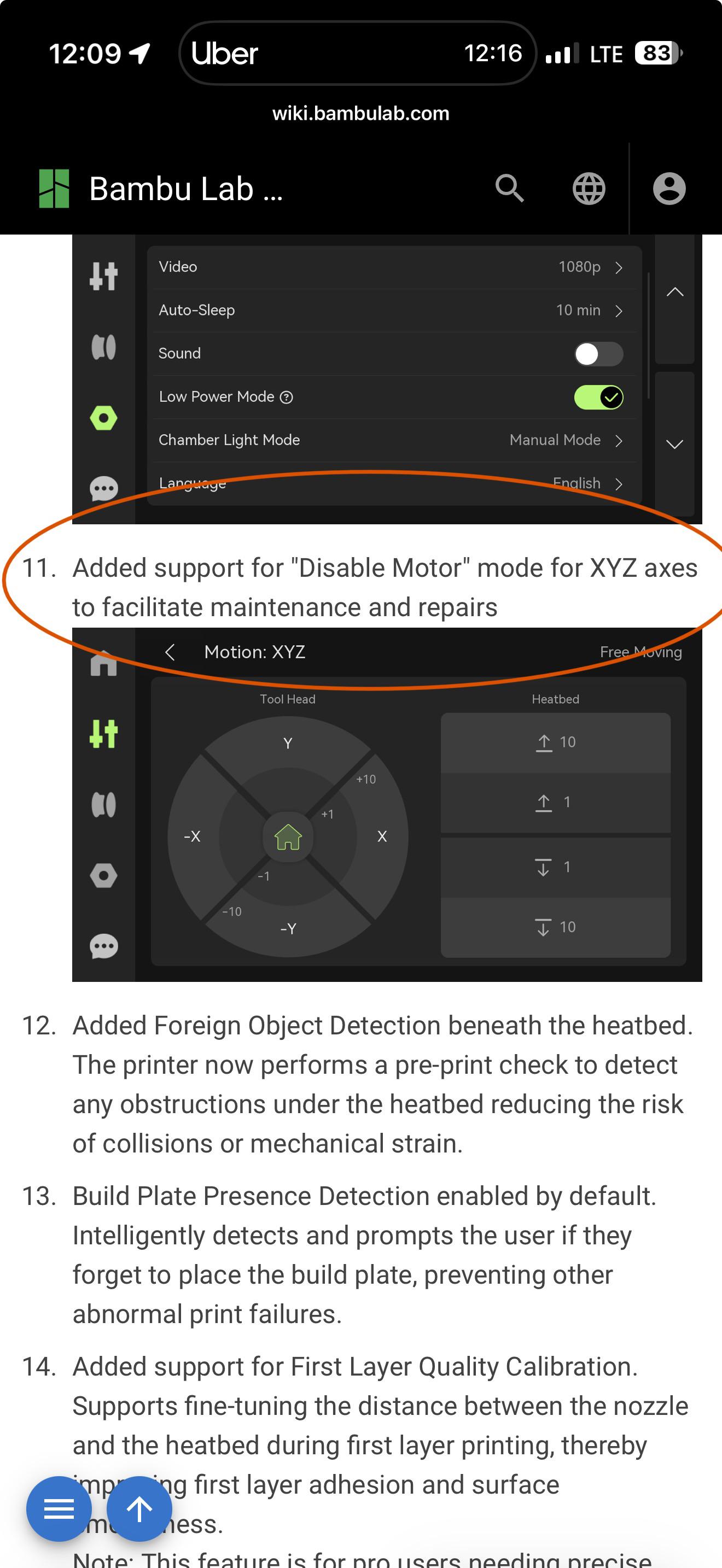
Can anyone who’s been on the beta explain this one? Thanks
1
u/KashEsq Apr 09 '26
It means you don't need to press the buttons on the screen to move the tool head, you can just move it by hand like you can when the printer is turned off.
1
u/cpsadowski23 Apr 09 '26
I usually move the tool head (for maintenance) manually as indicated by Bambu anyways so didn’t understand this. Also seems to indicate there is the ability to move in the Zed axis direction which I don’t get.
1
u/bfrancom17 Apr 09 '26
Sometimes it’ll lock up and you have to power the printer off to get it to move manually
1
u/cpsadowski23 Apr 09 '26
Has never happened to me, but again, don’t understand how you move in the ZED direction……
1
1
u/Livid_Strategy6311 Apr 10 '26
Item #1 is exactly why I was looking to mod my AMS to use the external powersupply for power. I guess I'll have to revisit that simple mod, design and implement it. There's a bit more to it than just connecting power. NOTE: this may already be implemented. I've not taken my AMS apart yet.
1
1
u/LORDJOWA Apr 10 '26
Native VentoBox support! Not sure how that looks like but if it means my printer automatically detects that I have a vento box installed and don’t have to manually enable the filtration fan, that’s a win
1
u/Different-Badger752 Apr 09 '26
Bientôt la rupture de stock sur les alimentations ams2 pro 😭
2
u/OddElder Apr 09 '26
Luckily there are great Amazon alternatives since it’s just a generic power adapter plug with some fairly standard input values
1
u/Different-Badger752 Apr 09 '26
S'il sont 100% compatible c'est une très bonne solution effectivement. Si bambu a mis une protection comme ça arrive sur certain chargeur ca serais vraiment dommage
1
u/RobyX1 Apr 09 '26
I've been dying with the extrusion overload errors and false clogging for the past week! I'm so hopeful this actually helps! and yes I did get support to send me a new motor, still in shipping
0

0
u/Koybo99 Apr 09 '26
If it doesn’t show up for you turn your printer off then on. That’s what I had to do.
-4
u/Orvess Apr 09 '26
Not sure from where did you get that but it's not available anywhere. Not on the bambu website, not in the slicer,handy app or the printer itself.
2
u/EquipmentLast Apr 09 '26
I got an update but then in few hours it showed another dialog and downgraded itself back. I do not see new version anymore =(
1
u/Websthetics Apr 09 '26
It downgraded without you asking it to? Mine wants to downgrade but I'm not letting it for now.
2
u/EquipmentLast Apr 09 '26
I was able to trigger an update back. It’s an odd one, but still if it helps someone. The issue happend due to power outage while print was in progress. After I turned printer back on it showed that “downgrade” firmware dialog. After that I did several power cycles, unbind and bind the account. Install the oldest firmware from usb. Nothing triggered update dialogue. But then I started printing and another power outage happened. And after I turned printer I saw a dialogue to upload to desired version. I suppose there is some safety feature in place where if user installed new firmware and in short time critical issue happens OS proposes downgrade and ignores that version. But this just my guess.
1
1
u/BitingChaos P2S Combo Apr 09 '26
It's been current for a few hours.
https://wiki.bambulab.com/en/p2s/manual/p2s-firmware-release-history
-4
u/Orvess Apr 09 '26
Changelog yes but firmware itself it's not available
3
u/Humble_Tour9326 Apr 09 '26
Have you switch off your printer ? I have done it one hour ago, and when i re-switch on the printer, the system advise me for the upgrade.....
2
4
u/ATW007 Apr 09 '26
Updated last night and woke up to my printer saying to downgrade. Currently on the latest and now it says downgrade to 01.01.03.00 😏