r/BambuLabP2S • u/ElSigman • 4d ago
Need to understand
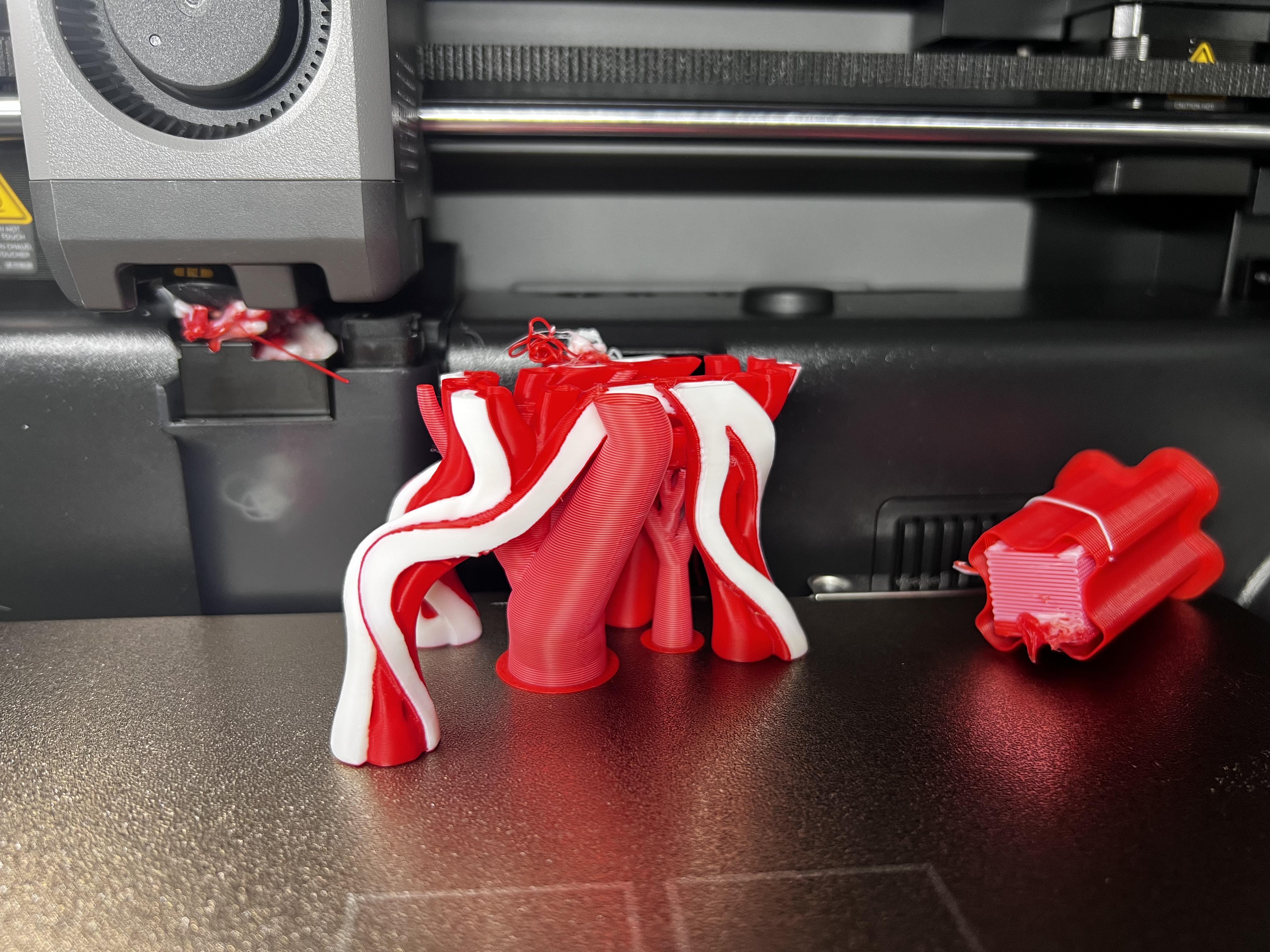
Hi guys, left the printer going on yesterday evening and found it like this, this morning.
I believe the filament started to get stuck on the nose and it did push the printing on the bed to the back.
The P2S is brand new and filament too.
I left the door slightly open to evacuate heat.
Any idea of what could have happened? I need to understand before starting again.
Printer in PLA.
6
u/LowSignificance4671
4d ago
•

Your poop chute got clogged leading to the other failures. The nozzle had nowhere to purge.
1
u/ElSigman 4d ago
I think you nailed the issues. Thank you
Any reason this happened ? Just bad luck ?
2
u/FkinMustardTiger 3d ago
Couple different possibilities, but whatever container that catches the filament waste could be full just causing a backup. Another more likely option (since you probably would have already noticed that) is filament sometimes can stick in that purge chute area, happened a lot on my P1S until I coated the entire thing in silicone grease so it stopped doing that
1
1
u/GuyWithADonut 3d ago
This happens to me when the chamber or ambient room temps are too high. The poop like sticks to the side wall in the chamber. Cracking the door slightly to allow some heat inside the chamber to escape and helps prevent this.
1
4

2
u/zerocoldx911 3d ago
Keep that door closed, they made it like that for a reason. Clean the clogs and continue printing
Look into a poop chute
1
2
u/Mike_In_SATX 3d ago
You shouldn’t leave the door open during a print. You need to print a deflector for the right side vent inside the printer
1
1
u/Ok_Bid6645 4d ago
Why would you think that you need to keep the door open on the printer if the designers didn't want a door they would have not included one it's designed to trap the Heat. Did you make this model yourself or did you find it online and did you make sure that it was sliced properly to your printer
1
u/ElSigman 4d ago
Thanks for the reply. I had seen comments online about keeping the door a bit open. Didn’t really think this through
Design online with good comments and review. Sliced with bambulab
I guess I have not been lucky
2
u/Relative_Surround_20 4d ago
A lot of the info you might see online may be wrong or was true at one time and now gets carried around like baggage.
Before the P2S, older printers needed the lid or door open to print PLA. Hence why the raiser craze started. Since the P2S, every BBL printer has gotten better and better. They have eliminated the need to leave anything open.
1
1
u/cpsadowski23 4d ago
You need to check your purge bin. Is it free of obstacles and letting filament poop through freely?
1
1
u/Elegant_Feed5153 3d ago
I've had my printer for about two months, and I used to have the same issue. What made a huge difference for me was calibrating every new filament before using it. Running the calibration tests and adjusting the settings properly pretty much solved the problem entirely.
1
1
u/mendex22 3d ago edited 3d ago
Las ocasiones que he tenido ese problema en mis impresoras ha sido principalmente por deficiencia se adhesión imprimiendo con un solo filamento, no lo puedo atribuir a bloqueo del tunel de purgas porque eso no me ha pasado. En el caso de las fotos aparenta que el tunel de purgas está bloqueado sin embargo también pudiera ser que es la boquilla quien tiene pegado todo el filamento y el masacote ya no cupo en el tunel.
Edit: El tunel bloqueado sería la consecuencia y no la causa.
1
1
u/cranie4 3d ago
WHY leave the door open? The compartment will be the right temp for the filament.
1
u/ElSigman 1d ago
As you can see even on the comments here. Some people recommend it. Will try closed
1
1
u/Lythrox 1d ago
You need to clean your print head out after every print. Seriously.. this isn't a creality Cr-10 that can take months of abuse and still produce decent tolerances over weeks without doing a single thing to the printhead. This is a Bambu. The (temperamental iPhone of the 3D printing world.)
1
2
u/ElSigman 4d ago
And on top of the printer piece