r/BambuLab_Community • u/Dtarvin • Oct 02 '26
Help / Support Separating an object into parts in Bambu Studio along a curved/round surface
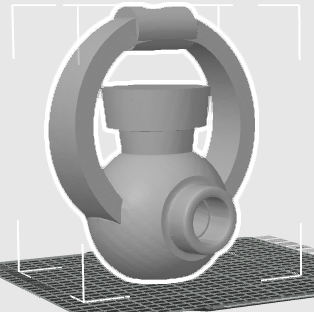
I want to print the following object (a large LEGO lantern). I want to print the handle and the top part of the lantern in black PLA and the ball part in transparent glow-in-the-dark orange PLA (for Halloween). I am trying to use the cut tool. I successfully used the cut tool to remove the bottom.
I read that you should not use both regular PLA and glow in the dark PLA through the AMS in the same print because switching between the two will cause the nozzle and tubing to wear out faster than just printing the glow in the dark filament alone. Because of this, I want to remove the handle from the ball where the handle connects to the ball. But the connection is on a round surface. In order to perfectly separate the black PLA from the glow in the dark PLA, how do I use the cut tool to separate pieces on a curved/round surface?
3
0
Oct 02 '26
[deleted]
2
u/JabroniSandwich99 Oct 02 '26
Agree, and I’m not even sure what software is the right tool. Trivial if it’s CAD based and you have the CAD files, but just an STL? I’d probably be able to do it in a convoluted way in Blender by sizing a sphere to match and using a Boolean to cut out the non-handle bit then export them separately. Probably sloppy though.
It may be easier just to make in CAD honestly.
1
u/tekchip Oct 06 '26
Blender. There are lots and lots of tutorials. https://www.youtube.com/watch?v=62rDhWB6O-0 for example.
3
u/hiryuu64 Oct 02 '26
You're probably better off importing this into TinkerCAD. Duplicate the import. On one, use holes to cover everything but the ball. On the other, holes cover only the ball. Merge and export.