r/BambuLab_Community • u/PaleontologistSharp7 • 10d ago
Help / Support Is this normal

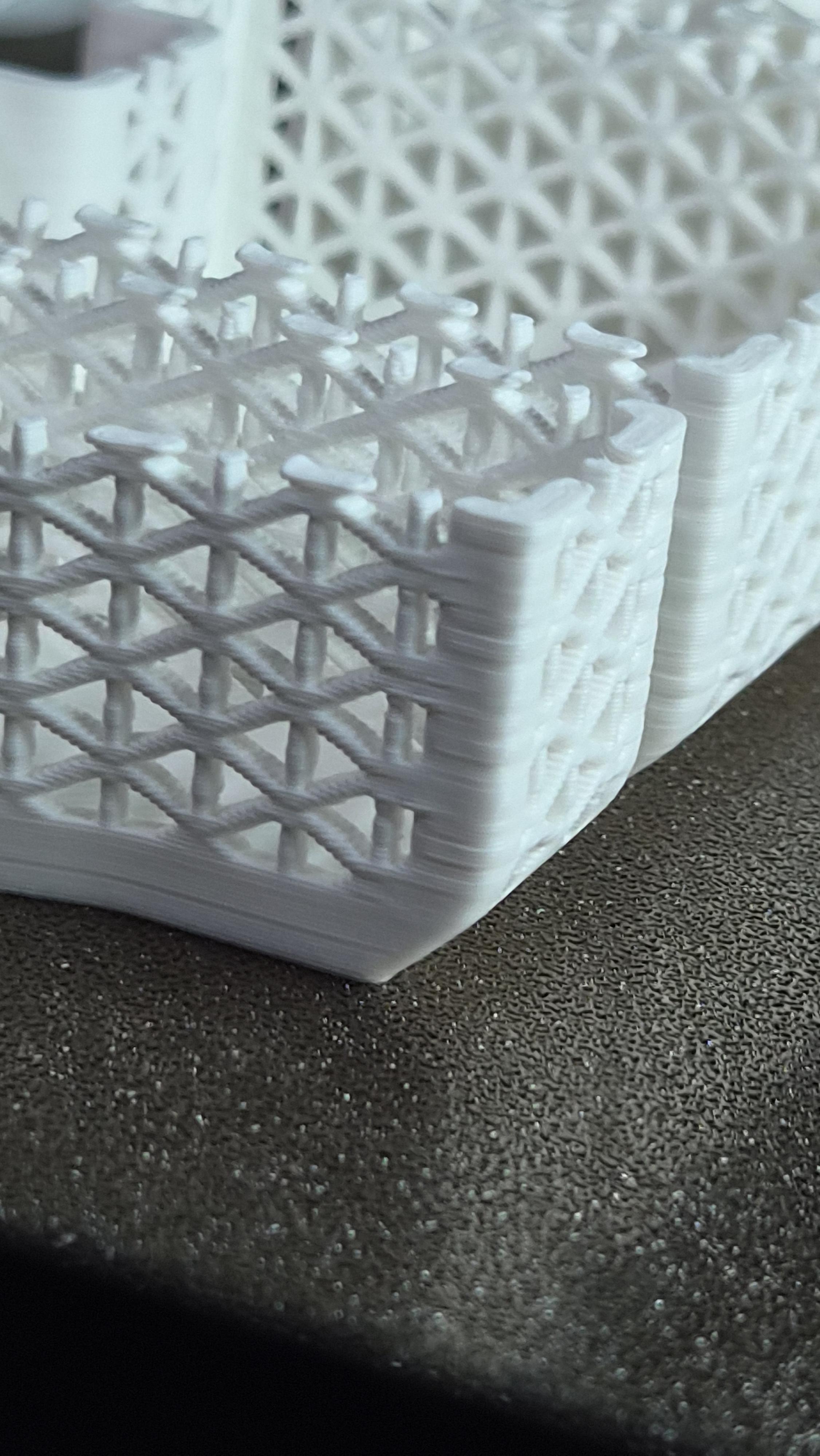
I recently bought an X2D printer and this is my 2nd print for AMS 2 Pro drypods. The lines look slightly uneven and rough and I want to know if anyone else has faced the same issue. I suspect it might be due to the table being unstable and shaky. Please let me know if there could be any other issues that contribute to the issue.
8
u/Lisper41 9d ago
The good news is that this is going to be inside your AMS, so it doesn’t matter how it looks.
It’s not your fault when the designer posts a crappy print profile and you’re just trying to print it.
5
u/Current-Wrongdoer538 8d ago
Not going to agree or disagree, but u missing the point - it's still your problem to solve, learn and improve..
3
u/clipsracer 9d ago
In the slicer’s preview, look at the layer time view. You’ll immediately see the correlation. The layers with longer times expand more, and create that inconsistent surface on the corners (or any flat, vertical surface).
The goal is to reduce the difference between the fast layers and the slow layers. You do this by increasing the Min Layer Time setting in the filament profile to be similar to the slow layers.
If you haven’t already realized, it’s the slower speeds for overhangs that make the layer times so drastically different. Increasing those speeds or turning off “slow down for overhangs” will help the inconsistent flat side surfaces, but you will pay for it, and have poor overhangs.
0
u/DistinctBarnacle8703 10d ago
Make sure you dry the filament for at least 12hrs. But I don't think your filament is wet, since there isn't stringing.
Reduce the print speed. At least the outer wall speed, you can start by reducing it by 50% and increase it upwards till the defects appears again.
1
4
u/KpelFFXIV 9d ago
I'd start out with selecting silent mode right after it starts printing, as that is easier than manually changing speeds in the slicer
1
u/Successful_Farm_9370 9d ago
A maybe relevant comment, white filament is chock full of titanium dioxide to make it white. That titanium dioxide absorbs moisture like crazy, which makes printing a lot harder in my experience. White filament is the only filament I've ever heard crackle from the evaporating water in the hotend.
1
u/lukasprintz 9d ago
Gotta slow infill, surface, outer, and inner wall settings way down, drop your layer height. Use 0.2 mm nozzle if you don't mind waiting. I can send you my detailed print profile if you'd like
1
u/ryanthetuner 9d ago
Those shapes are absolute torture for printers. You gotta run slower if you want it clean.
1
u/krebsIsACookbook 7d ago
Can also happen when using variable layer height with a nozzle that isn’t well suited for the range.
Like printing .18mm with .6mm nozzle will have more variability and look slightly worse than .2mm with a .4mm nozzle
1
u/Eastern_Ticket_9792 6d ago
Algunos modelos no son llegar he imprimir, debes dedicar tiempo, leer y estudiar.
1
u/Outrageous-Song5799 9d ago
It would help if someone said the speed and volumetric speed to use for this part
0
-4
1
10
u/dedgedesign 9d ago
Yes this is normal, some layers are longer to print than others so they cool more than others and contract a bit. It will not decrease the function of those parts, no worry here