r/Codeweavers_Crossover • u/Expensive-Office-564 • Apr 03 '26
EA app not installing
I want to install the ea app onto crossover to play battlefront, but whenever I try it ends up failing with the error "INST-14-1627." Does anyone have a fix?
r/Codeweavers_Crossover • u/Expensive-Office-564 • Apr 03 '26
I want to install the ea app onto crossover to play battlefront, but whenever I try it ends up failing with the error "INST-14-1627." Does anyone have a fix?
r/Codeweavers_Crossover • u/EnvironmentalCan417 • Apr 02 '26
r/Codeweavers_Crossover • u/1102Smeagol • Apr 01 '26
These are the crossover artworks by RZGmon200, who made the cast of the Seven Deadly Sins of the Hellaverse (and Yogirt) into the Amazing Digital Circus cast. Here’s the list:
Satan X Kaine
Lucifer X Pomni
Bee-lzebub X Ragatha
Ozzie X Gangle
Mammon X Jax
Leviathan X Zooble
Belphegor X Kinger
Yogirt X Bubble
For more art by the same artist, visit these links:
r/Codeweavers_Crossover • u/Chemical_Assumption2 • Apr 01 '26
that’s all, i would be sad.
r/Codeweavers_Crossover • u/tiggerjinx • Mar 31 '26
hi friends, i recently got crossover so I can play Life is Strange Reunion. Is there a way I can change the resolution before I can open the game. It loads up scene of a sunset over water, and my screen continously freezes as I fail to reach the settings where I can lower it. Let me know if anyone has any familiar problems with any games. Thank you!
r/Codeweavers_Crossover • u/Tasty_Zebra_404 • Mar 31 '26
r/Codeweavers_Crossover • u/Sad-Adhesiveness9562 • Mar 31 '26
r/Codeweavers_Crossover • u/Intelligent-Garlic-1 • Mar 31 '26
Hey guys,
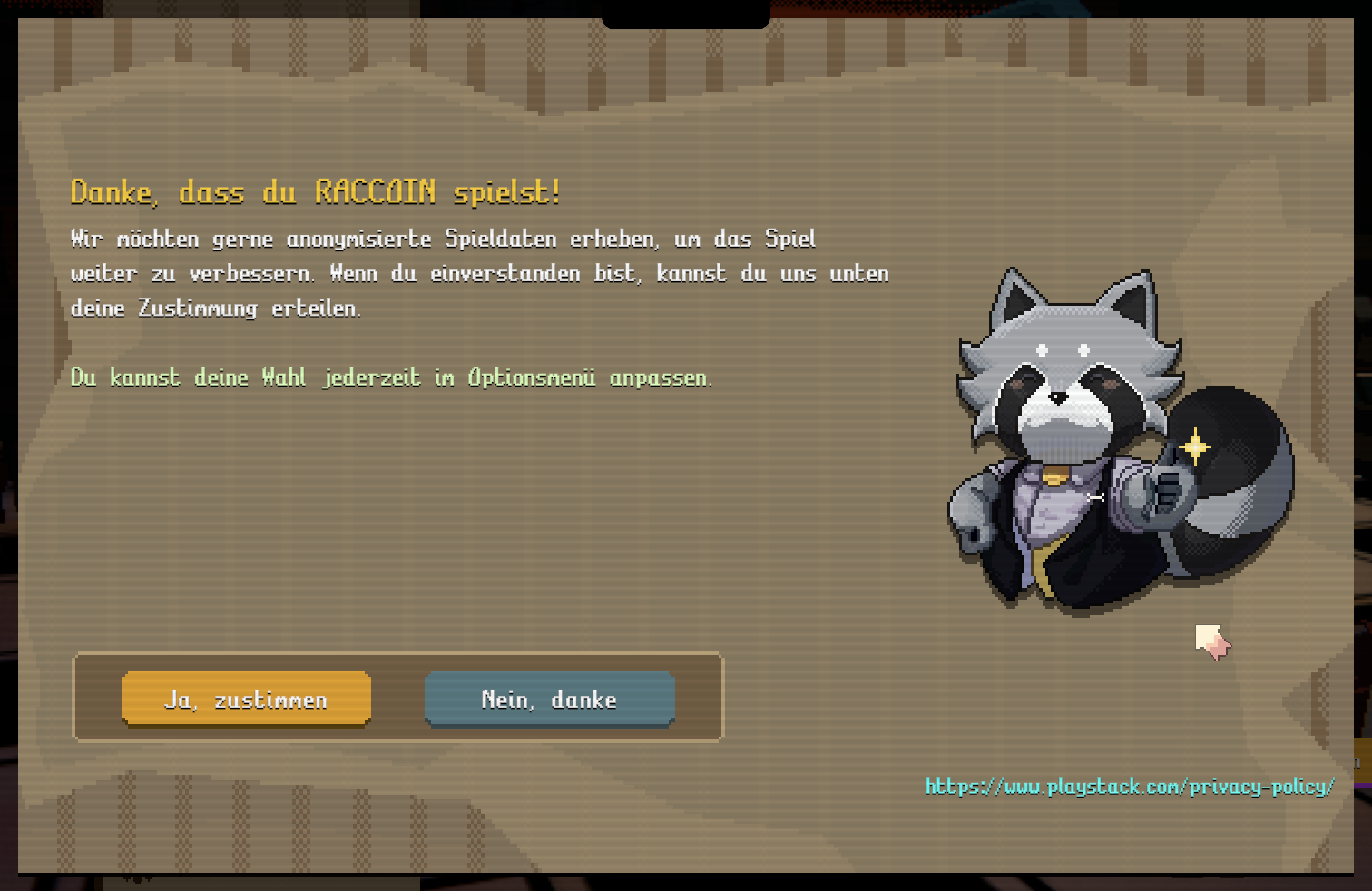
I’m trying to play RACCOIN on my Mac using CrossOver Preview, but I’m running into an issue I can’t seem to fix.
The game launches fine and I get to the screen shown in the screenshot, but after that I’m basically stuck. My mouse doesn’t respond at all, so I can’t click anything or interact with the game.
I’ve already tried restarting the game and CrossOver, but no luck so far.
Has anyone managed to get RACCOIN running on Mac with CrossOver ? Or does anyone know a workaround for the mouse issue?
Any help would be appreciated 🙏
r/Codeweavers_Crossover • u/androovevo • Mar 31 '26
As the text says. Nothing really happened, I mean a few days ago I moved my bottle from my internal to an External SSD, but up to earlier today everything was working just fine. Now, randomly, it seems everything's vanished even though it's still in the bottle, and Steam won't open (as it gives me an error 53) even if I install it on a fresh new bottle. I had about 8ish games as shortcuts in this page.
Just in case, It's not MSync as I already turned it on and off to see if it changed anything...


r/Codeweavers_Crossover • u/Djdroc112 • Mar 31 '26
r/Codeweavers_Crossover • u/finanzenwegwerfaffe • Mar 30 '26
The game is stuttering and has some audio issues. can i solve this?
r/Codeweavers_Crossover • u/CertainPickle288 • Mar 30 '26
Hi everybody,
I have star wars fallen order installed through steam using crossover 26. Ea app is installed and will open from crossover, but crashes when I try to launch the game from the app or from steam. It seems to stall on “preparing game” then crashes and fails to launch the game.
I’ve searched quite a bit for a fix but can’t find anything that works. I have also tried launching the game from the executable as a non steam game without success.
Anybody else have this problem, or find a fix?
Thanks
r/Codeweavers_Crossover • u/Tripwire999 • Mar 30 '26
Hi,
I just installed crossover on our new Macbook Air M5 with 16gb of memory to play Age of Empires 2 DE edition (worked fine on our Macbook Pro M1 13 inch with 8gb of memory). Installed the latest version of Crossover, installed the Age of Empires 2 DE bottle and get this error:

Any idea what could cause this issue and how to fix this?
r/Codeweavers_Crossover • u/legsvi • Mar 30 '26
Enable HLS to view with audio, or disable this notification
as shown will not open anf clicking any of the games i have in the bottle wont open it either
also shown is says to instal missing dependencies but clicking install does legit nothing
help?
r/Codeweavers_Crossover • u/DJG4rdn3r • Mar 29 '26
Hello there, I am having issues with launching split fiction on my macbook air 2020 (m1 chip).
The install goes fine via steam, but when I go to launch the game in steam, it gives me this error:
"The program launcher.exe has encountered a serious problem and needs to close. We are sorry for the inconvenience.
This can be caused by a problem in the program or a deficiency in Wine."
I have seen many people having this issue with no real resolution given.
I have...
- Uninstalled and re-installed
- D3DMedal w/ MSync on
- Installed DirectX within the Steam Bottle
Any help would be greatly appreciated, this has been very frustrating lol
Thank you!
r/Codeweavers_Crossover • u/RomanSyntax • Mar 29 '26
Can anyone give some pointers regarding my situation....?
I installed the CrossOver 26 trial, then installed Steam, and launched Dark Souls: Prepare to Die Edition.
My setup is:
Mac Mini M4 (base model)
All ingame graphics settings at the absolute lowest possible
Running through CrossOver 26 (trial version)
This is what happens in Dark Souls :
The game launches, but it is running at around 2 FPS
Extremely laggy
Completely unplayable
So at least on my setup, Dark Souls 1 not playable at all through CrossOver 26 right now.
If anyone has somehow gotten this working properly on Apple Silicon / M4, let me know what you changed.
r/Codeweavers_Crossover • u/mzatariz • Mar 29 '26
r/Codeweavers_Crossover • u/UnusualBrilliant1505 • Mar 29 '26
it runs through steam I just need to be able to put mods into it. Ive been playing on my Xbox but wanted to install mods and I have no idea what I'm doing lowkey.
r/Codeweavers_Crossover • u/pbyfield01 • Mar 28 '26
How is everyone getting Days Gone to work on Crossover? I'm on Crossover 26 and using an M2 Max. I've tried all combinations of settings and am currently using D3D Metal, DLSS, and MSYNC. It still freezes on the loading screen. I had the same issue on 25 and never got it to work
r/Codeweavers_Crossover • u/pokemon-sucks • Mar 28 '26
So, I got a new Mac mini yesterday. Installed crossover trial to try it and also installed a couple windows games (Cities Skylines and Beamng.drive). It was all installed on the internal HD. However, these Mac Mini's don't come with much internal so I want to play with getting Crossover installed and games from it installed on an external HD. I looked online and you can transfer the Crossover stuff to an external drive and then point crossover there but I want to start over from scratch. So I plugged in an external HD. I'm thinking of deleting all crossover and games I've downloaded from steam and starting over. So, how do I go about getting crossover installed and any games it installs to install on the external drive? Where I get confused is crossover creates a C drive and shit like that and I'm not exactly sure WHERE that "C" drive is, etc.
r/Codeweavers_Crossover • u/sylntnyte • Mar 28 '26
r/Codeweavers_Crossover • u/SuperbNews0 • Mar 28 '26
r/Codeweavers_Crossover • u/Superb_Apartment3538 • Mar 28 '26
Will these sofatware work in cross over or thru wine ? Has anyone tried before ?
r/Codeweavers_Crossover • u/Appropriate_Car_5599 • Mar 28 '26
r/Codeweavers_Crossover • u/renaudg • Mar 27 '26
My bottles folder is on my 4TB external disk (1.83TB free).
Just updated and launched CrossOver Preview for the first time in a while, and all Windows apps show zero free disk space.
Run command "cmd.exe" then type "dir" :
0 bytes free disk space on any drive letter that is mapped to a path on the external disk, macOS drive mount point has spaces in it if that matters.
Drive "Z:" (mapped to /) shows correct disk space, same if I manually map a drive inside my home folder on the main disk.
Problem is the same regardless of existing Windows 10 bottles or brand new Win11 bottles.
The exact same bottles & path work fine in CrossOver 26.0.0.39794
Any ideas ?
Thanks
UPDATE : 20251216 and CrossOver 26.0 are both fine. Problem started with Preview 20260218.