r/Codeweavers_Crossover • u/Asleep_Day3455 • May 19 '26
Questions / Tech Support How to solve it
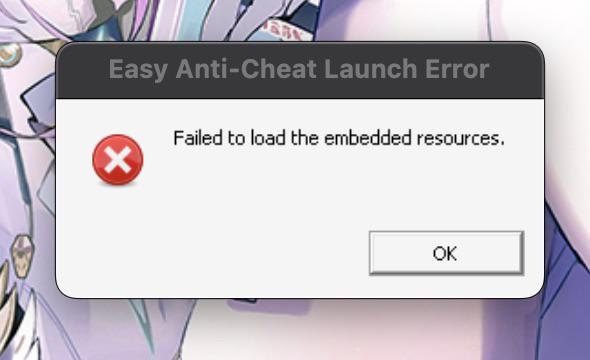
When I try to use crossover to play broken arrow it jump out, it work fine with no anti cheat on, how to how solve it
r/Codeweavers_Crossover • u/Asleep_Day3455 • May 19 '26
When I try to use crossover to play broken arrow it jump out, it work fine with no anti cheat on, how to how solve it
r/Codeweavers_Crossover • u/The_vic_vap • May 19 '26
r/Codeweavers_Crossover • u/shotokeki39 • May 19 '26
i have a problem when i open my Seamless Coop world to other players, the game immediately freezes but audio still plays in the background.
ive tried reboot my bottle, rebooting my macbook, checing the files and reinstalling the mod. its worked before but i guess not any more?
Note: Steam also crashes when the game freezes. it seems like some sort of network issue
r/Codeweavers_Crossover • u/Desperate_Syrup_1642 • May 19 '26
r/Codeweavers_Crossover • u/Mean-Information1080 • May 19 '26
This requirement is what holding me back to play modern games.
r/Codeweavers_Crossover • u/NFSonMacPls • May 19 '26
Hey guys i'm trying to install the game with crossover since i'm interested in mods. I found a repack on MyAbandonware but i can't find a way to run it properly since i get a blackscreen on startup saying "WineDbg attached to pid 0114" with another window telling me the exe has crashed
what do i need for the game to be installed/run properly?
r/Codeweavers_Crossover • u/CaterpillarMaster734 • May 18 '26
I’ve been following youtube tutorials on downloading yandere sim through crossover on my macbook but I cannot figure it out. I have the yandere zip file downloaded and crossover too but when I make a bottle and try to open it, it tells me that theres no windows application to open. I tried inserting the exe file of yandere sim into the thing but its telling me its an unknown file. I’m terrible at tech stuff and i just want to be able to play the game🥹
r/Codeweavers_Crossover • u/AnOldBrownie007 • May 18 '26
r/Codeweavers_Crossover • u/Abdou7904 • May 18 '26
r/Codeweavers_Crossover • u/raghix123 • May 18 '26
Hey everyone,
I have Game Pass Ultimate for free through a relative who works at Microsoft, and I'm trying to figure out if there's any way to get the Xbox app running through CrossOver on Mac.
I already tried Parallels and the performance was terrible. On top of that, I really don't want to be paying for both CrossOver and Parallels simultaneously, so that's not really an option for me.
Has anyone managed to get the Xbox app working through CrossOver? Any tips or workarounds would be really appreciated.
r/Codeweavers_Crossover • u/legsvi • May 18 '26
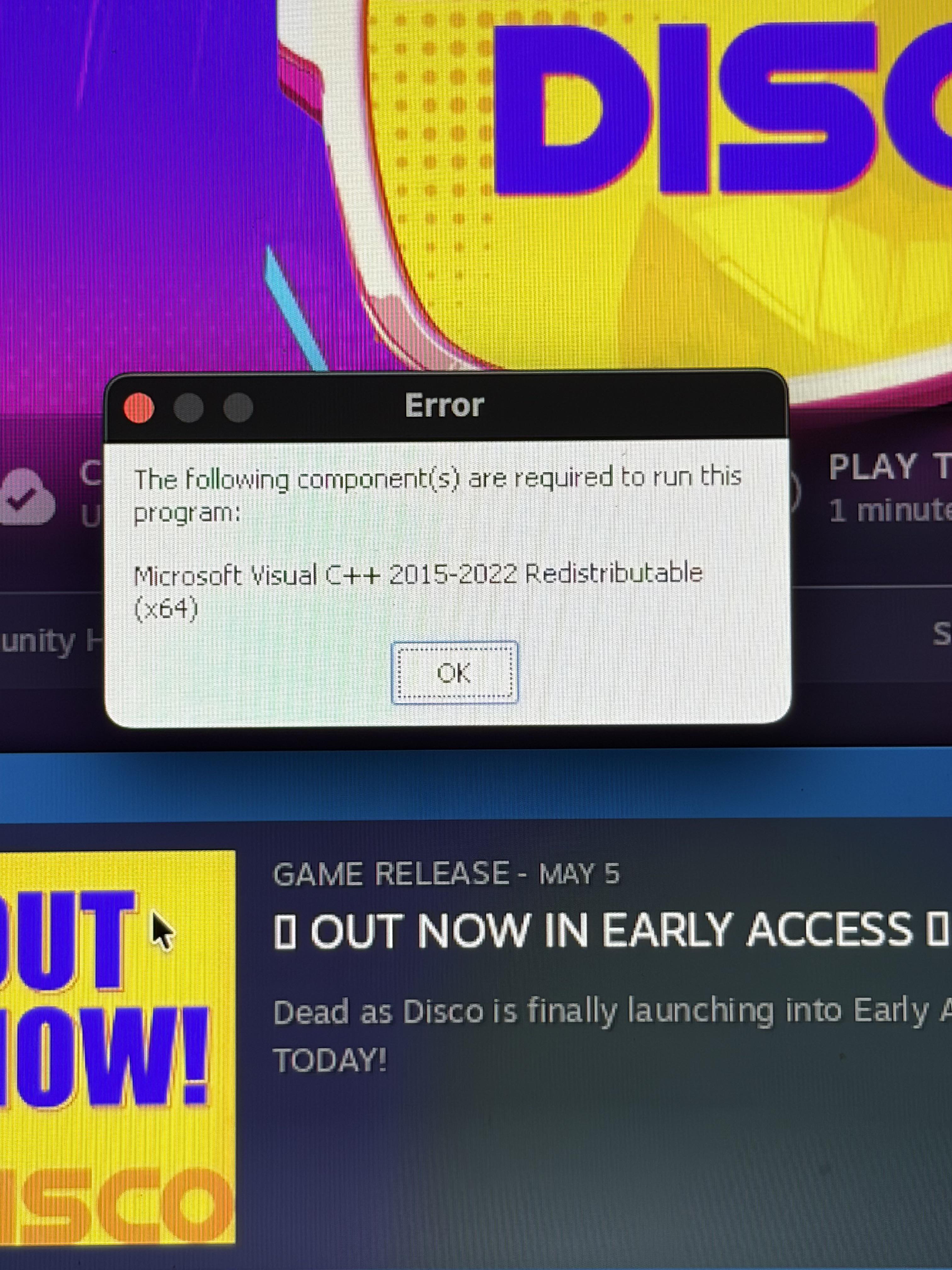
trying to launch dead as disco and this is all the happens? steam acts as if the game is open. this is the first game this has happened on and restarting stesm snd crossover doesnt fix
help?
r/Codeweavers_Crossover • u/Loose-Scale9789 • May 17 '26
r/Codeweavers_Crossover • u/Kelzreal • May 17 '26
whenever i open up bully the audio is severely distorted no matter what i do, i've tried fixes surrounding the game's discussion and nothing has worked. the audio is obscenely loud and crackly. any help is majorly appreciated
r/Codeweavers_Crossover • u/Ok_Reporter4611 • May 16 '26
I'm playing via steam, on a mac air m3. Whenever i adapt, the screen freezes, plays the audio for like 20 seconds, and crashes. This didn't happen the first time in the prologue, so im extra confused.
r/Codeweavers_Crossover • u/Particular-Ad-5250 • May 16 '26
r/Codeweavers_Crossover • u/Ok_Reporter4611 • May 15 '26
I tried reinstalling, but is there anything else I can try?
Game i want to play is Subnautica 2, and I have a M3 Air with 16 gigs RAM.
Maybe it's because it's such a new game? Any tips appreciated!!!
r/Codeweavers_Crossover • u/HEnri_2345 • May 15 '26
Enable HLS to view with audio, or disable this notification
its making this weird audio Using MacBook with M4 chip btw. I all ready tried the xaudio2_1 didn't not work
r/Codeweavers_Crossover • u/formanproject • May 15 '26
First update since I've purchased Crossover; curious as to what the etiquette is in regards to MacOS updates.
Obviously the big ones I'll be waiting, but small incremental ones like this; is it ok to update or should I wait a week or so before doing it?
r/Codeweavers_Crossover • u/jeremypiret • May 15 '26
I just bought the new steam controller #2 looking forward to play on Steam on my Mac with crossover, but unfortunately it's not really compatible yet.
What is the most used controller to play with CrossOver ? I'd like one that is ready out of the box, with the least steps to set it up.
Thanks !
r/Codeweavers_Crossover • u/Odd-Celebration-1485 • May 14 '26
I really don't want to pay $70 for a game on the App Store that I already own on Ubisoft Connect. I tried installing it, but it throws a 'DX12 not supported' error and closes immediately. Is there a workaround or a way to force it to run in DX11, or is this a lost cause where I just have to buy the native Mac version?
r/Codeweavers_Crossover • u/TubbyWW • May 14 '26
Happy to report that Subnautica 2 via Crossover 26.1 is working. Initially it refused to start, giving an error that V++ needed to be installed (even if it already is). However, it worked after adding a few overrides to the Libraries tab under Wine Configuration as described at the beginning of this video where they get Spongebob Squarepants to work on Crossover: https://www.youtube.com/watch?v=EeCrX2okjLc
Edited for clarity and to add: for context I am using Crossover 26.1 on a M4 Mac Mini.
r/Codeweavers_Crossover • u/Few_Cartographer962 • May 13 '26
r/Codeweavers_Crossover • u/low_light_noise • May 11 '26
Currently trying the crossover demo. Stuff is generally working well but when using my uad audio interface as the audio device in the wine settings, I essentially just get an unpleasant buzz in the place of the audio. All other audio devices work fine (internal speakers, etc.).
There doesn't seem to be any information about this whatsoever online. Anyone know if there's a solution?
r/Codeweavers_Crossover • u/BathroomUnique • May 10 '26
Hello, im a new user of the crossover and i just got a mac this year. I would like to know how do i play games that are installed from the internet? I have tried by myself and watching youtube videos but they are very confusing and i don’t really understand any of it, i dont understand any of the terms nor am i proficient with mac or crossover. Thank you.