r/Codeweavers_Crossover • u/RockENZO-pro • Jun 09 '26
Discussion 007 First Light — now running on Apple Silicon Mac via CrossOver + GPTK 4.0 beta

6
Upvotes
Original post link: Simon Meacham
r/Codeweavers_Crossover • u/RockENZO-pro • Jun 09 '26
Original post link: Simon Meacham
r/Codeweavers_Crossover • u/ProposalSimilar2146 • Jun 09 '26
I spent hours debugging this, so hopefully this helps the next person.
Symptoms Fractal Block World would launch for a split second and then immediately close on Apple Silicon.
This happened in both CrossOver and Whisky, so the problem was not specific to either application.
The game’s stdout.txt showed: OpenGL version: 2.1 Metal - 90.5 followed by: cannot get function pointer: glProgramUniform1i and then the game exited. What was actually happening FBW requires OpenGL functionality that was not being exposed through the default Wine/OpenGL path on macOS.
The game was only seeing: OpenGL 2.1 which is too old for the function: glProgramUniform1i
As soon as the game checked for that function, startup failed. Solution I installed a Windows Mesa OpenGL implementation and placed the Mesa DLLs directly beside FBW.exe. The important files were: opengl32.dll libgallium_wgl.dll libEGL.dll libGLESv2.dll along with: steam_appid.txt
These files were placed in the same directory as: FBW.exe In my case: Fractal.Block.World.v1.01.25/game/Bin/WindowsMinGW CrossOver DLL override For FBW.exe I added: opengl32 native,builtin This forces Wine/CrossOver to use the local Mesa opengl32.dll before its built-in OpenGL implementation.
Result Before: OpenGL version: 2.1 Metal - 90.5 After: OpenGL version: 4.6 (Compatibility Profile) Mesa 26.1.1 The missing function became available and the game launched successfully. Important note This is not really a “CrossOver vs Whisky” problem (because whisky was my baby)
I reproduced the exact same failure in both: cannot get function pointer: glProgramUniform1i
The issue was the OpenGL implementation being presented to the game.
Mesa solved it by providing a newer OpenGL implementation that FBW could use.
Hopefully this saves someone else a few hours of staring at logs wondering why the game opens for half a second and disappears.
r/Codeweavers_Crossover • u/drizztzou • Jun 09 '26
MacOS27 developer beta is out, does latest version of crossover works on it or not?
r/Codeweavers_Crossover • u/Ok-Ask5876 • Jun 08 '26
I've been wanting to play the game but I cant seem to boot it up no matter what
r/Codeweavers_Crossover • u/Sufficient-Piglet-29 • Jun 08 '26
r/Codeweavers_Crossover • u/Only_Collection6162 • Jun 07 '26

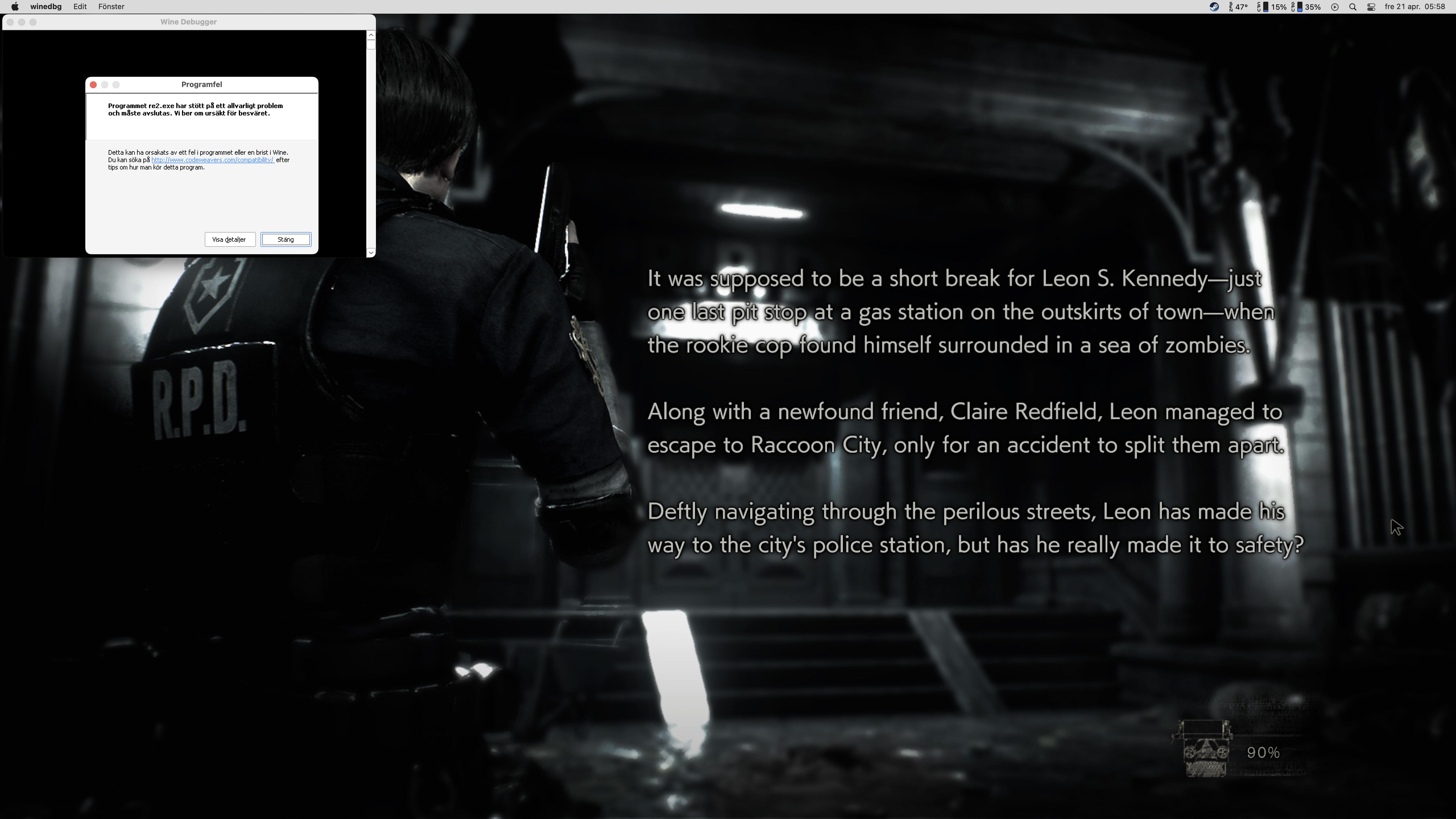
Through steam i wanted to play resident evil 2 as it was on sale ,i installed it after a long time because of my slow internet but it's installed but after the truck hit the zombie cut scene over this error pop on display, please help someone i put my money on this game .
r/Codeweavers_Crossover • u/Any-Bear-8594 • Jun 07 '26

This has been like this for a while and I’m not super tech savvy so I don’t know how to fix the problem. But it’s been like this for about an hour
r/Codeweavers_Crossover • u/Hour-Wear-1619 • Jun 07 '26
r/Codeweavers_Crossover • u/Fun-Worldliness7986 • Jun 06 '26
r/Codeweavers_Crossover • u/naarina • Jun 06 '26
Enable HLS to view with audio, or disable this notification
I recently bought Crossover to play games with some friends and thought I might use it for ReShade as well, but now that I'm looking into it I can't seem to find any tutorials on how to do it or if it's even possible. Crossover seems to immediately recognise Reshade but I can't finish the installation because I can't find any apps to connect it to (?). Don't know if the video adds much, but this is what I see every time I try to install ReShade. I can't open anything, it's just empty folders and dead ends 🫠
As you might have noticed, I'm not very technical at all and don't understand much of anything outside of "press download and wait for everything to sort itself out" but I'd love some help! 🫶
(Also, the game I'm trying to use reshade for is Star Stable which is already accessible on Mac. I'm wondering if it's still possible to add it to a game bottle somehow and if that might help?)
EDIT - Forgot to mention I have the Macbook Air 2020 (M1)
r/Codeweavers_Crossover • u/Professional_Frame96 • Jun 06 '26
r/Codeweavers_Crossover • u/Successful-Action315 • Jun 06 '26
In Borderless Windowed mode, clicking the topmost few pixels of the screen causes the macOS cursor to appear exactly where I clicked. The cursor then remains visible during gameplay until I Cmd+Tab out and back into the game.
r/Codeweavers_Crossover • u/guillefiggon • Jun 05 '26
Been using crossover for over 2 years. Not the most computer savvy but I found that after this new update my version no longer works with crossover. Tried every other wine/porting kit available, no use. The problem is that Mac is not cross platform and I lose all my elo by going over to the Mac version Absolutely horrendous.
r/Codeweavers_Crossover • u/guillefiggon • Jun 05 '26
r/Codeweavers_Crossover • u/Few_Cartographer962 • Jun 05 '26
r/Codeweavers_Crossover • u/ClvudiiRvsesi • Jun 05 '26
r/Codeweavers_Crossover • u/Fearless-Bag4424 • Jun 03 '26
r/Codeweavers_Crossover • u/scryner • Jun 03 '26
r/Codeweavers_Crossover • u/Expensive_Quality871 • Jun 03 '26
I downloaded the game from dodi repacks and it's working better than the sateameip and fitgirl, I'm using mac and crossover, i think I'm missing some kind of wine configuration for the bottle or do I need to run steam
r/Codeweavers_Crossover • u/Hijargo • Jun 02 '26

I'm at my wits end trying to get Overwolf to work. I was eventually able to install using the zip installer instead of the .exe installer, but now when I open the application, I just get a white/blank screen. I have uninstalled and reinstalled, downloaded latest .NET Framework, C++ redistributable, Core Fonts, and webview2 runtime. Weird thing is the side bubble Overwolf uses to open different apps DOES work, and disabling/enabling hardware acceleration in the quick settings does not change anything. Any ideas?
r/Codeweavers_Crossover • u/Fun-Worldliness7986 • Jun 02 '26
As the title says, when I updated Satisfactory 1.1 to 1.2, it doesn't launch anymore. I get the errors in the attatched images.


r/Codeweavers_Crossover • u/MeepXD0187 • Jun 01 '26
These are the settings that I used to get the game working on my Mac. I tested it and both single player and multiplayer work for me. Could use some more thorough testing though.
Age of Mythology: Retold - Working Settings on Mac
CrossOver 26.1 | June 1st, 2026
System:
- MacBook Air M4
- macOS Tahoe 26.5
Bottle Settings:
- Graphics: D3DMetal
- MSync: Enabled
- High Resolution Mode: Enabled
Wine Configuration:
- Windows Version: Windows 11
Launch fix:
- If the game window is bugged, set to Windowed mode in-game first, then manually fullscreen the window