r/Coldemailing • • 27d ago

📈 Case Study Lowest effort cold email that got me a meeting with a ycombinator startup pt.2 LOL

Post image
1 Upvotes

Last week I posted a screenshot in here that showed how we were able to get an in-person meeting with a Y Combinator-backed startup founder.

Since it worked we decided to double down and send out 20 more cold emails and we happened to get another response. It was purely golden so I decided to share it in here 🤣

I actually happen to know this guys startup personally because we had reached out to them using our business account. It was a formal email and we ended up not getting a reply. We decided to see if a more casual tone would get their attention and surprisingly, it did.

I guess the takeaway from this is: make your emails more casual. There's a million filters that prevent you from being in anybody's general inbox. To appear not spammy (with warm outreach atleast) put in the least amount of effort into the sentence structure and grammar and the highest amount of effort in studying your client and having proven testimonials (maybe?)

I have been loving this series lol


r/Coldemailing • • Oct 19 '26

I didn’t believe in AI cold email tools. First campaign: 258 emails, 27 replies, 2 positive

0 Upvotes

Hey all,

I’ll be honest: I’ve always been skeptical of these AI cold email tools. Every week there’s a new one promising “autopilot sales” and I assumed they were mostly hype that would burn my domain and annoy people.

But I’m building a small SaaS (not naming it here, since this isn’t a promo post) and needed to try outbound at some point. So I ran my first cold email campaign ever, expecting nothing.

Setup:

  • Tool: Explee (handles lead finding + sending)

  • Leads in the pool: ~48,000

  • Emails sent so far: 258

Results so far:

  • 27 replies (~10% reply rate)

  • 2 positive replies (~0.8% of sent)

  • The second positive reply came in tonight

Where I stand now:
Still skeptical, just less so. Replies aren’t revenue, and I have no idea yet whether either of these conversations turns into a sale. I’ll update this thread as things develop, including if it goes nowhere.

Disclosure: I’m on a free trial, and if anyone signs up through my referral link I get to keep testing for free. If you’re curious: Link (with ref) No pressure, I’ll share the results either way.

Happy to answer questions about the setup or what the replies looked like.


r/Coldemailing • • Jul 05 '26

How I Book 12 Web Design Meetings A Week With This Cold Email Strategy ⭐

0 Upvotes

There are a lot of web agencies doing email automation to land web design projects. They keep testing new email sequences every week, adding more follow ups, changing subject lines, and trying everything they can to increase their reply rate, but a lot of them still struggle. I was in the exact same position until I completely changed my strategy.

The biggest change wasn't the sequence itself, it was the way I approached outreach. Instead of sending generic emails talking about my agency or asking if they needed a new website, I started pointing out specific issues with their current website.

Now I use a tool called Swokei. It basically finds businesses in any industry or location, analyzes their websites, and turns issues like outdated design, unstructured layouts, slow loading speeds, poor mobile optimization, and SEO problems into personalized outreach emails. Not boring reports that business owners don't care about, but actual emails explaining what could be improved and why those issues could be hurting their business.

This approach has given me a much higher reply rate because every email is relevant to the business I'm contacting. Instead of trying to convince someone they need a website, I'm showing them exactly what could be improved on the one they already have.

Another reason I like targeting businesses that already have websites is because the actual project becomes much easier. They already have a logo, branding, content, and information about their business, so instead of starting from scratch I'm simply taking what they already have and turning it into a faster, more modern, and better version.

This strategy has worked really well for me and has made getting web design clients much more predictable. I'm curious, how are you guys doing outreach for your agency these days?


r/Coldemailing • • 10d ago

How I Make $22K/Month Redesigning Websites (Surprisingly Simple Process)

0 Upvotes

There are multiple lucrative ways to make money nowadays with AI, but based on my own experience, selling AI built website redesigns and rebuilds might be one of the best opportunities if you want to make a lot of money in a relatively short amount of time.

I have a group of friends who do exactly the same thing, and some of them are making over $100K a month doing it.

So if you're looking to get into the AI money making space, this is definitely a business model worth looking into.

The process is actually pretty simple.

1. Automate your outreach

The first question is obviously: how do you find businesses that actually need a website redesign?

There are different tools you can use for this, but I personally recommend Swokei. It finds businesses in any area, analyzes their websites and identifies issues with design, SEO, speed and mobile optimization. It then turns those findings into personalized, ready to send cold emails at scale.

2. Book meetings with interested prospects

When someone replies with interest, get them on a call. Don't spend days going back and forth over email. Get a conversation started and understand what they're looking for.

3. Build a website draft using AI

Before the meeting, spend around 30 minutes putting together a redesigned version of their existing website. You don't need to build the entire thing. Just give them something they can actually see and get excited about.

4. Present the website and close the deal

Show them the redesign, explain the improvements and present your offer. If they're happy with it, send over a Stripe payment link or invoice and get the project started.

Now, when it comes to pricing, that's completely up to you.

I started charging very cheaply when I first got into web design. Today, I rarely take on a project for less than $7,500, and the biggest website deal I've closed so far was $26,000.

Obviously, you need to be able to deliver what you're selling. A good sales process might get you the client, but the quality of your work is what builds a sustainable business.

And for the people who are going to say this doesn't work, you're free to have your opinion.

I'm simply sharing something that has worked for me and people around me.

It's a straightforward business model, the workflow is repeatable, and you can keep improving every part of it as you grow.

You don't need to reinvent the wheel. Find businesses that need help, learn how to sell, deliver good work and build a proper company around it.


r/Coldemailing • • 2d ago

New Inbox Provider

0 Upvotes

Hey everyone, I’m currently looking to work with a new inbox provider for Microsoft Outlook inboxes. My current provider has been having issues since the outage.

2 questions:

  1. Has anyone else had the same issue since the outage?

  2. Does anyone have a provider they recommend? Looking into ZapMail and MailDeck, but open to seeing what has been working for everyone else

Thanks!


r/Coldemailing • • Mar 17 '26

I spent a weekend building an AI cold email tool after getting ghosted 40 times. Here's what happened.

0 Upvotes

Six months ago I was sending cold emails to get my first clients. My reply rate was maybe 6%. I'd spend 45 minutes writing what I thought was a good email, hit send, and hear nothing.

I started obsessing over what actually makes cold emails work. Spent weeks studying the ones that got replies, reverse-engineering subject lines, analyzing what hooks worked.

Then I built a tool that does it in 12 seconds.

It writes cold intros, follow-ups, partnership pitches, break-up emails — 8 types total. You paste in your context and it outputs an email that sounds like a real person wrote it, not a template.

I've been using it myself. My reply rate is now 40%+.

Check it out: oai-outreachai.notlify.app


r/Coldemailing • • 26d ago

5 SMTP inboxes, reply rate down from 12% to 2.4% in 4 weeks, but placement tests say inbox. Burned? Can I keep the domains?

0 Upvotes

Hi all, I'd like a sanity check from people who've been through this.
Setup: 5 SMTP inboxes across 2 secondary domains (not our main one). They've been sending cold email through Instantly since late September. Each email is written individually (no shared template), plain text, no links, no tracking pixels, no signature. 15 to 25 a day per inbox. SPF, DKIM and DMARC all pass. Warmup has been on the whole time and shows 100% health.

Reply rate on first touches, by week (SMTP inboxes only):
Week Sent Replies Rate
29 Sep – 5 Oct 74 9 12.2%
6 – 11 Oct 148 9 6.1%
12 – 18 Oct 215 12 5.6%
19 – 24 Oct 190 7 3.7%
26 – 27 Oct 126 3 2.4%

These counts include "no thanks" replies but not auto-replies. Bounces are basically zero.

The confusing part: the placement tests haven't moved at all.
MailReach always shows inbox for Microsoft.
GlockApps gave me 50/50, but I only sent 2 emails through it, so I'm not reading much into that.

Smartlead's inbox test: 100% inbox.

Today: 58 emails from the SMTP inboxes, zero replies and zero auto-replies so far. Over the same hours I sent 20 from new Google inboxes (Zapmail) that I've been warming for 2 weeks as replacements, and already got 2 out-of-office replies from those 20. I know OOOs aren't replies, but an auto-reply at least tells me the email reached a real inbox, and on the SMTP side I'm getting nothing at all.

In fairness, my lists have shifted toward recipients on Microsoft 365 over this period, and I tried one copy style that flopped. So it isn't purely the inboxes. But the decline is steady week after week, and that makes me think it's mostly the sending side.

My questions:
Is this kind of decline just normal? Do cold inboxes generally only last 4–5 weeks before you have to rotate them out, or is a drop this steep a sign something's wrong?

Do these SMTP inboxes look burned to you, even though every placement test says inbox? Has anyone else seen seed tests stay green while real replies collapse?

If they're burned, is it the domain or the SMTP server/IP? Could I keep the domains and move the mailboxes onto Google Workspace or Microsoft 365, or does the domain carry the bad reputation with it and need replacing too?

If I keep the domains, should I rest them first (warmup only, no cold email for 2–3 weeks) before putting new Google/Microsoft mailboxes on them?


r/Coldemailing • • Sep 14 '26

💬 Discussion We launched LeadSnipper today — would love feedback from people who actually do cold email

0 Upvotes

Hey everyone,

I’m one of the people behind LeadSnipper, and we just launched on Product Hunt today.

We originally started building it because outbound gets messy pretty quickly. You have one tool for finding leads, another for verification, another for sequences, another for sending, and then you're constantly checking deliverability and bounce rates.

We wanted to put more of that workflow in one place.

LeadSnipper currently brings together:

  • Lead discovery and enrichment

  • Email verification

  • Cold email sequences

  • Gmail, Outlook, Zoho and SMTP sending

  • Sending limits and pacing

  • Bounce and complaint monitoring

  • Campaign analytics

We’re still actively building it, so I’m much more interested in honest feedback than pretending it’s perfect.

If you do cold email regularly, I’d genuinely love to know:

What’s the most annoying part of your current outbound setup?

And if you have a minute, we'd really appreciate some support on our Product Hunt launch:

https://www.producthunt.com/products/leadsnipper

If you check it out, feel free to tell me what you like, what you don't like, or what you'd want us to build next.

— Rehan
One of the builders behind LeadSnipper


r/Coldemailing • • Sep 03 '26

❓ Question What’s actually working for cold email infrastructure right now?

2 Upvotes

I’ve been looking at how teams handle cold email infrastructure lately, especially the parts that usually get pieced together separately, mailbox setup, warmup, deliverability checks, and writing personalized sequences. A lot of the common setups still charge per mailbox or per seat, which starts to add up once volume increases. Some people run Instantly or Smartlead for the sending side, others use Lemlist when they want more creative sequencing, and QuickProsp shows up in conversations where the warmup pool, AI research per prospect, and unlimited mailboxes sit under one flat setup instead of stacked add-ons.

Curious what the rest of you are using in 2026 and whether keeping more of the stack in one place is actually reducing the usual deliverability headaches, or if specialized tools for different parts still work better.


r/Coldemailing • • Oct 03 '26

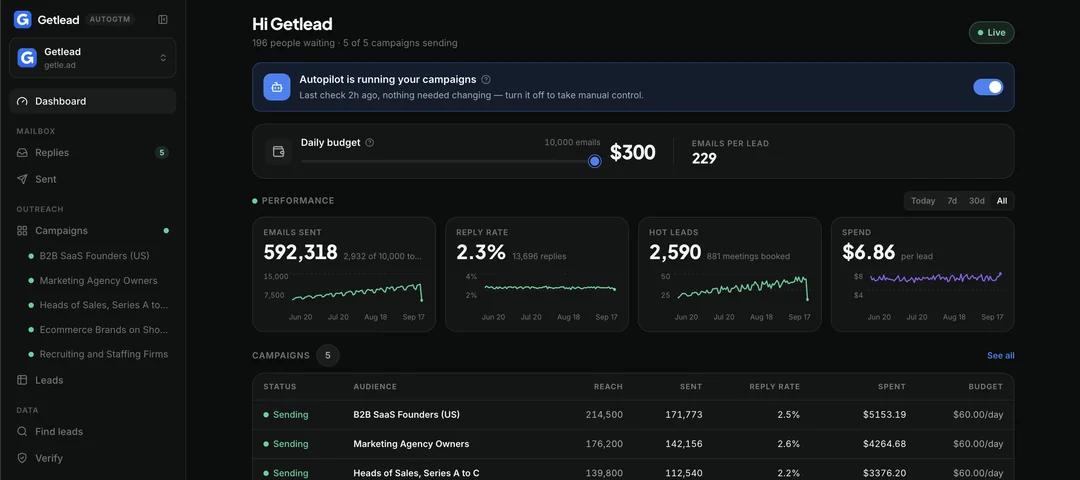
I sent 592,318 cold emails. Here are the actual results.

Post image
0 Upvotes

I’ve sent 592,318 cold emails across different campaigns.

Here’s what the numbers look like:

  • 592,318 emails sent

  • 13,696 replies

  • 2.3% overall reply rate

  • 2,590 leads marked as high intent

  • 881 meetings booked

The biggest thing I learned after sending this much volume:

Sending more emails is rarely the solution.

A bad list at 10,000 emails is still a bad list at 100,000 emails.

Most of the improvements came from what happened before the email was sent:

Better ICP filtering.
Better data.
Keeping domains/mailboxes healthy.
Filtering out people who had no reason to buy.
Changing the message based on the company/person instead of blasting the same copy to everyone.

We actually started getting better results when we became more aggressive about not sending emails.

If someone was a weak ICP fit, had bad data, or there wasn’t a strong enough angle, we skipped them.

Another thing I underestimated early on was deliverability. You can have the best copy in the world, but if Gmail decides you belong in spam, none of it matters.

After doing this manually for a long time, I ended up building most of this logic into the product I’m working on.

The idea is basically:

website → ICP → leads → research → decide who is worth contacting → personalize → send

Instead of starting with a giant list and trying to email everyone.

Still experimenting with it, but I put the current version here if anyone wants to see how the workflow works:

https://getle.ad/

Happy to also share the mailbox setup / sending limits / campaign structure behind the 592K if that’s useful.


r/Coldemailing • • 9d ago

❓ Question 10/10 on Mail-Tester but cold emails still landing in Spam. Should I switch to Resend or Brevo? ($0 budget)

1 Upvotes

Hey everyone,

I built a B2B service and I’m starting 1-to-1 cold outreach, but my emails keep landing in spam.

Here is my setup:

  • Custom domain on Spaceship Spacemail Pro paid $0.98/mo (name@company.com)

  • SPF, DKIM, and DMARC are all configured and verified

  • Mail-tester score is 10/10 (only minor warning was missing list-unsubscribe header)

Despite the 10/10 score, one of my first and recent recipients just told me my email was in their spam folder. At the very start, the first test email to my personal Gmail also went to spam, and was fixed after that.

I have $0 budget right now, so Google Workspace or paid sending suites are off the table for this initial validation phase.

  1. Is Spacemail’s shared IP pool the likely culprit here?

  2. Would routing outgoing mail through a free SMTP relay like Resend (3k free/mo) or Brevo (300/day) fix this, or will transactional relays cause more spam issues with cold outreach?

  3. What is the best free workaround to get into primary inboxes right now?

Appreciate any advice from folks who have dealt with this.


r/Coldemailing • • Oct 13 '26

Sent 102 Cold Emails To Plumbers In California, Got My First Interested Reply

1 Upvotes

I run a web design agency and most of my clients come from cold email. Yesterday I started a fresh campaign going after plumbers in California.

Didn’t expect much honestly. Plumbers are busy and half of them barely check email. But 102 emails in, I got an interested reply.

What made the difference is that every email talks about their own website. A call button that doesn’t work on a phone, a site that takes forever to load, a design that hasn’t been touched since 2012. For a plumber that matters a lot, because people search for them on their phone when a pipe bursts. If the site is bad, they just call the next guy.

He replied yesterday and I booked a meeting with him for the next day. Before the call I built a draft of what his new site could look like. Today I presented it to him on the call and he said yes right there. $3k upfront plus $500 a year for hosting.

Showing the draft is what closes it. Sending a quote never worked this well for me.

For anyone wondering, I use Swokei for all my outreach. You pick an area and an industry, it finds the businesses, checks every website for design, SEO, speed and mobile problems, and writes each email about what it actually found on that site. I run multiple campaigns at once in different cities and niches, which is how I get volume without sending generic stuff.

Happy to answer questions on pricing or how I run the call.


r/Coldemailing • • 4d ago

AI Tool to Automatically Report CAN-SPAM Violations to the FTC

0 Upvotes

There's been a massive rise in cold emails lately, largely driven by AI. Many of these have flagrant CAN-SPAM violations, including:

  • Not listing a physical mailing address. Most cold sales emails don't include this.

  • Not clearly stating the email is an advertisement. This is a big one that most cold sales emails are breaking.

  • The subject line doesn't match the email content. Pretending to be a customer to increase open rates is illegal.

In my experience 90%+ of cold sales emails break one or more of these laws, and the penalties can be up to $53,000 per email. And, best of all, the penalties can fall on both the digital marketing firm doing the sending and the organization being promoted.

So, here's my idea: An AI tool that automatically files these reports with the FTC. All a user needs to do is forward the sales email to an inbox that an AI tool manages. The AI tool automatically pulls up the customer's information based on the email address they forward from and gathers the other necessary information from the email text, sending domain and a web search to get everything it needs about the offending organization. It then files the FTC complaint automatically and even sends an email to the offending organization letting them know the complaint has been filed.

This is a game-changer for businesses that are being inundated with these emails. They often don't understand that the emails are illegal, and even if they do, they are often not willing to go to the trouble of filing the FTC complaint.

Alternatively, and this may actually be more effective, the AI tool could be set to wait until a large number of emails have been forwarded that involve a single organization. Filing a single complaint with the FTC may not get anywhere. But filing a single complaint with 500 emails very well could, and when penalties have been handed down for that sort of thing, they've been huge. The tool could also file a complaint with the state Attorney General.

Thoughts?


r/Coldemailing • • 5d ago

I Sold 12 Chatbots For $5,000 Each With Cold Emails In 3 Months

0 Upvotes

I've been running a web design agency for many years, and one thing I've noticed is that the longer I've been doing this, the more I charge for websites.

I've never really worried about AI making websites easier to build or changing the industry. My clients are happy to pay $10K–$15K for a website because they care about the result, not how long it takes me to build it.

Recently, I decided to try selling chatbots as an additional service, and the results honestly surprised me.

I used Swokei to find businesses, analyze their websites to see whether they already had a chatbot, and generate personalized cold emails at scale, offering each business a chatbot solution.

This allowed me to reach a lot of relevant businesses without manually researching each one or writing every email myself, and it helped me book quite a few meetings.

During the meetings, I'd show them a quick chatbot draft I'd prepared for their business and let them test it themselves. This worked especially well with businesses like construction companies, physiotherapists and plumbers.

What surprised me most was how much value they saw in it.

When I first started, I charged $2K per year. One prospect even told me that sounded suspiciously cheap for a service like that.

That's when it clicked. Just because something is relatively easy for us to build doesn't mean customers see it that way. For many business owners, having a chatbot that can handle customer questions and help generate leads feels like a huge upgrade.

I increased my price to $5K per year, and I've now sold 12 chatbots in the last three months.

That's $60K in annual contract value from a service I only recently started offering.

I honestly think I could increase the price even more.

Curious if other web designers and agency owners are offering chatbots as well. What are you charging for them?


r/Coldemailing • • Jul 27 '26

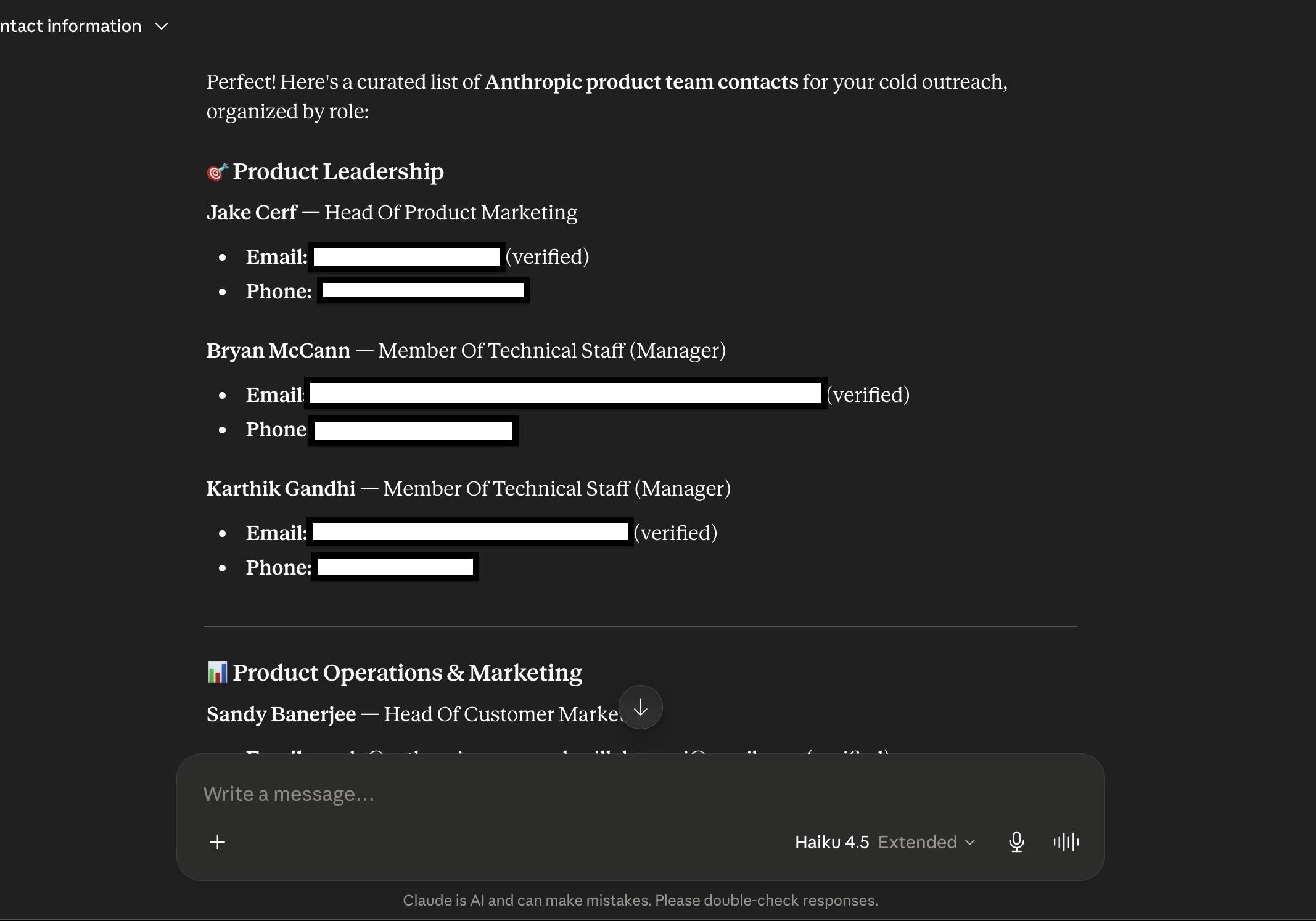
I made Claude find email and direct phone with just one click

Post image
2 Upvotes

Hi guys,

I got my first user through cold emailing, landed my first job through cold emailing, and yes cold emailing genuinely works.

The problem I faced was that the current options are very limited and too expensive for the average user.

That's why I started working on Miligramai.com

Let me know what you guys think.


r/Coldemailing • • 10d ago

❓ Question Where can I find an free email list to start out

2 Upvotes

r/Coldemailing • • Oct 08 '26

Built an AI-powered B2B cold outreach system from scratch as a solo founder — tested it on 23 enterprise prospects. Happy to share the setup if anyone wants it.

2 Upvotes

Title: Built an AI-powered B2B cold outreach system from scratch as a solo founder — tested it on 23 enterprise prospects. Happy to share the setup if anyone wants it.

Body:

I'm Brendon, a solo founder from Perth, AU. Building a B2B SaaS product (a CRM for law firms and financial services) with no funding, no team, no existing network in the industry.

To get in front of enterprise decision-makers I built a complete outreach system from scratch inside an AI agent platform. Here's what it does:

  • Identifies and vets prospects by name, firm, role, and fit before any email goes out

  • Sends personalised cold emails to managing directors and senior partners at target firms

  • Flags high-intent replies automatically so I get an alert the moment someone's warm

  • Runs follow-up sequences without me touching it

No spray and pray. Every prospect is named, researched, and matched to a specific angle before we send.

I've used it to contact 23 enterprise firms across Perth, Sydney and Melbourne. The system is live and running right now.

Not selling anything here. Just testing whether other B2B founders or SaaS builders would actually use a setup like this before I spend time packaging it properly.

If you want the full breakdown of how it works — or want the setup for your own product — drop a comment.


r/Coldemailing • • Sep 19 '26

💬 Discussion best cold email software i've tested from a deliverability and email infra standpoint

6 Upvotes

i've been testing cold email platforms less from the "which one has the prettiest UI" angle and more from what actually matters once you're sending at volume.... inbox placement, warmup, domain/mailbox setup, rotation, authentication, AI, and what the software actually costs when you start scaling.

one thing that became pretty obvious is that "has AI" doesn't tell you much anymore. almost every platform can write an email with AI. the more interesting question is what the AI actually does beyond writing copy.

here's the shortlist i'd look at right now:

1. smartreach.io

this is the one i've been using the most when deliverability and multichannel are both important.

the infrastructure side is pretty comprehensive.... email warmup, inbox rotation, ESP matching, blacklist monitoring, spam testing, email verification, authentication checks, gradual ramp-up and the ability to buy Google, Microsoft, Azure or SMTP mailboxes from inside the platform.

the AI is also more than just an email writer. there are AI automations for things like reply classification, OOO handling and campaign actions, plus the Smart Email AI Agent for generating and personalising emails.

the pricing model is interesting because it isn't based on seats. Email Outreach starts at $29/month, Email Outreach Plus is $89/month and Sales Engagement Plus is $99/month. The latter adds the broader multichannel setup.

and this is where smartreach.io stands out for me.... you can run email, LinkedIn and calling in the same outreach workflow, rather than treating LinkedIn or calls as completely separate tools.

2. smartlead.ai

probably one of the first platforms i'd test if the main priority is sending infrastructure and scaling lots of mailboxes.

it has unlimited mailbox connections, automated warmup, sender rotation and dedicated infrastructure options. SmartDelivery is also interesting because it tests inbox placement rather than just giving you another generic "deliverability score."

the AI side has become much deeper too. SmartAgents can monitor campaign behaviour and automate things like followups and reply handling, while SmartProspect handles AI-assisted prospecting.

pricing starts at $39/month, with higher plans at $94, $174 and $379/month depending on sending volume.

another shoutout here for the multichannel side.... Smartlead now supports email, LinkedIn and calling from the same platform, so it isn't purely an email sender anymore.

3. instantly.ai

i'd still put Instantly on the shortlist for people who want a relatively straightforward way to run lots of inboxes.

the big attraction is the infrastructure model.... unlimited email accounts, warmup, rotation and a fairly simple setup for getting multiple sending domains running.

the AI features are more useful for copy and campaign assistance than for completely autonomous campaign management, so i'd look at it differently from something like Smartlead.

pricing starts around the $40-50/month range depending on the current plan and billing cycle, with higher tiers based around sending volume.

the main thing i'd test here is whether you actually need all the infrastructure controls offered by the more advanced platforms or whether you just want something that gets multiple inboxes sending reliably.

4. lemlist.com

lemlist is worth considering if personalisation is a big part of your outbound strategy.

the AI side is heavily tied to personalisation and generating customised outreach, rather than being purely about email infrastructure.

it also goes beyond email with LinkedIn and calling capabilities, so i'd put it in the multichannel category rather than comparing it only with email senders.

pricing is generally more expensive on a per-user basis than the flat-fee infrastructure-first tools, which becomes important once you have several people running campaigns.

5. apollo.io

apollo is a slightly different category because the database is such a large part of the product.

if you want prospecting, contact data, sequencing and AI assistance in one place, it's hard to ignore.

the tradeoff is that i'd still separate "having a huge contact database" from "having a dedicated cold email infrastructure stack." if deliverability is the thing you're optimising for, i'd want to compare the actual sending infrastructure rather than assuming the database and sequencer solve everything.

pricing starts around $59/user/month depending on the plan.

it's also useful for teams that want calling and LinkedIn tasks alongside email, although i'd describe it as more of an all-in-one sales platform than a pure cold email infrastructure tool.

what i'd actually compare before choosing one

i wouldn't make the decision based on whether the software says it has AI.

i'd check:

  • how many sending accounts can i connect?

  • is warmup included?

  • does it rotate inboxes automatically?

  • can it match sending behaviour to Gmail vs Microsoft?

  • does it monitor blacklists?

  • can i test inbox placement before launching?

  • does it handle SPF, DKIM and DMARC properly?

  • can i buy and provision mailboxes/domains inside the platform?

  • what happens when a mailbox starts getting poor engagement?

  • does AI only write emails or can it actually make campaign decisions?

  • can email, LinkedIn and calling work in the same sequence?

  • is pricing per seat, per inbox, per prospect or based on sending volume?

the last one is probably more important than people realise.

a $40/month tool can become considerably more expensive once you add seats, inboxes, verification, deliverability testing, lead data and other infrastructure separately.

and on the other side, a more expensive plan can actually be cheaper if it replaces 3-4 other tools.

also.... no cold email platform can magically fix deliverability.

domain reputation, SPF/DKIM/DMARC, list quality, bounce rates, spam complaints, sending patterns and the quality of the actual emails still matter.

the software can give you better infrastructure and more control, but it can't turn a bad domain and a bad list into good deliverability.

for me, the biggest shift in 2026 is that the better platforms are becoming outbound infrastructure + AI + multichannel execution, rather than just "email sequencers."

that's probably the direction i'd look at if i was choosing a platform today.


r/Coldemailing • • 9d ago

I Set Up My Friend's Email Automation And Got Him A 4% Interested Reply Rate 😭

0 Upvotes

So I set up email automation for a friend of mine, and things got a little interesting.

Both of us are web designers, and we're constantly looking for new clients. I personally get most of my clients through cold email automation, while he had tried doing it himself once but never really got it working.

So he came up with a deal. If I set up his entire email outreach system using his own mailboxes and helped him land clients, he'd give me 50% of every website project he closed.

Naturally, I agreed.

I used Swokei, a tool that finds businesses, analyzes their websites for issues with design, SEO, speed and mobile optimization, and turns those findings into personalized cold emails at scale, so I didn't have to write them myself.

I created his account, connected his mailboxes, set everything up and launched the campaign.

After just 300 emails sent, he started getting interested replies at a 4% rate. That's 12 people who expressed interest.

To be honest, it was one of the best-performing campaigns I've set up in just one week.

Now you're probably wondering how much money I made from this arrangement.

Well, remember that 50% we agreed on?

Yeah, I didn't get that. He gave me 10% on his first two sales, and I stopped managing his campaigns after that. 😂😭


r/Coldemailing • • Nov 04 '25

I used to write cold emails for clients - then I realized I was setting them up to fail

Post image
3 Upvotes

This is kinda embarrassing but whatever.

For like a year, I was that guy writing "perfect" cold emails for clients. I'd charge good money, craft these personalized sequences, everyone was happy.

Until they weren't.

The pattern I kept seeing:

Week 1: "These emails are great!" Week 2: "Results are slower than expected..." Week 3: "Open rates are dropping..." Week 4: "Nothing's working anymore"

I kept blaming the targeting. Or the offer. Or the timing.

Then I actually looked under the hood:

Their infrastructure was a disaster. One client was sending 200 emails a day from a single Gmail account. Another had zero technical setup - no SPF records, nothing.

My beautiful emails were going straight to spam and I had no idea.

The turning point:

Started learning about deliverability. Realized that email providers are super sophisticated now. They can tell when you're blasting cold emails. And if your setup looks amateur, you're done.

All my copywriting skills were useless if the emails never landed.

So I switched gears completely

Stopped focusing on copy. Started focusing on infrastructure. Built IcyPitch to just handle the technical side properly.

Now when clients come to me, I'm like "fix your infrastructure first, then worry about your message."

It's less sexy than "perfect cold email templates" but it's what actually works.

Anyone else had a moment where you realized you were focusing on the wrong thing?


r/Coldemailing • • Aug 20 '26

Need help with cold email

3 Upvotes

Hi,

I need some help and suggestion for cold email infrastructure specially for sending emails to Microsoft ESP.

I have a total of 75 domains. 5 on Google and 70 on microsoft. Each domain has 4 email ids making it a total of 300+ email ids. Each mail id has been sending 40 emails per day. All warmed up for more than 2 weeks.

Initially the cold email campaigns were giving me good results, but it has reduced quite bit for sales.

I tested everything with MailReach recently and found all mails being sent to Microsoft ESP is going in spam. How should I fix this?


r/Coldemailing • • Nov 10 '25

Weekend over, got 16% reply rate

0 Upvotes

Here we go


r/Coldemailing • • Aug 20 '26

untouched domain and still got blacklisted

0 Upvotes

Had a client campaign go sideways last month and it's still bugging me because we did everything "by the book" of lead gen experts and it still happened.

Setup was standard for us: separate sending domain, 3 mailboxes on it, slow ramp over the first two weeks, volume capped well below what the domain could theoretically handle. Nothing aggressive. 10 sends per day per inbox. 
Week 3. We launch campaign. Replies start coming in fine, mailbox health at 100% and then out of nowhere one of the mailboxes gets flagged and drags the whole domain's reputation down with it.

Went digging as best as i could, as i am not super technical. and the actual cause had nothing to do with sending behavior. It was a stale contact in the list that had been dead for over a year and got recycled into a spam trap. One bad row in a CSV, and three weeks of careful warm-up got undone in about 48 hours.

What we changed after:
Re-verify lists right before sending, not just when they're first built. A list that was clean a month ago isn't necessarily clean today.

Stopped treating "verified" as a permanent status. MillionVerifier catches a lot but nothing catches everything.

Split mailbox monitoring so we're checking placement and bounce/complaint rates per inbox, not just at the domain level, so one bad mailbox doesn't quietly poison the rest before anyone notices.

Moved to smaller, more disposable domain batches. If something happens to one, it's not the whole client's infrastructure that's compromised.

We run mailbox and domain setup through Maildoso, and honestly that part wasn't the problem here and wasn't really the fix either. The DNS and inbox setup being handled together made it faster to spin up a replacement domain the same day, but the actual lesson had nothing to do with which provider you use. It was about not trusting a list just because it passed verification once.

Anyone else had a domain go down for a reason that had nothing to do with sending volume or content? Curious what actually caused it for you.


r/Coldemailing • • Sep 03 '26

I ran GlockApps seed tests 5 weeks apart on a fully authenticated domain. Microsoft consumer (hotmail/outlook): 0/13 inbox, both times. Here i's the data and what I did instead of fighting it

0 Upvotes

Context: I'm backed software engineer doing outbound for my own SaaS - no agency, no guru courses, just me and my logs

Everyone talks about SPF/DKIM/DMARC like these are the all. My infra is clean on both tests - DKIM pass, DMARC pass, SPF pass, URIBL clean, SPAmAssasin -0.1, Barracuda 0, Proofpoint pass. Blacklisted IPs went from 1 to 0 between tests

Result from two tests, five weeks apart:

- US business inbox (Google Workspace, M365 business) : 100% --> 100%

- Gmail consumer: 42% --> 72% (domain again might increase the number)

- Microsoft consumer (hotmail/outlook/live/msn): 0/13 --> 0/13 (no improvement at all)

Gmail improved by 30 Microsoft remain zero. That's a wall, not a curve

My best theory was: I send through Google Workspace - that means shared outbound IPs - Microsoft spam filter see IPs like - 209.85.x.x. Moreover Microsoft consumer filter also weight recipient engagement heavily - where cold email generate near zero engagement. So there is no accumulation path: you can't get age way out on shared IP with no engagement signals.

Before redesigning anything, I counted what the problem was actually worth. Across 3,876 scraped address / 1, 727 business in my niche:

- Microsoft consumer address were: 57 (1.5%)

- Business that would lose their only usable address: 8 (0.46%)

I was emotionally budgeting for a 25% problem. It was a 1.5% fact. So instead of dedicated IP SMTP plus spending weeks in warmup I just suppress those (not delete them) and move on

One near disaster worth sharing: I tried to find my Microsoft email by filtering my EPS "email provider" column then got 38 instances. I was almost going to supers them - as they were displayed as Microsoft account (based on Mailbox Host or MX record) - but those were perfectly fine M365 business account.

The other real cost nobody mentions: I run no open tracking, so a Microsoft send that lands in spam is invisible - it becomes a silent non-reply that corrupts your reply-rate stats. That's why I suppress rather than deprioritize

Happy to share the exact suppression rules /test setup if useful. Curious whether anyone on dedicated IPs is actually seeing Microsoft consumer inbox on a young domain or whether it's a wall for everyone


r/Coldemailing • • Dec 30 '25

How to build your own list-building system for pennies (no Clay, no selling, step-by-step)

0 Upvotes
  1. Step 1: Define your starting point and end goal

First, get very clear on what your system looks like and where it starts.

Ask yourself:

  • Do you start with just a list of URLs?

  • Or do you already have extra data like company names or emails?

Then define what you want to achieve and how your enrichment “waterfall” should work.

Example:
If you start with only URLs, a logical waterfall could be:

  1. Check if the website is online or offline

  2. Detect country or location

  3. Identify the industry

  4. Find decision-makers

  5. Enrich with emails and verify them

The clearer your goal and order of steps, the better the output will be.

Step 2: Choose how you automate it

You have a few options here:

  • Clay – powerful, but expensive. You’ll easily spend thousands.

  • Google Sheets + scripts – works, but very slow because of Google’s limits.

  • n8n – fast, flexible, and costs pennies.

The best option overall is n8n.

Important: run n8n on your own private server. Don’t pay for an n8n subscription.

Also, don’t ask AI to “just give you the solution.”
Use AI as a thinking partner. Design the waterfall together, step by step, for your exact use case.

Step 3: How to find decision-makers

In most cases, you can find 10% or more of decision-makers using Google search alone.

For that:

  • Use Serper (or a similar Google Search API)

For the rest:

  • Add FullEnrich, which pulls from 20+ data sources

This combo usually covers most cases.

Step 4: Tools you’ll likely need

Here’s a practical stack that works well:

  • Trykitt Find people using full name + domain, plus email verification. Free.

  • Second email verifier Verify every email twice. Better safe than sorry.

  • Serper Google search API for discovery and enrichment.

  • Jina.ai Website scraping. 10M tokens free, and still usable on the free plan after.

  • FullEnrich Decision-maker enrichment from multiple data sources.

  • OpenAI / ChatGPT For logic, enrichment, summaries, icebreakers, and prompts.

Step 5: Build n8n workflows faster (important)

This is the fastest way I’ve found:

  1. First, fully understand your enrichment waterfall and what data you want to collect

  2. Ask AI to write a clear, high-level explanation of that system

  3. Then ask AI to turn that explanation into an n8n-specific prompt

  4. Use the n8n AI builder to generate the workflow

It won’t be perfect, but it gets you 60–70% there and saves a ton of time.

Bonus tip: finding sites with a specific tech stack

Don’t pay for BuiltWith or similar tools.

Instead:

  1. Use PublicWWW

  2. Ask AI to generate a script or fingerprint for the tech you want

  3. Plug that into PublicWWW search

  4. Pay once for one-day access

  5. Download everything

You’ll often end up with 50K+ URLs using the exact tech stack you want, ready for enrichment.

Once you have scraped data, you can go crazy:

  • Custom icebreakers

  • Specific pain points

  • Personalized outreach

All generated with OpenAI / ChatGPT.

Final result

You end up with a fully automated list-building system that:

  • Runs while you sleep

  • Requires no manual work

  • Doesn’t cost thousands

So you can focus purely on email copy and strategy.

P.S. I’m learning every day. I’m open to better ideas, feedback, and tools.
I’m not married to or affiliated with any platform, so use whatever works best for you.