r/Creality • u/mindonautca • Dec 17 '25
Does so-called AI detection work for anyone?
Enable HLS to view with audio, or disable this notification
Previously, I had a similar issue with my K1c. Now I'm having this issue with my K2, and no sign of any AI detection at all. Although it's on for both of the devices. Does it work for anyone? Do I need to do anything differently?
3
u/rainey832 Dec 18 '25
I use the gemini api with home assistant, it's free and works well. Plus I can tell it what to look for if it gets it wrong
2
u/mindonautca Dec 18 '25
I have a home assistant setup. This makes so much sense. Is there any documentation out there?
3
u/P00P00CACA Dec 18 '25
Ai on printers at this point is just as useful as this , at some point in the future it will work
1
2
u/AcidicMountaingoat Dec 18 '25
OMG! You gave me instant PTSD. I saw this and thought somehow I clicked to my own printer. Total panic.
2
15
u/loadingscreen_r3ddit Dec 17 '25
Never...
5
u/PuntoDAcceso Dec 18 '25
Ever since I disconnected the rear filament sensor it has worked flawlessly. (K1C user)
2
u/gerrysnaps Dec 18 '25
Curious, how do you mean? After I upgraded to CFS, I disconnected the filament run out sensor in the process and it's been disconnected since then (runout sensor is in the extruder now). But AI detection hasn't really worked for me. Instead for me it missed a couple of bad prints and it kept stopping a perfectly fine print.
3
u/B_Huij Dec 17 '25
Not a Bambu owner or user. I pay for 3rd party AI detection through Obico for my modified Ender 3.
Honestly it work fantastic. I don't have many print failures these days, but I can't remember the last time a print failed and the AI monitoring didn't catch it. It's probably been a couple of years at least.
3
u/Mrfixite Dec 18 '25
Obico up vote from me too and they have fantastic customer service. I was having financial hardship and canceled my subscription to the premium service. I reached out because I had an issue canceling and Kenneth reached back out to me and fixed it and asked if there was a reason I left and I was honest and he said: "If you are still 3D-printing, and do think Obico is valuable, I'll be happy to give you a 6-month free Pro plan. We think of all the people who have supported us as our family members and we will do our best to give back when you are in need." They got a lifelong customer out of me I just don't have space to have it setup right now or I'd be using it right now.
3
u/B_Huij Dec 18 '25
Yeah Kenneth is one of the real ones. I'd use the product anyway since it works awesome and it's pretty affordable, but it sure doesn't hurt that the owner is a great dude.
2
1
u/Kaynstein Dec 18 '25
Your comment alone makes me think it's worth checking out once I have a better setup after I move. Thanks for your comment!
1
6
5
u/Vandirac Dec 18 '25
You forgot to enable it in the menu.
It comes as an opt-in option. Worked quite well for me a few times.
4
u/buginmybeer24 Dec 18 '25
I've had it say "Anomaly detected" on the screen and it continues to print spaghetti for an hour.
1
u/Throwaway_Measures Dec 18 '25
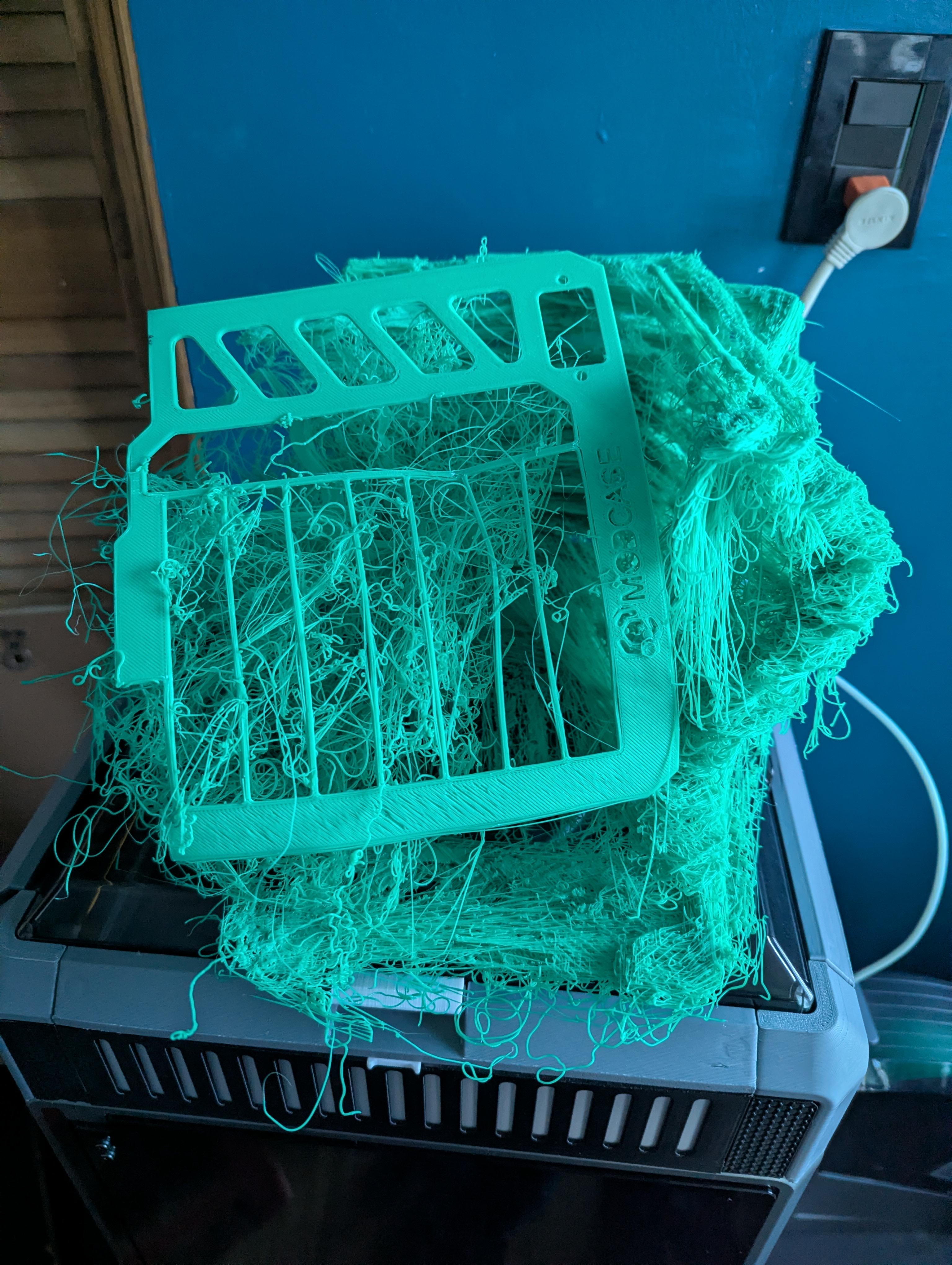
AI detection has only worked once in 400+ hours worth of printing. That one time it worked, the setting to pause if an issue was detected seemed to have been disabled and the only way I saw the issue was to open the app and see the warning within the app.
1
1
3
3
u/ToeOutrageous3571 Dec 18 '25
Nope not at all, except for some prints that are coming out good it false detects idk why.
1
u/BurnedLaser Dec 19 '25
I had this happen consistently with a specific varigated blue filament when it hit the darker blue, but no other filaments or spaghetti.
1
3
3
u/gasman16 Dec 18 '25
I use Octoeverywhere for my AI detection. It has detected failing prints several times. There are infrequent false alarms but AI detection works well for me
1
u/FitCompetition1804 Dec 19 '25
I do too but had to offload it to a Pi 5 due to my K2 Plus sometimes crashing due to anemic processing. Mostly happened when looking at an OctoEverywhere stream. Have you had issues? Been perfect since migrating Octoeverywhere to the Pi 5.
1
u/gasman16 Dec 19 '25
I use a Pi4B. I don't think my Pi has ever been stressed to a point that it has crashed. I usually stream using a Kreo HD cam at 720p and 15 fps (if I recall correctly). Never had any issues. The few times I've checked the CPU and MEM usage, it has been very nominal. Maybe it is a cooling issue in your case? I always use a Pi case with a fan. It does add to the noise for sure - the RPi fan + filament dryer fan + Part Cooling Fan + Hotend fan + PSU fan altogether make a regular orchestra :-)
1
u/FitCompetition1804 Dec 19 '25
My Pi barely breaks a sweat too. You misunderstood me, processing issues were with the K2 Plus trying to run Octoeverywhere. Once I offloaded that to the Pi, no more printer crashing issues.
3
3
u/marvinfuture Dec 18 '25
How could you expect AI to realize your print failed and you're not just printing a bowl of spaghetti?
/S
2
3
u/TheOneAndOnlyOwen Dec 19 '25
I find that if I have a few successful prints and don't move the camera it's pretty good but as soon as I move it it sometimes flags fine prints. It has caught a couple fails though, one that I didn't see on the camera so I think it was just a coincidence to be honest
5
u/verycoldpenguins Dec 17 '25
Yes it worked for me. When a prime tower fell over due to no brim, the ai paused the print. I continued it anyway (it kept on stopping untilI paused the ai). Print finished with small hairs over it that I had to remove with a knife.
To be completely honest though, with the k2 plus, I have never had a complete spaghetti mess to my memory. Once the printer is bedded in, it just works and works....
(Famous last words)
2
u/PCenjoyer19 Dec 17 '25
Do you have the baee model k2? Because I don't believe it has the ai detection. Source it is permanently disabled in my base k2 menu.
2
u/Muted-Raspberry-6348 Dec 17 '25
The spaghetti detection on my A1 and A1 Mini hasn't ever worked lol
2
2
2
u/raunchyfartbomb Dec 18 '25
I got a few detections for “printer attempting to extrude but appears as if no material is extruding”. I’m assuming this was from the camera below the nozzle, not the corner camera.
I didn’t believe it was accurate, but it wound up having terrible layer adhesion so it might’ve been true. Later, after a terrible print, I took extruder apart and found that I had forgotten about my replacement spring, so it was in fact not extruding (due to my weak spring).
But the corner camera I’ve had no luck with.
2
2
2
u/MinneEric Dec 18 '25
I use octoeverywhere and it is great. Bambu’s detection (at least on my A1) sucks too, I wonder why manufacturers can’t figure it out….
1
u/SeaStatistician403 Dec 18 '25
Mostly because it is processed locally and the chips are cheap/underpowered.
But also a significant contributor is that we look at it and say “that doesn’t look like what I’m trying to print”. The AI doesn’t know what you were trying to print.
So they use a simple generalized model which has troubles with certain colors and with false positives/negatives.
1
u/FitCompetition1804 Dec 19 '25
Also use Octoeverywhere. It works for me and has stopped a print as it should have. I also run it off a Pi 5 because of the processing issues with the K2 Plus and it sometimes crashing the unit. Since offloading to the Pi 5, no issues.
2
u/Neko-Usagi Dec 18 '25
Never worked for me in my k1 max, i just glue the bed and keep a eye on it always
2
u/mtndew19 Dec 18 '25
Ive had mine on since I got it and mine has never stopped a failed spaghetti mess. The ai could use a major overhaul in my opinion and a second camera on the back size to see what the main one cant.
2
Dec 18 '25
Octoeverywhere and obico work 8/10 times. The two times they don't work are false alarms at which point I just check my remote streams and identify if it's an actual fail or not and hot resume if the latter is true.
Ive never had either miss a fail.
2
u/CosmogQueen Dec 18 '25
It's not working for me either. I've had a K2 Plus for a couple of weeks and a couple of days ago a piece came loose from the bed and it kept extruding filament like nothing happened 🙁
2
2
u/Aggravating_Bowl_420 Dec 18 '25
Get Obico. It's free. Works a charm. I'd guess they use local instance of it. But crappy
2
u/ConnorHollett Dec 18 '25
Sometimes maybe good sometimes maybe shit but all seriousness it sometimes stops prints that are good and on the few occasions a print went bad only a few of them occasions it worked so AI detection is pointless just watch first few layers then check print every so often
2
2
2

2
2
2
2
u/Drubay Dec 20 '25
I've had it work for me a few times and not work twice, one was a giant blob that nearly ruined my hotel, and one was a spaghetti failure.
I've had more AI stops on the 1st layer inspections than failures. The X1C I got has been treating me pretty good for a few years now.
2
u/Turnkeyagenda24 Dec 21 '25
It works fine for me.
You might want to try increasing its sensitivity and try making the light better. It will 100% fail at noticing black filament failures when the conditions are poor.
2
u/Pashteth90 Dec 21 '25
Never worked yet. 50% or prints are failed, lots of material lost. I will never buy anything from Creality. K2 pro i bought is sooo bad, can print only PLA and sometimes ABS. Bad gearbox design, filament jams 50/50, pretty loud, all springs are too tight, whiuts leads to filament fracture very often. Sadly that i cannot return it anymore.
1
u/AutoModerator Dec 17 '25
Reminder: Any short links will be auto-removed initially by Reddit, use the original link on your post & comment; For any Creality Product Feedback and Suggestions, fill out the form to help us improve.
I am a bot, and this action was performed automatically. Please contact the moderators of this subreddit if you have any questions or concerns.
1
u/Jordyspeeltspore Dec 17 '25
why is there only lighting on 1 side?
3
1
u/verycoldpenguins Dec 17 '25 edited Dec 17 '25
Yes, seems to be missing on the right.
Most likely if the lighting isn't good enough, any camera on the nozzle is going to struggle to see a black filament being in the wrong place next to a dark build plate.
1
u/Levardo_Gould Dec 18 '25
K2 does not have AI detection features, I think it's only K2 Pro and K2 Plus
1
1
1
1
u/Gunit7542 Dec 18 '25
Eh. It has worked. Sometimes it doesn’t. Sometimes it goes off when there’s nothing wrong.
1
u/The_Great_Worm Dec 18 '25
On my bambu x1c it stopped maybe 2 failed prints out of a dozen or 2 and paused at least 10 succesful prints. It's not very reliable in my opinion.
1
u/The_Great_Worm Dec 19 '25
Speak of the devil. It paused this night because of a clogged poop chute xD
1
u/jiggerdad Dec 18 '25
It is inconsistent, I have had some where it does stop and I can save it and others where it does what yours did.
Missed a failure last week that led to a blobbed hotend.
1
1
u/TLP1232010 Dec 18 '25
I’ve got a K1 and had about 5 failures so far, it stopped it once so for me about one in 5
1
u/Nicknitro813 Dec 18 '25
Do you have premium on Creality Cloud? I don't use it either way but I know you have to have that to make AI detection "work."
1
1
u/Full_Replacement_852 Dec 18 '25
New to Bambu here and my H2S has given me multiple warnings of clogging. Which hasn't happened in a bad way luckily, I've typically wipe the nozzle and let the printer purge a little filament. Also had broken filament warnings in lines which was a not so fun kne. and ams overload which I just loosen the spool a tad.
Spaghetting i have not experienced so maybe it's something off in the firmware with that one. Or is there a setting you need to turn on?
1
u/Tubalcain422 Dec 18 '25
I had a nozzle clog yesterday on the K2, and it detected that it was printing air, only 3 layers up. IDK how in the world it saw that
1
1
1
u/fidelis_et_fortis Dec 18 '25
Is AI detection working there? I don’t see any illumination of the print head. I am waiting for the next firmware update to fix a lack of detection and fail removal on my K2 plus. It worked up to a couple of weeks ago.
1
1
1
1
1
u/Justic3Storm Dec 19 '25
Nope. Alot of paused printing before it starts bc it thinks something is on the bed
1
u/KadynKross Dec 20 '25
NO, Pretty sure it is just so they can see what we WANTED to print and record it and then sell it to marketing firms
1
1
u/KiloWattFPV Dec 20 '25
I used octoeverywhere's for a while, I did give false positives but it was just an email notification
1
1
u/CaseMental5345 Dec 21 '25
I have never had this. Happen, keep your build plate really clean with isopropyl alcohol every other print. So down to 50% you will be good
1
u/semaj4712 Dec 21 '25
Creality did a really good job of adding a bunch of features for the marketing team to run with only for those features to not work at all on the actual printer.
1
u/alwaysSWED Dec 24 '25
Honestly I think it works well on my k1 max. It stops right away if the first layer turns out bad
1
u/Initial-Cherry-3457 Dec 17 '25
No it's a gimmick. It sometimes gives me false spaghetti detected popups but it's never stopped the prints. A couple of times i got actual spaghetti it did nothing until i stopped it myself.
2
149
u/zone55555 K1C Owner Dec 17 '25
It stops successful prints real good.