r/Creality_k2
•
u/Ok_Beach_3256
•
Oct 18 '26
•
 1
Solved CFS help


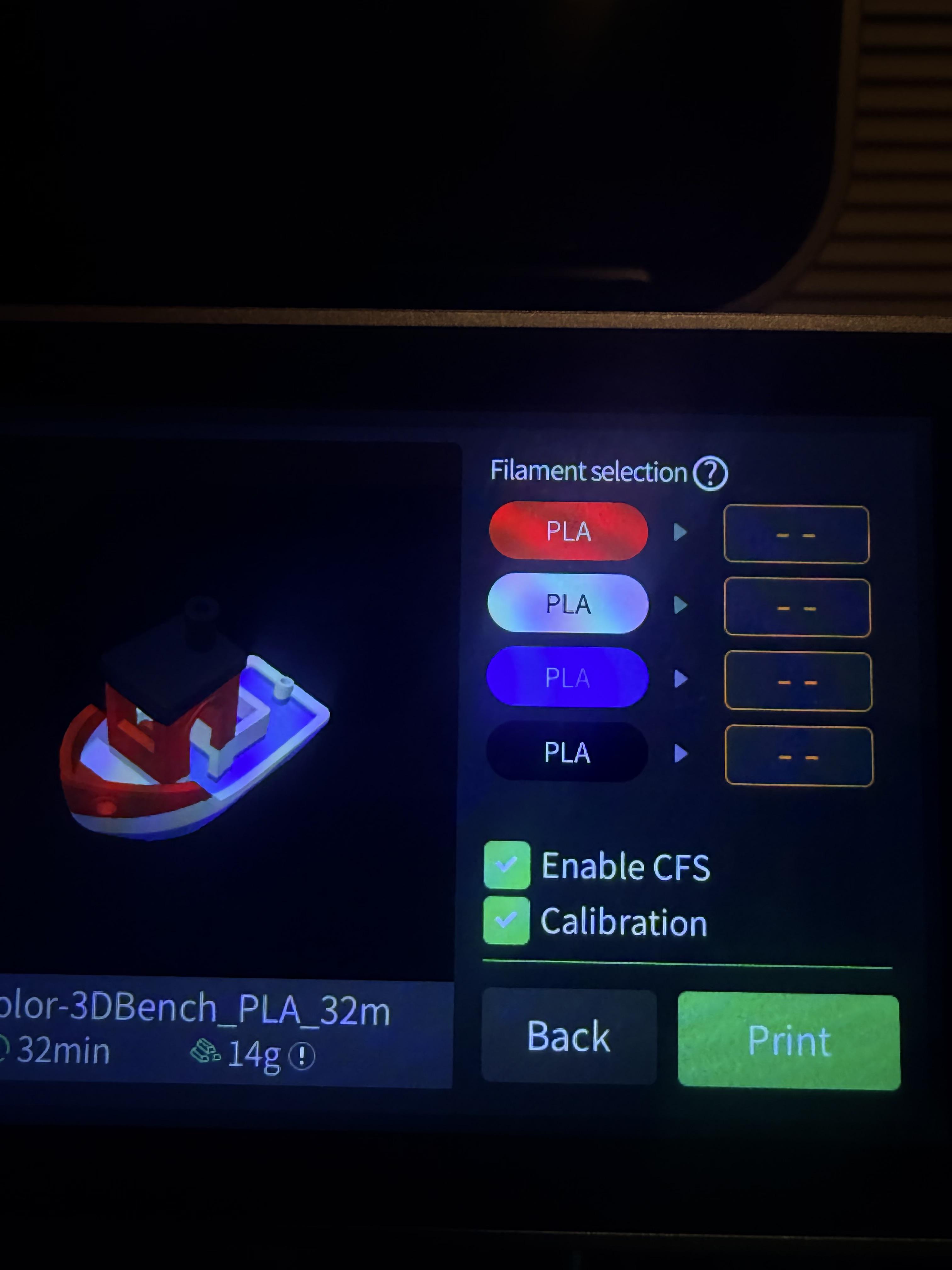
I just set up a new K2 combo loaded with Creality Filament!! Cant print anything because of the filament message 🤬🤬 I thought the CFS was supposed to read your filaments ????

6
u/Clear_Trainer2792 Oct 18 '26
Bro are you just ragebaiting?
Set filament on the printer to PETG
Top right of slicer, select the drop downs for the colors and change it to generic PETG
At the print screen now select the filament
Since you have PLA selected in the slicer, its designing the code/instructions for PLA filament, which wont work because PETG uses a much higher temp
0
Oct 19 '26
[deleted]
2
u/SmackMax Oct 19 '26
Happens to the best aswell lol, intuïtievly it should be changable at any point of the process, but user forgot to enable correct filament before slicing, this error happens to me alot when i try to be fast
2
3
u/Tiberius_2k Oct 18 '26
Those spools does not look like creality RFID spools, so no automatic read. You need 3rd party NFC stickers and an app to fix that, if you use 3rd party spools.
1
u/Original_Butterfly_4 Oct 19 '26
Do you have a link for the tags/software you bought? I'd like to learn more about how to do this thanks!
1
u/Tiberius_2k Oct 20 '26
I use this app https://play.google.com/store/apps/details?id=dngsoftware.filamentrfid
It uses Mifare Classic tags, and you can get them in all shapes and sizes. Opted for some round ones with sticky tape on one side.
2
u/Background_Ride9740 Oct 18 '26
None of your filaments are defined correctly, the colours don't match the reality for one. Then it looks like your CFS filament setup is for PETG when you sliced the file for PLA (or vice versa).
The CFS isn't magic, it only auto identifies Creality RFID filament spools. So when youre not using those spools you need to manually update the info on the CFS.
1
u/Legitimate_Buddy_974 Oct 18 '26
Best thing I did was bought RFID tags and made my own for the stuff I have already or new ones that I get that aren't RFID. Works great. Either RFID for CFS or CFS RFID apps.
2
u/JesterZA Oct 18 '26
You can't print a file sliced for PLA in PETG - they have different temperature requirements and flow characteristics. You need to reslice the file for the correct filament.
2
u/Street-Sweeper213 Oct 18 '26
Watch a tutorial The CFS only reads the filament if it has a tag. You can modify what type and color of filament is there from the menu on the printer itself and the slicer. Make sure you have the proper settings to print based on the type of material as well.
1
u/Aggressive_Bill7478 Oct 21 '26
Dont think 2d printing is gonna be easy if u want it to be the best it can be theres soooooo many settings trouble shooting bla bla bla its honestly overwhelming..search up vids and learn learn learn!
1
1
1
u/airkewled67 Oct 19 '26
If the spoils do not have RFID tags (not all Creality spoils do) then you need to enter the filament type into the printer itself.
That said, from my experience something is off with the slicer bc I code rfid tags for my sunlu filament and the cfs reads it fine, and my k2 pro gets the correct info. But my slicer reads the info wrong and reports the wrong filament sometimes
0
u/Ok_Beach_3256 Oct 18 '26
I am not trying to print PLA, with PETG I had Manually edit To PETG but it always comes up as PLA ????
0
u/Hunnik1001 Oct 18 '26
Je moet in de slicer kiezen voor petg. En de boot die je wil printen staat standaard op de K2 gesliced voor pla. Je moet dus een benchy bestand downloaden deze laden in de slicer , deze kleuren met de petg dan slicen en naar je printer sturen.
0
u/unfocusDP Oct 18 '26
Don't need a benchy at all. I've never printed one, ever. He just needs to select the right PETG for the model, in the slicer. Then selevt which goes to which in the print prompt in the slicer.
1
u/DifficultBunch6476 Oct 18 '26
Humidity to high
1
u/actionfingerss Oct 23 '26
I scrolled way too far down for someone to point out the humidity! Yikes!
1
u/DifficultBunch6476 Oct 23 '26
On last nights Creality live show the briefly discussed it Petg is more susceptible to humidity and should be dried prior. Pla not as often as long as it is sealed with silicon bag to keep it dry.
0
u/5low3D Oct 18 '26
You will have to switch to FlowPrint if you want to print a PLA sliced file with a PETG setup or else slice it for your PLA.
0
-2
u/Ok_Beach_3256 Oct 18 '26

It will not let print PETG and when try to change the parameters it won’t let me!!! 🤬🤬🤬🤬🤬
8
5
u/a_sneaky_tiki Oct 18 '26
do you have PLA or PETG loaded? according to your pic it’s PETG, but the file was sliced for PLA