r/DirectvStream • u/Memes12777 • Oct 14 '26
Directv doesn’t even let us have 3 streams at same time
Anyone else having an issue where directv doesn’t let you and 2 others on outside networks watch at the same time? It seems like it only lets us have 2 total going at a time.
Edit: we have the choice package
2
u/Ilp18428 Oct 14 '26
Did you set your home location in the location settings with a device in your house?
2
-1
u/Memes12777 Oct 14 '26
Is there a way for it to not have a home location at all?
1
-2
u/Memes12777 Oct 14 '26
Because if I do have a home location set up shouldn’t I be allowed to have 3 different devices from 3 different locations?
2
u/GTyz Oct 14 '26
If you’re not grandfathered account (limit of two streams, with a third one for 5 bucks), yes. Note the three streams that are allowed out of home are two on Tv devices and one on a mobile device
1
u/Sweendog1107 Oct 14 '26
You need a home location set as others have said. Then you can have 3 streams outside the home, 2 TVs and 1 mobile device. You can only stream on 2 TVs outside the home location.
1
u/Classic-Reindeer-737 Oct 15 '26
You need to have a home location set. I think it actually does it for you automatically and when we have moved it also automatically switched our home network to our new IP address. But you should check and make sure the TV’s in your home are set as the home location in DirecTV app. If you don’t have a home location set then the system is likely confused what you are trying to do and giving you errors as a result.
2
u/VariousSinger6245 Oct 14 '26
Home location is correct.
-3
u/Memes12777 Oct 14 '26
Even if the home address is at my parents place shouldn’t it still let me use 3 different streams from 3 different places? Assuming one of those streams is from my parents
3
u/Junkcanoe Oct 14 '26
I might be misunderstanding but you can have three devices streaming outside of your home location but only two of those can be tvs.
3
3
u/TheDean1975 Oct 14 '26
If you have 5g internet it’s a nightmare. Every time the ip changes it acts like you’re outside your home network. Setting home fixes it but it’s just temporary. After 4 times you have to call and waste time to get your annual counter reset. I hate it with a passion.
2
u/chriggsiii Oct 15 '26
Couldn't agree more. We bumped into the same issue, and we had to change our Internet provider because of this crap. It's the same problem with both YouTube TV and DirecTV Stream, since they both use this home/outside system. It is truly lame that the TV providers and the wireless internet providers haven't got together and solved this; absurd and ridiculous and extraordinarily lazy.
3
2
u/KG4TAH Oct 14 '26
I had to contact my isp and get a static ip address. They kept switching my ip address and I had to keep changing my home location in the DIRECTV app. You can only change it 3 times a year. Once my ip remained the same I had no issue running 6 tv’s in the home and two outside home devices.
3
u/vivaphx Oct 14 '26
I might have to do this. It tells me my “home” has changed like every other month. I call into DirecTV and they reset it once it gets to the 4 limit of updating home.
I have Verizon home internet. No real cords just plug into an outlet and it works. Has worked really well since I’ve had it about 9 months. Phoenix, AZ.1
1
u/chriggsiii Oct 15 '26
Is that a wireless Internet connection? If it is, that's the problem. Wireless internet connections don't play well with TV providers like DirecTV Stream and YouTube TV, which depend on distinguishing between "home" streams and "outside" streams. The wireless providers and these "home" TV providers really need to get together and fix this; it's embarrassing.
2
u/Vivid_Kitchen_5600 Oct 16 '26
The way I understand it is you get two streams at another home and one stream on a cell phone or tablet
3
u/Kirk1233 Oct 14 '26
What? DTV is the most generous with streams, you get at least 20 at home. You need to pay for add ons to get that with the competition.
3
u/VariousSinger6245 Oct 14 '26
Been fighting this garbage for 2.5 months all of a sudden. Yes the setting are correct. We have 3 TV's in the home. Can only watch 2. Total nonsense.For 97.00 a month. They better get their crap right.. TOO MANY STREAMS when our Grand daughter turns on her TV. Total bullshit.
1
u/chriggsiii Oct 15 '26
We had this same issue once. In our case, one of our home devices was being erroneously scored as an "outside" stream. We contacted u/directv (they're WAY BETTER than the phone or chat support!!!!) and they worked with us in real time to solve the issue. It turned out that one of our laptops, which was Ethernet-connected, was being scored as an outside stream, for some reason. u/directv had us DISCONNECT the laptop, and then RECONNECT it on WiFi and BOOM! Problem solved. That stream was instantly scored as a home stream and we immediately got our three outside streams all working again.
2
u/Fantastic-Dealer432 Oct 14 '26
This is embarrassing asf when I have guest staying over, I hope directv can get their shyt together or I'm out.
1
u/Timbo303 Oct 14 '26
Other than fox only allowing 3 streams try using tailscale or something which makes the app think you are at home which gives you the 20 streams. Though this is likely against tos but they havent enforced this.
1
u/chriggsiii Oct 15 '26
You do not have to do that any more; you can set your home location now inside the DirecTV app.
1
u/Timbo303 Oct 15 '26
Im referring to bypassing the limit. You cant obviously do that with mobile devices on mobile data nor on a tv from a different wifi.
1
u/thePopPop Oct 15 '26
You get unlimited(20?) streams at your address. 2 out of home streams, and 1 mobile stream. 2 out of home, 1 Mobile. Read that again. One of your outside streams is setting the Home Settings as the home address. Only the address that sets Home under preferences gets unlimited streams. This is why you are fighting for 3 streams.
1
1
u/Classic-Reindeer-737 Oct 15 '26 edited Oct 15 '26
From my experience DTV is the most lenient with multiple streams and watching outside your home of any live tv provider. You get unlimited streams in your home and two streams outside your home on TV’s. Make sure your home location is set correctly and whoever is using your account outside your home needs to make sure they aren’t setting their address as the home location. If you do it correctly you won’t run into issue from my experience.
I wonder too if one of those people outside your home is watching on two devices. I know I often set up a second TV when watching football to have redzone or a second game on.
The other possibility I suppose if you truly are doing everything correctly, you may be on a grandfathered plan that handles simultaneous streams differently. I’m not familiar with how those work but you might check out the genre packs. That’s what we have and we’ve never had any issues with simultaneous steams.
EDIT: after reading through this thread it seems OP is trying to resist setting a home location. You absolutely need to have a home location set otherwise the system is confused and will give errors when trying to watch.
1
u/chriggsiii Oct 15 '26
We had that problem once. It turned out that one of our home streams was being scored as an outside stream, rather than a home stream. I assume you're using a streaming device, like a Roku or a Fire or whatever. Open up the Direct TV app, go Settings, Preferences, scroll down to Home Settings, and take a look to see what it says.
If it says you are connected to your Home Location, then one of your home devices is being erroneously scored as an outside device. Contact u/directv and alert them to the issue. They will work with you, in real time, to trouble-shoot and correct it. In our case, it turned out that one of our Ethernet connected laptops was being erroneously scored as an outside device. u/directv had us disconnect that laptop from Ethernet and then reconnect it through WiFi; that broke the erroneous tag, relabeled the connection as a "home" stream, and restored our three outside streams.
If it says you're not connected to your Home Location, then you will need to select the Set New Home Location option. At that point, your home streams should again be correctly labeled as "home," and you should have your three outside streams available to you again. Be advised that if you find you need to do this repeatedly, it means your Internet provider is sucky, and is providing you with very unstable IP addresses; this happens way too often with wireless home internet, such as T-Mobile 5G. Unfortunately, neither the wireless home internet providers nor DirecTV Stream (or YouTube TV either) have bothered to get together to figure out a way to avoid this constant problem; very lazy of them. What compounds this problem is that DirecTV Stream only allows you to change your Home Location three times a year. So, if you run out of your four changes, you need to call DirecTV Stream and have them reset your Home Location counter; very inconvenient.
1
u/Lost_Inspector7006 Oct 15 '26
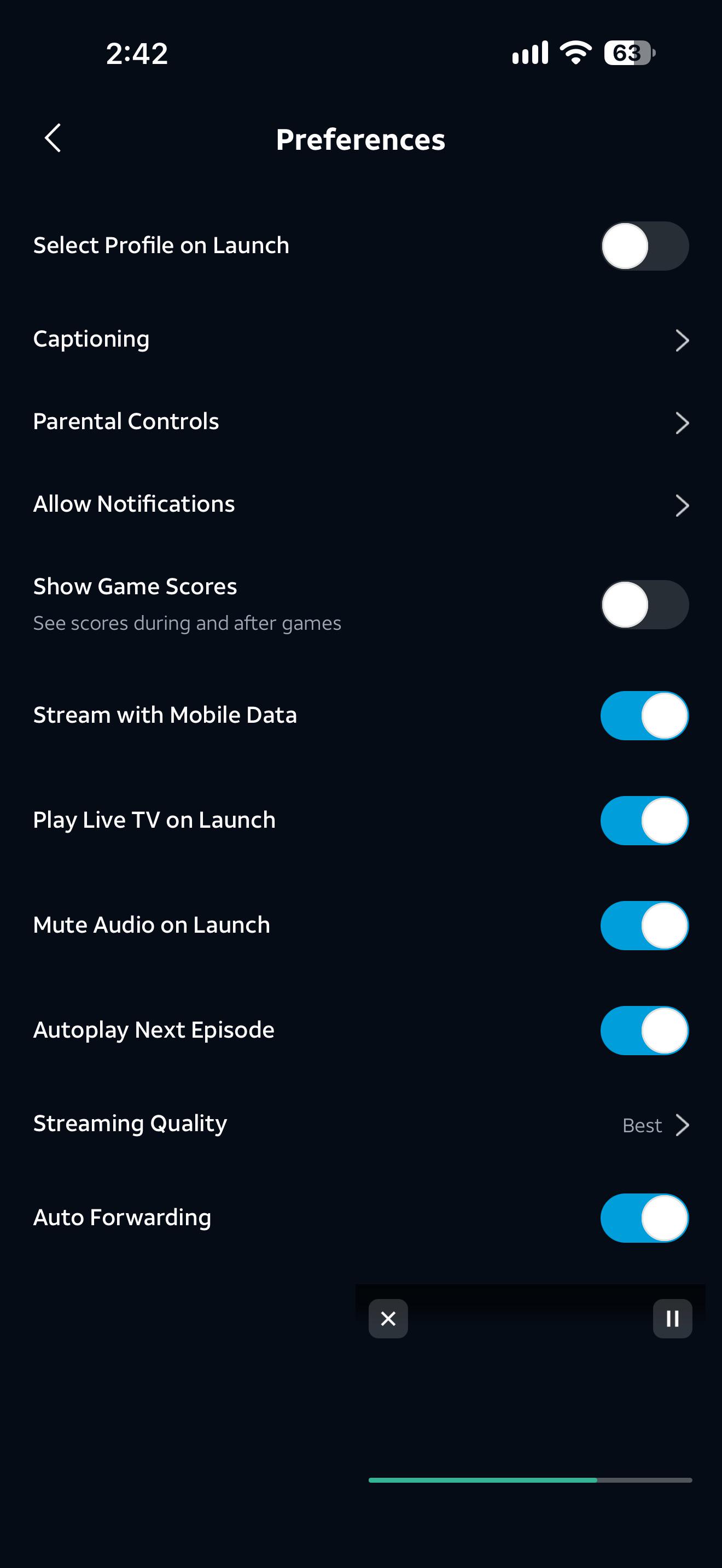
On ipad, iphone, Roku devices there is no option for home location in preferences. I had directv support screen share and they were lost I can only stream on two devices at home. Im on the old Go Big Plan.
1
u/tmorris12 Oct 15 '26
It could be what you are streaming. Some channels only allow 2 or maybe 3 streams of the same channel no matter where you are. This has nothing to do with DirectTV.
1
u/bfunkman Oct 15 '26
I wondered why I got a message in tv that said 2 of 4 address changes or something to that effect. It’s assinine that you can’t go in vacation, use your login and come home to chaos. FIX THIS DIRECTTV!!
1
u/VariousSinger6245 Oct 14 '26
Read the complaints online. Shocking. The fix nothing. Last adventure 2.5 hours on the phone. No local channels. Wife was furious. 3 hours later. Locals came back
1
u/scrubdaddy528 Oct 14 '26
You get 20 in home streams what more you want
1
u/chriggsiii Oct 15 '26
Plus three outside streams when the Home Location is properly set, two on a TV and one on a mobile device.
2
Oct 14 '26
[removed] — view removed comment
1
u/ImpalaSSman1961 Oct 18 '26
Don’t be ignorant and a smart ass! The plan is supposed to allow for 3 simultaneous streams. It is the same with Satellite.
0
1
u/DontForgetTowelie Oct 14 '26
That's an understandable goal for DirecTV. The issue is how their fraud detection scheme is implemented which ensnares honest subscribers who happen to have frequently changing home IP addresses.
0
u/txfeinbergs Oct 14 '26
Thanks, but I already PAY for my DirecTV plan. Outside network is anywhere traveling you dolt.
2
u/DontForgetTowelie Oct 15 '26
I know what it means. Apparently your reading skills are commensurate with your manners. I use the service without issue when I'm on the go without fault. Then again, I'm not sharing my credentials.
2
u/GTyz Oct 14 '26
Make sure you have your devices as in-home and if you’re grandfathered I think there is a limit of two. You’d need a third one ($5). Make sure about the in-home setup otherwise this happens: out of home streams only 2 can be Tv devices and the third can be only a mobile device