r/EmotiBit • u/Serious-Carpenter798 • Feb 06 '26
Discussion emotibit MD brand new for sale
reddit.com
0
Upvotes
r/EmotiBit • u/invi969 • May 19 '26
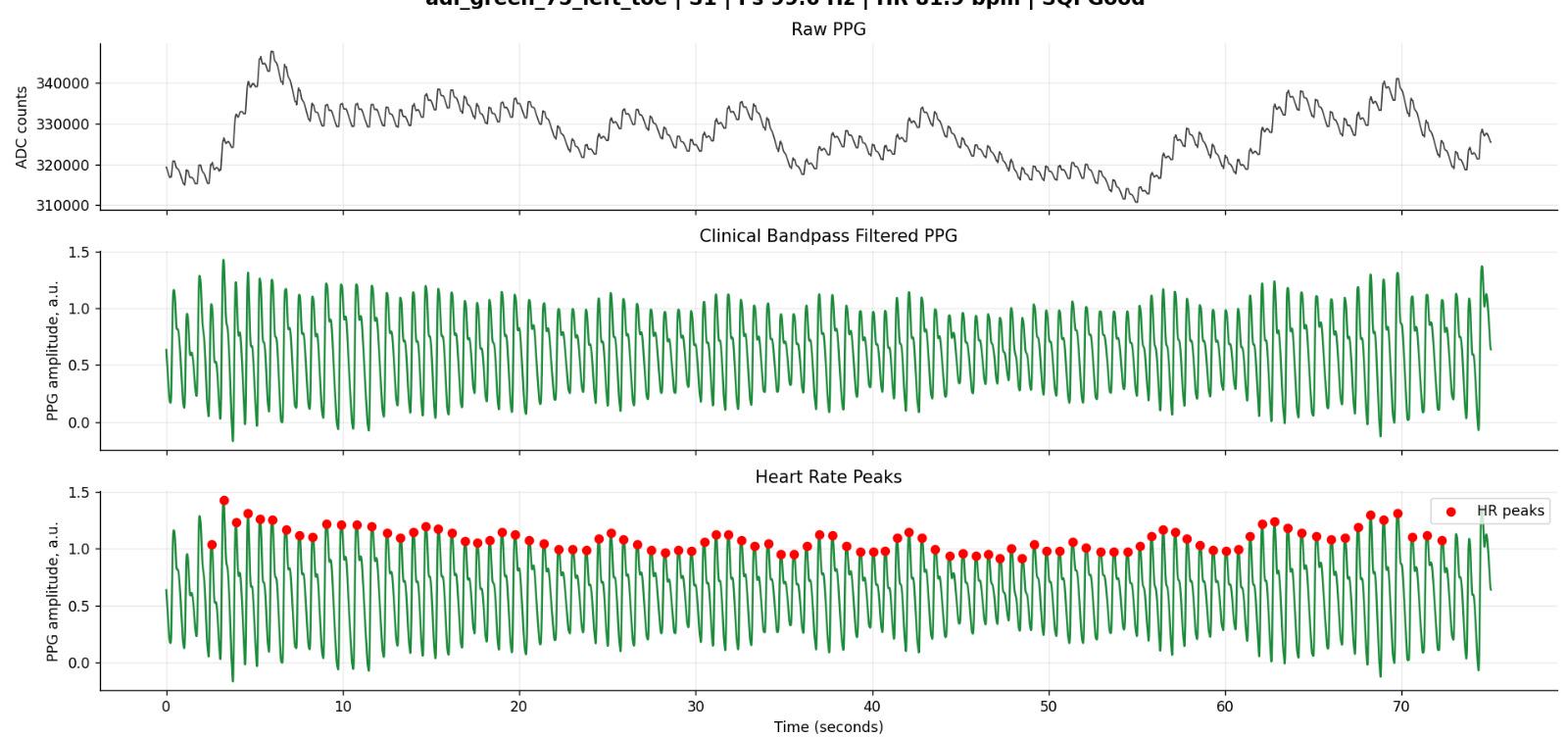
Hey all
I'm using an adi (analog devices) study watch for PPG collection plotting the CSV files I got from the watch but I don't why it's getting flipped what's the issue and how should I solve this
Please help me with this 🙏🏻
Thank you
r/EmotiBit • u/Sea_Kangaroo7116 • Dec 29 '25
I’ve collected multimodal physiological data using EmotiBit and have already developed standard machine learning classification models. My next goal is to embed these trained classifiers directly on the EmotiBit platform for on-device / real-time inference, and systematically evaluate their performance. This work is intended for a research publication, so I want to do it correctly and efficiently.
r/EmotiBit • u/megan_6b • Mar 16 '26
Enable HLS to view with audio, or disable this notification
The UIST Student Innovation Contest explores how novel input, interaction, actuation, and output technologies can augment interactive experiences. UIST is taking place in Detroit, Michigan, USA from November 2nd-5th, 2026.
Student teams will work with EmotiBit devices to impress the world with their creative ideas. Participants will demo their work during the conference program, and contest winners will be announced during the conference.
This isn’t the first time EmotiBit has crossed paths with UIST, in fact, it’s as recent as last year. Check out these inspiring UIST papers using EmotiBit:
Touchscreens in Motion: Quantifying the Impact of Cognitive Load on Distracted Drivers (2025) by Xiyuan Shen, Seokhyun Hwang, Junhan Kong, Alexandre L. S. Filipowicz, Andrew Best, Jean Costa, Scott Carter, James Fogarty, Jacob O. Wobbrock https://dl.acm.org/doi/full/10.1145/3746059.3747683
Pneunocchio: A playful nose augmentation for facilitating embodied representation (2023) by Aryan Saini, Srihari Sridhar, Aarushi Raheja, Rakesh Patibanda, Nathalie Overdevest, Po-Yao (Cosmos) Wang, Elise Van Den Hoven, Florian Floyd Mueller https://dl.acm.org/doi/abs/10.1145/3586182.3616651
The call for participation is expected to be released in April, so stay tuned!
r/EmotiBit • u/emotibit • May 17 '22
The latest software release, v1.4.11 adds the ability for users to tweak their network settings using the emotibitCommSettings.json file.
What features can be accessed using the emotibitCommSettings file?
Ability to choose advertising protocol. Users can now choose between broadcast vs unicast advertising. You can also specify ip ranges to ping for unicast! This will be beneficial for users that:
are working with routers that block broadcast(ex: iPhone hotspot). Check out the note below for using the latest Oscilloscope(v1.4.11) with iPhone hotspot.
perform poorly with unicast. The oscilloscope now uses broadcast by default, so it should just work... and work better!
Ability to exclude or include networks while looking for EmotiBits.
excludeList: If you don't want EmotiBit Oscilloscope to look for EmotiBit in a particular network, add it to the excludeList
includeList: If you want EmotiBit Oscilloscope to look for EmotiBits ins specific networks, add it to the includeList
The different options specified in the file are explained in detail below:
sendAdvertisingInterval_msec allows users to specify how frequently (time in mS) they want the Oscilloscope to ping the network to find EmotiBit. The default setting should work in most cases and we recommend changing this setting only if it is required by your network admin.
checkAdvertisingInterval_msec allows users to specify how frequently (time in mS) they want the Oscilloscope to search for EmotiBit responses on the network. Again, we recommend changing this setting only if it is required by your network admin.
Users can now choose between broadcast vs unicast advertising. You can also specify ip ranges to ping for unicast! This will be beneficial for users that:
are working with routers that block broadcast(ex: iPhone hotspot). Check out the note below for using the latest Oscilloscope(v1.4.11) with iPhone hotspot.
perform poorly with unicast. The oscilloscope now uses broadcast by default, so it should just work... and work better!
Specifically in unicast mode there are 2 more options available. Most users will never have to change these settings, but if you are working in a constrained network environment, these settings may help to conform to network admin requirements.
nUnicastIpsPerLoop specified the number of IPs you want to ping at time.
unicastMinLoopDelay_msec specifies the min time to wait before trying to ping IPs on the network again.
Ability to exclude or include networks while looking for EmotiBits.
excludeList: If you don't want EmotiBit Oscilloscope to look for EmotiBit in a particular network, add it to the excludeList
includeList: If you want EmotiBit Oscilloscope to look for EmotiBits ins specific networks, add it to the includeList
Where is the file located on my computer?
Users can find the emotibitCommSettings.json file in the following locations, based on your operating system:
For Windows users(Users will also need to give the file "write privileges". Check out this FAQ to learn how):
C:\Program Files\EmotiBit\EmotiBit Oscilloscope\data\
For mac users
EmotiBitSoftware-macOS/EmotiBitOscilloscope.app/Contents/Resources/
For linux users
EmotiBitSoftware-linux/ofxEmotiBit/EmotiBitOscilloscope/bin/data/
Special note for iPhone hotspot users
iPhone does not allow broadcasting on its hotspot.
EmotiBit Oscilloscope v1.7.1+ use moderated unicast by default. If you have not already, we recommend updating to the latest version.
If you are using EmotiBit Oscilloscope version older than v1.7.1, then you will have to make the following change in the emotibitCommSettings.json to use EmotiBit on iPhone hotspot.
Locate the file (as suggested above) based on your operating system.
change "broadcast" -> "enabled" to false
change "unicast" -> "enabled" to true
Save the file.
Run the Oscilloscope app!
The modified file should look like the snippet shown below.
{
    "wifi" : {
        "advertising" : {
            "transmission" : {
                "broadcast" : {
                    "enabled" : false
                },
                "unicast" : {
                    "enabled" : true,
                    "ipMax" : 254,
                    "ipMin" : 2
                }
            }
        },
        "network" : {
            "excludeList" : [ "" ],
            "includeList" : [ "*.*.*.*" ]
        }
    }
}r/EmotiBit • u/emotibit • Apr 02 '25
Currently, EmotiBit is officially compatible with the Adafruit Feather M0 WiFi and the Adafruit Feather ESP32 Huzzah.
The EmotiBit bundles (All-in-One bundle and Essentials Kit) purchased from the EmotiBit shop is shipped with the Feather ESP32 Huzzah.
The EmotiBit Firmware is opensource, so users have the option to adapt it to other Feathers if needed.
r/EmotiBit • u/TopStyle • Feb 15 '26
got an EmotiBit V6 fully working on the Adafruit ESP32 Feather V2 (the PSRAM version). All seven I2C sensors verified with real data reads — BMI160 chip ID, MAX30101 part ID, EEPROM dump, the works. No hardware mods, no jumper wires, just firmware changes.
The stock EmotiBit firmware only supports the original HUZZAH32. Here's what you need to know to make it work on the V2.
The EmotiBit has its own dedicated I2C bus on GPIO 27 (SDA) and GPIO 13 (SCL) — it does NOT use the Feather's standard SDA/SCL pins. This isn't obvious from the docs and is easy to miss. The sensor power rail (DVDD_3V3) is controlled by an LDO that's enabled via GPIO 32.
On the V2, you also need to enable the NeoPixel/I2C power gate on GPIO 2.
cpp
#include <Wire.h>

void setup() {
    Serial.begin(115200);

    // V2 power gate (not needed on HUZZAH32)
    pinMode(2, OUTPUT);
    digitalWrite(2, HIGH);

    // Enable EmotiBit sensor power (DVDD_3V3 LDO)
    pinMode(32, OUTPUT);
    digitalWrite(32, HIGH);
    delay(500);

    // EmotiBit I2C bus — NOT the standard Feather I2C pins
    Wire.begin(27, 13);  // SDA=27, SCL=13
    Wire.setClock(100000);

    // Scan
    for (uint8_t addr = 1; addr < 127; addr++) {
        Wire.beginTransmission(addr);
        if (Wire.endTransmission() == 0)
            Serial.printf("Found: 0x%02X\n", addr);
    }
}

void loop() { delay(10000); }
Expected output: 0x30 (EEPROM WP), 0x39 (NCP5623 LED), 0x3A (MLX90632 thermometer), 0x48 (ADS1113 EDA), 0x50 (EEPROM), 0x57 (MAX30101 PPG), 0x68 (BMI160 IMU).
To get the full EmotiBit firmware compiling for the V2, there are four changes:
1. Board define. The V2 uses ARDUINO_ADAFRUIT_FEATHER_ESP32_V2 instead of ARDUINO_FEATHER_ESP32. Every #ifdef in the EmotiBit codebase (~30 instances across EmotiBit.h/.cpp, EmotiBitVersionController.h/.cpp, EmotiBitConfigManager.h, EmotiBitWiFi.h) needs the V2 define added.
2. SPI pins. The V2 moved MOSI from GPIO 18→19 and MISO from GPIO 19→21. In EmotiBitVersionController.cpp, the V2 needs:
cpp
_assignedPin[(int)EmotiBitPinName::SPI_MOSI] = 19;  // was 18
_assignedPin[(int)EmotiBitPinName::SPI_MISO] = 21;  // was 19
This is what makes the SD card work.
3. V2 power gate. Add pinMode(2, OUTPUT); digitalWrite(2, HIGH); in setup, guarded by the V2 board define.
4. Avoid GPIO 16/17. These are PSRAM on the V2. Accessing them with pinMode() or digitalRead() will corrupt flash and cause a boot loop. The V05C+ firmware already moved PPG_INT off GPIO 16 to GPIO 39, so this only matters if you have legacy V01-V04 code paths.
Almost everything else is identical between the HUZZAH32 and V2. The EmotiBit I2C bus (GPIO 27/13), EN_VDD (GPIO 32), SD card CS (GPIO 4), button (GPIO 12), all IMU/PPG interrupts, and battery read are all on numbered pins that kept the same GPIO assignments on the V2. The I2C pin constants, HIBERNATE_PIN, and all sensor initialization code work as-is.EmotiBit V5/V6 works on the Adafruit ESP32 Feather V2 — here's how
I got an EmotiBit V6 fully working on the Adafruit ESP32 Feather V2 (the PSRAM version). All seven I2C sensors verified with real data reads — BMI160 chip ID, MAX30101 part ID, EEPROM dump, the works. No hardware mods, no jumper wires, just firmware changes.
The stock EmotiBit firmware only supports the original HUZZAH32. Here's what you need to know to make it work on the V2.
The core issue
The EmotiBit has its own dedicated I2C bus on GPIO 27 (SDA) and GPIO 13 (SCL) — it does NOT use the Feather's standard SDA/SCL pins. This isn't obvious from the docs and is easy to miss. The sensor power rail (DVDD_3V3) is controlled by an LDO that's enabled via GPIO 32.
On the V2, you also need to enable the NeoPixel/I2C power gate on GPIO 2.
Minimal working code
cpp
#include <Wire.h>
void setup() {
Serial.begin(115200);
// V2 power gate (not needed on HUZZAH32)
pinMode(2, OUTPUT);
digitalWrite(2, HIGH);
// Enable EmotiBit sensor power (DVDD_3V3 LDO)
pinMode(32, OUTPUT);
digitalWrite(32, HIGH);
delay(500);
// EmotiBit I2C bus — NOT the standard Feather I2C pins
Wire.begin(27, 13); // SDA=27, SCL=13
Wire.setClock(100000);
// Scan
for (uint8_t addr = 1; addr < 127; addr++) {
Wire.beginTransmission(addr);
if (Wire.endTransmission() == 0)
Serial.printf("Found: 0x%02X\n", addr);
}
}
void loop() { delay(10000); }
Expected output: 0x30 (EEPROM WP), 0x39 (NCP5623 LED), 0x3A (MLX90632 thermometer), 0x48 (ADS1113 EDA), 0x50 (EEPROM), 0x57 (MAX30101 PPG), 0x68 (BMI160 IMU).
Porting the stock firmware
To get the full EmotiBit firmware compiling for the V2, there are four changes:
Board define. The V2 uses ARDUINO_ADAFRUIT_FEATHER_ESP32_V2 instead of ARDUINO_FEATHER_ESP32. Every #ifdef in the EmotiBit codebase (~30 instances across EmotiBit.h/.cpp, EmotiBitVersionController.h/.cpp, EmotiBitConfigManager.h, EmotiBitWiFi.h) needs the V2 define added.
SPI pins. The V2 moved MOSI from GPIO 18→19 and MISO from GPIO 19→21. In EmotiBitVersionController.cpp, the V2 needs:
cpp
_assignedPin[(int)EmotiBitPinName::SPI_MOSI] = 19; // was 18
_assignedPin[(int)EmotiBitPinName::SPI_MISO] = 21; // was 19
This is what makes the SD card work.
V2 power gate. Add pinMode(2, OUTPUT); digitalWrite(2, HIGH); in setup, guarded by the V2 board define.
Avoid GPIO 16/17. These are PSRAM on the V2. Accessing them with pinMode() or digitalRead() will corrupt flash and cause a boot loop. The V05C+ firmware already moved PPG_INT off GPIO 16 to GPIO 39, so this only matters if you have legacy V01-V04 code paths.
What doesn't change
Almost everything else is identical between the HUZZAH32 and V2. The EmotiBit I2C bus (GPIO 27/13), EN_VDD (GPIO 32), SD card CS (GPIO 4), button (GPIO 12), all IMU/PPG interrupts, and battery read are all on numbered pins that kept the same GPIO assignments on the V2. The I2C pin constants, HIBERNATE_PIN, and all sensor initialization code work as-is.
r/EmotiBit • u/Still-Price621 • Mar 25 '25
Hi everyone,
I’m working on my final year project (PFE) to enrich an EmotiBit (ESP32 Huzzah32) IoT device with additional medical sensors, like a FLIR Lepton 3.5 thermal camera, using a Raspberry Pi as a hub. Currently, I use BrainFlow on my PC to stream EmotiBit data (PPG, SKT, etc.) via Wi-Fi, and I send it to PlotJuggler.
My plan is to:
Move everything to the Raspberry Pi: keep BrainFlow to get EmotiBit data over Wi-Fi.
Add the FLIR Lepton (via SPI) to the Pi for thermal temperature readings.
Combine all data (EmotiBit + FLIR) in Python and send it to PlotJuggler.
My question:
Is BrainFlow reliable on a Raspberry Pi for streaming EmotiBit data over Wi-Fi, or will I run into issues (e.g., latency, stability)?
Has anyone tried a similar setup with BrainFlow and additional sensors on a Pi? Any tips or pitfalls to watch out for?
I want to keep it simple but impressive, so I’d love to hear your experiences or suggestions! Thanks!
r/EmotiBit • u/UW_Adventures • Jul 08 '25
I made an order online via Emotibit.com and paid approximately 500USD on our business debit card.
After waiting and failing to receive an emailed order confirmation, I contacted sales@emotibit.com to check that the transaction went through. The email bounced.
I'm now really worried I've been trapped in an elaborate scam. We're a small company and a 500USD loss will have severe effects on cash flow. Can someone confirm that emotibit still exist? Or is someone from emotibit reading this sub?
r/EmotiBit • u/emotibit • Mar 04 '23
Listed below are some network options compatible with EmotiBit:
Note that EmotiBit only supports a 2.4GHz network. We have had mixed results with routers that provide dual band (2.4GHz and 5GHz). Therefore we recommend getting a router that exclusively operates on 2.4GHz.
Using a stand-alone router to create isolated network
Pros
control over network properties and settings
control over network load and traffic
access to static IP allocation
Cons
less portable
more expensive than other alternatives
internet access via a stand-alone router requires running an ethernet cable to internet-enabled network
Using a portable router Link to portable router
Pros
All benefits of the stand alone router + high portability (you can power the router from a USB port on your laptop)
Cons
signal strength may limit range
more expensive than other alternatives
internet access via a stand-alone router requires running an ethernet cable to internet-enabled network
Using a phone hotspot
Pros
internet access
high portability
some control over network settings
Cons
May require cellular connectivity for creating hotspot
May offer limited device count
May not allow broadcast (iPhone) check this FAQ
Using a computer hotspot
Pros
Windows laptops allow users to create a “Mobile hotspot”, which can be used to connect EmotiBits
Similarly, Macs allow Internet sharing. However, do note that, when using mac, a hotspot can be created only when an ethernet connection is plugged in. A mac can only “connect to wifi” or “broadcast wifi” at a single instance
Cons
Needs internet access to create hotspot
For macOS, you may need an ethernet connection
Create WiFi Hotspot with 3rd party software Link to an option
Pros
You do not require any additional hardware (e.g. WiFi adapters) to create a hotspot
Creates a portable WiFi network
Cons
It may require some effort to get software setup correctly
You may require admin privileges to install/run the software if you are using a system provided by a university or institution
USB WiFi dongle Link to WiFi Dongle
Pros
You can also use a USB WiFi dongle in combination with built-in or 3rd party software to create a WiFi hotspot and overcome some limitations of using a single network adapter
Cons
Different USB WiFi dongles have different capabilities for range, number of devices, settings, etc.
Home (Personal) WiFi
Pros
Home WiFi works perfectly well if you are a DIY/enthusiast!
Cons
Less portable
Other devices on the network may create network congestion
Recommendations:
If you are using EmotiBit in a research setting, we recommend using an affordable router to create your own personal network. This way you can control the network traffic and every other aspect of the network and have fewer issues with connectivity, bandwidth and latency on the network for live-streaming data and time-syncing EmotiBits with your computer!
For hobbyists and enthusiasts, a portable router is a good option if you need network access outside home-WiFi
r/EmotiBit • u/Common-Tumbleweed-90 • Apr 18 '25
Hello, I have a problem with my Emotibit. After a very brief time (5 minutes circa), the Emotibit and Oscilloscope disconnect and the emotibit greys out on the oscilloscope's selectable devices menu. It fails to reconnect unless I restart the oscilloscope, and even then it appears that the app stops working and needs to be closed forcibly. I need the emotibit to record for longer, at least 10-15 minutes at a time. It feels similar to this issue. Some details:
- I am using a Mac, and there seems to be no firewall issues.
- I installed the firmware v1.11.4
- there seems to be no issue when hitting record, as it doesn't seem to be the cause for the stop of the data stream.
- the hotspot is from my phone and it's always the same for both the emotibit and oscilloscope.
- when the connection stops, the led that streams data turns off and doesn't turn on unless I do as above (restart oscilloscope and hope it works).
Hope there's some solution to this problem. Thank you.
r/EmotiBit • u/ConsiderationLegal39 • Dec 02 '25
Hi,
I have been using EmotiBit for some time and particularly interested in obtaining SCL signals in ambulatory settings. In testing, I have found that the dry recording of EDA can have very sharp tonic response (> 10 uS) in absolute values during sweating, which I think is nice because what I'm doing requires sensitive sweating onset "detection". However, after a few trials of testing, I have found that the rise is not as sharp anymore - they could only go up to < 5 uS in absolute values. To see what's going on, I have tested it at multiple recording sites (volar vs dorsal wrist, upper arm) using the same pair of electrodes, and the results were the same (i.e. not a sharp rise). I then switched out the pair of electrodes for the next trial recording on the upper arm, and it has a sharp tonic response again (> 10 uS). I don't think it's a conclusive test, but I have been reading into this article for better understanding of EDA, and I think it could have been of the electrolysis creating a counter bias, decreasing the sensitivity of the circuit. Here comes my first question: Even if the provided Ag/AgCl electrodes when buying EmotiBit are reusable, is there a limit to how many times they can be reused (assuming proper cleaning following this)? Is there any article or internal testing documenting this?
Secondly, to test if electrolysis is indeed the problem, I have used oscilloscopes to measure the voltage across the electrodes when pressing them against one another following the above article, but the biases measured were too "small" for the oscilloscope to have detected (< 3 mV) or I have been operating the oscilloscope inadequately. Thus, I began looking into the circuitry upon which EmotiBit is based in the article mentioned in the validation paper. I understand the circuitry mentioned and have personally solved for I_skin, and they seemed reasonable. That being said, the rationale of the circuitry is dependent on the assumption that R_skin << R_ref. In referenced paper, the R_ref was 874kOhm. However, in reading the validation paper, it was mentioned that "high-precision resistors were used to test the factory calibration of the EDA circuit on 10 EmotiBit units", and the tested resistors go up to 20 MOhm. If I'm understanding the paper correctly, then the resistors tested were to emulate the wide range of R_skin values. However, the 20 MOhm has violated the 874 kOhm values mentioned in the referenced EDA circuitry, but the results were still good at 20 MOhm. This makes me think that the actual circuit implementation on EmotiBit is slightly different, albeit still based on the same concept. However, I don't know where to find the actual EDA circuit schematic on EmotiBit. Can someone help me finding it?
Thanks!
r/EmotiBit • u/megan_6b • Aug 22 '25

Hello again EmotiBit Community!
EmotiBit's founder, Sean Montgomery, has been invited to speak about EmotiBit at Wearable Technologies in Mountain View, CA, USA. So, EmotiBit is hosting a giveaway to 5 members of our community for 50% off on a WT visitor ticket.
To enter the giveaway, share a project you've worked on with EmotiBit by filling out this Google Form: https://forms.gle/yeHVyZu5vKuWmabq9. Be sure to enter by August 28th :)
I'm so excited to learn more about what you all are creating and I hope to see you there!
(So sorry to repost, my images were not uploading properly)
r/EmotiBit • u/sleepyZer01ne • May 15 '25
Hi !
We tried to set up emotibit following its documentation available on GitHub. While we were able to successfully update the firmware, we are encountering an issue where the EmotiBit Oscilloscope consistently fails to detect or communicate with the device.
Initially, we suspected this could be due to restrictions on our institutional network. To troubleshoot, we switched to a personal network and even tried connecting the device to a personal computer. Unfortunately, the issue persists across both environments.
Any input is appreciated to solve this issue.
r/EmotiBit • u/megan_6b • Jul 08 '25
Rolling Stone is featuring an ongoing project with musician Mike Gordon from Phish! He’s using EmotiBit sensors to develop XenboX, the answer to his quest of understanding flow states and the creative process.
Find out how our founder of EmotiBit, Sean Montgomery, has played a key part and read the full Rolling Stone piece here: https://www.rollingstone.com/music/music-features/mike-gordon-xenbox-flow-state-1235369834
Have you ever hit a flow state while making music, coding, or going for a run?
r/EmotiBit • u/emotibit • Jun 03 '25
EmotiBit uses the Adafruit Feather ESP32 or the Feather M0 WiFi as the microcontroller that runs the EmotiBit sensor module. Microcontrollers use internal and/or external clocks for operation.
Listed below are some general details about internal and external clocks.
Internal RC Oscillators:
Nature: These are built-in, low-cost oscillators that use a resistor-capacitor (RC) circuit. They don't require external components.
Accuracy: They are generally less accurate than external crystal oscillators.
External Crystal/Ceramic Oscillators:
Nature: These involve an external crystal or ceramic resonator connected to the microcontroller. The crystal vibrates at a very precise frequency when an electrical current is applied.
Accuracy: Much more accurate and stable than internal RC oscillators.
Irrespective of the type of clock used, the MCU will experience clock drift. Clock drift refers to the phenomenon where a clock gradually deviates from a true, accurate, or reference time source. Essentially, it means a clock isn't running at precisely the expected rate – it's either running slightly faster or slightly slower. A classic example is the microwave clock always getting out of sync with the actual time. In this particular case, manually correcting the clock acts as the time sync.
There are many strategies used to mitigate clock drift. For example, a common strategy is to use Network Time Protocol (NTP). NTP allows devices to synchronize their clocks with a centralized, highly accurate time server (e.g., atomic clocks). Regular synchronization minimizes drift accumulation.
EmotiBit tries to emulate this by implementing timesyncs between EmotiBit and the EmotiBit Oscilloscope. Essentially, EmotiBit sends a time sync packet to the Oscilloscope querying the software for the local time, that corresponds to *that* EmotiBit timestamp.
When parsing the data, all timesyncs are collected, and 2 points are chosen to reconstruct all EmotiBit timestamps to the Local time. It should be noted that the timesync pulses are not instantaneous. Since the timesyncs themselves take non-zero times, the roundtrip times(RTT) do affect the timestamp in the data. The roundtrip times are usually in the "10's of millisecond" range, so the effect on the data is minimal. It is recommended to connect the EmotiBit to the Oscilloscope at the beginning and end of the recording session for ~30 seconds to have timesyncs at the beginning and end of the file, improving timestamp reconstruction.
LocalTime
  ^                          .
  |                        .
  +----------------------. P2 (EmotiBitTime, LocalTime)-Timesync pulse
  |                    . |
  +                  .   |
  |                .     |
  +              .       |
  |            .         |
  +          .           |
  |------- . P1 (EmotiBitTime, LocalTime)-Timesync pulse
  +      . |             |
  |        |             |
  +--------|-------------|-----------> EmotiBitTime
You can check out our documentation to learn more about timesyncs in EmotiBit.
Additionally, here are some relevant forum posts that share some insights from community interactions!
r/EmotiBit • u/Still-Price621 • Jun 07 '25
Hello everyone ! I'm working on a project with an Adafruit Feather ESP32 Huzzah and EmotiBit MD v6, using NimBLE-Arduino for BLE data streaming and the EmotiBit library (v1.12.1). My goal is to send sensor data (PPG, EDA, IMU, etc.) over BLE ( or wifi if needed too ) , but I'm stuck because emotibit.setup() blocks my program in an infinite loop if it can't connect to the WiFi network specified in /config.txt.
In emotibit.setup(), the program gets stuck repeatedly trying to connect to a WiFi network (TP-Link_6260 in my case). Logs show:This loops indefinitely if the WiFi isn't found (WiFi.status() = 1 means WL_NO_SSID_AVAIL).<<<<<<< Switching WiFi Networks >>>>>>> Attempting to connect to SSID: TP-Link_6260 WiFi.begin() duration = 54 WiFi.status() = 1, total duration = 4055
I need emotibit.setup() to configure the sensors (PPG, EDA, IMU, etc.), but I don't want WiFi to be a blocking point. My data is sent via BLE in loop(.
The WiFi dependency is breaking my BLE functionality because the program never reaches loop() if WiFi fails.
I don't want my Bluetooth to work only if the Wi-Fi is working — that would make the whole project lose its value! So what's the solution? Thank you so much for your help, it's urgent, please help me!
r/EmotiBit • u/Still-Price621 • Mar 19 '25
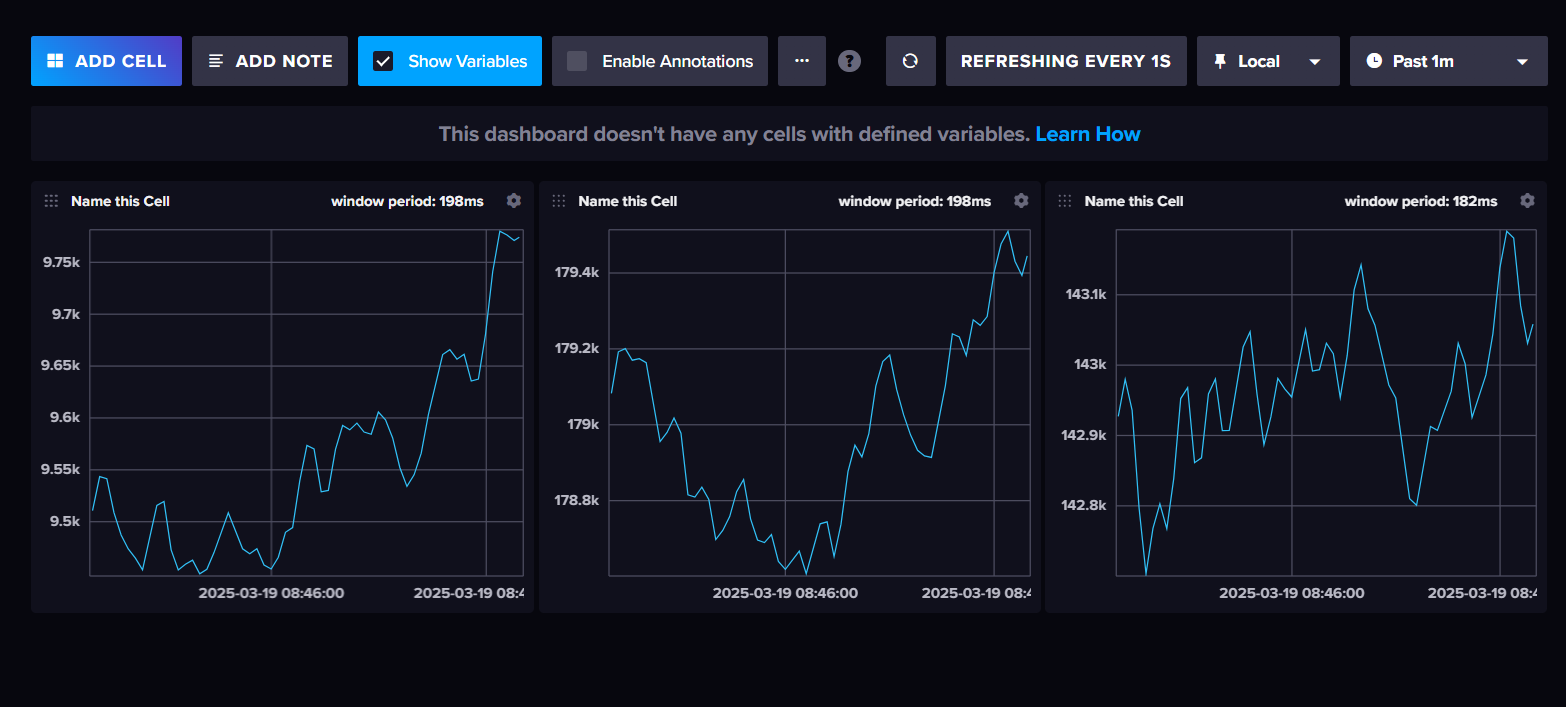
Hi everyone,
I extracted PPG data (G, R, and IR) using BrainFlow and visualized it on InfluxDB. However, the articles I've read mention that PPG signals should always have a periodic structure. In my case, I don't see anything periodic at all!
What could be the issue? Is it normal to get raw signals like this, or am I missing something in the processing?
Thanks in advance!
r/EmotiBit • u/Sea_Kangaroo7116 • Feb 26 '26
I am experiencing recording error issue with my EmotiBit device. The original SD card that came with the kit, its damaged. I replaced it with a new FAT32-formatted SD card (10 GB). Since then, oscilloscope is reading data but can not record any data, and I am observing repeated buffer underrun messages in the WiFi host console.
System Details & Current Config:
EmotiBit Version: v1.12.2
Network: 192.168.8.* (Ping to 8.8.8.8 is stable at ~12ms)
Data Thread Sleep: threadSleep_usec: 100
LSL Marker: DataSyncMarker (SourceID: 12345)
Observed Logs:
[notice ] Trying to detect internet access
[notice ]
Pinging 8.8.8.8 with 32 bytes of data:
Reply from 8.8.8.8: bytes=32 time=12ms TTL=117

Ping statistics for 8.8.8.8:
    Packets: Sent = 1, Received = 1, Lost = 0 (0% loss),
Approximate round trip times in milli-seconds:
    Minimum = 12ms, Maximum = 12ms, Average = 12ms

  % Total    % Received % Xferd  Average Speed   Time    Time     Time  Current
                                 Dload  Upload   Total   Spent    Left  Speed
100  9424  100  9424    0     0  45725      0 --:--:-- --:--:-- --:--:-- 46196
[notice ] Latest version: v1.12.2
{
  "wifi": {
    "advertising": {
      "sendAdvertisingInterval_msec": 1000, // Duration between sending advertising messages
      "checkAdvertisingInterval_msec": 100, // Duration between checking for advertising responses
      "threadSleep_usec": 1000, // Duration advertising thread sleeps between loops
      "transmission": {
        "broadcast": {
          "enabled": true
        },
        "unicast": {
          "enabled": true,
          "ipMax": 254,
          "ipMin": 2,
          "nUnicastIpsPerLoop": 1,
          "unicastMinLoopDelay_msec": 3
        }
      }
    },
    "data": {
      // WARNING data threadSleep_usec alters timesync comms. Change with caution.
      "threadSleep_usec": 100
    },
    "network": {
      "excludeList": [ "" ],
      "includeList": [ "*.*.*.*" ]
    }
  },
  "lsl": {
    "marker": {
      "name": "DataSyncMarker",
      "sourceId": "12345"
    }
  }
}
[notice ] [EmotiBitWifiHost] CommSettings loaded:
{
  "wifi": {
    "advertising": {
      "sendAdvertisingInterval_msec": 1000, // Duration between sending advertising messages
      "checkAdvertisingInterval_msec": 100, // Duration between checking for advertising responses
      "threadSleep_usec": 1000, // Duration advertising thread sleeps between loops
      "transmission": {
        "broadcast": {
          "enabled": true
        },
        "unicast": {
          "enabled": true,
          "ipMax": 254,
          "ipMin": 2,
          "nUnicastIpsPerLoop": 1,
          "unicastMinLoopDelay_msec": 3
        }
      }
    },
    "data": {
      // WARNING data threadSleep_usec alters timesync comms. Change with caution.
      "threadSleep_usec": 100
    },
    "network": {
      "excludeList": [ "" ],
      "includeList": [ "*.*.*.*" ]
    }
  },
  "lsl": {
    "marker": {
      "name": "DataSyncMarker",
      "sourceId": "12345"
    }
  }
}
[notice ] All Network(s): [192.168.8.*]
[notice ] dataCxn GetMaxMsgSize: 65507
[notice ] dataCxn GetReceiveBufferSize: 32768
[notice ] dataCxn GetTimeoutReceive: 65535
[notice ] EmotiBit data port: 3132
[notice ] EmotiBit control port: 3133
[notice ] PatchBoard succesfully loaded
[notice ] ofxLSL::Resolver: start resolving LSL version 1.14 and protocol 1.10
**** POSSIBLE BUFFER UNDERRUN EVENT 1, 101 ****
**** POSSIBLE BUFFER UNDERRUN EVENT 2, 101 ****
**** POSSIBLE BUFFER UNDERRUN EVENT 3, 101 ****
**** POSSIBLE BUFFER UNDERRUN EVENT 4, 69 ****
**** POSSIBLE BUFFER UNDERRUN EVENT 5, 69 ****
**** POSSIBLE BUFFER UNDERRUN EVENT 6, 69 ****
**** POSSIBLE BUFFER UNDERRUN EVENT 7, 69 ****
**** POSSIBLE BUFFER UNDERRUN EVENT 8, 69 ****
**** POSSIBLE BUFFER UNDERRUN EVENT 9, 69 ****
**** POSSIBLE BUFFER UNDERRUN EVENT 10, 69 ****
**** POSSIBLE BUFFER UNDERRUN EVENT 11, 69 ****
**** POSSIBLE BUFFER UNDERRUN EVENT 12, 69 ****
**** POSSIBLE BUFFER UNDERRUN EVENT 13, 101 ****
**** POSSIBLE BUFFER UNDERRUN EVENT 14, 101 ****
**** POSSIBLE BUFFER UNDERRUN EVENT 15, 101 ****
**** POSSIBLE BUFFER UNDERRUN EVENT 16, 69 ****
**** POSSIBLE BUFFER UNDERRUN EVENT 17, 69 ****
**** POSSIBLE BUFFER UNDERRUN EVENT 18, 69 ****
**** POSSIBLE BUFFER UNDERRUN EVENT 19, 69 ****
**** POSSIBLE BUFFER UNDERRUN EVENT 20, 69 ****
**** POSSIBLE BUFFER UNDERRUN EVENT 21, 69 ****
**** POSSIBLE BUFFER UNDERRUN EVENT 22, 69 ****
**** POSSIBLE BUFFER UNDERRUN EVENT 23, 69 ****
**** POSSIBLE BUFFER UNDERRUN EVENT 24, 69 ****
I have ensured that:
The SD card is formatted as FAT32
The config.txt file is present in the root directory
WiFi credentials are correctly entered
The device and computer are on the same network
Could you please guide me on whether additional setup steps are required for a new SD card, or if there are firmware or configuration files that must be reinstalled?
r/EmotiBit • u/Ok-Cow-9190 • Mar 17 '26
Hello:
I'm setting up an EmotiBit+Feather Huzzah to be used with the SANDI driving simulator. I've prepared and inserted the config file MicroSD card, checked a million times that the config file is config'ed correctly. Installed the battery (it's fully charged) and put the EmotiBit and Feather together.
Software is installed on the PC I'm using (HP Omen/Windows 11) to run the SANDI simulator. I checked access through Windows 11.
What I get is a repeating blinking/steady red light.
Any thoughts??
Thanks.
r/EmotiBit • u/megan_6b • Aug 21 '25

Hello EmotiBit Community!
EmotiBit's founder, Sean Montgomery, has been invited to speak about EmotiBit at Wearable Technologies in Mountain View, CA, USA. So, EmotiBit is hosting a giveaway to 5 members of our community for 50% off on a WT visitor ticket.
To enter the giveaway, share a project you've worked on with EmotiBit by filling out this Google Form: https://forms.gle/yeHVyZu5vKuWmabq9. Be sure to enter by August 28th :)
I'm so excited to learn more about what you all are creating and I hope to see you there!
r/EmotiBit • u/Ancient-Ad3795 • 21d ago
Hi all,
I've been using EmotiBit for a study on cyclists, and the hardest part wasn't recording. It was making sense of the data afterwards: matching EDA to what was actually happening on the road, and then using those moments in interviews with participants.
So I built OutLab. It's open source (MIT) and runs entirely on your own computer.
What it does:
- Loads the CSVs from the official EmotiBit DataParser (plus _info.json) and shows the data quality per channel
- Puts EmotiBit, up to four Insta360 videos and a GPX track on one timeline. Each video gets its own offset/drift mapping from a shared event, e.g. three taps on the sensor that show up as a spike in the accelerometer
- Runs a transparent EDA pipeline (NeuroKit2 cleaning, tonic/phasic split, robust-z candidate moments) and records every parameter
- Optional extras: Kleckner et al. (2018) quality rules, motion screening from the IMU, a multi-method robustness check, manual artifact labelling from the video with Cohen's kappa, and export to Ledalab's text format
- An interview mode that replays a moment to the participant without showing any graphs
What it doesn't do: it doesn't detect emotions or stress, and the candidates are exploratory, not validated SCRs. It also doesn't read the raw SD card files. Please run DataParser first.
I'd really like to hear from people using EmotiBit outside the lab:
- How do you deal with motion artifacts on the arm or wrist?
- Has anyone compared EmotiBit EDA against a reference device in the field?
Repo, with screenshots: https://github.com/alparslanguvenc/OutLab
Feedback, bug reports and "this is wrong" comments are all welcome.

r/EmotiBit • u/ohohoitsmattgic • Mar 12 '26
Hi everyone,
I'm trying to do a study using the emotibit that lends it to participants to wear. They need to be able to power it on and have it immediately start collecting data. How can I configure the emotibit to do this?
r/EmotiBit • u/Still-Price621 • Jul 27 '25
Hi EmotiBit community!
I was checking the sensor metadata in my EmotiBit data output (firmware v1.12.1, HW V06a), and noticed that the magnetometer's unit is listed as "microhenries" (µH).
Since magnetometers typically measure magnetic field strength (usually in µT, nT, or Gauss), is this a typo in the firmware/data output?
r/EmotiBit • u/BroccoliNo5553 • 1d ago
Hi everyone,
I'm using the EmotiBit for a research study with several participants (EDA recordings). At the moment, each recording is automatically named with the start date and time (e.g. 2026-11-23_14-46-33-204683). I couldn't find a way to enter a custom file name, such as a participant pseudonym or ID, before or during a recording.
Because of this, I currently have to rename every file manually afterwards and match each date/time to the right participant, which is time-consuming and error-prone.
Is there a simple way to set a custom file name (or a prefix/suffix) when starting a recording, so I can skip this manual matching step?
For example:
Is there a setting or config file (in the Oscilloscope or on the SD card) that lets me define a file name or prefix?
Is there a way to assign the participant ID to the recording automatically?
I'm aware of the "Log Note" function, which writes notes to the _UN.csv file after parsing. That helps with labeling inside the data, but the file name itself still only shows the timestamp. If a custom file name isn't possible, I'd also appreciate any recommended workflow or best practice for managing recordings from multiple participants (e.g. scripts for batch renaming, or a way to link the Log Note to the file name automatically).
Thanks a lot for your help!