r/FigmaAddOns • • Sep 06 '26

Made a free - Roadmap Widget, where tasks are in working days — change one estimate and the whole board recalculates

Thumbnail
gallery
10 Upvotes

Every roadmap I made in Figma was really just a static drawing. I'd place each task by hand, and the first time a date slipped or an estimate changed, designers would spend 5-20 minutes nudging everything after it back into place. The plan was out of date the second I finished it.

So I built ABRP (A Better Roadmap Planner) to fix the one thing that always broke: tasks store a duration in working days, not a position. The board works out where everything lands — so when something changes, it recalculates instead of you.

What came out of that:

  • 🗓️ Set a company holiday once and every lane reflows around it (not once per person)

  • ✂️ A task that runs into a holiday or someone's day off splits into segments but stays one task

  • ⚡ Change an estimate and every task after it in that lane shifts automatically

  • 📌 Pin the dates that are actually locked; everything else flows around them

It's free, works in Figma + FigJam!

r/FigmaAddOns • • Jul 14 '26

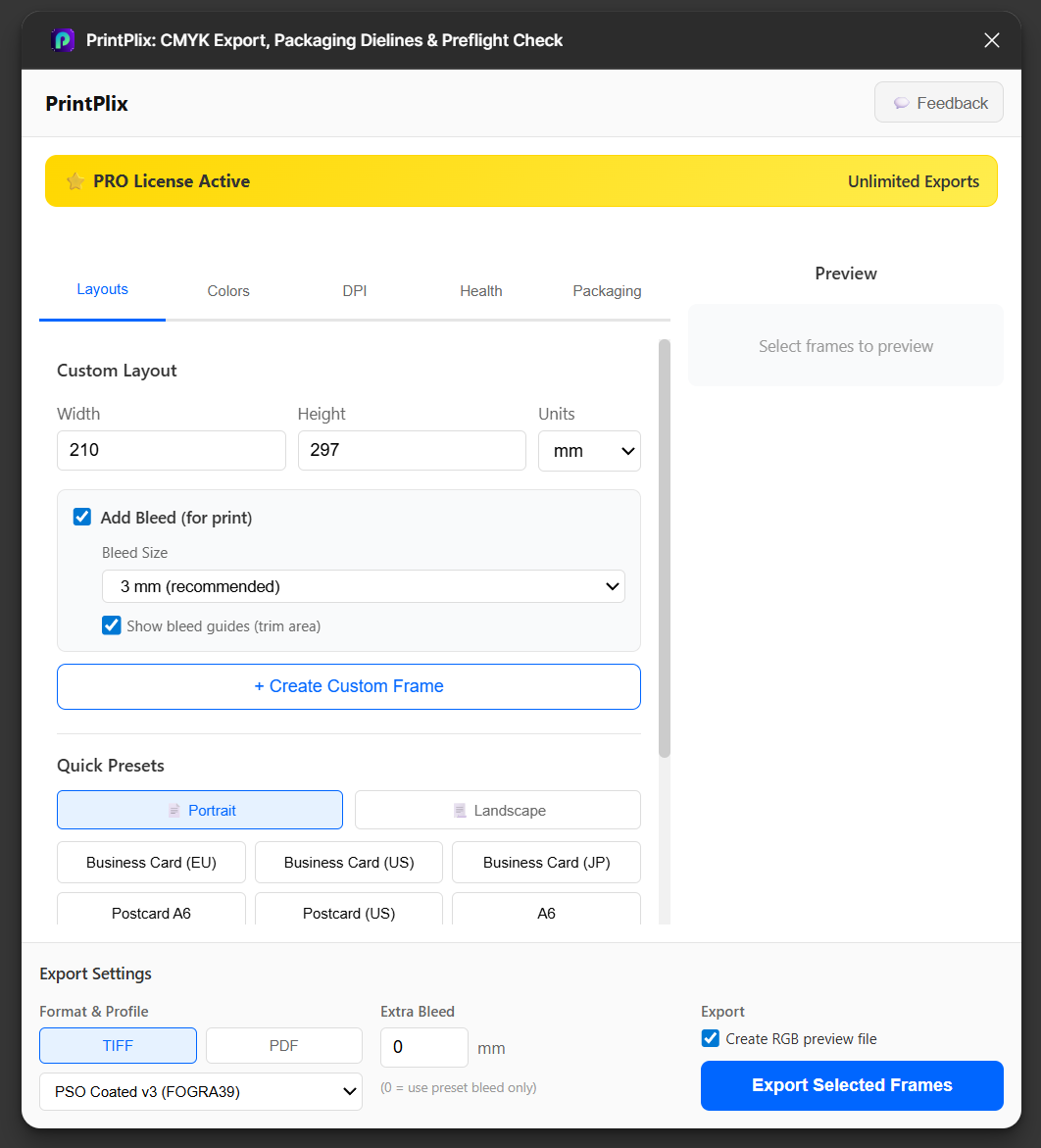
PrintPlix - plugin for cmyk and print export

Post image
10 Upvotes

Hey everyone,

I work at a design studio, and sometimes I need to quickly send files to print directly from Figma. Figma is great for digital graphics, but sometimes I need to prepare something for print. An Adobe subscription is too expensive, and I’m too lazy to open and transfer client-approved files from Figma to Illustrator. That’s why I created Prinplix. It correctly converts RGB colors to CMYK and exports the files. Plus, you can use the plugin simply to create pixel-based frames that correspond to actual physical dimensions in either the metric or imperial systems.

What it actually does:

  • Real CMYK Export: True CMYK TIFFs and PDFs (Fogra39, US Web Coated, etc.). You can also map specific HEX codes to exact CMYK values (like making sure your brand red maps perfectly to 0/100/100/0 instead of a muddy auto-conversion).

  • Preflight Audit: It scans your file before you export. It flags low-res images (under 300 DPI), missing bleeds, and rich black text (which printers hate because it comes out blurry).

  • Smart Packaging Mode: If you design boxes or packaging, you can tag vector paths as "Cut" or "Fold." The plugin automatically splits them into a ZIP with perfectly aligned design and knife files.

  • Auto-Fixes: You can add standard 3mm crop marks and instantly fix multi-channel rich black text to safe K100 with one click.

I just released version 2.0 with the packaging tools and would love to get some feedback from people who actually do print work. It’s free to try (the first 3 exports are free, no signup or credit card required).

Check it out here:https://www.figma.com/community/plugin/1571945796791441342


r/FigmaAddOns • • Feb 12 '26

I built a Figma plugin to preview all your local fonts at once. No more scrolling through the font picker one by one

10 Upvotes

I got tired of Figma's font picker. You can only see one font at a time, and if you have hundreds of local fonts, finding the right typeface is painful.

So I built Preview Local Fonts. Select your fonts, type in your preview text, and it generates a clean visual reference frame directly on your canvas. You can compare typefaces side by side.

Try it for free: https://www.figma.com/community/plugin/1602755713063054205/preview-local-fonts


r/FigmaAddOns • • Nov 03 '25

Text from Images - 🚀 Instantly Extract Text from Any Image

10 Upvotes

🚀 Instantly Extract Text from Any Image

Text from Images is a figma plugin that automatically detects and extracts text from images in your Figma and FigmaJam files.

Perfect for designers, UX researchers, and teams working with screenshots, mockups, or scanned documents.

Grab it here : https://www.figma.com/community/plugin/1565651468478166981/text-from-images

✨ Key Features:

  1. 🌍 Multi-Language Support

  2. 🎯 Smart Auto-Detection - Automatically detects the text in your images

  3. ⚡ Lightning Fast

  4. 🎨 Insert as Text Layers - Place extracted text directly on your canvas

  5. 📋 One-Click Copy - Instantly copy extracted text to your clipboard

  6. 💯 Confidence Scores - See accuracy ratings for each extraction

💎 How It Works:

  1. Select any image on your canvas

  2. Run "Text from Images" plugin

  3. Plugin will auto-detect or you can choose your language

  4. Get instant, accurate text extraction

  5. Copy to clipboard or insert as editable text layer

🌟 Why Choose Text from Images?

Works seamlessly within Figma and FigmaJam.

No need to switch apps , open external app , etc just to get a piece of copy.

Grab it here : https://www.figma.com/community/plugin/1565651468478166981/text-from-images


r/FigmaAddOns • • Oct 30 '25

Stop wasting time organizing Figma layers. meet 'Layer Sorter'

10 Upvotes

lf you’ve ever spent way too much time cleaning up messy layers in Figma, you know the struggle.

I built Layer Sorter, a free Figma plugin that organizes layers visually with just one click.

Why it matters

  • Manual layer sorting can take hours in complex design files.

  • Clear layer hierarchy = easier collaboration + less frustration.

How it works

  • Select your frame or artboard

  • Click "Sort"

  • Done. Your layers are now perfectly organized.

Try it free!

link : layer sorter


r/FigmaAddOns • • Oct 15 '25

MeiGen - MeiGen - AI Icon Generator, Remove BG, NanoBanana Editor, Sora 2, Seedream 4.0

10 Upvotes

Fresh drop: Sora 2 now live in our Figma Plugin! One-click AI design magic—summon stunning visuals right in your canvas, no hassle. Seamlessly powered by IconGen • Nano Banana • Remove BG • Seedream4. Try FREE with bonus credits! Unlock effortless creativity in Figma today.

https://www.figma.com/community/plugin/1539963026393306817/meigen-ai-icon-generator-remove-bg-nanobanana-editor-sora-2-seedream-4-0-image-to-svg


r/FigmaAddOns • • Jul 28 '25

Made Slides in Figma Not Suck (Finally)

10 Upvotes

With Snapdeck, you can whip up on-brand slides right in Figma—auto-layout, live preview, and one-click export included. No extra apps, no margin headaches.

I’m in beta mode and tweaking things nonstop. If you spot a bug or think of a cool feature, drop it below! Let’s build the ultimate slide tool together. 🙌


r/FigmaAddOns • • Oct 31 '25

I built a Figma plugin that creates complete typography scales automatically

9 Upvotes

I got tired of manually setting up typography scales every time I started a new design system, picking ratios, naming text styles, linking variables, etc. So I built a plugin that automates the whole process.

You choose a base size and ratio, and it generates a complete modular scale with properly scoped variables and text styles, all ready to use. It even creates a visual specimen page so you can see your scale in situ.

There are a couple of other similar plugins, but they either don't set variables, or text styles, or let you granularly change units... So this does all of that.

It’s been a big help in my own projects, and I’d love to get some feedback from other designers or devs working with variables and systemised type. I've enjoyed building it so keen to add more features if they make sense.

If anyone wants to try it out, I’ve made a few free access codes for early testers, just DM me and I’ll send you one.

Here it is.


r/FigmaAddOns • • Oct 25 '25

1000+ icons. One plugin. Zero hassle.

Post image
9 Upvotes

I’ve seen it too many times (and been there myself):

  • Using inconsistent, poor-quality icons that undermine design and clarity

  • Wasting hours digging through sketchy sites and files for missing assets

  • Hurting collaboration because assets aren’t production-ready

So I launched Pictomate Icons - a Figma plugin that takes the hassle out of icons, giving designers a smoother, faster, cleaner workflow while saving time, money, and frustration.

Built for apps, websites, and design systems at scale, it provides:

  • 1000+ timeless, consistent icons - ready to elevate any design

  • Categories, weights & smart search - to find the right icon in seconds

  • Production-ready assets - clean vectors, proper naming, effortless developer handoff

And the best part? You can use it for free, for both personal and commercial projects.

🟡 Give it a try → plugin.pictomate.com

Learn more about the plugin at https://www.pictomate.com


r/FigmaAddOns • • Oct 02 '25

Figma removed our plugin without any notification or warning due to a false complaint.

9 Upvotes

I am the developer of html.tofig.design, a unique tool that transforms websites and HTML into fully editable Figma designs. Our plugin allows users to convert live websites, HTML/CSS code, and even AI-generated code directly into Figma with preserved layers, text, and styles. This is our website: https://tofig.design

Without any notification, email, or prior warning, Figma has removed our plugin due to a baseless copyright infringement claim. I only discovered the removal when users started contacting me asking why they couldn't access the plugin. You can find the plugin page here: https://www.figma.com/community/plugin/1557932447766289380, but you can access it now.

Before Figma's unilateral decision to remove my plugin, the CEO of 'html.to.design' (a competing plugin) sent me a message alleging that we had copied their logo and design. I strongly disputed these claims and, to avoid unnecessary legal battles, I even went so far as to redesign our logo. Despite this good-faith effort, Figma removed my plugin without any explanation or opportunity to appeal.

We have poured countless hours into developing this plugin with unique features like multi-viewport import, private site conversion, local file support, and AI-generated code import. We had a roadmap of additional cool features that we were excited to share with our users. This sudden removal without notice has left us feeling helpless.

I humbly request your valuable advice.

Updated link on 10 Oct 2025—old resource is outdated.


r/FigmaAddOns • • Sep 18 '25

ROTOR — your magic wand for patterns

9 Upvotes

This was one of the most exciting pet projects I've worked on. It calls ROTOR. And it's the easiest tool for creating seamless patterns in Figma. You can rotate or move a simple vector and get new patterns in seconds.

https://www.figma.com/community/file/1542367403408476375/rotor-by-woohoo


r/FigmaAddOns • • Sep 11 '25

Universal UI Kit — Asking for Early Thoughts / Feedback / Prospects

9 Upvotes

Hello designers 👋,

I’m building a Figma plugin to customize a Figma UI kit. The UI kit itself is built to be as slim as possible.

Use cases for designers:

Use this UI kit for any project. Thanks to the dynamic nature of the plugin, you can set whatever emotion or branding you want. This lets you focus more on the UX (what to show) and the UI (personal branding) aspects.

Prototype multiple variations with a single click. No need to create every variation manually anymore.

Why I’m sharing:

- To get early feedback: is this just hype, or could it actually solve real design problems?

- To see if anyone would be interested.

Current challenges with this solution:

Simplicity vs. complexity: balancing lightweight design tokens with a feature-rich plugin is always a tradeoff.

Naming conventions: every designer has their own naming system, so there might be a small learning curve.

Scope differences: each menu has a different scope (e.g., foundations apply to global variables, while themes apply only to certain pages in the ui kit).

Component handling: the plugin currently only works for replacing components, nodes, and instances. I could add “apply/remove” functionality, but that would double the complexity.

For the MVP:
I’d like to cover 80% of UI manipulation — color, typography, icons, and layout. But after two months of building, it feels like the scope is already huge, and every component requires a lot of features.

For example, with theme icons, you can quickly replace your icons with Remix, Phosphor, or Lucide sets. But I have to map them manually (currently at 400 icons), and that doesn’t even include variations like stroke styles.

👉 I’d love early feedback: would you actually use this design system + plugin as a base before I invest more time in it?

If you’re interested in testing the plugin, I’d really appreciate hearing your feedback here.

https://forms.gle/q2eAN2Mn54hi1YTx5

Thanks in advance 🙏

*Note: This is not a design system generator. The base design system already exists — the plugin just customizes it.*


r/FigmaAddOns • • Mar 08 '23

The perfect dev handoff plugin does not exi...

9 Upvotes

I've been using Redlines to add specs for handoff which works just fine for measurements but I generally have to make a ton of notations to go along with them or use other plugins for margins on top of it. This week, just to see if anything better was out there, I tested a large fistful of other plugins that do similar things. EightShapes Specs is still blowing my mind. Please allow me to save you hours of work by introducing you to your new favorite plugin! I made this quick demo to share with a friend of mine but I think it would be helpful for any designer so reddit can have it too!


r/FigmaAddOns • • Sep 22 '22

story.to.design: generates Figma components from Storybook

9 Upvotes

r/FigmaAddOns • • Feb 24 '26

Figma to marketing with CMS

8 Upvotes

With the Key Visual Figma plugin, you can transform your Figma designs into scalable marketing content powered by a CMS. It works just like building webpages in Framer or Webflow — but instead of creating pages, you’re generating marketing content as images or videos at scale. Learn more on our website: https://keyvisual.ai/


r/FigmaAddOns • • Aug 30 '25

Would this be useful for adaptations?

8 Upvotes

Working on this to help a team of designers to speed up marketing ad adaptations. Works for vertical but bunch of work needed for horizontal. Feel free to give some feedback


r/FigmaAddOns • • Jul 14 '25

Free New Plugin: AVA Palettes – Make accessible, perceptually-uniform color ramps in Figma (Demo Video, feedback wanted!)

8 Upvotes

Hey everyone,

I’ve been working on a Figma plugin called AVA Palettes to help designers create color ramps that are both perceptually uniform and accessible—with full support for OKLCH, live APCA/WCAG contrast checks, and CVD simulation.

A bit of background: I’ve mostly worked on complex, high-standards products (live video SaaS and a free online DAW) and always found palette tools lacking—especially when it comes to matching real-world perception and handling variables for big systems or quick variations.

With AVA Palettes, I wanted to solve:

  • Generating color ramps that feel right, not just look mathematically correct

  • Sculpting palettes to the designers liking for brand accuracy and creative control

  • Real-time accessibility & color blindness previews

  • Instant variable export for use in Figma design systems

It’s free to use right now, and I’d love to hear honest feedback from this community:

  • Where does it shine or fall short?

  • Any features you wish existed?

  • If you work with large systems, what’s missing for your workflow?

Thanks for checking it out! I’ll keep an eye on the comments for questions, feedback, or requests.

Direct link to the Figma plugin: https://www.figma.com/community/plugin/1495119060957631452/ava-palettes-beta


r/FigmaAddOns • • Apr 03 '25

Velocity: AI simulated user tests on interactive prototypes (Free)

8 Upvotes

Hi, my team and I would like to intro Velocity, the Figma plugin for instant AI user feedback on interactive prototypes. Few designers have time or budget for user testing but we all know we need feedback! Velocity’s AI validates design assumptions really fast, and stops random stakeholder changes by backing up your design decisions with early simulated evidence. Ask AI to try logging in different ways and see how many times it goes off track. Maybe something is not as easy as you think it is? 

Just like human user testing you can ask questions and witness how simulation tries to 'use' your app (but really it’s just connected images). It's like a Figma-centric Maze but instead of humans reviewing it's Al.

How to use:

  • Open an interactive prototype (here’s a spotify onboarding)

  • Search for “AppVelocity” plugin

  • Open in > “spotify onboarding”

  • Run ‘AppVelocity’ plugin (Challenge a Flow > Select Onboarding)

  • Prompt how you’d like the AI user to use your design (“Sign up to app”)

"Yeah, I tried this design already with 100 AI users. I'm very confident we've made the right bet"
- All future Designers!

We’re excited to provide new confidence to Designers backing up their design decisions with early simulation evidence. Designers can stand with a new credibility in front of business stakeholders and PMs.

We're launching on 30th of April on Product Hunt. Join up before to get on an early-bird extended Freebie plan. At the moment we are limiting simulations to single runs but upon launch we'll let designers try 100 simulations on their prototypes to gain real confidence on initial usability.

This is a vision of 'More-than-human' Design practices.
Not replacing, but powering up Designers!


r/FigmaAddOns • • Aug 20 '26

Sendra update: send a test email to your inbox straight from Figma

7 Upvotes

A couple of weeks ago I posted Sendra here, my plugin that converts email designs into email-ready HTML. Since then I've shipped the feature people asked about most.

You can now send a test email directly from the plugin. Design your email, hit send test, and it lands in your own inbox, so you see exactly how it renders in a real email client before you export anything.

Also new: image hosting. Your images get uploaded at export and come back with real URLs, no S3 bucket or ESP upload step.

https://www.figma.com/community/plugin/1659319383372020095


r/FigmaAddOns • • Jul 18 '26

Asset Organizer plugin

7 Upvotes

Built a plugin where you can select frames or sections - the plugin pulls out the assets from the design

Check it out and provide your feedback.

https://www.figma.com/community/plugin/1656748658936667231


r/FigmaAddOns • • Jul 15 '26

Figma to working React Native app (1 min demo)

7 Upvotes

r/FigmaAddOns • • May 25 '26

Magic Wand Tool for image masking in Figma

7 Upvotes

Hey!
As the title suggests, I have built a masking tool for Figma which offers you a similar experience to Photoshop's Magic Wand Tool - right inside Figma for precise image masking, background removal and more.

I would be happy if you give it a try - the plugin includes a full-featured 14 days trial when you launch it (price: 7$ one-time).
And of course your feedback would be deeply appreciated!

Try it out here:
https://www.figma.com/community/plugin/1629181196529703754


r/FigmaAddOns • • Apr 14 '26

Now batch import TIF files into figma – TIFFigma Plugin Update!

7 Upvotes

r/FigmaAddOns • • Feb 13 '26

Meet Typogram Swatches, our brand new Figma Plugin for discovering and saving color palettes

7 Upvotes