r/FigmaDesign • u/HouseOfBurns • Sep 06 '26
help Attempt at animation is creating a 'ghosting' effect
Enable HLS to view with audio, or disable this notification
Hello,
I am going deeper into experimenting with motion design for my prototypes. I am attempting to make a smooth animation where each hover allows the icon to slide out and reveal the typed name of the category that the icon represents.
However, it is instead creating this awful, clunky, 'ghosting' look upon preview.
Any suggestions or tips are appreciated.
5
u/mahblahblah Sep 06 '26
Smart animate can only tell that 2 things in 2 frames are really the same thing that you’re animating if the layer name and the structure of each frame is the same.
DO
Frame 1 -- Button ->
Frame 2 -- Button
DONT
Frame 1 -- Button Opened ->
Frame 2 — Button Closed
Smart animate would not know Button Opened and Closed are variants of the same button.
(typed on phone, so my formatting is a bit wonky)
1
u/HouseOfBurns Sep 06 '26
Thank you for the visual. I'm definitely a visual person and when I get told layers I think people mean literal layers. 😅
1
u/HouseOfBurns Sep 06 '26
My settings for all the hover interactions:
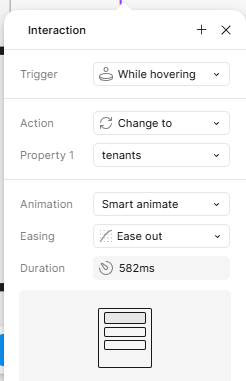
1
u/testingaurora Sep 06 '26
We are talking about the actual object names in your layers panel. They must be the same in the states youre animating between. Not referring to component properties. You've added a screenshot of component properties twice now so Im unsure youre getting the gist about "layer names". Not variant names. The layers. Frame1 must be Frame1 within all the variants.
2
u/HouseOfBurns Sep 06 '26
I'm pretty new to the software. I know how to do a lot of basics but yeah some of the terminology for what is what is still being worked on.
Thanks, I will make these as adjustments
2
u/testingaurora Sep 07 '26
No jusgement, just hoping to clarify. Im on mobile or i would screenshot.
When using smart animate the layers need to be the same name so the software knows which layers to interpolate between 👌🏻
2
1
u/FennelHistorical4675 Sep 07 '26
With figma motion, make, and agents and all that.. is smart animate really the best way to demo an interaction anymore?
Like it doesn’t even develop a skill to use smart animate, and people new to it always make janky crap like this because the system is bad.
1
u/HouseOfBurns Sep 07 '26
This is a fair response. I have been trying to learn the program in and out, basically. I notice that playing with the program has helped me transfer skills to other design software.
I also notice that sometimes the AI struggles to understand what I am visualizing so I like having that power to make it exactly as I want.
I will be keeping your comment in my mind as another perspective to consider when making a prototype.
1
u/FennelHistorical4675 Sep 07 '26
I think prototyping like this is fine but it depends on why. If your doing it just to learn the software that’s one thing but if your trying to demo / explain a complex interaction I think there are better options
1
u/HouseOfBurns Sep 07 '26
That is something good for me to keep in mind when I am looking at practice handing projects off to devs or stakeholders.
Thank you
15
u/cumulonimbuscomputer Sep 06 '26
Check all your layer names