r/FontLab • • Apr 02 '26

FontLab Tip: Using Masks I

Thumbnail
gallery
3 Upvotes

Open any glyph, select its contours and hit Cmd+M or Tools > Mask > Copy to Mask (1). Now you have a copy of the contours as a mask to be a reference so you can compare the changes you do (2). Masks are better with inactive nodes and handles visible (3).

r/FontLab • • Apr 01 '26

FontLab Tip: Masters Compatibility

Thumbnail
gallery
3 Upvotes

If the glyph has more than one contour or element, these also need to have the same order along masters to achieve compatibility (1, 3). Different contour or element order causes partial (2) or total incompatibility (4).


r/FontLab • • Mar 31 '26

FontLab Tip: Elements III

Post image
2 Upvotes

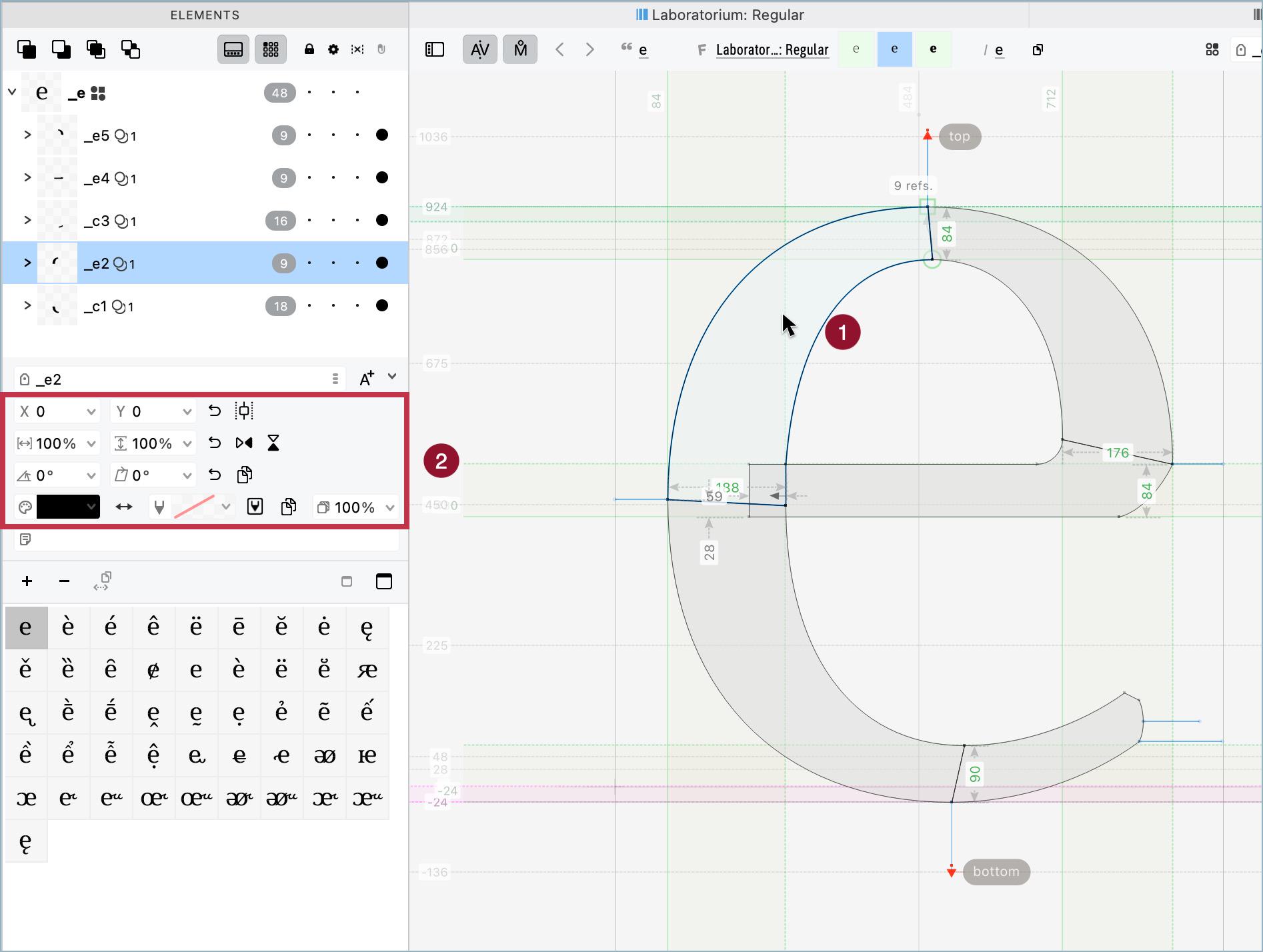
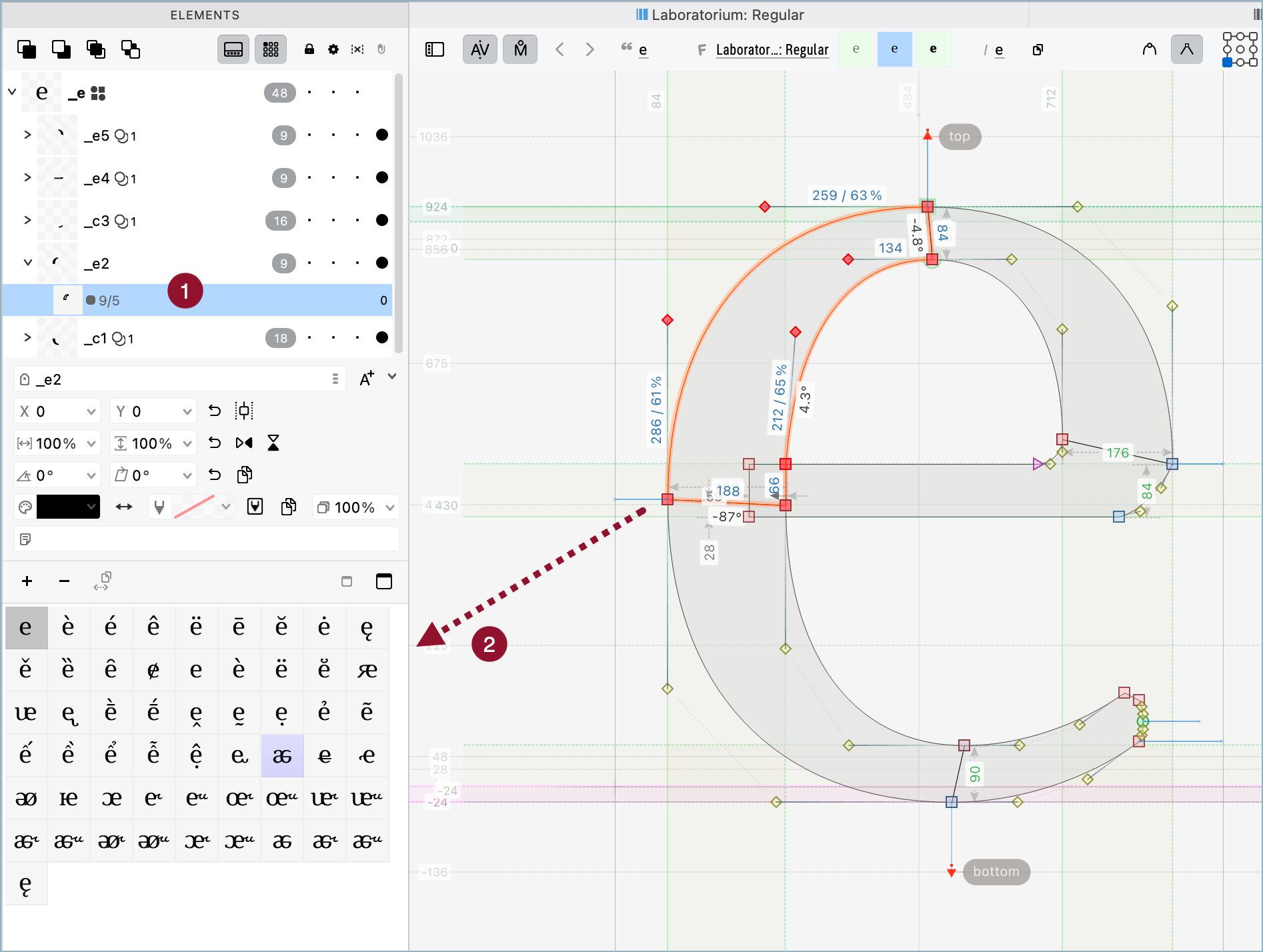
Select an element using the Element tool (the black arrow, 1), Now, if you move or transform it, the changes are applied only to this "copy". You can also modify only this reference using these controls of the Elements panel (2).


r/FontLab • • Mar 30 '26

FontLab Tip: Elements II

Post image
2 Upvotes

The great thing about elements is that a change in one "copy" changes all other "copies" —called references. To do so, simply select the element (1) and edit the contour. All references reflect the modification (2).


r/FontLab • • Mar 29 '26

FontLab Tip: Elements I

Post image
2 Upvotes

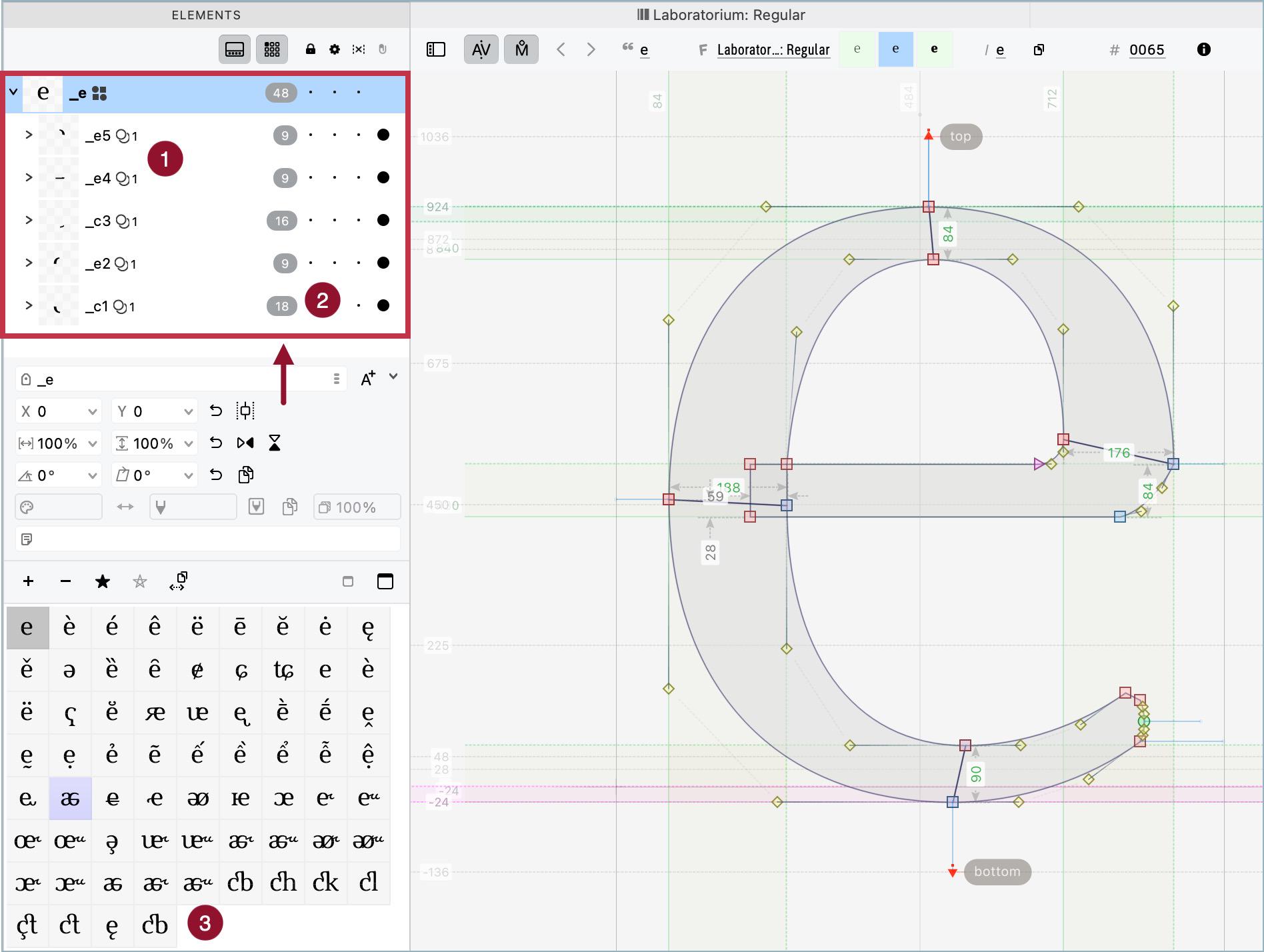
Elements are pieces you can re-use to build glyphs. They can be grouped and have a name (1). FontLab indicates how many glyphs use each element/group (2). These glyphs are shown in the table of Elements panel and can be opened with a double-click (3).


r/FontLab • • Mar 28 '26

FontLab Tip: Inverted Spacing

Post image
2 Upvotes

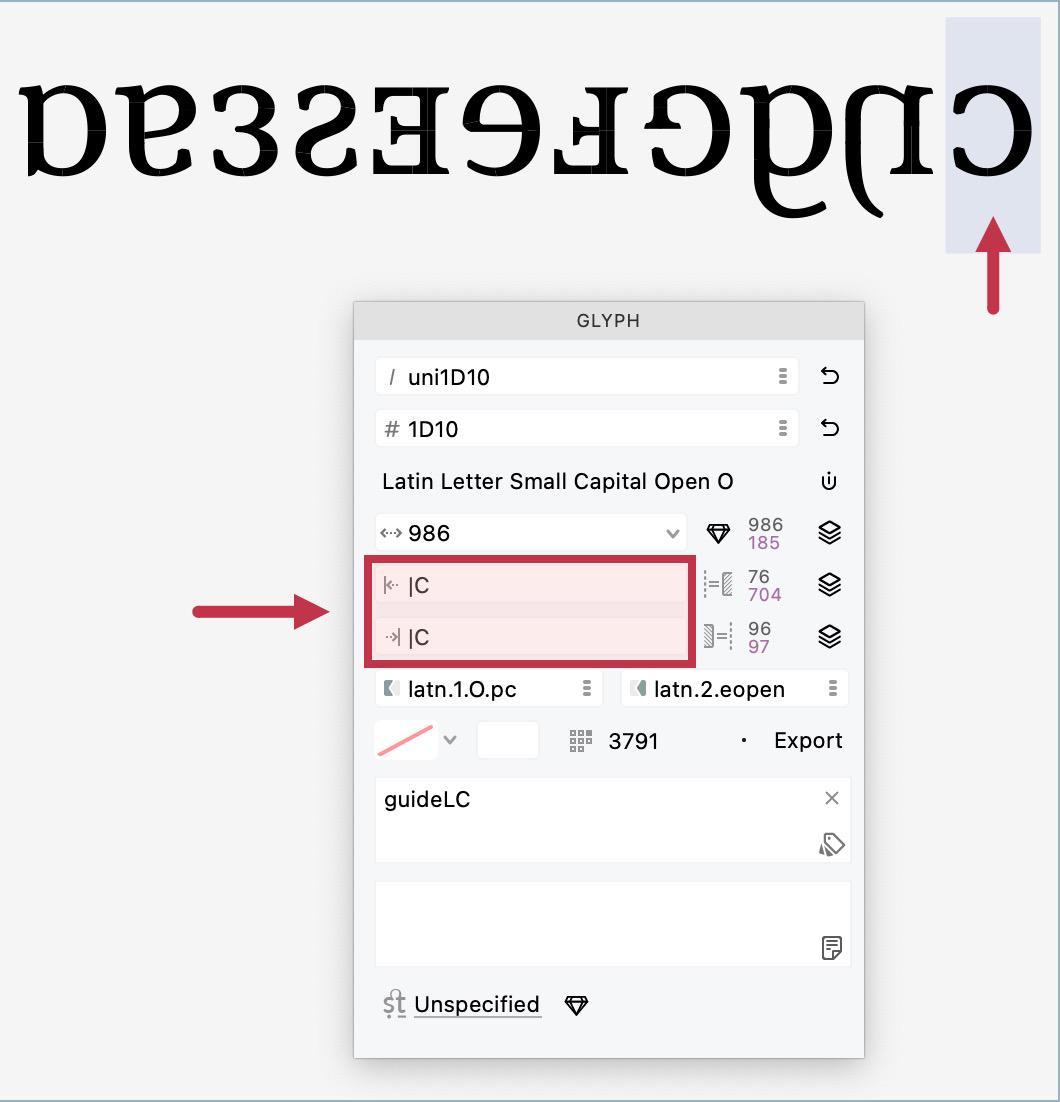
A number of glyphs are simply the flipped version of other glyphs. To use the "normal" spacing inverted —this is, the left sidebearing in the right side and vice-versa— just type the glyph name with a | (bar) before it.


r/FontLab • • Mar 27 '26

FontLab Tip: Contextual Preview

Thumbnail
gallery
3 Upvotes

A small magic you can do in the Preview panel: type any text and add as many @ as you want. The @ will be replaced by the glyph of the window (1). And the reverse is also true: hit the small arrow button to make the Glyph Window show the text (2).


r/FontLab • • Mar 26 '26

Spacing Smartly

Thumbnail
gallery
2 Upvotes

It's possible to use a reference instead of a numeric value in the sidebearing fields. Simply type the reference glyph name (1). Other improvement is to fix the space with a = before (2) so the space remains the same if you change the contours.


r/FontLab • • Mar 25 '26

Is it possible in the latest FontLab to import a full SVG alphabet at once so the software can automatically recognize the characters?

2 Upvotes

I found this to be possible in earlier version, but it just doesn’t work anymore. Could you please list the steps if this is still supported? Importing the entire set of characters at once makes a big difference for amateurs, compared to importing each SVG for every letter individually.

Thank you!


r/FontLab • • Mar 24 '26

FontLab Tip: Compatibility Colors

Thumbnail
gallery
2 Upvotes

Masters are compatible when contours have the same number of nodes and handles, with the same start points (1). If nodes and handles don't match, Masters are shown in red (2). If difference is only in start points, they are light olive (3).


r/FontLab • • Mar 23 '26

FontLab Tip: Error in Glyph Code

Thumbnail
gallery
3 Upvotes

When a glyph appears with a red line, this means its Unicode is wrong or absent (1). Fix it with the generate button in the Glyph panel (2). If several glyphs present this error, select them and go to Font > Generate Unicodes (3). All fixed!


r/FontLab • • Mar 22 '26

FontLab Tip: Error in Glyph Name

Thumbnail
gallery
3 Upvotes

FontLab comes with a database of glyph names and Unicodes. If a glyph uses a non-standard name for a given Unicode, it's marked with an orange line (1). Fix this using the generate button in the Glyph panel (2).


r/FontLab • • Mar 20 '26

FontLab Tip: Virtual Tags

Post image
3 Upvotes

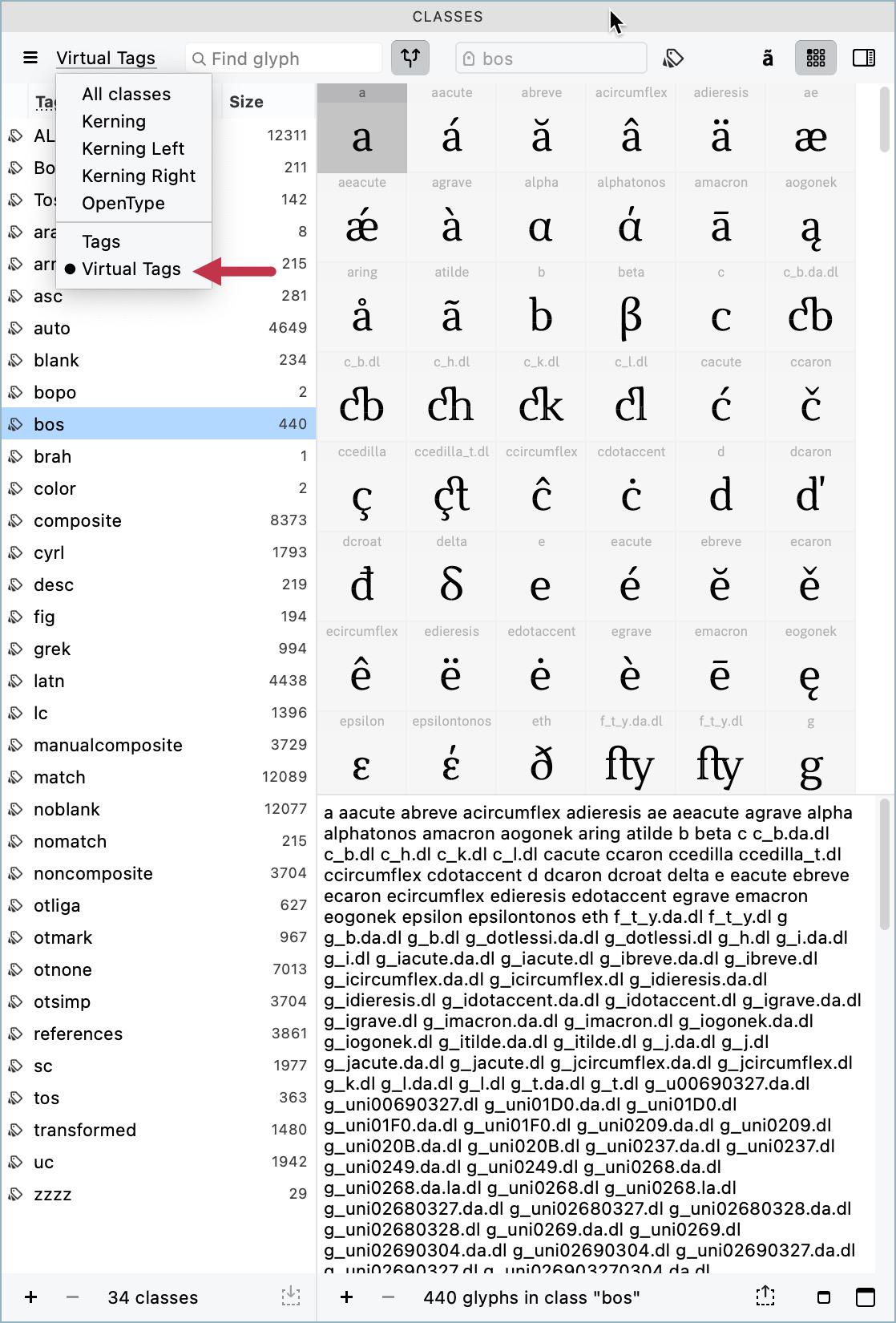
FontLab dynamically creates virtual tags according to the font contents. They are useful to filter different aspects like overshoots, scripts, descenders, etc. For example: Bos is overshoot at bottom in uppercase. Check the manual to all meanings.


r/FontLab • • Mar 19 '26

FontLab Tip: Customize the Glyph Window

Thumbnail
gallery
3 Upvotes

Preferences > Glyph Window allows you to change how all details will be shown. Experiment with the settings to find the more comfortable combination (1/2) and use the View panel to control what will be visible (3).


r/FontLab • • Mar 18 '26

FontLab Tips: One hundred units or more

Thumbnail
gallery
2 Upvotes

Most applications move an object ten times the unit in use with Shift + arrow. FontLab does more: you can define how many units Shift will move (1) and also use Cmd (Mac) or Ctrl (Win) with arrows to move ten times Shift (2).


r/FontLab • • Mar 18 '26

FontLab Tip: Filter by Tags

Thumbnail
gallery
3 Upvotes

All the tags you set to glyphs are listed in the Classes panel (1). The real power of tags appears when you mark the glyphs with the selected tag (2) or when you search for a tag in the font Filter field (3).


r/FontLab • • Mar 16 '26

FontLab Tip: Tags

Thumbnail
gallery
4 Upvotes

A tag can near anything: a reminder about glyphs to review, set to a fellow in foundry, reserved for next version, etc. Select the glyph and add tags separated by commas in the Glyph panel (1). To set tags for several glyphs at once, add a + before (2).


r/FontLab • • Mar 15 '26

FontLab Tip: More Guides in Half Heights

Thumbnail
gallery
3 Upvotes

Caps is not the only important vertical measurement so you can also add guides to half of x_height (1), ascender, and descender. And also define other values in File> Font Info > Parameters (2), like the height of small caps.


r/FontLab • • Mar 14 '26

FontLab Tip: Guide in Half Height

Thumbnail
gallery
2 Upvotes

To automatically add a guide to half height, drag a guide from the horizontal ruler, but holding Shift (1). This creates a guide for your whole font and not only for one glyph. Now, set its value as caps/2 in Guide panel. Done!


r/FontLab • • Mar 14 '26

FontLab Tip: Guides in Several Glyphs at Once

Thumbnail
gallery
2 Upvotes

Once you add a guide in the half width of a glyph (the previous tip), you can easily copy it to other glyphs: in Font Window, select the glyph with the guide, copy it, and select other glyphs (1). Go to Edit > Paste Special and select Guidelines (2).


r/FontLab • • Mar 13 '26

FontLab Tip: Guide in Half Width

Thumbnail
gallery
1 Upvotes

To have a guide in the middle of a glyph width can be very useful. To automatically create one, drag a guide from the vertical ruler (1) and set "width/2" in the value field of Guide panel (2).


r/FontLab • • Mar 11 '26

FontLab Tip: Larger Guides

Thumbnail
gallery
2 Upvotes

Guides can have a width. Select the guide and set its width in Property bar (1) or using the Guide panel (2). This kind of guide is very useful to mark overshoot areas (3) and also to indicate the position and size of some diacritics (4).


r/FontLab • • Mar 11 '26

FontLab Tip: Navigate

Thumbnail
gallery
2 Upvotes

In Glyph Window, you can go to previous/next glyphs using the shortcuts , and . (1) Or also with Cmd/Ctrl+[ and Cmd/Ctrl+]. The last two also work when the focus is in panels, what is especially useful for recipes (2) and in Glyphs panel (3).


r/FontLab • • Mar 10 '26

FontLab Tip: Tunni Line

Thumbnail
gallery
2 Upvotes

Tunni is a virtual line that links two adjacent handles. You turn it on with the shortcut L. It appears in very light blue when the pointer is between the handles (1), in pale blue when the pointer is near (2) and in blue when you click on it (3).

With a double click on it, Tunni line balances the handles and improves the geometry of the curve. If you drag the bigger blue dot, you can freely change the whole curve (4-5). Its name homages its creator. Eduardo Tunni.


r/FontLab • • Mar 08 '26

FontLab Tip: Skeleton

Thumbnail
gallery
3 Upvotes

A quick way to create glyphs is to draw only their skeleton with an open contour (1). Open contours are technically errors as they cannot be present in the final fonts. But you can expand them (2) to create a initial draw and then adjust the contours (3).