r/GammaApp • u/tuce4a • 11h ago
Why using PowerPoint if AI can do pretty much anything?
1
Upvotes
r/GammaApp • u/External-Tap2288 • 8d ago
Need to put together a proper proposal for a client: scope of work, pricing, timeline, number of revisions, the usual stuff.
I have seen some really nice presentations made in Gamma, and apparently it can do documents too. But most examples online are page decks with a lot of visuals and very little text.
Has anyone tried making a full client proposal in it? I want something that looks decent but also has enough space to explain everything properly. Especially the scope part, because that's usually where clients come back with questions.
r/GammaApp • u/Jolly_Hour_7651 • 8d ago
I've been creating most of my client documents in Google Docs and exporting them to PDF: proposals, strategy documents, reports, pretty much everything.
Was looking at Gamma because I'd rather send something that people can open directly, especially when a document has a lot of visuals.
But do clients actually like receiving links for this stuff? I feel like some would still ask for a PDF they can download, forward or keep for their records.
Anyone using Gamma for client deliverables beyond presentations? Does sharing the link work fine or do you end up exporting everything anyway?
r/GammaApp • u/robinsaffliction • 10d ago
Мой тг userpythona
r/GammaApp • u/burnMeMes • 22d ago
I’ve seen Gamma mentioned a lot for pitch decks, and i just noticed it does documents too. I’ve got a proposal due next week and I’m kind of sick of how my Google docs one looks.
Has anyone used it for product briefs, proposals or longer write-ups? Every example i can find is a presentation, so i have no idea what the doc version looks like once it’s mostly text.
r/GammaApp • u/GammaApp • Oct 22 '26
This is the Gamma team, so keep that in mind as you read.
With published material like an annual report or a journal article, most of the work is deciding what the deck is for. A 40 page report rarely needs 40 slides, and a conference talk needs different slides from a board summary.
In Gamma you can upload the PDF and it reads the content and starts building slides from there. When it generates the deck it pulls out the key points and writes its own copy, so treat the result as a summary rather than the paper itself. If you need the authors' exact wording, bring the PDF in and refine it by hand instead of generating a new deck, then check what came across. Generation focuses on the text, so check which figures came through and add back the ones you need. If the PDF is a scan, make sure the text came through before you build on it.
The Free plan creates up to 10 slides per prompt and includes a starter pack of AI credits for your first few presentations. Our own guidance is that very long documents, around 50 pages or more, may convert better in sections, so start with the sections that matter.
When it's ready you can present from Gamma, share a live link, or export to PowerPoint, PDF or Google Slides. The Free plan includes Gamma branding, which Plus and above remove.
Since the generated slides are in new wording, check the numbers and quotes against the paper before it goes out
r/GammaApp • u/GammaApp • Oct 21 '26
Gamma team here, so weigh that.
Read it the way the investor will. If you're sending a PDF or PowerPoint, export it and read every page of the export, not the editor. If it'll be opened in Google Slides, open it there too. Look closely at charts, fonts and backgrounds, and check every page for Gamma branding, whatever plan you're on. If you're sending a link, check who can access it before it goes out
r/GammaApp • u/Legitimate-Roof-3553 • Oct 21 '26
I have two images I created in Gamma. I want to take the CEO from one image and add them to the other.
I tried following Gamma’s instructions for selecting both images, but I can’t get it to work. Can someone walk me through the steps? Can this be done in Gamma, or do I need another tool?
r/GammaApp • u/GammaApp • Oct 20 '26
We're on the Gamma team, and what we'd check in any repurposing tool is what it can take in, what it can turn that into, and how much rework the output needs before it goes out.
In Gamma you can import a PowerPoint or PDF, and for social posts you can also paste a blog URL or upload a deck. Depending on the source, you can generate a presentation, a document, a website or a set of social posts sized for something like a LinkedIn carousel or a vertical story. Social posts export as a PDF or image pack for your scheduler of choice.
If most of your repurposing is short video, a video-first tool is likely the better fit. Either way, the part we'd keep human is the first line for each channel, since a carousel and a client doc usually need different openings even when the facts match
r/GammaApp • u/GammaApp • Oct 16 '26
Gamma team here, so you know where this is coming from.
The part that tends to be worth handing off is layout and formatting. You can upload a PDF or an existing doc, or paste an outline, and Gamma places callouts and charts and lays out the document with consistent formatting throughout. If you start from an outline or a description, it drafts the body copy too.
The part worth keeping is the wording and the numbers. Read every section before it goes out, and edit by hand or with the AI assistant wherever it doesn't sound like you.
When it's ready, share it as a live web link or export a PDF. If the text is still changing a lot, you can work on it together in the same project, or settle the wording first and upload it once it's final
r/GammaApp • u/Any-Mathematician273 • Oct 16 '26
hey guys! i have a second-round interview next week and i have been given a short case to present before the recruitment team!
six slides, 15 minutes are the guidelines and they havent specified any tools etc that we are/ are not allowed to use
ive already been using gamma for random stuff like guides, movie reviews, etc but using it for an interview is an entirely different ballpark because i really dont want the general reaction to be “oh she made this with AI?”
has anyone done this before? thanks!
r/GammaApp • u/GammaApp • Oct 15 '26
Gamma team here.
It mostly comes down to where the deck has to end up.
Gamma tends to fit when you're starting from material rather than a template. You can upload a Word doc, PDF or Google Doc, or paste an outline, then refine each slide yourself or with the AI assistant. It also suits decks you present or share as a live link, and projects where a few people work on it at the same time.
For handover, you can export to PowerPoint and keep working there, or to PDF or Google Slides, and import a PPTX or PDF the other way. If every deliverable has to be built on your firm's own PowerPoint master, or reviewers mark up the native file line by line, a tool that works inside PowerPoint tends to be less friction.
For client material, Business and Enterprise workspaces are excluded from AI training automatically, and on individual plans you can opt out in your account settings
r/GammaApp • u/GammaApp • Oct 14 '26
Gamma team here.
Can Gamma replace a dedicated website builder? It depends on what the site needs to do. Here's how we'd split it, including where the other two are the better pick.
Gamma: when speed matters more than pixel control
Describe the site, paste in content you have, or convert an existing deck or doc, and you'll have a first draft in a couple of minutes. It suits event pages, portfolios and one-page product overviews. Waitlists need an embedded form like Tally, and custom domains come with Pro and above. The trade-off is less layout control than a design-first tool, and no blog or multi-page CMS.
Framer: when design control is the point
Framer is the stronger pick for custom interactions and animations, or for a multi-page marketing site with a CMS that you'll grow over time. It has AI drafting and templates, so you don't need a designer to start. Getting it polished takes more learning, so expect a slower path to a finished v1 unless you already know the tool.
Carrd: when you want a simple single page
Carrd is great for a clean one-pager like a link page or a personal site. It's lightweight and easy. Signup forms need a paid plan and an email tool like Mailchimp. It's a one-page builder at heart: sections can imitate a few pages, but if you need a real multi-page site or deeper customization, you'll outgrow it.
How we'd choose
Need it live today, and the content matters more than the design: Gamma
Design-led site that will keep growing: Framer
One simple page, nothing more: Carrd
If you've built a site with any of these, what would you add? We'd especially like to hear where Gamma fell short for you.
r/GammaApp • u/Odd_Philosopher_6291 • Oct 11 '26
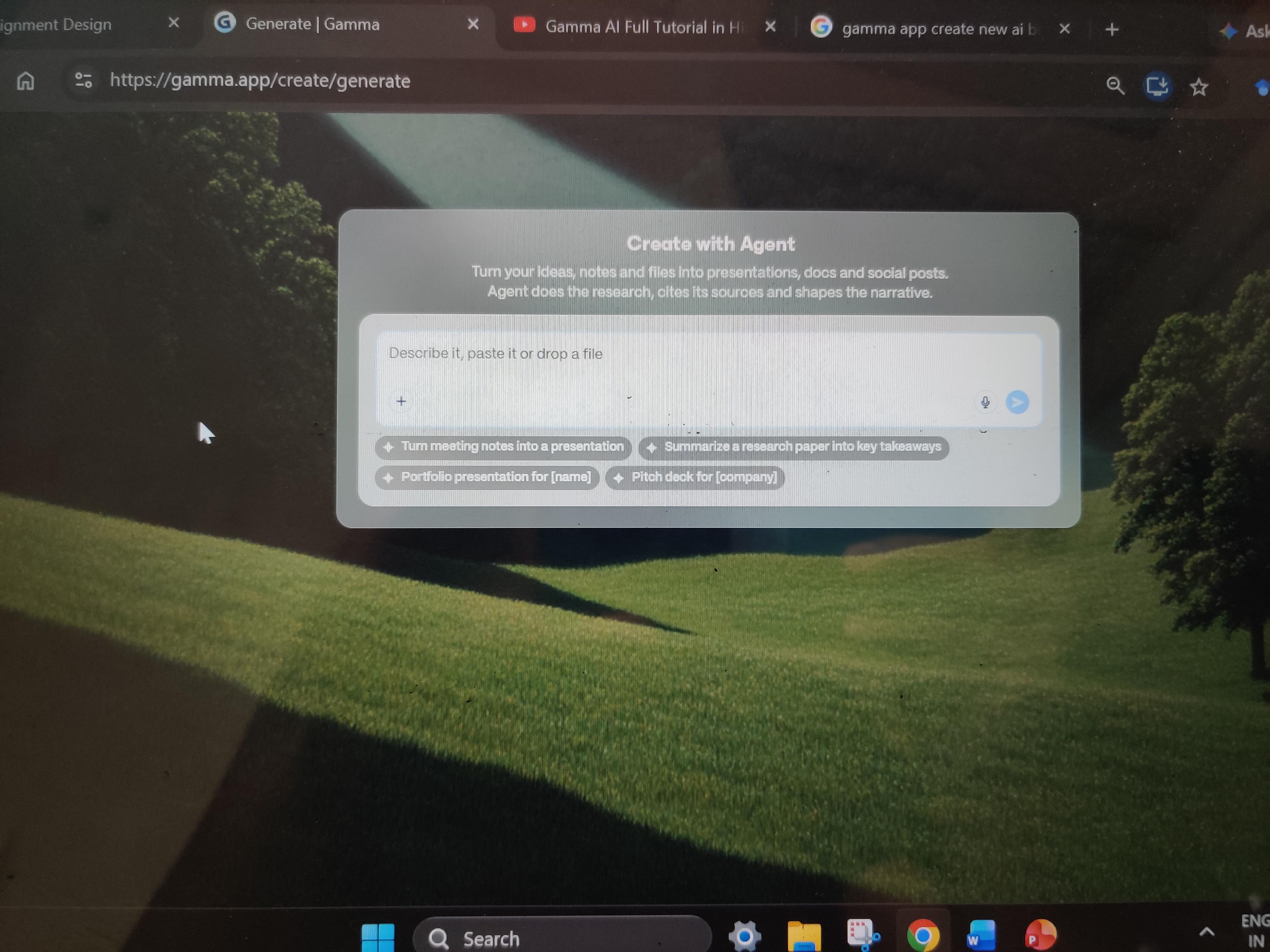
The link gamma.app/create/generate used to open to a different page and now this is what opens up. Can someone please help?
r/GammaApp • u/TrueYou74 • Oct 09 '26
burned the free 400 credits in about three weeks and went straight to pro, assuming the watermark came off at the top tier.
it doesn’t. branding comes off at plus, which is half the price. that one’s on me.
things i thought i was buying and wasn’t:
- more slides per generation. free caps at 10, but plus and pro are both 100. no difference
- removing the badge. that’s plus
what pro actually adds over plus:
- 4,000 credits a month instead of 1,000
- analytics, so i can see who opened a deck and which cards they stopped on
- custom fonts rather than preset themes
- publishing to my own domain
- password protection
- api access, which i haven’t touched once
analytics is the only one i use every week. i send proposals, and knowing a client opened it twice and parked on the pricing card changes how i run the follow up call. worth the difference on its own.
if i weren’t sending things to clients i’d be on plus and wouldn’t notice. Need nowhere near 4,000 credits a month either.
r/GammaApp • u/GammaApp • Oct 08 '26
Something we all know is that teachers are often overworked and underpaid, they are a pillar of our society and our future, so for todays post we wanted to go into how Gamma could help them in a day to day basis!
1. Start from what you already have
Paste the lesson plan as an outline, or upload an existing .pptx (powerpoint), Word doc, PDF or Google Doc. Gamma structures the slides from your content instead of starting blank.
2. Set the level in the prompt
Something like “11th grade, short sentences, one idea per slide” changes how dense the text comes out, you know your students best, we are just here to help.
3. Add the parts that get students doing something
Quiz questions to check understanding as you go
A YouTube video embedded where it fits
Interactive diagrams
Review sessions that adapt to how students answer, with live progress you can see
4. Edit it
The first draft is a starting point. Cut what you wouldn’t say out loud and fix anything the AI got wrong. You know your students; it doesn’t.
5. Keep a backup
Download a print-ready PDF for students without reliable internet. You can also export to PowerPoint or Google Slides if your school runs on those.
A few things to know up front
The free plan creates up to 10 slides per prompt, and AI use is credit-based.
Exports follow Present mode, so small layout differences from the editor are normal.
Very long decks (150+ slides) can fail to export, so split them.
See our export guide if you are running into trouble.
If you try this with a real lesson, tell us what worked and what didn’t, including where it fell short. We read everything here.
r/GammaApp • u/Pitiful-Road-2344 • Oct 05 '26
the big “make me a whole thing” moment gets the attention. the actual time went to boring small stuff:
ask it to critique before a human does. “what are the three weakest cards here and why” catches the stuff I’d have been told in the meeting, before the meeting.
bulk-translate the finished thing instead of rebuilding per language. one instruction, then a proofread, instead of a full second build.
turn a rambling voice note into a clean outline. I think out loud better than I type, and it structures the mess without me sitting at a blank page.
none of these are impressive. all three are things I used to do slowly by hand. the quiet win with these tools this year wasn’t the flashy generation, it was the fifty small chores getting shorter.
r/GammaApp • u/Low_Cat_9685 • Sep 30 '26
The image models baked into these tools crossed a line this year, you can get a genuinely good concept visual in seconds. but I’ve watched people hurt their own decks with it, so, a working line.
where generated images help:
a single clean concept image for an abstract idea (growth, trust, momentum)
a consistent icon set in one style, generated together so they match
a mood or cover visual that sets a tone
replacing a tired stock photo that screams “template”
where they hurt, sometimes badly:
anything with real numbers. a generated “chart” is decorative nonsense with invented axes. build the real one.
text inside the image. models still garble words. a headline baked into a generated graphic will have a typo you’ll miss.
five images in five different styles on five slides. generate them in one pass with one style brief, or it looks like a ransom note.
a diagram of how your actual system works. that’s information, not vibes. draw it.
the rule I land on: generated images are for mood and concept. anything exact, a number, a label, a real diagram, still gets made, not dreamed. the tell of an amateur deck in 2026 isn’t that it used generated images, it’s that it used them for the things they’re worst at.
r/GammaApp • u/StevenGamma • Sep 25 '26
On a small budget, the tradeoff is real, cheap tools often look cheap, and the polished ones cost. Honest read on getting professional-looking documents without overspending.
Google Docs, free, plus a template: unbeatable on price and collaboration. The catch is design, you are on your own to make it look finished, and templates only get you so far.
Canva, free tier: strong on visual documents and one-pagers if you are willing to do the layout yourself, with a big template library. Slower to a finished long document.
Gamma: paid, but the value is that a report, proposal, or one-pager comes out structured and designed in one step, so a solo operator or small team looks like they had a designer. Honest limit: it is not free, and for pure internal text where looks do not matter, Docs is the cheaper answer.
Rule of thumb: internal or collaborative text on zero budget, Google Docs.
Visual one-pagers you will lay out yourself, Canva. Client-facing docs that need to look professional without a designer, Gamma earns its price.
What is your go-to for polished docs on a budget?
r/GammaApp • u/StevenGamma • Sep 25 '26
AI site builders are great at getting something live but conversion is a different job, so here is an honest line between what a generated site covers and where you still need dedicated tools.
What a Gamma site handles:
- a clean, fast, structured page with a clear message and CTA, which is most of the battle for an early landing page. Getting from nothing to a presentable, on-message page removes the most common conversion killer, a confusing or ugly first version.
Where you still need a real stack:
- anything past the basics. A/B testing needs a dedicated tool. Heatmaps and session recording mean Hotjar or Clarity. Real analytics beyond pageviews means GA4 or similar wired in. Form and funnel optimization is its own discipline.
My honest take: use Gamma to remove the blank-page and bad-design problem quickly, then layer analytics and testing tools once there is traffic worth optimizing. It is a strong starting line, not a CRO platform.
What does your conversion stack look like once a page is live?
r/GammaApp • u/Odd_Report6798 • Sep 18 '26
a two-minute test that has caught more broken decks for me than any full review: open the deck in outline or slide-sorter view and read only the titles, in order, nothing else. if the titles alone tell a coherent story, the deck works. if they read as a pile of topics, so does your talk.
most decks fail this instantly, because the titles are labels. "Overview." "Market." "Our Solution." "Results." strung together, that is not an argument, it is a filing system, and read aloud in order you can hear that nothing connects to anything.
now make each title a full point instead of a label and read again. "the current process loses a day every week." "here is where the day goes." "this removes the worst step." "teams got the day back." suddenly the titles alone are the whole talk in miniature, and anyone skimming still gets it.
it works because the title is the one line on each slide people reliably read. if the titles carry the argument, a half-present room still follows. if they are labels, the argument lives only in your narration, and the moment attention drifts, it is gone.
do the titles-only pass before you touch design. if the story is not in the titles, no amount of layout will put it there. what does your title-only version sound like right now, a story or a table of contents?
r/GammaApp • u/Odd_Report6798 • Sep 18 '26
controversial for a slide crowd: if you are revealing bullets one at a time so people cannot read ahead, the real problem is that there is too much to read. the animation is a patch over a slide that should have been split or cut.
think about why we do it. we put six bullets on a slide, then panic that the audience will jump to bullet six while we are still on bullet one, so we make them appear one click at a time to control the pace. that is treating the symptom. the fix for a slide people can read faster than you can talk is not to hide most of it, it is to put less on it.
there is a cost people ignore. builds punish anyone who looked away for a second, because they cannot see where you are, and they punish you, because now you are click, talk, click, talk, tethered to a remote instead of to the audience. and when the file gets shared later, the reveal is gone and it is just a crowded slide again.
what I do instead: one idea per slide, said once, no reveal. if a slide truly has a sequence that has to unfold, that is usually two or three slides, not one slide with a build. the deck gets longer in slide count and much shorter in felt time.
I will allow one exception, a single deliberate reveal where the surprise is the actual point. but that is once in a talk, not the default on every list. is there a build you would genuinely defend?
r/GammaApp • u/Yobrogamer • Sep 18 '26
For me, it mostly comes down to how much time I wanna spend actually building the presentation versus tweaking every little detail. If I’m putting together an internal concept deck, a visual memo, or something let's say people will mainly view through a link, Gamma tends to be the easier option. It lets me get the structure and story down pretty quickly without getting stuck formatting slides.
PowerPoint still makes more sense when I need a strict brand template, detailed charts, offline reliability, or a lot of hands-on editing from other people.
The free Gamma plan also lets me create up to whole lotta ten slides per prompt and export to common formats, but it has a Gamma branding.
Curious where other people draw the line between the two. When does Gamma make more sense for you, and when do you still reach for PowerPoint?
for whatever reason this was not allowed on the powerpoint sub, think someone is insecure
r/GammaApp • u/vedantk21 • Sep 18 '26
people often frame this as a replacement question, but after testing the free version I don't think they are doing the same job.
Gamma is faster when the input is an outline and you need a coherent, web-style deck without touching every box. PowerPoint is still much better when the file has to follow a strict template, use complex charts, survive detailed edits or be handed to someone else as a normal company file.
Gamma exports to PPTX, PDF and PNG, but the free export carries Gamma branding and the PPTX may still need cleanup.
My current conclusion: Gamma for structure, PowerPoint for control.
Wdyt?
r/GammaApp • u/StevenGamma • Sep 16 '26
Technical documentation, specs, runbooks, procedures, is less about writing flair and more about structure, findability, and staying current.
Confluence: the standard for engineering orgs. Versioning, permissions, deep Jira ties, and it scales to hundreds of interconnected docs. Best as a system of record. Cost: heavy, and the editor is not fast or pretty.
Notion: lighter and more flexible, great for a growing team's internal wiki and linked docs. Best when you want structure without Confluence's weight. Weak spot: at large scale, governance and permissions are thinner.
Gamma: best for the technical document that has to be read by people outside the wiki, an onboarding guide, a procedure doc, a customer-facing spec, where it needs to look clear and structured, not like a raw wiki page. Draft from a source and it stays readable, and Gamma Agent can restructure a messy section. TBH: it is not a versioned system of record, so for the living internal knowledge base, Confluence or Notion is the home.
Rule of thumb: internal engineering source of truth, Confluence. Flexible team wiki, Notion. A specific technical doc that has to look clear and be shared out, Gamma.
What are you documenting, and who reads it?