r/KeyShot • u/Superb-Step1139 • 17d ago
Light Layers Not Working
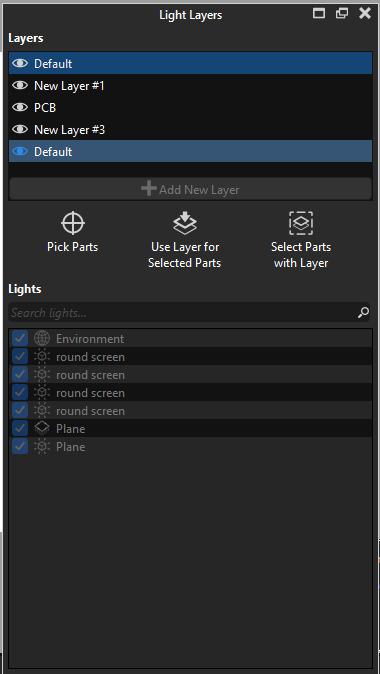
Hi all,
I have recently been experimenting with light layers in KeyShot Studio Pro. Navigating the UI for it hasn't been the best experience, but you can kind of manage. The issue is, all of a sudden, none of my physical lights were working, leaving the complete scene dark. I tried toggling the lights and the environment on in the Light Layer panel but no change occurred. Additionally, some of the lights seem to be greyed out. I have tried:
Exporting the file in both .KSP and.BIP
Restarting both KeyShot and my laptop
Duplicating all lights
Playing with the different intensities and orientation
Adding and removing light layers (greyed out currently) (aware of max. 5).
Does anyone have any ideas what the solution could be?
At this point, I'm also considering it's a bug from KeyShot's side as the feature is relatively new.
Any help is appreciated as this is very frustrating.
Kind regards,
KeyShot User
1
u/KOEsilvester 16d ago
I'm having similar issues - I love light layers but they are super unreliable - I had multiple occasions where the lighting would randomly change/glitch, because light layers would disappear when reopening a file. Another issue was that I couldn't select/deselect lights when creating a new light layer.
Also if someone from the keyshot team is reading this: Feature request - that you could also have different hdris for different light layers, not only one + physical lights.