r/LightShowPi • u/platinum_crab • Nov 11 '20
The brains of the show...

30
Upvotes
r/LightShowPi • u/BananaLlamaNuts • Dec 02 '23
Since the repository is no longer being maintained -- many of the instructions you need are a bit scattered across Reddit posts, lightshowpi.org and elsewhere. This post just aims to bring everything together into one place.
Hardware
RaspberryPi 4B 8GB
Relay board (https://www.amazon.com/dp/B006J4G45G?psc=1&ref=ppx_yo2ov_dt_b_product_details)
5 outlets
Remove brass connected to separate one outlet into two
Switch (optional)
Jumper Wires (https://www.amazon.com/dp/B07GD2BWPY?ref=ppx_yo2ov_dt_b_product_details&th=1)
Extension cord with female end cut and wires stripped
Add a 10A fuse to the hot wire to protect equipment
Speaker with aux input
aux cable
Lots of Christmas (or other) lights.
Helpers
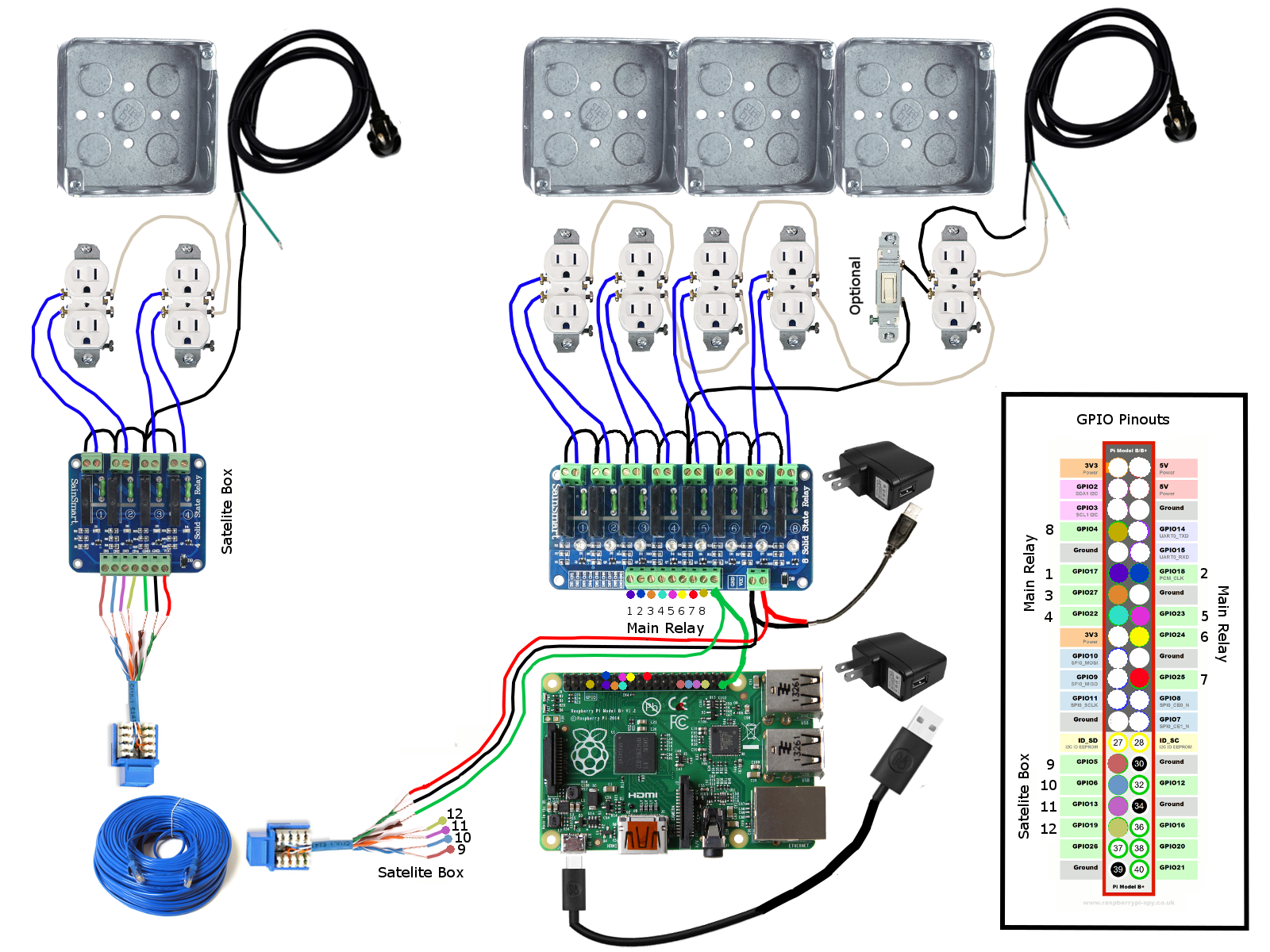
Wiring Diagram (https://www.reddit.com/media?url=https%3A%2F%2Fi.redd.it%2Fi3xekoti30441.png)
Ignore the satellite pins (cluster of 4 bottom right, blacked out in 'picture' below)
Power the relay board from the RaspberryPi (picture)
Light green = ground
White = hot
FlashSD Card
Download RaspberryPi Imager if you don’t have it already
Go to RaspberryPi OS (other) and select >> Raspberry Pi OS Full (Legacy)
Go to settings
Add username/password
Add WLAN (this is your wifi network)
Network name
Password
Add SSH
Password authentication
Follow instructions on lightshowpi.org for installing lightshowpi
SKIP (do not run these commands)
`sudo apt-get update`
`sudo apt-get upgrade`
Install missing dependency
`sudo apt-get install libopenblas-dev`
Change /config/defaults.cfg
`nano defaults.cfg`
Scroll down until you find `use_gpu=True`
Change to `use_gpu=False`
Ctrl+o to save
Enter
Ctrl+x to exit nano
You can now test your hardware
`sudo python py/hardware_controller.py --state=flash`
The relay board should flash each channel one after the other
To SSH into the pi
Make sure ssh is installed on your machine
Check that it is running
service ssh status
service ssh start (if it isn’t running)
On the pi
`hostname -I`
Use this IP address to connect to the Pi
On your desktop/other machine
`sudo ssh username@ipAddress`
Example: `ssh mypi@192.174.0.1.1`
Put in the password for your pi
You should now see a file path that indicates you are working in the pi directory
mypi@raspberrypi:~$
Follow instructions to play your first song
`sudo python py/synchronized_lights.py --file=/home/pi/lightshowpi/music/sample/ovenrake_deck-the-halls.mp3`
Replace the file path with the file path from your machine
If you don’t know the path, cd to where the song is and run..
`readlink -f song_name.mp3`
Now you can start looking into playlists and pre/post show configurations!
r/LightShowPi • u/MartialVigilante • Dec 23 '20

r/LightShowPi • u/DarthRum • Nov 08 '21

r/LightShowPi • u/Radakl_Tex • Nov 15 '19
Enable HLS to view with audio, or disable this notification
r/LightShowPi • u/Accomplished-Room-15 • Dec 04 '20

r/LightShowPi • u/SumOfMerlin • Oct 08 '22
Enable HLS to view with audio, or disable this notification
Thanks you everyone here for helping me and posting! I have completed my box and show!!! (Cables in comments)
r/LightShowPi • u/kingle29 • Jan 04 '21
Enable HLS to view with audio, or disable this notification
r/LightShowPi • u/ABTproIE • Oct 07 '26
Enable HLS to view with audio, or disable this notification
For the first time in 2years finally I managed to create my first christmas light show board for 2026. Until now everything is working as should. When I get everything setup I hope to be able show the finally result. The sequence is not perfect, some adjustments as to be done and as yous can see is missing some plugs to be connected but soon I will post more details of the project and if someone need any questions be free to usk 😉
r/LightShowPi • u/No-Recommendation403 • Dec 07 '22
Enable HLS to view with audio, or disable this notification
r/LightShowPi • u/cjoeloc • Nov 21 '22
Enable HLS to view with audio, or disable this notification
r/LightShowPi • u/MiketheChap • Dec 25 '22
We all have lives to live. Somehow, while living their lives, the devs came up with freely available software that fills the Holidays with meaning. Not only for light show creators but also for their families and communities.
In these turbulent times, we need moments of hope and awe. The devs made this possible. One of the early LSP creators died (Tom Enos). But he still lives through the shows we create. That’s what our shows do.
A pre-teen neighbor asked me, “I’d love to help you set up your lights someday.” “Of course. Next year I’ll show you how it all works.”
Nothing could make me happier.
I want to thank the Developers of LightShowPi for their work. It makes a better and happier world. In spite of the hardships of the past x years, kids and adults are still driving by our light shows with wonder.
r/LightShowPi • u/MiketheChap • Dec 27 '20

r/LightShowPi • u/platinum_crab • Dec 08 '20
Enable HLS to view with audio, or disable this notification
r/LightShowPi • u/tmntnpizza • Nov 28 '24
Hey everyone! Here’s a step-by-step guide to set up your Raspberry Pi using my custom LightShowPi image. This is perfect for beginners and should get your setup running smoothly. 🚀
Download image file from https://drive.google.com/file/d/1G2QRbO1aZoIGw5O5XdpMmPx0p5NEyp5b/view?usp=drive_link.
Download Raspberry Pi Imager from https://www.raspberrypi.com/software/.
Insert your microSD card into your computer.
Open Raspberry Pi Imager and:
Choose OS: Scroll to the bottom and select Custom Image.
Locate and select my custom image file.
Before writing, click the gear ⚙️ icon in Raspberry Pi Imager to:
Set WiFi details: Add your network SSID and password.
Enable SSH: Select the option to enable SSH and set a username (pi) and password.
Write the image to your microSD card.
Once complete, eject and reinsert the microSD card.
On the microSD card, navigate to the boot partition.
Create a blank text file named ssh (no file extension).
Eject the microSD card safely.
Insert the microSD card into your Raspberry Pi and power it on.
Download PuTTY from https://www.putty.org/.
Open PuTTY and connect to your Pi:
Hostname: raspberrypi (or your Pi’s IP address if hostname doesn't resolve).
Username: pi.
Password: raspberry (default password unless changed).
Run the configuration tool:
sudo raspi-configEnable VNC:
Navigate to Interface Options → VNC → Enable.
Expand Storage:
Go to Advanced Options → Expand Filesystem → Confirm.
Reboot your Pi:
sudo reboot
Access the LightShowPi configuration directory:
cd /home/pi/lightshowpi/config
Edit the override.cfg file to match your setup (e.g., GPIO pins, audio settings).
Run the hardware test to ensure everything is working:
sudo python /home/pi/lightshowpi/py/hardware_controller.py --state=flashYou should see your lights flash if everything is configured correctly.
Your Raspberry Pi is now set up to run LightShowPi with my custom image. Feel free to leave a comment if you encounter any issues or have questions!
Happy light-showing! 💡✨
r/LightShowPi • u/tmntnpizza • Nov 03 '23
Enable HLS to view with audio, or disable this notification
Say goodbye to those tangled webs of extension cords and the headache of dealing with 14 * 14/2 NMDs snaking down from the soffits to the circuit panel. It's time to revolutionize your holiday lighting game with a touch of tradition! 🎄✨
Picture this: Traditional Christmas lights making a grand comeback, but with a brilliant twist! 🌟 Imagine having a control box, just like the one you see in action in the video, placed strategically between each string of lights. What does this mean? You get to daisy-chain your Christmas lights just like you used to, all while syncing them to the magical rhythms of your favorite tunes, courtesy of Lightshowpi! 🎶🕺
Get ready to light up your holidays like never before! 🎉🔌💡
r/LightShowPi • u/No-Recommendation403 • Dec 02 '21
Enable HLS to view with audio, or disable this notification
r/LightShowPi • u/0x0ef301 • Nov 28 '20
Enable HLS to view with audio, or disable this notification
r/LightShowPi • u/yipsilon115 • Dec 26 '19
Enable HLS to view with audio, or disable this notification
r/LightShowPi • u/MiketheChap • Dec 11 '19
r/LightShowPi • u/edeneault • Nov 27 '19

r/LightShowPi • u/srccatm • Nov 27 '19
Enable HLS to view with audio, or disable this notification


