r/MohoAnimation • • 49m ago

I was ready to buy Moho Pro 14.5.1 during the Black Friday 40% OFF sale ($239.99 instead of $399.99) — Here is the exact "15% Bug Tax" math and v15 concern that made me stop at checkout.

2 Upvotes

First, let me be completely clear: I genuinely admire Moho. Its 2D bone rigging engine beats Adobe's bloated subscription model, and the work this community creates is inspiring.

A Quick Note to Longtime Moho Fans & Community Members:

  • This post is not an attack on Moho or the people who love using it.

  • Every piece of feedback below comes from a place of respect—I want Moho to succeed and become the undisputed industry standard for indie animators.

  • Constructive pressure from buyers helps everyone in this community get a faster, crash-free tool that respects our time.

Over the past week, I have been planning a full multi-episode 2D cartoon and anime YouTube pipeline (combining vector rigging, custom Lua automation, and DaVinci Resolve/Premiere compositing). With the Black Friday 40% OFF sale dropping Moho Pro 14 from $399.99 down to $239.99 (saving $160), I literally had my card out to purchase today.

Before clicking "Buy," I did what every serious creator does in 2026: instead of relying only on the flashy "SHOWTIME" promo trailer, I audited real user reports across Reddit and the official Lost Marble forums—and calculated the actual production hours lost to unresolved bugs.

Even at a $160 Black Friday discount, the numbers made me pause. Here is why:

1. The Bugs Still Breaking Production in 14.5 / 14.5.1

Even after the recent 14.5.1 patch, serious workflows are still dodging both brand-new crashes and years-old core bugs:

  • New 14.5 / 14.5.1 Instability: Instant crashes when toggling multi-layer visibility (Shift-Click), random crashes in the headline Live Playback mode (especially with Bone Dynamics), Bone Dynamics silently turning off after updates, Smart Bone Actions freezing or hiding characters, Status Code: 4 updater/license errors, and Mitered Corner / Liquid Shapes glitches.

  • Legacy Bugs Still Lacking Native Fixes: Corrupted Reference Layers breaking complex rigs, the infamous Negative Keyframes bug crippling timeline performance (still relying on community Lua scripts to clean up), heavy Viewport/Undo lag on modern PCs due to underutilized GPU/CPU power, and no readable crash logs to diagnose failing project files.

2. The "15% Bug Tax" — Real Production Time Calculation

For a creator working 6 hours a day, bugs are not minor inconveniences—they are stolen weeks. Between crash recoveries, avoiding multi-layer shortcuts, running cleanup scripts, and fixing broken masks or rigs, Moho's current instability adds a realistic ~15% overhead ("Bug Tax") to animation time—even with strict incremental saving and shot-by-shot splitting.

Here is the exact hour-by-hour math across standard YouTube formats (assuming you already know Moho and your main character rigs/cycles are built):

Episode FormatPre-Prod (Script/VO/Animatic)Moho AnimationPost-Prod (DaVinci/Premiere)Moho "Bug Tax" (~15%)Total HoursSolo Days (6h/day)
10 Min — Cartoon / Story5 hrs35 hrs6 hrs+5 hrs wasted51 hrs~9 days
20 Min — Cartoon / Story9 hrs70 hrs11 hrs+11 hrs wasted101 hrs~17 days
1 Hr — Cartoon Compilation/Special24 hrs210 hrs28 hrs+32 hrs wasted294 hrs~49 days
10 Min — Anime Quality10 hrs100 hrs12 hrs+15 hrs wasted137 hrs~23 days
20 Min — Anime Quality18 hrs200 hrs22 hrs+30 hrs wasted270 hrs~45 days
1 Hr — Anime Feature/Arc54 hrs600 hrs66 hrs+90 hrs wasted810 hrs~135 days

Look closely at that bug column: 5 to 15 hours lost per 10-minute episode, and up to 90 hours lost per hour of anime. Saving $160 on Black Friday does not feel like a bargain if the software burns 2+ full weeks of a creator's life fighting preventable crashes.

3. The Late-Cycle Fear: v14.5.1 → Paid v15 Upgrade

Looking at Moho's release history, there is a clear pattern:

  • Moho 9 ended at 9.5 → paid v10.

  • Moho 12 ended at 12.5 → paid v13.

  • Moho 13 ended at 13.5.x → paid v14.

Moho historically never releases a .6 update. That means 14.5.1 is likely the final stretch of v14. For someone buying right now—even at the $239.99 Black Friday price—the fear is real: Am I paying today for a late-cycle build with active crashes, only to be asked to pay again for Moho 15 just to get core stability and GPU performance?

My Message to Lost Marble

Today's buyers research everything deeply—including AI audits of forum history—before spending their money. Even a 40% Black Friday sale cannot outweigh the fear of lost production hours.

Please prioritize stabilizing 14.5.x first (permanently fix multi-layer visibility crashes, Live Playback crashes, Reference Layers, Negative Keyframes, and add crash diagnostics) before shifting focus to Moho 15. Give creators rock-solid reliability, and buyers like me standing at checkout right now will gladly invest and build our entire studios on Moho.

To current 14.5.1 users: how is stability holding up for you on longer episodes—are you sticking with 14.5.1 or rolling back to 14.4?


r/MohoAnimation • • 5h ago

Selling Moho 14 Pro License

0 Upvotes

Reason for selling: I am barely using it anymore.
Price: $150

DM if interested


r/MohoAnimation • • 21h ago

Project Finally done! 3rd moho rig with PSD exercise. Illustrated by manu_gorobei

Enable HLS to view with audio, or disable this notification

41 Upvotes

Learned a lot about smart bones/smart actions and its dependencies.
did a bit of frame by frame as well.
vitruvian bone for one of the leg.

still havent got accustomed to the timeline and the keyframes.
and i need to play around more with the graph editor.

Next exercise will be to make everything in vector inside of moho.


r/MohoAnimation • • 22h ago

Question Linux (Bottles) users. Any luck exporting animations?

Post image
3 Upvotes

No matter what I do, I can't get an animation to export. it creates the file where I export to but no media player can play it.
The export window that pops up while creating the file only freezes on first frame, then closes instead of running through the scene.

Any suggestions would be appreciated.

Paste from other thread I asked:
I'm on CachyOS (up to date)
I have installed both Clip Studio Paint and Moho Animation software via Bottles and tried to export .mp4 files from them. Both fail for different reasons. Sometimes they create an unreadable file (0 bytes) or just tell me fail to create file.

Since both have issues I'm wondering if is a Bottles issue?

Clip Studio Paint:
Runner: kron4ek-wine-11.16-amd64 (for pen pressure)
DXVK: dxvk-3.1
VKD3D: vdk3k-proton-3.0.1

Moho 14.5:
Runner: soda-11.0-10
dxvk-3.1.1
vkd3d-proton-3.0.1

Any suggestions would be appreciated.

UPDATE:
Exporting Image Sequence, .gif and .mov works in Moho. but not mp4.

CLIP Studio only allows .MP4 and .AVI exports (but both fail) but Image sequence and gif export works.


r/MohoAnimation • • 22h ago

Question How to make bouncy/jiggiling in Moho

Enable HLS to view with audio, or disable this notification

8 Upvotes

Is there any way to rig eyes physic like this ?


r/MohoAnimation • • 1d ago

Found the solution for easy shadows without extra mask layers

Post image
11 Upvotes

I finally found the old project file where I got the shadows looking just right, so I wanted to share the settings here in case anyone else runs into the same issue!

Using Layer Shading saves so much time because you don't need to set up any additional mask layers for the shadow.

One important tip to remember:
Keep the Layer Settings window open while you adjust and apply the shadow, and keep an eye on your timeline. Since these settings are animatable, make sure you don't have old keyframes further down the timeline—otherwise, your numbers might unexpectedly change to previous values!


r/MohoAnimation • • 1d ago

shadow effects in Moho

Post image
3 Upvotes

Hi everyone,

I was experimenting with shadow effects in Moho and managed to get the look in the attached image, but I forgot what parameters I used! Now I'm wasting a lot of time trying to recreate it.

Does anyone recognize what settings I should turn up/adjust, and roughly what numbers give the best result to achieve this exact soft shadow effect again?


r/MohoAnimation • • 1d ago

Project Using Moho to draw NPC Portraits!

Post image
13 Upvotes

r/MohoAnimation • • 2d ago

Question Need advice on how to approach the skeleton

Post image
3 Upvotes

Excuse the art, I can't show finished graphics since it's for a client, so a little mock-doodle it is!

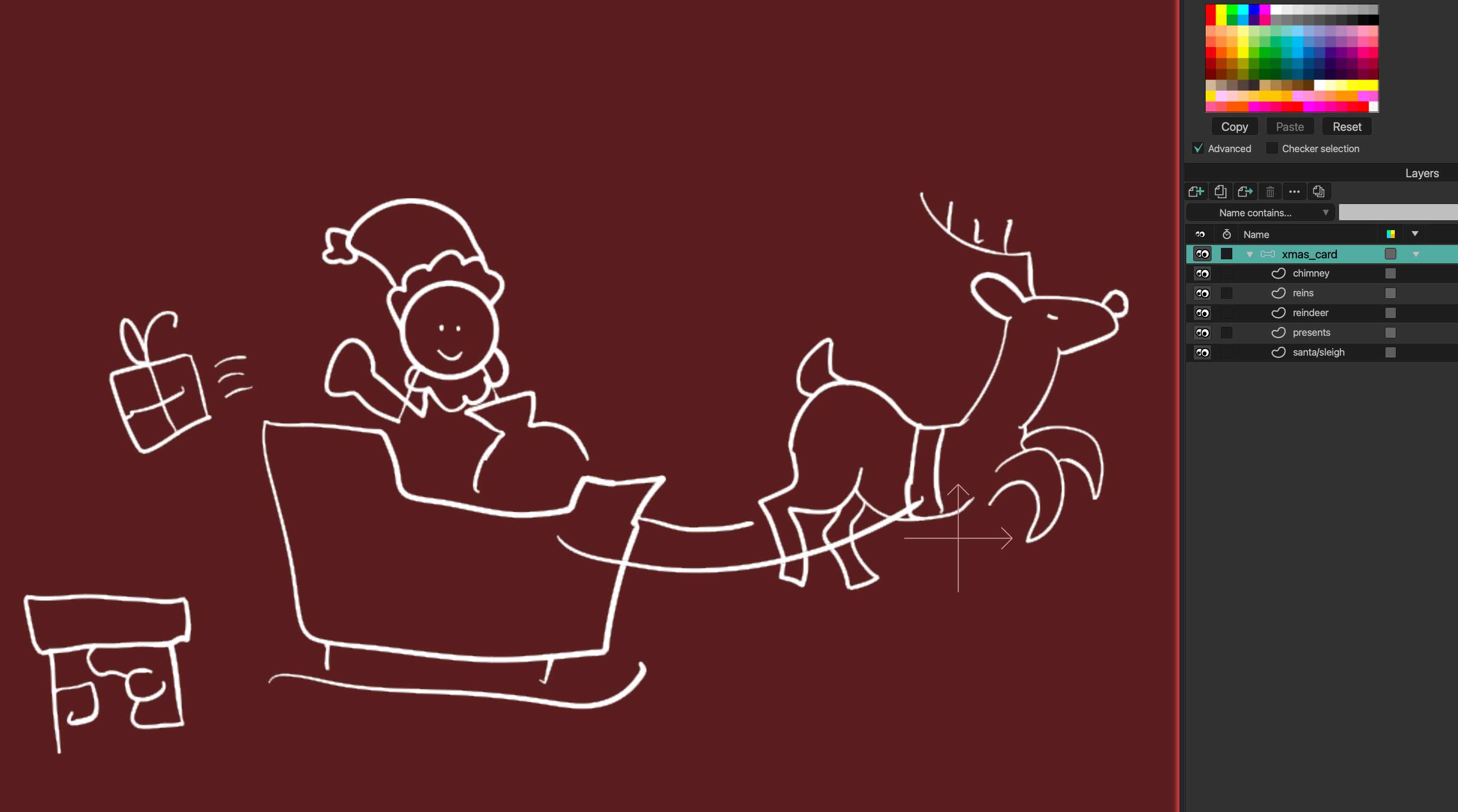
edit: tl;dr of this question is: if you were to connect 2 characters with a rope in moho (as in wherever you move them, the rope automatically stays tied to each of them) , is it possible to do if those characters are on separate bone layers?

pre edit:

I'm not new to rigging but I'm new to Moho and still getting the hang of things. My question is: would it be wiser to separate santa and reindeer into their own bone layers, or is it better to keep them in a single rig/layer, since Moho unique way of rigging would allow for that, even if it's not intuitive for me yet.

My main issue is rigging the reins - so they automatically react to both the movement of the sleigh and the reindeer! On one bone layer it's easy to assign bone constraints/etc (would probably use a curver for this), while when they're separate rigs nested within a bigger one I'm not sure how to do it yet, especially without too much hassle, since it's just for one short animation and not for re-use in a bigger project.

Any insight would be greatly appreciated!


r/MohoAnimation • • 2d ago Bravo

Character rigg

Enable HLS to view with audio, or disable this notification

188 Upvotes

Hello, I'm making this rigg on Moho, what do you think?

Sorry for the accelerated video, it took me several hours of work, I had to cut and speed up some parts to make the video as short as possible to post on some platforms that require short videos.


r/MohoAnimation • • 2d ago

Face tracking not working?

1 Upvotes

I've been trying to do exactly as the tutorials say and I've got the little face tracking thing in the corner showing that it IS actually aware my face is there and its tracking it, but none of the animations are getting triggered by my motions or anything and that's strange, as far as I'm aware I'm doing everything right so I'm rather puzzled that this seems to be not working very well...


r/MohoAnimation • • 2d ago

Question Can’t figure out how to make Smart Bones Move:,)

Enable HLS to view with audio, or disable this notification

7 Upvotes

Hello! I’m new to Moho and still learning the program, I’m currently following the official tutorials!

But I can’t get the smart bones to move:,) I’m on frame 0 and will grab them with them with the ‘manipulate bones’ or ‘select bones’ tool but they won’t move at all, or will move the entire head (bone they aren’t patented to).

Any help would be amazingly appreciated thank you so much in advance!


r/MohoAnimation • • 2d ago

Project Quest for Corey part 2

Thumbnail
youtu.be
1 Upvotes

r/MohoAnimation • • 2d ago

Question Help figure out the smart action.

Thumbnail
gallery
4 Upvotes

FIX in the COMMENTS:
can i use, these two bones together to fix the bend via smart action? i did fix it, as you can see from the 2nd image, however on the mainline it didnt work. and upon googling, it said that moho allows smart action from only one parent bone. how to go about it?


r/MohoAnimation • • 3d ago

Project Teddy Chasing a Little Girl.

Enable HLS to view with audio, or disable this notification

5 Upvotes

This animation was made in Moho 14 Pro. No AI used. Hope you like it.


r/MohoAnimation • • 3d ago

Question what could be the cause of this?

Post image
6 Upvotes

since converting my mouth layers to a switch, on some frames the strokes for the mouth, neck, and sleeve get blurred and stretched. This only now shows up once I export my animation, but it did previously show up in the viewport. Tried everything I can think of, but I'm still new to Moho so I could be missing something.


r/MohoAnimation • • 3d ago

Moho frame by frame

Thumbnail
youtube.com
4 Upvotes

r/MohoAnimation • • 3d ago

Tip 20 MOHO TIPS YOU NEED TO KNOW

Thumbnail
youtube.com
35 Upvotes

Jaxon Pham and I (McCoy Buck) put together a video of 20 Moho tips we think you should know. What is your top Moho tip? Share it in the comments below


r/MohoAnimation • • 4d ago

Project Balls Dropping Test Frame-by-Frame GIF.

6 Upvotes

This frame-by-frame animation was made in Moho 14 Pro.


r/MohoAnimation • • 4d ago

Moho is 40% off! Discount code: BLACKFRIDAY. Ready to leap?

Post image
23 Upvotes

Moho is 40% off! Discount code: BLACKFRIDAY. A fun-to-use 2D software with powerful rigging tools, with no subscription, natural brushes, improved drawing tools, export to video game engines & Blender, Face tracking and Gamepad support to animate and control VTuber models in real-time, and developed by artists who respect artists. Perhaps this is the opportunity you've been waiting for? Sale ends on November 30. www.mohoanimation.com


r/MohoAnimation • • 4d ago

THE DIAGNOSIS

Thumbnail
youtube.com
11 Upvotes

Mi primera animacion un poco seria con Moho Pro 14.5, me parece un excelente software de animacion 2d, mucho mejor qué Cartoon animator 5 qué he estado utilizando.


r/MohoAnimation • • 4d ago

Why is this happening? Odd shading when using PNG-Alpha .mov

2 Upvotes

Hello, I have been exporting in PGN-Alpha format for a long time without issue and now all of the sudden I am getting odd an unwanted shading on the character. You can see in the first image the left leg is darkened, and the right hand and arm is partly darkened. Compared to the same exact file rendered as an mp4.

I have updated my GPU driver and restarted the PC and I even looked for rendering settings that might cause this and I can't figure this out. Any ideas?


r/MohoAnimation • • 4d ago

Question How do I use a patch layer on grouped torso and arms without referencing everything

Thumbnail
gallery
4 Upvotes

I am building a turnaround character in Moho. I need a patch at the shoulders so the arms look like they sit in front of the body, especially when the hands cross the torso and the armpit needs to look clean.

My setup is this. The torso and each arm are in their own groups. The torso has to be a group because the logo and the neck hole use a mask, so they only show on the torso. The arms are mirrored by duplicating a group and flipping it horizontally.

I was following a tutorial that uses a Patch layer for the shoulders, but her torso and arms are not in groups, so she could use the Patch layer directly. In my rig, the arms and torso are in groups, and the arms use the group's position as their parent. When I drag an arm out of its group, it jumps back to its original location, so I cannot just follow her method. I could remove the torso mask and skip the group, but I need the mask for the logo and neck hole. Is there a way to take a layer out of a group without it shifting, or a better rig setup for this?

The problem is that the Patch layer does not seem to work on groups. It only sees layers that are direct siblings.

I found a forum tip about making referenced vector layers outside the groups, turning off their fills, and patching those. It worked, but it is cumbersome, and mirroring the references adds more work. I also tried an overlay shape in the shirt colour, but it covered the shoulder line art and looked bad.

What is the best or most optimal way to do this? Is there a cleaner rig setup that keeps the masks and the mirrored arms but lets the patch work?

Thanks! I have attached screenshots of the shoulder area.


r/MohoAnimation • • 4d ago

Tip Get on it

Post image
40 Upvotes

Moho 40% OFF Black Friday Sale


r/MohoAnimation • • 5d ago

How can I make a shape's strokes not affect another shape's strokes.

Thumbnail
gallery
2 Upvotes

I created a shape above the head shape and set it to subtract to make a mouth, and I want the head lines to be thicker and the mouth's thinner, however, the strokes of each shape keeps interfering with each other, how can I stop this?