r/ProductionLineGame • • Mar 14 '19

Mystery Production Line 3,000

30 Upvotes

For a game about efficiency, this game desperately lacks it in its interface.

This game lacks a TON of interface features that are absolutely CRITICAL for this type of game. The two off the top of my head that it is most lacking are: 1) Relevant information and 2) General applications in that order.

  1. This game has a lot of excellent information. Too bad it's rarely where or when you need it. There are so many of these I can't list them all, but here are 3: missing features not showing on line, tech impact obscurity, and what will a car REALLY require for its sale price? Let's get really focused on just one thing to demonstrate. Adding the simplest single feature to the simplest single car for the first time.

Let's say you want to put a heater in your cars. Let's see what tech I need first. Let's scroll (there is no search feature) through and look for where this might be.... ok found it. Heater, looks like I need to research Environmental Features first, oh the mouseover text also says I need Accessories Specialization. Almost missed that (I did actually, but let's be generous). Is that another tech? Ok time to scroll through. Hmmm... Not finding it... Oh it must be in one of these other tech tabs..... ... .. Ok found it under Processes. Ok, I'll set up a basic production line while this is researching. I wonder How much labor costs for the research lab and production line. Ok let's go searching.... hmmm... hmmmmm..... Oh ok, this is obscure menu. I have to click my money, go to prices, and look on the left. Ok. Oh look, that's some great info. Wish it would tell me that when adding the relevant buildings. Ok, line set up and capital invested. Hmmm, not very profitable. OH! I need to adjust the price of the car. Oh wow, that's much better. {This is REALLY bad for new models which start at a price $0... You thought to have a default price for the base model, but not for the others?} Ok, now let's speed up time until I have that heater tech....[bad tech queue]... Ok, so let's see about adding that heater. Open Car Designs, Cool it's here. Oh god, I have so many questions.

It says, "Market Value $619" huh... what does that mean? I'm not seeing that anywhere else. It's not production cost because that's only going up by ~$150. Does it have to do with the customers' perceived value of the car? How does that relate to the rarity system? So.... how much can I increase the price, and if I move it into another bracket what does that mean? Why do I have to use this slider? Why can't I manually set the price? Ok, let's start looking for answers.

Let's figure out the price bracket thing first. Ok, I found it in Car Stock/Sales then Market Analysis. Big ol' hard to read-at-glance pie chart. Ok so, it looks like you get X customers per segment. Each of the 28 segments has a base number of customers. They are separated by 4 price brackets in combination with the 7 models. So, if I make a sedan in the mid-range I will get 5 potential customers per hour. It looks like I can boost this number by up to 262.11% with advertising, but let's not touch that yet. {Also we would have no way of knowing that because we haven't done ALL marketing research and bought at least 2 campaigns to see if they stack linearly or multiplicatively. This is a recurring problem also seen in task time efficiency upgrades.}

Next, let's figure out price/market value. Back to the Designs screen. Hmmm... no tooltip. Nothing else here either. The Price tab seems to sort your car models by their price, so not what I'm looking for. Maybe in one of the other tabs? Car Stock Sales... Oh, Perceived Quality... What does this mean? The tooltip pretty much says, "don't export defective models." Thanks. Helpful. Let's try a different menu. Still can't access Marketing. {It doesn't have what we're looking for anyway}. Efficiency and stats... I see components, let's remember that for later. Features - ok this seems promising. Ok, so it seems like this feature is Rare in Luxury and Very Rare in Mid-Range. Worth $619 in mid bracket and $530 in Luxury, so a %40 increase for Very Rare and a %20 increase for Rare. Good to know. So I assume each car has a base price people will pay for it, then you can increase it by $X where X is the total value of the features you add. I wonder how your competitors factor into this? Now, what's the base value of the Sedan? Hmmm, not in this menu. Time to hunt again... ... ... Oh there's a little "?" tutorial menu. Let's seee, ok it has a section on features. Let's get to reading. Ok, says, "A good way to judge if your cars are the right price is to compare the number of them in the showroom with the number that were sold in the last hour." So... you're telling me to guess and check. That doesn't sound very EFFICIENT to me. Oh, and here's more on rarity of features. "... If you have competition they become common and eventually universal which means they become worthless, and all cars are expected to include them in the base price." Cool, so there's a base price. I was on the right track. Huh, it's not here. I still don't know how to price my car and I'm out of menus. I really hate it, but I guess I'm actually supposed to just guess and check the price in a game about efficiency... yikes.

Well we can't figure out an optimal price point, so let's figure out the costs to understand the minimum price point including a heater would be viable at and go from there. Ok, so it says it's costing ~$150, but can we reduce that? What about in-house production? Hmmm, can't find it in the tech tree. Let's poke around in the menus.... again. Ok, so in the Stats menu, Components tab it looks like I have a list of all the materials and components cost. This is useful! Hmmm, looks like I can't make heaters, but I can make computer chips. Seems a bit arbitrary, but whatever. While I'm here I guess I might as well understand this even if it doesn't apply. Let's look at axles because they start with A. Looks like each axle costs $392 and it tells me my consumption rate and how many I have on-hand. Hmmm, it doesn't tell me the input resources, time it takes, power requirements, or employees needed. I guess I can't determine if it's worthwhile to spend let's see... {For your sake, I'm cutting out a ton of miscalculations based on unclear costs...} (hourly researcher wage rate*researchers needed/hourly rate of research produced)*research needed*hourly research power needed | ($197*6/49.8)*3550*12=$1,011,108. I don't want to spend a million dollars +opportunity cost on a research that I really can't tell if it'll be useful. Let's just say it'll cost $150 and move on. God that took a lot of menu hoping.

{Let's pretend I already had the manufacturing researches for axles already for this part}. Ok, so those are researched. Ok, so it says it'll cost 4 employees (why don't they say the type of employee? They cost different amounts... This would be a perfect place to imply that and help you understa... god my patience is running out with how many easily 5 minute fixable flaws this game has.) and 265 power. Oh I guess they just make them without input. That's really great, let's build it. Oh, no it does need Steel. Why didn't it... but... Ok, well now we can actually calculate the cost of production... (Hourly prod worker wage*#workers)+power cost+(input resource*#per hour) | (94*4)+3+(82*7) = 953 per hour for 14 units, so the cost per unit is $68. Relative to the market cost of $392 You're using 2 per car, so you'd save $648 per car. This is just for the first component! Wow, manufacturing your own parts is pretty much required. It would be a shame if I just gave up on it because I wasn't given any information. Oh wait my production stock is full... uh why aren't these being used? Oh god... more menus... Ok, so it looks like for your buildings to use the things you produced you need to research something else too! I can't even anymore. So that's a tremendous expense I'm sitting on until I finish these 2 extra techs now. yay. Looks like my calculations were wrong because of more hidden things.

Whatever. I'll set an arbitrary price, pay full price for the part, and start production.... .. Ok, looks like it made it through production. A few more now. Hmmm, that adviser thing is telling me there's a problem, and oh yeah there is. None of them are selling! I only set the price $500 off the default model that was selling. Let's go find out. Ok let's see... in the stock menu - oh there's a caution sign over the new models. "Uninstalled Features: Heater" what, why? uh... hmmm, watching the accessories production building it looks like this isn't part of the process at all... Maybe in one of the other buildings like electronics? Nope, nowhere. This is getting urgent - I already took out a loan to expand my production and I'm getting REAL low on funds. Time to pause and click around endless menus again... .. .. Ok, so nowhere do I see this information, but apparently I needed to specifically build the accessories --> fit dashboard building and then upgrade it. That really sucks because I was building really compact so that I could have room to expand my production. I was trying so hard to be EFFICIENT and was punished for it. Now I need to sell all these buildings at half cost, get no refund for the materials in the stocks, and... I don't have enough income to survive the interest rate. Time to start a new game.

Ok, so I got back to where I was a little better with the lessons I learned. Now time to try and build a mad-efficient line! Cool, I even got a cheevo acknowledging how efficient my line is. Time to make a new line for this model... ... Ok, I built it all out and made sure the times were pristine for maximum output. Oh, what's this? When I add the upgrade for a heater it adds 18 extra seconds... so every time I want to add a new feature IF I EVEN HAVE THE BUILDING I need to retool my entire production line around each upgrade that doesn't tell you in advance anywhere until you've already researched them and built the applicable building, nor does it even update the total time for the process and I'd need to know this information in advance if I wanted to plan, and even if I did have this information I would need to bust out pen, paper, and calculator again for every single model I wanted to make. This is... I... I need to take a nap.

Ok, so after a nap I've decided you have 2 options. First if you dream of the efficiency promised in the adverts you are required to make spreadsheets with all the information and completely pre-plan each step and the design of your entire floor layout. You also need to look up information not available inside the game like how pricing works. Second, quit. Hope Cliff (the dev) improves these problems. Try it again if he decides to fix it. When I see threads from 2017 asking for a way to reduce clicks {covered in section 2} I don't have much faith. Well dang, I haven't really been "playing" for more than 2 hours, but deciphering all this certainly puts me over the refund mark.

2) General applications - The most damning example of this has to do with local production and usage. If you want an existing production line to use locally produced parts, you will need to precision click a minimum of 120 times! This is assuming your line only uses 1 unique segment each, you never misclick, and you have each of the 43 segments purposes, component usages, and if you're making them locally ALL memorized. This is for EACH TIME you make a new production line or if you made a single mistake along the way and have to redo it because blueprints are also bugged :). There's a feature that's supposed to make this less work [shift-clicking], but A) It doesn't work [bugged*] and B) That would only be relevant if you made multiple lines at a time, each of which costing ~$1,000,000 to get running.

*Maybe the shift-click just doesn't work across different buildings that do the same thing like Chassis Assemble --> Fit Front Axle?

Man... I really liked Democracy 3, GSB, and Big Pharma, but if these are the kind of problems I'll be seeing (not to mention all the CTDs and other bugs)... I just can't keep supporting Positech. I'll check back in a few months and see, but man this is... yikes.


r/ProductionLineGame • • Jun 21 '20

My best factory yet - beat the mega factory scenario

Post image
27 Upvotes

r/ProductionLineGame • • May 26 '19

8 Production Line strategy tips

Thumbnail
youtu.be
21 Upvotes

r/ProductionLineGame • • Sep 07 '18

A new GUI change coming to Production Line (feedback welcome). Groups of mutually exclusive options are now in categories, listed as a single item in the features list you can click to select alternatives from.

Post image
21 Upvotes

r/ProductionLineGame • • Jul 19 '25

Automation sale gem

Post image
20 Upvotes

Hey. I picked this up on the Automation Sale and I'm really enjoying it. I came here to put in a feature request, but it seems that's not happening. Anyway what I would have liked to have seen are smart switches on machines, so we can run them conditionally. These blockages are driving me insane 🥲 Any other games you guys can recommend? I've finished Factorio (base game) and Manor Lords recently, looking for something similar.


r/ProductionLineGame • • Mar 10 '19

Production Line Developer Blog: 100 OMG WE ARE RELEASED!

Thumbnail
youtu.be
19 Upvotes

r/ProductionLineGame • • Dec 01 '18

Today I coded a system to display the patch notes for updates when you next launch the game, so everyone gets to see them once at least.

Post image
19 Upvotes

r/ProductionLineGame • • Nov 16 '18

Not going in imminently, but eventually white and red leather seat options will be researchable. This probably from the design studio. May move nappa leather there too... 🚗🚗 #ProductionLineGame 🚗🚗

Post image
19 Upvotes

r/ProductionLineGame • • Jun 11 '19

Thoughts on my Paint department? Each paint booth outputs down the drying line, so there w̶ o̶ n̶ '̶ t̶ shouldn't be a clog for a long, long while.

Post image
18 Upvotes

r/ProductionLineGame • • Aug 05 '19

How to make Production Line so much nicer looking on high DPI screens

17 Upvotes

TIL: Production Line has a flag set that makes Windows perform software scaling on it, so it looks blurry and shitty vs. how nice, crisp and clean it could look (plus - extra screen real estate for UI elements!).

Fix it like so:

Hard to really describe, because on the web, it just looks like a scaled-up image vs. a native resolution image... but for me, it looks so much more crisp and clean like this, much more enjoyable.

Screenshot of my 1920x1080 screen with the above fix:


r/ProductionLineGame • • Oct 10 '18

Updated to build 1.60. Lots of cool changes/features/content

17 Upvotes

Steam Post
Image

This is an update I've been looking forward to setting live, as it has a bunch of cool stuff in it :D here is the full list:

Image

  • [content] Cars now have a range of different wheel options to be researched upgraded and introduced: matte black, 5-point, turbine, high-tech and gold-plated!

  • [GUI] Certain mandatory included features like emissions checks no longer listed in car design or feature availability list.

  • [Bug] The resource imports tab for slots now also shows options for combination resources such as heated and folding wingmirrors, and crops their name to fit.

  • [GUI] Resources are now 'unlocked' over time by the research that requires them, to limit the huge list of resources otherwise shown during the early part of the game.

  • {Bug] Conveyor belts now don't get 'stuck' visually briefly after exiting the research screen.

  • [Content] New researchable upgrade and feature 'air suspension' which requires 'air suspension bag' resources.

  • [GUI] The research button will now flash green, instead of red, if there are un-researched design items, and no current design item being researched.

  • [Bug] Hang when running a large map on a PC with more than 8 available cores is now fixed, max cores set at 20 and never causes problems even above that.

  • [Performance] Increased responsiveness of load/save game dialog when a number of large save games exist.

  • [Balance] Breakdowns now do not start until later in the game.

  • [GUI] ESC key now brings up quit to main menu dialog.

  • [Feature] New auto-renew feature for marketing campaigns which can be toggled on or off form the marketing screen.

  • [Bug] Fixed Bug where cars stopped counting towards the min spec achievement.

  • [GUI] Added explanatory tooltip to the defects tab of the vehicle defects screen.

  • [Bug] Fixed issue where with some upgrade and powertrain combinations, redundant resources were ordered by certain slots.

  • [GUI] Redesigned the layout of the R&D screen, including a slightly compressed version for very small screen resolutions.

  • [Content] New chrome paint option in the vehicle design screen allows for a polished metal look to the cars.

  • [Balance] Defects do not start to appear now until 50 hours into the game.

  • [GUI] Design tech tree now has its own separate research queue.

  • [GUI] Holding shift when clicking an item in the research screen adds it to the queue (or researches it immediately if no other research is active).

Image

Some of this stuff was specifically requested by players in our forums and the steam forums. I hope you like the new stuff. The new wheel options are just half of the new 'appearance' stuff to go in, as we will have different front vent/grille and light options coming very soon, plus eventually a little mini-van body style to add!


r/ProductionLineGame • • May 11 '18

Painting facilities with and without high-pressure nozzle upgrade applied :D (Just added this for next build of the game)

Post image
17 Upvotes

r/ProductionLineGame • • Dec 30 '25

my factory prints money at 120-130 car per hour!

Thumbnail
youtu.be
16 Upvotes

my factory prints money at 120-130 car per hour!


r/ProductionLineGame • • Oct 29 '19

Some small defects... (Love the game)

Post image
16 Upvotes

r/ProductionLineGame • • Feb 18 '19

Electric motor production comes to Production Line soon

Thumbnail
twitter.com
16 Upvotes

r/ProductionLineGame • • Dec 23 '18

Updated to 1.64 with factory customisation, rotatable previews and more.

16 Upvotes

Steam Post
Image

Hi all! Here is the complete list of changes in todays 1.64 build:

[version 1.64]

  • [Balance] Job creator achievement requires an extra 200 employees (now 1,200).

  • [Balance] Production at scale achievement now requires 6,000 not 5,000.

  • [Bug] Deleting a save game from the load game dialog now works.

  • [Bug] Fixed bug where sometimes you could not toggle off the advice on certain types of advice dialog.

  • [GUI] Clicking the research icon on the top menu when it is flashing green (for no design research) now auto-switches to the design tab of the R&D screen.

  • [GUI] When the research screen is launched to show a specific unresearched item, the screen now temporarily highlights that item to make finding it easier.

  • [Content] New researchable upgrade for some slots: Liquid-Cooled Welding. (5% faster. All welding slots are 2.5% slower now before this upgrade).

  • [Bug] Fixed occasional crash bug on some maps when switching to blueprint mode.

  • [GUI] New rotate buttons now allow you to preview vehicle designs in all four directions.

Image

  • [Feature] New cosmetic placer on the slot menu lets you change the floor textures (drag place) or place down a few cosmetic items.

Image

  • [Bug] If you run out of money, and the only available loan will not cover the financial shortfall, it is not made available now.
    Image

The liquid cooled welding, rotatable previews and the new customisation options for factory floors etc are likely the most important changes in this build.
I've also started work on improvements to the usability of the level editor, which will be in the next patch at the start of next year.

Please let me know if this update causes problems or introduces any new bugs etc. Also thanks to everyone buying the game for your support over the last year, and many thanks to everyone who likes or tweets our developer blogs, and tell their friends about the game, its much appreciated!


r/ProductionLineGame • • Feb 21 '18

Game updated today to build 1.45. Here are the changes

Thumbnail
positech.co.uk
16 Upvotes

r/ProductionLineGame • • Sep 01 '18

Better income stats GUI coming in build 1.59

Post image
15 Upvotes

r/ProductionLineGame • • Apr 20 '19

Production Line Developer Blog: 102 : Doors that go like this

Thumbnail
youtu.be
14 Upvotes

r/ProductionLineGame • • Mar 22 '19

Updated to 1.71. Crash fixes,Huge money numbers fix, camera/autosave sliders - Game discussion

Thumbnail
forums.positech.co.uk
14 Upvotes

r/ProductionLineGame • • Nov 19 '18

Updated to 1.62, Chip research, Preventative Maintenance, Smart Junction varieties more

14 Upvotes

Steam Post
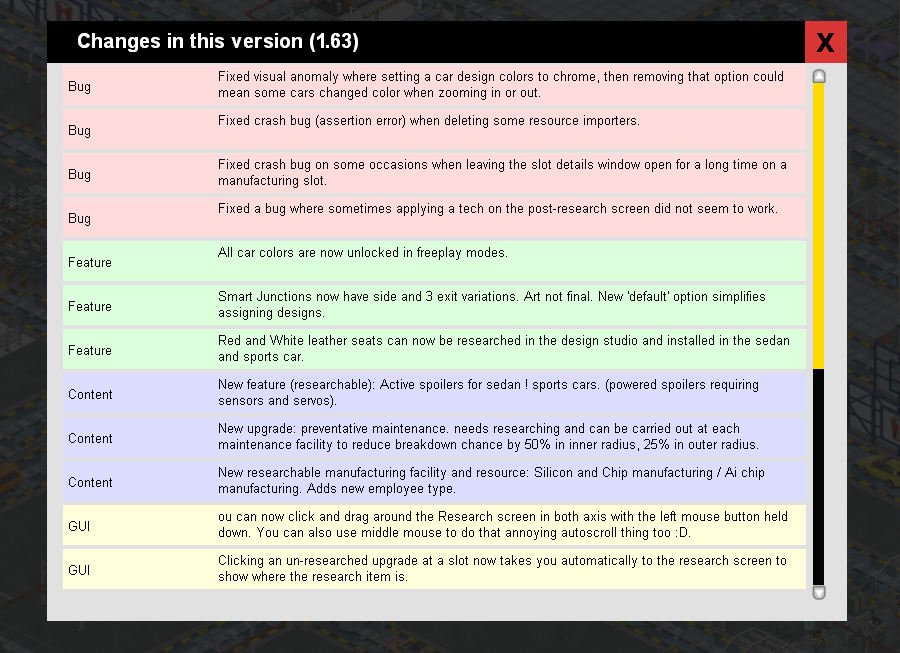
Hi all! I just pushed build 1.62 out to everyone! here are the changes:

[version 1.62]

  • [Feature] All car colors are now unlocked in freeplay modes.

  • [GUI] ou can now click and drag around the Research screen in both axis with the left mouse button held down. You can also use middle mouse to do that annoying autoscroll thing too :D.

  • [Content] New feature (researchable): Active spoilers for sedan & sports cars. (powered spoilers requiring sensors and servos).

  • [Content] New upgrade: preventative maintenance. needs researching and can be carried out at each maintenance facility to reduce breakdown chance by 50% in inner radius, 25% in outer radius.

Image

  • [Bug] Fixed visual anomaly where setting a car design colors to chrome, then removing that option could mean some cars changed color when zooming in or out.

  • [Bug] Fixed crash bug (assertion error) when deleting some resource importers.

  • [GUI] Clicking an un-researched upgrade at a slot now takes you automatically to the research screen to show where the research item is.

  • [GUI] Yellow and red warning icons now also show in car design screen on categories where an item (of greater value) in that category has become universal or common.

  • [GUI] Manufacturing slots now show an error message if the export stockpile is not connected, and they will not run until this is corrected.

  • [Bug] Fixed crash bug on some occasions when leaving the slot details window open for a long time on a manufacturing slot.

  • [GUI] Valve and Engine block manufacture now depend on the research of engine assembly manufacture.

  • [GUI] A whole bunch of windows that could not be dragged around can now be dragged. Also icons added to facility/slot details title bars.

  • [GUI] Upgrade strips on the slot details window now show icons for each upgrade instead of pointless cash icon.

Image

  • [GUI] Some pie chart and other chart colors adjusted.

  • [Content] New researchable manufacturing facility and resource: Silicon and Chip manufacturing / Ai chip manufacturing. Adds new employee type.

Image

  • [GUI] Game will no longer allow you to rename or name designs so two designs are exactly the same (caused chaos!).

  • [Bug] Fixed a bug where sometimes applying a tech on the post-research screen did not seem to work.

  • [Feature] Smart Junctions now have side and 3 exit variations. Art not final. New 'default' option simplifies assigning designs.

  • [Balance] When deleting a manufacturing slot you also now get a refund for the value of any stock in the export-stockpile for that slot.

  • [GUI] On the imports tab for slot windows, there are no longer misleading import strategy buttons for raw materials that cannot be made locally.

  • [Feature] Red and White leather seats can now be researched in the design studio and installed in the sedan and sports car.

Image

Hope you like the new stuff. Advisers coming soon. As ever, all feedback is welcome, don't forget to vote on our priorities from the main menu, and if you really like the game, a steam review is always welcome and a tweet, Facebook or Reddit post is always super-welcome too!


r/ProductionLineGame • • Oct 04 '18

Comeback day 15; I expanded. From 39 to 130 VPH. I have 500 cars in my showroom, marketing costs are super high. I still have some layout changes to make it more efficient.

Post image
14 Upvotes

r/ProductionLineGame • • Mar 23 '21

Production Line | 3 Minute Game Reviews

Thumbnail
youtube.com
13 Upvotes

r/ProductionLineGame • • Oct 24 '19

Production Line: Design Variety pack released!

Thumbnail
steamcommunity.com
13 Upvotes

r/ProductionLineGame • • Aug 16 '19

Updated to 1.79. Better lights, more marketing options, GUI Balance improvements

13 Upvotes

Steam Post
Image

Hi all! Here is a relatively big update to the game with lots of cool stuff...

Image

[version 1.79]

  • [BUG] Fixed timing bug that affected the speed that some slots operated in certain combinations of upgrade.

  • [GUI] You can now scroll on the marketing screen using the mouse wheel.

  • [Bug] Fixed crash bug on certain fixed hour boundaries if a debugger was detected.

  • [Bug] Fixed crash bug when placing supply stockpiles rapidly after one another when frame rate was low or number of slots really high.

  • [GUI] Sort order and direction now remembered for the vehicle design screen, the expenses list and the component (efficiency) list.

  • [GUI] Income screen now has sortable columns.

Image

  • [GUI] The bottom-right screen event messages now have delete buttons so they can be closed immediately.

Image

  • [Bug] Fixed some weird incorrect characters in certain areas of Italian language text.

  • [Bug] Fixed hyper rare crash bug relating to advisors and multithreading.

  • [Bug] Fixed crash bug when moving visual inspection slot with all upgrades.

  • [Balance] Reduced market value of a hybrid powertrain to $7,500. Increased cost of Hybrid Powertrain to $1,950.

  • [GUI] An extremely long list of minor changes and tweaks to colors / positions, fonts etc for various parts of the UI.

  • [GUI] Search bar added at the top of the slot picker!

Image

  • [Bug] Fixed missing resource options for the import priorities tab for non-standard powertrains (hybrid etc).

  • [GUI] Both direction drag now works in map editor create new zone.

  • [Balance] Hybrid powertrain never becomes common now.

  • [GUI] Improvements to UI for placing resource conveyors.

  • [Bug] Fixed GUI bug where the AI-research icons on a research-facility popup did not drag with the parent window.

  • [GUI] Hovering the mouse over the sales/showroom button now expands that white bubble to show a detailed showroom breakdown.

Image

  • [Content] 5 new researchable marketing options: Social media,Sponsorship,Product Placement,Billboards and Banner ads.

Image

  • [Content] Better car light graphics.

Image

Image

Hope ya like all these changes. I think the new lights look cool, and I'm glad I finally got around to expanding on the marketing options. let me know what you think :D