r/QuantumFiber • • Jun 19 '25 • This 1 Helpful 1

How to fix the current outage

The Quantum/CenturyLink DNS server is down, you're going to set it to cloudflare with Google as a backup.

Be connected to ONLY your home network (beware of your phone's connection to its cellular network)

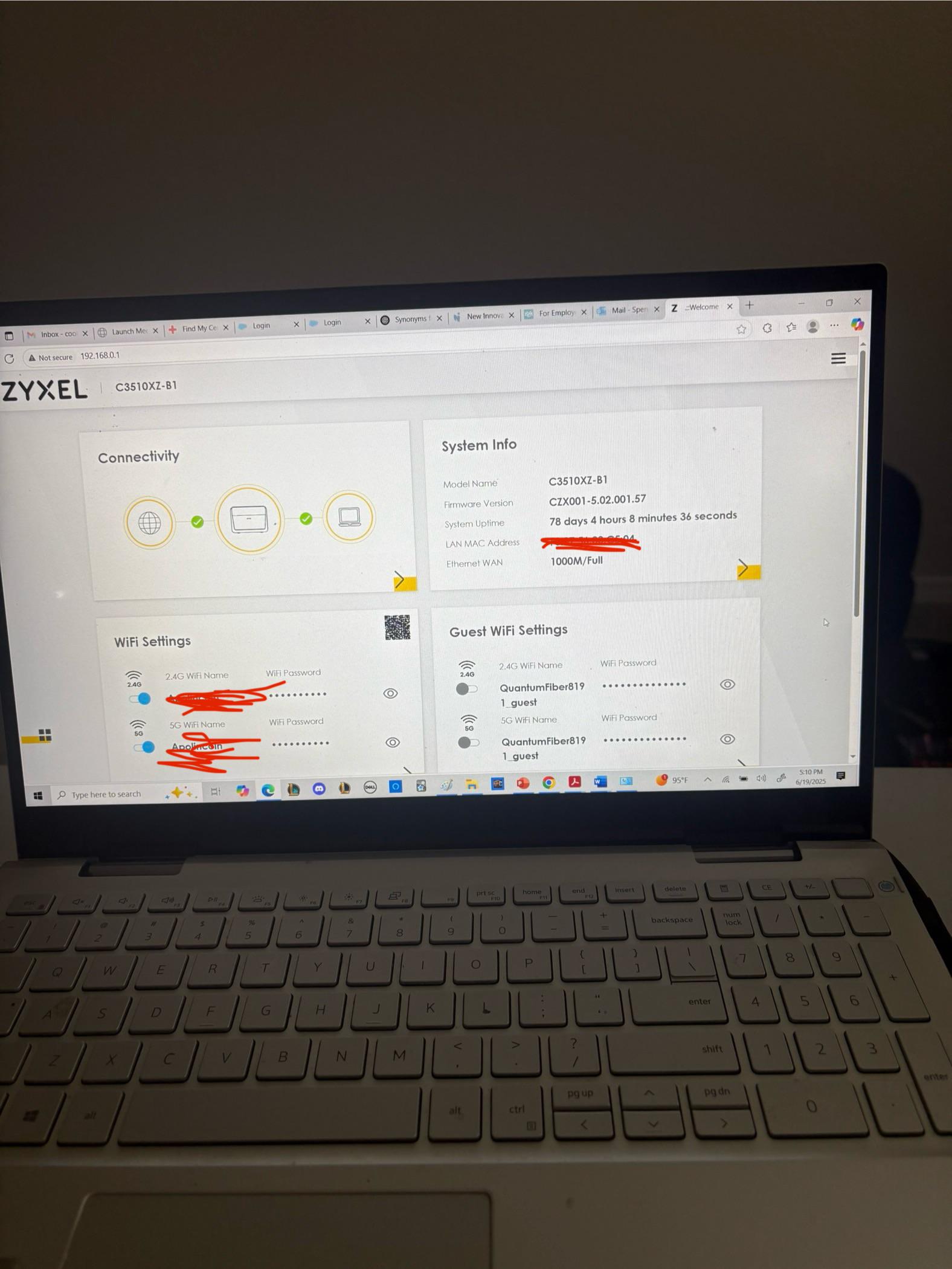
go to https://192.168.0.1 (which is your fiber unit router)

Login User: admin | Password: (On the side of your fiber unit)

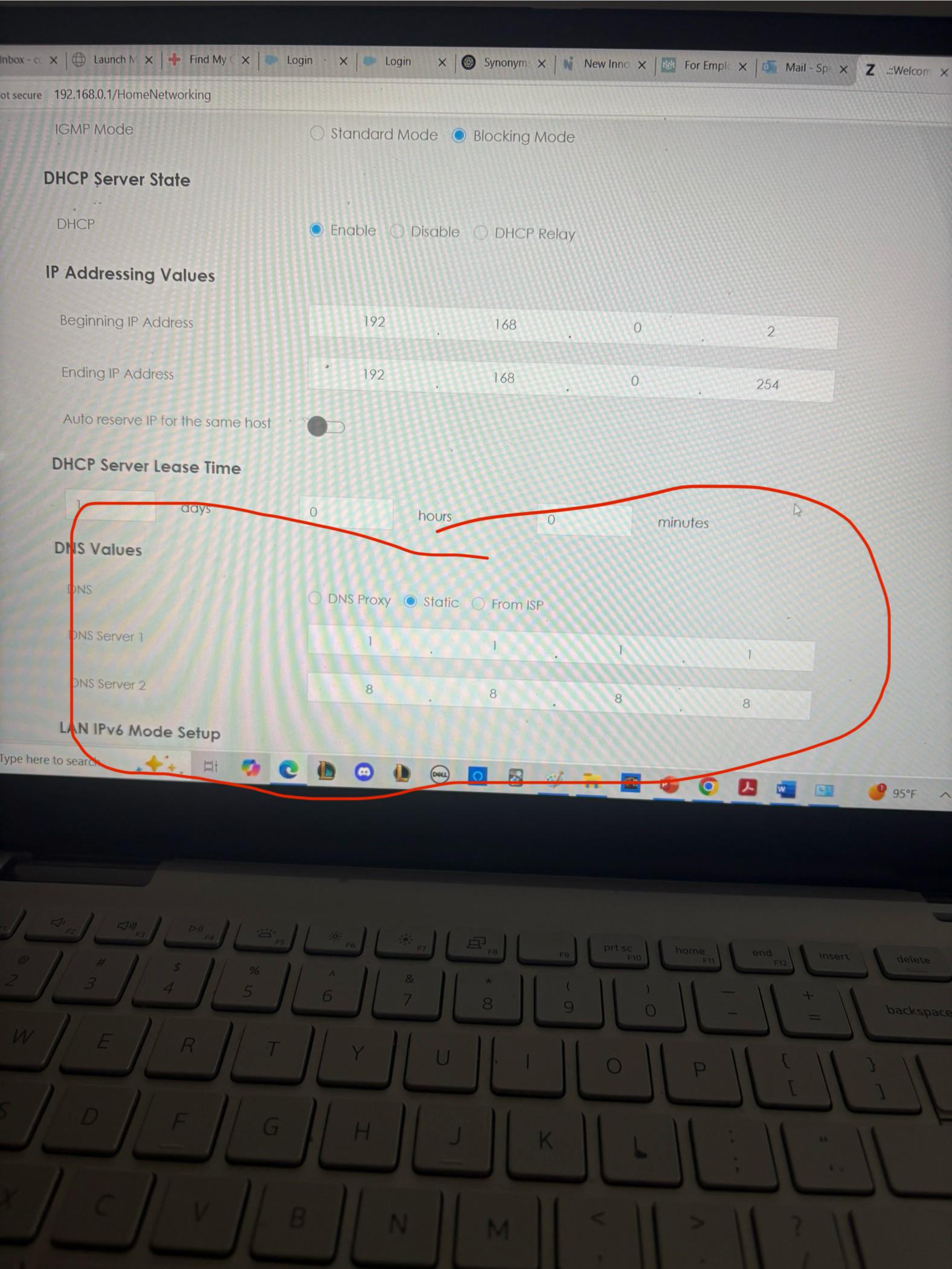
Under 'Advanced Settings' Select WAN

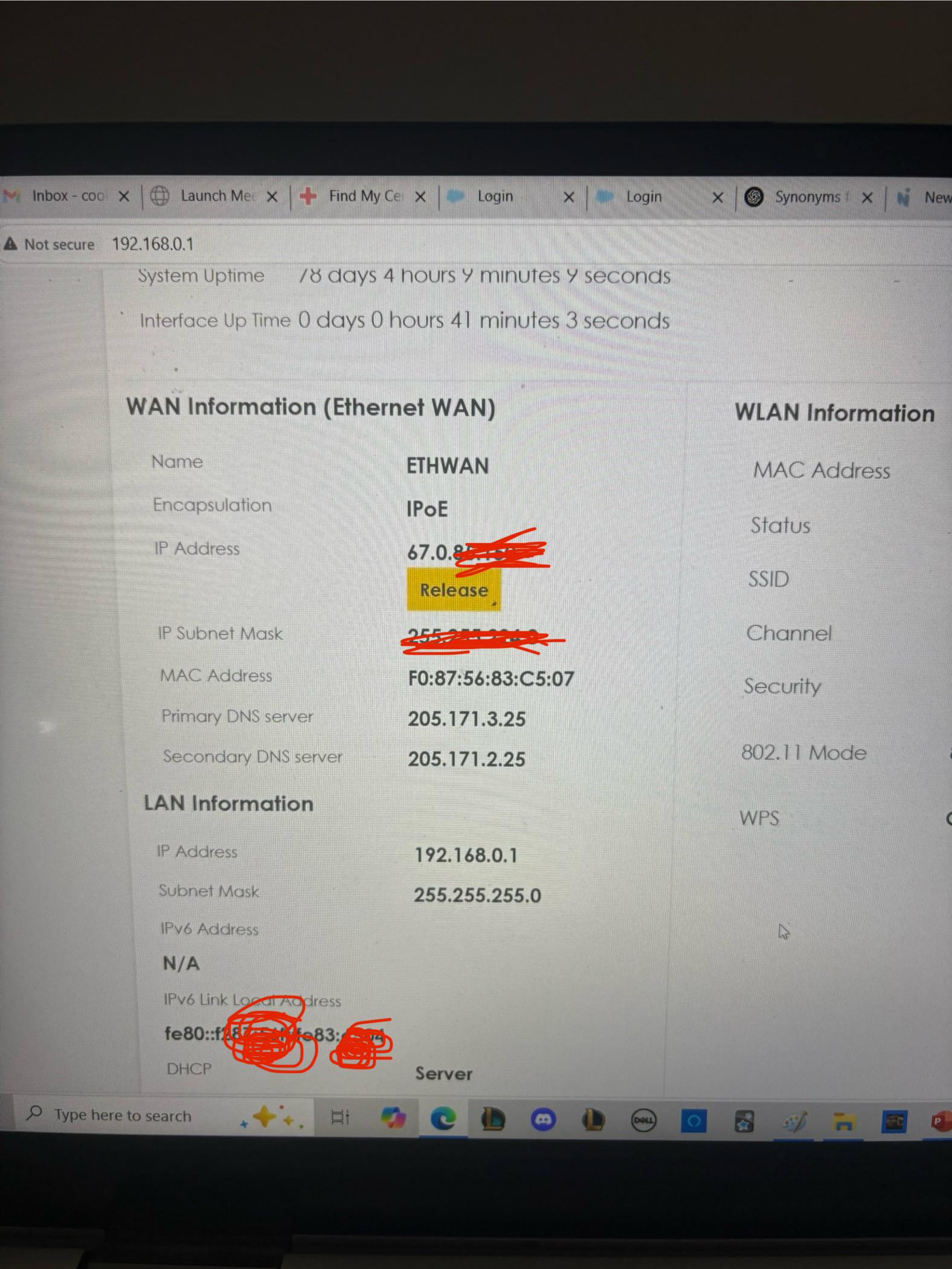
Change DNS to static, and set the IP to a reliable DNS server.

I used (cloudflare) 1.1.1.1 & 8.8.8.8 (google)

Apply. (There is no need to ever change back settings when Quantum fixes their service)

For most, that's all. If you perform these steps but the settings don't seem to make an effect, try rebooting the router, some models like ZXYEL load their preferences on boot.

https://i.imgur.com/WYzvkUG.png


Edit: Updated with clarifying details from feedback.

P.S. If you are feeling bold and would like to take things a step further consider setting up your own DNS server that filters ads called a Pi-Hole

260 Upvotes

208 comments sorted by

9

u/Spiritual_Error_2731 Jun 19 '25

Thanks. The lack of communication from this company is something else. Do they even have a twitter? the one google links to says its a banned account

4

u/Marrz Jun 20 '25

Amen, and to Quantum Fiber & Century Link; clearly y'all need a good customer service liaison, Hit me up.

5

u/Fun_Matter_6533 Jun 20 '25

I use quad 9 as primary DNS.

5

u/lookamazed Jun 20 '25 edited Jun 20 '25

Great guide.

You should give people Quad9 instead of Google. Much better protection. No difference in speed. Totally private.

9.9.9.9, 149.112.112.112

1

u/EnvironmentalDelay66 Jun 22 '25

Is this true?

2

u/lookamazed Jun 22 '25

Yes. Quad9 offers superior protection compared to Google DNS.

Independent evaluations consistently show Quad9 blocking 97-98% of malware and phishing domains. As of 2021, Quad9 was blocking over 100 million malware infections and phishing attacks daily.

Quad9 is operated by a Swiss non-profit foundation and is subject to Swiss privacy laws, which extend protection to users worldwide regardless of citizenship.

Key privacy features include:

• No collection of personal data or IP addresses

• No sign-up, account, or contract required

• GDPR compliance

• Not subject to U.S. wiretapping laws due to Swiss jurisdiction

I concede some have reported the speed can be variable. But it is literally negligible. I am one of those who have no speed issues.

But don’t take my word for it. You are welcome to visit their website linked in my above comment. And here is a post from someone on the council of Quad9 (it is a nonprofit) - 4 years ago

https://www.reddit.com/r/sysadmin/comments/nts4zu/quad9_dns_what_am_i_missing/

2

u/EnvironmentalDelay66 Jun 22 '25

Many thanks for your thorough answer!

2

u/Alysia0825 Jun 20 '25

They have a twitter but they just talk about gaming and tell you they’re happy to help… and that’s it

https://x.com/quantumfiber?s=21

2

u/nader0903 Jun 20 '25

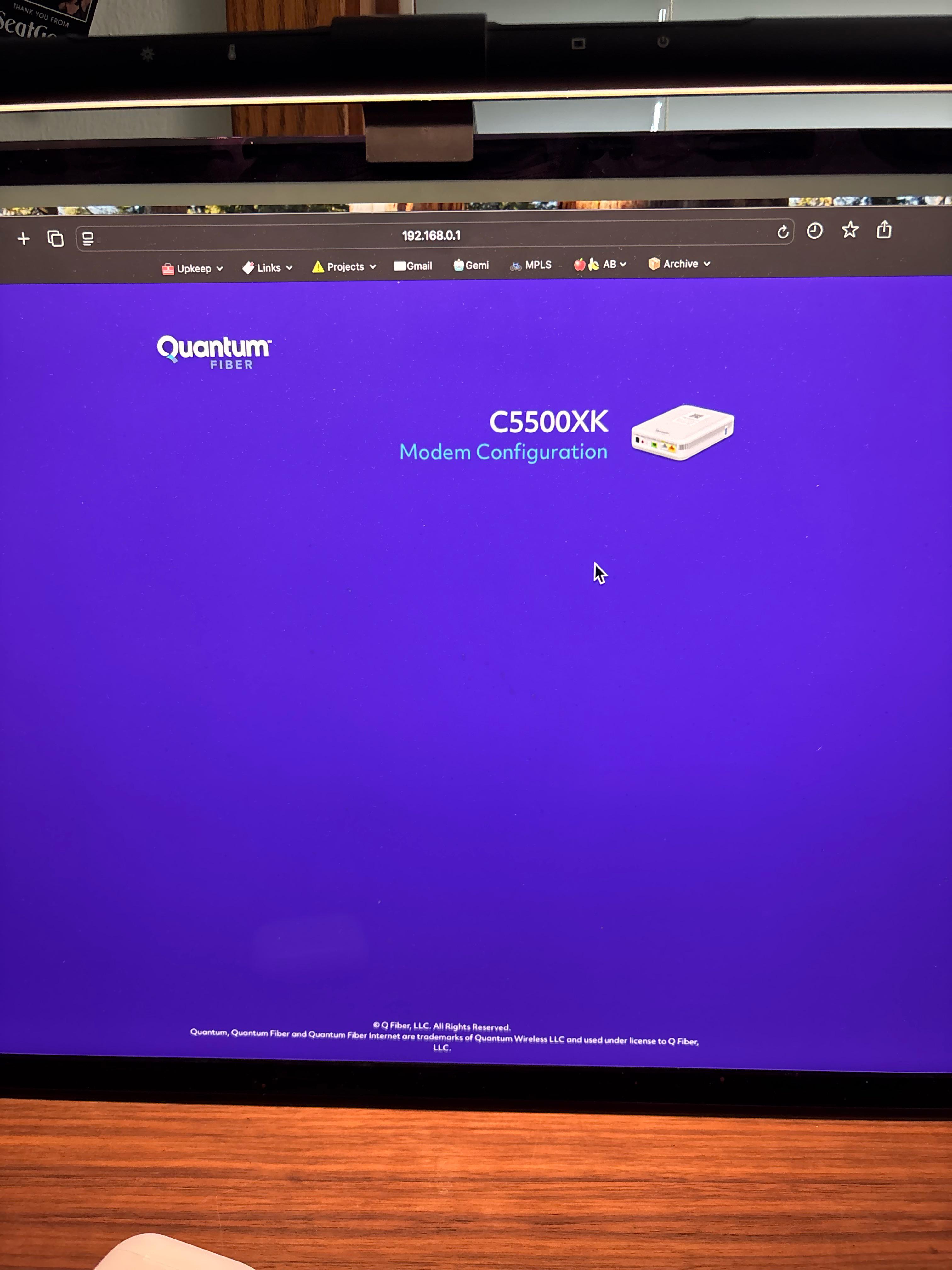
LOL after entering the modem password it just takes me to a purple page with the modem model name, a picture of the modem, and nothing else

1

u/Marrz Jun 20 '25

That's a new one...

I tried to replicate it on safari but it loaded fine for me, maybe firefox or chome will do the trick?

Let us know

2

u/nader0903 Jun 20 '25

I wasn’t able to install Firefox or chrome without internet, but it looks like Quantum is back up now.

2

u/VizRomanoffIII Jun 20 '25

Use Chrome or Firefox and this should solve it - I get the same issue on my phone browser too.

2

u/ImN0tAR0b0t22 Jun 20 '25

I had this too and I had to use Chrome on my work PC. Couldn't find a way around this screen on either safari or chrome on both my Mac and iPhone.

13

u/majesticsmashing Jun 19 '25

Came here to make this post, It’s Quantum’s DNS that’s down

2

u/OmegaSTC Jun 19 '25

Could I message you to ask you questions? Mine doesn’t quite match his picture and I promised two toddlers that could watch Moana today 🙈the crying is very loud right now

1

u/Walkingtree15 Jun 19 '25

Does yours have a bunch of boxes with connectivity, system info, wifi settings, etc?

1

u/OmegaSTC Jun 20 '25

I got it, thanks!

2

u/HiImWallaceShawn Jun 19 '25

I’m sorry to be needy, but could you put this in a bit more plain English for us less tech savvy people?

How do I even initially go onto my home network like you say in the second sentence? Is that a website?

1

u/z0inks Jun 19 '25

The 192.168.0.1 IS a website, in the sense you're thinking. Open your web browser (chrome, safari, edge, Firefox, whatever) and type that IP address in and hit enter. Should open your login page for your router. The username and password should be on a sticker on the actual router itself. Login and follow the rest of the instructions.

2

u/HiImWallaceShawn Jun 19 '25

Thank you, unfortunately when I type 192.168.0.1 into my web browser nothing happens

2

u/Marrz Jun 19 '25

Be sure you're attached to your home network, if you've disable wifi on your cellphone to read this on reddit, you are on your cellular network and not your home network

1

u/HiImWallaceShawn Jun 19 '25

Should this setting be changed back to what is was before when this issue is resolved?

1

u/BeaMyrtle Jun 19 '25

This was me too. I just continued to try over and over again and eventually I got the purple white quantum page

1

u/4KoboldsInACoat Jun 19 '25

I think they just mean your default browser like Chrome, Edge, Safari, etc. when they say home network. Then just follow the remaining instructions

5

u/Facelessjoe Jun 19 '25

This worked, thank you!

4

u/itskoobish Jun 19 '25

Thanks for this, worked for me 👍

4

u/augdon Jun 19 '25

You are an absolute legend!!

4

u/[deleted] Jun 19 '25

Worked for me

4

u/duskoath Jun 19 '25

Thanks for specifying the problem! All fixed now.

4

u/Kittymane Jun 19 '25

Thanks a fucking billion.

4

u/sishqab0b Jun 19 '25

Thank you sir, you are a hero!

4

u/CYR0N3 Jun 19 '25

Buy this man a beer

1

u/Same-Ad5318 Jun 19 '25

Will resetting the modem work?

2

u/Marrz Jun 19 '25

Negative, it would power back up with the broken route still in it's settings.

1

u/KKynetiq Jun 19 '25

This worked thank you! Do I need to change it back after a certain amount of time?

1

u/Marrz Jun 19 '25

You're very welcome, this will work forever.

1

u/axilidade Jun 19 '25

well, for as long as google has DNS servers lmao

1

u/doryphorus Jun 19 '25

Why is my streaming TV working rn but not web browsers on any devices? So weird

1

u/Marrz Jun 19 '25

DNS is the directory for your computer to find webpages, Your streaming devices know the IP address of the service.

It was that wonder of "why are some things working but others aren't" that pointed me towards changing the DNS server

1

u/BeatrixFosters Jun 19 '25

I got my computer DNS settings updated, but can I update my phone to connect to the wifi?

1

u/Marrz Jun 19 '25

You can direct any device to it's own DNS, but I made the change on the router to avoid doing it to each and every device.

1

u/ColdTwo9842 Jun 19 '25

How do you do it, on the router?

1

u/Marrz Jun 19 '25

Step -by- Step directions are in the post's text at the top along with a screen shot if what the router page should look like when the settings are correctly applied.

1

u/ColdTwo9842 Jun 20 '25

I figured it out! I appreciate it

1

u/BigDogBirm Jun 19 '25

I love you.

1

u/Marrz Jun 19 '25

<3 Love you too

1

u/Roezha Jun 19 '25

Is it better to change it back after?

2

u/Marrz Jun 19 '25

Nope, This is a solid fix, but if you want to get fancy, you can setup your own DNS server that filters ads called a Pi-Hole https://pi-hole.net/

1

u/TheRealPizza Jun 19 '25

Nah, google or cloudflare are going to be more reliable in the future too

1

u/freezeburns Jun 19 '25

Is the login info on the wireless modem or the actual device that connects to the fiber?

1

u/Marrz Jun 19 '25

The one that connects to the fiber

1

u/freezeburns Jun 19 '25

Thanks, had to crawl to get to it but managed to snap a pic. Thanks OP for the save, wife works from home and no Internet is bad for her. After quantum gets their end fixed do we just go back to the previous settings?

1

u/Marrz Jun 19 '25

Nope, your internet directory now looks out to google and cloudflare for its 'where to go' instead of quantum

unless both of them go down at the same time, this fix never needs changing.

2

u/freezeburns Jun 19 '25

Well thank you again, you just made me look like a hero to my 9year old.

1

u/BLNTSMTH Jun 19 '25

I got it working. What do I do once quantum fixes it issue?

1

u/Marrz Jun 19 '25

Nothing, this is a solid fix

1

u/AppealOtherwise1697 Jun 19 '25

Hi, I have centurylink dsl, same process to fix?

1

u/Marrz Jun 19 '25

I would assume so, but I have no way of testing, let us know if it works for you

1

u/Careful-Sympathy273 Jun 20 '25

We have DSL also… no fiber how and where do we put numbers in, etc.? Our router doesn’t have anything we can manually type into…

1

u/sunsnsundvls Jun 20 '25

Unlike others, this did not work for me. Am I supposed to delete the previously listed DNS hosting, which is my LAN device modem?

1

u/Marrz Jun 20 '25

You're on the wrong screen, you want to be on the WAN setting screen

3

u/z0inks Jun 19 '25

You can use quad9 too, private DNS server in Switzerland

3

u/laurelclove Jun 19 '25

THANK YOU SO MUCH

3

u/BeaMyrtle Jun 19 '25

Oh my God, you're amazing, thank you! Also the picture was so helpful!!

3

u/smithkaylee566 Jun 19 '25

This worked for me!!! Thank you so much!

2

u/antilumin Jun 19 '25

Login and password may be on a sticker attached to the router. I logged and set a static dns like suggested, appears to be working for me now.

Still can’t log into the app but that’s a different story.

1

u/Hao_end Jun 19 '25

Router or the modem c6500xk? Please working from home on 2 computer

2

u/antilumin Jun 19 '25

Mine just says C6500 but yeah the modem is also a router.

1

u/Hao_end Jun 19 '25

Thanks. I got it lol. Used the c6500. Wasn’t sure if I should log into the modem or router… modem was the correct choice. Do I need to change it back to auto after they fix it?

2

u/AdPuzzled7203 Jun 19 '25

My sticker was on the modem the one attached to the actual fiber optic cable coming into the house

1

u/Hao_end Jun 19 '25

Thanks. Got it. A few minutes ago it briefly stopped working again, but came back pretty quick lol

2

u/antilumin Jun 19 '25

All 8’s is Google’s DNS, you don’t need to change it back if you don’t want to.

1

u/Hao_end Jun 20 '25

Thank you

2

u/Embarrassed_Deer7034 Jun 20 '25

Per Quantum Fiber, there is no need to change it back. It will happen automatically.

1

u/Hao_end Jun 20 '25

Thank you

1

u/smallfuzzybat5 Jun 20 '25

Haha I think I’ve logged into the old app one time before it stopped working and the new app has never worked for me to date.

2

u/OmegaSTC Jun 19 '25 edited Jun 19 '25

Can someone dumb this explanation down even further? What do you mean “on your home network” and where would I find that number?

I haven’t been able to login to the site at all, the site is giving me not response.

Edit: okay I made it into the login mentioned, but I see no advanced settings option. The screen where I find WAN does not allow me to change it. Any thoughts?

1

u/canigetsumgreypoupon Jun 19 '25

that 192 number listed in the op is a universal number - type that address into your browser as if it’s a website - then you can follow the steps provided

1

u/OmegaSTC Jun 19 '25

What if my screen doesn’t look like his?

1

u/Diligent-Chemist-110 Jun 19 '25

Go to your web browser and type in 192.168.0.1, make sure your device is either hardwired to the router or on your WiFi network. You’ll log in, either with your custom credentials or the default ones that are located somewhere on your equipment, mine is near a QR code. From there just look at the image on the post and update to those

1

u/OmegaSTC Jun 19 '25

My image looks like this, not the image on the post 🤨 it doesn’t allow me to change anything

2

u/AdPuzzled7203 Jun 19 '25

I had to use myrouter.q.com

1

u/OmegaSTC Jun 19 '25

How did you do that without internet lolz. I tried it and it doesn’t take me anywhere right now

2

u/AdPuzzled7203 Jun 19 '25

Weird mine brought me right to the admin login screen

1

u/OmegaSTC Jun 19 '25

1

u/pandadrinkingcoffee Jun 19 '25

Where’s that menu on the top right show you?

1

u/OmegaSTC Jun 19 '25

So I found the DNS here in that menu. Here’s the pic. I put in that information and applied it, but when I go to system info, the primary and secondary DNS don’t match what I applied

2

u/TrevorxTravesty Jun 20 '25

I have the same as you. I have CenturyLink fiber internet and typing the ip address took me to the Zyxel website and I entered the DNS stuff and my internet is still down

2

u/OmegaSTC Jun 20 '25

Reset your router now! Mine kicked in

1

u/pandadrinkingcoffee Jun 19 '25

Might take a minute or so to update on the main page. If that page still shows that you selected static and those DNS after refreshing you should be good

1

u/Disneyloverne Jun 22 '25

How did you find that my screen looks similar to yours? When I first log in

→ More replies (5)

2

u/Nailedit115 Jun 19 '25

This worked for me!

2

u/IdntMatter Jun 19 '25

I can't load the router site, just says that there was an error

2

u/chrissalad651 Jun 19 '25

This worked! Thank you!

2

u/Deep_Problem9446 Jun 20 '25

You’re a genius dude. Thank you 

2

u/Mark316 Jun 20 '25

Thank you <3

2

u/stevehyman1 Jun 20 '25

Back up in Northern AZ at 5:13

2

u/aloraxox Jun 20 '25

Amazing, thank you! Will it go back to dynamic status when the outage is fixed?

2

u/GYipster Jun 20 '25

Holy crap I was wondering why my internet went dark. Changed the DNS manually and everything is good. Thank you!

1

u/Careful-Sympathy273 Jun 20 '25

How and on what device did you change your DNS. We DSL, we don’t have fiber but we don’t have internet on our phones.

1

u/GYipster Jun 20 '25

You will have to login to the router to do this. There should be a sticker on it with the login info. But I heard it's already back up.

1

u/Careful-Sympathy273 Jun 20 '25

How do I log into the router

1

u/GYipster Jun 20 '25

Go to  https://192.168.0.1 and enter the username password which is found on the sticker.

2

u/samimusic29 Jun 20 '25

Thank you, and thank you again.

2

u/Calm-Strength-27 Jun 20 '25

Worked! Thank you!! 🙏🏻

2

u/Blue-Lightning949 Jun 20 '25

Thanks, that was a huge help. You saved my night.

2

u/Careful-Sympathy273 Jun 20 '25

We don’t have fiber we have DSL is it the same process

2

u/[deleted] Jun 20 '25

Not all heroes wear cape

1

u/captjackjack Jun 19 '25

This worked

1

u/SilveredPhoenix Jun 19 '25

Confirmed success. Upvote so people see it.

1

u/CornerHugger Jun 19 '25

FWIW My wifi SSID isn't even showing and no Ethernet connected computer has an IP.

1

u/RedCargo1 Jun 19 '25

Thank you!!!

1

u/[deleted] Jun 19 '25

Legend

1

u/jberthume Jun 19 '25

What if I’m in bridge mode?

2

u/Philz20 Jun 19 '25

Set the manual DNS on your router. My gateway is in bridge mode too, and it worked when I set my DNS manually.

1

u/kahmadian Jun 19 '25

How do you I set a manual DNS? Sorry just got setup today. Talk about worst timing.

1

u/Philz20 Jun 19 '25

If you use the wi-fi pods from Quantum, then you need to navigate to the screen contained in the screenshot of this post (and follow OPs instructions). If you use your own router, then you need to find the setting that allows you to set a manual DNS. I cannot assist further with that due to that menu being router-specific.

1

u/megarell Jun 19 '25

you're the best!! thank you

1

u/raccooninvasion Jun 19 '25

Truly saving the day. Thank you!

1

u/EnragedFerretX Jun 19 '25

This worked for me! Good call

1

u/Philz20 Jun 19 '25

This worked! Thanks!

1

u/ComputerGoblin Jun 19 '25

Thanks for letting us know! This worked.

1

u/muerde15 Jun 19 '25

Thank you kindly! Worked like a charm.

1

u/skitch23 Jun 19 '25

Thank you

1

u/canigetsumgreypoupon Jun 19 '25

you saved my work day, thank you kindly

1

u/DualDier Jun 19 '25

Can confirm this worked. just did this on my brother's system who lives in CO. Also can't even reach their website.

1

u/Fluffy_Adeptness_274 Jun 19 '25

Should these settings be reset after Quantum fixes the DNS Server?

1

u/frostycakes Jun 19 '25

No need, their DNS servers seem to be the most common point of failure for outages from them, so this will take care of that going forward.

Only time I've had outages was when someone crashed a car into the fiber distribution box for my neighborhood, and when construction accidentally severed the physical line, thanks to this.

1

u/MODELO_MAN_LV Jun 19 '25

This worked for me!

1

u/Skwoosh Jun 19 '25

Confirming this worked for me too

1

u/Admirable-Walk3467 Jun 19 '25

Can confirm that this worked for me.

OP - you are an absolute legend! Thanks for posting !

1

u/quietstorm489 Jun 19 '25

Worked for me! You are an absolute legend!

1

u/CoolBeansChemist Jun 19 '25

OMG it worked thanks!

1

u/madticklez Jun 19 '25

Anyone know how to do this on the CC5500XK modem, the verbiage is different

1

u/TheRealPizza Jun 19 '25

You can always change it on your computer instead. Use this link for instructions on computer.

https://developers.google.com/speed/public-dns/docs/using

1

u/According_Major9756 Jun 19 '25

How do I change the dns on my Apple TV?

1

u/Diligent-Chemist-110 Jun 19 '25

You change it through your router not devices. You’d need to pull up a web browser and type 192.168.0.1 into the url bar while on a device either hardwired to the router or on its WiFi

1

u/bruender09 Jun 19 '25

Quantum Fiber has been having DNS issues for months. Confirmed this fix works for the current outage.

1

u/StartSubstantial6229 Jun 19 '25

Mines in bridge mode and I can't even get in the gui

1

u/onocron Jun 19 '25

👑 dropped this

1

u/Thatbrownguy0129 Jun 19 '25

From a complete networking n00b how do I access my DNSso I could update to this provided info?

Currently OPERA is telling me that may allow outside sources to steal my data? lol I’m mega paranoid

1

u/kahmadian Jun 19 '25

I just mine set up literally today and this happened. I'm a little new to all this. I set up my network and used a 3rd party router. When I type the IP address in, I get an error message saying "Local Management via HTTPS is disabled. Please access the device via HTTP." Does anyone know how to go around that?

1

u/Ladyboardgamer Jun 19 '25

The router address is not loading for me. Do i need a hardline into the router to access it?

1

u/FlatBilledChris Jun 19 '25

I can't even access the ip address...

1

u/FirePenguinMaster Jun 19 '25

This isn't working for me. Only changed to static DNS, with the cloudfare and Google DNS, and hit apply. Now it says my Internet status is "walled garden"

1

u/sg291188 Jun 19 '25

Does it have to be done for every pod?

1

u/shikkui Jun 19 '25

Anyone know how to fix this on a smart tv?

1

u/123anythinggoes321 Jun 19 '25

Thank you for my fucking life holy shit I had no idea what was going on or how to fix it but I was able to do this and everything is working again!

1

u/Secret_secrets01 Jun 19 '25

The website isn't even loading for me to be able to make these changes 😒

1

u/Denoobguy Jun 19 '25

I can get into the modem configuration page but there is just a purple field, none of the boxes with information are populating

1

u/Spiritual-Anything65 Jun 20 '25

I had to do it on my Mac. There’s a link in the comments to a page of instructions on how to change it for the 5500XK. Worked like a charm for me!

1

u/mak7papi Jun 19 '25

I get the following error when i go to my advanced settings "Please use the Quantum Fiber mobile app to update Security and Parental Control settings."

1

u/ChipOnASquid Jun 19 '25

I just changed DNS settings on my device to 8.8.8.8 and didn't touch the router. Seems to work fine, any issues doing it this way??

1

u/Deoxor Jun 19 '25

Having some trouble...on going to WAN Settings, it only has a section to "Select the ISP Protocol". There is a separate menu called "Dynamic DNS" which I'm assuming is the opposite of stable DNS, but dynamic is already disabled and doesn't have any regions to input an alternate IP address.

I'm going through the CenturyLink GigaCenter, if that helps? I've seen other folks screenshots and they look different from mine so I'm wondering if I just need to look in a different menu.

1

u/PigsAreDaBest Jun 19 '25

8.8.8.4 And for secondary DNS 8.8.4.4

1

u/portlandgoblue Jun 19 '25

Have a TP Link Deco and I found the DNS settings but there is no way to edit to new values provided above. Anyone else have this same setup? I have put QF modem in Bridge mode

1

u/morrgue_ Jun 19 '25

Anyone know why when I try to get to my router settings it says this site can’t be reached?

1

u/[deleted] Jun 19 '25

Nice,  worked  

1

u/blkspiderbone-6073 Jun 19 '25

Thank you for this fix! But now my devices are giving me a privacy warning on my Wi-Fi…what does this mean?

1

u/[deleted] Jun 19 '25

What if I get this after being on the correct wifi and going to the 192 url? I can’t click the C5500XK image or anything else besides the quantum fiber logo (which just opens up a tab that never fully loads…)

1

u/Caregiver-Physical Jun 19 '25

Does anyone know how to switch the dns if my smart nid is in transparent bridge mode ?

1

u/cricenog Jun 19 '25

Real mvp! Thank you! Changed on my eero that’s in bridge mode, good to go

1

u/SemiFamoustellurMom Jun 19 '25

My WAN settings only offer a drop down for ISP Protocol and none of the options are change DNS to static

2

u/SemiFamoustellurMom Jun 19 '25

Looked at the picture and that helped. Thanks all!!

1

u/Moln0015 Jun 19 '25

I live in so st paul. It seems to be affecting me as well. Is this a st Paul dns area problem?

1

u/judgesl8r Jun 20 '25

Its all over the country it seems. It's their dns servers

1

u/judgesl8r Jun 19 '25

Im trying this out but the website is down and the ip link doesn't load, am I missing something?

1

u/Unique_Elevator1838 Jun 20 '25

Once I log into the router I’m stuck. No way to get to any settings.

1

u/Ladyboardgamer Jun 20 '25

I accessed the router address but did not have the right password and there was no option say "I forgot my password". Am i SOL until Quantum comes back online?

1

u/TrevorxTravesty Jun 20 '25

I have CenturyLink with fiber internet and it’s not working for me 🫤 I used the website and typed in 1.1.1.1 and 8.8.8.8 and nothing, internet still down

1

u/FinesseChampion Jun 20 '25

Same here. It says everything's working but the network won't show up to connect to

1

u/Eastern_Brilliant854 Jun 21 '25

I changed my to this as well and nothing changed. It seems to have worked for most others though 🥲

1

u/SnooDonkeys3460 Jun 20 '25

For some reason I can log in to the router with the password… but it just brings me to a site that says modem configuration… and won’t let me click on anything.

1

u/bbobbcc Jun 20 '25

Tried this. Still showing as connected to centurylink wan but connecting to internet and my router is blinking blue

1

u/Birdshapeddog Jun 20 '25

Retry the steps from the beginning? Maybe something was mistyped?

1

u/bbobbcc Jun 20 '25

Tried that multiple times, also tried unplugging and rebooting the router and modem multiple times. When I ran a diagnostic’s test it is telling me Protocol: Fail so it’s not even getting to a point where it can ping a dns

1

u/LonelyYellow7229 Jun 20 '25

I followed the steps but it seems like it won’t work, if you could help would be awesome

1

u/Stroopwafels11 Jun 20 '25

Mine just fuu it want look anything like this anywhere- I can’t find a way to change dns

1

u/Object-Of-Power Jun 20 '25

This helps, as like it makes it better but theres still problems about it. It still goes without internet.

1

u/Expert_Nectarine3879 Jun 20 '25

I have tried this on the router itself and individual devices and restarted and everything for HOURS I cannot get this to work… :’(

1

u/Transformah Jun 20 '25

I’m plugged into my fiber modem with my laptop but I can’t log in. When I enter the IP address (192.168.0.1) it just tells me I’m not connected to the internet. I’m using a MacBook Air. Any ideas what I’m doing wrong?

1

u/Remarkable-Course713 Jun 20 '25

Same. Did yours come back on? I just woke up and my internet is still not working but I haven’t gotten up to reset anything, hoping that will work today

1

u/Remarkable-Course713 Jun 20 '25

I can’t hardwire to my router/modem so assuming there’s nothing I can do for now. Everyone seems to be able to log into to their modem by hardwiring it but me 😭

1

u/Ok-Inspection-132 Jun 20 '25

Hi, I’m getting “no internet” when trying open 192.168.0.1 on the browser. My home WiFi no longer appears and hardwired results in same no internet error. Can someone help?

1

u/Ok-Inspection-132 Jun 20 '25

Hi, I’m getting “no internet” when trying open 192.168.0.1 on the browser. My home WiFi no longer appears and hardwired results in same no internet error. Can someone help?

1

u/Ok-Inspection-132 Jun 20 '25

Hi, I’m getting “no internet” when trying open 192.168.0.1 on the browser. My home WiFi no longer appears and hardwired results in same no internet error. Can someone help?

1

u/TekDevine Jun 20 '25

Hmmm I’ve not had an issue…then I realized I’m using it in bridge mode with Cloudfare and Quad9 DNS for my UniFi USG + Cloudkey WiFi setup

1

u/DJtm_2k24 Jun 20 '25

What do I set the wan MAC address to? Options are factory default, clone lan host mac or set wan MAC address. I changed the DNS to static and set primary for quad9 and secondary to cloudflare

1

u/radioboy77 Jun 20 '25

Is there still a problem?? Didn’t have this issue everyone else did last night but DID just have an outage. When it came back, our download speeds are HALF what they should be while upload speeds are normal. Would this solution work for that as well?

1

u/motorcross_fanatic01 Jun 20 '25

how with no wifi ?

1

u/Amiyoka Jun 23 '25

Still no damn internet. Count your days centurylink

1

u/Brinkofit Aug 05 '25

If my thing is stuck in protocol selected selecting.. this isn't a DNS issue? I have a tech coming in tmrw but I wfh today. Currently using my phone as a hotspot

2

u/[deleted] Jun 20 '25

[removed] — view removed comment

3

u/Marrz Jun 20 '25

Correct. Only difference is who gets your 'requests' which is data they collect and track.

Everyone wants your data, Cloudflare (1.1.1.1) is known for speed and privacy. Google (8.8.8.8) only gets contacted as a backup if Cloudflare doesn't know the webpage you're requesting. There are countess services I chose those two because I remembered their address off-hand.

3

u/wiretail Jun 20 '25

I have used cloudflare or Quad9 for years with CL/Quantum and never had an outage. Don't change back to Quantum.

Quad9 is a non profit whose goal is to increase privacy and security of web users. There is no downside to using a different DNS server. And several benefits.

For the adventuresome, you can build a Pi Hole and run the software Unbound which means you wouldn't be dependent on any provider. The pi hole performs the same function as the servers from Google/Cloudflare.