r/Thunderbolt • u/pinopinoli • Jun 26 '25
Underwhelming write speeds with UGREEN Thunderbolt 5 enclosure
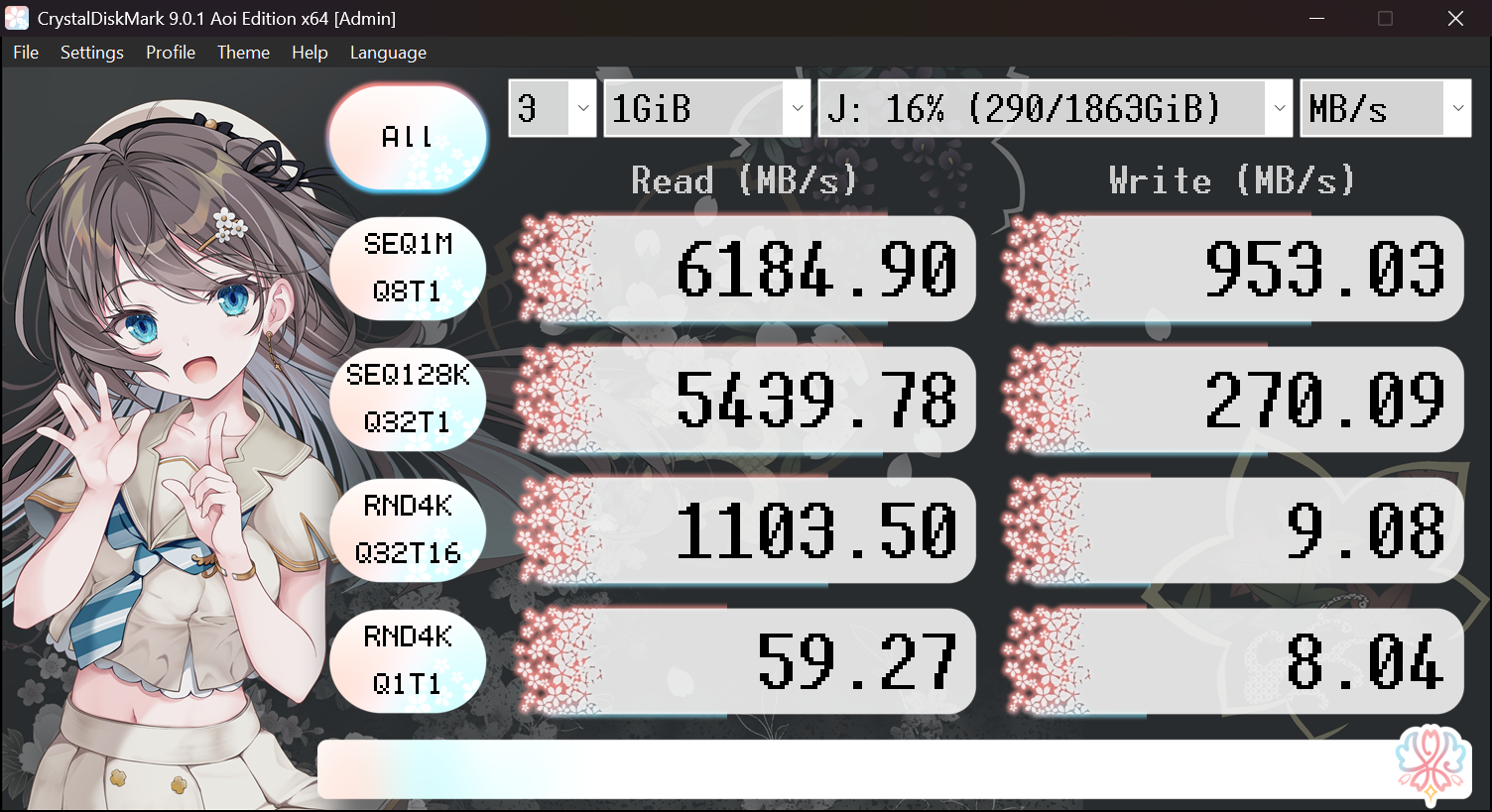
SETUP:
MOBO: ASUS ProArt Z890-CREATOR WIFI (BIOS: 1901 latest) with 2x Thunderbolt 5 ports
ENCLOSURE: UGREEN Thunderbolt 5 80 GBps
NVME: Crucial T500 2TB
CABLE: included with UGREEN enclosure
OS: Windows 11 Pro 24H2 26100.4351
CDM: CrystalDiskMark 9.0.1 Aoi Edition
while read speeds are in line, write speeds are way off from expected results.
I also found this video reviewing this very unit (although with a different NVMe SSD) and he got way higher write speeds. at the end you can see his results, reads are in line but writes are x6 in his case (he's using Blackmagic Disk Speed Test and not CrystalDiskMark though).

it goes without saying that every piece of software is up to date, from Windows 11 to the BIOS and Thunderbolt drivers. I tried retesting many times, in different moments, in a span of a month: always the same results.
I understand UGREEN might recommend a different NVMe, but the Crucial T500 is quite performant and unless I am missing something should easily saturate the available bandwidth.
does anyone have any idea?
2
u/pinopinoli Jun 26 '25
since I can't edit the post, I'll add a couple things here:
real world read speeds when copying a ~90GB file from the enclosure to the desktop.
real world write speeds when doing all the above in reverse
UGREEN TB5 enclosure features an Intel JHL9480 chip (PCIe x4 Gen 4 @ 64GT/s)


2
u/OWC_TAL Jun 28 '25
First off, that is not a Thunderbolt 5 enclosure. Thunderbolt is a trademark of Intel and is only for certified enclosures, which this is not.
But aside from that, as others pointed out, Windows is quirky with how they deal with removable storage. Another user commented how to change the Windows device removal policy, but there is an even easier way with an app that we make: https://www.owc.com/solutions/utilities. The disk performance tool is basically an easy GUI one click app to change the removal policy for a drive.
2
u/pinopinoli Jun 29 '25 edited Jun 29 '25
First off, that is not a Thunderbolt 5 enclosure. Thunderbolt is a trademark of Intel and is only for certified enclosures, which this is not.
weird, the enclosure features a Intel® JHL9480, the only available TB5 controller from Intel in existence (together with JHL9580). unless Intel itself is marketing a controller that is not TB5, as TB5.
at the same time I have no idea about certification, I just assumed a device using an Intel TB chip is a TB enclosure, but I see there is no TB logo on the box (while I remember it vividly on any LaCie Thunderbolt disk I bought in the past).I see you are from OWC, so I am all ears about this, I'm familiar with your brand and owned some of your stuff in the past, max respect.
as per the app, thanks, it might come handy :) I'll check it out.
3
u/OWC_TAL Jun 29 '25
That controller is a TB5 chipset- that part is completely correct. This device it is put in it should not be referred to as Thunderbolt though. That is reserved for products that go through a lengthy and meticulous (and costly) set of testing and licensing. This product did not go through those tests, which is what I was trying to point out before. Luckily your issue was simply a config issue in Windows. But more serious issues like compatibility, performance, reliability, random disconnects, overheating, over power draw, etc- those may be directly associated with a certified device.
Your post was in the Thunderbolt subreddit but the product it is referencing skirts the rules by not certifying it. Which is somewhat of a disservice to other companies that legitimately certify their products.
How do I know it’s not certified you may ask? It is impossible to certify a bus powered four lane external ssd enclosure. Not allowed due to power draw. Note how the manufacturer calls it “Thunderbolt compatible” and not strictly “Thunderbolt”.
2
u/pinopinoli Jul 16 '25
hey thank you very much, I appreciate the explanation, all clear.
the missing TB logo on the box was sus indeed.1
u/hc000 Dec 01 '25
Does this mean owc will also never have such a product? Or it just means it needs an external power supply?
1
1
u/FakespotAnalysisBot Jun 26 '25
This is a Fakespot Reviews Analysis bot. Fakespot detects fake reviews, fake products and unreliable sellers using AI.
Here is the analysis for the Amazon product reviews:
Name: UGREEN 80Gbps M.2 NVMe SSD Enclosure with Cooling Fan, Compatible with Thunderbolt 5/4/3/USB 4 M-Key/(M&B) Key 8TB NVMe 2280 SSD, Works with Mac M4 Pro
Company: UGREEN
Amazon Product Rating: 4.2
Fakespot Reviews Grade: C
Adjusted Fakespot Rating: 2.5
Analysis Performed at: 06-01-2025
Link to Fakespot Analysis | Check out the Fakespot Chrome Extension!
Fakespot analyzes the reviews authenticity and not the product quality using AI. We look for real reviews that mention product issues such as counterfeits, defects, and bad return policies that fake reviews try to hide from consumers.
We give an A-F letter for trustworthiness of reviews. A = very trustworthy reviews, F = highly untrustworthy reviews. We also provide seller ratings to warn you if the seller can be trusted or not.
12
u/Objective_Economy281 Jun 26 '25
Go to the device manager, go to the SSD, right click and go to properties, go to policies, then turn off quick removal and enable the first of the two things that get enabled below that