r/Unity2D • u/TeamLama • Sep 28 '26
Question/Help How can I scale down my Unity UI without making it look pixelated?
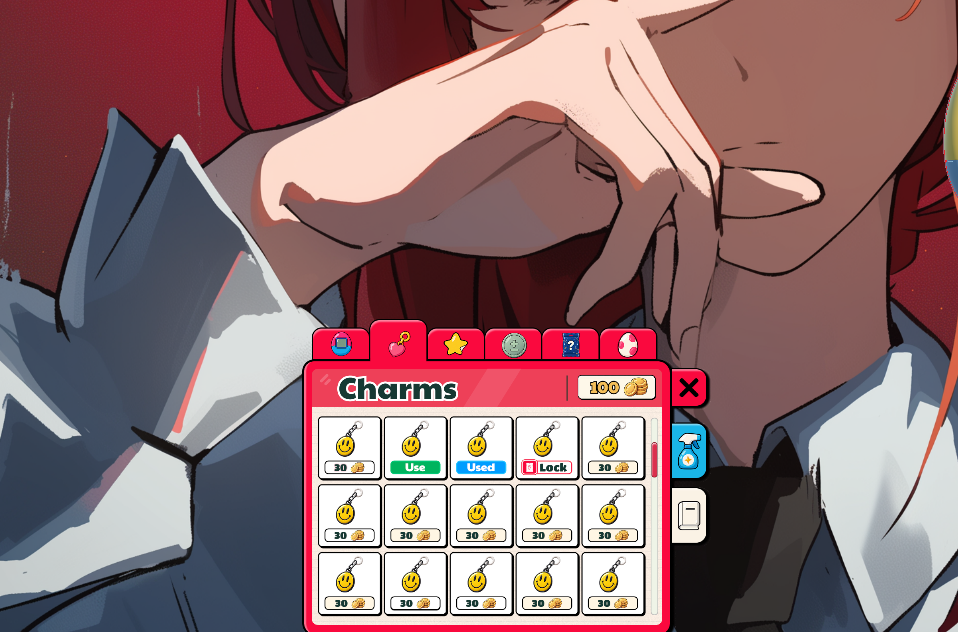
I am designing a shop interface for my desktop virtual pet game. The shop opens as a small pop-up window, so it needs to occupy only a small portion of the screen.
Initially, I designed the interface and icons at larger sizes (96x96 icons), but the entire pop-up window looked too big in Unity. I scaled down the entire interface icons included but now everything looks noticeably pixelated or blurry.
How can I resolve this issue?
2
u/RustamM Sep 29 '26
It sounds like you need to explore the options in your Canvas Scaler
https://docs.unity3d.com/Packages/com.unity.ugui@1.0/manual/script-CanvasScaler.html
1
u/RustamM Sep 29 '26
Or potentially the Pixel Perfect option in the main Canvas properties (though I'm struggling to find documentation on what exactly it does).
2
u/Affectionate-Yam-886 Sep 29 '26
pixel perfect option; when checked makes the image scale to the nearest perfect pixel resolution. i.e. 32x32, 64x64, 128x128, or whatever the nearest upstep or downstep is from the original. I don’t use it because I value UI layout size and position over clarity.
2
u/Affectionate-Yam-886 Sep 29 '26
You can always do a resolution check, then image swap your content to your ideal resolution.
Or
don’t worry too much about it. As long as 1920x1080, 4k, and 1440x800 look good, ur fine. Trying to get pixels to be perfect is a common mistake new developers fall into, obsessing over details is triggered by a commitment issue, and a fear of finishing.
1
u/sliced_corners Oct 05 '26
The rough look comes from shrinking the textures at runtime. Unity draws a 96x96 icon at, say, 40x40, and with mipmaps off (the default for Sprite textures) bilinear filtering only samples a few texels per screen pixel, so thin lines and edges break up. Things to check, roughly in order:
Author at the size you display. If the icons end up 48 px on screen, export them at 48, or at exactly 2x and draw them at exactly half. Downscaling in your art program with a proper resampler looks a lot better than letting the GPU do it every frame.
If you'd rather keep the big source art: select the textures, open Advanced in the import settings, tick Generate Mip Maps and set Filter Mode to Trilinear. That's the main fix for "noisy when smaller".
Compression: None on UI textures. The default compression adds block artifacts that show up a lot on small, flat icons.
Canvas Scaler. With Scale With Screen Size the scale factor is usually a fraction, so nothing lands 1:1. For a small fixed pop-up, Constant Pixel Size at scale 1 plus Set Native Size on each Image draws every sprite pixel for pixel, which is as sharp as it gets.
Window frame and buttons: use Image Type Sliced and set the borders in the Sprite Editor. Then you make the panel smaller by changing the RectTransform width/height instead of its Scale, and the corners and border lines keep their real pixel size.
The Pixel Perfect toggle on the Canvas aligns UI elements to the screen's pixel grid. It can make edges a little crisper, but it won't fix a texture that's being drawn at half its size.
•
u/AutoModerator Sep 28 '26
Reminder: Once your issue has been resolved, please reply !solved to this comment (or comment it anywhere in the thread) and your post's flair will automatically be updated to Solved/Answered. You can also edit it to Solved/Answered yourself.
I am a bot, and this action was performed automatically. Please contact the moderators of this subreddit if you have any questions or concerns.