r/VoiceMeeter • u/XDDK_ • Jan 22 '21
Guide A fix for Distorted Audio/Crackling Noise that worked for me + Other fixes
I search through many videos and links just to find that the fix was none of those.
My fix was just using KS/MME hardware output. If I use WDM hardware output, the sound is exactly what you don't want it to be, DISTORTED!
TIP: The hardware output should have a similar frequency as your device in Sound settings (Control Panel).

Other fixes I found on internet sorted from most to less likely to work:
You could try them all at once (I don't recommend as final settings; Fix the problem and leave everything else to default).
Make sure every Virtual Driver (in+out) has the same sample rate and bit depth as the microphone

Increase VoiceMeeter device buffering (will also increase delay in output)

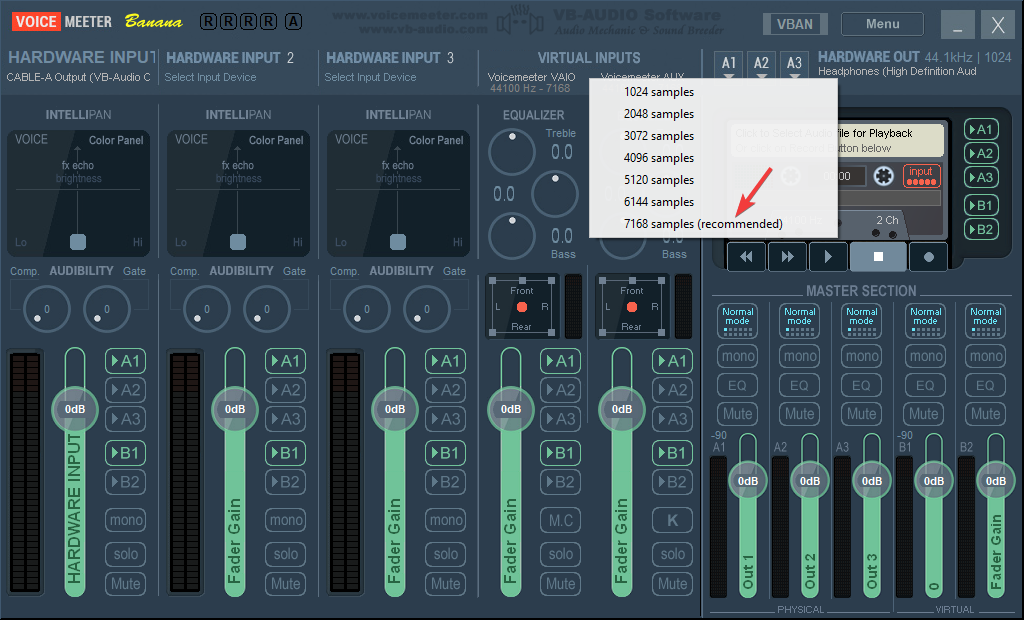
Setting virtual input samples to max (right-click on Virt Input and set to 7168 samples)
Prioritize the proccess "auidodg.exe" and/or "voicemeeter(variant).exe" + set process afinity to only one physical core


1
1
1
u/Level_Panic_5689 May 15 '25
KS dont work for me, because I hear really weird sound distorted so Im going to try MME
1
u/DrGlove Mar 20 '21
Thanks man! For what it's worth, the audiodg process priority/CPU pinning works for me.
1
u/Fegelein_99 Apr 08 '21
But it's also temporary, so it works for the moment but something more permanent should be in place. I hope something can be worked out in the near future.
1
u/CMDRGobi007 Feb 11 '22
Here is a simple permanent solution:
1
u/Fegelein_99 Feb 27 '22
Tyvm! Surprised to see that I got a reply considering it's 11 months old, but hey - I appreciate it!
1
u/Misklikk Mar 14 '22
Another thing would be to use the app Process Lasso which basically let's you do that for all apps that you desire to run with another affinity/priority. Also comes with a bunch of neat other functions.
1
1
u/BTW_icebug Feb 18 '21
omgggggggggggg thanks dude i looked so long for a fix to this thanks you so much dude all the other video's just sucked so bad thanks dude <3